Just as old as Java itself is the java.util.Stack class, available since version 1.0, implementing the abstract data type “stack”.
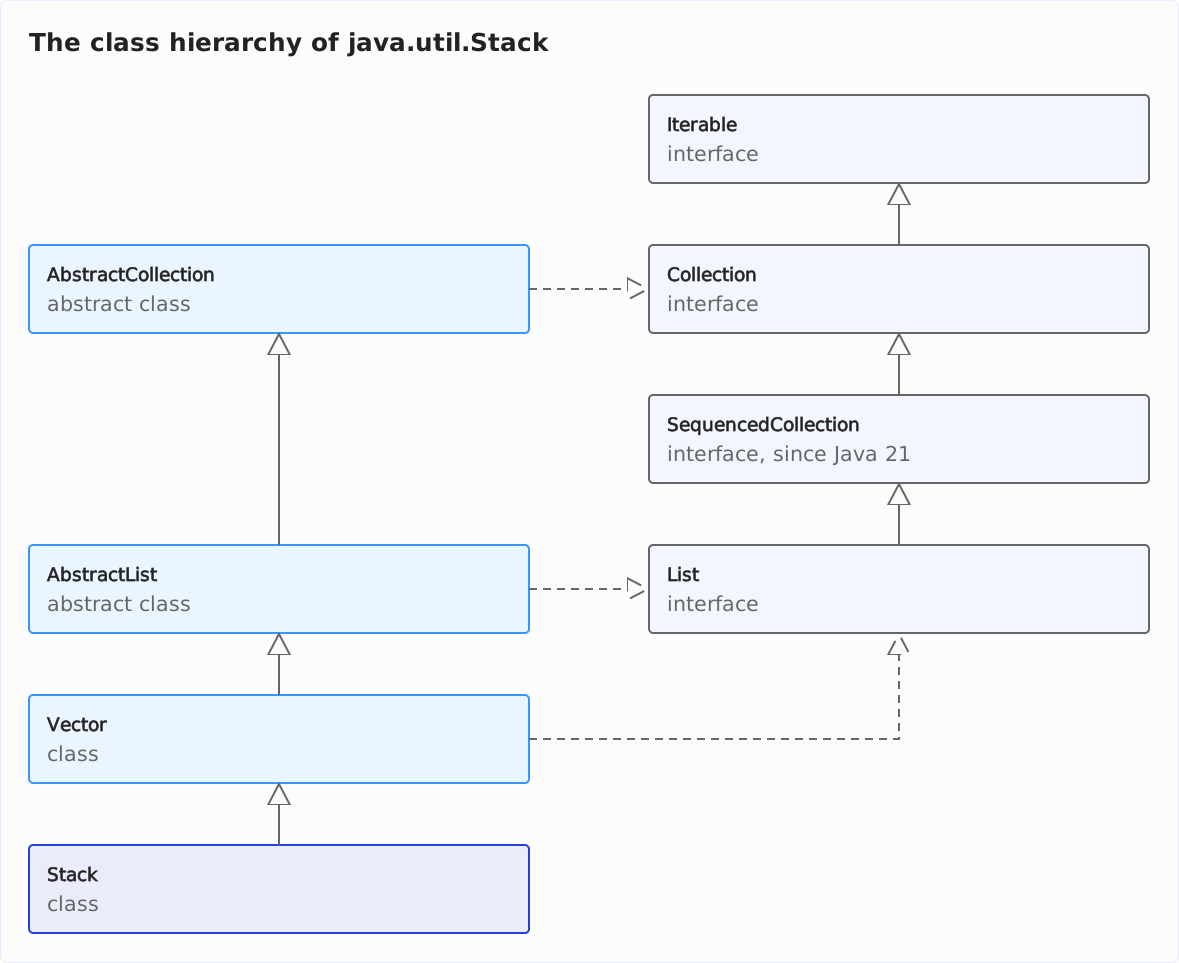
Stack inherits from java.util.Vector and, therefore, implements numerous interfaces of the Java Collections Framework – since Java 21, also SequencedCollection.
In the following class diagram, solid arrows stand for extends and dashed arrows for implements. I have left out the interfaces RandomAccess, Cloneable, and Serializable, which Vector also implements:
In this article, I’ll show you how to use Stack, why you should use a Deque instead – and how to implement your own stack behind an interface that contains only the stack operations.
How to Create a Stack in Java
Stack is located in the java.util package and has exactly one constructor – without parameters.
You use it to create an empty stack:
Stack<String> stack = new Stack<>();You specify the type of the elements in angle brackets – String in this case. Unlike with Vector, you can pass neither an initial capacity nor initial elements to the constructor.
Java Stack Methods
Stack extends Vector with the following methods:
push()– places an element on the stack and returns that elementpop()– takes the top element from the stack and returns it; if the stack is empty,pop()throws anEmptyStackExceptionpeek()– returns the top element of the stack without removing it from the stack; if the stack is empty,peek()also throws anEmptyStackExceptionempty()– checks if the stack is empty; sinceStackalready inherits theisEmpty()method fromVector, theempty()method is redundant; why the JDK developers included it is a mystery to mesearch()– searches for an element on the stack and returns its distance to the top of the stack:1for the top element,-1if the element is not on the stack
Just like Vector, Stack is thread-safe: pop(), peek(), and search() are synchronized; push() and empty() call synchronized methods of Vector.
I show how the methods work in the following example.
Java Stack Example
The following code snippets show an example use of Stack (you can find the complete code in the JavaStackDemo class in the GitHub repo).
First, we create a stack and put the elements “apple”, “orange”, and “pear” on the stack using push():
Stack<String> stack = new Stack<>();

stack.push("apple");
stack.push("orange");
stack.push("pear");
After that, we print the stack’s contents – and the results of peek() and empty() – to the console:
System.out.println("stack = " + stack);

System.out.println("stack.peek() = " + stack.peek());
System.out.println("stack.empty() = " + stack.empty());
The output looks like this:
stack = [apple, orange, pear]
stack.peek() = pear
stack.empty() = false
So Stack’s toString() method prints the elements from bottom to top. The last inserted element, “pear”, is at the top of the stack.
Using search(), we can look for an element:
System.out.println("stack.search(\"apple\") = " + stack.search("apple"));The output is:
stack.search("apple") = 3This means that “apple” is in the third position of the stack. That’s because we pushed two more elements onto the stack after “apple”.
search() counts from the top of the stack, starting at 1: for “pear”, the method returns 1; for an element that is not on the stack, it returns -1.
We take out the three elements again:
System.out.println("stack.pop() = " + stack.pop());
System.out.println("stack.pop() = " + stack.pop());
System.out.println("stack.pop() = " + stack.pop());
We see that the elements are retrieved in reverse order:
stack.pop() = pear
stack.pop() = orange
stack.pop() = apple
What happens if we call pop() one more time?
System.out.println("stack.pop() = " + stack.pop());As the stack is now empty, an EmptyStackException is thrown:
Exception in thread "main" java.util.EmptyStackException
    at java.base/java.util.Stack.peek(Stack.java:103)
    at java.base/java.util.Stack.pop(Stack.java:85)
    at eu.happycoders.demos.stack.JavaStackDemo.main(JavaStackDemo.java:28)
Just like pop(), peek() throws an EmptyStackException if the stack is empty.
Why You Should Not Use Stack (Anymore)
The JDK developers recommend no longer using java.util.Stack. The Javadoc states:
“A more complete and consistent set of LIFO stack operations is provided by the Deque interface and its implementations, which should be used in preference to this class.”
What exactly does this mean? In my opinion, Stack should not be used for the following reasons:
- By extending
Vector,Stackprovides operations that have no place in a stack, such as accessing elements by their index or inserting and deleting elements at arbitrary positions. Java 21 added methods such asaddFirst()andremoveFirst()via theSequencedCollectioninterface; they operate on the bottom of the stack. - There is no separate interface for
Stack. If you useStackas a type, you commit to this one implementation. - If only one thread accesses the stack, the synchronization is unnecessary. The Javadoc of
ArrayDequenotes: “This class is likely to be faster than Stack when used as a stack”. If, on the other hand, multiple threads access the stack, usingsynchronizedon every method call is not a particularly performant means of making a data structure thread-safe. Optimistic locking with CAS (“compare-and-swap”) operations, as used byConcurrentLinkedDeque, is usually the better choice.
Stack Alternatives
Instead of Stack, the JDK developers recommend using one of the Deque implementations, such as ArrayDeque.
The java.util.Deque interface has been available since Java 6. Its methods are similar to those of Stack:
- We have the methods
push(),pop(), andpeek(). - Instead of
empty(), you have to callisEmpty(). - There is no
search()method.
The following code (ArrayDequeDemo in the GitHub repo) shows how to use ArrayDeque as a stack:
public class ArrayDequeDemo {
  static void main() {
    Deque<String> stack = new ArrayDeque<>();

    stack.push("apple");
    stack.push("orange");
    stack.push("pear");

    System.out.println("stack = " + stack);

    System.out.println("stack.peek() = " + stack.peek());
    System.out.println("stack.isEmpty() = " + stack.isEmpty());

    System.out.println("stack.pop() = " + stack.pop());
    System.out.println("stack.pop() = " + stack.pop());
    System.out.println("stack.pop() = " + stack.pop());

    System.out.println("stack.pop() = " + stack.pop());
  }
}
As you can see, the code is almost identical to the previous example.
The output is not:
stack = [pear, orange, apple]
stack.peek() = pear
stack.isEmpty() = false
stack.pop() = pear
stack.pop() = orange
stack.pop() = apple
Exception in thread "main" java.util.NoSuchElementException
    at java.base/java.util.ArrayDeque.removeFirst(ArrayDeque.java:360)
    at java.base/java.util.ArrayDeque.pop(ArrayDeque.java:591)
    at eu.happycoders.demos.stack.ArrayDequeDemo.main(ArrayDequeDemo.java:28)
The output shows two differences from the Stack example:
toString()prints the elements from top to bottom – the last inserted element, “pear”, comes first.- If the stack is empty,
pop()throws aNoSuchElementExceptioninstead of anEmptyStackException.
The example does not show two more differences: peek() returns null for an empty ArrayDeque instead of throwing an exception. And ArrayDeque does not accept null elements – because for a deque, null is the return value for “empty”.
The following table summarizes these four differences. It also lists access by index and thread safety from the previous section:
Stack | ArrayDeque | |
|---|---|---|
peek() on an empty stack | throws EmptyStackException | returns null |
pop() on an empty stack | throws EmptyStackException | throws NoSuchElementException |
push(null) | allowed | throws NullPointerException |
Order of toString() and iterator | bottom to top | top to bottom |
| Access by index | yes | no |
| Thread safety | yes | no |
So ArrayDeque is not thread-safe. If multiple threads access the stack, use a thread-safe deque such as ConcurrentLinkedDeque instead.
I show how iteration and thread safety differ in detail in the article Java Deque vs. Stack.
Stack Implementation in Java
Neither Stack nor Deque is a clean stack: both provide operations that a stack should not offer – Stack the index-based methods of Vector, Deque methods such as addLast() and removeLast(), which insert and remove elements at the bottom of the stack.
These unnecessary operations contradict the Interface Segregation Principle (ISP), according to which an interface should contain only those methods that its users need.
Therefore, in this section and the following parts of this tutorial, I will show how to implement a stack yourself in Java – in four different ways, with the array variant in two versions:
| Variant | Class | Size | push() | pop() |
|---|---|---|---|---|
Adapter around an ArrayDeque (in this section) | ArrayDequeStack | grows | amortized O(1) | O(1) |
| Fixed-size array | BoundedArrayStack | fixed | O(1) | O(1) |
| Variable-size array | ArrayStack | grows | amortized O(1) | O(1) |
| Linked list | LinkedListStack | grows and shrinks | O(1) | O(1) |
| One (or rather two) queues | QueueStack | grows | O(n) | O(1) |
“Amortized” means: when the internal array is full, a single push() costs O(n) for copying the elements; spread over all calls, the cost stays constant (see amortized time in the article on Big O notation).
Let’s start with an interface…
Stack Interface
First, we create a Stack interface. It contains only those methods that a stack should offer, namely:
push()– to add elements to the stackpop()– to remove elements from the top of the stackpeek()– to view the top stack element without removing itisEmpty()– to check if the stack is empty (this method is optional)
The following code shows the interface (interface Stack in the GitHub repo):
public interface Stack<E> {
  void push(E element);
  E pop();
  E peek();
  boolean isEmpty();
}
Our interface has the same name as java.util.Stack, but it is located in the package eu.happycoders.collections.stack. From here on, Stack means this interface, not the JDK class.
At this point, I decided that pop() and peek() should throw a NoSuchElementException on an empty stack, just like Deque’s removeFirst() and getFirst() do. Unlike Deque.peek(), our peek() therefore does not return null.
Alternatively, one could also return Optional<E>. The decision depends on the extent to which calling pop() and peek() on an empty stack is an exception (then you should throw exceptions), or regular control flow (then you should return an Optional).
What you should not do is return null on an empty stack – because then an empty stack would be indistinguishable from a null element. The ArrayDequeStack that follows doesn’t accept null elements anyway: on push(null), ArrayDeque.addFirst() throws a NullPointerException.
Implementing a Stack with an ArrayDeque
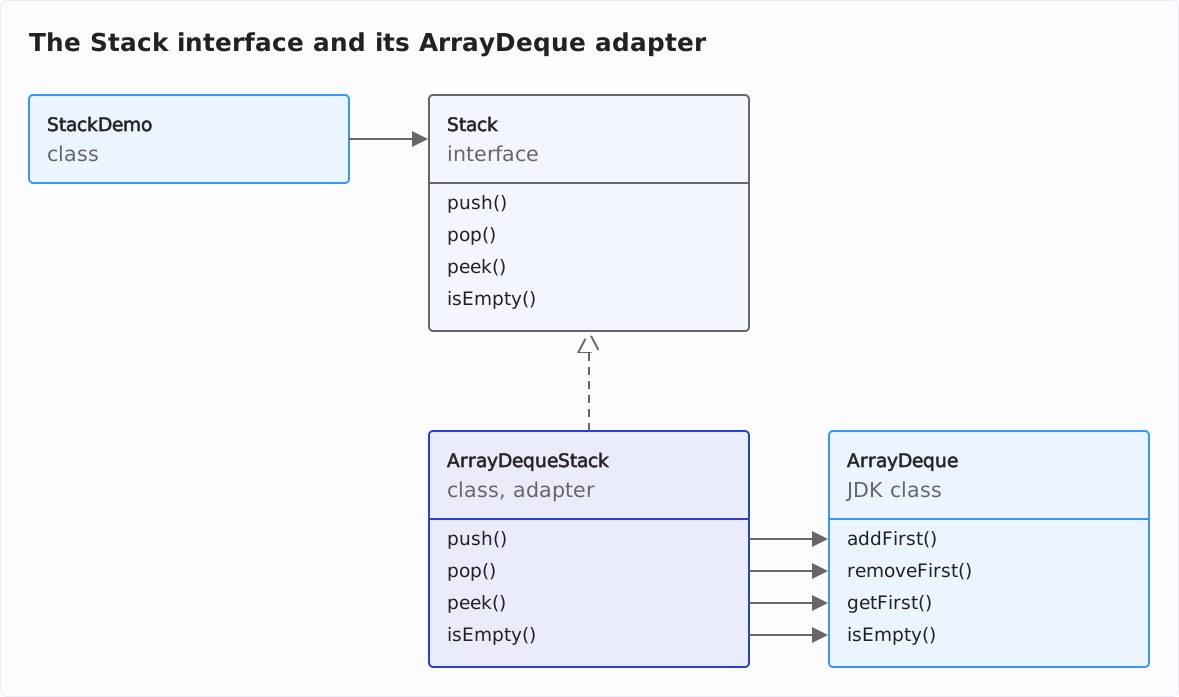
Our first implementation consists of an adapter around the (non-thread-safe) deque implementation ArrayDeque. The adapter forwards the stack methods as follows:
Stack.push()→ArrayDeque.addFirst()Stack.pop()→ArrayDeque.removeFirst()Stack.peek()→ArrayDeque.getFirst()Stack.isEmpty()→ArrayDeque.isEmpty()
First, here is a class diagram that represents the adapter pattern:
And here is the implementation of the adapter (class ArrayDequeStack in the GitHub repo):
public class ArrayDequeStack<E> implements Stack<E> {
  private final Deque<E> deque = new ArrayDeque<>();

  @Override
  public void push(E item) {
    deque.addFirst(item);
  }

  @Override
  public E pop() {
    return deque.removeFirst();
  }

  @Override
  public E peek() {
    return deque.getFirst();
  }

  @Override
  public boolean isEmpty() {
    return deque.isEmpty();
  }
}
The following demo program (class StackDemo in the GitHub repo) shows how to use the ArrayDequeStack class.
I have designed it to handle additional Stack implementations without much effort (by calling runDemo() on instances of other Stack classes).
public class StackDemo {
  static void main() {
    runDemo(new ArrayDequeStack<>());
  }

  private static void runDemo(Stack<Integer> stack) {
    System.out.println(
        "---------- " + stack.getClass().getSimpleName() + " ----------");

    stack.push(1);
    stack.push(2);
    stack.push(3);

    System.out.println("stack.peek() = " + stack.peek());

    System.out.println("stack.pop() = " + stack.pop());
    System.out.println("stack.pop() = " + stack.pop());
    System.out.println("stack.pop() = " + stack.pop());

    try {
      System.out.println("stack.pop() = " + stack.pop());
    } catch (Exception ex) {
      ex.printStackTrace(System.out);
    }
  }
}
The program prints the following:
---------- ArrayDequeStack ----------
stack.peek() = 3
stack.pop() = 3
stack.pop() = 2
stack.pop() = 1
java.util.NoSuchElementException
    at java.base/java.util.ArrayDeque.removeFirst(ArrayDeque.java:360)
    at eu.happycoders.collections.stack.ArrayDequeStack.pop(ArrayDequeStack.java:26)
    at eu.happycoders.demos.stack.StackDemo.runDemo(StackDemo.java:38)
    at eu.happycoders.demos.stack.StackDemo.main(StackDemo.java:17)
The elements come out in reverse order, and the fourth pop() call on the empty stack throws the NoSuchElementException from ArrayDeque.removeFirst().
With just a few lines of code, we implemented our own (non-thread-safe) stack class.
To implement a thread-safe stack, we can analogously put an adapter around a thread-safe deque – like ConcurrentLinkedDeque (non-blocking) or LinkedBlockingDeque (blocking). However, this only results in a blocking stack if the adapter forwards to putFirst() and takeFirst(); these methods throw an InterruptedException, which the interface would then have to declare.
Summary and Outlook
In this article, you have learned how to use Java’s Stack class, why the JDK developers recommend a Deque such as ArrayDeque instead, and how to implement your own stack behind an interface that contains only the stack operations.
In the next part of the tutorial, I will show you how to implement a stack with an array.
Did this article save you time? Then I’d be happy if you invested a minute of it in a review on my ProvenExpert profile. Your feedback shows me that the work on these articles pays off.