
In the previous article, I showed you that since Java 9, it no longer matters whether you convert an int to a String with String.valueOf(i) or with "" + i – and that String.format() is the wrong method for it.
Today, we go the opposite way: What do you need to watch out for when parsing a String into an int? You can find the source code for this article in my GitHub repository.
Parsing decimal numbers
Let’s first look at the options to parse a String into an int (or Integer). The two classic methods, available since Java 1.0:
The second method internally calls the first method and converts the result to an Integer object.
The String to convert must contain only digits, optionally with a plus or minus sign in front. These are allowed:
Integer.parseInt("47")Integer.parseInt("+86400")Integer.parseInt("-1")
The following calls, however, result in a NumberFormatException:
Integer.parseInt("") // Empty string not allowedInteger.parseInt(null) // NumberFormatException, not NullPointerExceptionInteger.parseInt(" 1") // Space not allowedInteger.parseInt("3.14") // Decimal point not allowedInteger.parseInt("1,000") // Thousands separator not allowedInteger.parseInt("1_000") // Underscore only in literals
Java has allowed the underscore as a digit separator since version 7, but only in numeric literals like 1_000 – for Integer.parseInt(), it remains an invalid character.
Parsing hexadecimal and binary numbers
The above methods parse decimal numbers. To parse other number systems, the following overloaded methods are available:
The parameter radix specifies the base of the number system. A hexadecimal number can be parsed as follows:
Integer.parseInt("CAFE", 16)
And a binary number like this:
Integer.parseInt("101111", 2)
Since Java 9, there is also Integer.parseInt(s, beginIndex, endIndex, radix) (→ JavaDoc). It parses a section of the String without you having to create a new String object with substring() first: Integer.parseInt("Port: 8080", 6, 10, 10) returns 8080. The same variant exists for parseUnsignedInt(), which I’ll show you in the next section.
Integer.decode() (→ JavaDoc) recognizes the base by the prefix: Integer.decode("0xCAFE") and Integer.decode("#CAFE") both return 51,966. Beware of a leading zero: as in Java source code, it stands for an octal number. Integer.decode("010") therefore returns 8 – and Integer.decode("09") throws a NumberFormatException because 9 is not an octal digit.
Java 17 added another class, HexFormat (→ JavaDoc), intended mainly for converting between byte arrays and hexadecimal Strings: HexFormat.of().parseHex("cafebabe") returns a byte array of four bytes. For single numbers, it has static methods: HexFormat.fromHexDigits("CAFE") returns 51,966, HexFormat.fromHexDigitsToLong(s) a long, and a variant with a begin and end index parses a section. Unlike parseInt(), it accepts neither a sign nor a prefix – 0x leads to a NumberFormatException – but at most eight hex digits, which it reads as a bit pattern. What that means for CAFEBABE, you’ll see in the next section.
Signed vs. unsigned ints
In all the above cases, the number to be parsed must be within the range Integer.MIN_VALUE (= -2³¹ = -2,147,483,648) to Integer.MAX_VALUE (= 2³¹ - 1 = 2,147,483,647).
It becomes interesting (not to say: confusing) if, for example, we convert the valid int value 0xCAFEBABE (the magic number of Java class files) into a hexadecimal String and then back into an int:
int hex = 0xCAFEBABE;
String s = Integer.toHexString(hex);
int i = Integer.parseInt(s, 16);
This attempt results in the following error (the suffix “under radix 16” has existed since Java 12):
java.lang.NumberFormatException: For input string: "cafebabe" under radix 16Why is that?
First of all: The variable s contains cafebabe as expected. Why can’t this String be converted back to an int?
The reason is that the parseInt() method assumes the given number to be positive unless a minus sign precedes it. If you convert cafebabe to the decimal system, you get 3,405,691,582. This number is higher than Integer.MAX_VALUE and therefore cannot be represented as an int.
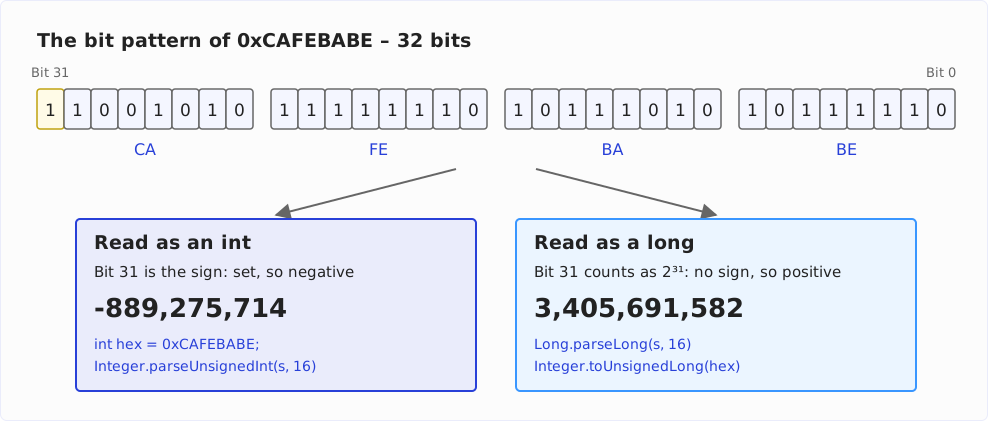
Then why can we assign the number to the int variable hex? The binary representation of the numbers plays an (intended) trick on us. 0xCAFEBABE corresponds to binary 11001010 11111110 10111010 10111110 – a 32-digit binary number with the first bit being 1. In an int – which is always signed in Java – the first bit stands for the sign. If it is 1, the number is negative (for details on negative numbers, see this Wikipedia article). Let’s add some debug output to the code above:
int hex = 0xCAFEBABE;
System.out.println("hex        = " + hex);
System.out.println("hex binary = " + Integer.toBinaryString(hex));

String s = Integer.toHexString(hex);
System.out.println("s          = " + s);

int i = Integer.parseInt(s, 16);
System.out.println("i          = " + i);
We see that hex contains the negative value -889,275,714 (I’ve inserted the thousands separators here for the sake of clarity). Hexadecimally, this negative number is represented as the positive value cafebabe, which in turn cannot be converted back by the parseInt() method.
To make this work, after all, the JDK developers added the following methods in Java 8:
int i = Integer.parseUnsignedInt(s);(→ JavaDoc)int i = Integer.parseUnsignedInt(s, radix);(→ JavaDoc)
These methods allow us to parse numbers in the range 0 to 4,294,967,295 (= 0xffffffff hexadecimal or 32 ones in the binary system). Since Java 8, we can adjust the penultimate line of the above example as follows:
int i = Integer.parseUnsignedInt(s, 16);As output, we don’t see 3,405,691,582. Rather, as int in Java is always signed, -889,275,714, which is the same value we get when we assign 0xCAFEBABE to an int. By the way, HexFormat.fromHexDigits(s) from Java 17 returns the same result: it reads the eight hex digits as a bit pattern and does not ask about the sign.
And how do we get to 3,405,691,582? Since Java 8, directly from the int: Integer.toUnsignedLong(i) (→ JavaDoc) returns 3,405,691,582 as a long, Integer.toUnsignedString(i) as a String. Or you parse cafebabe (or CAFEBABE – the case is insignificant) into a long right away:
long l = Long.parseLong(s, 16);Finally, what does 3,405,691,582 look like in binary and hexadecimal notation?
System.out.println("l binary = " + Long.toBinaryString(l));
System.out.println("l hex    = " + Long.toHexString(l));
Again, we get the same representations as for the int value -889,275,714, i.e. 11001010 11111110 10111010 10111110 and cafebabe. The same binary or hexadecimal number thus leads – depending on whether it is stored in an int or in a long – to a different decimal number (if it is larger than Integer.MAX_VALUE). The following diagram shows the bit pattern of 0xCAFEBABE and its two readings:
In the following section, we’ll take a look at some more examples.
parseInt() vs. parseUnsignedInt()
To illustrate the difference between parseInt() and parseUnsignedInt() once again, I wrote a small program, which you can find here in my GitHub repository and which parses different (threshold) values using both methods.
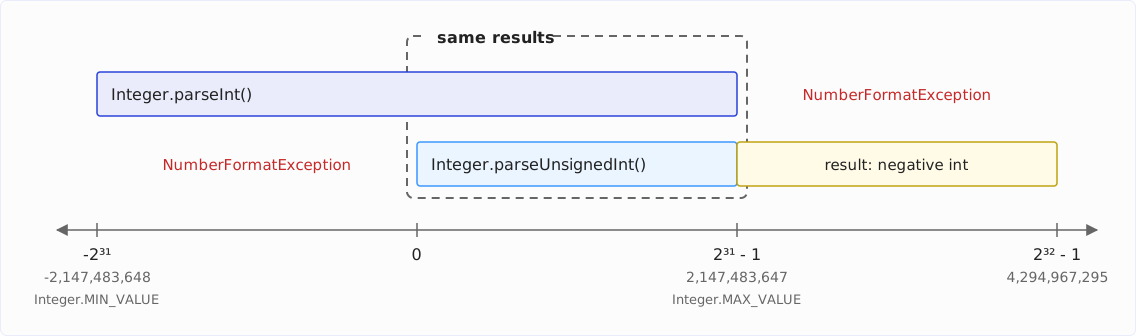
The two methods cover different value ranges, which overlap from 0 to Integer.MAX_VALUE:
In the following table, you find the result of the program summarized (✗ stands for a NumberFormatException):
String | Remark | parseInt() | → Hex | parseUnsignedInt() | → Hex |
|---|---|---|---|---|---|
| -2147483649 | MIN_VALUE - 1 | ✗ | ✗ | ✗ | ✗ |
| -2147483648 | MIN_VALUE | -2147483648 | 80000000 | ✗ | ✗ |
| -1000000000 | -1000000000 | c4653600 | ✗ | ✗ | |
| -1 | -1 | ffffffff | ✗ | ✗ | |
| 0 | 0 | 0 | 0 | 0 | |
| 1000000000 | 1000000000 | 3b9aca00 | 1000000000 | 3b9aca00 | |
| 2147483647 | MAX_VALUE | 2147483647 | 7fffffff | 2147483647 | 7fffffff |
| 2147483648 | MAX_VALUE + 1 | ✗ | ✗ | -2147483648 | 80000000 |
| 3000000000 | ✗ | ✗ | -1294967296 | b2d05e00 | |
| 4294967295 | 2 * MAX_VALUE + 1 | ✗ | ✗ | -1 | ffffffff |
| 4294967296 | 2 * MAX_VALUE + 2 | ✗ | ✗ | ✗ | ✗ |
You can see this clearly here:
- In the range
0toInteger.MAX_VALUE,parseInt()andparseUnsignedInt()return the same results. parseInt()also covers the range up toInteger.MIN_VALUEand returns exactly the value passed.parseUnsignedInt()covers the range up to2 * Integer.MAX_VALUE + 1– with the result in the range aboveInteger.MAX_VALUEalways being a negative number. Its hexadecimal representation, converted to the decimal system, corresponds to the input value.
Auto-boxing and -unboxing the result
We have seen above that there are separate methods to convert a String to an int primitive or an Integer object. But what happens if we use the wrong method?
Integer i = Integer.parseInt("42");int i = Integer.valueOf("555");
The first case is not particularly elegant but does not pose a problem either: Integer.parseInt() works internally with primitive values and the result is – just as with Integer.valueOf() – eventually converted into an Integer object by auto-boxing.
The second case is different: here, the result is converted to an Integer object inside Integer.valueOf() and then back to an int primitive when it is assigned to i. That is the difference from the first case: there, one conversion takes place, and it is necessary – an Integer can only be created by boxing. Here, there are two, and they cancel each other out. This pair is exactly what IntelliJ reports as redundant, and it recommends replacing valueOf() with parseInt():

Whether HotSpot forgives us this detour, we’ll check in the next chapter with the profiler.
Performance of the String-to-int conversion
I measured with the Java Microbenchmark Harness (JMH), with the same setup as in the sister article: two machines – a Dell XPS 17 with an Intel Core i7-12700H (x86) under WSL2 and a Mac with an Apple M5 Pro (arm64) –, Java 8 to 27, three forks of five warm-up and five measurement iterations each, plus the GC profiler for the bytes allocated per call. I measured every version several times, five times on the i7 and four times on the M5 Pro; the tables show the mean. Why that is necessary, and when I call a difference between two versions a difference at all, is explained in the info box in the sister article.
I wanted to answer three questions:
- Do the parse methods differ – positive, negative, unsigned numbers?
- What does boxing into an
Integercost? - How has
Integer.parseInt()evolved from Java 8 to 27?
The benchmark
You can find the benchmark in my GitHub repository. Here is an excerpt with three of the eight methods:
public class StringToIntMultiBenchmark {

  @Benchmark
  public void integerParsePositiveInt(RandomNumberStrings state,
      Blackhole blackhole) {
    int i = Integer.parseInt(state.positive(state.next()));
    blackhole.consume(i);
  }

  @Benchmark
  public void integerParsePositiveInteger(RandomNumberStrings state,
      Blackhole blackhole) {
    Integer i = Integer.valueOf(state.positive(state.next()));
    blackhole.consume(i);
  }

  @Benchmark
  public void integerParsePositiveIntegerAndUnbox(RandomNumberStrings state,
      Blackhole blackhole) {
    int i = Integer.valueOf(state.positive(state.next()));
    blackhole.consume(i);
  }

}
The state provides 1,024 random seven-digit numbers as Strings – plain, with a plus, and with a minus – and is filled once per trial:
@State(Scope.Thread)
public class RandomNumberStrings {

  private static final int SIZE = 1024;

  private final String[] positive = new String[SIZE];
  private final String[] positiveWithPlus = new String[SIZE];
  private final String[] negative = new String[SIZE];
  private int index;

  @Setup(Level.Trial)
  public void doSetup() {
    ThreadLocalRandom random = ThreadLocalRandom.current();
    for (int k = 0; k < SIZE; k++) {
      String digits = Integer.toString(1_000_000 + random.nextInt(9_000_000));
      positive[k] = digits;
      positiveWithPlus[k] = "+" + digits;
      negative[k] = "-" + digits;
    }
  }

  public int next() {
    return index++ & (SIZE - 1);
  }

  public String positive(int k) {
    return positive[k];
  }

  // positiveWithPlus(int k) and negative(int k) analogously

}
Why the numbers are drawn once per trial and not before every call, I explain in the info box in the sister article. In short: a parse call takes five to eight nanoseconds, and a setup per call would force JMH to wrap every single call in timestamps – then you measure the clock instead of the parser. The measurements in the first version of this article had exactly this flaw.
The parse methods compared
All eight methods on Java 27: the time per call in nanoseconds, averaged over two JMH runs per machine of three forks and five measurement iterations each, and, in the last column, the bytes one call allocates – the number that matters two sections down. The raw data with error intervals is available as JMH JSON in the results/ directory of the benchmark repository.
| Method | x86 | arm64 | Bytes per call |
|---|---|---|---|
parseInt(), positive value | 7.4 | 5.4 | 0 |
parseInt(), positive value with plus | 7.1 | 5.4 | 0 |
parseInt(), negative value | 7.0 | 5.2 | 0 |
parseUnsignedInt(), positive value | 6.9 | 5.1 | 0 |
parseUnsignedInt(), positive value with plus | 7.4 | 5.2 | 0 |
parseInt() with subsequent boxing | 7.5 | 5.8 | 16 |
valueOf(), positive value | 7.6 | 5.8 | 16 |
valueOf() with subsequent unboxing | 7.3 | 5.4 | 0 |
The chart shows the times; the bytes are in the table only.
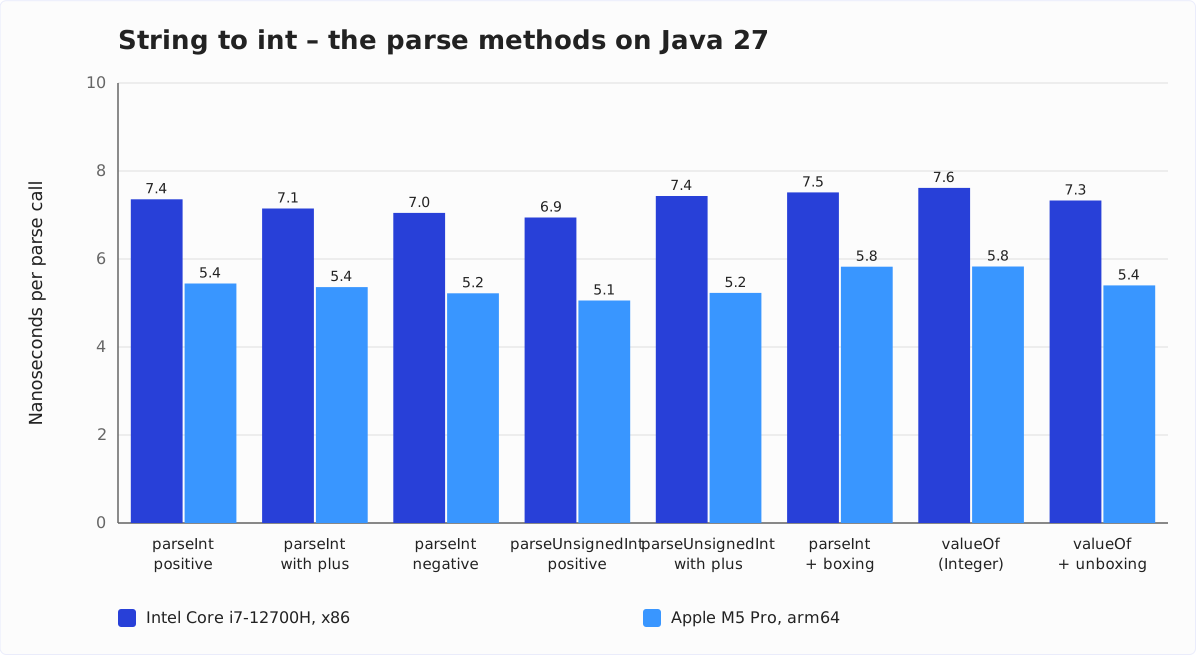
The five rows without boxing – parseInt() and parseUnsignedInt() in every sign variant – sit close together: 6.9 to 7.4 ns on the i7, 5.1 to 5.4 ns on the M5 Pro. So on each of the two machines, the five values lie within half a nanosecond, and two runs per method cannot establish a ranking within a band that narrow. You can also tell that the differences are noise, not a property of the methods, from the order not being the same on the two machines: parseInt() with a positive value is the slowest of the five on the M5 Pro, parseUnsignedInt() with a plus on the i7.
That is what you would expect, because the code behind them is practically the same. parseUnsignedInt() does have a digit loop of its own, but it differs from the one in parseInt() only in the overflow check – one does signed arithmetic, the other unsigned. And whether a plus, a minus, or no sign at all precedes the number costs one branch that the branch predictor knows after the first pass.
What boxing costs
The three rows with boxing – parseInt() with subsequent boxing, valueOf(), and valueOf() with subsequent unboxing – tell a different story than the first version of this article.
Integer.valueOf(s) returns an Integer object. For values outside the cache of -128 to 127 – that is, for all of our seven-digit numbers – it has to be allocated: 16 bytes per call, which the GC profiler shows as well. On the M5 Pro, that costs 7% in time – 5.8 instead of 5.4 ns – and on the i7 two to four percent. Whether you write Integer.valueOf(s) or Integer i = Integer.parseInt(s): it is the same boxing, with the same 16 bytes.
And the detour int i = Integer.valueOf(s), i.e., boxing with immediate unboxing? It costs nothing. Zero bytes per call, and the time cannot be told apart from parseInt(). HotSpot recognizes that the Integer object never leaves the method and drops the allocation – that is called escape analysis.
The 2019 recommendation – “be careful not to box unnecessarily” – still stands, just for a different reason: readability. If you need an int, write parseInt(); if you need an Integer, valueOf(). So the IntelliJ warning above is right, even though HotSpot optimizes the detour away.
Integer.parseInt() from Java 8 to 27
The three boxing variants end up calling Integer.parseInt(), and the five variants without boxing sit close together, as shown above. So I measured Integer.parseInt() with a positive value as the representative across the Java versions – nanoseconds per call:
| Architecture | Java 8 | Java 11 | Java 17 | Java 21 | Java 22 | Java 23 | Java 24 | Java 25 | Java 27 |
|---|---|---|---|---|---|---|---|---|---|
| x86 | 13.9 | 9.2 | 9.0 | 8.2 | 7.8 | 7.2 | 7.2 | 7.5 | 7.4 |
| arm64 | 7.2 | 5.6 | 5.9 | 6.0 | 5.4 | 5.4 | 5.3 | 5.3 | 5.5 |
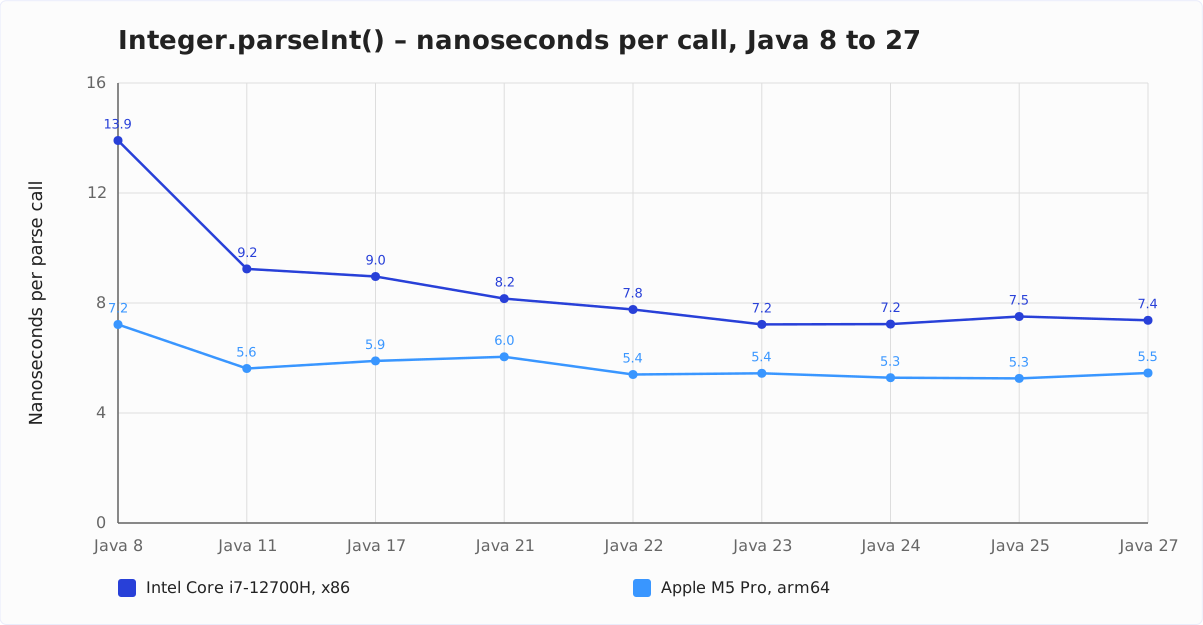
You can see the big step between Java 8 and 11: 34% less time on x86, 22% on arm64. After that, the two machines go different ways. On the i7, the time falls in every step up to Java 23 – by 3, 9, 5, and 7% –, and after that nothing happens that five rounds could tell apart from measurement noise: Java 23, 24, 25, and 27 lie within their noise.
On the M5 Pro, it goes up and down: Java 17 is 5% slower than 11, Java 21 another 3% slower, Java 22 more than makes up for that with 11% – and Java 27 is 3.7% slower than Java 25, unambiguous across four rounds. From Java 8 to 27, the time for parseInt() has almost halved on x86 and dropped by a quarter on arm64.
Little has changed in the parser itself in that time. Most of the gain comes from Compact Strings (JEP 254), with which Java 9 stores Strings of Latin-1 characters in a byte array instead of a char array – half as many bytes per character for the parser to read. That can be measured by switching Compact Strings off with the JVM option -XX:-CompactStrings – in a separate series, each run against one with Compact Strings on: parseInt() on the M5 Pro then takes 6.8 instead of 5.7 ns on Java 11, and 6.8 instead of 5.4 ns on Java 25 – almost back at the Java 8 level of 7.2 ns.
The rest of the gain comes from the JIT compiler – and that is also where the small slowdowns on the M5 Pro on Java 17, 21, and 27 must come from; I did not investigate them. The first version of this article, by the way, had measured that parseInt() became slower in Java 9 and 10 – that was the measurement flaw with the per-call setup, not Java.
Summary
You parse decimal numbers with parseInt(), other number systems via the radix parameter, and, since Java 9, substrings via the variant with a begin and end index. parseUnsignedInt() covers the range up to 4,294,967,295 – but above Integer.MAX_VALUE returns a negative int whose bit pattern corresponds to the input value.
All parse methods are equally fast: five to eight nanoseconds, depending on the machine. Boxing into an Integer allocates 16 bytes per call and costs two to seven percent in time, depending on the machine; the detour via boxing and unboxing into an int is optimized away by HotSpot. I still recommend: parseInt() for an int, valueOf() for an Integer – not because of the nanoseconds, but because the code then says what it does.
What should I cover next? The best way for me to find out is through your feedback: a review on my ProvenExpert profile shows me which topics matter to you – and motivates me to write more articles.