The last part of this tutorial series was about implementing a stack with a linked list. In this part, I’ll show you how to implement a stack with a queue – first with two queues, then with a single one.
This variant has hardly any practical use and is primarily used as an exercise (as a counterpart, I also have an exercise for implementing a queue with stacks). Therefore: Maybe you want to try to find the solution yourself first!
As a reminder, a queue is a data structure where you insert elements on one side and take them out on the other – i.e., a first-in-first-out (FIFO) data structure.
How can we use this to implement a stack, that is, a last-in-first-out (LIFO) data structure?
The Solution – Step by Step
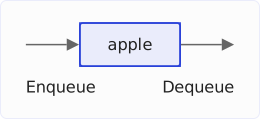
We insert the first element that we want to push onto the stack (in the example: “apple”) into a queue. To remove it from the stack, we take it out of the queue again:
We cannot simply write the second element into this queue as well. That’s because the queue works according to the FIFO principle. If we push “apple” and then “orange” into the queue, we also have to take “apple” out again first:
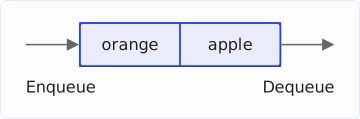
In a stack, however, we must first take out the last element pushed onto the stack (“orange”) – and not the first element inserted (“apple”).
With a single queue that we only insert into, that is not possible.
Instead, we proceed as follows when inserting an element:
- We create a new queue (the light blue “New queue” in the image below) and move the element to be inserted into it.
- We move the element from the first queue to the newly created queue.
- We replace the existing queue with the new queue.
The following image shows these three steps:
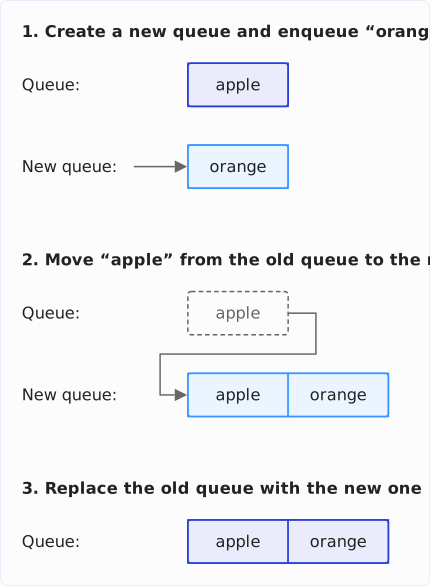
After that, the elements are in the queue in such a way that we can take out the last inserted element, “orange”, first and then the first inserted element, “apple”.
This works not only with two elements but with as many as you like. The following image shows how we move the third element, “pear”, onto the stack. I’ve split the second step from the previous image into steps 2a and 2b here: We first move “orange” from the old queue to the new one, then “apple”.
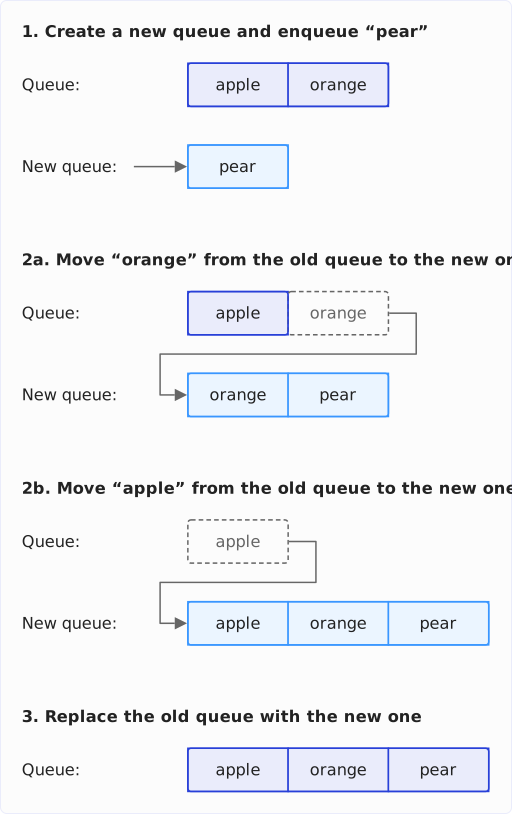
After that, we can take the elements out of the stack in last-in-first-out order, so first the last inserted “pear”, then the “orange”, then the first inserted “apple”.
Source Code for the Stack with Queues
Below you can see that the source code for the solution is short.
For the queue, I use the usual queue implementation, ArrayDeque. The fact that it is also a deque doesn’t bother us because we assign it to a variable whose type is the Queue interface.
Stack is the small interface of this tutorial series with push(), pop(), peek(), and isEmpty() (Stack.java on GitHub) – not java.util.Stack.
You can find the source code in the QueueStack class in the GitHub repository.
public class QueueStack<E> implements Stack<E> {

  private Queue<E> queue = new ArrayDeque<>();

  @Override
  public void push(E element) {
    Queue<E> newQueue = new ArrayDeque<>();
    newQueue.add(element);

    while (!queue.isEmpty()) {
      newQueue.add(queue.remove());
    }

    queue = newQueue;
  }

  @Override
  public E pop() {
    return queue.remove();
  }

  @Override
  public E peek() {
    return queue.element();
  }

  @Override
  public boolean isEmpty() {
    return queue.isEmpty();
  }
}
The second queue is created anew on every push() here. You could just as well reuse it: two fields instead of one, and after moving the elements, you swap the two references.
The demo program StackDemo shows you how to use QueueStack.
Running Time
Every push() moves all elements that are already in the stack into the new queue. With n elements, that is n moves – so push() costs O(n). pop(), peek(), and isEmpty() only access the head of the queue and run in constant time, O(1).
You can also turn the costs around: The new element simply goes to the end of the queue, and push() then runs in O(1). In return, pop() has to move all elements but the last one into the second queue before it can remove the last one – and costs O(n), just like peek(). Which variant is better depends on which operation occurs less often.
A stack whose push() or pop() gets linearly more expensive with the number of elements is of no use in production. That is why this implementation remains an exercise.
Stack Using a Single Queue
The second queue is not necessary at all. It is enough to insert the new element into the queue and then rotate all other elements through once: dequeue each one from the head and enqueue it again – until the new element is at the head.
The following diagram shows how “pear” gets onto the stack holding “apple” and “orange”: one insert, two rotations.
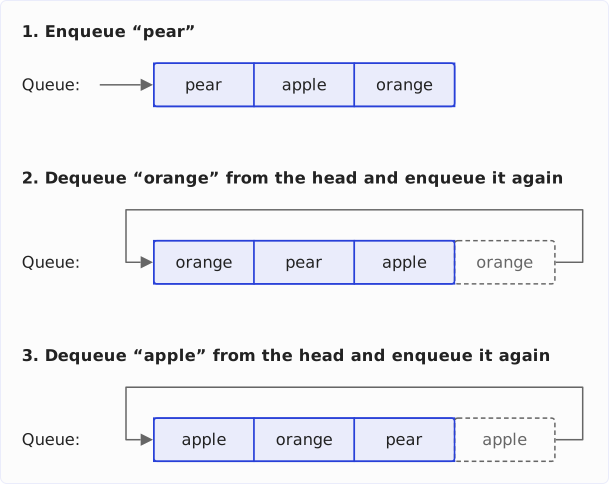
The SingleQueueStack class in the GitHub repository implements it like this:
public class SingleQueueStack<E> implements Stack<E> {

  private final Queue<E> queue = new ArrayDeque<>();

  @Override
  public void push(E element) {
    queue.add(element);
    for (int i = 1; i < queue.size(); i++) {
      queue.add(queue.remove());
    }
  }

  // pop(), peek(), isEmpty() as in QueueStack
}
After inserting “apple”, “orange”, and “pear”, queue.toString() prints [pear, orange, apple], head first – exactly the order in which pop() returns the elements. The running time does not change: push() stays at O(n); only the creation of the second queue is gone.
Outlook
In the next and last part of the tutorial, we’ll cover another exercise: How to reverse a stack via recursion?
Did this article save you time? Then I’d be happy if you invested a minute of it in a review on my ProvenExpert profile. Your feedback shows me that the work on these articles pays off.