
In the last part, we wrote a stack as an adapter around an ArrayDeque. In this part of the tutorial, I’ll show you how to implement a stack – without any Java collection classes – using an array.
It’s pretty simple: We create an empty array and fill it from left to right (i.e., ascending from index 0) with the elements placed on the stack. To remove the elements, we read them from right to left (and remove them from the array).
The following image shows a stack with an array named elements that can hold eight elements. So far, four elements have been placed on the stack.

The number of elements (not the size of the array) is stored in the numberOfElements variable. The value of this variable tells us at which position in the array we have to insert or read an element:
- Einfügen: at position
numberOfElements - Auslesen: at position
numberOfElements - 1
Source Code for a Stack with a Fixed Size Array
As long as we don’t need to resize the array, the implementation is fairly simple, as the following Java code shows (BoundedArrayStack class in GitHub):
public class BoundedArrayStack<E> implements Stack<E> {

  private final Object[] elements;

  private int numberOfElements;

  public BoundedArrayStack(int capacity) {
    if (capacity < 1) {
      throw new IllegalArgumentException("Capacity must be 1 or higher");
    }

    elements = new Object[capacity];
  }

  @Override
  public void push(E item) {
    if (numberOfElements == elements.length) {
      throw new IllegalStateException("The stack is full");
    }
    elements[numberOfElements] = item;
    numberOfElements++;
  }

  @Override
  public E pop() {
    E element = elementAtTop();
    elements[numberOfElements - 1] = null;
    numberOfElements--;
    return element;
  }

  @Override
  public E peek() {
    return elementAtTop();
  }

  private E elementAtTop() {
    if (isEmpty()) {
      throw new NoSuchElementException();
    }

    @SuppressWarnings("unchecked")
    E element = (E) elements[numberOfElements - 1];

    return element;
  }

  @Override
  public boolean isEmpty() {
    return numberOfElements == 0;
  }
}
It gets a bit more complicated when more elements are to be pushed onto the stack than the size of the array. An array cannot grow. I will show you how this works in the next chapter.
Implementing a Stack with a Variable Size Array
Instead, we must (when the array is full):
- create a new, larger array,
- copy the elements from the original array into the new array, and
- discard the old array.
The following diagram represents these three steps visually:
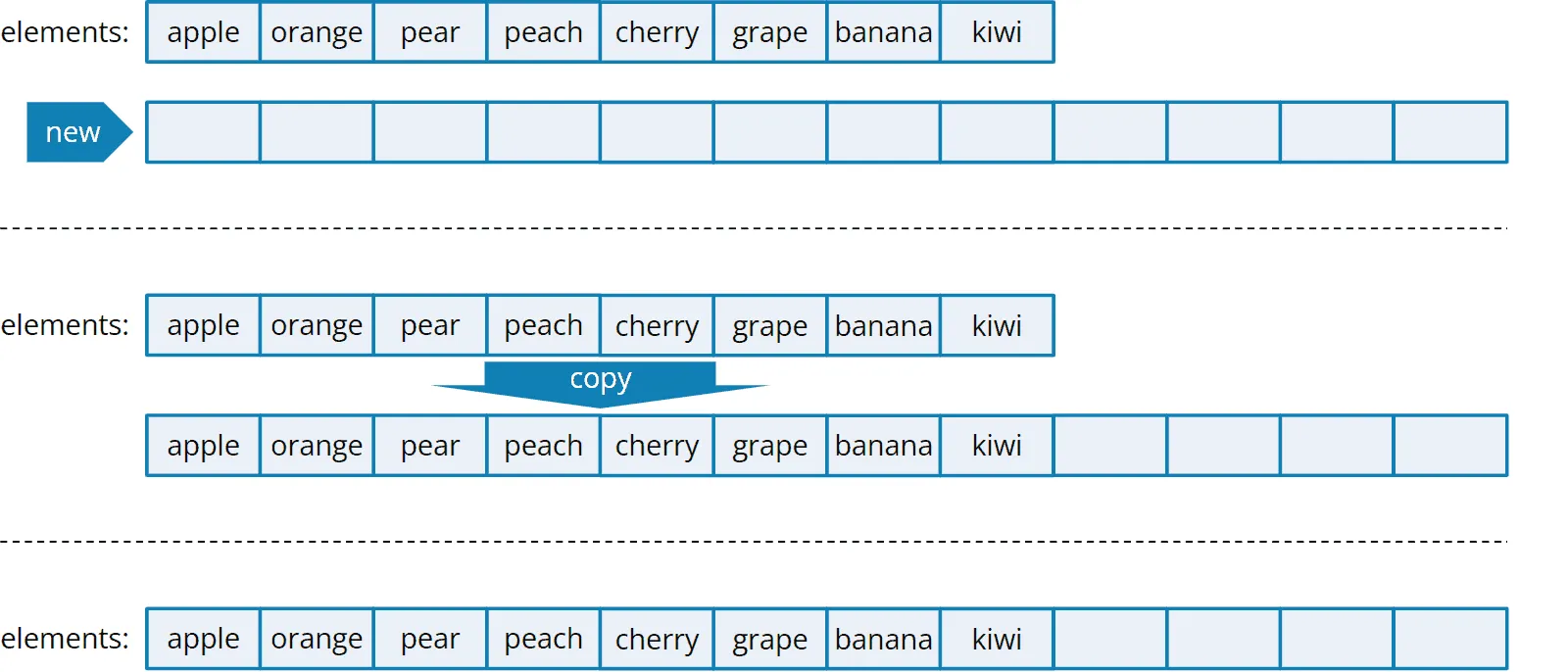
We can do all this in Java in just one step by calling the Arrays.copyOf() method. All we have to do is pass the size of the new array to the method.
Source Code for the Stack with a Variable Size Array
The following code shows a stack initially created with an array for ten elements. Each time the push() method is called, it checks whether the array is full. If it is, the grow() method is called.
The grow() method, in turn, calls calculateNewCapacity() to calculate the new size of the array. In the example, we expand the array always by a factor of 1.5. The code also specifies a maximum size for the array. If this is reached and another element is pushed, an exception is thrown (unless we got an OutOfMemoryError before).
Here is the code (class ArrayStack in GitHub):
public class ArrayStack<E> implements Stack<E> {

  public static final int MAX_SIZE = Integer.MAX_VALUE - 8;
  private static final int DEFAULT_INITIAL_CAPACITY = 10;
  private Object[] elements;
  private int numberOfElements;

  public ArrayStack() {
    this(DEFAULT_INITIAL_CAPACITY);
  }

  public ArrayStack(int initialCapacity) {
    elements = new Object[initialCapacity];
  }

  @Override
  public void push(E item) {
    if (elements.length == numberOfElements) {
      grow();
    }
    elements[numberOfElements] = item;
    numberOfElements++;
  }

  private void grow() {
    int newCapacity = calculateNewCapacity(elements.length);
    elements = Arrays.copyOf(elements, newCapacity);
  }

  static int calculateNewCapacity(int currentCapacity) {
    if (currentCapacity == MAX_SIZE) {
      throw new IllegalStateException("Can't grow further");
    }

    int newCapacity = currentCapacity + calculateIncrement(currentCapacity);

    if (newCapacity > MAX_SIZE || newCapacity < 0 /* overflow */) {
      newCapacity = MAX_SIZE;
    }

    return newCapacity;
  }

  private static int calculateIncrement(int currentCapacity) {
    return currentCapacity / 2;
  }

  // pop(), peek(), elementAtTop(), isEmpty() are the same as in BoundedArrayStack

}
The methods pop(), peek(), elementAtTop(), and isEmpty() are identical to those in the BoundedArrayStack presented above. I have, therefore, not printed them again.
The ArrayStack in the form printed above cannot yet shrink the array again (we don’t want to waste too much memory). Feel free to try to extend the implementation yourself.
You can see how BoundedArrayStack and ArrayStack can be used in the StackDemo program.
Outlook
In the next part of the series, you will learn about a variant not based on an array, but a linked list and thus grows fully automatically with each push() and shrinks again with each pop().
Did you take something away from this article? With a review on my ProvenExpert profile, you help other developers assess whether these articles are worth reading – and you help me understand which content is most useful to you.
The HappyCoders newsletter lets you know as soon as new articles are published – click here to sign up.