
In this article, you will learn how “Compressed Oops” is used on a 64-bit system to represent references to Java objects with only 32 bits instead of 64, and how this significantly reduces the memory requirements of a Java application.
What is a 64-Bit System?
A 64-bit system is characterized by the fact that pointers to addresses in memory are 64 bits long. This means we can address 264 bytes = 16 exabytes = 18,446,744,073,709,551,616 bytes.
Nowadays, there are practically no programs that require this much memory. In ten years, we might smile at this statement ;-)
Here is the graphical representation of such a 64-bit pointer:

Now you could consider dividing these 64 bits in half and storing not just one but two pointers with the same amount of memory:

However, with 32 bits, we can address only 232 bytes = 4 GB. That is not enough for many applications.
The JDK developers have, therefore, devised a clever trick (“Compressed Oops”) to address not just 4 GB but 32 GB using only 32 bits. And that, in turn, is sufficient for most applications today.
How does Compressed Oops Work?
Compressed Oops (OOP stands for “ordinary object pointer”; in the HotSpot source code, a compressed pointer is called narrowOop) allows an address space of 235 bytes = 32 gigabytes to be addressed using 32-bit pointers.
How is that possible? To address 32 gigabytes, we would need 35 bits. But we cannot store 35 bits in a 32-bit int; for that, we would need the next largest data structure, a 64-bit long:

So we would have wasted 29 bits. Then we could have stuck with 64-bit pointers.
It’s time to use a trick!
First of all, we position all Java objects at memory addresses that are divisible by eight. Eight is equal to 2³, which means that the last 3 bits of a pointer are always 0. Therefore, only the upper 32 bits contain relevant information:

Since we know that the last three bits are always 0, we do not need to store them every time. Therefore, the 35-bit memory address can be shifted right by three bits without any loss of information and thus stored in a 32-bit field:
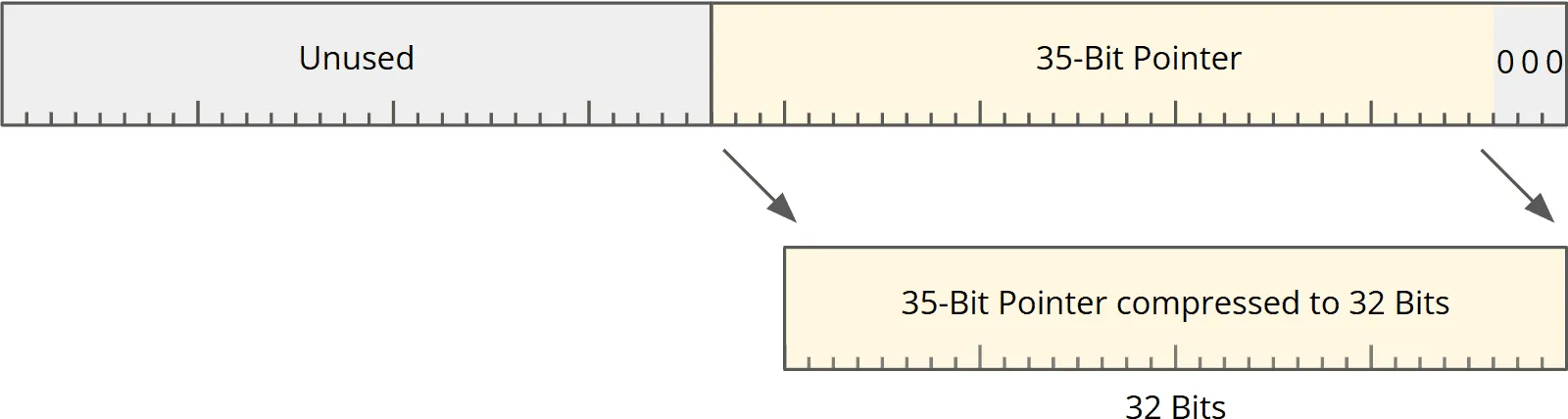
To access the uncompressed memory address again later, the 32 bits simply have to be shifted left by three bits.
The Four Modes of Compressed Oops
The calculation above assumes that the heap starts at address 0. Where the heap actually ends up depends on which address ranges the operating system grants the JVM at startup.
The JVM therefore tries, one after the other, to reserve the heap below 4 GB, below 32 GB, and at an address divisible by 32 GB. If none of these works, it takes any address.
Depending on where the heap lands, the JVM works in one of four modes. The table shows, for each mode, its name in the JVM log, where the heap is located, and how the JVM calculates the memory address from the compressed pointer. The heap base is the start address of the reserved heap area:
| Mode (name in the log) | Heap location | Address calculation |
|---|---|---|
32-bit | ends at 4 GB at most | none – the 32-bit value is the address |
Zero based | ends at 32 GB at most | shift left by 3 bits |
Non-zero disjoint base | heap base divisible by 32 GB | shift, then OR with the heap base (x86, ARM: addition) |
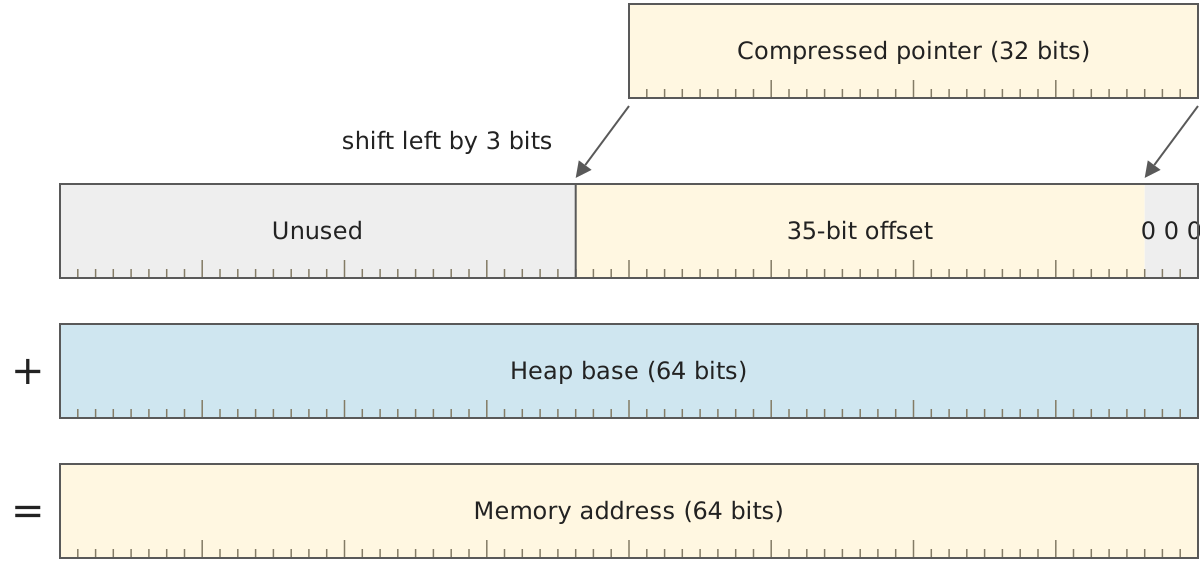
Non-zero based | anywhere | shift, then add the heap base |
The following diagram shows Non-zero based mode: The shift turns the compressed pointer into a 35-bit offset, and only adding the heap base yields the 64-bit memory address.
In Non-zero disjoint base mode, the lower 35 bits of the heap base are all 0. Its bits therefore don’t overlap with those of the shifted pointer, and the OR operation (in Java: |) yields the same result as the addition.
In the following diagram, the heap base therefore occupies only the upper 29 bits and the shifted pointer the lower 35 – the OR operation puts the two side by side:
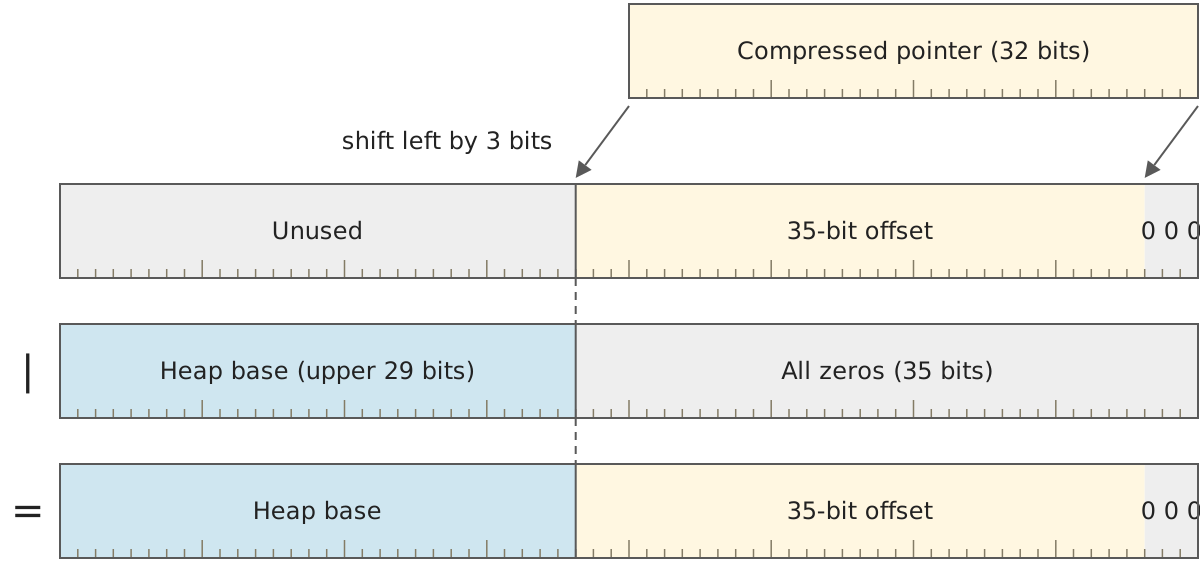
The JVM uses the OR operation only on PowerPC and IBM Z, where it doesn’t keep the heap base in a register at all times but loads it as a constant when needed – there, it saves the JVM instructions when decoding. On x86 and ARM, the mode brings no benefit, because there the heap base sits in a register reserved for it: On ARM, a single instruction performs the shift and the addition, and on x86, both are part of the memory access itself.
The log option -Xlog:gc+heap+coops=debug shows you which mode your JVM has chosen:
java -Xmx2g -Xlog:gc+heap+coops=debug -versionWith JDK 27 on macOS (arm64), the command prints, among other things, this line:
[0.010s][debug][gc,heap,coops] Heap address: 0x0000007000800000, size: 2048 MB, Compressed Oops mode: Non-zero disjoint base: 0x0000007000000000, Oop shift amount: 3The heap is only 2 GB in size and still doesn’t sit below 32 GB: The heap base 0x7000000000 corresponds to 448 GB. Since 448 is divisible by 32, the JVM works in Non-zero disjoint base mode here – on ARM, that means with the same addition as in Non-zero based mode.
Compressed Oops are Enabled by Default
On a 64-bit system with a heap of less than 32 GB, Compressed Oops are enabled by default.
From 32 GB on – i.e., already with -Xmx32g – the JVM turns them off. That is because it reserves a protected memory page in front of the heap, and heap and page together must fit into the 32 GB that Compressed Oops can address. If you force Compressed Oops with -XX:+UseCompressedOops anyway, the JVM reports “Max heap size too large for Compressed Oops” and starts without them.
You can turn off Compressed Oops with the following VM option:
-XX:-UseCompressedOops
Why would you do that?
Encoding and decoding pointers costs time. Not much, as the required shift operation can usually be performed in a single CPU cycle – in the modes with a heap base, an addition or an OR operation comes on top. However, if you want to squeeze the last bit of performance out of your application and are willing to accept the increased memory requirement (all pointers occupy 64 instead of 32 bits), you can consider this option.
Conclusion
Compressed Oops allows you to encode memory addresses with only 32 bits instead of 64 on a 64-bit system with a heap size of less than 32 GB. Since there is at least one pointer to every active Java object in an application, Compressed Oops significantly reduces the memory requirements of an application.
What should I cover next? The best way for me to find out is through your feedback: a review on my ProvenExpert profile shows me which topics matter to you – and motivates me to write more articles.