
Converting an int to a String – Java gives you four ways to do it. Which one is the fastest?
I measured all four with JMH microbenchmarks: on Java 8 to 27, every version several times, on an x86 and an arm64 machine. The result is clear – and it is a different one than the first version of this article claimed in 2019. I’ll show you why the old answer was wrong, too.
If you only want the recommendation: Jump straight to the summary.
Four ways to convert an int to a String
Leaving aside deliberately convoluted constructions, these are the four options:
- Option 1:
Integer.toString(i) - Option 2:
String.valueOf(i) - Option 3:
String.format("%d", i) - Option 4:
"" + i
String.valueOf(i) calls Integer.toString(i) internally. String.format() sends the number through the Formatter. And "" + i is the variant where it gets interesting: since Java 9, it is no longer the compiler that decides what this becomes, but the JVM. More on that later.
The benchmark setup
For the measurements, I use the Java Microbenchmark Harness, JMH for short – a framework that runs short pieces of code millions of times, starts measuring only after a warm-up phase for the JIT compiler, and finally reports throughput along with an error interval.
You can find a good beginner’s tutorial by Jakob Jenkov. For IntelliJ, there is a JMH plugin that lets you start benchmarks straight from the IDE.
The benchmark
You can find the complete source code in my GitHub repository. The benchmark itself is short:
public class IntToStringBenchmark {

  @Benchmark
  public void option1(RandomInts state, Blackhole blackhole) {
    String s = Integer.toString(state.next());
    blackhole.consume(s);
  }

  @Benchmark
  public void option2(RandomInts state, Blackhole blackhole) {
    String s = String.valueOf(state.next());
    blackhole.consume(s);
  }

  @Benchmark
  public void option3(RandomInts state, Blackhole blackhole) {
    String s = String.format("%d", state.next());
    blackhole.consume(s);
  }

  @Benchmark
  public void option4(RandomInts state, Blackhole blackhole) {
    String s = "" + state.next();
    blackhole.consume(s);
  }

}
The numbers come from a JMH state. It initializes an array of 1,024 random numbers once, up front, and every call of the benchmark method picks one of them through the next() method.
@State(Scope.Thread)
public class RandomInts {

  private static final int SIZE = 1024;

  private final int[] values = new int[SIZE];
  private int index;

  @Setup(Level.Trial)
  public void doSetup() {
    ThreadLocalRandom random = ThreadLocalRandom.current();
    for (int k = 0; k < SIZE; k++) {
      values[k] = 1_000_000 + random.nextInt(9_000_000);
    }
  }

  public int next() {
    return values[index++ & (SIZE - 1)];
  }

}
Three things about this are deliberate:
- The numbers are random, so that the JIT compiler cannot optimize the conversion away – converting a constant to a String, it would simply replace with the result of that conversion.
- All numbers have seven digits, so that every String has the same length.
- The result goes into a
Blackhole– for the same reason as the first point.
And a fourth detail is the reason for the new version of this article: the 1,024 numbers are drawn once per trial (Level.Trial), not before every single invocation.
The test environment
I measured on two machines:
- a Dell XPS 17 with an Intel Core i7-12700H (six performance and eight efficiency cores), under WSL2, and
- a Mac with an Apple M5 Pro (18 cores).
The Java versions used were 8, 11, 17, 21, 22, 23, 24, 25, and 27, each an OpenJDK build. JMH ran with three forks of five warm-up and five measurement iterations of five seconds each – and with the GC profiler, which reports the bytes allocated per call for every variant. And I measured every version five times; the following info box explains why.
One more detail: the bytecode for "" + i depends on the compiler. That is why I built a separate JAR for each Java version, with that version’s javac compiler. So every column of the tables shows you what you get when you compile and run your code with exactly that Java version. What happens when bytecode compiled with Java 8 runs on a new JVM, I’ll show you in the section “Under the hood”.
The results
The tables show how long one conversion takes, in nanoseconds, as the mean of five rounds – the fewer, the better. The range of the five rounds is at most two percent of the mean on the M5 Pro and at most four percent on the i7; the exceptions are Java 8, String.format(), and two individual cells on the i7. The tables leave the range out for readability. You can find the raw data of every round with iterations, error intervals, and bytes per call as JMH JSON in the results/ directory of the benchmark repository.
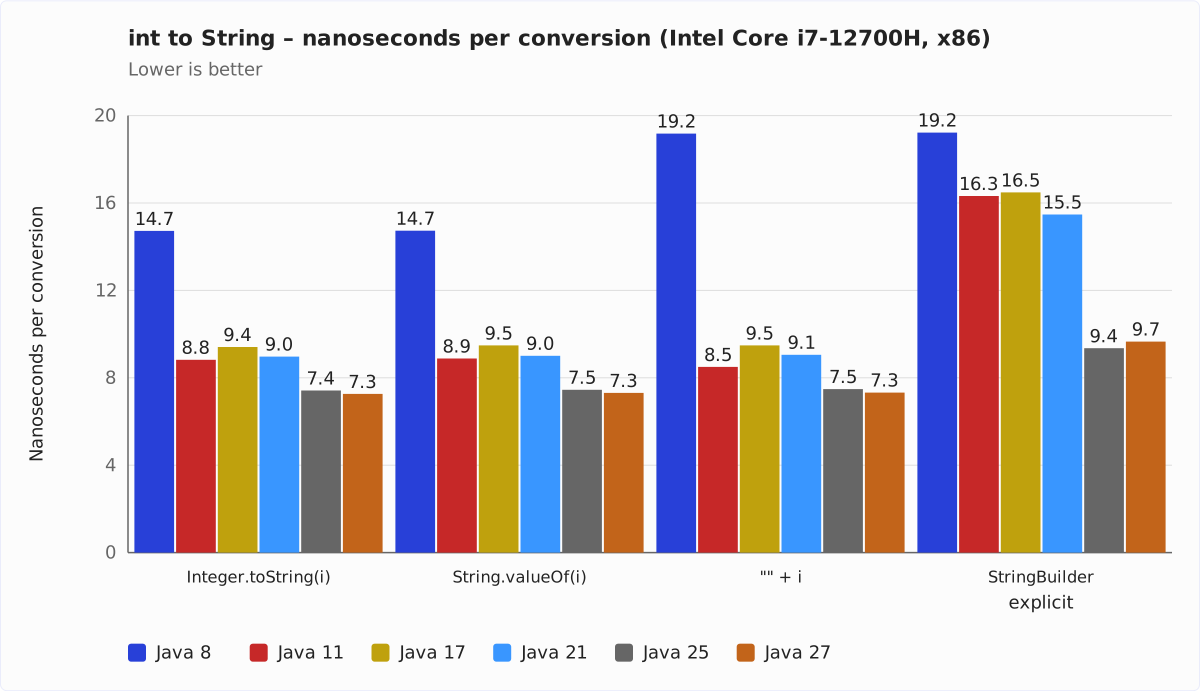
The last row of each table – new StringBuilder().append("").append(i).toString() – is not one of the four variants but a fifth measurement. This is exactly the code the compiler turns "" + i into up to Java 8. I measured it because it explains why "" + i is the odd one out on Java 8: you can see it in the Java 8 numbers – identical.
Intel Core i7-12700H (x86)
| Method | Java 8 | Java 11 | Java 17 | Java 21 | Java 22 | Java 23 | Java 24 | Java 25 | Java 27 |
|---|---|---|---|---|---|---|---|---|---|
Integer.toString(i) | 14.7 | 8.8 | 9.4 | 9.0 | 8.5 | 8.2 | 8.1 | 7.4 | 7.3 |
String.valueOf(i) | 14.7 | 8.9 | 9.5 | 9.0 | 8.4 | 8.2 | 8.1 | 7.5 | 7.3 |
"" + i | 19.2 | 8.5 | 9.5 | 9.1 | 8.4 | 8.3 | 8.2 | 7.5 | 7.3 |
String.format("%d", i) | 176.6 | 158.9 | 55.6 | 62.1 | 60.0 | 56.0 | 56.2 | 57.6 | 56.3 |
explicit StringBuilder | 19.2 | 16.3 | 16.5 | 15.5 | 11.5 | 13.7 | 11.0 | 9.4 | 9.7 |
The chart for it leaves out String.format(): at up to 177 nanoseconds, that value would squeeze the other bars so much that no differences would be visible there anymore. This variant gets a chart of its own further down. Also, the chart shows only the LTS line plus the current GA release – Java 8, 11, 17, 21, 25, and 27; the in-between versions 22 to 24 are in the table above.
Apple M5 Pro (arm64)
| Method | Java 8 | Java 11 | Java 17 | Java 21 | Java 22 | Java 23 | Java 24 | Java 25 | Java 27 |
|---|---|---|---|---|---|---|---|---|---|
Integer.toString(i) | 9.8 | 6.7 | 6.7 | 7.0 | 6.2 | 6.1 | 6.1 | 6.1 | 6.0 |
String.valueOf(i) | 9.9 | 6.8 | 6.7 | 7.0 | 6.3 | 6.1 | 6.1 | 6.1 | 6.0 |
"" + i | 14.7 | 6.4 | 6.7 | 7.0 | 6.2 | 6.1 | 6.1 | 6.1 | 6.0 |
String.format("%d", i) | 150.2 | 145.3 | 149.0 | 45.0 | 43.2 | 42.1 | 41.1 | 40.6 | 39.7 |
explicit StringBuilder | 14.7 | 9.2 | 9.1 | 8.5 | 7.7 | 12.0 | 7.5 | 7.4 | 7.1 |
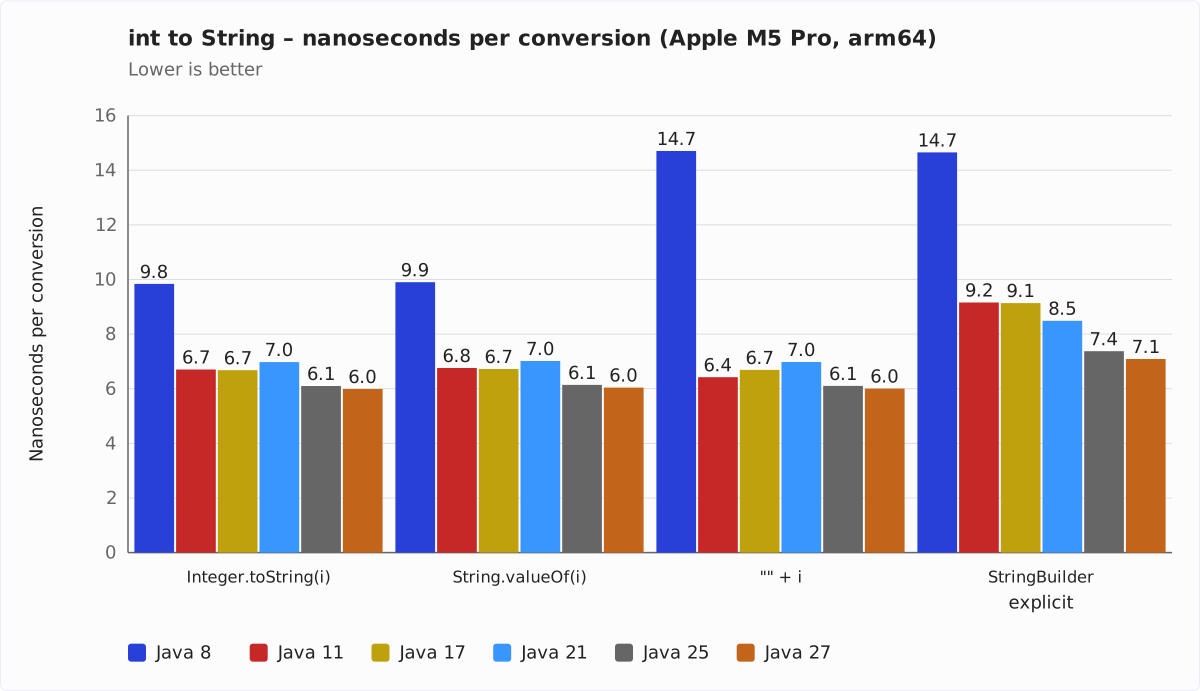
Here, too, the chart is without String.format() and without the versions 22 to 24, for the same reasons.
What the numbers say
Three variants, one operation
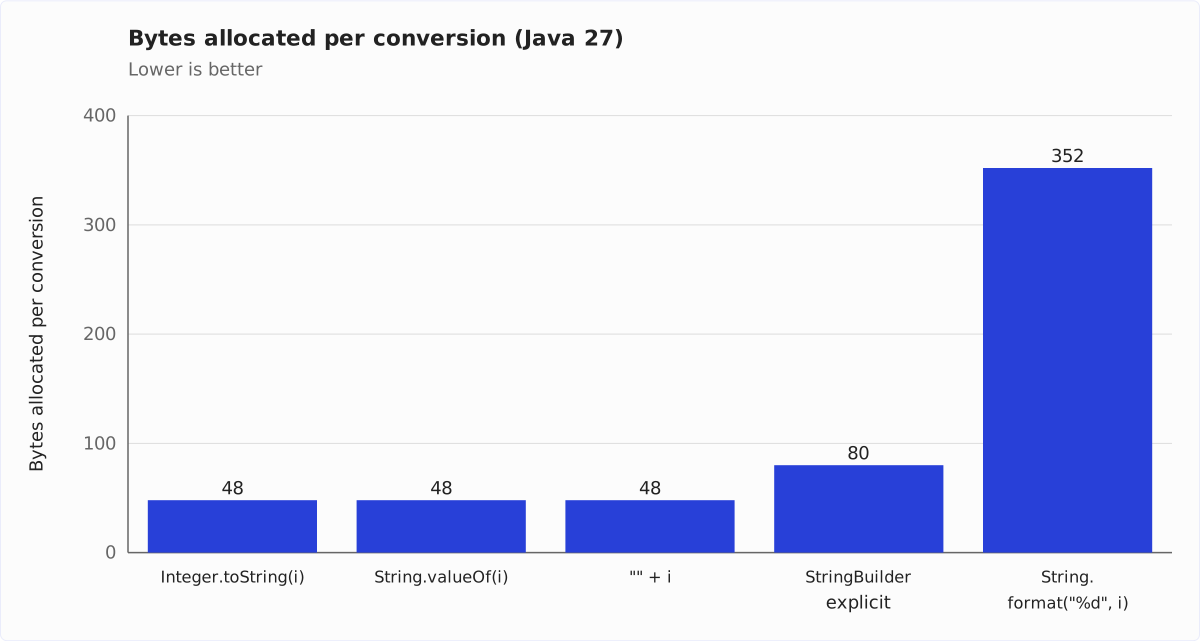
Since Java 17, Integer.toString(i), String.valueOf(i), and "" + i are on par – on both machines, in every version: the largest difference between the three methods is under one percent. The GC profiler confirms that this is no coincidence: all three allocate 48 bytes per conversion, namely exactly one String with a byte array for seven digits.
It is the same work. Integer.toString() computes the number of digits first, allocates an array of exactly that length, and writes the digits into it. And since Java 9, "" + i does the same – by way of a detour I’ll show you in a moment.
On Java 11, "" + i is even 4 to 5% ahead. On Java 8, however, it is clearly behind: 30% slower on x86, almost 50% slower on the M5 Pro. The reason is the StringBuilder chain that javac 8 turns it into – with a buffer for 16 characters that is copied into an array of the right length at the end. The last table row shows that this chain remains the slower option on new JVMs too, and it allocates 80 instead of 48 bytes – most of the time, anyway; this row gets a chapter of its own further down.
From Java 8 to 27: no straight line
The big step lies between Java 8 and 11: Integer.toString() gets 40% faster on the i7 and 32% on the M5 Pro – and "" + i 56% on both, because here the bytecode changes as well: from the StringBuilder chain of javac 8 to invokedynamic.
After that, it is no longer a straight line, and the two machines go different ways. On the i7, Java 17 is slower than Java 11 – by 7% for Integer.toString() and String.valueOf(), by 12% for "" + i –, and only from Java 21 on does the time fall again, most clearly from 24 to 25 with 8%. On the M5 Pro, Java 11 and 17 cannot be told apart for Integer.toString() and String.valueOf(), and "" + i gets 4% slower. Java 21 is then a good 4% slower than 17, Java 22 more than makes up for that with 10%. Between 23 and 24 nothing happens that could be told apart from measurement noise, and from 25 to 27 it gets another 2% faster.
The bottom line: on Java 27, a conversion takes half as long on the i7 as on Java 8, and 39% less on the M5 Pro. What is behind the setbacks on Java 17 (i7) and Java 21 (M5 Pro), I did not investigate – it does not matter for the recommendation at the end, because wherever one of the three variants gets faster or slower, the other two do so to the same degree.
String.format() is the outlier
On Java 27, String.format("%d", i) takes about 56 ns on the i7 and 40 ns on the M5 Pro – 7.7 and 6.6 times as long as the other variants – and allocates about 350 bytes per call: a Formatter, a StringBuilder, the parsed format specification, and the result String.
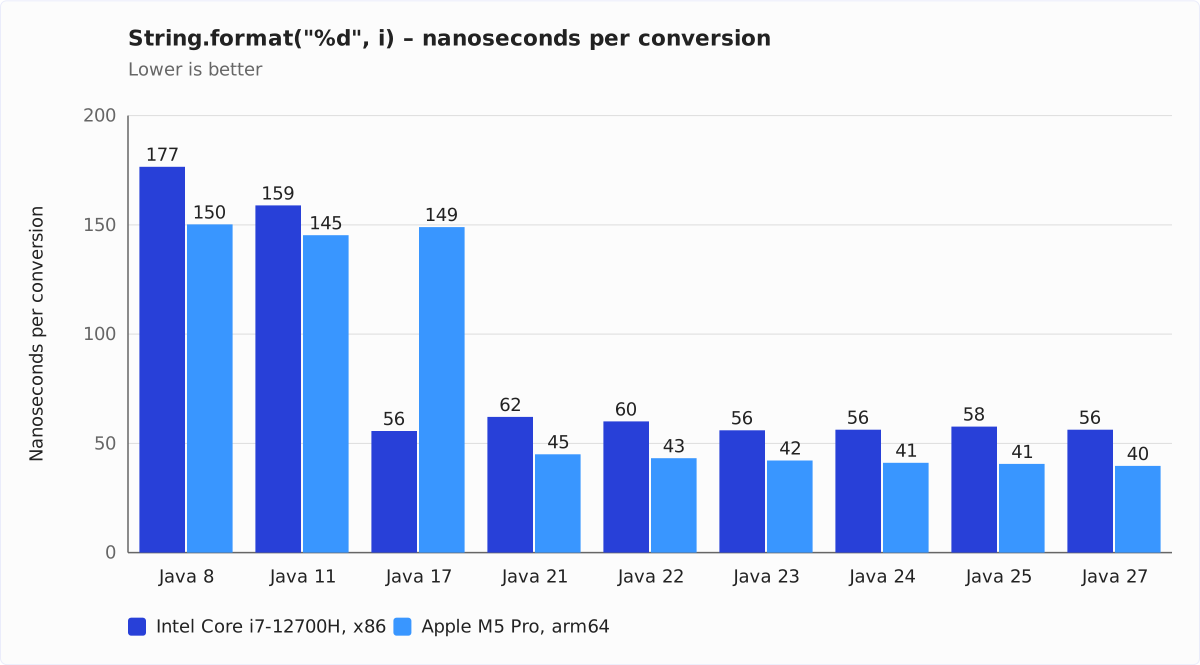
Up to Java 11, String.format() was even slower: 145 to 177 ns, 12 to 22 times the other variants. Since Java 17, the Formatter has a fast path for simple specifications like %d and %s, which are parsed without a regular expression (JDK-8263038). On x86, you can see the jump exactly there: from 159 to 56 ns. On the M5 Pro, however, only from Java 21 on: there, Java 17 formats in 149 ns even with build 17.0.20 and allocates about 1,150 bytes per call, three times as much as on x86. The fast path is the same Java code on both platforms – so the cause lies in the JIT compiler for aarch64 in Java 17. Which optimization is missing there, I did not investigate.
The further steps are small – on the M5 Pro, the last two, from Java 24 to 25 and from 25 to 27, lie within the noise –, with one exception: on the i7, Java 21 is 12% slower than Java 17 at this method, and only Java 23 gets back to that level.
My recommendation: use String.format() only when you actually format – zero padding, thousands separators, fixed width. For a plain conversion, it is the wrong method.
Under the hood: what "" + i becomes
To understand why "" + i has been just as fast as Integer.toString() since Java 9, let’s look at the bytecode. For that, we need a file IntToStringFast.java with the following content:
import java.util.Random;

public class IntToStringFast {
  public static void main(String[] args) {
    int i = new Random().nextInt();
    System.out.println("" + i);
  }
}
Compile it:
javac IntToStringFast.javaAnd display the bytecode:
javap -c IntToStringFast.classJava 8: a StringBuilder chain
With javac 8, the relevant excerpt looks like this:
14: new           #6          // class java/lang/StringBuilder
17: dup
18: invokespecial #7          // Method java/lang/StringBuilder."<init>":()V
21: ldc           #8          // String
23: invokevirtual #9          // Method java/lang/StringBuilder.append:(Ljava/lang/String;)Ljava/lang/StringBuilder;
26: iload_1
27: invokevirtual #10         // Method java/lang/StringBuilder.append:(I)Ljava/lang/StringBuilder;
30: invokevirtual #11         // Method java/lang/StringBuilder.toString:()Ljava/lang/String;
That corresponds to this Java code:
new StringBuilder().append("").append(i).toString();The compiler did not even optimize the append("") away. The StringBuilder allocates a char buffer for 16 characters, appends an empty String, writes the digits into it, and toString() copies them into a new array of the exact length. Two arrays instead of one, one copy – that is how 48 bytes become 80.
Since Java 9: invokedynamic
From javac 9 on, the same line of Java code becomes a single bytecode instruction:
15: invokedynamic #6, 0 // InvokeDynamic #0:makeConcatWithConstants:(I)Ljava/lang/String;The compiler no longer commits to how the concatenation is done. It only leaves behind a “recipe” – here: a constant followed by an int – and leaves the rest to the JVM. On the first call, StringConcatFactory builds a concatenation method from it, and that method goes about it differently than the StringBuilder: it first computes the length of the result – zero characters for the empty constant plus the number of digits – allocates the target array in exactly that size, and writes the digits straight into it. No buffer, no copy. That is the same work Integer.toString() does, which is why it is the same 48 bytes and the same nanoseconds.
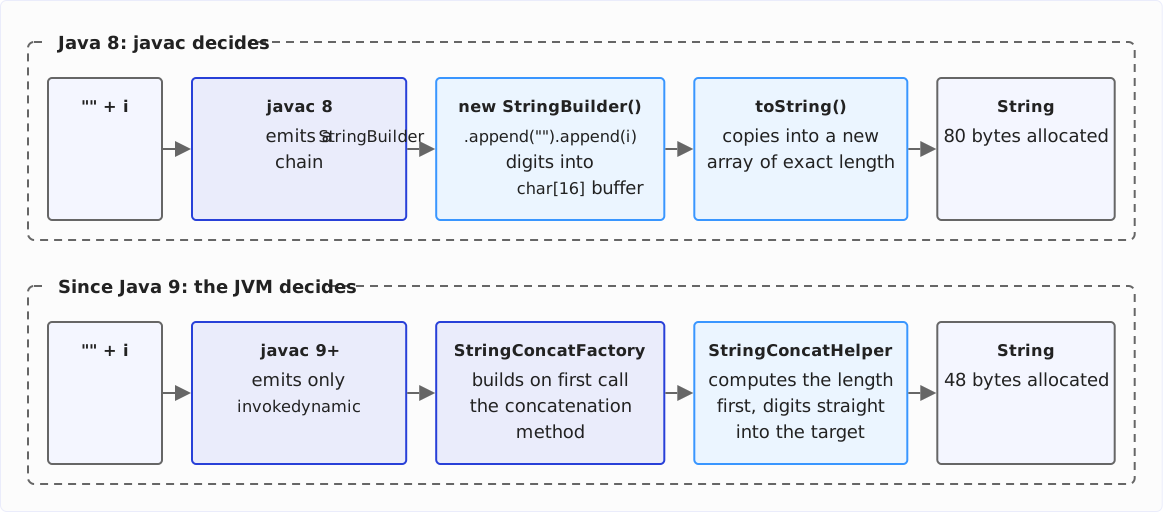
This mechanism is called indified string concatenation and arrived with JEP 280 in Java 9. The advantage of the detour: the JVM can improve the strategy without you having to recompile your code.
The proof: old bytecode on new JVMs
If the explanation is right, "" + i must be slower than Integer.toString() on a current JVM too – provided it is compiled as a StringBuilder chain. That can be checked: I additionally compiled the benchmark with --release 8. Then even a current javac emits the old StringBuilder chain. I ran this one JAR unchanged on all JVMs. "" + i is then considerably slower than Integer.toString():
| Architecture | Java 11 | Java 17 | Java 21 | Java 22 | Java 23 | Java 24 | Java 25 | Java 27 |
|---|---|---|---|---|---|---|---|---|
| x86 | +91% | +71% | +69% | +35% | +64% | +32% | +24% | +31% |
| arm64 | +43% | +37% | +22% | +25% | +98% | +24% | +21% | +19% |
The spike on Java 23 – and, on the i7, the high values up to Java 21 as well – has the same cause as the jumps in the StringBuilder row of the tables above: an allocation path that I show in the next chapter.
If your project still builds with --release 8 or -target 8, or even still runs on Java 8, String.valueOf(i) is the faster choice.
I did the cross-check as well: a JAR built with --release 11, run on all JVMs from Java 17 on. On every JVM version, it delivers the same numbers as the JAR built with the corresponding version’s javac – to within 0.1 ns. The compiler has not changed anything about concatenation since Java 11 – the progress came from the JVM.
The explicit StringBuilder: 80 bytes, 104 bytes, and a contradiction
The fifth table row – new StringBuilder().append("").append(i).toString() – is none of the four variants this article started with, but it has more to tell than all four together. That is why it gets a chapter of its own.
On Java 8, this StringBuilder chain measures the same as "" + i, as you have seen in the tables. From Java 11 on, it stays behind the three equally fast variants: on the i7 by 85% on Java 11 and still by 33% on Java 27, on the M5 Pro by 37% and 18%. The reason is in the previous chapter: a buffer for 16 characters that is copied into an array of the exact length at the end.
The GC profiler shows what this row allocates – and this is where it gets interesting. A String of seven digits costs 48 bytes: 24 for the String object and 24 for its byte array. The StringBuilder’s buffer, a byte array for 16 characters, costs 32 bytes. And the StringBuilder object itself 24. That adds up to 104 bytes. What is measured, however, is mostly 80: the missing 24 bytes are exactly the StringBuilder object – it never leaves the method, and the JIT compiler’s escape analysis saves the allocation.
Mostly – not always. On the M5 Pro, Java 23 allocates the full 104 bytes, and the time jumps from 7.7 to 12.0 ns, 55% up; Java 24 is back where 22 was, at 7.5 ns and 80 bytes. That is not measurement noise: five rounds, a range of 0.3%.
On the i7, it is not a Java 23 story. There, Java 11, 17, 21, and 23 allocate the 104 bytes; only Java 22, 24, 25, and 27 get by with 80. And there you can see the price in the time as well: Java 22 is 26% faster than 21, Java 23 falls back by 19%, Java 24 catches up again. So the question is not what goes wrong in Java 23, but why Java 22 finds the shorter path and Java 23 loses it again – and why one machine has it from Java 11 on, the other only from 22. Which optimization decides this, I did not investigate.
That it is the JVM and not my benchmark is shown by the JAR from the section “The proof”: compiled with --release 8, "" + i is the same StringBuilder chain – and shows exactly the same pattern, 104 and 80 bytes in the same order, with the same jump on Java 23 (on the i7 13.5 ns between 11.4 and 10.8 ns, on the M5 Pro 12.1 ns between 7.8 and 7.5 ns). Hence the spike of 98% in the table there.
And the contradiction? Between Java 25 and 27, the explicit StringBuilder is the only row of the whole series where the two machines contradict each other: on the M5 Pro, Java 27 is 3.9% faster (7.09 instead of 7.37 ns), on the i7 3.3% slower (9.66 instead of 9.35 ns). Both are unambiguous across five rounds, and both remain when the rounds in which another process kept more than half a core busy are left out.
Where the cause is not, I have checked: the benchmark’s bytecode is identical on both JDKs, the source code of StringBuilder and AbstractStringBuilder is identical except for two removed methods that this path does not use, so is the allocation (80 bytes on both), and so are even the inlining decisions of the C2 compiler – the same 46 calls, the same decisions. What remains is the machine code that C2 generates from identical intermediate code: register allocation, instruction scheduling. Comparing that needs hsdis and -XX:+PrintAssembly, on both architectures – that is still open.
What does that mean for you? For a single conversion, the StringBuilder chain is the slower choice in every version, and whether it costs 80 or 104 bytes is decided by the JVM version, not by you. If your bytecode is built with --release 8, exactly this chain is what runs – see above.
Summary
Since Java 9, Integer.toString(i), String.valueOf(i), and "" + i are the same operation: they are equally fast, and all three allocate the same 48 bytes per conversion – exactly one String, no intermediate buffer – on x86 as on arm64. Which one you pick is a matter of readability, not speed. From version to version, the conversion gets faster at times and slower at others – but always for all three variants alike.
I recommend String.valueOf(i): you can see at first glance that a conversion happens here, and it is fast no matter which compiler produced your bytecode – unlike "" + i, which falls behind clearly on Java 8 and with --release 8. "" + i is equivalent as soon as your bytecode comes from a javac of version 9 or later; some read it as a trick, so it is a matter of taste within your team.
Use String.format("%d", i) only when you actually format. For a plain conversion, it costs about seven times as much. And the hand-written StringBuilder chain is the slower choice in every version – whether it allocates 80 or 104 bytes is decided by the JVM version.
And the 2019 result, according to which "" + i was the fastest variant? It was an artifact of the benchmark, not a property of Java. The info box in the section “The benchmark” explains what went wrong – if you write microbenchmarks yourself, that is the part of this article that will save you the most time.
The next article goes the other way: what you need to watch out for when parsing Strings into ints – and what boxing costs you there.
Did this article save you time? Then I’d be happy if you invested a minute of it in a review on my ProvenExpert profile. Your feedback shows me that the work on these articles pays off.