In this part of the tutorial series, I will introduce you to a queue that, strictly speaking, is not a queue at all: the PriorityQueue.
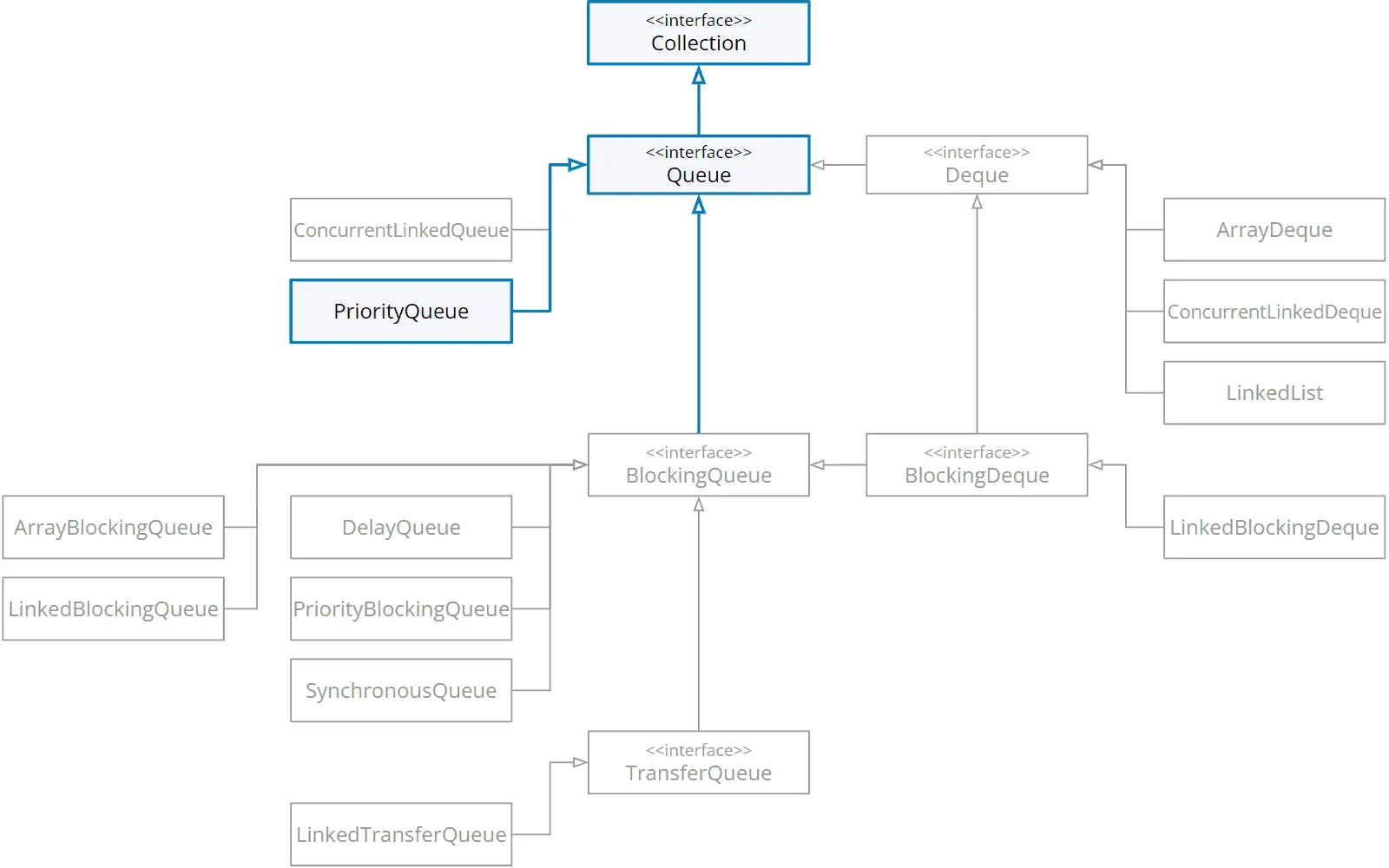
We are here in the class hierarchy:
What Is a Priority Queue?
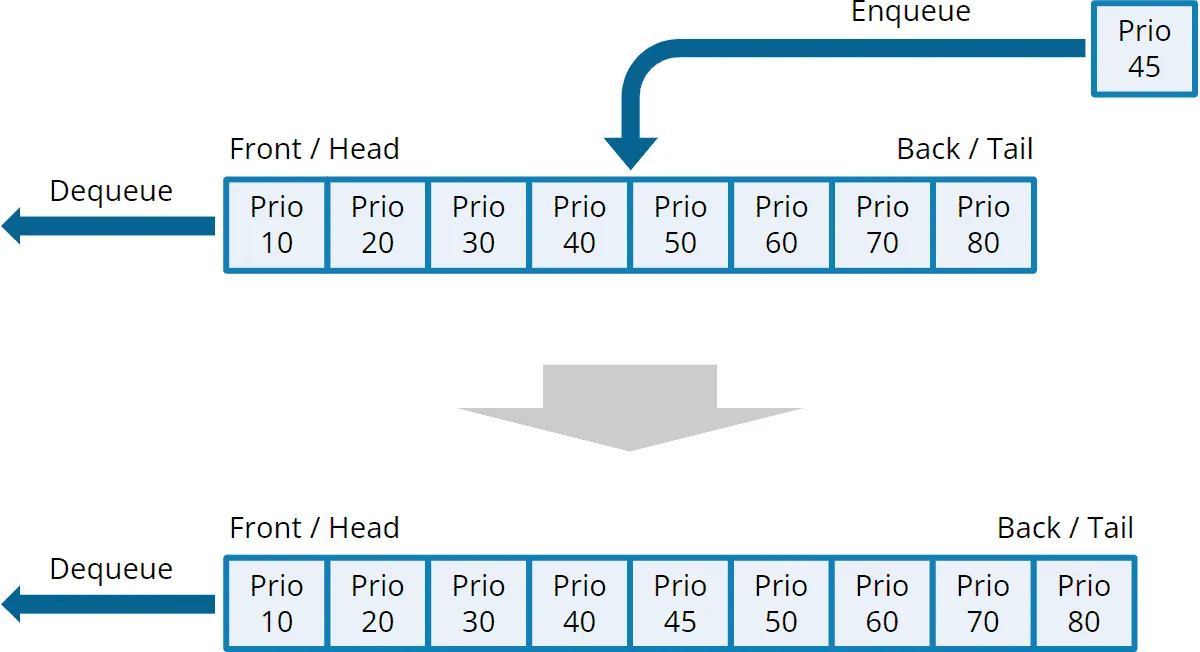
A priority queue is not a queue in the classical sense. The reason is that the elements are not retrieved in FIFO order but according to their priority. The element with the highest priority is always taken first – regardless of when it was inserted into the queue.
The following example shows a priority queue with elements of priority 10 (highest priority), 20, etc., to 80 (lowest priority). Another element with priority 45 is inserted into the queue. The queue then automatically ensures that this element is removed after the element with priority 40 and before the element with priority 50.
Which Data Structure Is Used to Implement a Priority Queue?
Priority queues are usually implemented with a heap.
In the last part of this tutorial series, I will show you how to implement a priority queue using a heap yourself.
Java PriorityQueue Characteristics
With the java.util.PriorityQueue class, the dequeue order results either from the elements’ natural order¹ or according to a comparator¹ passed to the constructor. The underlying data structure is a min-heap, i.e., the smallest element is always at the head of the queue.
The sort order is not stable, i.e., two elements that are in the same position according to the sort order are not necessarily removed in the same order as they were inserted into the queue.
PriorityQueue does not permit null elements – offer(null) throws a NullPointerException. Without a comparator, the elements must also implement Comparable; otherwise, offer() throws a ClassCastException.
The iterator does not return the elements in priority order but in the order of the internal heap array – the same applies to toString(), toArray(), and stream(). If you need the elements sorted, take them out with poll() or sort them first, e.g., with queue.stream().sorted() (for natural ordering).
PriorityQueue is neither thread-safe nor blocking. A thread-safe, blocking counterpart is the PriorityBlockingQueue.
The queue’s characteristics are:
| Underlying data structure | Thread-safe? | Blocking/ non-blocking | Bounded/ unbounded | Iterator type |
|---|---|---|---|---|
| Min-heap (stored in an array) | No | Non-blocking | Unbounded | Fail-fast² |
¹ You can read all about the “natural order” of objects and sorting-by-comparator in the “Comparing Java Objects” article.
² Fail-fast: The iterator throws a ConcurrentModificationException if elements are added to or removed from the queue during iteration.
Recommended Use Case
PriorityQueue is the default choice when you need a non-thread-safe queue with the dequeue order described above – for example, to process tasks by priority or for graph algorithms such as Dijkstra’s algorithm.
PriorityQueue Example
The following example shows how to create a priority queue in Java and how to write several random numbers into the queue and then take them out again (→ code on GitHub).
We do not specify a comparator, i.e. the integer elements are sorted according to their natural order.
public class PriorityQueueExample {
  public static void main(String[] args) {
    Queue<Integer> queue = new PriorityQueue<>();

    // Enqueue random numbers
    for (int i = 0; i < 8; i++) {
      int element = ThreadLocalRandom.current().nextInt(100);
      queue.offer(element);
      System.out.printf("queue.offer(%2d)    -->  queue = %s%n", element, queue);
    }

    // Dequeue all elements
    while (!queue.isEmpty()) {
      Integer element = queue.poll();
      System.out.printf("queue.poll() = %2d  -->  queue = %s%n", element, queue);
    }
  }
}
The following is an example output of the program:
queue.offer(80)    -->  queue = [80]
queue.offer(14)    -->  queue = [14, 80]
queue.offer(10)    -->  queue = [10, 80, 14]
queue.offer(50)    -->  queue = [10, 50, 14, 80]
queue.offer( 9)    -->  queue = [9, 10, 14, 80, 50]
queue.offer(58)    -->  queue = [9, 10, 14, 80, 50, 58]
queue.offer(41)    -->  queue = [9, 10, 14, 80, 50, 58, 41]
queue.offer( 1)    -->  queue = [1, 9, 14, 10, 50, 58, 41, 80]
queue.poll() =  1  -->  queue = [9, 10, 14, 80, 50, 58, 41]
queue.poll() =  9  -->  queue = [10, 41, 14, 80, 50, 58]
queue.poll() = 10  -->  queue = [14, 41, 58, 80, 50]
queue.poll() = 14  -->  queue = [41, 50, 58, 80]
queue.poll() = 41  -->  queue = [50, 80, 58]
queue.poll() = 50  -->  queue = [58, 80]
queue.poll() = 58  -->  queue = [80]
queue.poll() = 80  -->  queue = []
You can see clearly:
- how eight elements are inserted into the priority queue,
- how the elements in the priority queue are shown in supposedly random order (in fact, it is the array representation of the min-heap),
- that the smallest element is always at the head of the queue (left),
- how the elements are removed in ascending order.
The toString() output is the heap array – the min-heap read level by level, left to right. The following diagram shows both for the state after queue.offer(1):
![The PriorityQueue’s min-heap after inserting 1, as a tree and as the array [1, 9, 14, 10, 50, 58, 41, 80]: the array is the tree read level by level, left to right](/_astro/priorityqueue-min-heap-tree-and-array-en.a3uPu4Qg_1uirBj.svg)
PriorityQueue with a Comparator
In the previous example, we created a PriorityQueue using the default constructor. This causes the elements to be sorted according to their natural order.
However, we can also specify a custom comparator for the priority queue. In the following example, we create tasks with a name and a priority, and these tasks are to be retrieved sorted by priority.
We define the comparator for this simply as:
Comparator<Task> comparator = Comparator.comparingInt(Task::priority);If you are not familiar with this notation – it creates a comparator that sorts tasks by priority. This notation is much more readable than the following comparator defined with a lambda:
Comparator<Task> comparator =
    (task1, task2) -> Integer.compare(task1.priority(), task2.priority());
Here is the full example code (PriorityQueueWithCustomComparatorExample class on GitHub):
public class PriorityQueueWithCustomComparatorExample {
  public static void main(String[] args) {
    Comparator<Task> comparator = Comparator.comparingInt(Task::priority);
    Queue<Task> queue = new PriorityQueue<>(comparator);

    // Enqueue tasks with random priorities
    for (int i = 0; i < 5; i++) {
      String name = "Task " + (i + 1);
      int priority = ThreadLocalRandom.current().nextInt(10, 100);
      Task task = new Task(name, priority);
      queue.offer(task);
      System.out.printf("queue.offer(%s)    -->  queue = %s%n", task, queue);
    }

    // Dequeue all elements
    while (!queue.isEmpty()) {
      System.out.printf("queue.poll() = %s  -->  queue = %s%n", queue.poll(), queue);
    }
  }

  private record Task(String name, int priority) {
    @Override
    public String toString() {
      return name + " (prio " + priority + ")";
    }
  }
}
An example output looks as follows:
queue.offer(Task 1 (prio 93))    -->  queue = [Task 1 (prio 93)]
queue.offer(Task 2 (prio 76))    -->  queue = [Task 2 (prio 76), Task 1 (prio 93)]
queue.offer(Task 3 (prio 92))    -->  queue = [Task 2 (prio 76), Task 1 (prio 93), Task 3 (prio 92)]
queue.offer(Task 4 (prio 51))    -->  queue = [Task 4 (prio 51), Task 2 (prio 76), Task 3 (prio 92), Task 1 (prio 93)]
queue.offer(Task 5 (prio 35))    -->  queue = [Task 5 (prio 35), Task 4 (prio 51), Task 3 (prio 92), Task 1 (prio 93), Task 2 (prio 76)]
queue.poll() = Task 5 (prio 35)  -->  queue = [Task 4 (prio 51), Task 2 (prio 76), Task 3 (prio 92), Task 1 (prio 93)]
queue.poll() = Task 4 (prio 51)  -->  queue = [Task 2 (prio 76), Task 1 (prio 93), Task 3 (prio 92)]
queue.poll() = Task 2 (prio 76)  -->  queue = [Task 3 (prio 92), Task 1 (prio 93)]
queue.poll() = Task 3 (prio 92)  -->  queue = [Task 1 (prio 93)]
queue.poll() = Task 1 (prio 93)  -->  queue = []
We can clearly see how the tasks are taken according to priority (priority 35 first, priority 93 last).
To retrieve the tasks sorted alphabetically by name, we would only need to change the comparator to:
Comparator<Task> comparator = Comparator.comparing(Task::name);And if the element with the highest priority – i.e., the largest number – is to be retrieved first, reverse the comparator with comparator.reversed():
Queue<Task> queue = new PriorityQueue<>(comparator.reversed());For elements with natural ordering, such as the Integer objects in the first example, pass Comparator.reverseOrder() to the constructor instead:
Queue<Integer> queue = new PriorityQueue<>(Comparator.reverseOrder());PriorityQueue Time Complexity
The time required for the enqueue and dequeue operations of the Java PriorityQueue is equal to the time required to insert into and extract from a heap: O(log n). By using a heap, the element with the highest priority is always automatically at the head of the queue and can be read in constant time: O(1).
Two operations are more expensive than you might expect: remove(Object) and contains(Object) have to search the heap array linearly and therefore cost O(n). And one is cheaper: if you pass an entire collection to the constructor, it builds the heap in O(n) – faster than n individual offer() calls, which cost O(n log n) in total.
| Operation | Time complexity |
|---|---|
offer(), add() | O(log n) |
poll(), remove() | O(log n) |
peek(), element(), size() | O(1) |
remove(Object), contains(Object) | O(n) |
| Constructor with a collection | O(n) |
(Here, you can find an introduction to time complexity.)
Summary and Outlook
This article has explained what a priority queue is in general, the characteristics of the Java PriorityQueue, when to use it, how to specify the dequeue order with a custom comparator, and the time complexities of the priority queue operations.
In the following article, we come to the first blocking queue: LinkedBlockingQueue.
Was this article helpful to you? Then I’d be happy if you took a moment to leave a review on my ProvenExpert profile.