In this article, you will find out:
- How were string templates supposed to simplify composing strings from text, variables, and computed values?
- What is a template processor, and which ones were there?
- Why were string templates removed again?
- What do you use instead today?
String templates were introduced as a preview feature in Java 21 as part of Project Amber. In Java 22, they were sent to a second preview round without any changes. There was no third round.
Status Quo of Java String Concatenation
We have several ways to compose strings at runtime using variables and calculated values. The most common ones are the following:
int a = ...;
int b = ...;

String concatenated = a + " times " + b + " = " + a * b;
String format       = String.format("%d times %d = %d", a, b, a * b);
String formatted    = "%d times %d = %d".formatted(a, b, a * b);
Often we also use a StringBuilder, less often java.text.MessageFormat. But none of these variants lets you see at a glance what the finished string looks like.
String Interpolation With String Templates
Almost every modern programming language offers string interpolation, i.e., it evaluates placeholders in a string and replaces them with the result.
Precisely this (and even more, see below) was enabled by “string templates” introduced by JDK Enhancement Proposal 430.
With string templates, the example from above could be rewritten as follows:
int a = ...;
int b = ...;

String interpolated = STR."\{a} times \{b} = \{a * b}";
At runtime, the placeholder \{a} was replaced by the value of the variable a, and the placeholder \{b} by the value of the variable b.
The placeholders marked with \{...} could contain not only variables and arithmetic expressions but any Java expression, e.g., a static method call:
String interpolated = STR."\{a} times \{b} = \{Math.multiplyExact(a, b)}";The placeholder could also contain quotes, and for the sake of clarity, you could split it over multiple lines and add comments:
String dateMessage = STR."Today's date: \{
  LocalDate.now().format(
    // we could also use DateTimeFormatter.ISO_DATE
    DateTimeFormatter.ofPattern("yyyy-MM-dd")
  )}";
String templates could also be combined with text blocks:
int    httpStatus   = ...;
String errorMessage = ...;

String json = STR."""
    {
      "httpStatus": \{httpStatus},
      "errorMessage": "\{errorMessage}"
    }""";
In case you were wondering what STR. means in front of the strings, you’ll find the answer in the next section.
String Template Processor
STR is the name of a so-called template processor. A template processor defines how template text and placeholders are combined. The JDK came with three such processors: STR, FMT, and RAW.
STR Template Processor
The STR processor – as described above – evaluates the Java expressions in the placeholders and replaces the placeholders with the resulting values.
STR is a constant of type StringTemplate.Processor that is automatically imported into every Java file. That is why the examples above worked without an import statement.
FMT Template Processor
Another standard processor is FMT. It evaluates format specifiers placed in front of the placeholders – as we know them from String.format(). Unlike STR, you have to import it; it lives in the class java.util.FormatProcessor.
Here again, our multiplication example with floating point numbers rounded to two decimal places using the FMT processor:
import static java.util.FormatProcessor.FMT;

double a = ...;
double b = ...;

String interpolated = FMT."%.2f\{a} times %.2f\{b} = %.2f\{a * b}";
RAW Template Processor
The third standard processor is RAW. It does not assemble anything but returns the StringTemplate object itself – the text fragments and the placeholder values, kept apart. Like FMT, you have to import it:
import static java.lang.StringTemplate.RAW;

int a = ...;
int b = ...;

StringTemplate template  = RAW."\{a} times \{b} = \{a * b}";
List<String>   fragments = template.fragments();  // returns "", " times ", " = ", ""
List<Object>   values    = template.values();     // returns a, b, a * b
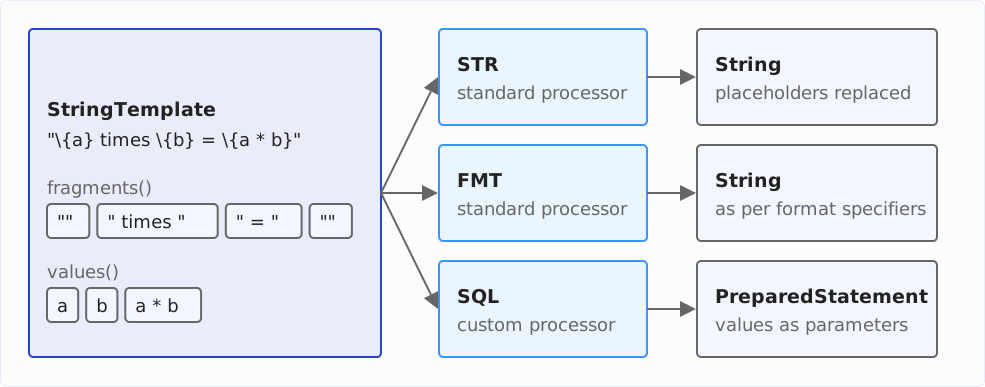
Every template processor sees exactly this separation: it receives fragments and values separately and decides what to make of them – STR joins them into a string, FMT evaluates format specifiers while doing so, and a custom processor can return something else entirely, e.g., a PreparedStatement.
The following diagram shows these three paths. A custom processor that builds SQL queries is described in the next section.
SQL Template Processor
As RAW shows, a template processor does not have to return a string. For example, one could implement a template processor that assembles SQL commands and returns a PreparedStatement – with the search term passed as a parameter rather than as part of the SQL text. That protects against injection attacks:
String searchQuery = ...;
PreparedStatement statement = SQL."""
    SELECT * FROM User u
    WHERE u.userName LIKE '%\{searchQuery}%'""";
Such a processor was never part of the JDK. JEP 459 uses it as an example of what custom processors would have made possible – there it is called DB, joins the fragments with ? into a query, and sets the values as parameters of the PreparedStatement. How you would have written your own processor is described there as well.
Why Were String Templates Withdrawn?
After the second preview round, Brian Goetz took stock on the amber-spec-experts mailing list on March 8, 2024. He held on to the goals: readable strings composed of text and expressions, protection against injection attacks, results that are not strings. The placeholder syntax \{...} was not up for debate either.
What was up for debate was the template processor. Using string templates in jextract (the tool that generates Java code for the Foreign Function & Memory API from the header files of a C library), the JDK developers had found that a processor is just a new syntax for a method call. Instead of DB."...", you could just as well write Query.of("...") – and Java already has methods.
For Goetz, the core of the problem was that template and processor are fused into one expression: API designers had to decide whether to write a processor or an ordinary method – often before the consequences were clear. Yet DB."..." combines two steps:
- Java evaluates the template: it splits the text into the fragments and computes the values of the placeholders.
- A processor turns fragments and values into the result – a string, a formatted string, or a database query.
Goetz wanted to separate these two steps. A new literal would take care of the first: "Hello \{name}" would be a StringTemplate object on its own, without a preceding STR. or DB.. The second would be up to the method you pass this object to. System.out.println("Hello \{name}"), for instance, would call a new overload println(StringTemplate) that joins the template into a string; a database library could offer Query.of(StringTemplate) and set the values as parameters.
Four weeks later, on April 5, 2024, Gavin Bierman drew the conclusion: there was support for changing the design, but no consensus on how. So the feature did not make it into Java 23, not even as a preview: the JDK developers removed it from compiler and class library entirely (JDK-8329948); two leftover helper methods in AbstractStringBuilder disappeared with Java 26 (JDK-8371130). The JEP for the planned third preview round, JEP 465, has been withdrawn.
What happens next? There is no successor JEP to this day (as of October 2026, Java 27). In July and August 2025, the amber-dev mailing list discussed the placeholder syntax once more; Ron Pressler referred to ongoing “design explorations” there.
What Can You Use Instead of String Templates Today?
For strings with placeholders, I recommend String.formatted(), available since Java 15:
int a = ...;
int b = ...;

String result = "%d times %d = %d".formatted(a, b, a * b);
The JSON example from above becomes a text block with formatted():
int    httpStatus   = ...;
String errorMessage = ...;

String json = """
    {
      "httpStatus": %d,
      "errorMessage": "%s"
    }""".formatted(httpStatus, errorMessage);
That is hardly longer than the template version – but you have to make sure yourself that the number and order of the arguments match the placeholders. If you swap two arguments, this only shows up in a test, not at compile time.
For the remaining cases, there are these tools:
String.format()is the same function as a static method.java.text.MessageFormatnumbers its placeholders ({0},{1}) and formats numbers and dates according to the locale – for texts that are output in several languages.- A
StringBuilderfits when you assemble a string in a loop. - For SQL, use a
PreparedStatementwith?placeholders. That is the same protection against injection attacks theSQLprocessor would have offered – you just write the parameters yourself.
Summary
String templates showed what string interpolation in Java could look like – and the JDK developers withdrew them before the design was set in stone. That is exactly what preview features are for.
For your code, this means: preview features stay in experiments, not in production code. And for strings with placeholders, formatted() remains my tool of choice until further notice.
If this article has helped you, I would greatly appreciate a positive review on my ProvenExpert profile. Your feedback helps me improve my content and motivates me to write new informative articles.