
Java 27 was released on September 15, 2026, and is available for download from OpenJDK.
Java 27 is – like Java 26 – a very manageable release: it contains only nine JEPs. More than half of them are re-submitted preview and incubator features: three with minor changes (Lazy Constants, Structured Concurrency, and PEM Encodings) and two without any changes (Primitive Type Patterns and the Vector API).
Four features are new: Compact Object Headers are enabled by default starting with Java 27; G1 is also the default garbage collector on small instances; TLS now supports quantum-safe encryption, and the Java Flight Recorder can redact sensitive information in environment variables, system properties, and program arguments.
Compact Object Headers by Default – JEP 534
Compact Object Headers (object headers compressed from 96 to 64 bits) were introduced in Java 24 as an experimental feature. In Java 25, they became a production feature but still had to be explicitly enabled with -XX:+UseCompactObjectHeaders.
In Java 27, they are enabled by default through JDK Enhancement Proposal 534. They can currently still be disabled with -XX:-UseCompactObjectHeaders – but the old header layout is to be deprecated in a future Java version.
Traditional object headers: 96 bits / 12 bytes
Every Java object in memory consists of two parts: the object header and the actual payload data. The object header was previously divided into two parts: the Mark Word (also referred to as the Lock Word) and the Class Word.
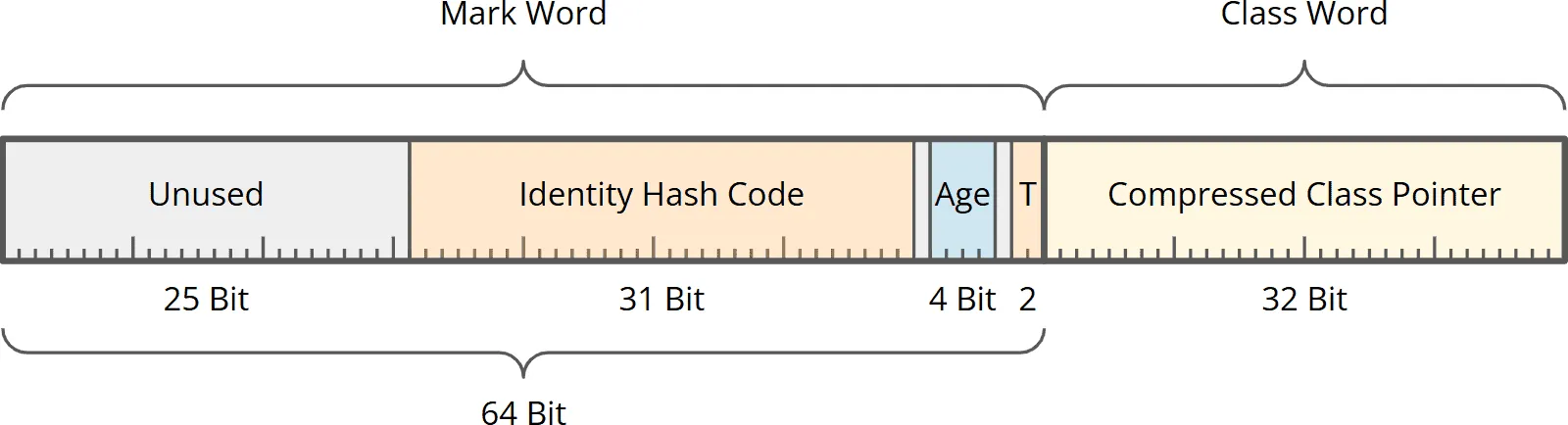
The Mark Word contained:
- the identity hash code (the value returned by
System.identityHashCode()), - the object age (used by the garbage collector to decide when an object is moved from the young generation to the old generation),
- two lock bits, used among other things for
synchronizedlocking, - a total of 27 unused bits (25 at the beginning and one each before and after the four age bits).
The Class Word contained a 32-bit offset to the class metadata in the so-called Compressed Class Space. Through the Class Word, the JVM knows which class an object belongs to.
Compact Object Headers: 64 bits / 8 bytes
In the new compact object header, the Mark Word and Class Word are merged into a single 64-bit value.
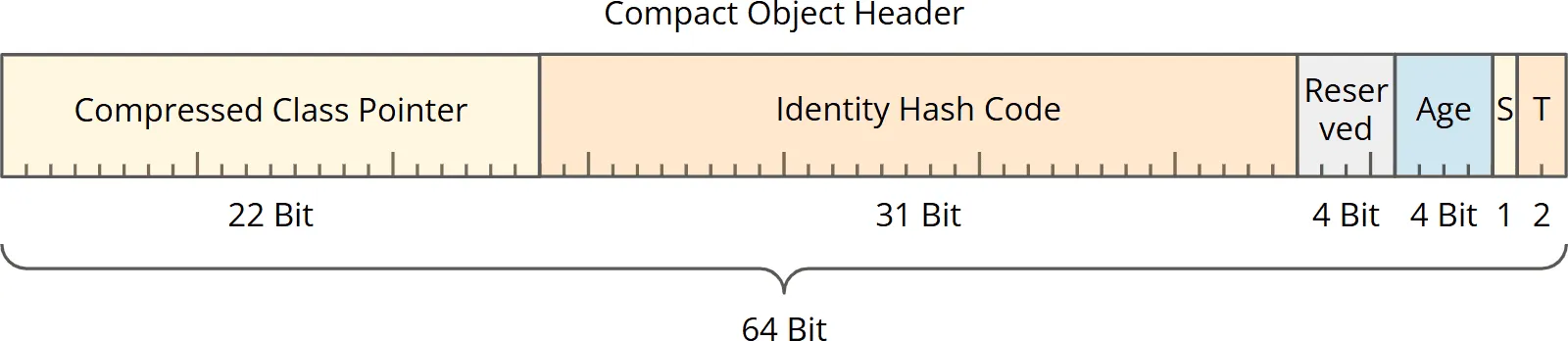
This contains, unchanged:
- 31 bits for the identity hash code,
- 4 bits for the object age,
- and the two lock bits.
The 27 previously unused bits are allocated in the compact header as follows:
- 22 bits for a compressed class pointer (this eliminates the Class Word; you can read exactly how the class pointer was shortened from 32 bits to 22 bits in the main article about Compact Object Headers),
- 1 bit for the new self-forwarded bit (you can also find out more about this in the aforementioned main article),
- 4 bits are reserved for Project Valhalla (Value Classes).
By enabling Compact Object Headers by default, heap consumption will be reduced by approximately 10–20% and throughput increased by approximately 5–10% when upgrading to Java 27 – especially for applications with many small objects.
JFR In-Process Data Redaction – JEP 536
If a Java application is started with the JDK Flight Recorder enabled (the monitoring and profiling tool integrated into the JVM), it records environment variables, system properties, and program arguments, among other things.
However, confidential information – such as access tokens for APIs or passwords for databases or keystores – is often passed to the application via environment variables, system properties, or program arguments, as in the following example:
$ export ACCESS_TOKEN=SECRET_ACCESS_TOKEN
$ java -XX:StartFlightRecording:filename=recording.jfr \
       -Djavax.net.ssl.keyStorePassword=SECRET_KEYSTORE_PASSWORD \
       -jar application.jar \
       --dbpassword SECRET_DATABASE_PASSWORD
An attacker with access to the Flight Recorder recording could easily extract tokens and passwords from the recording.
To prevent this, starting with Java 27, everything that is likely a token or a password is automatically redacted in the JFR recording and appears as [REDACTED].
How does the Flight Recorder know what a token or a password is?
Default Configuration
By default, the Flight Recorder redacts all environment variables or system properties with a key that matches one of the following patterns (case is ignored, and the asterisk is a placeholder for any other characters):
*api*key*
*auth*
*client*secret*
*credential*
*jaas*config*
*passphrase*
*passwd*
*password*
*private*key*
*pwd*
*secret*
*token*
In addition, all program arguments (or pairs of program arguments) that match one of the following patterns are redacted (a space represents the space between two consecutive arguments):
-*api*key *
-*client*secret *
-*credential *
-*jaas*config *
-*passphrase *
-*passwd *
-*password *
-*private*key *
-*pwd *
-*secret *
-*token *
*api*key*
*client*secret*
*credential*
*jaas*config*
*passphrase*
*passwd*
*password*
*private*key*
*pwd*
*secret*
*token*
In the example at the beginning of the section, the following sensitive information was specified at program start:
- an environment variable with the key
ACCESS_TOKEN– this matches*token*and is therefore redacted starting with Java 27, - the system property
javax.net.ssl.keyStorePassword– this matches*password*and is therefore redacted - and the program argument pair
--dbpassword SECRET_DATABASE_PASSWORD– this matches-*password *and is therefore also redacted.
These patterns match generously on purpose – when in doubt, it’s better to redact too much than too little. This can also affect harmless values: for example, an environment variable named TOKEN_REFRESH_INTERVAL contains no secret but matches *token* and accordingly appears as [REDACTED]. If the redaction of a specific, non-critical value bothers you, you can specifically restrict the two lists using the redact-key and redact-argument parameters shown below.
Changing the Default Configuration
The configuration of what should be redacted can also be changed:
- With the JFR parameter
redact-key, we can override or extend the first of the two lists shown above (the patterns for environment variables and system properties). - With the JFR parameter
redact-argument, we can override or extend the second of the lists shown above (the patterns for program arguments).
For example, if we only wanted to redact the key ACCESS_TOKEN and the system property javax.net.ssl.keyStorePassword, we could start the Flight Recorder as follows:
java -XX:FlightRecorderOptions:'redact-key=ACCESS_TOKEN;*keyStorePassword' ...
Alternatively, we could create a text file containing the two keys, one per line. If this file were named keys.txt, for example, we could also specify the name of this file – preceded by an @:
java -XX:FlightRecorderOptions:'redact-key=@keys.txt' ...
If we want to extend the default redaction lists instead of replacing them, we can prepend a + to the list of keys (or the filename), e.g. like this:
java -XX:FlightRecorderOptions:'redact-key=+*confidential*' ...
In this case, all environment variables or system properties that either match a pattern from the default list or contain the term “confidential” would be redacted.
Turning Off Redaction
To restore the previous behavior, we can completely disable redaction by specifying “none”:
java -XX:FlightRecorderOptions:'redact-key=none,redact-argument=none' ...
This means environment variables, system properties, and program arguments will be recorded without restriction again.
JFR In-Process Data Redaction is specified in JDK Enhancement Proposal 536.
Post-Quantum Hybrid Key Exchange for TLS 1.3 – JEP 527
Algorithms for quantum-safe key encapsulation and for quantum-safe digital signatures were introduced in Java 24.
Why now? Although there are currently no quantum computers that can break today’s encryption methods, an attacker could already record and store encrypted data traffic today – to decrypt it years later as soon as sufficiently powerful quantum computers are available. This scenario is called “Harvest now, decrypt later”. Everything you transmit today with classic encryption is therefore potentially at risk.
Java 27 now adds quantum-safe encryption for TLS (the successor to SSL) – specifically in the form of so-called hybrid key exchange. Hybrid key exchange means that several key exchange methods are combined – and the key exchange is still secure even if all but one of the methods used have been cracked.
In the Java implementation, one ECDHE algorithm (not quantum-safe) is combined with one ML-KEM algorithm (quantum-safe) – in three variants, each with different key lengths.
If supported by the server, Java 27 automatically uses the new, quantum-safe key exchange – without the need for special configuration. This way, recorded data traffic can no longer be decrypted even with a future quantum computer. Only the X25519MLKEM768 variant is enabled by default; the other two (SecP256r1MLKEM768 and SecP384r1MLKEM1024) have to be enabled via the system property jdk.tls.namedGroups.
You can read about exactly which variants of the algorithms are used – and how you can override Java’s default algorithm selection when establishing a TLS connection – in JDK Enhancement Proposal 527.
Make G1 the Default Garbage Collector in All Environments – JEP 523
The G1 Garbage Collector has been the default garbage collector since Java 9 – usually. An exception previously applied to low-performance machines with either only one CPU or less than 1,792 MB of RAM. On such machines, the Serial GC was enabled by default because it had significantly higher throughput and lower memory consumption than G1 with these limited resources.
Due to continuous improvements to G1 – most recently through the throughput improvements in Java 26 – G1 now achieves nearly the throughput of the Serial GC even on lower-performance machines.
Since G1’s latencies are generally better than those of the Serial GC, the JDK team decided to remove the exception rule for low-performance machines and make G1 the default garbage collector in all environments – regardless of CPU count and memory size.
There are no plans to remove the Serial GC; it can still be enabled via -XX:+UseSerialGC (just as before where it was not selected by default).
The change is specified in JDK Enhancement Proposal 523.
Re-submitted Preview and Incubator Features
In Java 27, the following four preview features and one incubator feature are being re-submitted – some with minor changes, some without any changes.
Lazy Constants (Third Preview) – JEP 531
You might know Lazy Constants by another name: they were introduced as Stable Values in Java 25. In Java 26, the JDK team significantly slimmed down the API after plenty of feedback and renamed it to Lazy Constants (JEP 526).
If you are already familiar with Lazy Constants from previous versions and only want to know what’s changing in Java 27, jump directly to the section Lazy Constants – Changes in Java 27.
What problem do Lazy Constants solve?
Constants – values that no longer change after their initialization – bring several advantages: the code becomes simpler and safer because a constant knows only a single state and can be safely read from multiple threads. In addition, the JVM can optimize access to them through so-called constant folding.
So far, there is only one way to define a constant – via a final field:
- a final static field set when the class is loaded, or
- a final instance field set when the object is created.
But what if you want to calculate an immutable value only when it is actually needed – perhaps because its initialization is expensive? Then you are left with “lazy initialization.” And for this to work correctly in a concurrent application, you previously had to laboriously secure it with double-checked locking or the initialization-on-demand holder idiom. Anyone who has written this by hand knows: errors quickly creep in, even for experienced developers.
The Lazy Constants API
This is exactly where the API comes in. A Lazy Constant is a container for exactly one value that is calculated at most once and thereafter treated like a true constant.
In the following example, we define a LazyConstant that creates a Bean Validation validator on the first access – an object whose creation is expensive, which is why we don’t want to create it directly at program start:
private final LazyConstant<Validator> validator =
    LazyConstant.of(this::createValidator);

private Validator createValidator() {
  return Validation.buildDefaultValidatorFactory().getValidator();
}

public Set<ConstraintViolation<Order>> validate(Order order) {
  return validator.get().validate(order); // ⟵ Here we access the lazy constant
}
Only the first call to validator.get() executes createValidator(). The result is stored in the LazyConstant; every further call to validator.get() returns the stored validator. You don’t have to worry about thread safety: even if multiple threads access validator.get() simultaneously, createValidator() is guaranteed to be executed at most once.
Once the Lazy Constant is initialized, the JVM considers it immutable and optimizes access via constant folding – as if you had written the value into a final field from the start.
Lazy Lists
You can define not only individual Lazy Constants but also entire lists of them – lists where each element is its own Lazy Constant. The following example creates a preview image for each page of a document, but each one is only rendered when it is first accessed:
private final List<Thumbnail> thumbnails =
    List.ofLazy(document.pageCount(), this::renderThumbnail);
renderThumbnail() is therefore not called for all pages of the document at once, but separately per element of the thumbnails list – for example, during direct access via get(int index) or when iterating over the list. If you only access the first three pages, only three preview images are rendered. Here, too, initialization is thread-safe – and after the first access, the JVM treats the values as constants here as well.
Lazy Maps
Maps can also be lazily initialized. In a Lazy Map, the keys are already fixed when it is created, but the associated values are only calculated on demand. The following example maps currency codes to their exchange rates, which we retrieve via an external service:
Set<String> currencies = Set.of("USD", "GBP", "JPY", "CHF");
Map<String, BigDecimal> exchangeRates =
    Map.ofLazy(currencies, this::fetchExchangeRate);
Only upon the first access to a specific currency code – e.g., via exchangeRates.get("JPY") – is fetchExchangeRate() called for this key and the result stored as a constant in the map. If you never request a Yen rate, it will never be loaded. As with Lazy Constants and Lazy Lists, the Lazy Map is also thread-safe.
Lazy Sets
And now to the actual innovation in Java 27: Lazy Sets. With a Lazy Set, you pass a set of possible candidates as well as a function that decides for each candidate whether it actually belongs to the set. This function is only executed when an element is first tested.
The following example checks which features are enabled for the current application. The possible features are fixed; whether a feature is active is clarified by a (potentially expensive) query against a feature flag service:
Set<String> candidates =
    Set.of("dark-mode", "beta-export", "ai-assistant", "live-collab");

Set<String> enabledFeatures =
    Set.ofLazy(candidates, this::isFeatureEnabled);

// Only here is isFeatureEnabled("ai-assistant") called:
if (enabledFeatures.contains("ai-assistant")) {
  // ...
}
The isFeatureEnabled() method is only executed for those features that you actually query – and at most once per element – and all of this is again thread-safe.
Lazy Constants – Changes in Java 27
In Java 27, three changes are made through JDK Enhancement Proposal 531:
- The low-level methods
isInitialized()andorElse()are removed. They tempted developers to use Lazy Constants against their actual design idea – for example, to react differently depending on the initialization state. But that is exactly what a Lazy Constant is not supposed to do. - Secondly – as shown above – the new factory method
Set.ofLazy()is added. This means there is now a lazy variant for all three basic collection types –List,Set, andMap. - Thirdly, the behavior on a failed initialization changes. If the function that computes the value (
createValidator()in the example above) throws an unchecked exception or returnsnull, the Lazy Constant transitions to an error state:get()throws aNoSuchElementExceptionwhose cause is the original exception (aNullPointerExceptionfornull). Every subsequentget()call throws aNoSuchElementExceptionagain, without invoking the function a second time. In Java 26, an exception from the function reached the caller directly, and the nextget()call retried the computation. The same now applies per element to Lazy Lists, Lazy Sets, and Lazy Maps. The JEP text does not mention this change; it came with the JEP’s implementation (JDK-8376811).
You can find more examples and details in the main article about Lazy Constants.
Primitive Types in Patterns, instanceof, and switch (Fifth Preview) – JEP 532
Pattern matching with primitive types was introduced as a preview feature in Java 23. In Java 26, there were some improvements in dominance checking. In Java 27, the feature is sent into a fifth preview round through JDK Enhancement Proposal 532 – again without changes.
Pattern matching and switch with primitive types – status quo
So far, pattern matching works exclusively with reference types, like this:
Object obj = . . .
switch (obj) {
  case String s when s.length() > 10 -> IO.println("long string");
  case Character c                   -> IO.println(Character.toUpperCase(c));
  case null, default                 -> IO.println(obj);
}
A switch over primitive types also exists – but so far only for byte, short, char, and int. And only constants are allowed in the case labels:
int port = . . .
switch (port) {
  case 80  -> IO.println("HTTP");
  case 443 -> IO.println("HTTPS");
}
Pattern matching and switch with primitive types – what’s changing
In the future, all primitive types should be usable in switch, including long, double, float, and even boolean. Furthermore, not only constants but also patterns should be allowed in the case labels. This would allow us, for example, to check an int value for certain ranges:
int score = . . .
switch (score) {
  case int s when s >= 90 -> IO.println("very good");
  case int s when s >= 75 -> IO.println("good");
  case int s when s >= 60 -> IO.println("satisfactory");
  case int s when s >= 50 -> IO.println("sufficient");
  default                 -> IO.println("failed");
}
Patterns with reference types also match subtypes – so a case Number n would capture an Integer object just as well. However, there is no inheritance with primitive types. The JDK developers have therefore come up with something else for this case:
In the future, we can use switch – and likewise instanceof – to check whether the value of a primitive variable can be represented in another primitive type without loss of precision:
double value = . . .
switch (value) {
  case byte   b -> IO.println(value + " instanceof byte:   " + b);
  case short  s -> IO.println(value + " instanceof short:  " + s);
  case char   c -> IO.println(value + " instanceof char:   " + c);
  case int    i -> IO.println(value + " instanceof int:    " + i);
  case long   l -> IO.println(value + " instanceof long:   " + l);
  case float  f -> IO.println(value + " instanceof float:  " + f);
  case double d -> IO.println(value + " instanceof double: " + d);
}
If value had the value 100 here, the pattern byte b would match because 100 fits into a byte without loss. For 40_000, char c would match; for 100_000, the pattern int i. A value like 0.25 matches float f – because this number can be represented exactly as float . 0.1 on the other hand only matches double d because this value cannot be represented precisely in a float .
The dominance principle also applies to primitive types: the order of the case labels in the example above is not arbitrary. If we were to change it, individual labels would no longer be reachable. For example, int i could not stand before byte b because every possible byte value would already match int i.
You can find more about the exact rules and further examples and peculiarities in the main article Primitive Types in Patterns, instanceof, and switch.
Structured Concurrency (Seventh Preview) – JEP 533
Structured Concurrency is now in its seventh preview round. If you are already familiar with the API and only want to know what has changed in Java 27, you should jump directly to the section “Structured Concurrency – Changes in Java 27”.
What is Unstructured Concurrency?
Anyone who used to program with GOTO knows what unstructured programming is: with GOTO, we could jump to any point in the program code – without ever returning to the calling point. This usually resulted in poorly readable, so-called spaghetti code. By introducing structured programming, GOTO was eliminated and replaced by loops, if-then-else blocks, and method calls – control structures with clearly recognizable entry and exit points.
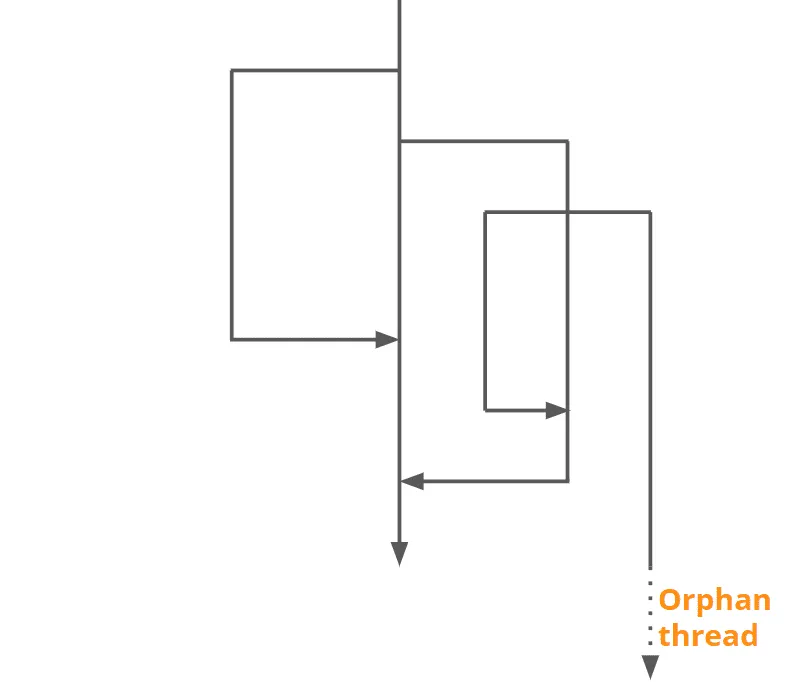
Unstructured Concurrency transfers this model to concurrency: we start threads, where it is often not clearly recognizable in the code when these threads end. Sometimes we wait for a thread to end with join(), sometimes we don’t. Sometimes we shut down an ExecutorService cleanly with shutdown() and awaitTermination(), sometimes we don’t.
This can be represented graphically something like this:
What is Structured Concurrency?
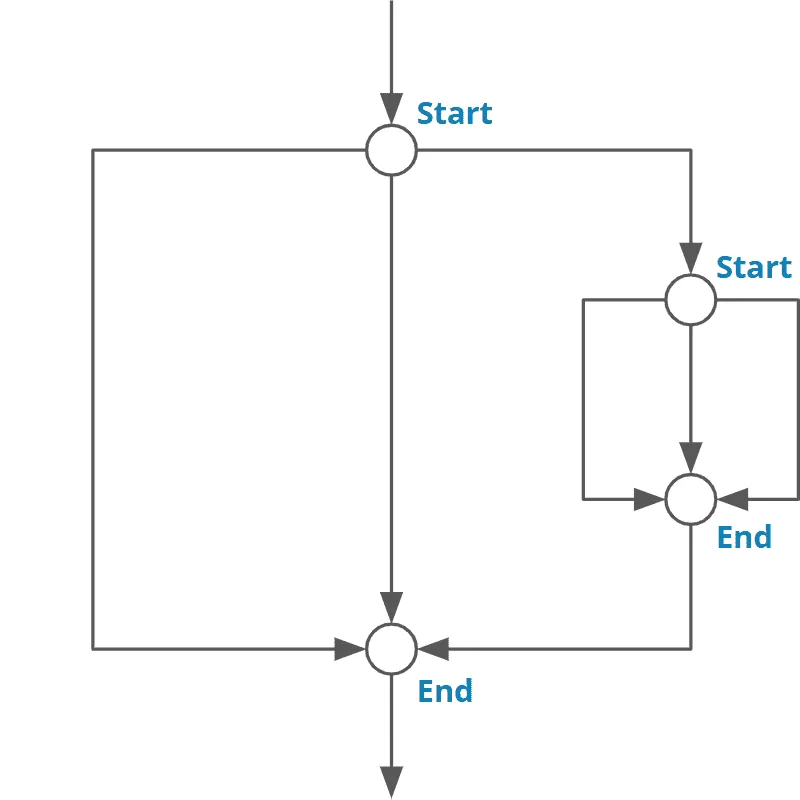
Structured Concurrency transfers the principle of structured programming to concurrency: all execution paths that are spanned when starting concurrent tasks converge again at a single point in the code. And at this point, it is guaranteed that no orphaned thread continues to work in the background:
Structured Concurrency in Java
In principle, this was already possible in Java – for example with an ExecutorService and a subsequent call to close() or shutdown() and awaitTermination() – or since Java 19 by opening an ExecutorService in a try-with-resources block (which automatically calls close() at the end).
But the Structured Concurrency API StructuredTaskScope goes noticeably further: it can terminate a scope prematurely when certain events occur and cancel all tasks still running. With an ExecutorService, this could only be simulated via extremely complex and error-prone orchestration in which business logic, thread handling, and error handling were so intertwined that the business logic was hardly recognizable anymore.
The StructuredTaskScope API
With StructuredTaskScope, this is much easier. The following code starts three subtasks in parallel and then waits with scope.join() until all three are finished. If one of the subtasks fails, the others are canceled – and scope.join() throws an ExecutionException with the originally occurred exception as the cause:
ProductPage loadProductPage(long productId)
    throws InterruptedException, ExecutionException {
  try (var scope = StructuredTaskScope.open()) {
    var detailsTask = scope.fork(() -> catalogService.getDetails(productId));
    var priceTask   = scope.fork(() -> pricingService.getPrice(productId));
    var stockTask   = scope.fork(() -> inventoryService.getStock(productId));
    scope.join();
    return ProductPage.assemble(
        detailsTask.get(), priceTask.get(), stockTask.get());
  }
}
Sometimes, however, we don’t need the results of all subtasks, but only the first one that arrives. For this, we can change the strategy of the StructuredTaskScopes by passing a so-called Joiner to the open() method. In the following example, we query the same address from three redundant geocoding services – and as soon as one provides a result, the other two are canceled:
GeoCoordinates resolveAddress(String address)
        throws InterruptedException, ExecutionException {
    try (var scope = StructuredTaskScope.open(
            Joiner.<GeoCoordinates>anySuccessfulOrThrow())) {
        scope.fork(() -> primaryGeocoder.lookup(address));
        scope.fork(() -> backupGeocoder.lookup(address));
        scope.fork(() -> offlineGeocoder.lookup(address));
        return scope.join();
    }
}
The Joiner interface provides further strategies – and you can also implement your own. You can find out which ones they are and how to proceed in the main article about Structured Concurrency in Java.
Structured Concurrency – Changes in Java 27
Structured Concurrency was first introduced as an incubator feature together with virtual threads in Java 19. In Java 25, the API was fundamentally revised (keyword “composition over inheritance”), followed by some minor adjustments in Java 26. With Java 27, JDK Enhancement Proposal 533 brings the following changes:
- The joiners
allSuccessfulOrThrow(),anySuccessfulOrThrow()andawaitAllSuccessfulOrThrow()no longer throw the preview-specificFailedExceptionwhen a subtask fails, but anExecutionException– i.e., the same wrapper exception thatFuture.get()can also throw. The original exception is contained ingetCause()as usual. StructuredTaskScopeandJoinerhave received a third type parameterR_X, which stands for the exception type thatjoin()can throw.Joiner<T, R>thus becomesJoiner<T, R, R_X>. If you use the included joiners viaopen(), the compiler usually infers the types itself – your code looks unchanged. The difference only becomes visible when you write your own joiners.- The
JoinermethodonTimeout()introduced in Java 26 is now calledtimeout(). It is called when the scope is canceled due to a timeout and then either provides a result or throws an exception. - The joiner
awaitAll()has been removed. - There is a new
StructuredTaskScope.open()method that combines the default join strategy (wait for all subtasks, cancel on the first error) with a configuration operator. Previously, to give the scope a timeout and a name, for example, you had to additionally pass the default joiner. This is no longer necessary:
try (var scope = StructuredTaskScope.open(
        cfg -> cfg.withTimeout(Duration.ofSeconds(2)).withName("checkout"))) {
    scope.fork(() -> cartService.getCart(userId));
    scope.fork(() -> profileService.getProfile(userId));
    scope.join();
}
Code written for Java 26 can therefore be transferred to Java 27 with manageable effort – the most common intervention will be to change a catch (FailedException ...) to catch (ExecutionException ...).
PEM Encodings of Cryptographic Objects (Third Preview) – JEP 538
PEM is the abbreviation for Privacy-Enhanced Mail – an encoding scheme used to represent cryptographic objects as text that can be sent by mail. You have surely encountered PEM-encoded objects before – for example in the form of a certificate like this:
-----BEGIN CERTIFICATE-----
MIIDtzCCAz2gAwIBAgISBUCeYELtjMmr4FAIqHapebbFMAoGCCqGSM49BAMDMDIx
CzAJBgNVBAYTAlVTMRYwFAYDVQQKEw1MZXQncyBFbmNyeXB0MQswCQYDVQQDEwJF
. . .
DBeMde1YpWNXpF9+B/OMKgn7RgXRj5b2QpBCnFsP92T4cK/Nn+xFIjYCMCCx4E79
toSQBlYnNHv0eXnWkI8TmXsU/A6rU4Gxdr9GbGixgRJvkw0C6zjL/lH2Vg==
-----END CERTIFICATE-----
Until now, it was surprisingly tedious in Java to read or write such PEM-encoded objects. The following example shows how much effort was required to read a PEM-encoded private key:
String encryptedPrivateKeyPemEncoded = . . .
String passphrase = . . .

String encryptedPrivateKeyBase64Encoded = encryptedPrivateKeyPemEncoded
    .replace("-----BEGIN ENCRYPTED PRIVATE KEY-----", "")
    .replace("-----END ENCRYPTED PRIVATE KEY-----", "")
    .replaceAll("[\\r\\n]", "");

Base64.Decoder decoder = Base64.getDecoder();
byte[] encryptedPrivateKeyBytes = decoder.decode(encryptedPrivateKeyBase64Encoded);
EncryptedPrivateKeyInfo encryptedPrivateKeyInfo =
    new EncryptedPrivateKeyInfo(encryptedPrivateKeyBytes);

String algorithmName = encryptedPrivateKeyInfo.getAlgName();
SecretKeyFactory secretKeyFactory = SecretKeyFactory.getInstance(algorithmName);

PBEKeySpec pbeKeySpec = new PBEKeySpec(passphrase.toCharArray());
Key pbeKey = secretKeyFactory.generateSecret(pbeKeySpec);

Cipher cipher = Cipher.getInstance(algorithmName);
AlgorithmParameters algParams = encryptedPrivateKeyInfo.getAlgParameters();
cipher.init(Cipher.DECRYPT_MODE, pbeKey, algParams);

KeyFactory rsaKeyFactory = KeyFactory.getInstance("RSA");
KeySpec keySpec = encryptedPrivateKeyInfo.getKeySpec(cipher);
PrivateKey privateKey = rsaKeyFactory.generatePrivate(keySpec);
With Java 25, a dedicated PEM API was introduced – initially as a preview feature (JEP 470) intended to significantly simplify the handling of PEM-encoded objects. In Java 26, the API entered the second preview round (JEP 524), and in Java 27, the third preview follows (JEP 538).
You can read the encrypted private key in just a few lines:
PrivateKey privateKey = PEMDecoder.of()
    .withDecryption(passphrase.toCharArray())
    .decode(encryptedPrivateKeyPemEncoded, PrivateKey.class);
For the reverse path, there is – analogous to the PEMDecoder – also a PEMEncoder with an encodeToString() method:
String encryptedPrivateKeyPemEncoded = PEMEncoder.of()
    .withEncryption(passphrase.toCharArray())
    .encodeToString(privateKey);
Changes in Java 27
In the third preview round, some classes, interfaces, and methods were adjusted compared to Java 26. However, for the basic use cases shown here, these changes are not relevant – the simple example above continues to work unchanged.
You can find further details on the PEM API and these changes in JDK Enhancement Proposal 538.
Vector API (Twelfth Incubator) – JEP 537
And with that, we have arrived – for the twelfth time now – at the Vector API. The Vector API allows us to execute mathematical vector operations directly via the vector instruction sets of modern CPUs – Streaming SIMD Extensions (SSE) or Advanced Vector Extensions (AVX) – and thereby calculate significantly more performantly than with classic scalar code. A typical example is the addition of two vectors:
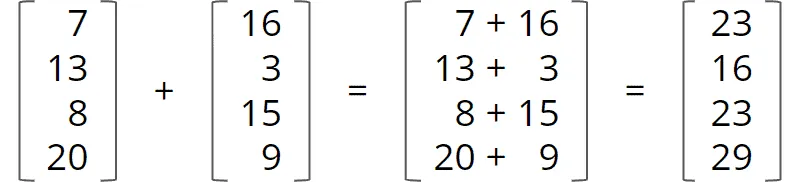
With the Vector API, such an addition looks like this – a and b are the two input vectors, c the result vector:
static final VectorSpecies<Float> SPECIES = FloatVector.SPECIES_PREFERRED;

void addVectors(float[] a, float[] b, float[] c) {
  int i = 0;
  int upperBound = SPECIES.loopBound(a.length);
  for (; i < upperBound; i += SPECIES.length()) {
    var va = FloatVector.fromArray(SPECIES, a, i);
    var vb = FloatVector.fromArray(SPECIES, b, i);
    var vc = va.add(vb);
    vc.intoArray(c, i);
  }
  for (; i < a.length; i++) {
    c[i] = a[i] + b[i];
  }
}
For such a simple calculation operation, this is currently still a surprising amount of boilerplate:
SPECIES.length()provides the number of vector elements that the CPU can process in parallel in a single cycle.SPECIES.loopBound(…)determines how many complete subvectors of this length can be formed from the input vector.- The first loop adds these subvectors.
- If the length of the input vector does not divide evenly, a remainder is left at the end – to process these elements, we need another loop.
The twelfth incubator version of the Vector API is defined by JDK Enhancement Proposal 537 – and just like in Java 26, there are no changes this time.
Status of the Vector API
Why is the Vector API still in the incubator stage at all?
The Vector class is intended to become a so-called “Value Class” – this is a class whose objects do without identity. Work has been ongoing on Value Classes since 2014 as part of Project Valhalla. As soon as the first JEP from Project Valhalla, JEP 401: Value Classes and Objects, is included in the JDK as a preview, the Vector API will be switched to Value Classes and likewise “promoted” to the preview stage.
Other Changes in Java 27
Not all changes are large enough to be described in a JEP (JDK Enhancement Proposal) – numerous smaller changes can therefore only be found in the release notes. I have picked out some noteworthy changes for this section.
Predefined ISO-8601 Formatters Support Short Zone Offsets
The DateTimeFormatter.parse() method has always recognized dates with time zone offsets, such as “2026-06-01T22:57:00+02:00”. This means: June 1, 2026, 10:57 PM with a time zone offset of plus 2 hours compared to UTC, i.e., 8:57 PM UTC.
The format is defined in ISO 8601 and allows the time zone offset to be specified in a short form where only the hours are given, i.e., “2026-06-01T22:57:00+02”.
DateTimeFormatter.parse() previously rejected this format as incorrect and threw a DateTimeParseException. Starting with Java 27, the format is supported.
(There is no JEP for this change; it is registered in the bug tracker under JDK-8210336.)
Change the Default Values of MinHeapFreeRatio and MaxHeapFreeRatio for G1
With the VM arguments -Xms and -Xmx, we define the minimum and maximum heap of a Java application. With -XX:MinHeapFreeRatio and -XX:MaxHeapFreeRatio, we can also define the thresholds of free heap below or above which the heap is increased or decreased.
These values were previously at 40% and 70%, i.e., as soon as less than 40% heap was free, the heap was increased, and as soon as more than 70% was free, the heap was decreased again.
Since this led to unnecessarily frequent heap size changes, these values were set to 0% and 100% in Java 27. Thus, by default, the heap is only increased when it is full and only decreased when it is empty.
If a different behavior is desired, this can still be configured via -XX:MinHeapFreeRatio and -XX:MaxHeapFreeRatio.
(There is no JEP for this change; it is registered in the bug tracker under JDK-8238686.)
Rename -XX:InitiatingHeapOccupancyPercent to -XX:G1IHOP
In case you have set the G1 option -XX:InitiatingHeapOccupancyPercent in your application (this configures when G1 executes a “Concurrent Start collection” as long as G1 has not yet collected enough data for its own heuristics): this option has been renamed to -XX:G1IHOP. The new name is intended to reflect the fact that this parameter is G1-specific. The old name will still be supported for several Java versions.
(There is no JEP for this change; it is registered in the bug tracker under JDK-8227106.)
Removal of the JVM Compiler Interface (JVMCI)
The JVM Compiler Interface (JVMCI) introduced in Java 9 was an experimental API with which the Hotspot JVM could control a just-in-time compiler written in Java – instead of the built-in C2 compiler. It was exactly through this interface that the Graal compiler, for example, could be plugged into a normal OpenJDK as a C2 replacement (via -XX:+UseGraalJIT or -XX:+UseJVMCICompiler).
The JDK team had already removed the experimental Graal compiler in Java 17; however, the JVMCI interface was retained at the time so that externally built compilers could still be plugged in. After a good ten years, the interface itself is now also being discontinued, as the maintenance and testing effort was no longer worth it for the few remaining use cases.
(There is no JEP for this change; it is registered in the bug tracker under JDK-8382582.)
Obsolete UseCompressedClassPointers
In Java 25, the option -XX:-UseCompressedClassPointers, which could be used to disable Compressed Class Pointers, was deprecated.
In Java 27, uncompressed class pointers were removed, and the option no longer has any effect.
(There is no JEP for this change; it is tracked in the bug tracker under JDK-8363996.)
Full list of all changes in Java 27
This article has introduced all the JEPs released in Java 27 – as well as some selected changes from the release notes. You can find the full list of all changes in the official Java 27 Release Notes.
Conclusion
There are no major new language features in Java 27, but there are still some noteworthy changes:
- Compact Object Headers are enabled by default, which can save up to 20% heap and increase throughput by up to 10% for applications with many small objects.
- Java Flight Recorder can redact sensitive information, closing potential attack vectors.
- TLS automatically uses quantum-safe encryption – provided the server supports it – preventing so-called “Harvest now, decrypt later” attacks.
- G1 is now the default garbage collector even on lower-performance machines (only one CPU or less than 1,792 MB RAM).
- For Lazy Constants, further low-level methods were removed – as was already the case in Java 26; additionally, Lazy Sets were added to the API.
StructuredTaskScopenow has an additional type parameter for the exception type;join()throws – unless otherwise specified – anExecutionException(instead of aFailedException); theawaitAll()joiner has been removed;Joiner.onTimeout()has been replaced bytimeout().- In PEM Encodings of Cryptographic Objects, the
PEMrecord became a class, and several other classes and methods were renamed. - Primitive Type Patterns and the Vector API were sent into the next preview or incubator round without changes.
As always, various other changes round off the release. The Java 27 builds are available from OpenJDK.
If this article has helped you, I would greatly appreciate a positive review on my ProvenExpert profile. Your feedback helps me improve my content and motivates me to write new informative articles.