
Since Java 5.0, the JDK contains the interface java.util.Queue and several queue implementations, which differ in various properties (bounded/unbounded, blocking/non-blocking, thread-safe/non-thread-safe).
In this article, I’ll introduce the Queue interface and its methods, compare the queue implementations of the JDK, and show you which one to use when.
Java Queue Class Hierarchy
Before I present the Java queue in detail, I would like to give an overview in the form of a UML class diagram:

I will describe the BlockingQueue interface in the next part of the tutorial.
The concrete queue classes ConcurrentLinkedQueue, PriorityQueue, ArrayBlockingQueue, DelayQueue, LinkedBlockingQueue, PriorityBlockingQueue, and SynchronousQueue follow. Finally, I will explain the TransferQueue interface together with the LinkedTransferQueue.
You can jump to the corresponding parts at any time using the tutorial navigation on the right margin.
The interfaces Deque and BlockingDeque, drawn in gray, and their implementations are covered in the tutorial series on deques. Since Java 21, Deque also extends SequencedCollection.
I explain how Queue and Deque differ – and when you need which of the two – in the article Queue vs. Deque in Java.
Java Queue Methods
The Queue interface defines six methods for inserting, removing, and viewing elements. For each of the three queue operations “Enqueue”, “Dequeue”, and “Peek”, the interface defines two methods: one that throws an exception in case of an error and one that returns a special value (false or null).
Methods for Inserting into the Queue
First, a graphical overview of the enqueue methods:

Queue.add()
This method is already defined in the Collection interface and inserts an element into the queue. On success, the method returns true. If a bounded (size-restricted) queue is full, this method throws an IllegalStateException.
Queue.offer()
offer(), like add(), adds an element to the queue and returns true on success. If a bounded queue is full, this method returns false instead of throwing an IllegalStateException.
Methods for Removing from the Queue
Also for the dequeue methods, first a graphical overview:

Queue.remove()
remove() removes the element from the queue’s head. If the queue is empty, the method throws a NoSuchElementException.
Queue.poll()
poll(), too, removes the element at the head of the queue. Unlike remove(), the method does not throw an exception if the queue is empty but returns null.
Methods for Viewing the Head Element
And again, first an overview of methods:

Queue.element()
The element() method returns the element from the head of the queue without removing it from the queue. If the queue is empty, a NoSuchElementException is thrown.
Queue.peek()
Like element(), peek() also returns the head element without removing it from the queue. However, if the queue is empty, this method returns null, just like poll().
Queue Methods – Summary
The following table shows the six methods again grouped by operation and type of error handling:
| In case of error: exception | In case of error: return value | |
|---|---|---|
| Adding an element (enqueue): | add(E e) | offer(E e) |
| Removing an element (dequeue): | remove() | poll() |
| Viewing an element (peek): | element() | peek() |
How to Create a Queue?
java.util.Queue is an interface. An interface cannot be instantiated because it only describes what methods a class offers but does not contain implementations of those methods.
What happens if you still try?
public class QueueTest {
  public static void main(String[] args) {
    Queue<Integer> queue = new Queue<>(); // <-- Don't do this!
  }
}
When trying to compile this code, you would see the following error message:
QueueTest.java:5: error: Queue is abstract; cannot be instantiated
    Queue<Integer> queue = new Queue<>(); // <-- Don't do this!
                           ^
1 error
Therefore, you must select one of the concrete queue implementations, e.g., ConcurrentLinkedQueue:
Queue<Integer> queue = new ConcurrentLinkedQueue<>();The JDK offers eight classes that implement Queue but not Deque. They differ in thread safety, blocking behavior, and capacity – the next section compares them.
Queue Implementations in Java: Which One to Use?
In the table, each class name links to the part of this series in which that queue and its specific characteristics are described. I compare the four deque implementations in the article about the Deque interface.
For explanations of the terms blocking, non-blocking, fairness policy, bounded, and unbounded, see the article about the BlockingQueue interface.
| Class | Base data structure | Thread- safe? | Blocking/ non-blocking | Fairness policy | Bounded/ unbounded | Iterator type |
|---|---|---|---|---|---|---|
ConcurrentLinkedQueue | Linked list | Yes (optimistic locking through compare-and-set) | Non-blocking | — | Unbounded | Weakly consistent¹ |
PriorityQueue | Min-heap (stored in an array) | No | Non-blocking | — | Unbounded | Fail-fast² |
LinkedBlockingQueue | Linked list | Yes (pessimistic locking with two locks) | Blocking | Not available | Bounded³ | Weakly consistent¹ |
ArrayBlockingQueue | Array | Yes (pessimistic locking with one lock) | Blocking | Optional | Bounded | Weakly consistent¹ |
PriorityBlockingQueue | Min-heap (stored in an array) | Yes (pessimistic locking with one lock) | Blocking (dequeue only) | Not available | Unbounded | Weakly consistent¹ |
DelayQueue | Priority queue | Yes (pessimistic locking with one lock) | Blocking (dequeue only) | Not available | Unbounded | Weakly consistent¹ |
SynchronousQueue | Linked stack (non-fair) or linked queue (fair) | Yes (optimistic locking through compare-and-set) | Blocking | Optional | No capacity | The iterator is always empty. |
LinkedTransferQueue | Linked list | Yes (optimistic locking through compare-and-set) | Blocking (only transfer and dequeue) | Not available | Unbounded | Weakly consistent¹ |
¹ Weakly consistent: All elements that exist when the iterator is created are traversed by the iterator exactly once. Changes that occur after this can, but do not need to, be reflected by the iterator.
² Fail-fast: The iterator throws a ConcurrentModificationException if elements are added to or removed from the queue during iteration.
³ If you don’t pass a capacity to the constructor, the bound is Integer.MAX_VALUE elements.
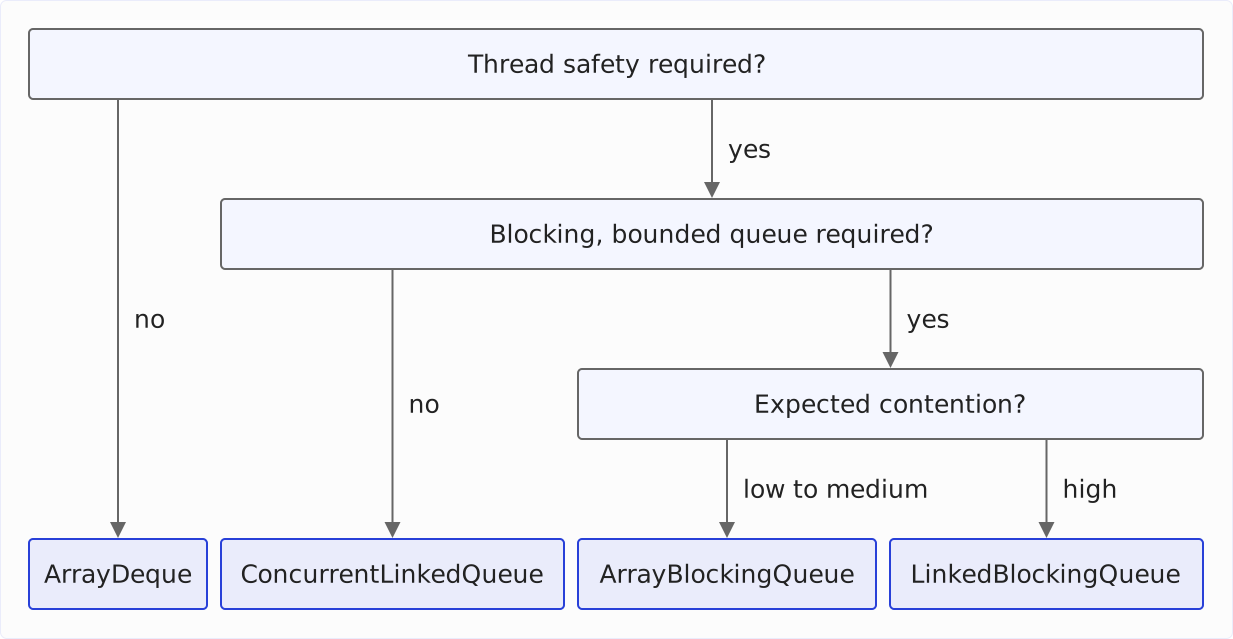
Using these characteristics, you can find the proper queue for each use case. For day-to-day use of general queue implementations, I make the following recommendations:
ArrayDequefor single-threaded applications.ConcurrentLinkedQueueas a thread-safe, non-blocking, and unbounded queue.ArrayBlockingQueueas a thread-safe, blocking, bounded queue if you expect low to medium contention between producer and consumer threads.LinkedBlockingQueueas a thread-safe, blocking, bounded queue if you expect high contention between producer and consumer threads (best to test which implementation is more performant for your use case).
So the choice between ConcurrentLinkedQueue and LinkedBlockingQueue comes down to whether your threads should wait: ConcurrentLinkedQueue never blocks, is unbounded, and protects its linked list with compare-and-set. LinkedBlockingQueue lets producers wait in put() while it is full and consumers in take() while it is empty; it protects its linked list with two locks and is bounded.
Here is the process in the form of a decision tree:
Optimized MPMC, MPSC, SPMC, and SPSC Queues
All thread-safe queue implementations provided by the JDK can be used in multi-producer-multi-consumer environments. This means that one or more writing threads and one or more reading threads can access the JDK queues concurrently.
With special mechanisms, it is possible to optimize queues so that the overhead for maintaining thread safety is minimized when there is a restriction to one reading and/or one writing thread.
Accordingly, the following four cases are distinguished:
- Multi-producer-multi-consumer (MPMC)
- Multi-producer-single-consumer (MPSC)
- Single-producer-multi-consumer (SPMC)
- Single-producer-single-consumer (SPSC)
The open-source library JCTools provides highly optimized queue implementations for all four cases.
Example: How to Use a Queue?
The following example shows how to create a queue, fill it with some values, and retrieve the values. You can also find the example code on GitHub.
public class JavaQueueDemo {
  public static void main(String[] args) {
    // 1.
    Queue<Integer> queue = new ConcurrentLinkedQueue<>();

    // 2.
    for (int i = 1; i <= 5; i++) {
      queue.offer(i);
      System.out.println("queue.offer(" + i + ") --> queue = " + queue);
    }

    System.out.println();

    // 3.
    System.out.println("queue.peek() = " + queue.peek());

    System.out.println();

    // 4.
    while (!queue.isEmpty()) {
      System.out.println("queue.poll() = " + queue.poll() + " --> queue = " + queue);
    }

    System.out.println();

    // 5.
    System.out.println("queue.poll() = " + queue.poll());
    System.out.println("queue.peek() = " + queue.peek());
  }
}
The program does the following (the numbering refers to the comments in the source code):
- It creates a queue. Which one you use is irrelevant for this example since it doesn’t require any special queue properties. We will use
ConcurrentLinkedQueue. - Using
Queue.offer(), we write the values 1 to 5 to the queue. And we display the queue’s content after each insertion. - We look at the queue’s head element using
Queue.peek(). - As long as the queue contains elements (we check this with the
isEmpty()method, which theQueueinterface inherits fromCollection), we retrieve these elements withQueue.poll()and display them. After that, we show the entire content of the queue again. - After the queue has been emptied, we once again display the return values of
poll()andpeek().
The program prints the following:
queue.offer(1) --> queue = [1]
queue.offer(2) --> queue = [1, 2]
queue.offer(3) --> queue = [1, 2, 3]
queue.offer(4) --> queue = [1, 2, 3, 4]
queue.offer(5) --> queue = [1, 2, 3, 4, 5]

queue.peek() = 1

queue.poll() = 1 --> queue = [2, 3, 4, 5]
queue.poll() = 2 --> queue = [3, 4, 5]
queue.poll() = 3 --> queue = [4, 5]
queue.poll() = 4 --> queue = [5]
queue.poll() = 5 --> queue = []

queue.poll() = null
queue.peek() = null
You can see very nicely how the elements are taken out in the same order as they were inserted (First-in-first-out – FIFO).
Summary and Outlook
In this part of the tutorial, you have learned about Java’s Queue interface and its methods, the queue implementations of the JDK, and when to use which one. Using an example, you have seen how to use the queue.
In the next part, we will look at the BlockingQueue interface. I will also explain the difference between bounded and unbounded or blocking and non-blocking queues.
After that, I’ll present each of the JDK’s queue implementations with its characteristics in detail.
If this article has helped you, I would greatly appreciate a positive review on my ProvenExpert profile. Your feedback helps me improve my content and motivates me to write new informative articles.