
An Optional is a container that holds either exactly one value or none. A method returns an Optional when there may be no result – instead of returning null.
An example: Stream.findFirst() returns an Optional<Book>, because the stream may be empty, or none of its books may pass the filter:
Optional<Book> firstGothic = BOOKS.stream()
    .filter(book -> book.genre() == GOTHIC)
    .findFirst();
Code that calls findFirst() cannot overlook the missing result: To get at the book, it has to say what should happen if there is none.
Java has had Optional since Java 8 (March 2014) – before that, a method signaled a missing result with null, and whether it could return null was, at best, in its Javadoc. If the calling code overlooked the null, the result was a NullPointerException. Don’t worry – I will show you all of it with examples in a moment.
In this article, you will find out
- what an
Optionalis and which problem it solves, - how to create an
Optionalwithof(),ofNullable(), andempty(), - how to get the value out with
orElse(),orElseGet(), andorElseThrow()– and howorElse()andorElseGet()differ, - how to transform an
Optionalwithmap(),flatMap(),filter(), andor(), - how
Optionaland streams work together, - when to use
Optional– and when not, - what “value-based class” means and what Project Valhalla changes about
Optional, - which mistakes to avoid.
The Examples in This Article
The examples use the data model of the Java Streams article – an enum Genre, a record Book, and a small library of eleven classics:
public enum Genre {
  NOVEL,
  GOTHIC,
  ADVENTURE,
  FANTASY,
  SCIENCE_FICTION
}

public record Book(String title, String author, int year, Genre genre) {}
public class Library {
public static final List<Book> BOOKS = List.of(
new Book("Pride and Prejudice", "Jane Austen", 1813, NOVEL),
new Book("Frankenstein", "Mary Shelley", 1818, GOTHIC),
new Book("Moby-Dick", "Herman Melville", 1851, ADVENTURE),
new Book("From the Earth to the Moon", "Jules Verne", 1865, SCIENCE_FICTION),
new Book("Alice's Adventures in Wonderland", "Lewis Carroll", 1865, FANTASY),
new Book("Around the World in Eighty Days", "Jules Verne", 1873, ADVENTURE),
new Book("Treasure Island", "Robert Louis Stevenson", 1883, ADVENTURE),
new Book("Kidnapped", "Robert Louis Stevenson", 1886, ADVENTURE),
new Book("The Time Machine", "H. G. Wells", 1895, SCIENCE_FICTION),
new Book("Dracula", "Bram Stoker", 1897, GOTHIC),
new Book("The War of the Worlds", "H. G. Wells", 1898, SCIENCE_FICTION));
}For this article, Library gets two methods that return an Optional.
findByTitle() returns the book with exactly the given title:
public static Optional<Book> findByTitle(String title) {
  return BOOKS.stream()
      .filter(book -> book.title().equals(title))
      .findFirst();
}
nextBookBy() returns the book that the same author published next:
public static Optional<Book> nextBookBy(Book book) {
  return BOOKS.stream()
      .filter(otherBook -> otherBook.author().equals(book.author()))
      .filter(otherBook -> otherBook.year() > book.year())
      .min(Comparator.comparingInt(Book::year));
}
For “Treasure Island” (1883), that is “Kidnapped” (1886). For “Dracula”, the library has no later book by Bram Stoker, so the Optional is empty.
In the code examples that follow, I call both methods without the class name – they are imported statically. You can find the complete code of all examples in the GitHub repository java-streams-examples, in the package eu.happycoders.optional.
What Is an Optional in Java?
Suppose the search for a title were written the way methods were written before Java 8 – getByTitle() returns the book or, if there is none, null:
static Book getByTitle(String title) {
  for (Book book : BOOKS) {
    if (book.title().equals(title)) {
      return book;
    }
  }
  return null;
}
The signature Book getByTitle(String title) does not reveal that the method may return null.
The compiler does not know it either, and so this code compiles:
Book book = getByTitle("Ulysses");
System.out.println(book.year());
You only find out at runtime:
java.lang.NullPointerException: Cannot invoke "eu.happycoders.streams.Book.year()" because "book" is nullWith Optional<Book> as the return type, the signature says it: There may be no book. And the caller cannot call year() on an Optional<Book> – Optional has no such method. To get at the book, the caller has to unwrap the Optional and decide what happens when it is empty.
You can picture an Optional as a box. For “Dracula”, findByTitle() returns a box with the book inside; for “Ulysses”, a box that is empty. The box itself is always there:
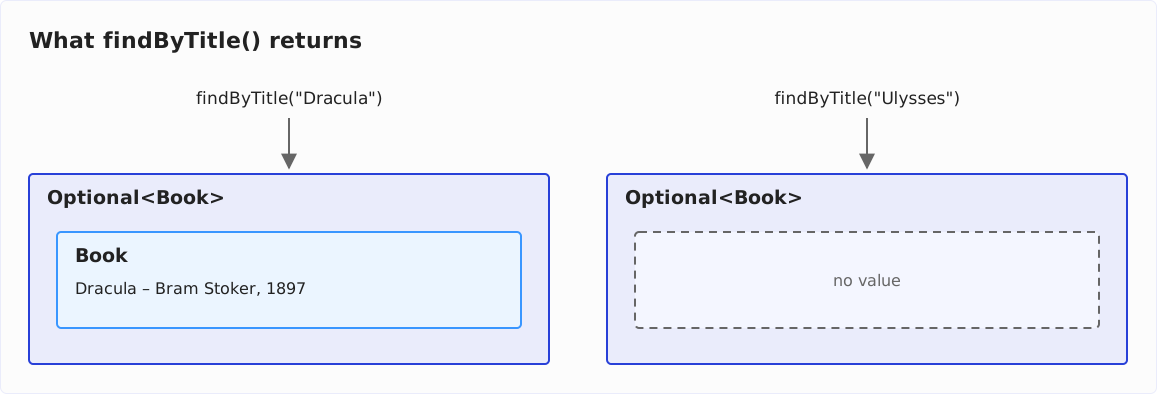
toString() prints the two Optionals like this:
System.out.println(findByTitle("Dracula"));
System.out.println(findByTitle("Ulysses"));
Optional[Book[title=Dracula, author=Bram Stoker, year=1897, genre=GOTHIC]]
Optional.emptyAn Optional never contains null: An Optional created from null is empty.
Creating an Optional
Optional.of() and Optional.empty()
Optional.of() wraps a value that is not null; Optional.empty() returns an empty Optional:
Optional<String> title = Optional.of("Dracula");
Optional<String> noTitle = Optional.empty();

System.out.println(title);
System.out.println(noTitle);
Optional[Dracula]
Optional.emptyOptional.ofNullable()
Optional.ofNullable() accepts null as well and then returns an empty Optional.
You need it where a value comes from an API that signals “no result” with null – Map.get(), for example:
Map<String, Book> byTitle = new HashMap<>();
for (Book book : BOOKS) {
  byTitle.put(book.title(), book);
}

System.out.println(Optional.ofNullable(byTitle.get("Dracula")));
System.out.println(Optional.ofNullable(byTitle.get("Ulysses")));
Optional[Book[title=Dracula, author=Bram Stoker, year=1897, genre=GOTHIC]]
Optional.emptyOptional.of(), on the other hand, throws a NullPointerException immediately if you pass it null:
Optional<Book> book = Optional.of(byTitle.get("Ulysses"));java.lang.NullPointerExceptionWhy not always use ofNullable(), then? Because of() states something: This value is never null. If it is null after all, that is a bug, and the NullPointerException points to the line where it happens – not to some place three methods later, where an unexpectedly empty Optional shows up.
I recommend of() wherever the value must not be null, and ofNullable() only where null is a legitimate answer.
Getting the Value Out of an Optional
orElse() and orElseGet()
orElse() returns the value if there is one, and otherwise the fallback value you pass to it.
In the following listing, map(Book::title) first turns the Optional<Book> into an Optional<String> with the title – more on that in the section map():
String title = findByTitle("Dracula")
    .map(Book::title)
    .orElse("(unknown)");
System.out.println(title);

String missing = findByTitle("Ulysses")
    .map(Book::title)
    .orElse("(unknown)");
System.out.println(missing);
Dracula
(unknown)orElseGet() does the same, but takes a Supplier that produces the fallback value. Where is the difference? orElse() receives the fallback value as an argument – and Java evaluates arguments before the method is called, whether the Optional contains a value or not. The Supplier that orElseGet() receives, on the other hand, is only called if the Optional is empty.
This method makes that visible, because it prints a line whenever it is called:
static String fallbackTitle() {
  System.out.println("  computing the fallback title");
  return "(unknown)";
}
With orElse(), fallbackTitle() runs, although “Dracula” is in the library:
System.out.println(findByTitle("Dracula")
    .map(Book::title)
    .orElse(fallbackTitle()));
computing the fallback title
DraculaWith orElseGet(), it runs only if the Optional is empty:
System.out.println(findByTitle("Dracula")
    .map(Book::title)
    .orElseGet(() -> fallbackTitle()));

System.out.println(findByTitle("Ulysses")
    .map(Book::title)
    .orElseGet(() -> fallbackTitle()));
Dracula
computing the fallback title
(unknown)For a constant or a value you already have, orElse() is the right choice. As soon as the fallback value has to be computed – e.g., through a database query, the construction of a new object, or the assembly of a string – I recommend orElseGet(), because otherwise the computation also happens when the Optional contains a value and the fallback value is not needed at all.
orElseThrow()
If a missing value means that something went wrong, orElseThrow() throws an exception. Without an argument – available since Java 10 – it throws a NoSuchElementException:
Book book = findByTitle("Ulysses").orElseThrow();java.util.NoSuchElementException: No value presentWith a Supplier, you determine the exception yourself:
Book book = findByTitle("Ulysses")
    .orElseThrow(() -> new IllegalArgumentException("Unknown title: Ulysses"));
java.lang.IllegalArgumentException: Unknown title: UlyssesI recommend the variant with the Supplier wherever the exception reaches a caller who has to understand it: “Unknown title: Ulysses” says what went wrong, “No value present” does not.
isPresent(), isEmpty(), and get()
isPresent() returns true if the Optional contains a value. isEmpty(), available since Java 11, returns the opposite.
get() returns the value and throws a NoSuchElementException if there is none. So only call get() after checking with isPresent() that a value is present. Static code analysis tools like SonarQube report a call to get() without that check as a bug (rule S3655, “Optional values should not be accessed when they may be empty”).
The Javadoc of get() calls orElseThrow() “the preferred alternative”. orElseThrow() behaves exactly like get(), but its name says what happens when the Optional is empty.
The following listing uses isPresent(), get(), and isEmpty():
Optional<Book> dracula = findByTitle("Dracula");
if (dracula.isPresent()) {
  System.out.println(dracula.get().year());
}

System.out.println(findByTitle("Ulysses").isEmpty());
1897
trueThis works, but it is the null check in a different form. Why I avoid the pair isPresent() and get() is shown in the section isPresent() and get() instead of map() and orElse().
Acting on the Value: ifPresent() and ifPresentOrElse()
ifPresent() executes an action with the value, but only if there is one:
findByTitle("Dracula")
    .ifPresent(book -> System.out.println("Found: " + book.title()));

findByTitle("Ulysses")
    .ifPresent(book -> System.out.println("Found: " + book.title()));
Found: DraculaThe second call prints nothing, because “Ulysses” is not in the library.
Since Java 9, ifPresentOrElse() takes a second action, a Runnable, for the case that the Optional is empty:
findByTitle("Ulysses")
    .ifPresentOrElse(
        book -> System.out.println("Found: " + book.title()),
        () -> System.out.println("Not in the library"));
Not in the libraryTransforming an Optional
The four methods in this chapter each return an Optional again. You can therefore chain them, like the operations of a stream. map(), flatMap(), and filter() only act if there is a value – they pass an empty Optional on unchanged. or(), conversely, only steps in if the Optional is empty.
map()
map() applies a function to the value and wraps the result in a new Optional:
Optional<Integer> draculaYear = findByTitle("Dracula")
    .map(Book::year);
System.out.println(draculaYear);

Optional<Integer> ulyssesYear = findByTitle("Ulysses")
    .map(Book::year);
System.out.println(ulyssesYear);
Optional[1897]
Optional.emptyFor an empty Optional, map() does not call the function at all. And if the function returns null, map() returns an empty Optional – it wraps the result with ofNullable().
flatMap()
What happens if the function itself returns an Optional, like nextBookBy()?
Then map() wraps that Optional in another one:
Optional<Optional<Book>> nestedAfterTreasureIsland = findByTitle("Treasure Island")
    .map(Library::nextBookBy);
System.out.println(nestedAfterTreasureIsland);

Optional<Optional<Book>> nestedAfterDracula = findByTitle("Dracula")
    .map(Library::nextBookBy);
System.out.println(nestedAfterDracula);
Optional[Optional[Book[title=Kidnapped, author=Robert Louis Stevenson, year=1886, genre=ADVENTURE]]]
Optional[Optional.empty]For “Dracula”, the result is not even empty, but an Optional that contains an empty Optional.
For this case, there is flatMap(): It returns the Optional from the function as it is, without wrapping it again:
Optional<Book> afterTreasureIsland = findByTitle("Treasure Island")
    .flatMap(Library::nextBookBy);
System.out.println(afterTreasureIsland);

Optional<Book> afterDracula = findByTitle("Dracula")
    .flatMap(Library::nextBookBy);
System.out.println(afterDracula);
Optional[Book[title=Kidnapped, author=Robert Louis Stevenson, year=1886, genre=ADVENTURE]]
Optional.emptyThe rule of thumb matches the one for Stream.flatMap(): If the function returns a plain value, use map(); if it returns an Optional, use flatMap().
filter()
filter() keeps the value if it satisfies the condition; otherwise, the result is an empty Optional:
System.out.println(findByTitle("Treasure Island")
    .filter(book -> book.genre() == ADVENTURE));

System.out.println(findByTitle("Dracula")
    .filter(book -> book.genre() == ADVENTURE));
Optional[Book[title=Treasure Island, author=Robert Louis Stevenson, year=1883, genre=ADVENTURE]]
Optional.empty“Dracula” is in the library, but it is not an adventure novel.
or()
or(), available since Java 9, provides a fallback for an empty Optional – in contrast to orElseGet(), not a value, but another Optional.
In the following example, the search falls back to a search that ignores upper and lower case:
static Optional<Book> findByTitleIgnoreCase(String title) {
  return BOOKS.stream()
      .filter(book -> book.title().equalsIgnoreCase(title))
      .findFirst();
}
The following listing searches once with or() and, for comparison, with orElseGet():
Optional<Book> withOr = findByTitle("treasure island")
    .or(() -> findByTitleIgnoreCase("treasure island"));
System.out.println(withOr);

Book withOrElseGet = findByTitle("treasure island")
    .orElseGet(() -> findByTitleIgnoreCase("treasure island").orElse(null));
System.out.println(withOrElseGet);
Optional[Book[title=Treasure Island, author=Robert Louis Stevenson, year=1883, genre=ADVENTURE]]
Book[title=Treasure Island, author=Robert Louis Stevenson, year=1883, genre=ADVENTURE]findByTitle() finds nothing, because the library spells the title with capital letters; findByTitleIgnoreCase() finds the book.
or() returns an Optional<Book> again, so the chain can continue – with map(Book::title), for example. orElseGet(), on the other hand, has to return a Book: The Supplier therefore has to unwrap the Optional of findByTitleIgnoreCase() itself, here with orElse(null) – and so the result can be null again.
Chaining Instead of Nested null Checks
What do these methods gain you? In the following, we want to find the title of the next book by the author of a given book.
With methods that return null, you have to add a null check after every step. The following listing uses getByTitle() from the section What Is an Optional in Java? and getNextBookBy(), which likewise returns null instead of an empty Optional:
static String nextTitleWithNullChecks(String title) {
  Book book = getByTitle(title);
  if (book != null) {
    Book next = getNextBookBy(book);
    if (next != null) {
      return next.title();
    }
  }
  return "(none)";
}
With Optional, the same becomes an easy-to-read chain of three steps:
static String nextTitle(String title) {
  return findByTitle(title)
      .flatMap(Library::nextBookBy)
      .map(Book::title)
      .orElse("(none)");
}
Both methods return the same result for “Treasure Island”, “Dracula”, and “Ulysses”:
Treasure Island: Kidnapped / Kidnapped
Dracula: (none) / (none)
Ulysses: (none) / (none)
The following diagram shows the three titles on their way through the Optional chain in nextTitle(): one column per title, one row per step. An Optional with a value has a dark blue border, an empty Optional a gray one, and the String that orElse() returns a light blue one:
![Three columns for the titles Treasure Island, Dracula, and Ulysses and four rows for the steps findByTitle(title), .flatMap(Library::nextBookBy), .map(Book::title), and .orElse("(none)"). Treasure Island keeps a value all the way: Optional[Treasure Island], Optional[Kidnapped], Optional["Kidnapped"], "Kidnapped". Dracula becomes empty at flatMap(): Optional[Dracula], then Optional.empty twice, then "(none)". Ulysses is empty from the start: Optional.empty three times, then "(none)"](/_astro/java-optional-chain-three-titles-en.l0rNky_p_ZWvUcT.svg)
The Optional chain contains no explicit if – every Optional method it calls checks for the missing value itself. The nested version, on the other hand, needs two null checks, and each one you forget becomes a NullPointerException; the Optional chain has nothing you could forget.
Optional and Streams
Terminal Operations That Return an Optional
Five terminal operations of a stream return an Optional, because the stream may be empty: findFirst(), findAny(), min(), max(), and reduce() without a starting value.
The Java Streams article introduces them; here is how the result continues:
Optional<Book> oldest = BOOKS.stream()
    .min(Comparator.comparingInt(Book::year));
System.out.println(oldest.map(Book::title).orElseThrow());

Optional<Book> anyAfter1900 = BOOKS.stream()
    .filter(book -> book.year() > 1900)
    .findAny();
System.out.println(anyAfter1900);
Pride and Prejudice
Optional.emptyorElseThrow() is justified for oldest: The library is not empty, so there is an oldest book. There is no book after 1900, so anyAfter1900 is empty.
Optional.stream()
Since Java 9, Optional.stream() turns an Optional into a stream with one element or none. Combined with flatMap(), it turns a stream of Optionals into a stream of the values present.
The following example looks up a wish list in the library and keeps only those books that are available:
List<String> wishList = List.of("Dracula", "Ulysses", "Moby-Dick", "Beloved");

List<Book> available = wishList.stream()
    .map(Library::findByTitle)
    .flatMap(Optional::stream)
    .toList();

available.forEach(book -> System.out.println(book.title()));
Dracula
Moby-Dickmap() produces four Optionals, two of them empty. Optional::stream turns each empty Optional into an empty stream and each filled one into a stream with one book. flatMap() merges these streams into a single stream – the stream of those books that were in the filled Optionals.
OptionalInt, OptionalLong, and OptionalDouble
Primitive streams return their own Optional variants: IntStream.max(), for example, returns an OptionalInt, LongStream.max() an OptionalLong, and average() an OptionalDouble.
They hold a primitive value without boxing it into an Integer, Long, or Double, and you read the value with getAsInt(), getAsLong(), or getAsDouble():
OptionalInt newestYear = BOOKS.stream()
    .mapToInt(Book::year)
    .max();
System.out.println(newestYear);
System.out.println(newestYear.getAsInt());

OptionalDouble averageYear = BOOKS.stream()
    .filter(book -> book.year() > 1900)
    .mapToInt(Book::year)
    .average();
System.out.println(averageYear);
System.out.println(averageYear.orElse(Double.NaN));
OptionalInt[1898]
1898
OptionalDouble.empty
NaNThe primitive variants have orElse(), orElseGet(), orElseThrow(), ifPresent(), ifPresentOrElse(), and stream(), but no ofNullable(), map(), flatMap(), filter(), or or(). If you need to transform the value, read it with orElse() or orElseThrow() first.
When to Use Optional – and When Not
The Javadoc of Optional states the purpose of the class itself:
Optionalis primarily intended for use as a method return type where there is a clear need to represent “no result,” and where usingnullis likely to cause errors.
The following sections show what that means for return types, fields, parameters, collections, and their elements.
Return Types
A return type is the place for Optional: wherever a method may regularly have no result, as findByTitle() or nextBookBy() may.
A method that returns an Optional must never return null itself. The Javadoc says so explicitly: A variable of type Optional “should never itself be null”. The section An Optional method that returns null shows what happens otherwise.
Fields
Within its class, a field does not need an Optional: The class knows its field and checks it wherever it reads it. I therefore recommend a field that may be null and a getter that returns Optional.ofNullable(field) – the caller gets the Optional, and the class keeps the plain field.
There is a second reason: Optional does not implement Serializable.
A class with an Optional field can therefore not be serialized:
record Reservation(String title, Optional<String> note) implements Serializable {}try (ObjectOutputStream out = new ObjectOutputStream(new ByteArrayOutputStream())) {
out.writeObject(new Reservation("Dracula", Optional.of("second copy")));
}java.io.NotSerializableException: java.util.OptionalA field that may be null does not have this problem.
Method Parameters
Suppose you want to search for the books by an author – once all of them, once only those of a particular genre.
With Optional as a parameter type, a single method covers both cases:
static List<Book> booksBy(String author, Optional<Genre> genre) {
  return BOOKS.stream()
      .filter(book -> book.author().equals(author))
      .filter(book -> genre.map(g -> book.genre() == g).orElse(true))
      .toList();
}booksBy("Jules Verne", Optional.empty()); // returns 2 books
booksBy("Jules Verne", Optional.of(ADVENTURE)); // returns 1 bookEach call has to wrap its argument, and nothing stops a caller from passing null instead of Optional.empty().
Two separate methods say the same thing more directly:
static List<Book> booksBy(String author) {
  return BOOKS.stream()
      .filter(book -> book.author().equals(author))
      .toList();
}

static List<Book> booksBy(String author, Genre genre) {
  return booksBy(author).stream()
      .filter(book -> book.genre() == genre)
      .toList();
}booksBy("Jules Verne"); // returns 2 books
booksBy("Jules Verne", ADVENTURE); // returns 1 bookI recommend the separate methods. With more than two or three optional parameters, their number grows too fast – then a builder or a parameter object is the better choice.
Collections as Return Values
A method that returns a collection best says “no result” with an empty collection:
static List<Book> booksPublishedIn(int year) {
  return BOOKS.stream()
      .filter(book -> book.year() == year)
      .toList();
}
booksPublishedIn(1865) returns two books, booksPublishedIn(1900) an empty list. An Optional<List<Book>> would have two ways of saying “nothing” – an empty Optional and an empty list – and every caller would have to handle both.
Elements of Collections
Optionals are out of place in a collection too: Either the collection contains the value – or it does not.
Here is the wish list from the section Optional.stream() once more, this time mapped without flatMap():
List<Optional<Book>> results = wishList.stream()
    .map(Library::findByTitle)
    .toList();
results has four elements, two of which are empty Optionals. Code that reads the list has to unwrap every element and skip the empty ones. With flatMap(Optional::stream), on the other hand, only the two books that are present end up in the list.
Optional Is a Value-Based Class
The Javadoc calls Optional a value-based class: Two Optionals with the same content are interchangeable, and it does not matter whether they are the same object. That has two consequences for your code.
The first consequence: Compare Optionals with equals(), not with ==:
Optional<String> a = Optional.of("Dracula");
Optional<String> b = Optional.of("Dracula");

System.out.println(a.equals(b));
System.out.println(a == b);
true
falseequals() compares the content, == the object identity. Optional.of() creates a new object on each call, so a == b is false.
The second consequence: Do not use an Optional for synchronization.
Since Java 16, the javac compiler warns when you synchronize on an instance of a value-based class:
void m(Optional<String> o) {
synchronized (o) { }
}warning: [identity] attempt to synchronize on an instance of a value-based classBoth rules prepare Optional for Project Valhalla. Java 28 will bring JEP 401: Value Objects (Preview): With preview features enabled, Optional then becomes a value class – a class whose objects have no identity. For two value objects, == then no longer compares the identity but the fields: Two objects are equal under == if their fields are equal under ==.
To show what that means for Optional, the program gets a second pair, c and d, whose strings have the same content but are two different objects:
Optional<String> c = Optional.of(new String("Dracula"));
Optional<String> d = Optional.of(new String("Dracula"));
System.out.println(c.equals(d));
System.out.println(c == d);On a JDK built from the Valhalla repository, with --enable-preview, the program prints for a, b, c, and d:
true
true
true
falsea == b is now true, because both Optionals contain the same String object – the literal "Dracula" exists only once. c == d remains false: String keeps its identity, and the two newly created strings are different objects. So even with Valhalla, == does not replace equals().
synchronized on an Optional fails at runtime in Java 28 with preview features enabled:
java.lang.IdentityException: Cannot synchronize on an instance of value class java.util.OptionalIf your code compares Optionals with equals() and does not synchronize on them, it behaves the same with and without Valhalla.
Common Mistakes
isPresent() and get() Instead of map() and orElse()
The most direct translation of a null check looks like this:
Optional<Book> book = findByTitle("Dracula");
String title;
if (book.isPresent()) {
  title = book.get().title();
} else {
  title = "(unknown)";
}
You can write the same much more concisely with map() and orElse():
String title = findByTitle("Dracula")
    .map(Book::title)
    .orElse("(unknown)");
The first version needs a variable, a condition, and two assignments, and it relies on get() being called only after isPresent().
Without the check, get() fails on an empty Optional with the exception you know from orElseThrow():
java.util.NoSuchElementException: No value presentThe second version cannot fail that way: It never reads a value that is not there.
Optional.of() for a Value That May Be null
Optional.of() throws a NullPointerException if the value passed to it is null; the section Optional.ofNullable() shows the case with Map.get(). Use ofNullable() instead wherever the value comes from an API that can return null.
An Optional Method That Returns null
A method with the return type Optional that returns null in a special case breaks every caller that relies on the return type:
static Optional<Book> findByTitleBroken(String title) {
  return title.isBlank() ? null : findByTitle(title);
}findByTitleBroken(" ").ifPresent(System.out::println);java.lang.NullPointerException: Cannot invoke "java.util.Optional.ifPresent(java.util.function.Consumer)" because the return value of "eu.happycoders.optional.Ch9Mistakes.findByTitleBroken(String)" is nullThe caller did everything right – and gets exactly the exception Optional was supposed to prevent. For the special case, return Optional.empty(), not null.
orElse() with a Fallback Value That Has to Be Computed
orElse(fallbackTitle()) calls fallbackTitle() even if the Optional contains a value and no fallback title is needed at all; the section orElse() and orElseGet() shows the output. For a computed fallback value, use orElseGet(() -> fallbackTitle()).
Optional Only to Avoid an if
Optional is not a replacement for every null check:
String author = "Mary Shelley";

Optional.ofNullable(author)
    .ifPresent(name -> System.out.println("Author: " + name));
The Optional here exists for a single line and is then thrown away.
The if says the same thing directly:
if (author != null) {
  System.out.println("Author: " + author);
}
Optional shows its strength as the return type of a method, not as a local helper.
Optional Methods by Java Version
The following table shows in which Java version each method of Optional was added:
| Java version | Methods |
|---|---|
| Java 8 | of(), ofNullable(), empty(), isPresent(), get(), ifPresent(), filter(), map(), flatMap(), orElse(), orElseGet(), orElseThrow(Supplier) |
| Java 9 | ifPresentOrElse(), or(), stream() |
| Java 10 | orElseThrow() |
| Java 11 | isEmpty() |
The primitive Optional variants OptionalInt, OptionalLong, and OptionalDouble received the methods added in Java 9, 10, and 11 in the same versions – except for or(), which they do not have.
Since Java 11, no new method has been added. What Project Valhalla changes is not the methods of Optional but its identity.
Summary
An Optional contains either exactly one value or none. As the return type of a method, it says in the signature that there may be no result, and forces the caller to decide what happens then. You create it with of(), ofNullable(), or empty(), you get the value out with orElse(), orElseGet(), or orElseThrow(), and you transform it with map(), flatMap(), filter(), and or() – map(), flatMap(), and filter() only act if a value is present, or() only if none is.
My recommendations for everyday code:
- Use
Optionalas a return type – not for fields, parameters, collections, or their elements. - Never return
nullfrom a method whose return type isOptional. - Prefer
map(),orElse(), andorElseThrow()to the pairisPresent()andget(). - Use
orElseGet()instead oforElse()as soon as the fallback value has to be computed. - Compare
Optionals withequals()and never synchronize on them – then your code behaves the same with Valhalla.
Where Optionals come from most often – the Stream API – is the subject of the Java Streams article; the lambdas that map(), filter(), and orElseGet() receive are explained in the Java Lambda Expressions article.
If this article has helped you, I would greatly appreciate a positive review on my ProvenExpert profile. Your feedback helps me improve my content and motivates me to write new informative articles.
Want to stay up to date on all new Java features? Then click here to sign up for the HappyCoders newsletter.