A two-dimensional array in Java is an array whose elements are arrays themselves. You declare it with two pairs of square brackets, and you access an element with two indexes – the first selects the row, the second the column:
int[][] intMatrix = {{2, 3, 6}, {4, 5, 1}};
int value = intMatrix[1][2]; // row 1, column 2 – returns 1
That every row is an array of its own has consequences you should know about: the rows can have different lengths, clone() copies only the outer level, and if you nest the loops in the wrong order, a large matrix takes seven times as long to traverse as in the right order.
In this article, you will learn
- how a 2D array in Java is laid out in memory,
- how to declare and initialize it – with values, with default values, or row by row,
- how to access elements, get the number of rows and columns, and iterate over the array,
- how to print, fill, copy, and sort a 2D array,
- what jagged arrays are and what they are good for,
- how 3D arrays work,
- and when a flat one-dimensional array is the better choice – with benchmark results.
The Examples in This Article
You can find the complete code in the GitHub repository java-arrays, in the package eu.happycoders.twodimensional. Each section has its own class there with a main() method that produces the output shown. Where the article shows an exception, the class catches and prints it so that the following examples keep running. The benchmark from the last section is in the subpackage benchmark.
What Is a 2D Array in Java?
Java has no true multidimensional arrays. An int[][] is a one-dimensional array whose elements are, in turn, references to int arrays – the rows of the matrix.
The array intMatrix from the introduction looks like this in memory:
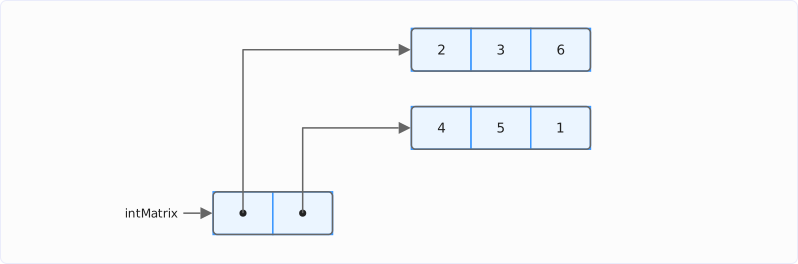
On the left, the outer array with two references; on the right, the two inner arrays with three values each. Three objects on the heap in total – not one.
That is why a single index gives you a whole row, because intMatrix[0], for example, is an int[]:
int[][] intMatrix = {{2, 3, 6}, {4, 5, 1}};

int[] row0 = intMatrix[0];
int[] row1 = intMatrix[1];
System.out.println("row0 = " + Arrays.toString(row0));
System.out.println("row1 = " + Arrays.toString(row1));

System.out.println("intMatrix[1][2] = " + intMatrix[1][2]);
row0 = [2, 3, 6]
row1 = [4, 5, 1]
intMatrix[1][2] = 1Which index is the row and which is the column? The first index selects the inner array, the second the position within it. That the inner array is a row and not a column is a convention – Java does not prescribe it, but all examples in this article and nearly all Java code follow it. Accordingly, intMatrix.length is the number of rows and intMatrix[0].length the number of columns.
How to Declare a 2D Array
You declare a two-dimensional array with two pairs of square brackets after the element type:
int[][] intMatrix;
String[][] stringMatrix;
You do not specify a size in the declaration – you set it only when you initialize the array.
Java also allows the brackets in C style after the variable name, and even mixed:
int intMatrix[][];
int[] mixedMatrix[];
All three notations produce the same type. I recommend the first one, with both pairs of square brackets at the type: the common Java style guides prefer it, and it is the only one in which the type int[][] reads as a whole.
How to Initialize a 2D Array
You can initialize a 2D array in three ways: with fixed values, with default values for a fixed size, or row by row.
Initializing With Values
The shortest form is the array literal with curly braces – one outer pair of braces and one inner pair per row:
int[][] intMatrix = {{2, 3, 6}, {4, 5, 1}};You get the same matrix with new followed by the type and two pairs of empty square brackets in front of the array literal. When you use new, you may also write var in front of the variable name, because the compiler can then read the type from the right-hand side:
int[][] intMatrix = new int[][] {{2, 3, 6}, {4, 5, 1}};
var sameMatrix = new int[][] {{2, 3, 6}, {4, 5, 1}};
You also need the new form when you split declaration and initialization into two statements, because the bare literal {{2, 3, 6}, {4, 5, 1}} is only allowed in a declaration:
int[][] intMatrix;
intMatrix = new int[][] {{2, 3, 6}, {4, 5, 1}};
Initializing With Default Values
If you know the size but not yet the values, you specify both dimensions in the brackets:
int[][] intMatrix = new int[2][3];This creates two rows of three elements each, all with the default value of the element type: 0 for int, 0.0 for double, false for boolean, and null for reference types such as String:
int[][] intMatrix = new int[2][3];
System.out.println("new int[2][3] = " + Arrays.deepToString(intMatrix));

String[][] stringMatrix = new String[2][3];
System.out.println("new String[2][3] = " + Arrays.deepToString(stringMatrix));
new int[2][3] = [[0, 0, 0], [0, 0, 0]]
new String[2][3] = [[null, null, null], [null, null, null]]I show the method Arrays.deepToString() in the section Printing a 2D Array. You then set the elements one by one:
intMatrix[0][0] = 2;
intMatrix[0][1] = 3;
intMatrix[0][2] = 6;
intMatrix[1][0] = 4;
intMatrix[1][1] = 5;
intMatrix[1][2] = 1;
By the way, new int[2][3] creates all three objects – the outer array and the two rows – with a single bytecode instruction, multianewarray. So you do not have to create the rows yourself.
Initializing Row by Row
You may also omit the second dimension. Then only the outer array is created, and its elements – that is, the rows – are null:
int[][] intMatrix = new int[2][];
System.out.println("new int[2][] = " + Arrays.deepToString(intMatrix));

intMatrix[0] = new int[] {2, 3, 6};
intMatrix[1] = new int[] {4, 5, 1};
System.out.println("rows assigned = " + Arrays.deepToString(intMatrix));
new int[2][] = [null, null]
rows assigned = [[2, 3, 6], [4, 5, 1]]You need this form when the rows are created later – for example, while reading a file – or when they are to have different lengths. More on this in the section Jagged Arrays: Rows of Different Lengths.
The article How to Initialize Arrays in Java shows how to initialize one-dimensional arrays, fill them, and create them from lists and streams.
Accessing Elements
Reading and writing work with two indexes, both starting at 0:
int[][] intMatrix = {{2, 3, 6}, {4, 5, 1}};

int value = intMatrix[1][2];
System.out.println("intMatrix[1][2] = " + value);

intMatrix[1][2] = 9;
System.out.println("intMatrix = " + Arrays.deepToString(intMatrix));
intMatrix[1][2] = 1
intMatrix = [[2, 3, 6], [4, 5, 9]]Since a row is an array of its own, you can hold the row in a variable of its own and read or write the row’s elements through that variable. A change is visible in the matrix, because both variables point to the same inner array:
int[] row1 = intMatrix[1];
row1[0] = 7;
System.out.println("intMatrix = " + Arrays.deepToString(intMatrix));
intMatrix = [[2, 3, 6], [7, 5, 9]]An index outside the valid range leads to an ArrayIndexOutOfBoundsException – for the row as well as for the column:
System.out.println(intMatrix[0][3]);Exception in thread "main" java.lang.ArrayIndexOutOfBoundsException: Index 3 out of bounds for length 3System.out.println(intMatrix[2][0]);Exception in thread "main" java.lang.ArrayIndexOutOfBoundsException: Index 2 out of bounds for length 2The message does not say which of the two indexes was wrong – but the length gives it away: length 3 is the length of a row, so the column was wrong; length 2 is the number of rows.
Number of Rows and Columns of a 2D Array
The number of rows is the length of the outer array; the number of columns is the length of a row:
int[][] intMatrix = {{2, 3, 6}, {4, 5, 1}};
int rows = intMatrix.length;
int columns = intMatrix[0].length;
System.out.println("rows = " + rows + ", columns = " + columns);
rows = 2, columns = 3intMatrix[0].length requires two things: that there is a row 0 and that this row is not null. For an array without rows, the access throws an ArrayIndexOutOfBoundsException:
int[][] intMatrix = new int[0][];
int columns = intMatrix[0].length;
Exception in thread "main" java.lang.ArrayIndexOutOfBoundsException: Index 0 out of bounds for length 0For an array created with new int[2][] without a second dimension and whose rows have not been assigned yet, the access throws a NullPointerException:
int[][] intMatrix = new int[2][];
int columns = intMatrix[0].length;
Exception in thread "main" java.lang.NullPointerException: Cannot read the array length because "intMatrix[0]" is nullSo check first that rows is greater than 0 and that intMatrix[0] is not null.
For a jagged array, the length of the first row says nothing about the lengths of the other rows. The article Array Length in Java shows how to evaluate the length when the rows differ in length, how much memory a 2D array takes up, and how large it can get.
Iterating Over a 2D Array
Two nested for loops traverse the matrix row by row – the outer loop over the rows, the inner loop over the columns of the current row:
for (int row = 0; row < intMatrix.length; row++) {
  for (int col = 0; col < intMatrix[row].length; col++) {
    System.out.println(
        "intMatrix[" + row + "][" + col + "] = " + intMatrix[row][col]);
  }
}
intMatrix[0][0] = 2
intMatrix[0][1] = 3
intMatrix[0][2] = 6
intMatrix[1][0] = 4
intMatrix[1][1] = 5
intMatrix[1][2] = 1Note the bound of the inner loop: intMatrix[row].length, not intMatrix[0].length – this way, the loop also runs over a jagged array without an exception.
If you do not need the indexes, two for-each loops are shorter. The outer one yields each row as an int[], the inner one each value:
int sum = 0;
for (int[] row : intMatrix) {
  for (int value : row) {
    sum += value;
  }
}
System.out.println("sum = " + sum);
sum = 21The same as a stream: Arrays.stream(intMatrix) returns a Stream<int[]>, and flatMapToInt(Arrays::stream) breaks each row down into its values. After that, you have sum(), max(), and all other operations of an IntStream at your disposal:
int sum = Arrays.stream(intMatrix)
    .flatMapToInt(Arrays::stream)
    .sum();
System.out.println("sum = " + sum);
sum = 21The order of the loops – rows first, then columns – is more than a convention. If you swap them, the inner loop runs across all rows, and for a 4,096 × 4,096 matrix, that takes 6.9 times as long. The measurement is in the section Memory and Performance: 2D Array or Flat Array?
Printing a 2D Array
System.out.println(intMatrix) prints only the type and the hash code of the outer array, and Arrays.toString() gets one level further – the method shows the references to the rows:
int[][] intMatrix = {{2, 3, 6}, {4, 5, 1}};
System.out.println(intMatrix);
System.out.println(Arrays.toString(intMatrix));
[[I@2b2fa4f7
[[I@7ad041f3, [I@251a69d7]Neither is usually what we want to print. That is why there is Arrays.deepToString() for nested arrays. The method descends into every level and prints the values:
System.out.println(Arrays.deepToString(intMatrix));[[2, 3, 6], [4, 5, 1]]If you want each row on a line of its own, combine a for-each loop with Arrays.toString():
for (int[] row : intMatrix) {
  System.out.println(Arrays.toString(row));
}
[2, 3, 6]
[4, 5, 1]For output in columns, as you would expect from a table, you format each value to a fixed width with printf(). The following example fills a 4 × 4 matrix with the products of the numbers 7 to 10 and prints it; %4d reserves four characters per number and pads with spaces on the left:
int[][] products = new int[4][4];
for (int i = 0; i < products.length; i++) {
  for (int j = 0; j < products[i].length; j++) {
    products[i][j] = (i + 7) * (j + 7);
  }
}

for (int[] row : products) {
  for (int value : row) {
    System.out.printf("%4d", value);
  }
  System.out.println();
}
49 56 63 70
56 64 72 80
63 72 81 90
70 80 90 100Filling a 2D Array
The methods Arrays.fill() and Arrays.setAll() work on one-dimensional arrays. For a 2D array, you have to call them for each row.
The following code creates a multiplication table. Arrays.setAll() calls the lambda for each index j of the row and writes the result into it; for this, the row number has to be in an effectively final variable:
int[][] products = new int[11][11];
for (int i = 0; i < products.length; i++) {
  int row = i; // the lambda needs an effectively final variable
  Arrays.setAll(products[i], j -> row * j);
}
System.out.println("products[7] = " + Arrays.toString(products[7]));
products[7] = [0, 7, 14, 21, 28, 35, 42, 49, 56, 63, 70]If all elements are to get the same value, Arrays.fill() per row is the shortest way:
for (int[] row : products) {
  Arrays.fill(row, -1);
}
It is tempting to apply Arrays.fill() to the outer array instead and pass it a ready-made row:
int[][] matrix = new int[3][];
Arrays.fill(matrix, new int[] {1, 2, 3, 4});
System.out.println("matrix = " + Arrays.deepToString(matrix));
matrix = [[1, 2, 3, 4], [1, 2, 3, 4], [1, 2, 3, 4]]The output looks right. But new int[] {1, 2, 3, 4} is evaluated only once, and Arrays.fill() writes the same reference into all three rows:
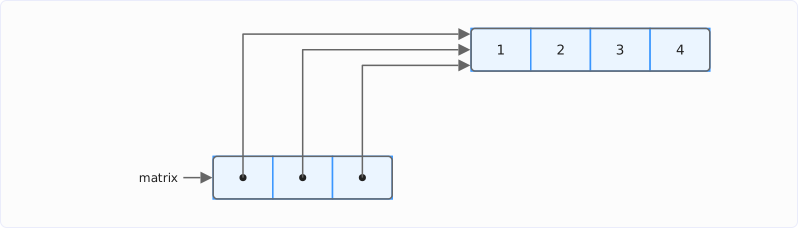
All three references of the outer array point to the one inner array. If you now change a single element, it changes in every row:
matrix[1][1] = 99;
System.out.println("matrix = " + Arrays.deepToString(matrix));
matrix = [[1, 99, 3, 4], [1, 99, 3, 4], [1, 99, 3, 4]]The correct way is Arrays.setAll() on the outer array, because it calls the lambda again for each row, and the lambda creates a new array each time:
Arrays.setAll(matrix, _ -> new int[] {1, 2, 3, 4});
matrix[1][1] = 99;
System.out.println("matrix = " + Arrays.deepToString(matrix));
matrix = [[1, 2, 3, 4], [1, 99, 3, 4], [1, 2, 3, 4]]The 99 is now in one row only.
Jagged Arrays: Rows of Different Lengths
Because each row is an array of its own, the rows do not have to be the same length. An array with rows of different lengths is called a jagged array, and you can even write it as an array literal:
int[][] twoDimensionalArray = {{2, 3, 6}, {4, 5, 1, 9, 7}};In memory, it looks like this – two inner arrays with three and five elements:
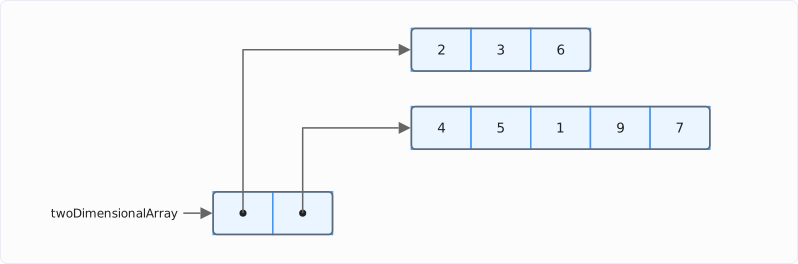
Jagged arrays are well suited for triangular shapes. Pascal’s triangle, for example, has exactly n + 1 entries in row n; with new int[4][], you create only the outer array and give each row its own length:
int[][] triangle = new int[4][];
for (int row = 0; row < triangle.length; row++) {
  triangle[row] = new int[row + 1];
  triangle[row][0] = 1;
  triangle[row][row] = 1;
  for (int col = 1; col < row; col++) {
    triangle[row][col] = triangle[row - 1][col - 1] + triangle[row - 1][col];
  }
}
System.out.println(Arrays.deepToString(triangle));
[[1], [1, 1], [1, 2, 1], [1, 3, 3, 1]]Each row has as many elements as it needs – a 4 × 4 matrix would have wasted six elements. Code that uses intMatrix[0].length as the number of columns, on the other hand, is wrong for a jagged array; the inner loop has to query the length of each row individually.
Copying a 2D Array
clone() copies an array – but only one level deep. For a 2D array, it creates a new outer array whose references point to the same rows as those of the cloned array:
int[][] original = {{2, 3, 6}, {4, 5, 1}};

int[][] copy = original.clone();
copy[0][0] = 99;
System.out.println("original = " + Arrays.deepToString(original));
System.out.println("copy     = " + Arrays.deepToString(copy));
System.out.println("same row: " + (original[0] == copy[0]));
original = [[99, 3, 6], [4, 5, 1]]
copy = [[99, 3, 6], [4, 5, 1]]
same row: trueThe change to the copy is also visible in the original, because original[0] and copy[0] are the same object:
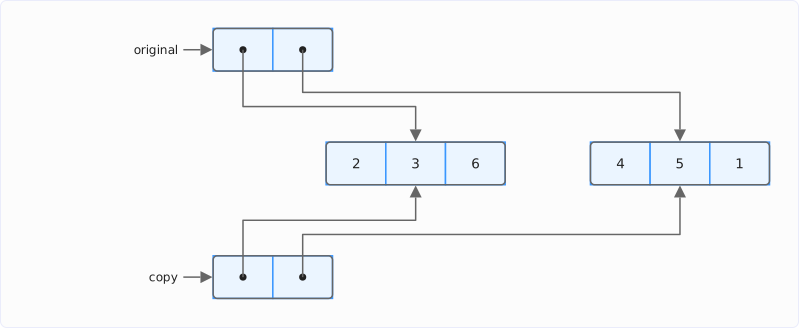
An independent copy – a deep copy – clones each row individually:
int[][] deepCopy = new int[original.length][];
for (int row = 0; row < original.length; row++) {
  deepCopy[row] = original[row].clone();
}
deepCopy[0][0] = 42;
System.out.println("original = " + Arrays.deepToString(original));
System.out.println("deepCopy = " + Arrays.deepToString(deepCopy));
original = [[99, 3, 6], [4, 5, 1]]
deepCopy = [[42, 3, 6], [4, 5, 1]]This way, the change to the copy is no longer visible in the original.
With a stream, you can create a deep copy in just one statement: map(int[]::clone) clones each row, and toArray(int[][]::new) collects the clones in a new outer array:
int[][] streamCopy = Arrays.stream(original)
    .map(int[]::clone)
    .toArray(int[][]::new);
Comparing has the same pitfall as copying. Arrays.equals() compares the elements of the outer array – that is, references to the rows – so two separately created matrices with equal values in their rows are not equal. Only Arrays.deepEquals() compares the values in the rows, and Arrays.deepHashCode() is the matching counterpart for the hash code:
int[][] a = {{1, 2}, {3, 4}};
int[][] b = {{1, 2}, {3, 4}};
System.out.println("Arrays.equals(a, b)     = " + Arrays.equals(a, b));
System.out.println("Arrays.deepEquals(a, b) = " + Arrays.deepEquals(a, b));
Arrays.equals(a, b) = false
Arrays.deepEquals(a, b) = trueThe other copy methods – System.arraycopy(), Arrays.copyOf(), and Arrays.copyOfRange() – also copy only one level. The article How to Initialize Arrays in Java shows how they differ.
Sorting a 2D Array
Arrays.sort(), too, works on only one level. For a 2D array, you have two sensible options: sort each row on its own, or reorder the rows by one of their columns.
You can sort each row on its own in a for-each loop, for example:
int[][] intMatrix = {{2, 3, 6}, {4, 5, 1}};
for (int[] row : intMatrix) {
  Arrays.sort(row);
}
System.out.println(Arrays.deepToString(intMatrix));
[[2, 3, 6], [1, 4, 5]]To reorder the rows, you pass a Comparator to Arrays.sort() along with the outer array. The following example sorts points whose first column is the x-coordinate by that coordinate – and then in descending order by the second column:
int[][] points = {{3, 7}, {1, 9}, {2, 4}};

Arrays.sort(points, Comparator.comparingInt(point -> point[0]));
System.out.println(Arrays.deepToString(points));

Arrays.sort(points, Comparator.comparingInt((int[] point) -> point[1]).reversed());
System.out.println(Arrays.deepToString(points));
[[1, 9], [2, 4], [3, 7]]
[[1, 9], [3, 7], [2, 4]]In the second call, the lambda parameter carries the type int[], because without it, the compiler cannot infer the type as soon as reversed() follows comparingInt().
The article Sorting in Java describes the sorting algorithms behind Arrays.sort() and the alternatives for lists and streams.
3D Arrays and More Dimensions
The principle continues: an int[][][] is an array of int[][], that is, an array of arrays of arrays. Each additional pair of square brackets adds a level of references:
int[][][] cube = new int[2][3][4];
cube[1][2][3] = 42;
System.out.println(Arrays.deepToString(cube));
System.out.println(cube.length + " x " + cube[0].length + " x " + cube[0][0].length);
[[[0, 0, 0, 0], [0, 0, 0, 0], [0, 0, 0, 0]], [[0, 0, 0, 0], [0, 0, 0, 0], [0, 0, 0, 42]]]
2 x 3 x 4Arrays.deepToString() and Arrays.deepEquals() descend to any depth, and the literal nests further as well: {{{1, 2}, {3, 4}}, {{5, 6}, {7, 8}}} is a 2 × 2 × 2 array.
If you know the number of dimensions only at runtime, Array.newInstance() from java.lang.reflect helps. The method takes the element type and any number of lengths and returns an Object that you cast to the array type:
int[][] viaReflection = (int[][]) Array.newInstance(int.class, 2, 3);
System.out.println(Arrays.deepToString(viaReflection));
[[0, 0, 0], [0, 0, 0]]In practice, it usually stays at two, rarely three dimensions. If you need more, you are usually dealing with a data structure that is easier to read as a class with meaningful field names than as an int[][][][].
Memory and Performance: 2D Array or Flat Array?
Instead of as a 2D array, you can also store a matrix as a flat array: as a single one-dimensional int[r * c] for r rows and c columns, in which the rows are stored one after the other. The element in row row and column col is then at index row * c + col:
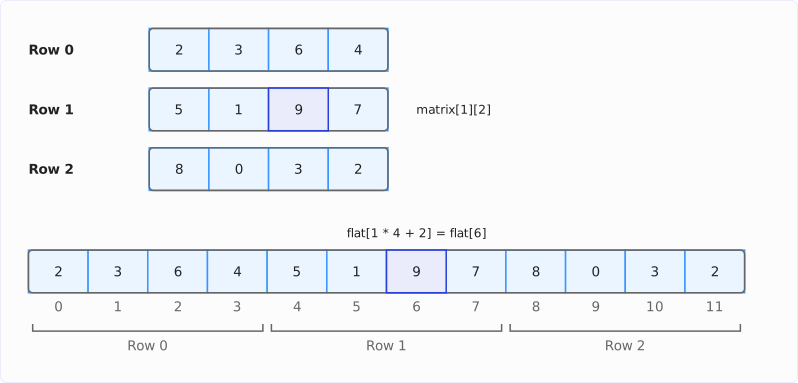
At the top, the matrix with three rows; below it, the flat array with the same twelve values. The highlighted element is in row 1, column 2 – in the flat array, at index 1 · 4 + 2 = 6.
The following code copies the matrix row by row into a flat array and reads the element in row 1, column 2 both ways:
int[][] matrix = {{2, 3, 6, 4}, {5, 1, 9, 7}, {8, 0, 3, 2}};
int rows = matrix.length;
int columns = matrix[0].length;

int[] flat = new int[rows * columns];
for (int row = 0; row < rows; row++) {
  for (int col = 0; col < columns; col++) {
    flat[row * columns + col] = matrix[row][col];
  }
}
System.out.println("flat = " + Arrays.toString(flat));
System.out.println("matrix[1][2] = " + matrix[1][2]);
System.out.println("flat[1 * 4 + 2] = " + flat[1 * columns + 2]);
flat = [2, 3, 6, 4, 5, 1, 9, 7, 8, 0, 3, 2]
matrix[1][2] = 9
flat[1 * 4 + 2] = 9A 2D array with n rows consists of n + 1 objects, each with its own header and length field. An int[2][3] takes up 72 bytes on the heap, a flat int[6] with the same values 40 bytes – the article Array Length in Java shows how these numbers come about. With long rows, on the other hand, the difference no longer matters: as a 2D array, a 4,096 × 4,096 matrix takes up 80 KB more than its 64 MB of data.
How you traverse the matrix matters more than the memory. Each row is stored in one piece as an array; if you read it row by row, you get the next values from the CPU cache line that the first access loaded. If you read column by column – the outer loop over the columns and the inner loop over the rows – you jump to a different array with each access and thus to a different cache line.
I measured how big the difference is with JMH. The benchmark computes the sum of all elements of a square int matrix – row by row and column by column, as a 2D array and as a flat array. The table shows the time per traversal in microseconds; the flat array is listed only row by row – the reason follows after the table.
| Rows × columns | 2D, row by row | 2D, column by column | Flat, row by row |
|---|---|---|---|
| 64 × 64 (16 KB) | 0.32 µs | 1.08 µs | 0.35 µs |
| 1,024 × 1,024 (4 MB) | 184 µs | 526 µs | 181 µs |
| 4,096 × 4,096 (64 MB) | 3,992 µs | 27,594 µs | 3,635 µs |
The table shows two results:
- Row by row vs. column by column: Column by column, the traversal takes 3.4 times as long as row by row for the small matrix and 6.9 times as long for the large one: 27.6 instead of 4.0 milliseconds. The 64 MB are four times the size of the M5 Pro’s 16 MB L2 cache, and the column-wise loop jumps to a different row with each access – and thus to a different cache line, of which it initially uses only 4 bytes.
- Flat array vs. 2D array: Row by row, the flat array is 9% faster than the 2D array for the large matrix, equally fast for the medium one, and 10% slower for the small one – there, the multiplication for the index costs more than the saved row access gains.
I measured the flat array column by column as well. With 4,096 columns, the traversal takes 51.5 ms, almost twice as long as with the 2D array. With 4,100 columns, it takes only 21.6 ms – even though the elements of a column are then even farther apart.
The value for 4,096 columns shows a property of the cache, not of the array, and is therefore missing from the table. The following box explains how the cache causes it.
My recommendation: use the 2D array. It is readable, you can take out individual rows, and in the measurement, row-by-row traversal is within 10% of the flat array. The flat array pays off if you hold millions of small matrices – there, you save the row headers of every matrix – or if you pass the data as one block to a library or a ByteBuffer anyway. In both cases, the index calculation belongs in a class with get(row, col) and set(row, col, value) so that it is in one place only.
Common Mistakes
- Loops in the wrong order. The inner loop runs over the rows instead of the columns; at 64 MB, the traversal then takes 6.9 times as long.
Arrays.fill()with one row. All rows point to the same inner array; the correct way isArrays.setAll()with a lambda that creates a new array for each row.clone()as a deep copy. The copy shares the rows with the original; clone each row individually instead.Arrays.equals()for two matrices. It compares the references to the rows, not their values; for the values, you needArrays.deepEquals().Arrays.toString()for printing. The result is row references like[I@7ad041f3; for the values, useArrays.deepToString().intMatrix[0].lengthfor a jagged array. The length of the first row does not apply to the other rows; the inner loop has to query the respective row length withintMatrix[row].length.
Summary
A 2D array in Java is an array of arrays: the outer array holds one reference per row, and each row is a one-dimensional array of its own. You declare a 2D array with int[][] and initialize it with a literal such as {{2, 3, 6}, {4, 5, 1}}, with new int[2][3] for default values, or with new int[2][] and one assignment per row. intMatrix.length is the number of rows, intMatrix[row].length the length of a row – and that may differ from row to row.
The methods of the Arrays class work on only one level, and so does clone(): you have to call fill(), setAll(), sort(), and clone() per row, and for printing and comparing, you use deepToString() and deepEquals(). Traverse the matrix row by row; for a 4,096 × 4,096 matrix, the column-wise loop takes 27.6 instead of 4.0 milliseconds.
My recommendations:
- Put the brackets at the type:
int[][] intMatrix. - Let the outer loop run over the rows and the inner loop over the columns, with
intMatrix[row].lengthas the bound. - Fill the rows with
Arrays.setAll()or a loop – never withArrays.fill()on the outer array. - Clone each row individually when you need an independent copy.
- Use a flat array only for millions of small matrices or for data that is passed on as one block – and then encapsulate the index calculation.
The article How to Initialize Arrays in Java shows how to create, fill, and copy one-dimensional arrays; the article Array Length in Java shows how much memory an array takes up and how large it can get. One algorithm that uses a matrix as a 2D array is the Floyd-Warshall algorithm – with a distance matrix as an int[][].
If you enjoyed this article, I’d appreciate a review on my ProvenExpert profile.