
A parallel stream processes the elements of a stream pipeline on several threads at the same time. All it takes is one word in your code – stream() becomes parallelStream(), or you append parallel() to an existing stream –, and the Java Stream API distributes the work across the cores of your machine.
This is how you count in parallel how many of the eleven books in the sample library were published before 1850:
long before1850 = BOOKS.parallelStream()
    .filter(book -> book.year() < 1850)
.count();2Parallel streams have existed since Java 8. The promise sounds simple: one word more, several times the speed. With eleven books, however, you get the opposite, because splitting and combining cost more than the work itself. I have measured where the break-even point lies – on a Mac with 18 cores.
In this article, you will find out
- how a parallel stream splits its elements and who processes them,
- how many threads take part and how to change their number,
- from which number of elements and which amount of work per element
parallel()pays off – with measurements, - which sources split well and which do not,
- what happens to the order of the elements,
- which rules your code must follow for the result to be correct,
- why blocking calls do not belong in a parallel stream – and what to use instead,
- which mistakes to avoid.
The Examples in This Article
The examples use the data model of the article on Java Streams – an enum Genre, a record Book, and a small library of eleven classics:
public enum Genre {
  NOVEL,
  GOTHIC,
  ADVENTURE,
  FANTASY,
  SCIENCE_FICTION
}

public record Book(String title, String author, int year, Genre genre) {}
public class Library {
public static final List<Book> BOOKS = List.of(
new Book("Pride and Prejudice", "Jane Austen", 1813, NOVEL),
new Book("Frankenstein", "Mary Shelley", 1818, GOTHIC),
new Book("Moby-Dick", "Herman Melville", 1851, ADVENTURE),
new Book("From the Earth to the Moon", "Jules Verne", 1865, SCIENCE_FICTION),
new Book("Alice's Adventures in Wonderland", "Lewis Carroll", 1865, FANTASY),
new Book("Around the World in Eighty Days", "Jules Verne", 1873, ADVENTURE),
new Book("Treasure Island", "Robert Louis Stevenson", 1883, ADVENTURE),
new Book("Kidnapped", "Robert Louis Stevenson", 1886, ADVENTURE),
new Book("The Time Machine", "H. G. Wells", 1895, SCIENCE_FICTION),
new Book("Dracula", "Bram Stoker", 1897, GOTHIC),
new Book("The War of the Worlds", "H. G. Wells", 1898, SCIENCE_FICTION));
}Eleven books are enough to show what a parallel stream does differently – which thread processes which book and what happens to the order. They are not enough to show when it is faster. For the measurements, I therefore use ranges from IntStream.range() and lists of up to one million elements, and I control the work per element with a function that executes a configurable number of work steps.
You can find the complete code of all examples in the GitHub repository java-streams-examples, in the package eu.happycoders.parallel; the benchmarks and their results are in the same repository, in the directory benchmarks/parallel-streams.
Creating a Parallel Stream
There are two ways to get a parallel stream. Collection.parallelStream() creates it directly from a collection:
BOOKS.parallelStream()
    .map(Book::title)
    .forEach(System.out::println);
BaseStream.parallel() turns an existing stream into a parallel one – including a stream that does not come from a collection, for example from LongStream.rangeClosed() or Files.lines(). The following listing adds up the numbers from 1 to 1,000,000 in parallel:
long sum = LongStream.rangeClosed(1, 1_000_000)
    .parallel()
    .sum();
System.out.println(sum);500000500000An IntStream would return a wrong result here, by the way: the sum does not fit into an int, and IntStream.sum() overflows silently.
The counterpart is BaseStream.sequential(), and BaseStream.isParallel() tells you which mode a stream is currently in.
Whether a stream runs in parallel is a property of the whole pipeline, not of a section of it. You cannot run the first half of the operations in parallel and the second half sequentially. The last call of parallel() or sequential() before the terminal operation decides for all of them:
boolean parallel = BOOKS.stream()
    .parallel()
    .filter(book -> book.year() > 1850)
    .sequential()
    .map(Book::title)
    .parallel()
.isParallel();trueHad the pipeline ended with sequential(), it would run completely sequentially – including filter(), which sits between the two parallel() calls.
How Does a Parallel Stream Work?
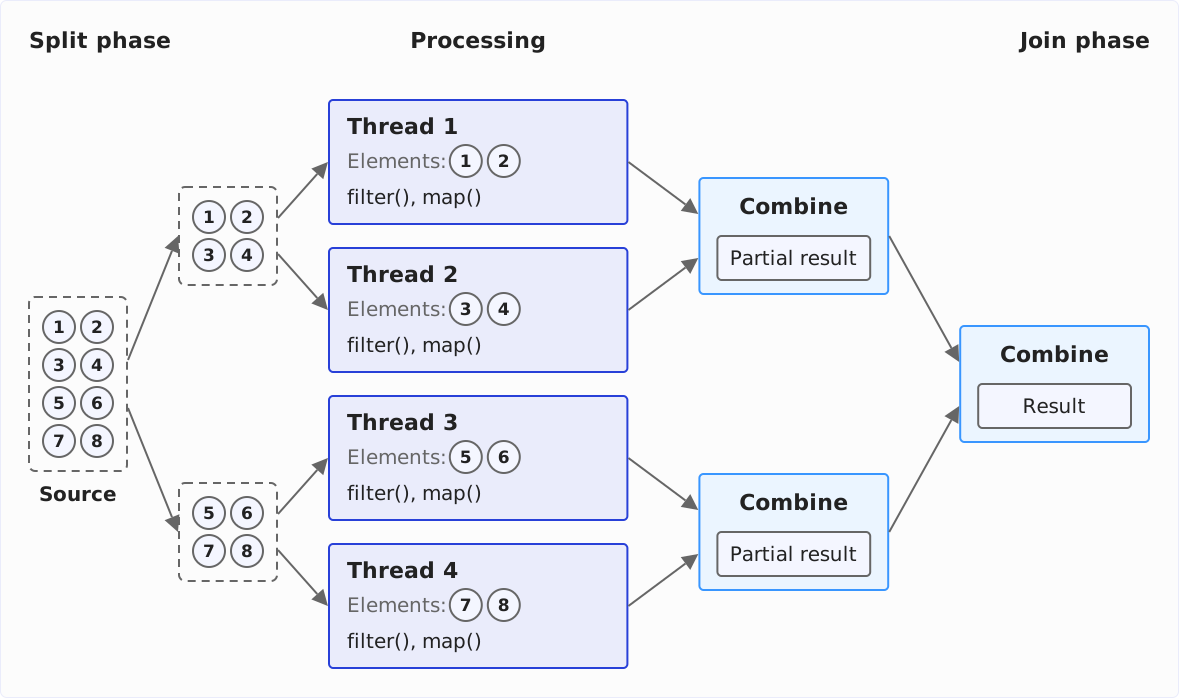
A parallel stream works in three phases: it splits the source into pieces, processes the pieces on the threads of a thread pool, and combines the partial results. The pipeline itself – which operations in which order – stays the same as in the sequential stream.
The following diagram shows the three phases for a list of eight elements and four threads: the source is halved twice, each quarter runs through the same pipeline on a thread of its own, and the four partial results are combined in pairs into one result.
Split Phase: The Spliterator Splits the Source
To split the source, the stream asks it for its spliterator – the interface java.util.Spliterator is the counterpart of Iterator for parallel processing. Its method trySplit() splits off a part of the elements and returns a second spliterator for it; estimateSize() estimates how many elements a spliterator still holds.
An ArrayList, for example, halves itself on every call. This is what the first five calls of trySplit() look like for one million elements – each line is the size of the part split off, the last one the number of elements still left in the original spliterator:
List<Integer> numbers =
    new ArrayList<>(IntStream.range(0, 1_000_000).boxed().toList());
Spliterator<Integer> spliterator = numbers.spliterator();
for (int i = 0; i < 5; i++) {
  Spliterator<Integer> part = spliterator.trySplit();
  System.out.println(part.estimateSize());
}
System.out.println("remaining: " + spliterator.estimateSize());
500000
250000
125000
62500
31250
remaining: 31250How often the stream splits depends on a target size: it keeps splitting until a piece has at most number of elements ÷ (4 × parallelism) elements. This produces at least four times as many pieces as there are worker threads. The next section shows why so many.
With 17 worker threads (more on that shortly) and one million elements, this formula allows at most 1,000,000 ÷ (4 × 17) = 14,705 elements per piece – the stream uses integer division. The ArrayList from the example, however, always splits in the middle. With 64 pieces, each would have 15,625 elements, more than 14,705 – so the stream splits once more. In the end, the ArrayList arrives at 128 pieces of 7,812 or 7,813 elements each, a good seven times as many as there are worker threads.
This target size comes from AbstractTask.suggestTargetSize() in the JDK and cannot be configured.
Processing: The Common Pool and Work Stealing
The pieces are processed by the common pool – the one ForkJoinPool instance that all parallel streams and all CompletableFuture calls without an executor of their own share within a JVM. You get it with ForkJoinPool.commonPool().
Why so many pieces? Not every piece finishes equally fast – the work per element can vary, and a core may have to do something else in between. If every thread got exactly one large piece, the stream would only be done when the slowest thread is done, and all others would wait for it. That is why the stream splits more finely than there are threads. There is no central distributor: a thread splits off a piece from the spliterator with trySplit(), puts one of the two halves into its own queue, and keeps splitting the other – until that half has reached the target size, and then processes it.
A ForkJoinPool does this with work stealing: once a thread has worked through its queue, it takes a piece from the queue of another thread – it “steals” it. So all cores stay busy to the end, as long as there is a piece left anywhere.
You can see which thread processes which book if you print the thread name in forEach():
BOOKS.parallelStream()
    .forEach(book -> System.out.println(
        Thread.currentThread().getName() + ": " + book.title()));
ForkJoinPool.commonPool-worker-10: Kidnapped
ForkJoinPool.commonPool-worker-7: Around the World in Eighty Days
ForkJoinPool.commonPool-worker-8: The War of the Worlds
ForkJoinPool.commonPool-worker-1: Moby-Dick
ForkJoinPool.commonPool-worker-3: Pride and Prejudice
ForkJoinPool.commonPool-worker-9: From the Earth to the Moon
ForkJoinPool.commonPool-worker-5: Dracula
main: Treasure Island
ForkJoinPool.commonPool-worker-2: Frankenstein
ForkJoinPool.commonPool-worker-6: The Time Machine
ForkJoinPool.commonPool-worker-4: Alice's Adventures in WonderlandTwo things stand out. First, the stream has distributed the eleven books over eleven pieces – with so few elements, the target size is 1. Second, the main thread takes part: the thread that calls the terminal operation does not just wait for the result, it processes pieces itself.
Join Phase: Combining the Partial Results
How the partial results are combined depends on the terminal operation. count() and sum() add up the partial results. reduce() combines them with the combiner you pass – or with the accumulator if the elements and the result have the same type. collect() calls the combiner of the collector, which merges two result containers into one: Collectors.toList() appends the second list to the first, Collectors.toMap() inserts the entries of one map into the other.
The combining runs in pairs, in the reverse order of the splitting: the partial results of two halves become one, then the two at the next level up – until one is left. In the reduce() example in the article on Stream.reduce(), you can follow every single call of the combiner.
How Many Threads Take Part?
The number of worker threads in the common pool is the number of available processors minus one:
System.out.println(Runtime.getRuntime().availableProcessors());
System.out.println(ForkJoinPool.getCommonPoolParallelism());
18
17The minus one is intentional: the calling thread takes part, so together there are exactly as many threads as cores. The following program counts on how many different threads the elements of a parallel stream arrive:
Set<String> threadNames = ConcurrentHashMap.newKeySet();
IntStream.range(0, 1_000_000)
    .parallel()
    .forEach(i -> threadNames.add(Thread.currentThread().getName()));
System.out.println(threadNames.size());18And on a machine with only one processor? There, the common pool would end up with zero worker threads – which is why it always creates at least one. With the VM option -XX:ActiveProcessorCount=1, which tells the JVM that it has a single processor, the first program prints 1 twice and the second prints 2: one worker thread and the calling thread share the one core.
You change the size of the common pool with the system property java.util.concurrent.ForkJoinPool.common.parallelism. With -Djava.util.concurrent.ForkJoinPool.common.parallelism=4, for example, the program that counts the threads prints 5 – four workers plus the calling thread. The property applies to the whole JVM; you cannot set the number for a single stream. What you can do instead is shown in the section on a custom ForkJoinPool.
Parallel Streams in a Container
Since Java 10, availableProcessors() in a container counts not the cores of the host but the CPU limit of the container (JDK-8146115). A container with a limit of two CPUs therefore gets a common pool with one worker thread – no matter how many cores the host has. A parallel stream runs on two threads there, the worker and the caller.
When Is a Parallel Stream Faster?
On top of the actual work, a parallel stream costs the splitting, the distribution of the pieces to the threads, and the combining of the partial results. It only pays off if the computing time it saves exceeds these costs.
Doug Lea, the author of the ForkJoinPool, set up a rule of thumb for this in his Stream Parallel Guidance: the product of the number of elements N and the work per element Q should be at least 10,000. I have measured whether the rule still holds on today’s hardware.
Number of Elements Times Work per Element
The first series uses the source that splits best, IntStream.range(), and varies two parameters: the number of elements from 100 to one million and the work per element from zero to 1,000 work steps. The following listing is the parallel benchmark; the sequential one is the same without parallel():
@Benchmark
public long parallel() {
  return IntStream.range(0, size)
      .parallel()
      .mapToLong(this::work)
      .sum();
}

private long work(int i) {
  Blackhole.consumeCPU(tokens);
  return i;
}
mapToLong() calls the method work() for each element, and work() generates the work per element: Blackhole.consumeCPU() from JMH executes as many work steps as tokens specifies. One work step is one iteration of a loop with one multiplication, three additions, and one AND operation. JMH sets the fields size and tokens anew for each cell of the following table.
Sequentially, one element costs 2 nanoseconds (ns) on the M5 Pro without work steps, 5 ns with 10 work steps, 127 ns with 100 work steps, and 1,534 ns with 1,000 work steps. The 2 ns without work steps are what the stream does per element anyway: fetch the next element from the range, call work(), and add up the result.
The following table shows by what factor the parallel stream is faster than the sequential one; a value below 1 means that it is slower.
| Elements | 0 steps | 10 steps | 100 steps | 1,000 steps |
|---|---|---|---|---|
| 100 | 0.01 | 0.02 | 0.39 | 2.87 |
| 1,000 | 0.06 | 0.15 | 2.64 | 8.28 |
| 10,000 | 0.60 | 1.44 | 7.48 | 14.54 |
| 100,000 | 3.07 | 4.36 | 14.11 | 15.15 |
| 1,000,000 | 8.21 | 9.49 | 14.66 | 15.05 |
The table shows three things.
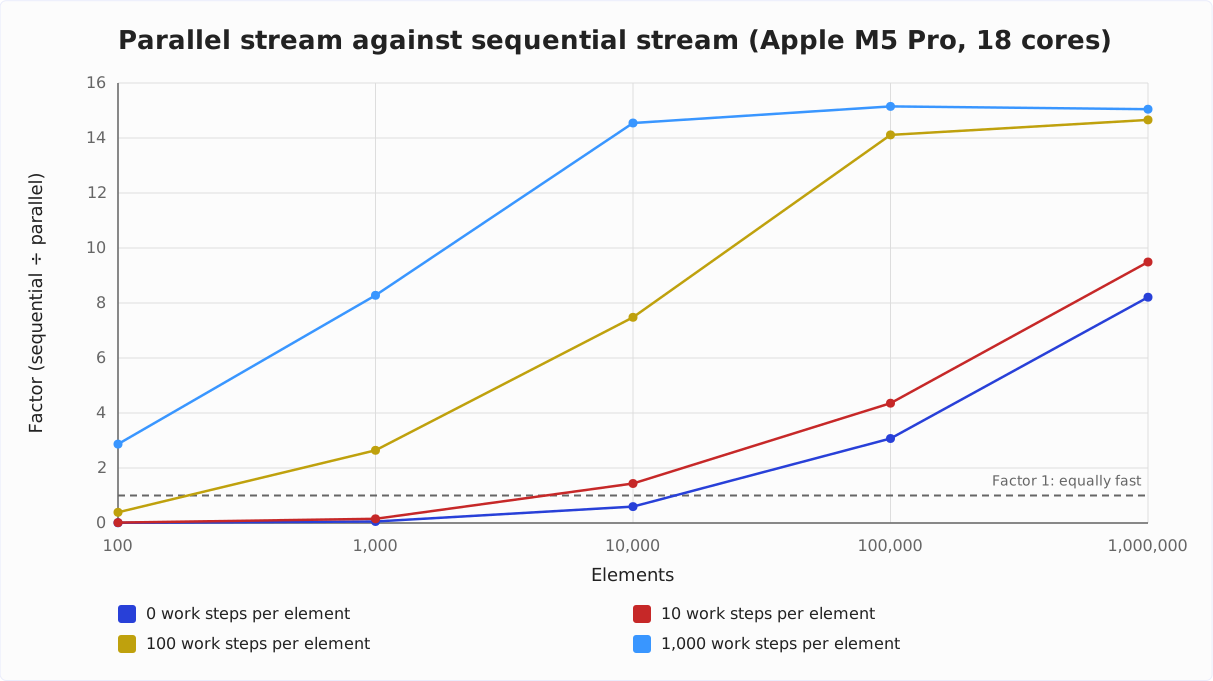
First, a parallel stream has a fixed base price: with 100 to 10,000 elements and little work, it takes 32 to 35 microseconds, no matter how little there is to do. The sequential stream is done with 100 elements without work after 0.2 microseconds.
Second, the running time of the sequential stream decides whether parallel() pays off. Where it needed at most 19 microseconds, the parallel stream was slower; where it needed 50 microseconds or more, the parallel one was faster – in every cell of the table. There is no data point in between. This fits Doug Lea’s rule of thumb: for a trivial function, he puts the threshold at 10,000 elements, and without work per element, the break-even point on the M5 Pro lies between 10,000 elements (factor 0.60) and 100,000 elements (factor 3.07).
Third, on 18 cores, the speedup tops out at around factor 15. From 10,000 elements with 1,000 work steps or 100,000 elements with 100 work steps on, the factor lies between 14.1 and 15.2 – more elements or more work hardly change it.
The following diagram shows the same factors as lines – one line per amount of work, with the number of elements on the x-axis. The dashed line at factor 1 is the break-even point: above it, the parallel stream is faster, below it, slower.
How Well the Source Splits
The second series keeps the pipeline fixed – one million elements, 100 work steps per element, sum() – and exchanges the source. First, a look at how the sources split.
An ArrayList knows its size and halves itself with every trySplit(), as shown above. A LinkedList knows its size as well, but its spliterator cannot jump to the middle – it has to count the elements from the start. That is why it splits off 1,024 elements on the first call, 2,048 on the second, then 3,072, and so on:
List<Integer> numbers =
    new LinkedList<>(IntStream.range(0, 1_000_000).boxed().toList());
Spliterator<Integer> spliterator = numbers.spliterator();
for (int i = 0; i < 5; i++) {
  Spliterator<Integer> part = spliterator.trySplit();
  System.out.println(part.estimateSize());
}
System.out.println("remaining: " + spliterator.estimateSize());
1024
2048
3072
4096
5120
remaining: 984640After five calls, only 15,360 elements have been split off, and 984,640 are still in the original spliterator. The sources based on an iterator use the same procedure – blocks that grow by 1,024 elements each –, for example Stream.iterate() and BufferedReader.lines().
A HashSet and a TreeSet halve themselves like an ArrayList: the HashSet splits its internal table, the TreeSet its tree. Neither of them knows, however, how many elements are in a half – the estimate is half of the total size, and the actual number can differ from it.
With files, it depends on how you read them. BufferedReader.lines() is based on an iterator and splits in growing blocks as with the LinkedList. Files.lines(), on the other hand, halves the file itself if three conditions are met: the file is on the default file system, it is encoded in UTF-8, ISO-8859-1, or US-ASCII, and it is at most 2,147,483,647 bytes (Integer.MAX_VALUE) in size. Then Files.lines() splits the byte range of the file in the middle and moves the cut to the nearest line break. If one of the three conditions is not met, it falls back to BufferedReader.lines().
The following table shows, for each source, the running time of the sequential and the parallel stream and the factor by which the parallel one is faster:
| Source | Sequential | Parallel | Factor |
|---|---|---|---|
ArrayList | 126.6 ms | 8.59 ms | 14.7 |
HashSet | 127.0 ms | 9.88 ms | 12.9 |
TreeSet | 126.1 ms | 15.9 ms | 7.92 |
LinkedList | 125.3 ms | 9.33 ms | 13.4 |
Stream.iterate() | 125.6 ms | 10.4 ms | 12.0 |
BufferedReader.lines() | 135.1 ms | 11.9 ms | 11.4 |
With 100 work steps per element, the growing blocks hardly matter: the LinkedList reaches factor 13.4, Stream.iterate() 12.0, and BufferedReader.lines() 11.4 – against 14.7 for the ArrayList.
The TreeSet does worst with factor 7.92, even though it halves itself. Its spliterator splits the tree at the root of the respective subtree and estimates each half at half of the previous estimate – but the red-black tree is not exactly balanced. If you split the TreeSet the way the stream does, the largest of the 128 pieces, with 82,497 elements, is more than ten times as large as the average of 7,813 elements. This one piece alone takes about 10 milliseconds, and at the end, the whole stream waits for its thread.
Operations That Depend on the Order
Some operations need to know the order of the elements – and in a parallel stream, the order costs coordination between the threads. findFirst() must return the first matching element in the order of the source, even if another thread found a later one long ago. limit() must return the first n elements, not just any n. sorted() and distinct() must merge all partial results before they can pass on an element.
The third series compares these operations with their counterparts that do not need an order: findAny() instead of findFirst(), and limit() on a stream whose order unordered() has removed. The source is an ArrayList with one million elements, 100 work steps per element. findFirst() and findAny() search for an element from the second half – each of the 500,000 elements from the middle on matches. sorted() runs once on the numbers in their sorted order and once on the same numbers in shuffled order, there also without work per element. distinct() runs once with 1,000 and once with 100,000 different values.
| Operation | Sequential | Parallel | Factor |
|---|---|---|---|
findFirst() | 62.6 ms | 4.71 ms | 13.3 |
findAny() | 62.6 ms | 0.11 ms | 568 |
limit(1000) | 0.13 ms | 0.38 ms | 0.34 |
unordered().limit(1000) | 0.13 ms | 0.10 ms | 1.27 |
forEachOrdered() | 127.0 ms | 10.8 ms | 11.8 |
sorted(), sorted | 128.7 ms | 9.26 ms | 13.9 |
sorted(), shuffled | 248.8 ms | 18.5 ms | 13.5 |
sorted(), shuffled, no work | 122.1 ms | 10.2 ms | 12.0 |
distinct(), 1,000 values | 127.8 ms | 8.88 ms | 14.4 |
distinct(), 100,000 values | 130.1 ms | 13.5 ms | 9.66 |
With findFirst() and findAny(), the parallel stream wins both times, but for different reasons. Sequentially, both methods first work through the 500,000 elements of the first half. In parallel, findAny() returns the first hit of any thread – and a thread whose piece lies in the second half hits with its very first element. findFirst(), on the other hand, has to wait until it is certain that there is no hit in the first half; but 18 threads work through that half together, 13 times as fast as one.
With limit(1000), the picture is reversed: the sequential stream stops after 1,000 elements. The parallel one takes almost three times as long with the encounter order – after unordered(), it is slightly faster than the sequential one.
forEachOrdered(), sorted(), and distinct() with 1,000 values reach factors between 11.8 and 14.4 – close to the 14.7 of the ArrayList from the previous series, whose pipeline only sums up. With work per element, the reason is the same for all three: the expensive work is in the filter() before them, and the threads do it in parallel. What comes after it differs:
forEachOrdered()lets every piece process its part of the pipeline right away. If a piece is done before the pieces preceding it, it buffers its results. Only the action itself runs in the order of the source – here, adding to a list.sorted()collects the elements in parallel into an array and then sorts it withArrays.parallelSort(). If the numbers are already sorted, sorting costs hardly anything. Shuffled, it takes 122 milliseconds sequentially, almost as much as the 100 work steps per element – but the sorting runs in parallel too: without work per element, the parallel stream is 12.0 times as fast, with work 13.5 times.- In an ordered stream,
distinct()collects every piece into aLinkedHashSetof its own and then merges the sets in pairs. With 1,000 different values (i % 1000), the sets stay small, and merging costs little. With 100,000 different values (i % 100_000), they become large, and the factor drops from 14.4 to 9.66.
The Cost of Combining in Collectors
The fourth series measures what combining the partial results costs. To do this, the same source – an ArrayList with one million Integer elements – runs through each collector twice: once without work per element, so that the stream only collects, and once with 100 work steps per element.
In the join phase, the candidates in the table combine their partial results as follows:
Stream.toList()is in the table for comparison; it is not a collector itself. It writes the partial results into a shared array; if the stream knows the number of elements in advance, it writes each piece directly to its place.Collectors.toSet()inserts the elements of the smallerHashSetinto the larger one, one by one.Collectors.toMap()inserts the entries of oneHashMapinto the other one by one, each time with a hash value and a check for a duplicate key.Collectors.groupingBy()inserts the entries of one map into the other in the same way; if a key is in both, it appends the second list to the first.Collectors.toConcurrentMap()andCollectors.groupingByConcurrent()skip the combining: all threads write into one sharedConcurrentHashMap.Collectors.joining(",")appends the text of oneStringJoinerto the other.
The inserting in toSet(), toMap(), and groupingBy() happens again at every level of the combining, so an element can be inserted several times. That is why the Javadoc of toMap() calls the combining “an expensive operation” and recommends toConcurrentMap() if the order does not matter.
The following table shows by what factor the parallel stream is faster than the sequential one with each candidate; again, a value below 1 means that it is slower:
| Collector | No work per element | 100 steps per element |
|---|---|---|
Stream.toList() | 7.94 | 14.4 |
toSet() | 0.66 | 5.82 |
toMap() | 0.79 | 6.61 |
toConcurrentMap() | 1.50 | 14.9 |
groupingBy() | 8.31 | 13.7 |
groupingByConcurrent() | 0.98 | 6.82 |
joining(",") | 9.06 | 13.5 |
Without work per element, the first column measures almost nothing but the collecting, and there, the candidates fall into two groups. Stream.toList(), joining(","), and groupingBy() combine cheaply – groupingBy() because the benchmark groups by i % 1000 and the maps only have 1,000 keys. toSet() and toMap(), on the other hand, are slower in parallel than sequentially: with one million different keys, inserting entry by entry costs more than the parallelism saves. In parallel, toMap() takes 11.1 milliseconds instead of 8.81.
toConcurrentMap() beats toMap() in both columns. groupingByConcurrent(), on the other hand, loses against groupingBy() – without work per element, it is no faster than sequentially. The reason is in the JDK source code: groupingByConcurrent() adds each element to the list of its key inside a synchronized block, and with only 1,000 keys, the 18 threads constantly wait for each other. So the concurrent variant is not automatically the faster one.
With 100 work steps per element, the work dominates, and four of the seven candidates reach factors of 13.5 to 14.9. Only toSet(), toMap(), and groupingByConcurrent() stay at 5.8 to 6.8 – the combining and the waiting for the lock slow them down here too.
The concurrent variants also have a price that the table does not show: they give up the order. Which thread inserts a key first is a matter of chance. A merge function like (first, second) -> second then keeps not the value of the element that comes later in the source, but the value that some thread inserted last in time – first and second follow the order of insertion, not that of the source. The example for this is in the article on Collectors.toMap().
For Comparison: Arrays.parallelSort()
How much parallelism can bring at most on the same hardware is shown by an operation that does without a stream: Arrays.parallelSort() sorts 100 million double values 11.7 times faster than Arrays.sort() on the M5 Pro (18 cores), and 8.6 times faster on a Dell XPS 17 with an Intel Core i7-12700H (14 cores). The measurement is in the article on Sorting in Java. Neither machine becomes as many times faster as it has cores; the merge step, the memory bandwidth, and the thread management take their share.
Order in Parallel Streams
A stream from a List, an array, or IntStream.range() has an encounter order – the order in which the source delivers its elements. A parallel stream keeps this order for all operations that depend on it: toList(), sorted(), limit(), skip(), findFirst(), and forEachOrdered() return the same result in parallel as sequentially.
forEach(), by contrast, calls the action on each thread as soon as an element arrives there. The following example prints the first letters of the eleven titles, first with forEach(), then with forEachOrdered():
BOOKS.parallelStream()
    .map(Book::title)
    .forEach(title -> System.out.print(title.charAt(0)));
System.out.println();

BOOKS.parallelStream()
    .map(Book::title)
    .forEachOrdered(title -> System.out.print(title.charAt(0)));
System.out.println();
TMAFTKTPFAD
PFMFAATKTDTThe first line looks different on every run; the second one is the order of the library.
In a parallel stream, findFirst() returns the first matching element in encounter order – and has to wait until it is certain that no earlier piece contains a hit. findAny() takes the first hit that any thread reports. Five runs searching for an adventure novel:
for (int i = 0; i < 5; i++) {
  Book book = BOOKS.parallelStream()
      .filter(b -> b.genre() == ADVENTURE)
      .findAny()
      .orElseThrow();
  System.out.println(book.title());
}
Treasure Island
Treasure Island
Treasure Island
Moby-Dick
KidnappedWith findFirst(), it says “Moby-Dick” five times, the first adventure novel in the list.
If you don’t care about the order, tell the stream with unordered(). For limit(), skip(), and distinct(), the coordination between the threads then disappears; what that brings for limit() is shown in the measurement above. For sources without an encounter order – a HashSet, for example – the stream is unordered from the start, and unordered() changes nothing.
Rules for Correct Results
A parallel stream returns the same result as a sequential one – if your code follows three rules. None of them is checked. A violation only shows when the same code runs in parallel – and not even on every run. What happens when a lambda throws an exception is covered at the end of this chapter.
Rule 1: No Shared Mutable State
A lambda in the pipeline computes values; it does not change anything outside the pipeline. The most common violation is a list that is filled in forEach():
List<Integer> result = new ArrayList<>();
IntStream.range(0, 100_000)
    .parallel()
    .forEach(result::add);
System.out.println(result.size());
Five runs:
16170
java.lang.ArrayIndexOutOfBoundsException
11907
12510
8624
ArrayList is not thread-safe. Two threads that call add() at the same time overwrite each other’s entry or the size field – or one of them writes to a position that no longer exists after the other one has enlarged the internal array. Of 100,000 elements, between 8,624 and 16,170 arrive.
The solution is to let the stream build the result:
List<Integer> result = IntStream.range(0, 100_000)
    .parallel()
    .boxed()
    .toList();
toList() gives every piece its own place in the result – no thread writes where another one writes.
A thread-safe collection like ConcurrentHashMap.newKeySet() or a synchronizedList() would also fix the wrong result – but at a price: all threads then wait at a lock or compete for a cache line, and that is the opposite of what you wanted to achieve with parallel().
Rule 2: No Stateful Lambdas
Rule 2 is about lambdas that remember something – a counter, for example, that is supposed to number the books:
int[] counter = {0};
List<String> numbered = BOOKS.parallelStream()
    .map(book -> ++counter[0] + ". " + book.title())
    .toList();
System.out.println(numbered);
[5. Pride and Prejudice,
4. Frankenstein,
6. Moby-Dick,
8. From the Earth to the Moon,
2. Alice's Adventures in Wonderland,
10. Around the World in Eighty Days,
11. Treasure Island,
3. Kidnapped,
7. The Time Machine,
9. Dracula,
1. The War of the Worlds]The list is in the right order, because toList() restores the encounter order – but the numbers come from the order in which the threads processed the elements. And ++counter[0] is not atomic; with more elements, two books can get the same number.
A number that depends on the position of the element is best computed from a stream of indices. The following listing generates the indices from 0 to 10 with IntStream.range() and fetches the book for each index from the list:
List<String> numbered = IntStream.range(0, BOOKS.size())
    .parallel()
    .mapToObj(i -> (i + 1) + ". " + BOOKS.get(i).title())
    .toList();
System.out.println(numbered);
[1. Pride and Prejudice,
2. Frankenstein,
3. Moby-Dick,
4. From the Earth to the Moon,
5. Alice's Adventures in Wonderland,
6. Around the World in Eighty Days,
7. Treasure Island,
8. Kidnapped,
9. The Time Machine,
10. Dracula,
11. The War of the Worlds]The lambda now depends only on its parameter i and returns the same result in any order.
Rule 3: Partial Results Must Combine Correctly
The functions you pass to reduce() must return the same result in any order and grouping. The identity must not change the result, because every piece starts with it:
int sequential = IntStream.rangeClosed(1, 5).reduce(10, Integer::sum);
int parallel = IntStream.rangeClosed(1, 5).parallel().reduce(10, Integer::sum);
System.out.println(sequential + " " + parallel);
25 65Sequentially, the 10 is added once, in parallel five times – once per piece. What identity, accumulator, and combiner have to fulfill in detail is shown, with examples, in the article on Stream.reduce().
For collect(), the same applies to the combiner of the collector. The collectors from Collectors follow the rules; a collector of your own needs a combiner that merges two result containers so that the order of the elements is preserved – unless you mark it with Collector.Characteristics.UNORDERED.
A stream gatherer with state only runs in parallel in a parallel stream if you give it a combiner. A gatherer from Gatherer.ofSequential() has none, and the stream executes it sequentially – even in a parallel pipeline.
Exceptions in Parallel Streams
If a lambda throws an exception, the thread that called the terminal operation gets it – even if it was thrown on a worker thread. What is not fixed: which exception you get when several pieces throw one, and what happens to the remaining elements.
The following program throws an exception for ten out of one million elements and counts the elements it has processed without an exception – once at the moment the exception arrives, and once more two seconds later:
AtomicInteger processed = new AtomicInteger();
try {
  IntStream.range(0, 1_000_000)
      .parallel()
      .forEach(i -> {
        if (i % 100_000 == 7) throw new IllegalStateException("element " + i);
        processed.incrementAndGet();
      });
} catch (IllegalStateException e) {
  int atCatch = processed.get();
  Thread.sleep(2000);
  System.out.println(e.getMessage() + " | at catch: " + atCatch
      + " | 2 s later: " + processed.get());
}
Five runs:
java.lang.IllegalStateException: element 100007 | at catch: 405666 | 2 s later: 859447
java.lang.IllegalStateException: element 900007 | at catch: 438607 | 2 s later: 867259
java.lang.IllegalStateException: element 900007 | at catch: 287214 | 2 s later: 776628
java.lang.IllegalStateException: element 800007 | at catch: 316167 | 2 s later: 836009
java.lang.IllegalStateException: element 7 | at catch: 212332 | 2 s later: 614113
There is a reason why every message starts with the name of the exception: the exception that arrives at the caller is not the original (whose message starts not with the name of the exception but with “element …”). If the exception comes from a worker thread, the pool creates a new exception of the same type with the original as its cause – so its stack trace shows the caller, and the message of the new exception is the text of the original including the name of the exception. You get to the original with getCause().
Sequentially, it would always be element 7, with seven processed elements before it. In parallel, the caller gets the exception that is thrown first – four different ones in the five runs –, and the other exceptions are lost; getSuppressed() is empty.
And the caller gets it while the other worker threads are still working: at the catch, 210,000 to 440,000 elements have been processed, two seconds later 610,000 to 870,000.
When an exception occurs in a piece, the stream does not cancel the other pieces. Every worker thread finishes its current piece and then takes the next one from a queue – including the thread in which the exception occurred. With a single exception at element 500,007, that thread processed another 7,812 to 15,626 elements afterwards in three out of five runs.
What remains undone is the rest of the piece in which the exception occurred, plus pieces from the same branch of the splitting that were still waiting in a queue. The reason: on its way to the caller, the exception marks the tasks from which its piece was split off as completed – and the pool skips a completed task when a thread takes it from the queue. That is why the example never processes all 999,990 elements.
What this means for you: a parallel stream that is supposed to stop on an error has to cope with a random part of the elements having been processed – and with the processing going on while your catch block is already running.
Blocking Calls in Parallel Streams
The common pool has as many threads as cores because it is built for computing. A thread that waits for an HTTP response, a database, or Thread.sleep() occupies its place in the pool without using a core. And because all parallel streams of the JVM share the same pool, it is not only your stream that waits – all the others wait with it.
The following program measures how long a computation in a parallel stream takes – alone, and while another thread runs a parallel stream that sleeps 200 times for 100 milliseconds each:
static long computeMillis() {
  long start = System.nanoTime();
  LongStream.range(0, 400_000_000L)
      .parallel()
      .map(i -> i * i % 7)
      .sum();
  return (System.nanoTime() - start) / 1_000_000;
}

static void blockingStream() {
  IntStream.range(0, 200)
      .parallel()
      .forEach(_ -> sleep(100));
}

static void sleep(long millis) {
  try {
    Thread.sleep(millis);
  } catch (InterruptedException e) {
    Thread.currentThread().interrupt();
  }
}

public static void main(String[] args) throws InterruptedException {
  for (int i = 0; i < 3; i++) computeMillis(); // warms up the JIT compiler
  System.out.println("alone: " + computeMillis() + " ms");

  Thread other = Thread.ofPlatform().start(Ch7Blocking::blockingStream);
  Thread.sleep(50);
  System.out.println("while the blocking stream runs: " + computeMillis() + " ms");
  other.join();

  long start = System.nanoTime();
  blockingStream();
  System.out.println("blocking stream alone: "
      + (System.nanoTime() - start) / 1_000_000 + " ms");
}
alone: 15 ms
while the blocking stream runs: 168 ms
blocking stream alone: 1246 msThe computation takes more than ten times as long, because 17 of the 18 threads are currently sleeping in the forEach() of the other stream, and the main thread computes alone. The blocking stream itself takes 1.2 seconds for 200 calls of 100 milliseconds each, because only 18 calls wait at the same time – if all 200 calls waited at the same time, they would be done after 100 milliseconds.
For blocking calls, you therefore don’t use parallel() but virtual threads – and in a stream pipeline, the gatherer mapConcurrent(), available since Java 24. It starts a virtual thread for each element, limits the number of simultaneous calls to the value you specify, and keeps the order of the elements:
List<UserData> users = urls.stream()
    .gather(Gatherers.mapConcurrent(50, this::fetchUser))
    .toList();
The rule of thumb in streams: parallel() for computing, mapConcurrent() for waiting.
A Parallel Stream in a Custom ForkJoinPool
The number of threads cannot be set per stream – at least not via the Stream API. There is a way, though, that follows from how the ForkJoinPool works: if a task running on a thread of a ForkJoinPool creates subtasks, they end up in the queues of the same pool. So if you start the terminal operation within a pool of your own, the pieces of the stream run in that very pool:
try (ForkJoinPool pool = new ForkJoinPool(4)) {
  Set<String> threadNames = pool.submit(() ->
      IntStream.range(0, 1_000_000)
          .parallel()
          .mapToObj(i -> Thread.currentThread().getName())
          .collect(Collectors.toSet())).get();
  System.out.println(threadNames);
}
[ForkJoinPool-1-worker-1,
ForkJoinPool-1-worker-4,
ForkJoinPool-1-worker-2,
ForkJoinPool-1-worker-3]The stream runs on the four threads of the custom pool, and the common pool stays untouched. ForkJoinPool has been AutoCloseable since Java 19, hence the try-with-resources.
I’m showing you this way because you will come across it in projects – but I can’t recommend it. It is not part of the specification of the Stream API: the Javadoc of parallel() says nothing about the pool, and the mechanism is a side effect of the ForkJoinPool implementation. Two limitations show this. First, the target size of the pieces still depends on the parallelism of the common pool, not on that of your pool – AbstractTask reads it from ForkJoinPool.getCommonPoolParallelism(). Second, every custom pool starts threads of its own, which compete with those of the common pool for the same cores – together, more threads then run than the machine has cores.
If you need a fixed number of threads for a task, you are better off with an ExecutorService and explicit tasks. And if you want to parallelize blocking calls, with mapConcurrent().
Common Mistakes
parallel() Without Measuring
The most common mistake is to add parallel() because it can’t hurt. It can – the first table above shows in which range: with few elements and little work per element, the parallel stream is slower than the sequential one. It processes 100 elements without work in 35 microseconds, the sequential stream in 0.2. And in a web application, the parallel streams of all concurrent requests compete for the same common pool.
I recommend treating parallel() as what it is: an optimization. You add it when a profiler or a measurement shows that the stream is a bottleneck, and you keep it if the measurement looks better afterwards.
Measuring with System.currentTimeMillis()
The measurement itself is the second mistake. A program that runs a stream once sequentially and once in parallel and takes the time with System.currentTimeMillis() measures the JIT compiler, the first setup of the common pool, and the garbage collector along with it. With the first parallel stream of a JVM, the common pool only then creates its worker threads – 17 of them on the M5 Pro.
Use JMH – with warm-up iterations, several forks, and a Blackhole that prevents the JIT compiler from optimizing the result away. You can use the benchmarks of this article as a template – they are in the directory benchmarks/parallel-streams of the GitHub repository java-streams-examples.
Collecting with forEach()
If you write the result of a stream into a list or map with forEach(), you have the problem from the section on shared state in a parallel stream – and in a sequential one, a pipeline that returns wrong results once you switch it to parallel(). The pipeline builds its result with toList(), collect(), or reduce(); forEach() is for actions that return no result, such as printing.
parallel() in the Middle of the Pipeline
Putting parallel() after filter() looks as if only the operations after it ran in parallel. They don’t: the call sets a flag on the source, and the whole pipeline runs in parallel – including filter(). So write parallel() right after the source, where it raises no false expectations.
Summary
A parallel stream splits its source into pieces with the spliterator, processes them on the common pool – as many threads as the machine has cores, counting the calling thread – and combines the partial results in pairs. The pipeline stays the same; parallel() only changes who executes it.
Whether that is faster depends mainly on how long the sequential stream takes. On the M5 Pro, the parallel stream was slower as long as the sequential one needed at most 19 microseconds, and faster from 50 microseconds on – it brought no more than factor 15 on 18 cores. The source hardly mattered at 100 work steps per element: even the LinkedList reached factor 13.4, and only the TreeSet dropped noticeably, to 7.92. When collecting, on the other hand, the collector can eat up the advantage: without work per element, toMap() and toSet() were slower in parallel than sequentially.
Four recommendations for everyday work:
- Only add
parallel()after measuring, and measure with JMH. - Let the stream build its result – with
toList(),collect(), orreduce(), never withforEach()into a shared collection. - Use
findAny()instead offindFirst()andunordered()beforelimit()if you don’t care about the order. - For blocking calls, use
mapConcurrent()instead ofparallel().
Which other operations there are in a pipeline and how they work together is shown in the article on Java Streams.
Did this article answer your questions? Then I’d be happy about a review on my ProvenExpert profile – it helps other developers find this content.