Collectors.toMap() is a collector of the Java Stream API that collects the elements of a stream into a Map. For each element, it computes the key with one function and the value with a second function.
This is how you build a map from book title to publication year out of a list of books:
Map<String, Integer> yearByTitle = BOOKS.stream()
    .collect(toMap(Book::title, Book::year));

System.out.println(yearByTitle.get("Moby-Dick"));1851toMap() has existed since Java 8, in three variants. In this article, I show you which one to use when, what happens with duplicate keys, and why toMap() does not accept null values.
In this article, you will find out
- how
toMap()turns each element into an entry of the map, - which three variants of
toMap()exist, - how to merge duplicate keys with a merge function,
- how to choose the type and thus the order of the map,
- why
toMap()fails onnullvalues and what to do about it, - when
toUnmodifiableMap(),groupingBy(), ortoConcurrentMap()is the better tool, - which mistakes to avoid.
The Examples in This Article
The examples use the data model of the article on Java Streams – an enum Genre, a record Book, and a small library of eleven classics:
public enum Genre {
  NOVEL,
  GOTHIC,
  ADVENTURE,
  FANTASY,
  SCIENCE_FICTION
}

public record Book(String title, String author, int year, Genre genre) {}
public class Library {
public static final List<Book> BOOKS = List.of(
new Book("Pride and Prejudice", "Jane Austen", 1813, NOVEL),
new Book("Frankenstein", "Mary Shelley", 1818, GOTHIC),
new Book("Moby-Dick", "Herman Melville", 1851, ADVENTURE),
new Book("From the Earth to the Moon", "Jules Verne", 1865, SCIENCE_FICTION),
new Book("Alice's Adventures in Wonderland", "Lewis Carroll", 1865, FANTASY),
new Book("Around the World in Eighty Days", "Jules Verne", 1873, ADVENTURE),
new Book("Treasure Island", "Robert Louis Stevenson", 1883, ADVENTURE),
new Book("Kidnapped", "Robert Louis Stevenson", 1886, ADVENTURE),
new Book("The Time Machine", "H. G. Wells", 1895, SCIENCE_FICTION),
new Book("Dracula", "Bram Stoker", 1897, GOTHIC),
new Book("The War of the Worlds", "H. G. Wells", 1898, SCIENCE_FICTION));
}Three authors have two books in the library: Jules Verne, Robert Louis Stevenson, and H. G. Wells. They provide the duplicate keys in the following sections.
The examples import the collectors statically, e.g., with import static java.util.stream.Collectors.toMap;. You can find the complete code of all examples in the GitHub repository java-streams-examples, in the package eu.happycoders.tomap. The program prints long maps on a single line; in the article, they are wrapped after each entry so that you don’t have to scroll sideways.
How Does toMap() Work?
Here is the example from the introduction once more:
Map<String, Integer> yearByTitle = BOOKS.stream()
    .collect(toMap(Book::title, Book::year));
In its simplest form, toMap() takes two functions:
- The first argument,
keyMapper, computes the key from an element – in the example,Book::title. - The second argument,
valueMapper, computes the value from an element – in the example,Book::year.
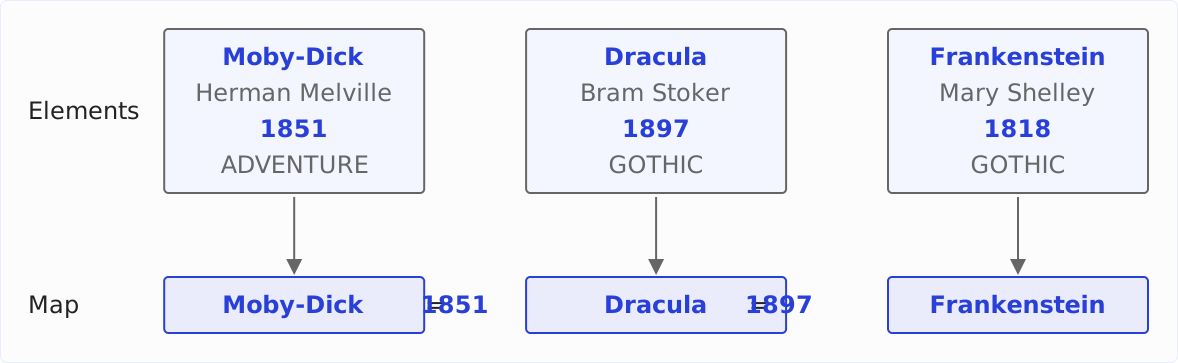
collect() calls both functions for each book, collects the results as entries in a new map, and returns it. The following diagram shows this for three of the eleven books: at the top the books with all four fields, at the bottom the entries of the map. Title and publication year are highlighted; author and genre do not go into the map.
This corresponds to the following loop:
Map<String, Integer> yearByTitle = new HashMap<>();
for (Book book : BOOKS) {
  yearByTitle.put(book.title(), book.year());
}
With one difference: put() silently overwrites an existing entry, whereas toMap() throws an exception when two elements return the same key. What you do then is shown in the next section.
The two arguments of the toMap() method are of type Function – so you can pass any function that turns an element into a key or value, not just a method reference to a field.
Often, the value should be the element itself, e.g., for a map in which you look up books by their title. That is what Function.identity() is for, a function that returns its argument unchanged:
Map<String, Book> bookByTitle = BOOKS.stream()
    .collect(toMap(Book::title, Function.identity()));

System.out.println(bookByTitle.get("Dracula"));
Book[title=Dracula, author=Bram Stoker, year=1897, genre=GOTHIC]Instead of Function.identity(), you can also write the lambda book -> book. Both do the same; Function.identity() says with its name what is meant.
The Three Variants of toMap()
The class Collectors declares toMap() in three variants:
<T, K, U> Collector<T, ?, Map<K, U>> toMap(
    Function<? super T, ? extends K> keyMapper,
    Function<? super T, ? extends U> valueMapper)

<T, K, U> Collector<T, ?, Map<K, U>> toMap(
    Function<? super T, ? extends K> keyMapper,
    Function<? super T, ? extends U> valueMapper,
    BinaryOperator<U> mergeFunction)

<T, K, U, M extends Map<K, U>> Collector<T, ?, M> toMap(
    Function<? super T, ? extends K> keyMapper,
    Function<? super T, ? extends U> valueMapper,
    BinaryOperator<U> mergeFunction,
    Supplier<M> mapFactory)
Each variant extends the previous one by one argument. What the wildcards ? super T and ? extends K mean is explained in the article on functional interfaces; you don’t need them to use toMap().
toMap(keyMapper, valueMapper) – Unique Keys Only
You know the first variant from the previous section. It requires every element to return a different key.
With the author as key, that is not the case, because Jules Verne has two books in the library:
Map<String, Integer> yearByAuthor = BOOKS.stream()
    .collect(toMap(Book::author, Book::year));
java.lang.IllegalStateException: Duplicate key Jules Verne (attempted merging values 1865 and 1873)The message names the key and the two values that were to end up under it. toMap() stops at the first duplicate key; the message does not tell you that Robert Louis Stevenson and H. G. Wells have two books as well.
I recommend the first variant for keys that are guaranteed to be unique – an ID, an article number, the name of an enum constant. Then a duplicate key is an error in the data, and the exception makes it visible.
toMap(keyMapper, valueMapper, mergeFunction) – With a Merge Function
If two elements can return the same key, you pass a merge function as the third argument. It receives the value that is already in the map and the value of the new element, and it returns the value that is to be in the map afterwards.
The following example keeps the title of the later book for every author:
Map<String, String> latestTitleByAuthor = BOOKS.stream()
    .collect(toMap(Book::author, Book::title, (first, second) -> second));

System.out.println(latestTitleByAuthor.get("Jules Verne"));
Around the World in Eighty DaysThe parameter first is the title that is already in the map, second the title of the new element. “Later” means: later in the list. The books in the library are sorted by publication year, so it is also the more recent book.
With (first, second) -> first, you keep the first book accordingly:
Map<String, String> firstTitleByAuthor = BOOKS.stream()
    .collect(toMap(Book::author, Book::title, (first, second) -> first));

System.out.println(firstTitleByAuthor.get("Jules Verne"));
From the Earth to the MoonThe merge function is a BinaryOperator<U>: it combines two values of the map’s value type into a third one of the same type. So it can not only pick one of the two values but also compute a new value from both. How that works is shown in the section Merging Duplicate Keys.
toMap(keyMapper, valueMapper, mergeFunction, mapFactory) – With Your Own Map Type
The fourth argument, mapFactory, is a Supplier that creates a new, empty map. With it, you determine which map implementation toMap() collects into.
The following example collects into a TreeMap, which sorts its entries by key – here, alphabetically by the authors’ names:
Map<String, String> latestTitleByAuthor = BOOKS.stream()
    .collect(toMap(
        Book::author,
        Book::title,
        (first, second) -> second,
        TreeMap::new));
{Bram Stoker=Dracula,
H. G. Wells=The War of the Worlds,
Herman Melville=Moby-Dick,
Jane Austen=Pride and Prejudice,
Jules Verne=Around the World in Eighty Days,
Lewis Carroll=Alice's Adventures in Wonderland,
Mary Shelley=Frankenstein,
Robert Louis Stevenson=Kidnapped}There is no variant with a map type but without a merge function. If you need a particular map but no merge function, because the keys must be unique, then write a merge function that throws an exception:
Map<String, Integer> yearByAuthor = BOOKS.stream()
    .collect(toMap(
        Book::author,
        Book::year,
        (first, second) -> {
          throw new IllegalStateException("Duplicate key");
        },
        TreeMap::new));
java.lang.IllegalStateException: Duplicate keyThe message does not name the key, because the merge function does not receive it – it only sees the two values. This is exactly how toMap() with two arguments was implemented in Java 8: as a call of the fourth variant with HashMap::new and a merge function that always throws an exception. That is why the message could only name a value there.
Since Java 9, the toMap() variant with two arguments checks the keys itself. You can use this check for your own map type by wrapping toMap() with two arguments in collectingAndThen() and copying the finished map into the type you want:
Map<String, Integer> yearByTitle = BOOKS.stream()
    .collect(collectingAndThen(
        toMap(Book::title, Book::year),
        TreeMap::new));
collectingAndThen() applies a function to the result of another collector, here the constructor TreeMap(Map). Duplicate keys are then reported by toMap() again, with key and values. The price is a second map: toMap() first collects into a HashMap, and TreeMap::new copies all entries.
Merging Duplicate Keys
A merge function that picks one of the two values throws the other one away. More often, you want to compute a new value from both. The following three examples show how.
Counting
The following example counts the books per author. Each book returns a 1 as its value, and the merge function Integer::sum adds up the values for a duplicate key:
Map<String, Integer> bookCountByAuthor = BOOKS.stream()
    .collect(toMap(Book::author, book -> 1, Integer::sum));
{Bram Stoker=1,
Robert Louis Stevenson=2,
Mary Shelley=1,
Jane Austen=1,
Lewis Carroll=1,
Herman Melville=1,
Jules Verne=2,
H. G. Wells=2}The following diagram shows what happens at the sixth book, “Around the World in Eighty Days”: on the left the map as the first five books left it, on the right the map after the sixth book. The key Jules Verne already exists, so toMap() calls the merge function with the existing value 1 and the new value 1 and stores its result 2 under the key.
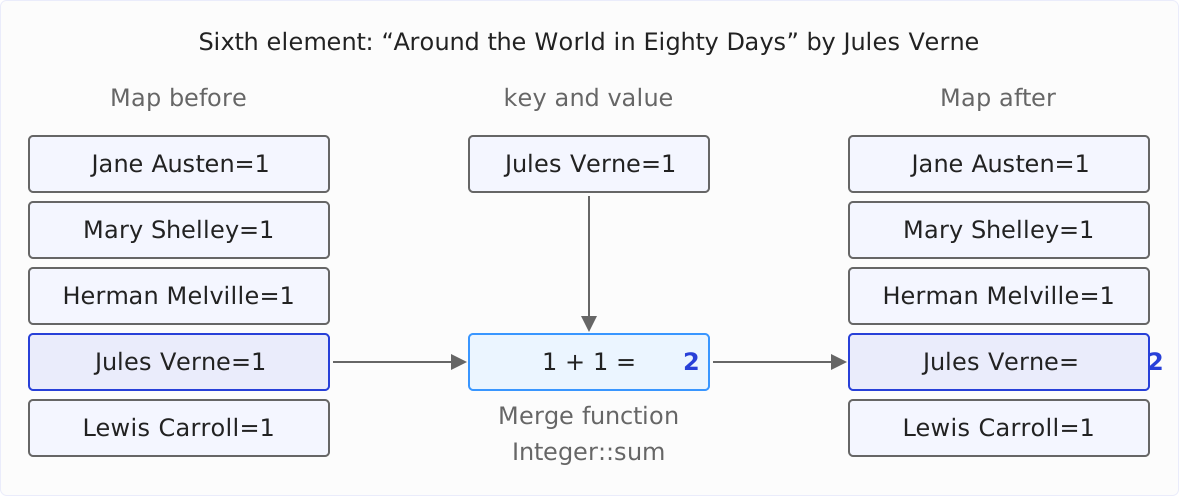
Internally, the toMap() variant with a merge function calls the map’s merge() method for each element. If the key is not yet in the map, merge() stores the value directly; the merge function is only called for a duplicate key.
For counting, there is also the collector groupingBy() with counting(). How the two solutions differ is shown in the section toMap() vs. groupingBy().
Concatenating Values
The merge function may also join strings. The following example collects all titles per author, separated by comma and space:
Map<String, String> titlesByAuthor = BOOKS.stream()
    .collect(toMap(
        Book::author,
        Book::title,
        (first, second) -> first + ", " + second));

System.out.println(titlesByAuthor.get("Jules Verne"));
From the Earth to the Moon, Around the World in Eighty DaysHowever, each call of the merge function copies the entire string so far. If a key has many values, the effort therefore grows quadratically – the same effect the article on reduce() shows when joining strings.
groupingBy() with joining() as downstream collector, on the other hand, collects the titles of each key in a StringJoiner, and the effort grows linearly. I recommend this solution as soon as a key can have many values:
Map<String, String> titlesByAuthor = BOOKS.stream()
    .collect(groupingBy(Book::author, mapping(Book::title, joining(", "))));
The Oldest Book per Author
The merge function can also compare two elements. BinaryOperator.minBy() returns a function that returns the smaller of two values according to a Comparator – the first one in case of a tie.
The following example finds the oldest book for every author. The value is the book itself, hence Function.identity():
Map<String, Book> oldestBookByAuthor = BOOKS.stream()
    .collect(toMap(
        Book::author,
        Function.identity(),
        BinaryOperator.minBy(Comparator.comparingInt(Book::year))));

System.out.println(oldestBookByAuthor.get("H. G. Wells").title());
The Time MachineminBy() returns the oldest book regardless of the order in which the books appear in the stream – unlike (first, second) -> first, which only returns the oldest book if the stream is sorted by publication year. With BinaryOperator.maxBy(), you get the most recent book accordingly.
Order and Map Type
The Javadoc of the toMap() variants with two and three arguments makes no promise about the map you get: neither about its type nor about whether it is mutable, serializable, or thread-safe.
In Java 8 as in Java 27, it is a HashMap. You should not rely on that – what this means for you is shown in the following sections.
HashMap: No Fixed Order
A HashMap stores its entries by the hash code of the key. The order in which you iterate over them therefore has nothing to do with the order of the elements in the stream.
The following example prints the keys of the map from book title to publication year:
Map<String, Integer> yearByTitle = BOOKS.stream()
    .collect(toMap(Book::title, Book::year));

yearByTitle.keySet().forEach(System.out::println);
Pride and Prejudice
From the Earth to the Moon
Alice's Adventures in Wonderland
Around the World in Eighty Days
Frankenstein
Treasure Island
The War of the Worlds
Moby-Dick
The Time Machine
Kidnapped
DraculaYou can see: “Frankenstein” is second in the library and fifth in the map. With String keys, the order is the same from run to run, because the hash code of a string depends only on its characters. But it can change as soon as entries are added and the HashMap enlarges its internal table.
LinkedHashMap: The Order of the Stream
A LinkedHashMap remembers the order in which its entries were inserted. With LinkedHashMap::new as the fourth argument, the map therefore keeps the order of the stream:
Map<String, Integer> yearByTitle = BOOKS.stream()
    .collect(toMap(
        Book::title,
        Book::year,
        (first, second) -> first,
        LinkedHashMap::new));

yearByTitle.keySet().forEach(System.out::println);
Pride and Prejudice
Frankenstein
Moby-Dick
From the Earth to the Moon
Alice's Adventures in Wonderland
Around the World in Eighty Days
Treasure Island
Kidnapped
The Time Machine
Dracula
The War of the WorldsThe merge function (first, second) -> first is never called here, because the titles are unique. It is only there because the variant with a map type requires one. If you want duplicate titles to be reported as an error, use collectingAndThen() with LinkedHashMap::new as in the section on the fourth variant.
TreeMap and EnumMap: Sorted by Key
A TreeMap sorts its entries by key – by their natural order or by a Comparator that you pass to its constructor. The section on the fourth variant showed an example.
If the key is an enum constant, an EnumMap is the right choice. It stores its values in an array that it indexes by the ordinal of the constant, and it returns the entries in the order in which the constants are declared.
EnumMap has no constructor without arguments, because it needs to know the enum type. The method reference EnumMap::new therefore does not fit as the fourth argument of toMap(). Instead, you pass a lambda there that calls the EnumMap constructor with Genre.class. The following example returns the title of the first book for each genre:
Map<Genre, String> firstTitleByGenre = BOOKS.stream()
    .collect(toMap(
        Book::genre,
        Book::title,
        (first, second) -> first,
        () -> new EnumMap<>(Genre.class)));
{NOVEL=Pride and Prejudice,
GOTHIC=Frankenstein,
ADVENTURE=Moby-Dick,
FANTASY=Alice's Adventures in Wonderland,
SCIENCE_FICTION=From the Earth to the Moon}Mutable or Not?
You can modify the HashMap that toMap() returns today – put() and remove() work. Because the Javadoc does not promise that, I recommend:
- If you want to modify the map, pass
HashMap::newas the fourth argument. Then mutability is not an accident of the implementation but part of your code. - If the map should be unmodifiable, use
toUnmodifiableMap(), which the sectiontoUnmodifiableMap()shows.
null Values and null Keys
A HashMap may contain null as a value. toMap() rejects null values nonetheless – in every variant.
Suppose you have recorded the years of death for only four of the eight authors:
Map<String, Integer> deathYearByAuthor = Map.of(
    "Jane Austen", 1817,
    "Mary Shelley", 1851,
    "Herman Melville", 1891,
    "Jules Verne", 1905);
The following example tries to assign to each title the year of death of its author. For Lewis Carroll, get() returns null, and toMap() throws a NullPointerException:
Map<String, Integer> deathYearByTitle = BOOKS.stream()
    .collect(toMap(Book::title, book -> deathYearByAuthor.get(book.author())));
java.lang.NullPointerException
at java.base/java.util.Objects.requireNonNull(Objects.java:220)
at java.base/java.util.stream.Collectors.lambda$uniqKeysMapAccumulator$0(Collectors.java:182)The exception has no message – so it does not tell you for which element the value is missing. The two lines of the stack trace do show where it comes from, though:
- The
toMap()variant with two arguments checks every value withObjects.requireNonNull()before inserting it into the map withputIfAbsent(). - The
toMap()variants with three or four arguments call the map’smerge()method for each element. The Javadoc ofMap.merge()requires this method to throw aNullPointerExceptionfor anullvalue. So here the exception comes from the map itself – not fromCollectors.toMap().
merge() could not do anything unambiguous with a null value anyway, because the method uses null as a sign for “no value.” If a key maps to null, merge() treats it like a missing key and stores the new value without calling the merge function. And if the merge function returns null, merge() removes the entry.
In Java 8, the toMap() variant with two arguments called merge() as well. Since Java 9, it inserts with putIfAbsent(), and the explicit check with requireNonNull() preserves the behavior of Java 8.
How you deal with it depends on what a missing value means:
- If it means that the element does not belong in the map, you filter it out beforehand.
- If the map should contain the missing value as
null, you collect withcollect()with three arguments. This is the variant ofStream.collect()that takes three functions instead of a collector – not to be confused withtoMap()with three arguments.
The following example leaves out the books whose authors have no year of death in the map:
Map<String, Integer> deathYearByTitle = BOOKS.stream()
    .filter(book -> deathYearByAuthor.containsKey(book.author()))
    .collect(toMap(Book::title, book -> deathYearByAuthor.get(book.author())));
{Pride and Prejudice=1817,
From the Earth to the Moon=1905,
Around the World in Eighty Days=1905,
Frankenstein=1851,
Moby-Dick=1891}collect() with three arguments takes a Supplier for the map, an accumulator that inserts an element into the map, and a combiner that merges two maps. The accumulator calls put(), and put() also accepts null:
Map<String, Integer> deathYearByTitle = BOOKS.stream()
    .collect(
        HashMap::new,
        (map, book) -> map.put(book.title(), deathYearByAuthor.get(book.author())),
        Map::putAll);
{Pride and Prejudice=1817,
From the Earth to the Moon=1905,
Alice's Adventures in Wonderland=null,
Around the World in Eighty Days=1905,
Frankenstein=1851,
Treasure Island=null,
The War of the Worlds=null,
Moby-Dick=1891,
The Time Machine=null,
Kidnapped=null,
Dracula=null}However, this solution no longer checks for duplicate keys: put() silently overwrites an existing entry. How collect() with three arguments works in detail is shown in the article on reduce() in the section Building a List with reduce().
A null key, on the other hand, is allowed as long as the map allows it. A HashMap accepts a null key. A TreeMap with natural ordering throws a NullPointerException, because it cannot compare null with other keys. The same applies to toUnmodifiableMap().
toUnmodifiableMap()
Since Java 10, there is Collectors.toUnmodifiableMap(). It returns a map that cannot be modified:
Map<String, Integer> yearByTitle = BOOKS.stream()
    .collect(toUnmodifiableMap(Book::title, Book::year));

yearByTitle.put("The Invisible Man", 1897);java.lang.UnsupportedOperationExceptiontoUnmodifiableMap() comes in two variants, corresponding to the first two variants of toMap(): with two arguments, which reports duplicate keys with the same IllegalStateException, and with a merge function. There is no variant with a map type, because toUnmodifiableMap() determines the type of the map itself.
Internally, toUnmodifiableMap() collects with toMap() into a HashMap and then copies its entries into an unmodifiable map with Map.ofEntries(). Two properties follow from this, which the map inherits from Map.ofEntries():
- It rejects
nullkeys, not justnullvalues. - Its order changes from program run to program run. The unmodifiable maps of
Map.of()andMap.ofEntries()shuffle their order with a random value that is set when the JVM starts. This is intentional: according to a comment in the JDK source code, the order is meant to vary between two program runs.
I recommend toUnmodifiableMap() for every map that is only read after collecting. It protects you from another part of the program modifying the map, and it makes visible in the code that this is not intended.
Examples of Use
Filtering and Transforming a Map
A map has no stream() method, but its entrySet() has one. With it, you filter the entries of a map or transform its values, and toMap() with Map.Entry::getKey and Map.Entry::getValue builds a new map from them.
The following example copies only those books from the map from book title to publication year that were published before 1850:
Map<String, Integer> before1850 = yearByTitle.entrySet().stream()
    .filter(entry -> entry.getValue() < 1850)
    .collect(toMap(Map.Entry::getKey, Map.Entry::getValue));
{Pride and Prejudice=1813, Frankenstein=1818}If you only want to filter the map and not copy it, you can also do without a stream: yearByTitle.values().removeIf(year -> year >= 1850) removes the entries directly from the map – provided it is mutable.
The following example transforms the values and turns the publication year into the decade:
Map<String, Integer> decadeByTitle = yearByTitle.entrySet().stream()
    .collect(toMap(Map.Entry::getKey, entry -> entry.getValue() / 10 * 10));

System.out.println(decadeByTitle.get("Dracula"));1890Inverting a Map
Inverting a map means swapping keys and values. This can produce duplicate keys even if the original map had none: two books in the library were published in 1865.
The following example tries to invert the map from book title to publication year:
Map<Integer, String> titleByYear = yearByTitle.entrySet().stream()
    .collect(toMap(Map.Entry::getValue, Map.Entry::getKey));
java.lang.IllegalStateException: Duplicate key 1865 (attempted merging values From the Earth to the Moon and Alice's Adventures in Wonderland)With a merge function that joins the titles and a TreeMap that sorts the years, it works:
Map<Integer, String> titlesByYear = yearByTitle.entrySet().stream()
    .collect(toMap(
        Map.Entry::getValue,
        Map.Entry::getKey,
        (first, second) -> first + ", " + second,
        TreeMap::new));

System.out.println(titlesByYear.get(1865));
From the Earth to the Moon, Alice's Adventures in WonderlandThe order in which the two titles appear depends here on the order of the original HashMap, not on the library.
Combining Two Lists into a Map
If keys and values are in two lists of equal length, you combine them via a stream of the indexes. IntStream.range() returns the indexes from 0 to the length minus one, boxed() turns them into a Stream<Integer>, and the method references titles::get and years::get fetch the key and the value for each index:
List<String> titles = List.of("Frankenstein", "Dracula", "Kidnapped");
List<Integer> years = List.of(1818, 1897, 1886);

Map<String, Integer> yearByTitle = IntStream.range(0, titles.size())
    .boxed()
    .collect(toMap(titles::get, years::get));
{Frankenstein=1818, Dracula=1897, Kidnapped=1886}boxed() is necessary because IntStream has no collect() that accepts a Collector. If the lists differ in length, years::get throws an IndexOutOfBoundsException – or, if years is the longer list, its last values are silently missing from the map. So check the lengths beforehand.
toMap() vs. groupingBy()
toMap() stores one value per key. groupingBy() stores a group of elements per key – as a list by default, and as any other result with a downstream collector.
Both solve some tasks equally well. The following sections show which collector fits better when.
Multiple Values per Key
With a merge function, toMap() can also collect multiple values per key. The following example creates a list with one title for each book, and the merge function concatenates two lists:
Map<String, List<String>> titlesByAuthor = BOOKS.stream()
    .collect(toMap(
        Book::author,
        book -> List.of(book.title()),
        (first, second) -> Stream.concat(first.stream(), second.stream()).toList()));

System.out.println(titlesByAuthor.get("Jules Verne"));
[From the Earth to the Moon, Around the World in Eighty Days]groupingBy() with mapping() as downstream collector returns the same in just one line:
Map<String, List<String>> titlesByAuthor = BOOKS.stream()
    .collect(groupingBy(Book::author, mapping(Book::title, toList())));
[From the Earth to the Moon, Around the World in Eighty Days]groupingBy() creates one ArrayList per key and adds each title to it. The toMap() solution, on the other hand, creates a new list for each book and, for each duplicate key, another one into which it copies both.
I therefore recommend groupingBy() as soon as a key can have multiple values, and toMap() when it has exactly one – even if that one value is computed from several elements, like the sum or the oldest book.
Counting: Integer or Long
In the section Counting, toMap(Book::author, book -> 1, Integer::sum) counted the books per author. groupingBy() with counting() returns the same numbers:
Map<String, Long> bookCountByAuthor = BOOKS.stream()
    .collect(groupingBy(Book::author, counting()));
The difference lies in the type: counting() always counts in Long, the toMap() solution in the type you choose for the 1. I recommend groupingBy() with counting(), because it says with its name what it does.
Nested Maps: groupingBy() with toMap()
You build a map whose values are maps themselves with groupingBy() and toMap() as downstream collector. groupingBy() divides the elements into groups, and toMap() collects each group into a map of its own.
The following example groups the books by genre and builds a map from book title to publication year for each genre. TreeMap::new as the second argument of groupingBy() sorts the outer map by genre:
Map<Genre, Map<String, Integer>> yearByTitleByGenre = BOOKS.stream()
    .collect(groupingBy(Book::genre, TreeMap::new, toMap(Book::title, Book::year)));

yearByTitleByGenre.forEach((genre, yearByTitle) ->
    System.out.println(genre + ": " + yearByTitle));
NOVEL: {Pride and Prejudice=1813}
GOTHIC: {Frankenstein=1818,
Dracula=1897}
ADVENTURE: {Around the World in Eighty Days=1873,
Treasure Island=1883,
Moby-Dick=1851,
Kidnapped=1886}
FANTASY: {Alice's Adventures in Wonderland=1865}
SCIENCE_FICTION: {From the Earth to the Moon=1865,
The War of the Worlds=1898,
The Time Machine=1895}groupingBy() and its downstream collectors will be the topic of an article of their own.
toMap() in Parallel Streams and toConcurrentMap()
In a parallel stream, toMap() collects each part into a HashMap of its own and then merges the maps in pairs. The Javadoc warns that this merging can be expensive – because toMap() inserts every entry of one map into the other one by one, using the merge function for duplicate keys.
For the merge function, the order of the elements is preserved: toMap() merges the map of the front part with that of the back part, so that first is the value of the earlier element in parallel, too.
Collectors.toConcurrentMap() takes a different route. It has the same three variants as toMap() and collects the entries into a ConcurrentHashMap. All threads insert their elements into this one map. The Javadoc holds out the prospect of better performance in parallel streams for this – because merging the partial maps is no longer necessary, and a ConcurrentHashMap lets several threads insert at the same time as long as they hit different slots of its internal table.
The price is the order: which thread inserts a key first is a matter of chance. A merge function like (first, second) -> second then keeps not the value of the later element but that of the element that was inserted last.
The following example groups the numbers from 0 to 99,999 by their remainder when divided by three and keeps the later number for each remainder – first with toMap(), then with toConcurrentMap():
Map<Integer, Integer> lastByRemainder = IntStream.range(0, 100_000)
    .boxed()
    .parallel()
    .collect(toMap(i -> i % 3, i -> i, (first, second) -> second));

Map<Integer, Integer> lastByRemainderConcurrent = IntStream.range(0, 100_000)
    .boxed()
    .parallel()
    .collect(toConcurrentMap(i -> i % 3, i -> i, (first, second) -> second));
In five runs, toMap() returns the same result five times, the three largest numbers:
{0=99999, 1=99997, 2=99998}
{0=99999, 1=99997, 2=99998}
{0=99999, 1=99997, 2=99998}
{0=99999, 1=99997, 2=99998}
{0=99999, 1=99997, 2=99998}
toConcurrentMap() returns five different ones in five runs:
{0=70311, 1=70309, 2=70310}
{0=21873, 1=21874, 2=21872}
{0=85935, 1=85936, 2=85934}
{0=5466, 1=5467, 2=5465}
{0=94530, 1=94528, 2=94529}I therefore recommend toConcurrentMap() only for parallel streams whose result does not depend on the order – for example, if the keys are unique or the merge function, like Integer::sum, returns the same in any order. Whether a parallel stream pays off at all is another question – it will be the topic of an article of its own.
Common Mistakes
Swallowing Duplicate Keys with the Merge Function
When toMap() throws an IllegalStateException, (first, second) -> first is quickly written down. But that makes not only the exception disappear but also every second element with the same key – without any message.
For toMap(Book::author, Book::year, (first, second) -> first), three of the eleven books are missing from the map. Whether that is intentional or an error in the data, nobody can tell from the result anymore.
I recommend a merge function only where duplicate keys are expected and the function expresses a rule: the later book, the sum, the oldest book. If duplicate keys are an error, use toMap() with two arguments – then the exception reports the error.
Removing Entries with null from the Merge Function
If the merge function returns null, the map’s merge() method removes the entry. This invites a trick: if you only want authors with exactly one book in the map, you could let the merge function return null for a duplicate key:
Map<String, String> onlyTitleByAuthor = BOOKS.stream()
    .collect(toMap(Book::author, Book::title, (first, second) -> null));
{Bram Stoker=Dracula,
Mary Shelley=Frankenstein,
Jane Austen=Pride and Prejudice,
Lewis Carroll=Alice's Adventures in Wonderland,
Herman Melville=Moby-Dick}The result is correct – but only because nobody has more than two books in the library. After the second book, the key is indeed removed from the map – but a third book would create it anew, as if it were the first.
The following example appends “The Invisible Man” by H. G. Wells from 1897 to the library as a twelfth book and shows the error:
List<Book> books = new ArrayList<>(BOOKS);
books.add(new Book("The Invisible Man", "H. G. Wells", 1897, SCIENCE_FICTION));

Map<String, String> onlyTitleByAuthor = books.stream()
    .collect(toMap(Book::author, Book::title, (first, second) -> null));
{Bram Stoker=Dracula,
Mary Shelley=Frankenstein,
Jane Austen=Pride and Prejudice,
Lewis Carroll=Alice's Adventures in Wonderland,
Herman Melville=Moby-Dick,
H. G. Wells=The Invisible Man}Although H. G. Wells has three books in the list, he is in the map – as if he had only one.
I recommend counting the books with groupingBy() and counting() first and then collecting only the books of authors with exactly one book into the map:
Map<String, Long> bookCountByAuthor = BOOKS.stream()
    .collect(groupingBy(Book::author, counting()));

Map<String, String> onlyTitleByAuthor = BOOKS.stream()
    .filter(book -> bookCountByAuthor.get(book.author()) == 1)
    .collect(toMap(Book::author, Book::title));
{Bram Stoker=Dracula,
Jane Austen=Pride and Prejudice,
Mary Shelley=Frankenstein,
Lewis Carroll=Alice's Adventures in Wonderland,
Herman Melville=Moby-Dick}This costs a second pass over the books. In return, the result holds for any number of books per author, and the toMap() variant with two arguments confirms that each key occurs only once.
Summary
toMap() collects the elements of a stream into a map. The function keyMapper returns the key for each element, the function valueMapper the value.
With two arguments, toMap() throws an IllegalStateException for a duplicate key. With a merge function as the third argument, you determine which value ends up under a duplicate key – one of the two or one computed from both. The fourth argument determines the map type and thus the order. toMap() rejects null values in every variant with a NullPointerException.
Five recommendations for everyday use:
- Use
toMap()with two arguments for keys that must be unique – a duplicate key is then an error in the data, and the exception shows it. - Use a merge function only if duplicate keys are expected and the function expresses a rule.
- Don’t rely on the order of the map; pass
LinkedHashMap::new,TreeMap::new, or, for enum keys, anEnumMapif you need one. - Use
toUnmodifiableMap()for maps that are only read after collecting. - Use
groupingBy()as soon as a key can have multiple values.
How collect() fits into a stream pipeline and which other collectors exist is shown in the article on Java Streams.
Did you take something away from this article? With a review on my ProvenExpert profile, you help other developers assess whether these articles are worth reading – and you help me understand which content is most useful to you.