A PrintWriter writes text – strings, numbers, any objects – to a file, a network stream, or the console. It wraps another Writer or an OutputStream and adds the methods print(), println(), and printf() that you know from System.out.
For writing to a file, the code looks like this in most cases:
Path log = Path.of("target/server.log");
try (PrintWriter out = new PrintWriter(Files.newBufferedWriter(log))) {
  for (LogEntry entry : LogEntry.SERVER_LOG) {
    out.printf("%s %-5s %s%n", entry.timestamp(), entry.level(), entry.message());
  }
}
Afterward, the file target/server.log contains these five lines:
2026-10-17 08:15:02 INFO  Server started on port 8080
2026-10-17 08:15:07 INFO  GET /java/java-bufferedreader/ 200
2026-10-17 08:15:09 WARN  GET /java/bufferedreader/ 404
2026-10-17 08:15:11 INFO  GET /java/java-streams/ 200
2026-10-17 08:15:12 ERROR Connection reset by peer
LogEntry.SERVER_LOG is a list of the five entries of the log file, each with a timestamp, a log level, and a message. The section The Examples in This Article shows the LogEntry record with this constant.
Files.newBufferedWriter() opens the file and returns a BufferedWriter that encodes the text as UTF-8. The PrintWriter around it uses printf() to write each line according to a format string: %s inserts an argument as text, %-5s pads it left-aligned to five characters, and %n ends the line. The try-with-resources statement closes the PrintWriter – and with it the file – even if an exception occurs while writing.
PrintWriter has existed since Java 1.1. Java 5 added the constructors for a file name and for a File object, as well as printf(), format(), and append(). Since Java 10, the constructors accept the character encoding as a Charset, and since Java 18, a PrintWriter for which you specify no encoding writes UTF-8.
In this article, you will find out
- what a
PrintWriterdoes itself and what it leaves to the classes behind it, - which ways there are to create a
PrintWriter, which one I recommend, and which one has no buffer, - how to append to a file without the first run aborting with an exception,
- how
print(),println(),write(), andappend()differ, - how to align columns with
printf()and format numbers with the right locale, - when the characters reach the file and what
autoFlushchanges about that, - why a
PrintWriterdoes not throw anIOExceptionand how to detect write errors withcheckError(), - how to write text to a string with a
PrintWriter, - how
PrintWriterdiffers fromPrintStream,FileWriter, andBufferedWriter, - how fast a
PrintWriterwrites with and without aBufferedWriterbehind it, withautoFlush, and withprintf().
The Examples in This Article
Most examples write the small log file server.log that the article about BufferedReader reads. It has five lines, each with a date, a time, a log level, and a message. The entries are in a record:
public record LogEntry(String timestamp, String level, String message) {

  public static final List<LogEntry> SERVER_LOG = List.of(
      new LogEntry("2026-10-17 08:15:02", "INFO", "Server started on port 8080"),
      new LogEntry("2026-10-17 08:15:07", "INFO",
          "GET /java/java-bufferedreader/ 200"),
      new LogEntry("2026-10-17 08:15:09", "WARN", "GET /java/bufferedreader/ 404"),
      new LogEntry("2026-10-17 08:15:11", "INFO", "GET /java/java-streams/ 200"),
      new LogEntry("2026-10-17 08:15:12", "ERROR", "Connection reset by peer"));
}
You can find the complete code in the GitHub repository java-printwriter, in the package eu.happycoders.printwriter. Each section has its own class there with a main() method that produces the outputs shown. Start the classes in the root directory of the repository; all files that the examples write end up in the target/ directory.
The examples use language features from Java 25 and therefore run only on Java 25 or later. The text states since when each method or constructor of PrintWriter has existed.
What Is a PrintWriter?
PrintWriter is a Writer that wraps another Writer. It stores this Writer in the field out and passes everything you hand to the PrintWriter on to it as characters:
print(404)converts the number into the string"404"withString.valueOf()and writes it toout.println(404)writes the same and then the line terminator.printf()has ajava.util.Formatterassemble the text and writes the pieces toout.
The following diagram shows which characters the three methods write to out. Each box is a separate call to out.write():
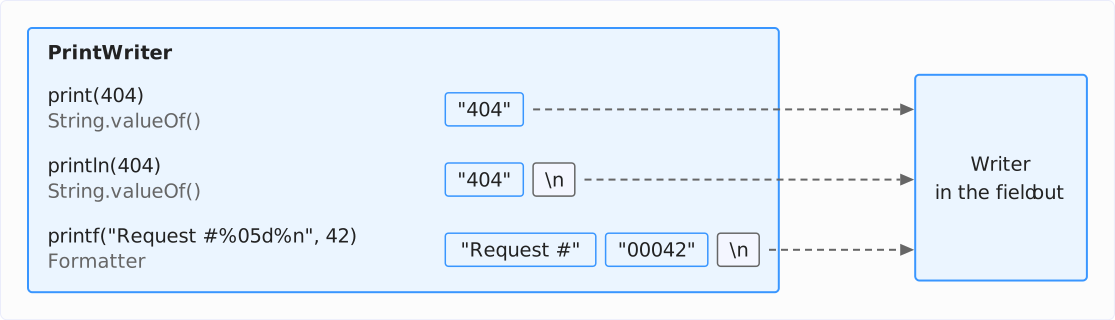
There are two things the PrintWriter does not do itself: it does not buffer, and it does not convert characters into bytes. The classes behind it do both. When writing to a file, these are up to three classes that form a chain:
- A
BufferedWritercollects the characters in a buffer of 8,192 characters and passes them on only when the buffer is full or is flushed. - An
OutputStreamWriterencodes the characters, i.e., it converts them into bytes according to a character encoding such as UTF-8, and writes these to anOutputStream. In doing so, it collects the encoded bytes in a buffer of its own of up to 8,192 bytes. - A
FileOutputStream– or anotherOutputStream– finally writes the bytes to the file.
Which of these classes are behind a PrintWriter depends on how you create it:
- If you pass it a file name, all three are behind it.
- If you wrap it around a
FileWriter, there are onlyOutputStreamWriterandFileOutputStream. - If it writes, e.g., to a
StringWriter, none of the three classes is behind it.
The following diagram shows the three cases for writing to files, which I present one by one in the next sections: on the left, a PrintWriter around a BufferedWriter from Files.newBufferedWriter(); in the middle, a PrintWriter to which you pass a file name; and on the right, a PrintWriter around a FileWriter.
The dashed arrows stand for text data, i.e., characters; the solid arrows stand for binary data, i.e., bytes:
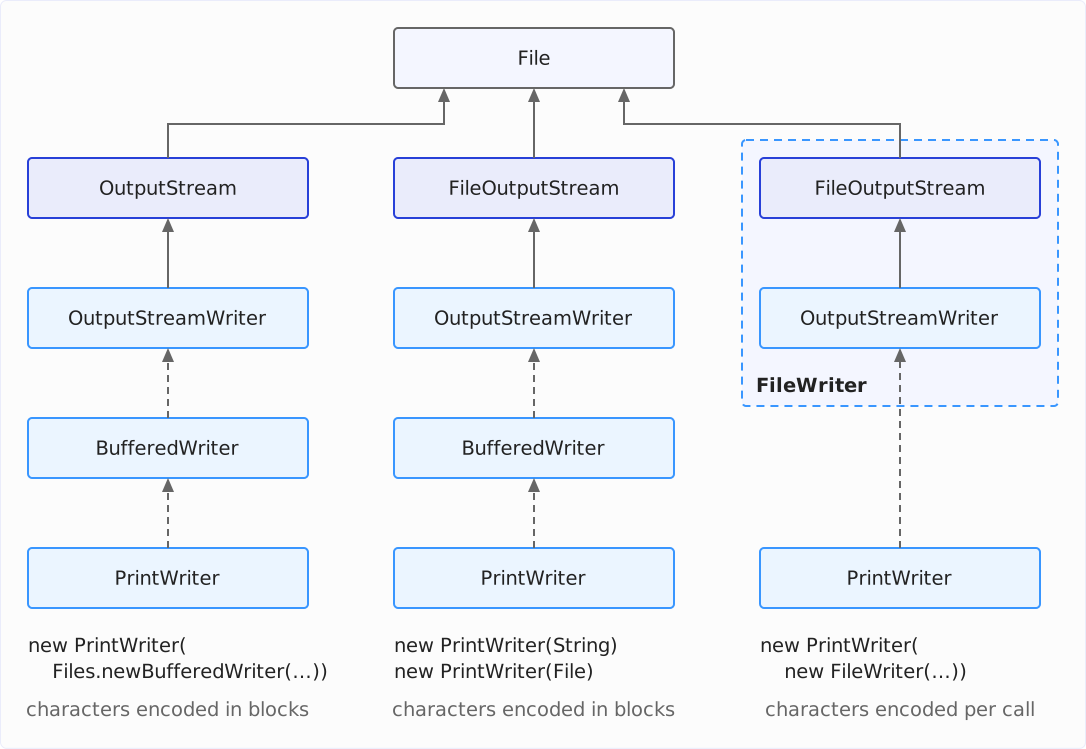
In the case on the right, the BufferedWriter is missing. Every print() call then reaches the OutputStreamWriter immediately, and it encodes the characters of each call individually. The section new PrintWriter(Writer): Without a Buffer of Its Own shows how much time that costs.
Creating a PrintWriter
PrintWriter has eleven constructors. They fall into three groups: constructors that wrap a Writer, those that wrap an OutputStream, and those that open a file themselves – via a file name or a File object.
new PrintWriter(Files.newBufferedWriter(…))
This is the way I recommend for files. Files.newBufferedWriter() from the NIO.2 API expects a Path and returns a BufferedWriter, which the PrintWriter wraps:
Path log = Path.of("target/server.log");
try (PrintWriter out = new PrintWriter(Files.newBufferedWriter(log))) {
  out.println("2026-10-17 08:15:02 INFO  Server started on port 8080");
}
System.out.print(Files.readString(log));
2026-10-17 08:15:02 INFO Server started on port 8080The Files.newBufferedWriter() variant without a Charset parameter has existed since Java 8 and always encodes as UTF-8, regardless of the Java version. You pass a different encoding as the second argument, e.g., Files.newBufferedWriter(log, StandardCharsets.ISO_8859_1). Further arguments are OpenOptions, with which you can, among other things, append to the file – the section Appending to a File shows this.
What decides my recommendation is a difference that only shows when a character does not fit into the chosen encoding: the BufferedWriter from Files.newBufferedWriter() reports this with an exception – the other ways silently replace the character with the replacement character of the encoding. The section The Euro Sign in ISO-8859-1 shows how the PrintWriter passes this exception on to you.
new PrintWriter(String) and new PrintWriter(File)
Since Java 5, a PrintWriter can also open a file itself. To do so, you pass it the file name as a String or as a File object:
try (PrintWriter out = new PrintWriter("target/greeting.txt")) {
  out.println("Grüße aus Köln");
}
Path greeting = Path.of("target/greeting.txt");
System.out.println(Files.readString(greeting).strip());
System.out.println(Files.size(greeting) + " bytes");
Grüße aus Köln
18 bytesFor this, the constructor internally creates a FileOutputStream, an OutputStreamWriter, and a BufferedWriter – the same chain you would otherwise write by hand. Without an encoding parameter, the OutputStreamWriter uses the default encoding of the JVM, and since Java 18, that is UTF-8. That is why the file is 18 bytes in size, although “Grüße aus Köln” (German for “Greetings from Cologne”) has only 14 characters: “ü”, “ß”, and “ö” take up two bytes each in UTF-8, and the line terminator \n takes up one more.
Up to and including Java 17, the default encoding depended on the operating system and the locale; on a Windows system set to English or another Western European language, it was usually Windows-1252. Details are in the article about writing files, in the section What character encoding does Java use by default to write text files?
Since Java 10, you specify a different encoding as a Charset:
try (PrintWriter out = new PrintWriter("target/greeting-latin1.txt", ISO_8859_1)) {
  out.println("Grüße aus Köln");
}
Path latin1 = Path.of("target/greeting-latin1.txt");
System.out.println(Files.readString(latin1, ISO_8859_1).strip());
System.out.println(Files.size(latin1) + " bytes");
Grüße aus Köln
15 bytesIn ISO-8859-1, “ü”, “ß”, and “ö” take up only one byte each, so the file is 15 bytes in size. Up to and including Java 9, the only constructor for this was the one that expects the name of the encoding as a String, e.g., new PrintWriter(fileName, "ISO-8859-1"). It throws an UnsupportedEncodingException if it does not know the name.
Compared to Files.newBufferedWriter(), these constructors have two disadvantages: they always open the file for overwriting, and they replace a character that does not fit into the encoding without an error message.
new PrintWriter(Writer): Without a Buffer of Its Own
If you pass the PrintWriter a Writer, it wraps exactly this one – and nothing else. It does not put a BufferedWriter in between. So it would seem obvious to wrap it around a FileWriter, which opens the file:
try (PrintWriter out = new PrintWriter(new FileWriter("target/server.log"))) {
  // ...
}
A FileWriter, however, is just an OutputStreamWriter around a FileOutputStream, as the right column of the diagram above shows. Every print(), println(), and printf() call therefore goes directly to the OutputStreamWriter.
A counting Writer behind the PrintWriter shows how many calls these are. The following program writes the five log lines once directly into this counter and once via a BufferedWriter in between:
CountingWriter direct = new CountingWriter(Writer.nullWriter());
try (PrintWriter out = new PrintWriter(direct)) {
  writeLog(out);
}
System.out.println("Without BufferedWriter: " + direct.calls + " write calls");

CountingWriter buffered = new CountingWriter(Writer.nullWriter());
try (PrintWriter out = new PrintWriter(new BufferedWriter(buffered))) {
  writeLog(out);
}
System.out.println("With BufferedWriter:    " + buffered.calls + " write call(s)");
Without BufferedWriter: 34 write calls
With BufferedWriter: 1 write call(s)CountingWriter is a FilterWriter from the demo repository that counts every call of its write() methods and passes it on to the wrapped Writer – here to Writer.nullWriter() (since Java 11), which discards all characters. writeLog() is the printf() loop from the introduction.
Without a BufferedWriter, 34 calls for five lines arrive at the Writer behind it. The Formatter behind printf() writes each argument, each space in between, and the line terminator individually, and %-5s even appends each padding space with a call of its own. With a BufferedWriter, all 34 pieces end up in its buffer, and when it is closed, it passes them on in a single call.
The following diagram shows the 34 pieces line by line; each box is a write() call. Outlined in blue are the timestamp, log level, and message; outlined in gray are the spaces (␣) and the line terminators (\n). At the top, the PrintWriter passes each piece on to the FileWriter individually; at the bottom, the BufferedWriter collects all pieces and passes them on in one call:
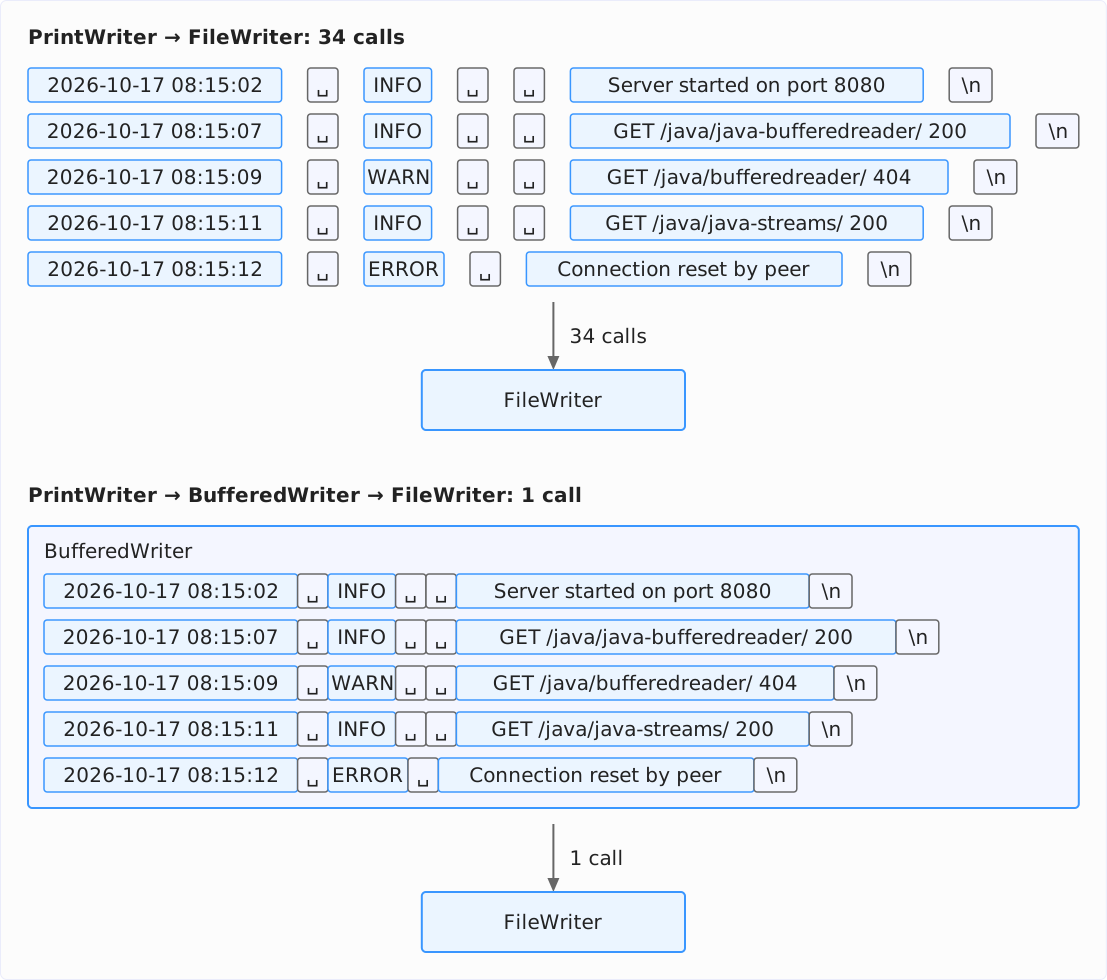
If a FileWriter is directly behind the PrintWriter, it encodes the characters of each of the 34 calls individually. With a BufferedWriter in between, on the other hand, it receives blocks of up to 8,192 characters – here all five lines in one call – and encodes each block in one pass.
More expensive than the individual encoding is a consequence of the small calls: since Java 19, the OutputStreamWriter initially creates its byte buffer with only 512 bytes and enlarges it only when a single call passes it more characters than are sure to fit into this buffer once encoded – for UTF-8, from 171 characters on (170 characters take up to 510 bytes, 171 characters up to 513 bytes, i.e., more than 512). With many short calls of at most 170 characters, it therefore writes the file in blocks of 512 instead of 8,192 bytes. The section How Fast Is PrintWriter? shows how much time that costs.
So if you wrap a PrintWriter around a FileWriter, better put a BufferedWriter in between – or use Files.newBufferedWriter() right away.
new PrintWriter(OutputStream): A PrintWriter Around Any OutputStream
Not all text goes to a file. If you write to a network socket, to the input of a process, or to a compressed file, the respective API gives you an OutputStream. You pass it to the PrintWriter directly: the PrintWriter then puts an OutputStreamWriter and a BufferedWriter around it itself, just as with a file name.
The following example writes the log lines to a gzip-compressed file. As a check, it reads the first line back in with a BufferedReader and counts the lines:
Path gzipped = Path.of("target/server.log.gz");
try (PrintWriter out = new PrintWriter(
    new GZIPOutputStream(Files.newOutputStream(gzipped)), false, UTF_8)) {
  for (LogEntry entry : LogEntry.SERVER_LOG) {
    out.printf("%s %-5s %s%n", entry.timestamp(), entry.level(), entry.message());
  }
}

try (BufferedReader reader = new BufferedReader(new InputStreamReader(
    new GZIPInputStream(Files.newInputStream(gzipped)), UTF_8))) {
  System.out.println(reader.readLine());
  System.out.println(reader.lines().count() + 1 + " lines");
}
2026-10-17 08:15:02 INFO Server started on port 8080
5 linesThe chain reads from the outside in: the PrintWriter formats the lines, its internal OutputStreamWriter encodes them as UTF-8, GZIPOutputStream compresses the bytes, and the OutputStream from Files.newOutputStream() writes them to the file.
The second argument is autoFlush (here false), which the section When the Characters Reach the File: flush() and autoFlush explains. The constructor used in the example, with the Charset as the third argument, has existed since Java 10. Without a Charset, the PrintWriter encodes with the default encoding of the JVM – unless the OutputStream is a PrintStream. Since Java 18, the PrintWriter adopts the encoding of a PrintStream, as the section PrintWriter on the Console and in a Servlet shows.
Even so, you should always specify the encoding explicitly for an OutputStream. Which encoding the bytes must have should be determined by the receiver – the protocol, the process, the program that later reads the file – not by the JVM that writes them.
Appending to a File
All the ways shown so far overwrite an existing file. To write to its end instead, you pass the option StandardOpenOption.APPEND to Files.newBufferedWriter(). It would seem obvious to specify only this one option – but that fails as long as the file does not exist yet:
Path log = Path.of("target/append.log");
Files.deleteIfExists(log);

try (PrintWriter out = new PrintWriter(Files.newBufferedWriter(log, APPEND))) {
  out.println("first run");
} catch (NoSuchFileException e) {
  System.out.println(e);
}
java.nio.file.NoSuchFileException: target/append.logAs soon as you pass any option to Files.newBufferedWriter(), only the options passed apply (plus WRITE). Without options, the method works as if you had specified CREATE, TRUNCATE_EXISTING, and WRITE. You therefore have to pass CREATE explicitly.
Files.newBufferedWriter() accepts the options as a varargs parameter (OpenOption... options). So you simply write them after the Path, separated by commas:
for (String run : new String[] {"first run", "second run"}) {
  try (PrintWriter out =
      new PrintWriter(Files.newBufferedWriter(log, CREATE, APPEND))) {
    out.println(run);
  }
}
System.out.print(Files.readString(log));
first run
second runWith these options, the first run creates the file, and the second run appends its line.
If you create a FileWriter via its constructor instead of using Files.newBufferedWriter(), you set the append parameter to true to append to a file. In the following example, that is the last argument.
For the PrintWriter to write buffered, you put a BufferedWriter in between yourself:
try (PrintWriter out = new PrintWriter(new BufferedWriter(
    new FileWriter(log.toFile(), UTF_8, true)))) {
  out.println("third run");
}
System.out.print(Files.readString(log));
first run
second run
third runThe FileWriter creates the file itself if necessary, so a missing file is not a problem here. The constructor with Charset and append has existed since Java 11.
print(), println(), write(), and append()
PrintWriter has two kinds of write methods. Its own – print(), println(), and printf() – convert values into text; the section Formatted Output with printf() and format() shows printf(). Those inherited from Writer – write() and append() – write characters, as with any Writer.
Printing Values with print() and println()
print() exists for boolean, char, int, long, float, double, char[], String, and Object. println() exists with the same parameter types and additionally without a parameter. It writes the same as print() and then a line terminator.
The following example writes an integer, a decimal number, a boolean, and a list on one line, then a String that is null, an empty line, and the word “end”:
Path file = Path.of("target/print.txt");
try (PrintWriter out = new PrintWriter(Files.newBufferedWriter(file))) {
  out.print(404);
  out.print(' ');
  out.print(3.5);
  out.print(' ');
  out.print(true);
  out.print(' ');
  out.println(List.of("GET", "POST"));
  String missing = null;
  out.println(missing);
  out.println();
  out.println("end");
}
System.out.print(Files.readString(file));
404 3.5 true [GET, POST]
null
endprint(3.5) writes “3.5” with a period, regardless of the locale, because print() converts every value with String.valueOf(). For the list, String.valueOf() calls its toString() method. For the String that is null, println() writes the text “null”, and println() without an argument writes only the line terminator – hence the empty line before “end”.
The Line Terminator
println() does not write the character \n but the value of System.lineSeparator(). This value depends on the operating system: on Linux and macOS, it is \n; on Windows, it is \r\n. The following program prints the content of the file from the previous example, with the control characters made visible:
String text = Files.readString(file);
System.out.println(text.replace("\r", "\\r").replace("\n", "\\n"));
On macOS, it prints:
404 3.5 true [GET, POST]\nnull\n\nend\nOn Windows, every line would end with \r\n.
%n in a format string and newLine() in BufferedWriter also write the line separator of the operating system.
For a file that is read on the same system, the line terminator of the operating system is correct. If, however, you write a format that prescribes a specific line terminator – HTTP headers and CSV according to RFC 4180, for example, require \r\n – you must not use println(). Write the line terminator yourself with print("\r\n") instead.
write(int) Is Not print(int)
write() comes from the Writer class and writes characters, not values. write(int) therefore interprets its parameter as a character code, print(int) as a number:
try (PrintWriter out = new PrintWriter(Files.newBufferedWriter(file))) {
  out.write(65);
  out.println();
  out.print(65);
  out.println();
}
System.out.print(Files.readString(file));
A
65write(65) writes the character with the code 65, the “A”; print(65) writes the digits “6” and “5”. For strings and char arrays, on the other hand, write() and print() write the same characters.
append()
append() comes from the Appendable interface and accepts a CharSequence or a single char. Unlike print(), append() returns the PrintWriter, so you can chain the calls:
try (PrintWriter out = new PrintWriter(Files.newBufferedWriter(file))) {
  out.append("GET ").append("/java/java-streams/").append(' ').append("200")
      .println();
}
System.out.print(Files.readString(file));
GET /java/java-streams/ 200The chain ends with println(), because println() returns nothing.
Printing null
print(String) and print(Object) write the text “null” for null, as the example above shows. print(char[]), on the other hand, throws a NullPointerException for null:
try (PrintWriter out = new PrintWriter(Files.newBufferedWriter(file))) {
  char[] chars = null;
  out.print(chars);
} catch (NullPointerException e) {
  System.out.println(e);
}
java.lang.NullPointerException: Cannot read the array length because "buf" is nullFormatted Output with printf() and format()
printf() assembles a line according to a format string. Each placeholder in it starts with % and ends with a letter that specifies the conversion; in between, there are optional flags, a width, and a precision. The following example shows the placeholders you need most often for log lines and tables:
try (PrintWriter out = new PrintWriter(Files.newBufferedWriter(file))) {
  out.printf("%s %-5s %s%n", "2026-10-17 08:15:12", "ERROR",
      "Connection reset by peer");
  out.printf("[%-5s] [%5s]%n", "WARN", "WARN");
  out.printf("%d of %d requests failed (%d %%)%n", 1, 4, 25);
  out.printf("Request #%05d%n", 42);
}
System.out.print(Files.readString(file));
2026-10-17 08:15:12 ERROR Connection reset by peer
[WARN ] [ WARN]
1 of 4 requests failed (25 %)
Request #00042The placeholders in detail:
%swrites an argument as text,%dan integer.- A number between
%and the letter is the minimum width:%5spads “WARN” with spaces on the left to five characters, so it is right-aligned. With the-flag, it becomes%-5s, and the text is left-aligned. - The
0flag pads with zeros instead of spaces:%05dwrites 42 as “00042”. %%writes the percent sign itself,%nthe line terminator of the operating system, likeprintln().
The Javadoc of the class java.util.Formatter describes the complete syntax.
format() does the same as printf(): printf() calls format(). Both return the PrintWriter, so you can chain them:
try (PrintWriter out = new PrintWriter(Files.newBufferedWriter(file))) {
  out.printf("%d ", 1).printf("%d ", 2).format("%d%n", 3);
}
System.out.print(Files.readString(file));
1 2 3Numbers and the Locale
Without a Locale argument, printf() formats numbers according to the default locale of the JVM, which the JVM takes from the settings of the operating system. On my computer, that is en_DE – English language, German number formats. The following example writes the same decimal number with the default locale, with three explicitly specified locales, and, for comparison, with print():
System.out.println("Default locale: " + Locale.getDefault());
try (PrintWriter out = new PrintWriter(Files.newBufferedWriter(file))) {
  out.printf("%.2f ms%n", 1234.5);
  out.printf(Locale.GERMANY, "%,.2f ms%n", 1234.5);
  out.printf(Locale.US, "%,.2f ms%n", 1234.5);
  out.printf(Locale.ROOT, "%.2f ms%n", 1234.5);
  out.print(1234.5);
  out.println(" ms");
}
System.out.print(Files.readString(file));
Default locale: en_DE
1234,50 ms
1.234,50 ms
1,234.50 ms
1234.50 ms
1234.5 ms%.2f writes a decimal number with two decimal places; the , flag inserts thousands separators. The locale determines which characters appear as the decimal separator and the thousands separator. The first printf() call with the default locale en_DE and the second one with Locale.GERMANY put a comma before the decimal places; Locale.US and Locale.ROOT put a period. print() does not depend on any locale but always uses a period as the decimal separator: it converts the number via String.valueOf() with Double.toString(), and the format of that method prescribes the period.
So if you write a file that another program reads – a CSV file, a log, a configuration – specify Locale.ROOT. Otherwise, the same program writes a comma on a computer with different settings where the reading program expects a period.
A Missing Argument
printf() reports an error in the format string with an exception. The following example passes only two arguments for three placeholders:
try (PrintWriter out = new PrintWriter(Files.newBufferedWriter(file))) {
  out.printf("%s %-5s %s%n", "2026-10-17 08:15:12", "ERROR");
} catch (IllegalArgumentException e) {
  System.out.println(e);
}
System.out.println("In the file: \"" + Files.readString(file) + "\"");
java.util.MissingFormatArgumentException: Format specifier '%s'
In the file: "2026-10-17 08:15:12 ERROR "The MissingFormatArgumentException is a subclass of IllegalArgumentException and therefore an unchecked exception. Note the file: the Formatter had already written what comes before the third placeholder before it noticed the missing argument.
So the PrintWriter passes errors in the format string on to you. It does not pass on errors during writing, however – that is what the section Detecting Write Errors with checkError() is about.
When the Characters Reach the File: flush() and autoFlush
A PrintWriter around a BufferedWriter initially writes only into the buffer of the BufferedWriter. The characters reach the file only when the buffer is full, when you call flush(), or when you close the PrintWriter. The following example writes a line and then queries the size of the file:
Path file = Path.of("target/flush.log");
try (PrintWriter out = new PrintWriter(Files.newBufferedWriter(file))) {
  out.println("2026-10-17 08:15:02 INFO  Server started on port 8080");
  System.out.println("After println(): " + Files.size(file) + " bytes");
  out.flush();
  System.out.println("After flush():   " + Files.size(file) + " bytes");
}
After println(): 0 bytes
After flush(): 54 bytesAfter println(), the file is still empty. Only flush() passes the characters through all layers to the operating system: the PrintWriter calls flush() on the BufferedWriter. The BufferedWriter empties its buffer into the OutputStreamWriter, and the OutputStreamWriter finally writes the encoded bytes to the file.
With the second constructor parameter, autoFlush, the PrintWriter calls flush() itself – but only after println(), printf(), and format(), not after print():
try (PrintWriter out = new PrintWriter(Files.newBufferedWriter(file), true)) {
  out.print("2026-10-17 08:15:07 ");
  System.out.println("After print():      " + Files.size(file) + " bytes");
  out.println("INFO  GET /java/java-bufferedreader/ 200");
  System.out.println("After println():    " + Files.size(file) + " bytes");
  out.print("2026-10-17 08:15:09 WARN  GET /java/bufferedreader/ 404\n");
  System.out.println("After print(...\\n): " + Files.size(file) + " bytes");
  out.printf("%s %-5s %s%n", "2026-10-17 08:15:11", "INFO",
      "GET /java/java-streams/ 200");
  System.out.println("After printf():     " + Files.size(file) + " bytes");
}
After print(): 0 bytes
After println(): 61 bytes
After print(...\n): 61 bytes
After printf(): 171 bytesNote the third line: even a print() whose text ends with \n does not trigger a flush(). The WARN line reaches the file only with the following printf().
autoFlush pays off when another program reads along while you write – e.g., on the console, with a line-based network protocol, or with a log file that someone follows with tail -f. For a file that is read only after writing, autoFlush only costs time: in the measurement in the section How Fast Is PrintWriter?, a PrintWriter with autoFlush takes 17 times as long for the test file as one without.
Only the PrintWriter constructors that wrap a Writer or an OutputStream have the autoFlush parameter. A PrintWriter to which you pass a file name or a File object never flushes its buffer by itself.
Detecting Write Errors with checkError()
No method of PrintWriter throws an IOException – only its constructors do, such as a FileNotFoundException if they cannot create the file. If an error occurs while writing, the PrintWriter catches the exception and only remembers that an error occurred. You can query this with checkError().
A Writer That Throws Exceptions
The following example wraps the PrintWriter around a Writer that throws an IOException on every write access – the way a Writer on a full disk or around a broken network connection does:
PrintWriter out = new PrintWriter(new FailingWriter());
out.println("2026-10-17 08:15:02 INFO  Server started on port 8080");
System.out.println("println() returned normally");
System.out.println("checkError(): " + out.checkError());
out.close();
println() returned normally
checkError(): trueFailingWriter is a small class from the demo repository whose write() and flush() methods always throw an IOException. println() still returns normally; only checkError() returns true. You do not find out which exception it was or what it reported.
Before checkError() returns the error status, it calls flush(). This way, an error that occurs only when the buffers are flushed is noticed as well.
Writing After close()
A write access to a closed PrintWriter does not throw an exception either:
PrintWriter closed = new PrintWriter(Writer.nullWriter());
closed.close();
closed.println("too late");
System.out.println("checkError(): " + closed.checkError());
checkError(): trueThe Euro Sign in ISO-8859-1
The ISO-8859-1 encoding has no euro sign. The following example writes “Preis: 5 €” (German for “Price: 5 €”) as ISO-8859-1 anyway – once with the PrintWriter constructor for files and once via Files.newBufferedWriter(), each to a file of its own:
Path first = Path.of("target/price-file-constructor.txt");
try (PrintWriter latin1 = new PrintWriter(first.toFile(), ISO_8859_1)) {
  latin1.println("Preis: 5 €");
  System.out.println("new PrintWriter(File, ISO_8859_1), checkError(): "
      + latin1.checkError());
}
System.out.println("In the first file:  "
    + Files.readString(first, ISO_8859_1).strip());
System.out.println();

Path second = Path.of("target/price-new-buffered-writer.txt");
try (PrintWriter latin1 =
    new PrintWriter(Files.newBufferedWriter(second, ISO_8859_1))) {
  latin1.println("Preis: 5 €");
  System.out.println("Files.newBufferedWriter(), checkError():          "
      + latin1.checkError());
}
System.out.println("In the second file: \""
    + Files.readString(second, ISO_8859_1) + "\"");
new PrintWriter(File, ISO_8859_1), checkError(): false
In the first file: Preis: 5 ?
Files.newBufferedWriter(), checkError(): true
In the second file: "Preis: 5 Preis: 5 "The PrintWriter that opens the file itself (the first PrintWriter in the example above) replaces the euro sign with a question mark and reports no error. Its OutputStreamWriter silently replaces characters that the encoding does not know with the replacement character of the encoding – for ISO-8859-1, that is “?”.
The BufferedWriter from Files.newBufferedWriter(), on the other hand, throws an UnmappableCharacterException, a subclass of IOException, when encoding the euro sign. The PrintWriter (the second one in the example above) catches it, and checkError() returns true.
Afterward, the second file contains “Preis: 5 ” – twice and without a line terminator. checkError() makes the first attempt to flush the buffer, close() the second. Both times, the OutputStreamWriter encodes the characters before the euro sign into its byte buffer and then aborts. The BufferedWriter has not emptied its buffer in the process and delivers the same text again on the second attempt. When closing, the OutputStreamWriter finally writes everything in its byte buffer to the file.
So if checkError() returns true, the content of the file is not only incomplete but may also contain parts twice. I therefore recommend calling checkError() as the last statement in the try block and discarding the file if it returns true. If you need to know which error occurred, use a BufferedWriter instead of the PrintWriter: it passes every IOException on to you.
Closing a PrintWriter
A PrintWriter keeps a file or a network connection open through the classes behind it. If you do not close the PrintWriter, the file or network connection stays open – and the characters in its BufferedWriter also stay where they are. The following program writes the five log lines and forgets to close the PrintWriter:
Path log = Path.of("target/not-closed.log");
PrintWriter out = new PrintWriter(Files.newBufferedWriter(log));
for (LogEntry entry : LogEntry.SERVER_LOG) {
  out.printf("%s %-5s %s%n", entry.timestamp(), entry.level(), entry.message());
}
System.out.println("Bytes in the file at the end of main(): " + Files.size(log));
Bytes in the file at the end of main(): 0Even after the program has ended, the file stays empty: the JVM does not flush the buffers of Writers on exit. The five lines, 276 characters, have never left the BufferedWriter.
So make it a rule to close the PrintWriter with try-with-resources. It is enough to close the outermost Writer: close() flushes the buffer and closes the Writer that the PrintWriter wraps, and this one in turn closes the class it wraps. The following example shows this with a Writer that prints a message when it is closed:
try (PrintWriter out =
    new PrintWriter(new ClosingReporter(Writer.nullWriter()))) {
  out.println("2026-10-17 08:15:02 INFO  Server started on port 8080");
}
System.out.println("After the try block");
Inner writer closed
After the try blockClosingReporter is a FilterWriter from the demo repository that prints the message in close() and then closes the wrapped Writer.
The exception is System.out. If you close a PrintWriter around System.out, it also closes System.out, and no output via System.out appears on the console afterward:
PrintWriter console = new PrintWriter(System.out, true);
console.println("Via the PrintWriter");
console.close();
System.out.println("Via System.out after close()");
System.err.println("System.out.checkError(): " + System.out.checkError());
Via the PrintWriter
System.out.checkError(): trueThe line “Via System.out after close()” is missing; the one via System.err, on the other hand, appears. System.out is a PrintStream and – like the PrintWriter – does not throw an IOException. Only checkError() shows that the output failed. You should therefore not close a PrintWriter around System.out. It is enough to flush it with flush() or to create it with autoFlush.
Writing Text to a String: PrintWriter and StringWriter
A StringWriter collects all the characters it receives in a StringBuffer; toString() returns them as a String. If you wrap a PrintWriter around it, you write to a string with println() and printf() instead of to a file. The following example collects the log lines whose level is not INFO:
StringWriter buffer = new StringWriter();
try (PrintWriter out = new PrintWriter(buffer)) {
  for (LogEntry entry : LogEntry.SERVER_LOG) {
    if (!entry.level().equals("INFO")) {
      out.printf("%-5s %s%n", entry.level(), entry.message());
    }
  }
  System.out.print(buffer);
}
WARN GET /java/bufferedreader/ 404
ERROR Connection reset by peerThe text is in the StringWriter before the end of the try block, without flush(): a PrintWriter to which you pass a Writer has no buffer of its own, as the section new PrintWriter(Writer): Without a Buffer of Its Own shows.
You need this combination when an API expects a PrintWriter. Without an argument, for example, Throwable.printStackTrace() writes the stack trace to System.err; with a PrintWriter as an argument, it writes it to wherever that PrintWriter writes – here to a string:
try {
  Integer.parseInt("8O80");
} catch (NumberFormatException e) {
  StringWriter trace = new StringWriter();
  try (PrintWriter out = new PrintWriter(trace)) {
    e.printStackTrace(out);
  }
  String text = trace.toString();
  System.out.println(text.lines().findFirst().orElseThrow());
  System.out.println(text.lines().count() + " lines");
}
java.lang.NumberFormatException: For input string: "8O80"
5 linesYou can then write the string, e.g., into an error message or a database. “8O80”, by the way, contains a capital O instead of a zero.
If you only assemble a string yourself, you do not need a PrintWriter. String.formatted() (since Java 15) understands the same format strings as printf(), and a StringBuilder collects the pieces:
StringBuilder text = new StringBuilder();
for (LogEntry entry : LogEntry.SERVER_LOG) {
  if (!entry.level().equals("INFO")) {
    text.append("%-5s %s%n".formatted(entry.level(), entry.message()));
  }
}
System.out.print(text);
WARN GET /java/bufferedreader/ 404
ERROR Connection reset by peerPrintWriter on the Console and in a Servlet
System.out is a PrintStream, not a PrintWriter. If you need a PrintWriter that writes to the console for a method, wrap it around System.out, with autoFlush so that every line appears immediately:
System.out.println("System.out encodes as " + System.out.charset());

PrintWriter console = new PrintWriter(System.out, true);
console.println("Grüße aus Köln");
console.printf("%-5s %s%n", "WARN", "GET /java/bufferedreader/ 404");
System.out encodes as UTF-8
Grüße aus Köln
WARN GET /java/bufferedreader/ 404Since Java 18, a PrintWriter that you wrap around a PrintStream adopts its encoding – here UTF-8. Up to and including Java 17, it encoded with the default encoding of the JVM, even if System.out used a different one. You should not close the PrintWriter, as the section Closing a PrintWriter shows.
Two APIs give you ready-made PrintWriters:
System.console().writer()returns aPrintWriterto the console if the program has one. If it has none,System.console()already returnsnull.- In a servlet,
response.getWriter()returns aPrintWriterthat writes to the HTTP response.
IO.println() from Java 25, on the other hand, writes via System.out, not via a PrintWriter.
PrintWriter vs. PrintStream
PrintStream has the same print(), println(), and printf() methods as PrintWriter. The difference lies in the base class: PrintStream is an OutputStream and can therefore also write bytes; PrintWriter is a Writer and writes only characters.
They also differ in when autoFlush flushes. The following program wraps a PrintStream and a PrintWriter, both with autoFlush, around an OutputStream that counts how often flush() is called, and writes the same to both:
FlushCounter streamCounter = new FlushCounter();
FlushCounter writerCounter = new FlushCounter();
PrintStream stream = new PrintStream(streamCounter, true, UTF_8);
PrintWriter writer = new PrintWriter(writerCounter, true, UTF_8);

stream.print("first line\nsecond line\n");
writer.print("first line\nsecond line\n");
System.out.println("print(\"...\\n...\\n\"): PrintStream " + streamCounter.flushes
    + " flush(es), PrintWriter " + writerCounter.flushes);

stream.print('x');
writer.print('x');
System.out.println("print('x'):          PrintStream " + streamCounter.flushes
    + " flush(es), PrintWriter " + writerCounter.flushes);

stream.println("third line");
writer.println("third line");
System.out.println("println(...):        PrintStream " + streamCounter.flushes
    + " flush(es), PrintWriter " + writerCounter.flushes);
print("...\n...\n"): PrintStream 2 flush(es), PrintWriter 0
print('x'): PrintStream 3 flush(es), PrintWriter 0
println(...): PrintStream 5 flush(es), PrintWriter 1The counters are cumulative. The PrintWriter flushes exactly once, at the println(). The PrintStream, on the other hand, flushes on each of the three calls, even on print('x'), which contains no line terminator at all.
The reason lies in its design: a PrintStream encodes every text with an internal OutputStreamWriter, which passes the bytes to write(byte[], int, int), a method of the PrintStream itself – and with autoFlush, this method flushes after every byte array. If the text contains a \n, print() flushes once more afterward. That is why the counter counts two flushes for the first call and also two for the println().
The following table compares the two classes:
PrintWriter | PrintStream | |
|---|---|---|
| Base class | Writer | OutputStream |
| Writing bytes | ✗ | write(int), write(byte[]) |
autoFlush flushes after | println(), printf(), format() | every text and byte array,write(int) only on \n |
IOException | caught, retrievable with checkError() | caught, retrievable with checkError() |
| Well-known instances | response.getWriter(),System.console().writer() | System.out, System.err |
| Writing the test file | 121 ms | 141 ms |
My recommendation: write text with a PrintWriter. You need a PrintStream where an API expects one – e.g., System.setOut() – or where you write text and bytes to the same stream.
PrintWriter vs. FileWriter vs. BufferedWriter
PrintWriter, FileWriter, and BufferedWriter are not alternatives to choose between but layers that you wrap around each other. Each has one task:
FileWriter | BufferedWriter | PrintWriter | |
|---|---|---|---|
| Task | Opening the file, encoding characters | Buffering characters | Writing values as text, formatting |
| Buffer | 512 to 8,192 bytes (encoded bytes) | 8,192 characters | none |
print(), println(), printf() | ✗ | ✗ (only write() and newLine()) | ✓ |
IOException | thrown | thrown | caught |
| Appending to a file | constructor parameter append | Files.newBufferedWriter()with CREATE and APPEND | ✗ (only via the Writer behind it) |
This results in three recommendations:
- For text with
println()andprintf(), usenew PrintWriter(Files.newBufferedWriter(path)). - If you need to see every write error as an exception, use
Files.newBufferedWriter(path)alone and write withwrite()andnewLine(). - You usually do not need a
FileWriter: you can also pass aFileobject toFiles.newBufferedWriter()withfile.toPath().
How Fast Is PrintWriter?
I measured how fast PrintWriter and the classes behind it write with the Java Microbenchmark Harness (JMH). For each variant, the test program WriteBenchmark writes the same 1,222,747 lines of 0 to 160 characters to a file. Encoded as UTF-8, that is 100,000,000 bytes – exactly the test file that the BufferedReader article reads.
The following chart shows how long each variant takes for the whole file, in milliseconds. The PrintWriter variants, all of which write with println(), are blue; for comparison, a BufferedWriter with write() and newLine() and a PrintStream around a BufferedOutputStream are gray:
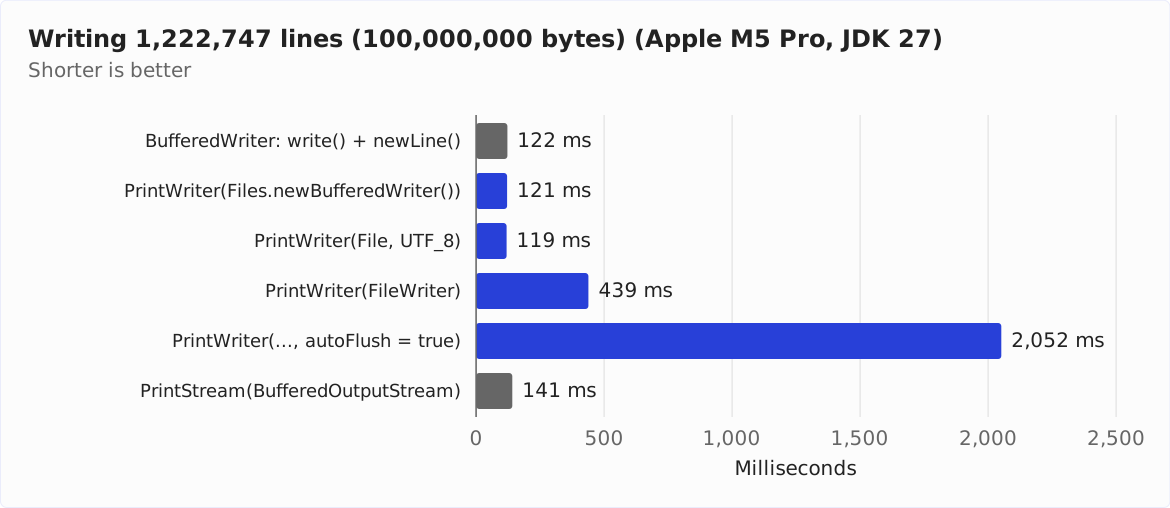
A PrintWriter around the BufferedWriter from Files.newBufferedWriter() (row 2 in the chart) takes 121 ms, the BufferedWriter alone 122 ms (row 1). So the PrintWriter itself costs no measurable time. With the constructor that takes a File object (row 3), it is 119 ms, because this constructor builds the same chain.
Around a FileWriter (row 4), the PrintWriter takes 439 ms, which makes it 263% slower.
A second program, WriteCallCounter, shows where the time goes. It counts how many calls arrive at the OutputStreamWriter and how often the OutputStreamWriter writes to the OutputStream behind it:
1222747 lines
PrintWriter -> OutputStreamWriter:
  2,445,494 calls to the OutputStreamWriter, 195,317 writes to the OutputStream
PrintWriter -> BufferedWriter -> OutputStreamWriter:
  12,088 calls to the OutputStreamWriter, 12,208 writes to the OutputStream
PrintWriter(autoFlush) -> BufferedWriter -> OutputStreamWriter:
  1,222,747 calls to the OutputStreamWriter, 1,222,747 writes to the OutputStream
Without a BufferedWriter, the OutputStreamWriter receives two calls per line, one for the text and one for the line terminator. And because none of these calls brings more than 160 characters, its byte buffer stays at 512 bytes: it writes to the file 195,317 times instead of 12,208 times.
A cross-check shows which of the two effects costs the time: if you put a BufferedOutputStream behind the OutputStreamWriter, which collects the bytes back into blocks of 8,192 bytes, the PrintWriter takes 136 ms. So encoding the 2,445,494 calls individually costs 15 ms, and the 183,109 additional write accesses to the file cost 303 ms – around 1.7 µs per access.
With autoFlush (row 5 in the chart above), the PrintWriter takes 2,052 ms, 17 times as long as without. It flushes the buffer after every line and thus writes to the file 1,222,747 times. Per additional write access, that is 1.6 µs, about as much as with the FileWriter.
The PrintStream (row 6 in the chart) takes 141 ms, which makes it 17% slower than the PrintWriter. It encodes every println() call individually and passes the bytes on to its BufferedOutputStream immediately, as the section PrintWriter vs. PrintStream shows.
printf() vs. println()
A second benchmark, FormatBenchmark, writes 1,000,000 log lines like those from the introduction, with the log level padded to five characters – with printf(), with println() and a string concatenated with +, and with one print() call per field and space. It measures the last variant twice, once with a BufferedWriter behind the PrintWriter and once with a FileWriter.
The following chart shows how long each variant takes for all lines, in milliseconds. All four bars are PrintWriter variants and therefore blue:
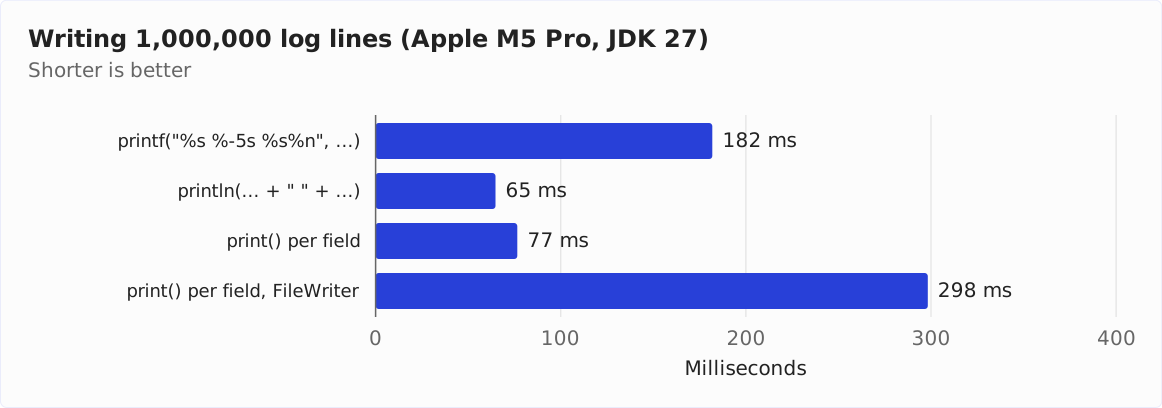
printf() takes almost three times as long as println(), because the Formatter parses the format string anew on every call. Per line, however, that is only around 120 ns more: 182 ns instead of 65 ns. I recommend printf() wherever it makes the code more readable, and println() with + where you write millions of lines and time matters.
If you assemble each line with one print() call per field, it takes 77 ms, 18% longer than the concatenated line. Around a FileWriter, it takes 298 ms, almost four times as long. The reason is the same as in row 4 of the chart above: without a BufferedWriter, each of the seven to eight calls per line arrives at the OutputStreamWriter individually, and the OutputStreamWriter writes the encoded bytes to the file in blocks of 512 bytes.
Common Mistakes
The sections above show each of the following mistakes in detail:
- The
PrintWriteris never closed: The characters stay in the buffer, and the file is empty after the program ends. - The
PrintWriterwraps aFileWriterdirectly: Without aBufferedWriterin between, it writes the file in blocks of 512 bytes and, in the measurement, takes 3.6 times as long. autoFlushfor a file that nobody reads along: Every line becomes a write access of its own, and writing takes 17 times as long.- Nobody queries
checkError(): A write error then goes unnoticed, and the file may contain parts twice. write(int)instead ofprint(int):write(65)writes an “A”, not “65”.println()in a format with a fixed line terminator: On Windows,println()writes\r\n; on Linux and macOS, it writes\n– depending on the operating system.printf()without a locale for a file that a program reads: With German number formats, for example, the file contains a comma instead of a period.APPENDwithoutCREATE: On the first run, when the file does not exist yet,Files.newBufferedWriter()throws aNoSuchFileException.- A try-with-resources statement closes a
PrintWriteraroundSystem.out: After that, no output viaSystem.outappears anymore.
Summary
A PrintWriter wraps a Writer or an OutputStream and writes values as text: with print() and println() via String.valueOf(), with printf() according to a format string. It leaves buffering and encoding to the classes behind it.
Which classes these are depends on the PrintWriter constructor. If you pass a file name, a File object, or an OutputStream, the constructor creates a BufferedWriter and an OutputStreamWriter behind it in all three cases. It wraps a Writer without adding a buffer. That is why, in the measurement, the PrintWriter takes 439 ms for a 100 MB file around a FileWriter and 121 ms around a BufferedWriter – as long as the BufferedWriter alone.
A PrintWriter does not throw an IOException. Only checkError() indicates errors during writing, while printf() reports errors in the format string with an exception. autoFlush flushes the buffer after println(), printf(), and format(), but not after print().
My recommendations:
- Create the
PrintWriterfor files withnew PrintWriter(Files.newBufferedWriter(path)). Without further arguments, it encodes as UTF-8, and if a character does not fit into another encoding you chose, it reports this viacheckError()instead of replacing the character. - To append, specify
CREATEandAPPEND. - Close the
PrintWriterwith try-with-resources, unless it wrapsSystem.out. - Call
checkError()as the last statement in the try block if you need to rely on the file. - Turn on
autoFlushonly where someone reads along. - For
printf()in machine-readable files, specifyLocale.ROOT.
The article about writing files from the same series shows how to write strings, lists, and byte arrays to a file with a single method call. The article about BufferedReader shows how to read the written file back in line by line.
If you enjoyed this article, I’d appreciate a review on my ProvenExpert profile.