A ring buffer is a fixed-size array that you use like a circle: once the last slot has been written, you continue with the first one. Two indices – one for writing, one for reading – always move in the same direction, and no element is ever moved.
In this article, you will learn:
- how a ring buffer works, step by step – and why the two indices alone cannot tell you whether it is full or empty,
- how to implement a ring buffer in Java yourself,
- which three variants exist and where the JDK uses them: in
ArrayBlockingQueue,ArrayDeque, andMemoryHandler, - and what the LMAX Disruptor does differently.
What Is a Ring Buffer?
A ring buffer (also called a “circular buffer”) is an array of fixed length whose slots you can imagine arranged on a circle: after the last slot comes the first one again. Two indices point into the array – the write index to the next free slot, the read index to the oldest element.
The following diagram shows the same ring buffer twice: on the left as a circle, on the right as a flat array. It has six slots; slots 2 to 4 hold the elements 3, 4, and 5. readIndex points to the 3 in slot 2, writeIndex to the free slot 5. The two arrows give the write direction – clockwise in the circle, left to right in the array.
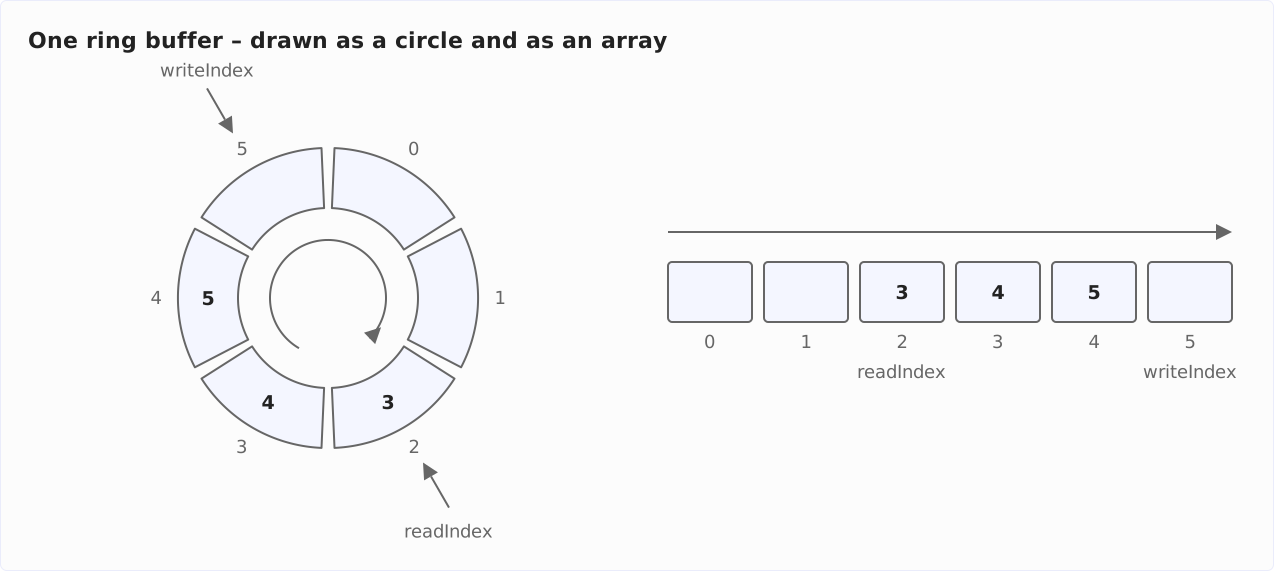
Elements are inserted at the write index and removed at the read index, in the order in which they were written. A ring buffer is thus a queue following the FIFO principle, with a capacity that is fixed from the start.
This data structure goes by several names that all mean the same thing: “ring buffer,” “circular buffer,” and – for the array itself – “circular array.” A “circular queue” is the queue built on top of such an array.
What do you gain from the circle? Removing an element never shifts the others, and inserting one never allocates memory: the array is created once and only written to after that. Writing and reading therefore always take the same time, no matter how full the buffer is – more on that in the section “Time Complexity of Ring Buffer Operations.”
How a Ring Buffer Works
Writing and Reading with Two Indices
When writing, the new element goes into the slot that writeIndex points to; then writeIndex moves on by one slot. When reading, the element is taken from the slot that readIndex points to – the slot is set to null – and readIndex moves on by one slot.
So both indices move in one direction only. The read index follows the write index, and between the two lie the elements that have not been read yet.
In the diagram above, three elements lie between them: the 3, the 4, and the 5. The 1 and the 2 have already been read – their slots 0 and 1 are free again.
The following diagram shows both operations on the circle, from left to right. On the left, the buffer from the first diagram. In the middle, the same buffer after write(6) has stored the 6 in slot 5 – writeIndex is now on the neighboring slot 0. On the right, the buffer after read() has taken the 3 out of slot 2 – readIndex is now on slot 3:
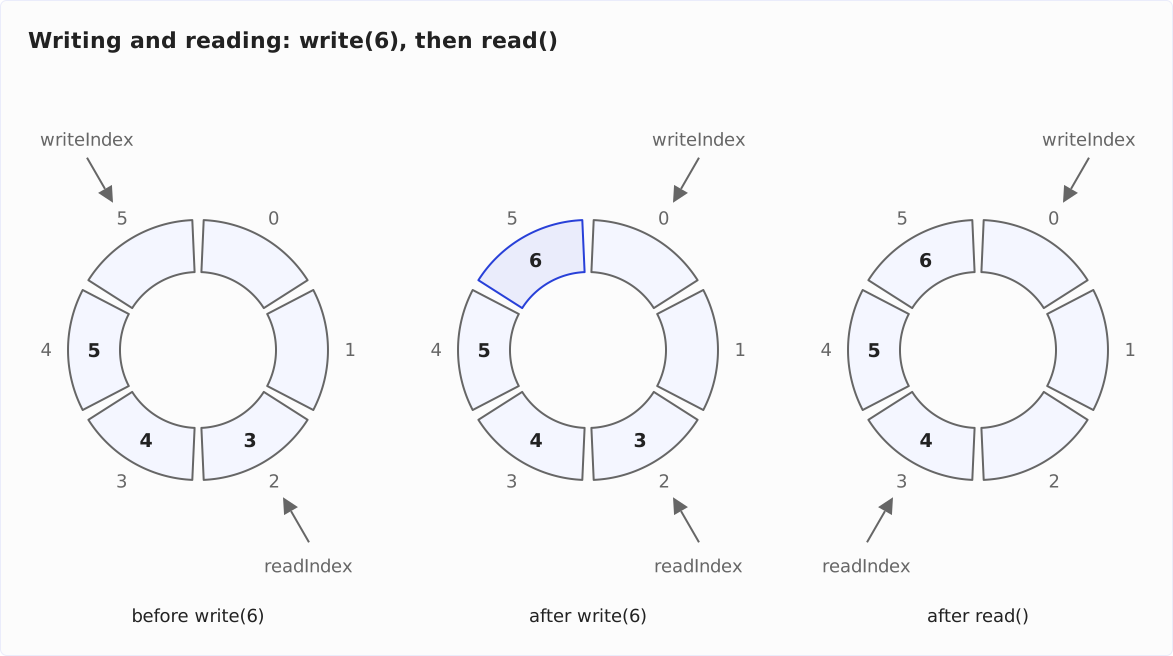
On the circle, there is nothing special about write(6): slot 0 is the neighbor of slot 5. In the flat array, the same step becomes a jump – that is what the next section is about.
The Wrap-Around: From the Last Slot Back to 0
What happens in the array when writeIndex is on the last slot? The following diagram shows it. At the top, the buffer from the first diagram, with writeIndex on slot 5. At the bottom, the same buffer after the 6 has been written: it sits in slot 5, and writeIndex has jumped to slot 0:
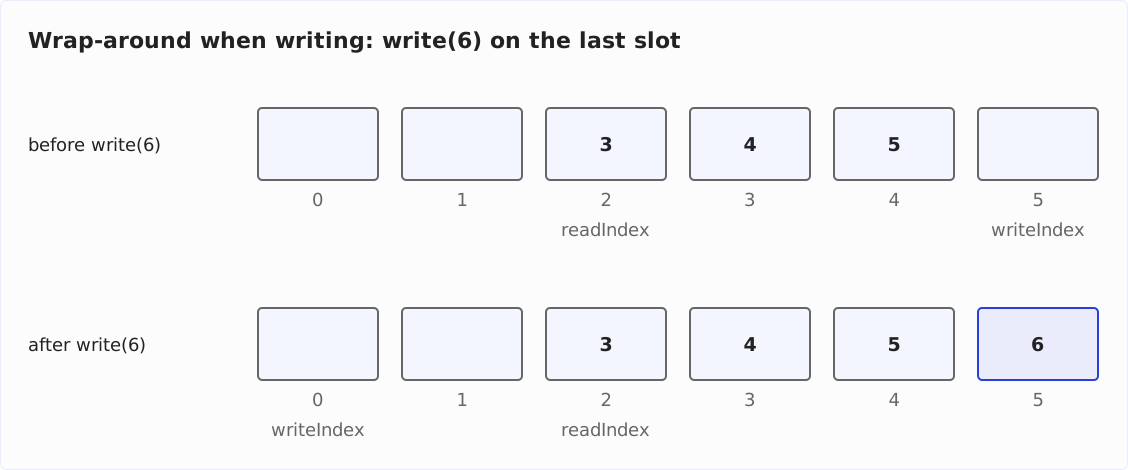
This jump is the whole trick of the ring buffer. In code, there are three ways to write it:
- Comparison: The index is incremented; if it then equals the length of the array, it is set to 0. This is what the JDK does, e.g., in
ArrayBlockingQueue:if (++putIndex == items.length) putIndex = 0; - Modulo: The new index is
(index + 1) % capacity. For every index belowcapacity - 1, that isindex + 1; forcapacity - 1itself, it is 0. This is how theMemoryHandlerfromjava.util.loggingcalculates: its next write slot is(start + count) % buffer.length. - Bitmask: If the capacity is a power of two, say 8, then
(index + 1) & (capacity - 1)gives the same result as modulo: the maskcapacity - 1consists of ones only in binary (for 8:0b111), and a bitwise AND with it cuts off all higher bits – 8 (0b1000) becomes 0. This is what the LMAX Disruptor does, which is why it accepts only powers of two as buffer size.
All three ways lead to the same result; they differ in what the CPU executes: a comparison, a division, or a bitwise AND. I recommend the comparison: it works with any capacity, and the JDK does the same in ArrayDeque and ArrayBlockingQueue. The bitmask only pays off when the capacity is a power of two anyway.
Full or Empty? Three Answers
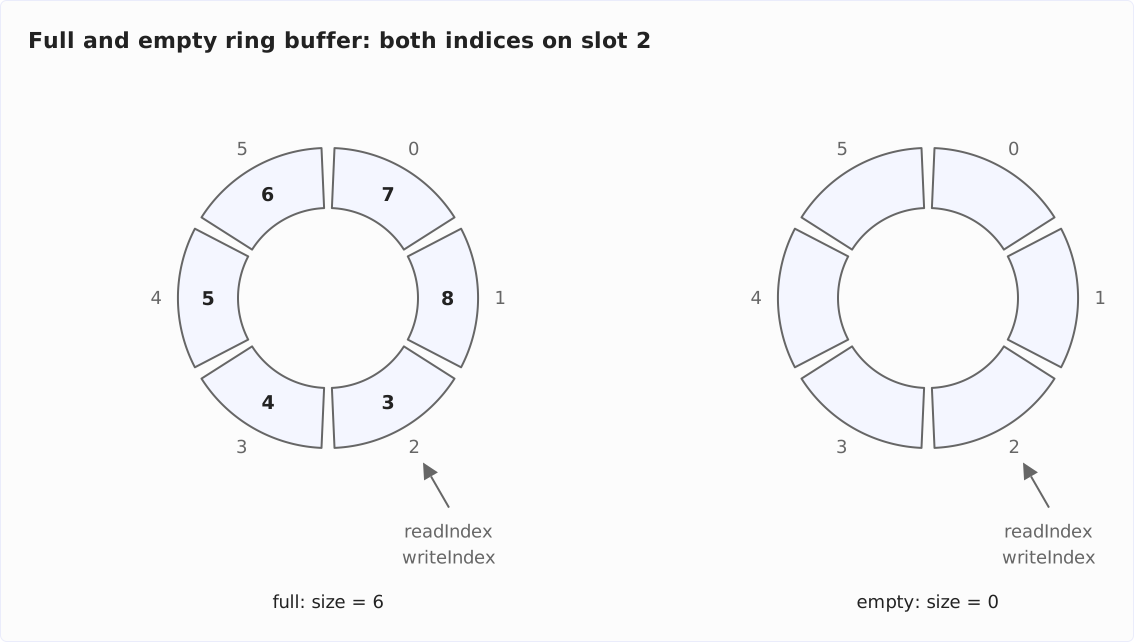
When the buffer is full, writeIndex points to the slot that holds the oldest element – that is, to the same slot as readIndex. When the buffer is empty, readIndex has caught up with writeIndex: both point to the same slot again.
The following diagram shows both cases. On the left, a full buffer with the elements 3 to 8 – after the 6 in slot 5, the 7 and the 8 were written into slots 0 and 1 –, on the right an empty buffer. In both buffers, readIndex and writeIndex are on slot 2; the indices alone do not reveal the difference:
Three solutions have established themselves, and you will find all three in the JDK:
- A counter. Besides the two indices, the buffer keeps track of the number of elements:
size == 0means empty,size == capacitymeans full. This is whatArrayBlockingQueuedoes with its fieldcount– and what I do in the implementation in the section “Implementing a Ring Buffer in Java.” - One slot stays free. The buffer is never filled completely;
writeIndexalways points to an empty slot. ThenreadIndex == writeIndexunambiguously means “empty,” and the buffer is full when the slot afterwriteIndexis the slotreadIndex. The price is one additional slot in the array –ArrayDequepays this price and allocates an array of 17 slots for 16 elements. - Check the slot. When both indices point to the same slot, its content decides: if it is
null, the buffer is empty, otherwise full. This only works ifnullis not a valid element –ArrayDequeandArrayBlockingQueueboth rejectnull.ArrayDequeneeds this check even though it keeps one slot free:addLast()first writes the new element into the last free slot and grows the array afterwards. At that moment the array is full, andhead == tailwould look like “empty” – sogrow()checks the slotelements[head]before it moves the content apart.
I recommend the counter. It keeps the code most readable and makes size() a field access – for the price of one additional int field.
Implementing a Ring Buffer in Java
A ring buffer needs only an array, two indices, and a counter. The following class RingBuffer shows this minimal form – without thread safety: if several threads access it at the same time, you need a lock as in ArrayBlockingQueue.
You can also find the code, together with unit tests, in the class RingBuffer in the GitHub repository for this article:
public class RingBuffer<E> {

  private final Object[] elements;
  private int readIndex;
  private int writeIndex;
  private int size;

  public RingBuffer(int capacity) {
    if (capacity < 1) {
      throw new IllegalArgumentException("Capacity must be 1 or higher");
    }
    elements = new Object[capacity];
  }

  public void write(E element) {
    if (isFull()) {
      throw new IllegalStateException("The ring buffer is full");
    }
    elements[writeIndex] = element;
    writeIndex = next(writeIndex);
    size++;
  }

  public E read() {
    if (isEmpty()) {
      throw new NoSuchElementException("The ring buffer is empty");
    }

    @SuppressWarnings("unchecked")
    E element = (E) elements[readIndex];

    elements[readIndex] = null;
    readIndex = next(readIndex);
    size--;
    return element;
  }

  public boolean isEmpty() {
    return size == 0;
  }

  public boolean isFull() {
    return size == elements.length;
  }

  public int size() {
    return size;
  }

  private int next(int index) {
    index++;
    if (index == elements.length) {
      index = 0;
    }
    return index;
  }
}
The methods one by one:
write()first checks whether the buffer is full, stores the element in the slot thatwriteIndexpoints to, moves the index on, and increments the counter.read()checks whether the buffer is empty, takes the element from the slot thatreadIndexpoints to, sets the slot tonull– so the garbage collector can collect the element once nobody else holds a reference to it –, moves the index on, and decrements the counter.next()is the one place where the indices wrap around: the comparison from the section “The Wrap-Around: From the Last Slot Back to 0.” If you want to try modulo or the bitmask, you change only this method.isEmpty(),isFull(), andsize()read the counter.
The array has the type Object[] because new E[capacity] is not allowed in Java; the cast in read() is nevertheless safe, since write() only lets elements of type E in.
The following example writes three elements into a buffer of capacity 3, reads two of them, and writes two more – those land in slots 0 and 1 while “c” still sits in slot 2 (→ code on GitHub):
RingBuffer<String> buffer = new RingBuffer<>(3);

buffer.write("a");
buffer.write("b");
buffer.write("c");
System.out.println("read: " + buffer.read());
System.out.println("read: " + buffer.read());

buffer.write("d"); // lands in slot 0
buffer.write("e"); // lands in slot 1
System.out.println("full: " + buffer.isFull());

while (!buffer.isEmpty()) {
  System.out.println("read: " + buffer.read());
}
The program prints the following:
read: a
read: b
full: true
read: c
read: d
read: e
The elements come out in the order in which they were written – the wrap-around from slot 2 to slot 0 is invisible from the outside.
A version of the same idea with enqueue() and dequeue() behind a queue interface is the BoundedArrayQueue from the article “Implementing a Queue Using an Array” – there I also show how the array grows when the queue is not supposed to stay bounded.
Variants of the Ring Buffer
What happens when the buffer is full and another element is to be written? There are three answers, and each has its representative in the JDK.
Fixed Buffer: ArrayBlockingQueue Rejects or Waits
The first answer: the buffer does not accept the element. ArrayBlockingQueue recognizes a full queue by its counter – count == items.length – and reacts differently depending on the method: offer() returns false, add() throws an IllegalStateException with the message “Queue full,” and put() makes the calling thread wait until a slot becomes free. offer() with a timeout waits at most for the given time and returns false if no slot has become free by then.
In the source code (JDK 27), the waiting is a loop: as long as count == items.length holds, put() calls notFull.await(). Every removal – via take() or poll() – signals the condition notFull and thereby wakes up a waiting producer. The condition belongs to the one ReentrantLock of the class; why producers and consumers can slow each other down because of it, I show in the section “Is ArrayBlockingQueue Thread-Safe?” of the article about ArrayBlockingQueue.
Growing Buffer: ArrayDeque Allocates a Larger Array
The second answer: the buffer grows. ArrayDeque has no capacity limit – when the array is full, the class allocates a larger one and copies the elements over.
The array is full as soon as head and tail point to the same slot after an insertion. Then the insert method – e.g., addLast() – immediately calls grow(). An array with fewer than 64 slots grows by its length plus 2 – the 17 slots of the default constructor become 36 –, a larger one by half.
If the content currently runs past the end of the array and continues at slot 0, grow() moves the part from head to the old end of the array to the end of the new array, so the order is preserved. How a growing array is copied for a deque, I show with diagrams in the article “Implementing a Deque Using an Array”; the characteristics of the class are in the article about ArrayDeque.
Overwriting Buffer: The Oldest Values Drop Out
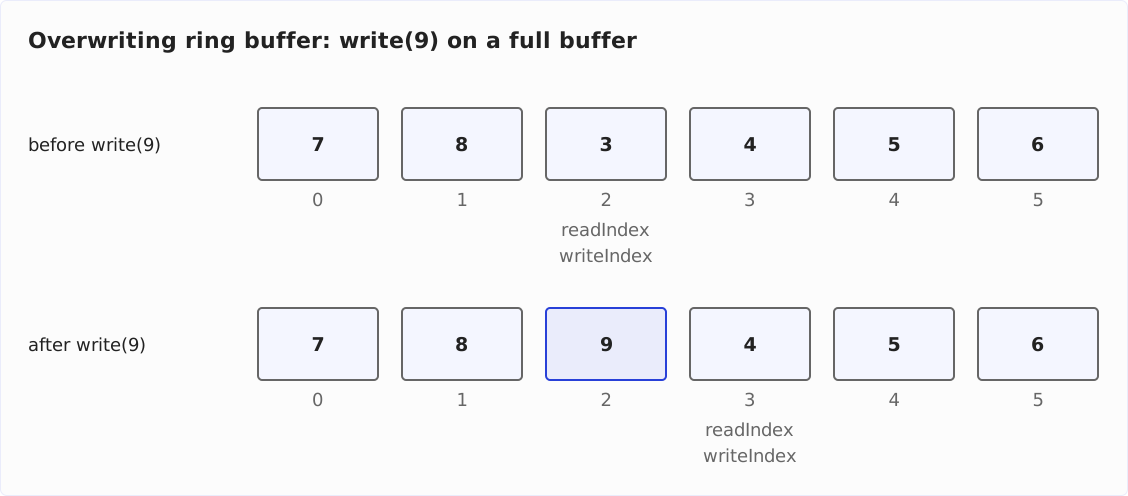
The third answer: the new element overwrites the oldest one. The buffer is then never full in the sense of “accepts nothing more” – it always holds the most recent elements, at most as many as it has slots. This is the right variant for everything where only the last n values matter to you: the last 1,000 log lines, the sensor readings of the last minute, the last positions of a game character.
The following diagram shows the full buffer from the previous diagram before and after write(9): the 9 replaces the 3 – the oldest element – in slot 2, and both indices move on to slot 3. The 4 is now the oldest element:
In code, that is one more if. The class OverwritingRingBuffer extends RingBuffer and overrides only write() (→ code on GitHub):
public class OverwritingRingBuffer<E> extends RingBuffer<E> {

  public OverwritingRingBuffer(int capacity) {
    super(capacity);
  }

  @Override
  public void write(E element) {
    if (isFull()) {
      read(); // discards the oldest element
    }
    super.write(element);
  }
}
If the buffer is full, write() reads the oldest element and discards it – readIndex moves on, and one slot becomes free. Then the inherited method writes the new element as usual.
If you write five numbers into a buffer of capacity 3, the last three remain (→ code on GitHub):
RingBuffer<Integer> buffer = new OverwritingRingBuffer<>(3);

for (int i = 1; i <= 5; i++) {
  buffer.write(i);
}
System.out.println("size: " + buffer.size());

while (!buffer.isEmpty()) {
  System.out.println("read: " + buffer.read());
}
The output:
size: 3
read: 3
read: 4
read: 5
The JDK has an overwriting ring buffer, too – not in java.util, but in java.util.logging. The MemoryHandler keeps log entries in an array of LogRecords, a “circular buffer” according to its Javadoc. When the buffer is full, the new entry overwrites the oldest one, and start – the index of the oldest entry – moves on by one slot.
This way, the MemoryHandler always holds the most recent entries. It passes them on to another handler only once an entry with at least the level pushLevel arrives – SEVERE by default. When an error occurs, the up to 1,000 entries before it (the buffer’s default size) therefore end up in the log as well, without you having to log everything all the time.
LMAX Disruptor: The Best-Known Java Ring Buffer
Outside the JDK, the best-known ring buffer in Java is the LMAX Disruptor – a library by the trading venue LMAX Exchange for passing events between threads (Maven coordinates com.lmax:disruptor, version 4.0.0 as of October 2026). Its core is the class RingBuffer, according to its Javadoc a “ring based store of reusable entries.”
The Disruptor does three things differently from the buffers in this article:
- The entries are pre-allocated. On creation, the
RingBufferfills every slot with an empty event object via anEventFactory. A producer does not allocate a new object but copies its data into the fields of the existing event – in the example from the Disruptor documentation, alongthat it reads from aByteBuffer:event.set(buffer.getLong(0)). Because the events live as long as the Disruptor does, this produces no garbage for the garbage collector. That only holds as long as the data is copied as values: if the producer merely stores a reference to an object it allocated for this purpose in the event, it produces the same garbage as with anArrayBlockingQueue. - Instead of two indices, there are sequence numbers. A producer claims the next sequence number with
next()– alongthat keeps counting up –, fills the entry, and releases it withpublish(). Every consumer keeps its ownSequence, up to which it has read; this is how the Disruptor knows which entries not all consumers have read yet and must therefore not be overwritten. - The capacity must be a power of two. The constructor checks this with
Integer.bitCount(bufferSize) != 1and otherwise throws anIllegalArgumentException(“bufferSize must be a power of 2”). The slot for a sequence number is thensequence & indexMaskwithindexMask = bufferSize - 1– the bitmask from the section “The Wrap-Around: From the Last Slot Back to 0.”
If you only want to hand elements from one thread to another, an ArrayBlockingQueue is the simpler choice. The Disruptor pays off when the latency per event and every object allocation during operation matter – that is what it was built for.
Time Complexity of Ring Buffer Operations
You can find an introduction to time complexity in the article “Big O Notation and Time Complexity – Easily Explained”.
Writing and reading each access one slot and move one index on – no matter how many elements the buffer holds. Their time complexity is O(1). The same applies to isEmpty(), isFull(), and size() when the buffer keeps a counter.
If the buffer grows, as with ArrayDeque, copying the elements when growing costs O(n) once. Because the array grows proportionally to its size each time, this happens rarely, and averaged over many insert operations, it stays at amortized O(1).
Searching for or removing an element in the middle, on the other hand, costs O(n): the array has to be traversed, and when removing, everything behind the gap has to be moved up – ArrayBlockingQueue.remove(Object) does exactly that.
Summary and Outlook
A ring buffer is an array with two indices that jump back to 0 once they have reached the end of the array. Writing and reading never move an element, and as long as the buffer does not have to grow, they never allocate memory – that is why a ring buffer sits underneath ArrayBlockingQueue, ArrayDeque, and the MemoryHandler of the logging package, and why the LMAX Disruptor made it the core of its design.
Three points to take away:
- Whether the buffer is full or empty, the indices alone do not tell you. You need a counter, a slot that stays free, or a look into the slot both indices point to.
- When the buffer is full, you have three options: reject or wait (
ArrayBlockingQueue), grow (ArrayDeque), or overwrite the oldest element (MemoryHandler,OverwritingRingBuffer). - The wrap-around from the last slot back to 0 is best written as a comparison; the bitmask only pays off with a capacity that is a power of two anyway.
How to turn the ring buffer into a queue with a growing array, I show in the article “Implementing a Queue Using an Array” – and how to insert and remove at both ends, in the article “Implementing a Deque Using an Array.”
Did you take something away from this article? With a review on my ProvenExpert profile, you help other developers assess whether these articles are worth reading – and you help me understand which content is most useful to you.