
A Java stream is a sequence of elements that flows through a pipeline of operations that filter, transform, and sort the elements, among other things – and collect the result into a list, for example. The Stream API has been part of the JDK since Java 8 (that is, since March 2014), and it replaces imperative for and for-each loops, which describe how something is filtered, transformed, and collected again, with a declarative description of what is to happen.
In this article, you will find out
- what a Java stream is and how a stream pipeline is structured,
- what you need to know about lambda expressions and method references to write streams,
- how to create streams from collections, arrays, ranges, and files,
- how the intermediate operations
filter(),map(),flatMap(),distinct(),sorted(), and the others work, - how the terminal operations
forEach(),collect(),reduce(),findFirst(),anyMatch(), and the others work, - why streams are lazy and what that means for your code,
- which mistakes to avoid when working with streams.
The Examples in This Article
All examples work on the following data model – a record Book and a small library of eleven classics:
public enum Genre {
  NOVEL,
  GOTHIC,
  ADVENTURE,
  FANTASY,
  SCIENCE_FICTION
}

public record Book(String title, String author, int year, Genre genre) {}
public class Library {
public static final List<Book> BOOKS = List.of(
new Book("Pride and Prejudice", "Jane Austen", 1813, NOVEL),
new Book("Frankenstein", "Mary Shelley", 1818, GOTHIC),
new Book("Moby-Dick", "Herman Melville", 1851, ADVENTURE),
new Book("From the Earth to the Moon", "Jules Verne", 1865, SCIENCE_FICTION),
new Book("Alice's Adventures in Wonderland", "Lewis Carroll", 1865, FANTASY),
new Book("Around the World in Eighty Days", "Jules Verne", 1873, ADVENTURE),
new Book("Treasure Island", "Robert Louis Stevenson", 1883, ADVENTURE),
new Book("Kidnapped", "Robert Louis Stevenson", 1886, ADVENTURE),
new Book("The Time Machine", "H. G. Wells", 1895, SCIENCE_FICTION),
new Book("Dracula", "Bram Stoker", 1897, GOTHIC),
new Book("The War of the Worlds", "H. G. Wells", 1898, SCIENCE_FICTION));
}You can find the complete code of all examples in the GitHub repository java-streams-examples.
Before we get into the theory, here is an example that puts the imperative loop and the declarative stream side by side.
Here is how you collect the titles of all science fiction books, sorted alphabetically – first with a loop:
static List<String> scienceFictionTitles(List<Book> books) {
  List<String> titles = new ArrayList<>();
  for (Book book : books) {
    if (book.genre() == SCIENCE_FICTION) {
      titles.add(book.title());
    }
  }
  Collections.sort(titles);
  return titles;
}
And here with a stream:
static List<String> scienceFictionTitles(List<Book> books) {
  return books.stream()
      .filter(book -> book.genre() == SCIENCE_FICTION)
      .map(Book::title)
      .sorted()
      .toList();
}
Both methods return the same list:
[From the Earth to the Moon, The Time Machine, The War of the Worlds]The loop says how you get to that result: create a list, iterate, check, add, sort, return. The stream says what you want: the titles of the science fiction books, sorted – four operations, visible in the code at a glance, from top to bottom.
What Is a Java Stream?
A stream is not a data structure. It stores no elements; it takes them from a source – a list, an array or a file, for example – and passes them through a chain of operations. Once a stream has delivered its result, it is used up. You cannot use a stream a second time; for that you need a new stream from the same source.
That is the difference from a collection: A List holds its elements and you can iterate over it as often as you like. A Stream describes a computation over elements and runs it exactly once.
The Anatomy of a Stream Pipeline
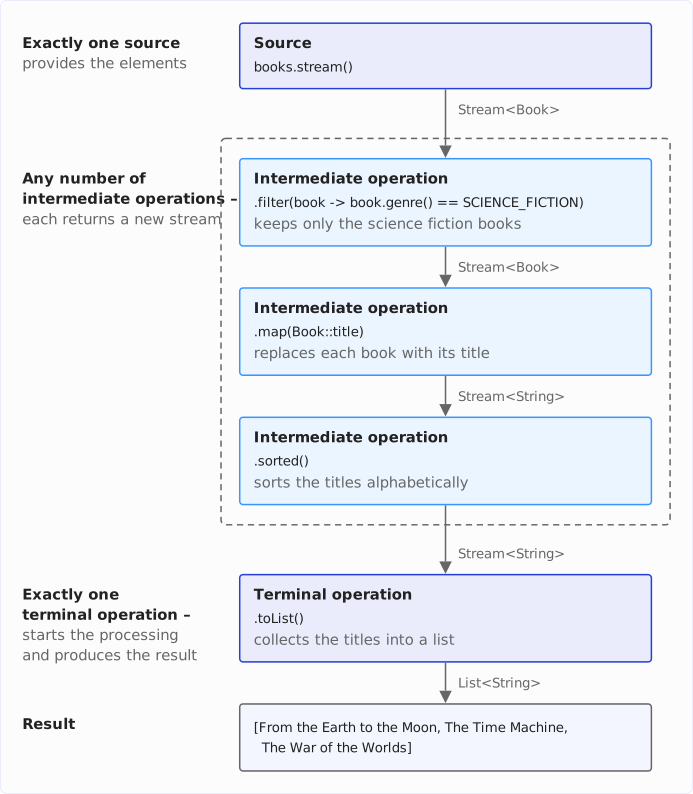
Every stream pipeline consists of three parts:
- Exactly one source that provides the elements – for example,
books.stream(). - Any number of intermediate operations that each return a new stream – for example,
filter()andmap(). - Exactly one terminal operation whose call starts the stream processing and which produces the result – with
count()ortoList(), for example.
The following diagram shows the pipeline from the first example, top to bottom, with the stream type on every arrow – it changes from Stream<Book> to Stream<String> at map():
Let us look at the three parts in a second example.
The following method counts the books published after a given year:
static long countBooksAfter(List<Book> books, int year) {
  return books.stream()                    // ⟵ Source
      .filter(book -> book.year() > year)  // ⟵ Intermediate operation
      .count();                            // ⟵ Terminal operation
}
For the example library Library.BOOKS, countBooksAfter(BOOKS, 1880) returns 5.
The intermediate operations do not run as soon as you call them. They only describe what is to happen. The terminal operation count() starts the processing – you will see in the chapter on lazy evaluation why that matters.
Overview of All Stream Operations
The following table lists every operation this article covers, with its type (intermediate or terminal) and the Java version that introduced it. Each row links to the section that explains the operation. I explain what “stateful” and “short-circuiting” mean in the chapter on lazy evaluation – for now, it is enough to know that a stateful operation remembers something about the elements it has already seen, and a short-circuiting one can stop the processing early.
| Operation | Type | Stateful | Short-circuiting | Since |
|---|---|---|---|---|
filter() | intermediate | no | no | Java 8 |
map() | intermediate | no | no | Java 8 |
flatMap() | intermediate | no | no | Java 8 |
mapMulti() | intermediate | no | no | Java 16 |
mapToInt(), mapToObj(), boxed() | intermediate | no | no | Java 8 |
distinct() | intermediate | yes | no | Java 8 |
sorted() | intermediate | yes | no | Java 8 |
limit() | intermediate | yes | yes | Java 8 |
skip() | intermediate | yes | no | Java 8 |
takeWhile() | intermediate | yes | yes | Java 9 |
dropWhile() | intermediate | yes | no | Java 9 |
peek() | intermediate | no | no | Java 8 |
gather() | intermediate | depends | depends | Java 24 |
forEach(), forEachOrdered() | terminal | – | no | Java 8 |
collect() | terminal | – | no | Java 8 |
toList() | terminal | – | no | Java 16 |
toArray() | terminal | – | no | Java 8 |
reduce() | terminal | – | no | Java 8 |
count(), min(), max(), sum(), average() | terminal | – | no | Java 8 |
findFirst(), findAny() | terminal | – | yes | Java 8 |
anyMatch(), allMatch(), noneMatch() | terminal | – | yes | Java 8 |
Lambda Expressions and Method References – What You Need for Streams
Every operation in the examples above takes a small piece of code as an argument: book -> book.genre() == SCIENCE_FICTION for filter(), Book::title for map(). This chapter explains just enough about these two notations to read and write any pipeline in this article. Lambda expressions have far more to them than that – the article about Java lambda expressions covers them in full, including the four kinds of method references. The functional interfaces that give these lambdas their type are covered in the article about Java functional interfaces.
Lambda Expressions
A lambda expression is a function without a name that you pass as an argument. Before Java 8, you needed an anonymous class for that:
Predicate<Book> publishedBefore1850 = new Predicate<Book>() {
  @Override
  public boolean test(Book book) {
    return book.year() < 1850;
  }
};
Six lines for one comparison. A lambda expression reduces that to the parameter and the expression:
Predicate<Book> publishedBefore1850 = book -> book.year() < 1850;The compiler infers everything else from the target type Predicate<Book>: The parameter book is a Book, and the expression to the right of the arrow is the return value of the test() method.
A lambda comes in three forms: 1. with an inferred parameter type, 2. with an explicit one, and 3. with a block body that needs its own return:
// 1. Inferred parameter type: the compiler derives the type `Book` from the context
Function<Book, String> title = book -> book.title();

// 2. Explicit parameter type – needed only where the compiler cannot infer it
Function<Book, String> titleTyped = (Book book) -> book.title();

// 3. Block body: more than one statement, and therefore its own `return`
Function<Book, String> titleBlock = book -> {
  String t = book.title();
  return t.toUpperCase();
};
I recommend the first form wherever it works. The explicit type only earns its place when the compiler cannot infer it, and a block body only when the lambda needs more than one statement.
Method References
A lambda that does nothing but call one method – book -> book.title(), for example – can also be written as a method reference: Book::title. The four forms of method references you will see in stream pipelines are a reference 1. to an instance method of a type, 2. to a static method, 3. to a method of a specific object, and 4. to a constructor:
// 1. Instance method of a type: `title()` is called on every `Book` element
List<String> titles = BOOKS.stream().map(Book::title).toList();

// 2. Static method: every element is passed to `String.valueOf()` as its argument
List<String> years = BOOKS.stream().map(Book::year).map(String::valueOf).toList();

// 3. Method of a specific object: `println()` on `System.out` with the element
titles.forEach(System.out::println);

// 4. Constructor: creates the array that `toArray()` writes the titles into
String[] titleArray = titles.toArray(String[]::new);
Which form applies follows from the referenced method. Book::title is an instance method without arguments and is called on every Book element. String.valueOf() is static and is passed the element as its argument. System.out::println calls println() on the object System.out and is passed the element as its argument as well. And String[]::new creates the array that toArray() writes the titles into – a constructor reference you will meet again at toArray() and Collectors.toCollection().
Functional Interfaces in the Stream API
Every lambda has a type, and that type is a functional interface – an interface with exactly one abstract method. filter() expects the functional interface Predicate as its argument, map() a Function, forEach() a Consumer. You rarely have to write out the names of the functional interfaces, because the compiler can derive them from the method signature. You are more likely to meet them in the Javadoc and in compiler errors, so here are the ones the Stream API uses most:
| Interface | Method | Used by |
|---|---|---|
Predicate<T> | boolean test(T t) | filter(), anyMatch(), allMatch(), noneMatch(), takeWhile(), dropWhile() |
Function<T, R> | R apply(T t) | map(), flatMap(), Collectors.toMap(), Collectors.groupingBy() |
Consumer<T> | void accept(T t) | forEach(), peek() |
Supplier<T> | T get() | Stream.generate(), Collectors.toCollection() |
Comparator<T> | int compare(T a, T b) | sorted(), min(), max() |
BinaryOperator<T> | T apply(T a, T b) | reduce(), the merge function of Collectors.toMap() |
The method signature (the second column of the table) tells you what your lambda has to look like: A Predicate returns a boolean, a Function returns a new value, a Consumer returns nothing.
How to Create a Stream
A stream needs a source, and the JDK offers one for almost every kind of data.
From a Collection: Collection.stream()
Every Collection has a stream() method, for example List, Set, Queue and Deque.
In the following example, a List and a Set are the source:
Stream<Book> books = BOOKS.stream();

Set<String> authors = Set.of("Jane Austen", "Bram Stoker");
List<String> sorted = authors.stream().sorted().toList();
[Bram Stoker, Jane Austen]Map, on the other hand, is not a Collection and has no stream() method. For a map, you choose one of its views as the stream source: map.entrySet().stream(), map.keySet().stream(), or map.values().stream().
Stream.of() and Arrays.stream()
Stream.of() creates a stream from the values you pass to it:
Stream<String> genres = Stream.of("Novel", "Gothic", "Adventure");Arrays.stream() does the same for an existing array:
String[] words = {"streams", "are", "lazy"};
List<String> upper = Arrays.stream(words).map(String::toUpperCase).toList();

int[] years = {1813, 1818, 1851};
int sum = Arrays.stream(years).sum();
[STREAMS, ARE, LAZY]
5482Note the second example: Arrays.stream(years) on an int[] does not return a Stream<Integer> but an IntStream – and that is the stream which offers the sum() method. That brings us to the primitive streams.
Primitive Streams: IntStream, LongStream, DoubleStream
A Stream<Integer> holds boxed Integer objects. For numbers, the JDK provides three specialized streams that work on primitives instead: IntStream, LongStream, and DoubleStream. They avoid boxing, and they have methods that make no sense for non-numeric objects – sum(), average(), range(), rangeClosed(), and summaryStatistics():
int sum = IntStream.rangeClosed(1, 5).sum();
int sumExclusive = IntStream.range(1, 5).sum();
double average = DoubleStream.of(1.5, 2.5).average().getAsDouble();
long max = LongStream.of(1L, 2L, 3L).max().getAsLong();
IntSummaryStatistics stats = IntStream.rangeClosed(1, 5).summaryStatistics();
15
10
2.0
3
IntSummaryStatistics{count=5, sum=15, min=1, average=3.000000, max=5}rangeClosed(1, 5) includes the upper bound and therefore sums the five numbers 1 to 5, range(1, 5) excludes it and sums the four numbers 1 to 4. average() and max() return an OptionalDouble and an OptionalLong, because the stream may be empty; getAsDouble() and getAsLong() unwrap the value. And summaryStatistics() returns count, sum, minimum, average and maximum in one pass.
The way back to an object stream is boxed(): it wraps every int in an Integer, so that a Stream<Integer> comes out again.
List<Integer> numbers = IntStream.range(0, 3).boxed().toList();[0, 1, 2]Other Stream Sources
Files.lines() reads a text file line by line as a Stream<String>. The stream holds the file open, so it belongs in a try-with-resources block:
try (Stream<String> lines = Files.lines(file)) {
  List<String> startingWithD = lines.filter(line -> line.startsWith("D")).toList();
}
String.chars() returns the characters of a string as an IntStream:
long vowels = "Moby-Dick".chars().filter(c -> "aeiou".indexOf(c) >= 0).count();Stream.iterate() and Stream.generate() create infinite streams: iterate() applies a function to the previous element, generate() calls a supplier for each element. Since neither has an end, you need limit() – or, since Java 9, the three-argument form of iterate() with a termination condition:
List<Integer> powersOfTwo = Stream.iterate(1, n -> n * 2).limit(6).toList();
List<Integer> powersBelow100 = Stream.iterate(1, n -> n < 100, n -> n * 2).toList();
List<String> xs = Stream.generate(() -> "x").limit(3).toList();
[1, 2, 4, 8, 16, 32]
[1, 2, 4, 8, 16, 32, 64]
[x, x, x]Stream.empty() creates a stream with no elements, and Stream.ofNullable(), also since Java 9, creates a stream with one element – or an empty one if the argument is null:
long none = Stream.empty().count();          // 0
long zero = Stream.ofNullable(null).count(); // 0
long one = Stream.ofNullable("Dracula").count(); // 1Intermediate Operations
An intermediate operation takes a stream and returns a new stream. Calling an intermediate operation does not process the elements yet; that happens only once a terminal operation runs. This chapter shows every intermediate operation of the Stream interface with an example.
filter()
filter() keeps those elements for which the predicate returns true and drops all others:
List<Book> adventures = BOOKS.stream()
    .filter(book -> book.genre() == ADVENTURE)
    .toList();

adventures.forEach(System.out::println);
Book[title=Moby-Dick, author=Herman Melville, year=1851, genre=ADVENTURE]
Book[title=Around the World in Eighty Days, author=Jules Verne, year=1873, genre=ADVENTURE]
Book[title=Treasure Island, author=Robert Louis Stevenson, year=1883, genre=ADVENTURE]
Book[title=Kidnapped, author=Robert Louis Stevenson, year=1886, genre=ADVENTURE]The elements pass through unchanged. Only their number changes.
map()
map() transforms every element into exactly one new element. The type may change – here from Book to String:
List<String> titles = BOOKS.stream()
    .map(Book::title)
    .toList();

List<String> labels = BOOKS.stream()
    .map(book -> book.title() + " (" + book.year() + ")")
    .toList();
[Pride and Prejudice, Frankenstein, Moby-Dick, From the Earth to the Moon, ...]
[Pride and Prejudice (1813), Frankenstein (1818), Moby-Dick (1851), ...]The number of elements stays the same. Only their content changes.
flatMap()
What if one element should become several? Authors each have a list of books, and you want a stream of all books. map() would give you a Stream<List<Book>> – a stream of lists of books. flatMap() takes a function that returns a stream per element and flattens all those streams into one.
For this example, the record Author bundles the books of one author:
public record Author(String name, List<Book> books) {}The list Library.AUTHORS holds the library grouped by author. From it, flatMap() gets you back to all the books:
List<Book> allBooks = AUTHORS.stream()
    .flatMap(author -> author.books().stream())
    .toList();
allBooks then contains all books of all authors.
In the same way, you can split a list of titles into a list of all their words:
List<String> words = Stream.of("The Time Machine", "Moby-Dick")
    .flatMap(title -> Stream.of(title.split(" ")))
    .toList();
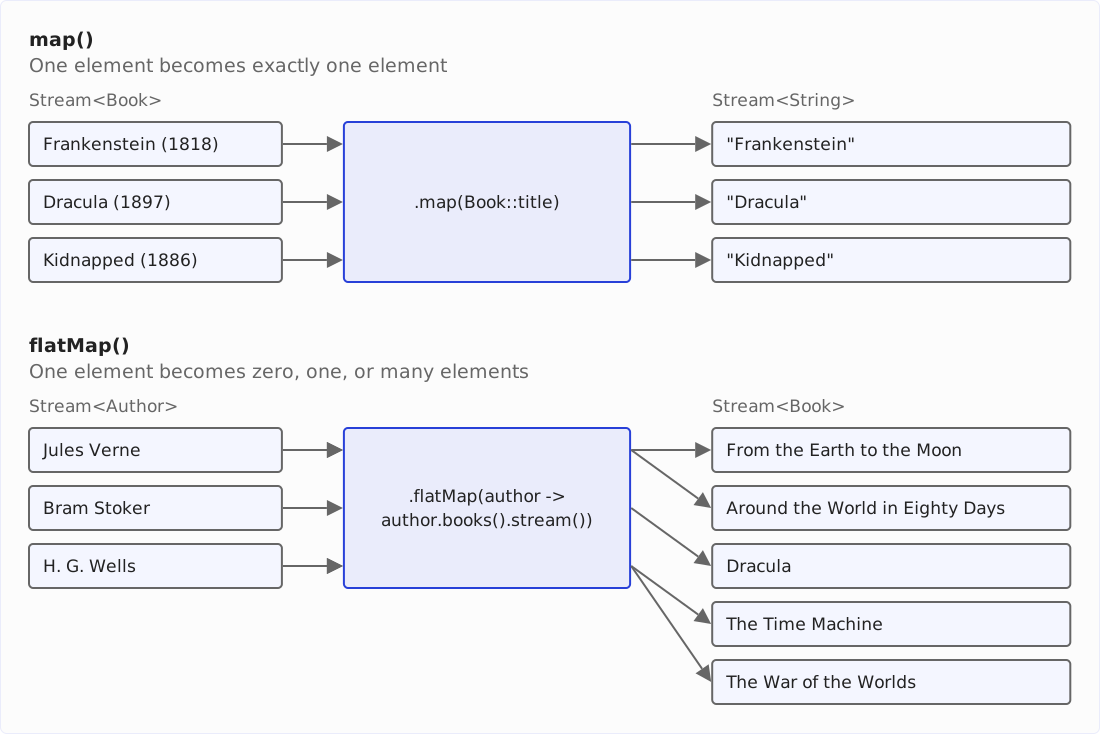
[The, Time, Machine, Moby-Dick]Here is what to remember: map() maps one to one, flatMap() maps one to zero, one, or many.
The following diagram shows both operations side by side – map() on three books, flatMap() on three authors with one, one, and two books:
Since Java 16, there is mapMulti() as an imperative alternative to flatMap(). Instead of returning a stream, the lambda receives a Consumer and passes it every element it wants to emit:
List<String> earlyTitles = BOOKS.stream()
    .<String>mapMulti((book, downstream) -> {
      if (book.year() < 1850) {
        downstream.accept(book.title());
      }
    })
    .toList();
[Pride and Prejudice, Frankenstein]mapMulti() saves creating a stream per element. The explicit type argument <String> is necessary in this example, because the compiler cannot infer the element type of the result from the lambda.
Mapping Between Object Streams and Primitive Streams
mapToInt(), mapToLong(), and mapToDouble() turn a Stream<T> into a primitive stream, so that you can use sum(), max(), and the other numeric operations. mapToObj() and boxed() go the other way:
int newestYear = BOOKS.stream().mapToInt(Book::year).max().getAsInt();

List<Integer> years = BOOKS.stream().mapToInt(Book::year).boxed().toList();

List<String> squares = IntStream.rangeClosed(1, 3)
    .mapToObj(n -> n + "² = " + n * n)
    .toList();
1898
[1813, 1818, 1851, 1865, 1865, 1873, 1883, 1886, 1895, 1897, 1898]
[1² = 1, 2² = 4, 3² = 9]distinct()
distinct() removes duplicates. Two elements count as duplicates when equals() returns true for them; the first occurrence stays:
List<String> authors = BOOKS.stream()
    .map(Book::author)
    .distinct()
    .toList();
[Jane Austen, Mary Shelley, Herman Melville, Jules Verne, Lewis Carroll, Robert Louis Stevenson, H. G. Wells, Bram Stoker]Eleven books, eight authors. distinct() has to remember every element it has seen, which makes it a stateful operation – more on that in the section on stateful operations.
sorted()
sorted() without an argument sorts the stream by natural order, so the elements must implement Comparable:
List<String> titles = BOOKS.stream().map(Book::title).sorted().toList();[Alice's Adventures in Wonderland, Around the World in Eighty Days, Dracula, Frankenstein, From the Earth to the Moon, Kidnapped, Moby-Dick, Pride and Prejudice, The Time Machine, The War of the Worlds, Treasure Island]For anything else, you pass a Comparator. In the following example, Comparator.comparingInt() extracts the publication year as the sort key, and reversed() flips the order:
List<Book> byYearDescending = BOOKS.stream()
    .sorted(Comparator.comparingInt(Book::year).reversed())
    .toList();

byYearDescending.forEach(
    book -> System.out.println(book.year() + " " + book.title()));
1898 The War of the Worlds
1897 Dracula
1895 The Time Machine
1886 Kidnapped
1883 Treasure Island
...With thenComparing(), you add a second sort key for those elements that the first sort key considers equal. The following example therefore sorts by author first and by year second:
List<Book> byAuthorThenYear = BOOKS.stream()
    .sorted(Comparator.comparing(Book::author).thenComparing(Book::year))
    .toList();

byAuthorThenYear.forEach(
    book -> System.out.println(book.author() + " " + book.year()));
Bram Stoker 1897
H. G. Wells 1895
H. G. Wells 1898
Herman Melville 1851
Jane Austen 1813
Jules Verne 1865
Jules Verne 1873
...Everything a Comparator can do – nullsFirst(), reverseOrder(), comparing by multiple keys – is covered in the article about sorting streams with Comparator.comparing().
limit() and skip()
limit(n) keeps the first n elements, skip(n) drops the first n. Together, they return any section of the stream – in the third example, elements four to six:
List<String> firstThree = BOOKS.stream().map(Book::title).limit(3).toList();
List<String> lastThree = BOOKS.stream().map(Book::title).skip(8).toList();
List<String> fourToSix = BOOKS.stream().map(Book::title).skip(3).limit(3).toList();
[Pride and Prejudice, Frankenstein, Moby-Dick]
[The Time Machine, Dracula, The War of the Worlds]
[From the Earth to the Moon, Alice's Adventures in Wonderland, Around the World in Eighty Days]takeWhile() and dropWhile()
Since Java 9, takeWhile() returns the elements from the start of the stream until the Predicate passed to it is false for the first time. dropWhile() skips exactly those elements and returns the rest:
List<String> before1860 = BOOKS.stream()
    .takeWhile(book -> book.year() < 1860)
    .map(Book::title)
    .toList();

List<String> from1890 = BOOKS.stream()
    .dropWhile(book -> book.year() < 1890)
    .map(Book::title)
    .toList();
[Pride and Prejudice, Frankenstein, Moby-Dick]
[The Time Machine, Dracula, The War of the Worlds]This works in this case because the library is sorted by year. On an unsorted stream, the difference from filter() becomes visible:
List<Integer> taken = Stream.of(1, 2, 8, 3, 4).takeWhile(n -> n < 5).toList();
List<Integer> filtered = Stream.of(1, 2, 8, 3, 4).filter(n -> n < 5).toList();
[1, 2]
[1, 2, 3, 4]takeWhile() stops at the 8 – the first element that is not smaller than 5 – and never gets to see the 3 and the 4. filter() checks every element.
peek()
peek() runs an action on every element that runs through the operation and hands the element on unchanged. It is meant for looking into a running pipeline while debugging:
List<String> result = BOOKS.stream()
    .filter(book -> book.year() > 1890)
    .peek(book -> System.out.println("after filter: " + book.title()))
    .map(Book::title)
    .peek(title -> System.out.println("after map:    " + title))
    .toList();
after filter: The Time Machine
after map: The Time Machine
after filter: Dracula
after map: Dracula
after filter: The War of the Worlds
after map: The War of the WorldsNote the order of the output: “after filter” and “after map” alternate. The first book runs through filter() and map() before the second book enters the pipeline. That is the element-by-element processing the lazy evaluation chapter explains.
Do not use peek() to modify elements or to fill an external list. The JDK developers do not guarantee that the action runs for every element – a pipeline that only counts, for example, may skip the intermediate operations entirely. For side effects, use forEach(); for results, collect().
gather()
Since Java 24, you can write intermediate operations of your own with gather(). The JDK ships a few ready-made gatherers; Gatherers.windowFixed() groups the elements into lists of a fixed size:
List<List<String>> pairs = BOOKS.stream()
    .map(Book::title)
    .gather(Gatherers.windowFixed(2))
    .toList();
[Pride and Prejudice, Frankenstein]
[Moby-Dick, From the Earth to the Moon]
[Alice's Adventures in Wonderland, Around the World in Eighty Days]
[Treasure Island, Kidnapped]
[The Time Machine, Dracula]
[The War of the Worlds]How the other built-in gatherers work and how you implement your own is the topic of the article about Java Stream Gatherers.
Terminal Operations
A terminal operation starts the processing and produces the result: a value, a collection, or a side effect. Afterwards, the stream is consumed.
forEach() and forEachOrdered()
forEach() runs an action for every element:
BOOKS.stream()
    .filter(book -> book.year() > 1890)
    .forEach(book -> System.out.println(book.title()));
The Time Machine
Dracula
The War of the WorldsforEachOrdered() does the same, but guarantees the encounter order of the elements. For a sequential stream, that makes no difference; for a parallel stream, it does.
collect() and Collectors
collect() builds a result from the elements – a list, a set, a map or a string, for example. How it does that is defined by a Collector, and the Collectors class provides the common ones. Here is one example each.
toSet() collects the elements into a Set and drops duplicates on the way – what remains here are the five genres that occur in the library:
Set<Genre> genres = BOOKS.stream().map(Book::genre).collect(toSet());toMap() builds a map from a key function and a value function, for example a map from book title to publication year:
Map<String, Integer> yearByTitle = BOOKS.stream()
    .collect(toMap(Book::title, Book::year));
Two elements with the same key make toMap() throw an IllegalStateException. With the author as key, that happens at Jules Verne, who has two books in the library:
Map<String, Integer> yearByAuthor = BOOKS.stream()
    .collect(toMap(Book::author, Book::year));
java.lang.IllegalStateException: Duplicate key Jules Verne (attempted merging values 1865 and 1873)toMap() with three arguments takes a merge function that decides which value wins – in the following example, the newer one overwrites the one already stored:
Map<String, String> latestTitleByAuthor = BOOKS.stream()
    .collect(toMap(Book::author, Book::title, (first, second) -> second));

System.out.println(latestTitleByAuthor.get("Jules Verne"));
Around the World in Eighty DaysHow to merge duplicate keys, choose the type of the map, and deal with null values is shown in the article about Collectors.toMap().
joining() concatenates strings with a separator:
String authors = BOOKS.stream()
    .map(Book::author)
    .distinct()
    .collect(joining(", "));
Jane Austen, Mary Shelley, Herman Melville, Jules Verne, Lewis Carroll, Robert Louis Stevenson, H. G. Wells, Bram StokergroupingBy() groups the elements by a key into a map of lists. That also solves the task toMap() just failed at: every author gets a list of publication years instead of a single value. What ends up in those lists is decided by a second argument, a downstream collector – here mapping():
Map<String, List<Integer>> yearsByAuthor = BOOKS.stream()
    .collect(groupingBy(Book::author, mapping(Book::year, toList())));
{Bram Stoker=[1897], Robert Louis Stevenson=[1883, 1886], Mary Shelley=[1818], Jane Austen=[1813], Lewis Carroll=[1865], Herman Melville=[1851], Jules Verne=[1865, 1873], H. G. Wells=[1895, 1898]}In the same way, you group the titles by genre, and with counting() as the downstream collector you count the books per genre:
Map<Genre, List<String>> titlesByGenre = BOOKS.stream()
    .collect(groupingBy(Book::genre, mapping(Book::title, toList())));

Map<Genre, Long> countByGenre = BOOKS.stream()
    .collect(groupingBy(Book::genre, counting()));
{FANTASY=[Alice's Adventures in Wonderland], SCIENCE_FICTION=[From the Earth to the Moon, The Time Machine, The War of the Worlds], GOTHIC=[Frankenstein, Dracula], NOVEL=[Pride and Prejudice], ADVENTURE=[Moby-Dick, Around the World in Eighty Days, Treasure Island, Kidnapped]}
{FANTASY=1, SCIENCE_FICTION=3, GOTHIC=2, NOVEL=1, ADVENTURE=4}groupingBy() returns a HashMap. Its order is not defined: with the Genre keys, it depends on which objects the program hashed before – in a different program or a different Java version, the output will therefore look different.
Which downstream collectors exist and how to group on several levels is shown in the article on Collectors.groupingBy().
Two more collectors are worth knowing: Since Java 10, toUnmodifiableList(), toUnmodifiableSet(), and toUnmodifiableMap() return collections that cannot be changed afterwards. And since Java 12, teeing() feeds the elements into two collectors at once and combines their results.
Stream.toList() vs. Collectors.toList()
Since Java 16, Stream has its own toList() method, and you have seen it in many of the examples above. It returns an unmodifiable list:
List<String> titles = BOOKS.stream().map(Book::title).toList();
titles.add("Emma"); // UnsupportedOperationException
collect(Collectors.toList()) is the older form. Its Javadoc makes no promise about the type or the mutability of the list – today it returns an ArrayList that you can modify, but the API does not guarantee it:
List<String> mutable = BOOKS.stream()
    .map(Book::title)
    .collect(Collectors.toList());
mutable.add("Emma"); // works today, but the API does not guarantee it
I recommend Stream.toList() wherever the result does not need to be modified. If it does, say so explicitly with collect(Collectors.toCollection(ArrayList::new)) – see the chapter on common mistakes.
toArray()
toArray() returns the elements as an array. For an object stream, you pass the array constructor so that the result has the right type; a primitive stream knows its type:
String[] titles = BOOKS.stream().map(Book::title).toArray(String[]::new);
int[] years = BOOKS.stream().mapToInt(Book::year).toArray();
reduce()
reduce() combines all elements into one value. You pass a function that takes two elements – the accumulated result so far and the next element – and returns one:
int sum = IntStream.rangeClosed(1, 5).reduce(0, (a, b) -> a + b);

Optional<Book> oldest = BOOKS.stream()
    .reduce((a, b) -> a.year() <= b.year() ? a : b);
15
Optional[Book[title=Pride and Prejudice, author=Jane Austen, year=1813, genre=NOVEL]]The first form takes a starting value, the so-called identity – the 0 for a sum – and returns an int. The second form has no identity and returns an Optional, because an empty stream has nothing to reduce. What else reduce() can do, and when collect() is the better tool, is shown in the article about reduce().
count(), min(), max(), sum(), and average()
For the common aggregations, you do not need reduce(). count(), min(), and max() exist on every stream; sum(), average(), and summaryStatistics() on the primitive streams:
long before1850 = BOOKS.stream().filter(book -> book.year() < 1850).count();

Optional<Book> newest = BOOKS.stream().max(Comparator.comparingInt(Book::year));

double averageYear = BOOKS.stream().mapToInt(Book::year).average().getAsDouble();

IntSummaryStatistics stats = BOOKS.stream()
    .mapToInt(Book::year)
    .summaryStatistics();
2
Optional[Book[title=The War of the Worlds, author=H. G. Wells, year=1898, genre=SCIENCE_FICTION]]
1867.6363636363637
IntSummaryStatistics{count=11, sum=20544, min=1813, average=1867.636364, max=1898}findFirst() and findAny()
findFirst() returns the first element of the stream, findAny() any element. Both return an Optional, because the stream may be empty:
Optional<Book> firstGothic = BOOKS.stream()
    .filter(book -> book.genre() == GOTHIC)
    .findFirst();

String title = firstGothic.map(Book::title).orElse("none");
System.out.println(title);
firstGothic.ifPresent(book -> System.out.println("found: " + book.title()));
Frankenstein
found: FrankensteinOptional.map() transforms the value if there is one, orElse() provides the fallback, and ifPresent() runs an action only when a value exists. That is all you need from Optional to work with these methods; everything beyond that is covered in the article about Java Optional. What an empty result looks like:
Optional<Book> after1900 = BOOKS.stream()
    .filter(book -> book.year() > 1900)
    .findFirst();

after1900.isPresent();                         // false
after1900.map(Book::title).orElse("none");     // "none"
In a sequential stream, findAny() returns the same element as findFirst(). Its purpose is the parallel stream, where it may return whichever element a thread finds first – and saves the coordination that findFirst() needs to identify the first one in encounter order.
anyMatch(), allMatch(), and noneMatch()
The three match operations answer a yes/no question about the elements – whether there is any book by the author Bram Stoker, whether all books are from before 1900, or whether no book is a novel:
boolean hasStoker = BOOKS.stream()
    .anyMatch(book -> book.author().equals("Bram Stoker"));

boolean allBefore1900 = BOOKS.stream().allMatch(book -> book.year() < 1900);

boolean noNovels = BOOKS.stream().noneMatch(book -> book.genre() == NOVEL);
true
true
falseAll three end the stream as soon as the answer is known: anyMatch() at the first match, allMatch() and noneMatch() at the first element that decides the question.
How Streams Work: Lazy Evaluation
The previous chapters used a property of streams without explaining it: Intermediate operations do not run as soon as you call them (but only once you call the terminal operation). This chapter shows what happens instead – and why it matters for your code.
Intermediate Operations Do Nothing on Their Own
What does the following pipeline print?
BOOKS.stream()
    .filter(book -> book.year() > 1890)
    .peek(book -> System.out.println("filtered: " + book.title()));
Nothing. There is no terminal operation, so the source never pushes a single element into the pipeline, and the peek() action never runs. The intermediate operations only build a description of the processing. That is what lazy evaluation means: The work happens only when the result is requested, not when the pipeline is assembled.
Element by Element, Not Stage by Stage
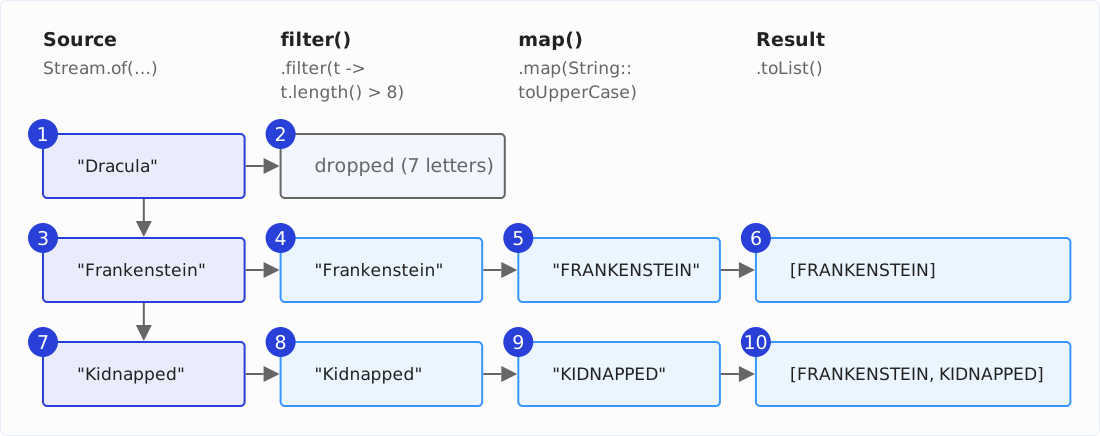
You might expect a pipeline to run in stages: in the following example, first filter() on all elements, then map() on all remaining ones. That is not what happens. The terminal operation starts the traversal, and the source pushes its elements into the pipeline one at a time: every element runs through the whole pipeline before the next one follows.
List<String> result = Stream.of("Dracula", "Frankenstein", "Kidnapped")
    .peek(title -> System.out.println("filter sees " + title))
    .filter(title -> title.length() > 8)
    .peek(title -> System.out.println("map sees    " + title))
    .map(String::toUpperCase)
    .toList();
filter sees Dracula
filter sees Frankenstein
map sees Frankenstein
filter sees Kidnapped
map sees Kidnapped“Dracula” has seven letters and fails the filter, so map() never sees it. “Frankenstein” passes the filter and reaches map() before “Kidnapped” is even read from the source.
The following diagram shows the same run as a grid – one row per element, one column per stage, and the order of the steps as numbers:
That has two consequences. A stream never needs to hold the intermediate results of all elements in memory – only one element travels through the pipeline at a time. And an operation that decides early can stop the whole pipeline early, which is the next section.
Short-Circuiting Operations
findFirst(), anyMatch(), limit(), and the other operations marked as short-circuiting in the overview tell the source that no further elements are needed as soon as their result is known. Combined with element-by-element processing, that makes the following pipeline terminate although its source is infinite:
String first = Stream.iterate(1, n -> n + 1)
    .peek(n -> System.out.println("checking " + n))
    .filter(n -> n % 7 == 0)
    .map(n -> "first multiple of 7: " + n)
    .findFirst()
    .orElseThrow();
checking 1
checking 2
checking 3
checking 4
checking 5
checking 6
checking 7
first multiple of 7: 7iterate() would produce numbers forever. findFirst() needs exactly one element that passes the filter; the 7 is that element, and findFirst() ends the stream. The 8 is never generated.
Stateful Operations: sorted() and distinct()
Element-by-element processing has a limit. sorted() cannot emit its first element before it has seen the last one – the smallest element might come last. It collects all elements, sorts them, and only then passes them on:
List<String> sorted = Stream.of("Dracula", "Frankenstein", "Kidnapped")
    .peek(title -> System.out.println("before sorted: " + title))
    .sorted()
    .peek(title -> System.out.println("after sorted:  " + title))
    .toList();
before sorted: Dracula
before sorted: Frankenstein
before sorted: Kidnapped
after sorted: Dracula
after sorted: Frankenstein
after sorted: KidnappedThe three “before” lines come first, then the three “after” lines. Up to sorted(), the pipeline ran element by element; at sorted(), it had to buffer.
Operations like that are called stateful: sorted() buffers everything, distinct() remembers every element it has seen, limit() and skip() count. The others – filter(), map(), flatMap(), peek() – are stateless: They look at one element at a time and remember nothing.
Stateful operations have a price. sorted() holds all elements in memory, and on an infinite stream, it never returns – Stream.iterate(1, n -> n + 1).sorted().findFirst() runs until the JVM is out of memory. limit() before sorted() fixes that; limit() after it does not.
A Stream Can Be Used Only Once
A stream runs its pipeline exactly once. The second terminal operation on the same stream throws:
Stream<Book> books = BOOKS.stream();
books.count();
books.count(); // IllegalStateException
java.lang.IllegalStateException: stream has already been operated upon or closedIf you need the elements twice, you have to create the stream twice. That costs nothing: BOOKS.stream() does not copy the list, it only creates the pipeline object.
Parallel Streams
parallelStream() on a collection – or parallel() on any stream – splits the elements across the threads of the common ForkJoinPool and processes them concurrently. The pipeline stays the same; only the execution changes. With forEach(), you see that immediately, because the order in which the threads finish is no longer the order of the source:
BOOKS.parallelStream()
    .map(Book::title)
    .forEach(System.out::println);
Treasure Island
Kidnapped
Around the World in Eighty Days
Dracula
...forEachOrdered() restores the encounter order, at the price of the coordination that takes:
BOOKS.parallelStream()
    .map(Book::title)
    .forEachOrdered(System.out::println);
Pride and Prejudice
Frankenstein
Moby-Dick
...Results of reduce(), collect(), and the aggregations stay correct in a parallel stream – the JDK splits the work and combines the partial results:
long sum = IntStream.rangeClosed(1, 1_000_000).parallel().asLongStream().sum();500000500000Whether a parallel stream is faster than a sequential one depends on the amount of work per element, the size of the source, and how easily it can be split. With eleven books, there is nothing to distribute – splitting and combining is the whole cost, and the work per element is a method call. When parallel streams pay off, and when they do not, is shown with measurements in the article on parallel streams.
Common Mistakes
The following five mistakes are ones I see often when streams are used – each has a simple fix.
Side Effects in Lambdas
Filling an external list from inside forEach() works – in a sequential stream:
List<String> titles = new ArrayList<>();
BOOKS.stream()
    .filter(book -> book.year() > 1890)
    .forEach(book -> titles.add(book.title()));
If you turn that into a parallel stream, several threads write into an ArrayList at the same time, which is not thread-safe. The result is a list with missing elements or an ArrayIndexOutOfBoundsException.
The fix is to let the stream produce the list:
List<String> titles = BOOKS.stream()
    .filter(book -> book.year() > 1890)
    .map(Book::title)
    .toList();
That version has no shared state and works sequentially and in parallel. The rule behind it: lambdas in a pipeline compute values, they do not change anything outside the pipeline.
Reusing a Stream
You have seen the IllegalStateException in the section A stream can be used only once. It usually appears when a stream is stored in a variable and used in two places:
Stream<Book> stream = BOOKS.stream();
stream.forEach(book -> {});
stream.count(); // IllegalStateException
Do not store streams in variables; create them where you need them.
Checked Exceptions in Lambdas
Function, Predicate, and the other functional interfaces do not declare checked exceptions. A lambda that calls a method with a checked exception therefore does not compile:
// does not compile: Files.readAllLines() throws IOException
List<String> lines = files.stream()
    .flatMap(file -> Files.readAllLines(file).stream())
    .toList();
The fix is a small helper method that wraps the checked exception in an unchecked one – UncheckedIOException exists for exactly this purpose. Let it return a Stream right away, and a method reference is all flatMap() needs:
List<String> lines = files.stream()
    .flatMap(FileUtil::readLines)
    .toList();
public class FileUtil {
public static Stream<String> readLines(Path file) {
try {
return Files.readAllLines(file).stream();
} catch (IOException e) {
throw new UncheckedIOException(e);
}
}
}If you need this in several places, a functional interface of your own whose method may declare the exception pays off – how to write it is shown in the article about functional interfaces.
Streams for Everything
Not every loop is better as a stream. This loop sums the title lengths:
int total = 0;
for (Book book : BOOKS) {
  total += book.title().length();
}
And this stream does the same:
int total = BOOKS.stream().mapToInt(book -> book.title().length()).sum();Both are fine. The stream wins when the pipeline has several steps that would each become a nested if or a temporary list in the loop. It loses when the loop runs over indices or modifies several variables at once. Nested loops show that most clearly.
The following method searches a matrix stored as a 2D array for every cell that holds a given value and returns their coordinates:
static List<String> findAll(int[][] matrix, int value) {
  List<String> hits = new ArrayList<>();
  for (int row = 0; row < matrix.length; row++) {
    for (int col = 0; col < matrix[row].length; col++) {
      if (matrix[row][col] == value) {
        hits.add(row + "/" + col);
      }
    }
  }
  return hits;
}
The same task as a pipeline:
static List<String> findAll(int[][] matrix, int value) {
  return IntStream.range(0, matrix.length)
      .boxed()
      .flatMap(row -> IntStream.range(0, matrix[row].length)
          .filter(col -> matrix[row][col] == value)
          .mapToObj(col -> row + "/" + col))
      .toList();
}
For the matrix {{1, 0, 2}, {0, 2, 0}, {2, 1, 0}} and the value 2, both return the same result:
[0/2, 1/1, 2/0]The stream version is three lines shorter and still the harder read: the outer range() has to switch to an object stream with boxed() before flatMap() may return a Stream<String>, and the inner pipeline sits inside the lambda of the outer one as an expression. The nested loop needs neither.
And where a loop stops midway with break while carrying an intermediate result, a stream pipeline needs a gatherer of its own, because takeWhile() only ever sees one element and does not know that intermediate result.
I recommend choosing the form that says most clearly what the code does, and that is not always the stream.
Assuming Collectors.toList() Returns a Mutable List
The comparison above showed it: Collectors.toList() returns a modifiable ArrayList today, but its contract does not promise that. Code that adds to the result relies on an implementation detail. If you need a mutable list, ask for one explicitly:
List<String> titles = BOOKS.stream()
    .map(Book::title)
    .collect(Collectors.toCollection(ArrayList::new));
Summary
A stream pipeline has one source, any number of intermediate operations, and one terminal operation. The intermediate operations describe the processing; and only the call of the terminal operation runs it – lazily, element by element, and only as far as the result requires. That is why findFirst() terminates on an infinite stream and why sorted() does not.
Three recommendations for everyday code: use Stream.toList() unless you need a mutable list. Keep lambdas free of side effects, and the pipeline works sequentially and in parallel. And create a stream where you use it, instead of storing it.
This article covered every operation of the Stream interface. There is more to say about some of them than one example can show, and they have articles of their own: the one about groupingBy(), which also shows the downstream collectors and partitioningBy(), the one about parallel streams, which shows when parallel() pays off, the one about toMap(), which also shows how to merge duplicate keys, the one about reduce(), which also shows when collect() is the better tool, the one about functional interfaces, which give every lambda its type, the one about lambda expressions, which every pipeline is made of besides the stream itself, the one about Optional, which findFirst(), min(), max(), and reduce() return, and the one about the stream gatherers, which let you write intermediate operations of your own.
Was this article helpful to you? Then I’d be happy if you took a moment to leave a review on my ProvenExpert profile.