A FileWriter writes text to a file. It encodes the characters into bytes using a character encoding – since Java 18, UTF-8 by default – and writes these bytes to the file.
The following program writes two log lines to the file target/server.log and then prints its content:
try (FileWriter writer = new FileWriter("target/server.log")) {
  writer.write("2026-10-17 08:15:02 INFO  Server started on port 8080\n");
  writer.write("2026-10-17 08:15:12 ERROR Connection reset by peer\n");
}

System.out.print(Files.readString(Path.of("target/server.log")));
2026-10-17 08:15:02 INFO Server started on port 8080
2026-10-17 08:15:12 ERROR Connection reset by peerFileWriter has existed since Java 1.1. It does not have a single method of its own: everything it can do, it inherits from OutputStreamWriter. It has no method that writes a line separator: you either write it yourself as \n in the text, or you wrap a BufferedWriter around the FileWriter and call its newLine() method. To write numbers and formatted text, you have to wrap a PrintWriter around the FileWriter – ideally with a BufferedWriter in between.
In this article, you will find out
- what is inside
FileWriterand how it relates toFileOutputStreamandOutputStreamWriter, - how to create a
FileWriter, append text to an existing file, and specify the character encoding, - how to write single characters, strings, and
chararrays, and when the bytes reach the file, - why
FileWritersilently replaces characters that do not exist in the encoding with a question mark and how to get an exception instead, - how to write text to any
OutputStreamwith anOutputStreamWriter, - when you need a
BufferedWriterand whenFileOutputStreamis the right class, - how fast
FileWriterwrites, - why you must always close a
FileWriter.
The Examples in This Article
Most examples write log lines to the file target/server.log. Almost all of these lines come from the log file that the examples in the article about FileReader read.
You can find the complete code in the GitHub repository java-file-io, in the package eu.happycoders.filewriter. Each section has its own class there with a main() method that produces the outputs shown. Start the classes in the root directory of the repository; files written by the examples end up in the target/ directory.
The classes in the repository require Java 25 because they use the simplified main() method without String[] args. The listings in the article run on Java 17 or later. For each constructor and method, the text says since when it has existed.
What Is a FileWriter?
FileWriter is a subclass of OutputStreamWriter, which in turn is a subclass of Writer, the abstract base class of all classes that write characters.
The FileWriter class consists of nothing but nine constructors. Each of them opens the file with a FileOutputStream and passes it to the constructor of the parent class OutputStreamWriter. Here is, for example, the constructor with file name and character encoding:
public FileWriter(String fileName, Charset charset) throws IOException {
  super(new FileOutputStream(fileName), charset);
}
So a new FileWriter(fileName, charset) is the same as a new OutputStreamWriter(new FileOutputStream(fileName), charset) – just shorter.
The following diagram shows how the classes for writing files are related. The dashed frame is the FileWriter: it encloses the OutputStreamWriter and the FileOutputStream. Below the frame are the BufferedOutputStream, which buffers bytes, and the BufferedWriter, which buffers characters.
The dashed arrows stand for text data, i.e., characters; the solid arrows stand for binary data, i.e., bytes:
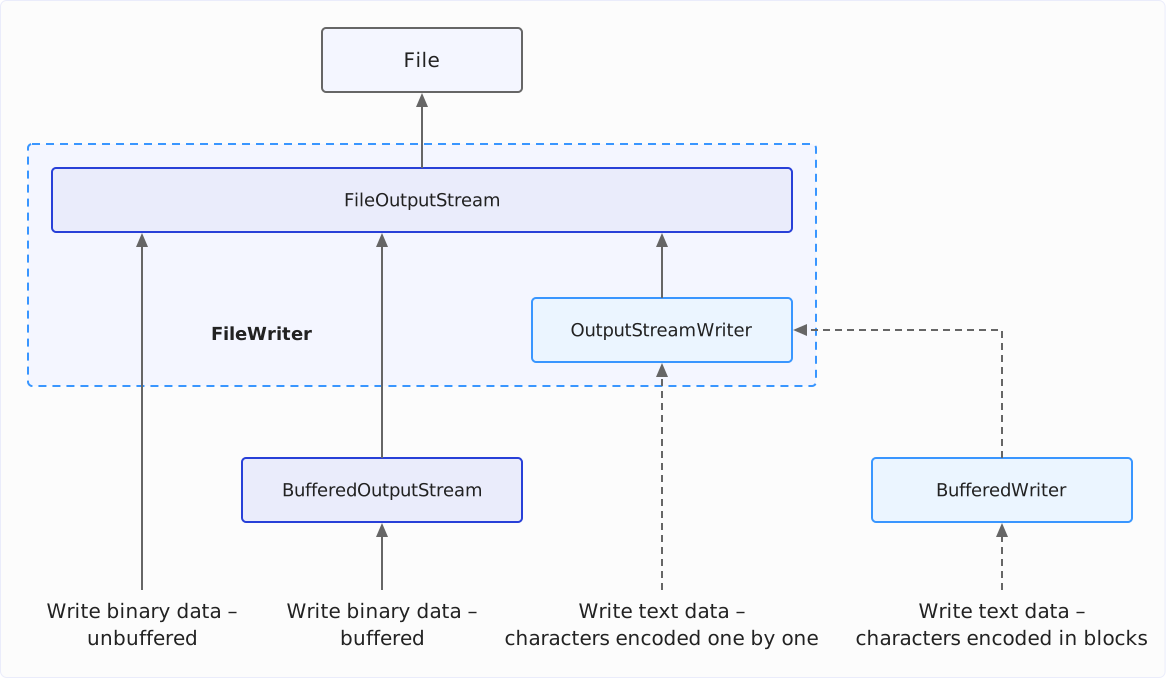
The OutputStreamWriter converts the characters into bytes – this is called encoding. It does not do this itself, though, but leaves it to a StreamEncoder from the JDK-internal package sun.nio.cs, to which the OutputStreamWriter forwards every method call.
The StreamEncoder lets a CharsetEncoder of the chosen character encoding convert the characters into bytes and collects these bytes in a buffer. Only when the buffer is full does it write it to the FileOutputStream and thus to the file. How large this buffer is and when the bytes reach the file is shown in the section When the Bytes Reach the File: flush().
Creating a FileWriter
The nine FileWriter constructors differ in three respects: how you specify the file, whether you pass a character encoding, and whether you can append text to the file with the append parameter.
| Constructor | Since | Character encoding | appendparameter |
|---|---|---|---|
FileWriter(String) | Java 1.1 | JVM default | ✗ |
FileWriter(String, boolean) | Java 1.1 | JVM default | ✓ |
FileWriter(File) | Java 1.1 | JVM default | ✗ |
FileWriter(File, boolean) | Java 1.4 | JVM default | ✓ |
FileWriter(FileDescriptor) | Java 1.1 | JVM default | ✗ |
FileWriter(String, Charset) | Java 11 | the Charset passed | ✗ |
FileWriter(String, Charset, boolean) | Java 11 | the Charset passed | ✓ |
FileWriter(File, Charset) | Java 11 | the Charset passed | ✗ |
FileWriter(File, Charset, boolean) | Java 11 | the Charset passed | ✓ |
File Name, File, and Path
You pass the file as a file name or as a File object. There is no constructor for a Path from the NIO.2 API; you convert a Path into a File object with toFile():
Path path = Path.of("target/from-path.txt");
try (FileWriter fromName = new FileWriter("target/from-name.txt");
    FileWriter fromFile = new FileWriter(new File("target/from-file.txt"));
    FileWriter fromPath = new FileWriter(path.toFile())) {
  // each one writes into its own file
}
A FileDescriptor refers to a file that is already open, e.g., via FileDescriptor.out to standard output. You do not need it for writing to files.
Appending to a File
Without the append parameter, FileWriter overwrites an existing file – and it does so already in the constructor. It empties the file before you write the first character, even if you never write one.
The following program shows this. It writes a line to target/server.log, appends a second line with append = true, and then creates a FileWriter without append, which it closes right away. After each step, it prints the size of the file:
Path log = Path.of("target/server.log");
Files.writeString(log, "2026-10-17 08:15:02 INFO  Server started on port 8080\n");
System.out.println("At the start:           " + Files.size(log) + " bytes");

try (FileWriter writer = new FileWriter(log.toFile(), true)) {
  writer.write("2026-10-17 08:15:12 ERROR Connection reset by peer\n");
}
System.out.println("After append = true:    " + Files.size(log) + " bytes");

new FileWriter(log.toFile()).close();
System.out.println("After new FileWriter(): " + Files.size(log) + " bytes");
At the start: 54 bytes
After append = true: 105 bytes
After new FileWriter(): 0 bytesThe FileWriter with append = true appends its line, and the file grows from 54 to 105 bytes. The FileWriter without append does not write a single character and still leaves an empty file behind.
Four of the nine constructors have the append parameter; the two constructors that also take a Charset have existed since Java 11.
If the file does not exist yet, FileWriter creates it, even with append = true:
Path missing = Path.of("target/appended.log");
Files.deleteIfExists(missing);
try (FileWriter writer = new FileWriter(missing.toFile(), true)) {
  writer.write("first line\n");
}
System.out.println(
    "Exists: " + Files.exists(missing) + ", " + Files.size(missing) + " bytes");
Exists: true, 11 bytesFiles.newBufferedWriter(), on the other hand, does not create the file with the APPEND option alone but throws a NoSuchFileException. There, you also have to specify the CREATE option – how to do that is shown in the article about PrintWriter in the section Appending to a File.
Specifying the Character Encoding
The constructors with a Charset parameter have existed since Java 11. Without this parameter, FileWriter uses the default encoding of the JVM, Charset.defaultCharset().
Since Java 18, this default encoding is always UTF-8 (JEP 400). Up to and including Java 17, it depended on the operating system and the locale: on a German Windows, it was usually Windows-1252; on Linux and macOS, usually UTF-8. The same code therefore wrote a “ü” as different bytes depending on the machine: in Windows-1252 as one byte, in UTF-8 as two. The details are in the article about writing files, in the section What character encoding does Java use by default to write text files?
The getEncoding() method tells you which encoding a FileWriter uses. The following example prints it for a FileWriter without an encoding, for one with ISO-8859-1, and for a closed FileWriter:
try (FileWriter writer = new FileWriter("target/encoding.txt")) {
  System.out.println("Without charset: " + writer.getEncoding());
}
try (FileWriter writer = new FileWriter("target/encoding.txt", ISO_8859_1)) {
  System.out.println("ISO_8859_1:      " + writer.getEncoding());
}

FileWriter closed = new FileWriter("target/encoding.txt", UTF_8);
closed.close();
System.out.println("After close():   " + closed.getEncoding());
Without charset: UTF8
ISO_8859_1: ISO8859_1
After close(): nullgetEncoding() does not return the name under which you specified the encoding but its so-called historical name, i.e., the name Java defines for compatibility with the versions before the Charset class (Java 1.4) – UTF8 instead of UTF-8, ISO8859_1 instead of ISO-8859-1. After close(), the method returns null.
I recommend always specifying the encoding if your code also has to run on Java 17 or older or if the file is not to be written in UTF-8. If your code runs only on Java 18 or newer and writes UTF-8, a UTF_8 in the constructor does not change the result.
When the File Cannot Be Created
The constructor opens or creates the file immediately. If the directory it is supposed to be in is missing, if the file itself is a directory, or if the program is not allowed to write it, the constructor throws a FileNotFoundException.
The following program first creates a read-only file. Then it tries, one after the other, to write to a file in a missing directory, to the target directory, and to the read-only file:
File readOnly = new File("target/read-only.txt");
readOnly.createNewFile();
readOnly.setReadOnly();

for (String fileName :
    new String[] {"target/missing-dir/out.txt", "target", "target/read-only.txt"}) {
  try (FileWriter writer = new FileWriter(fileName, UTF_8)) {
    writer.write("x");
  } catch (IOException e) {
    System.out.println(e);
  }
}
java.io.FileNotFoundException: target/missing-dir/out.txt (No such file or directory)
java.io.FileNotFoundException: target (Is a directory)
java.io.FileNotFoundException: target/read-only.txt (Permission denied)The reason in parentheses comes from the operating system; the output above is from macOS.
FileWriter does not create a missing directory. You have to do that beforehand with Files.createDirectories().
By the way, all constructors except the one with FileDescriptor declare an IOException. In all three cases, what is thrown is its subclass FileNotFoundException.
Writing with FileWriter
All writing methods of FileWriter come from Writer and OutputStreamWriter. With them, you can write single characters, strings, and char arrays.
Writing Character by Character: write(int)
write(int) writes a single character. The parameter is an int, but FileWriter uses only its lower 16 bits as a char – it ignores the upper 16 bits.
In two cases, this gives you a different result than you might expect. The first: if you want to write the number 200 with write(200), you get the character with the code 200 instead, an “È”:
try (FileWriter writer = new FileWriter("target/status.txt")) {
  writer.write(200);
}
System.out.println(Files.readString(Path.of("target/status.txt")));ÈYou can write a number as text with write(String.valueOf(200)) – or with print() of a PrintWriter.
The second case concerns characters outside the so-called Basic Multilingual Plane, e.g., many emojis. Their code point is above 65,535 and does not fit into 16 bits. If you pass such a code point to write(int), FileWriter writes only its lower 16 bits.
The following program writes the rocket U+1F680 to a file this way, reads the first character of the file back in, and prints its hexadecimal value and its Unicode name:
Path codePoint = Path.of("target/code-point.txt");
try (FileWriter writer = new FileWriter(codePoint.toFile())) {
  writer.write("🚀".codePointAt(0)); // 0x1F680
}
char c = Files.readString(codePoint).charAt(0);
System.out.println(Integer.toHexString(c) + " " + Character.getName(c));
f680 PRIVATE USE AREA F680The rocket U+1F680 has become U+F680, a code point from the Private Use Area, to which Unicode assigns no character.
In Java, a character outside the Basic Multilingual Plane occupies two chars, a so-called surrogate pair. You have to write these two halves with two write(int) calls (or with write(String) – more on that in a moment):
Path rocket = Path.of("target/rocket.txt");
try (FileWriter writer = new FileWriter(rocket.toFile())) {
  writer.write(0xD83D);
  writer.write(0xDE80);
}
System.out.println(Files.readString(rocket) + " " + Files.size(rocket) + " bytes");
🚀 4 bytesThe StreamEncoder – the JDK-internal object that encodes the characters into bytes for the FileWriter – holds back the first half after the first call and encodes it only together with the second. This results in the four bytes the rocket occupies in UTF-8.
It is easier to write the emoji as a String: write("🚀") writes both halves in one call. The next section introduces the write(String) method.
Writing Strings and Arrays: write(String), write(char[]), and append()
Besides write(int), FileWriter has the following writing methods:
write(String)writes a string,write(String, int, int)part of a string – from a position, with a length.write(char[])writes achararray,write(char[], int, int)part of achararray.append(CharSequence)andappend(char)write likewrite()but return theFileWriter. This lets you chain several calls. Theappend()methods have existed since Java 5.
The following program uses these methods to assemble a line from HTTP method, path, status code, and referrer. In this example, the referrer is null:
String path = "/java/java-filewriter/";
int code = 200;
String referrer = null;
try (FileWriter writer = new FileWriter("target/request.log")) {
  writer.write("GET ");
  writer.write(path);
  writer.append(' ').append(String.valueOf(code));
  writer.append(" referrer=").append(referrer).append('\n');
}
System.out.print(Files.readString(Path.of("target/request.log")));
GET /java/java-filewriter/ 200 referrer=nullNote the end of the line: for null, append() writes the four characters “null”.
write(), on the other hand, throws a NullPointerException for null:
try (FileWriter writer = new FileWriter("target/request.log")) {
  String nothing = null;
  writer.write(nothing);
} catch (NullPointerException e) {
  System.out.println(e);
}
java.lang.NullPointerException: Cannot invoke "String.length()" because "str" is nullWhen the Bytes Reach the File: flush()
What you write with write() is not yet in the file afterward. The StreamEncoder collects the encoded bytes in its buffer and writes them to the file only when the buffer is full, when you call flush(), or when you close the FileWriter.
The following program writes a line and prints the size of the file after that and after a flush():
Path log = Path.of("target/server.log");
try (FileWriter writer = new FileWriter(log.toFile())) {
  writer.write("2026-10-17 08:15:02 INFO  Server started on port 8080\n");
  System.out.println("After write(): " + Files.size(log) + " bytes");
  writer.flush();
  System.out.println("After flush(): " + Files.size(log) + " bytes");
}
After write(): 0 bytes
After flush(): 54 bytesAfter the write(), the file is still empty. Only flush() writes the line’s 54 bytes into it.
How large is the buffer? Since Java 19, the StreamEncoder initially creates it with only 512 bytes. It enlarges the buffer only when a single write() call passes more characters than are guaranteed to fit into the buffer once encoded – to 8,192 bytes at most. In UTF-8, a char occupies up to three bytes. So the buffer grows starting at 171 characters per call (170 characters occupy up to 510 bytes, 171 characters up to 513 bytes, i.e., more than 512). Up to and including Java 18, it was always 8,192 bytes.
The following program shows this. It writes the same 54-byte line 20 times and prints the size of the file each time the file has grown. Then it writes 10,000 characters to an empty file with a single call:
Path log = Path.of("target/server.log");
String line = "2026-10-17 08:15:02 INFO  Server started on port 8080\n";
try (FileWriter writer = new FileWriter(log.toFile())) {
  long lastSize = 0;
  for (int i = 1; i <= 20; i++) {
    writer.write(line);
    long size = Files.size(log);
    if (size != lastSize) {
      System.out.println("After line " + i + ": " + size + " bytes in the file");
      lastSize = size;
    }
  }
}

try (FileWriter writer = new FileWriter(log.toFile())) {
  writer.write("x".repeat(10_000));
  long size = Files.size(log);
  System.out.println("After 10,000 characters: " + size + " bytes in the file");
}
After line 10: 512 bytes in the file
After line 19: 1024 bytes in the file
After 10,000 characters: 8192 bytes in the fileAfter nine lines, 486 bytes are in the buffer. The tenth line no longer fits completely: the StreamEncoder writes the full 512 bytes to the file and encodes the rest of the line into the emptied buffer. After the 19th line – 1,026 bytes in total – the buffer is full a second time.
The one call with 10,000 characters, on the other hand, makes the buffer grow to 8,192 bytes. Afterward, 8,192 bytes are in the file, and the remaining 1,808 bytes stay in the buffer until close() writes them.
So with many short calls of at most 170 characters, FileWriter writes the file in blocks of 512 bytes.
You need flush() when another program reads the file while your program is still writing – e.g., a log file that someone follows with tail -f. If there are bytes in the buffer, every flush() call is a separate write access to the file. In the measurement in the section How Fast Is FileWriter?, writing through a BufferedWriter with a flush() after every line takes 17 times as long as without flush(). If nobody reads the file at the same time, you should therefore not call flush() after every line. close() writes the buffer to the file anyway before it closes the file.
What FileWriter Cannot Do: newLine(), println(), and printf()
FileWriter has no method that writes a line separator. You write the line separator yourself, as "\n" or as System.lineSeparator(), the line separator of the operating system: \r\n on Windows, \n on Linux and macOS. newLine() exists only in BufferedWriter, println() only in PrintWriter.
Nor does FileWriter write numbers, booleans, or other objects as text, and it cannot format output. For that, you can wrap a PrintWriter around the FileWriter – ideally with a BufferedWriter in between, as the article about PrintWriter shows in the section new PrintWriter(Writer): Without a Buffer of Its Own.
Unmappable Characters: Question Mark or Exception
A FileWriter does not report an error when a character does not exist in the chosen encoding. It silently replaces it with a replacement character – with UTF-8 and ISO-8859-1, a question mark.
FileWriter Replaces Unmappable Characters
The ISO-8859-1 encoding has no euro sign. The following program writes “Price: 5 €” with a FileWriter for ISO-8859-1 anyway and then reads the file back in:
Path price = Path.of("target/price.txt");
try (FileWriter writer = new FileWriter(price.toFile(), ISO_8859_1)) {
  writer.write("Price: 5 €");
}
System.out.println(Files.readString(price, ISO_8859_1));
Price: 5 ?The euro sign has become a question mark, and the program continues without an exception.
Where does this come from? The StreamEncoder creates the CharsetEncoder for an OutputStreamWriter – and thus for every FileWriter – with the REPLACE error handling:
cs.newEncoder()
    .onMalformedInput(CodingErrorAction.REPLACE)
    .onUnmappableCharacter(CodingErrorAction.REPLACE)
onUnmappableCharacter() determines what happens to a character that does not exist in the target encoding, like the euro sign in ISO-8859-1. onMalformedInput() determines what happens to an invalid character sequence; when writing, that is a single half of a surrogate pair, as the section Half an Emoji Becomes a Question Mark shows. In both cases, REPLACE means: write a replacement character and carry on.
An Exception Instead of a Question Mark
A CharsetEncoder that you create yourself with newEncoder(), on the other hand, has the REPORT error handling. You can pass such an encoder to the OutputStreamWriter in its constructor. The OutputStreamWriter then reports an unmappable character with an UnmappableCharacterException. This is not possible with FileWriter, as none of its constructors takes a CharsetEncoder.
The following program writes “Price: 5 €” with an OutputStreamWriter around a FileOutputStream and an encoder with REPORT. The two on…() calls are not necessary, as REPORT is already the default; they are here so that you can see what the encoder does. Finally, the program prints what is in the file:
CharsetEncoder encoder =
    ISO_8859_1
        .newEncoder()
        .onMalformedInput(CodingErrorAction.REPORT)
        .onUnmappableCharacter(CodingErrorAction.REPORT);
Path reported = Path.of("target/price-reported.txt");
try (OutputStreamWriter writer =
    new OutputStreamWriter(new FileOutputStream(reported.toFile()), encoder)) {
  writer.write("Price: 5 €");
} catch (IOException e) {
  System.out.println(e);
}
String content = Files.readString(reported, ISO_8859_1);
System.out.println("In the file: \"" + content + "\"");
java.nio.charset.UnmappableCharacterException: Input length = 1
In the file: "Price: 5 "UnmappableCharacterException is a subclass of IOException. “Input length = 1” means: a single character could not be encoded.
Afterward, the file contains the text up to the euro sign. The StreamEncoder had already encoded “Price: 5 ” into its buffer when it encountered the euro sign, and the automatic close() at the end of the try block wrote this buffer to the file. After such an exception, you should therefore delete or rewrite the file instead of continuing to use it.
By the way, Files.newBufferedWriter() and Files.writeString() also report such a character with an exception. Files.newBufferedWriter() creates exactly such an encoder for this; in the JDK, the method consists of three lines:
CharsetEncoder encoder = cs.newEncoder();
Writer writer = new OutputStreamWriter(newOutputStream(path, options), encoder);
return new BufferedWriter(writer);
The following program writes “Price: 5 €” as ISO-8859-1 with both methods:
Path reported = Path.of("target/price-reported.txt");
try (BufferedWriter writer = Files.newBufferedWriter(reported, ISO_8859_1)) {
  writer.write("Price: 5 €");
} catch (IOException e) {
  System.out.println(e);
}

try {
  Files.writeString(reported, "Price: 5 €", ISO_8859_1);
} catch (IOException e) {
  System.out.println(e);
}
java.nio.charset.UnmappableCharacterException: Input length = 1
java.nio.charset.UnmappableCharacterException: Input length = 1Both methods report the euro sign with an UnmappableCharacterException. Of the ways shown, FileWriter and an OutputStreamWriter with a Charset are therefore the only ones that silently keep writing.
I recommend writing text files with Files.newBufferedWriter() or Files.writeString(). A character that does not exist in the encoding then shows up as an exception instead of ending up in the file as a question mark.
Half an Emoji Becomes a Question Mark
Even with UTF-8, which can encode every Unicode character, a question mark ends up in the file when a string ends with the first half of a surrogate pair. This happens, e.g., when you truncate a text to a maximum length with substring() and the limit falls in the middle of an emoji.
The following program truncates “Start 🚀” to seven chars – the six characters of “Start ” and the first half of the rocket – and writes the result with a FileWriter for UTF-8. Then it prints the content of the file and its bytes as hexadecimal values. Finally, it tries to write the same string with Files.writeString():
String message = "Start 🚀";
String truncated = message.substring(0, 7);
Path half = Path.of("target/half-rocket.txt");
try (FileWriter writer = new FileWriter(half.toFile(), UTF_8)) {
  writer.write(truncated);
}
String hex = HexFormat.ofDelimiter(" ").formatHex(Files.readAllBytes(half));
System.out.println(Files.readString(half) + "  " + hex);

try {
  Files.writeString(half, truncated);
} catch (IOException e) {
  System.out.println(e);
}
Start ? 53 74 61 72 74 20 3f
java.nio.charset.UnmappableCharacterException: Input length = 1FileWriter has replaced the half rocket with the byte 3f, a question mark. After the write(), the StreamEncoder holds back the first half, because the second could still arrive with the next call – as the section Writing Character by Character: write(int) showed. Only close() determines that no second half will follow and writes the replacement character.
Files.writeString(), on the other hand, throws an UnmappableCharacterException before it opens the file.
OutputStreamWriter: Text into Any OutputStream
FileWriter writes only to files. If the text is to go somewhere else – e.g., into a compressed file, over a network socket, or into the response of an HTTP server – the respective API gives you an OutputStream. Around it, you wrap an OutputStreamWriter, which converts the characters into bytes.
OutputStreamWriter has four constructors:
| Constructor | Since | Character encoding |
|---|---|---|
OutputStreamWriter(OutputStream) | Java 1.1 | JVM default |
OutputStreamWriter(OutputStream, String) | Java 1.1 | the encoding name passed |
OutputStreamWriter(OutputStream, Charset) | Java 1.4 | the Charset passed |
OutputStreamWriter(OutputStream, CharsetEncoder) | Java 1.4 | the encoder passed, with its own error handling |
The section An Exception Instead of a Question Mark showed the constructor with a CharsetEncoder. The following example uses the constructor with a Charset to write 1,000 log lines to a GZIP-compressed file. Then it prints the size of the file, unpacks it with a GZIPInputStream, and also prints the number of unpacked bytes:
Path gzip = Path.of("target/server.log.gz");
OutputStream out = new GZIPOutputStream(Files.newOutputStream(gzip));
try (OutputStreamWriter writer = new OutputStreamWriter(out, UTF_8)) {
  for (int i = 0; i < 1000; i++) {
    writer.write("2026-10-17 08:15:07 INFO  GET /java/java-filewriter/ 200\n");
  }
}
System.out.println("Compressed: " + Files.size(gzip) + " bytes");

try (InputStream in = new GZIPInputStream(Files.newInputStream(gzip))) {
  System.out.println("Unpacked:   " + in.readAllBytes().length + " bytes");
}
Compressed: 262 bytes
Unpacked: 57000 bytesThe 1,000 identical lines of 57 bytes each add up to 57,000 bytes, which GZIP compresses to 262 bytes. Together with the OutputStreamWriter, the try block also closes the GZIPOutputStream, which writes the checksum and the length of the data to the end of the file.
You should always specify the encoding explicitly with OutputStreamWriter. Which encoding the bytes must have should be determined by the receiver – the protocol, the process, the program that reads the file later – not by the JVM that writes them.
It is best to pass it as a Charset object, e.g., a constant from StandardCharsets. The constructor with the name as a String checks the name only at runtime and throws the checked exception UnsupportedEncodingException for an unknown name:
try {
  new OutputStreamWriter(OutputStream.nullOutputStream(), "UTF-9");
} catch (UnsupportedEncodingException e) {
  System.out.println(e);
}
java.io.UnsupportedEncodingException: UTF-9For the standard input of a process, the JDK creates the OutputStreamWriter itself: since Java 17, Process.outputWriter() returns a ready-made BufferedWriter around an OutputStreamWriter, with the encoding of the operating system from the native.encoding system property.
FileWriter, BufferedWriter, and PrintWriter
Usually, FileWriter does not stand alone but behind a BufferedWriter:
try (BufferedWriter writer =
    new BufferedWriter(new FileWriter("target/server.log", UTF_8))) {
  writer.write("2026-10-17 08:15:02 INFO  Server started on port 8080");
  writer.newLine();
  writer.write("2026-10-17 08:15:12 ERROR Connection reset by peer");
  writer.newLine();
}
System.out.print(Files.readString(Path.of("target/server.log")));
2026-10-17 08:15:02 INFO Server started on port 8080
2026-10-17 08:15:12 ERROR Connection reset by peerWhy, if FileWriter already buffers the encoded bytes? BufferedWriter has two advantages:
newLine(): UnlikeFileWriter,BufferedWriterhas a method that writes the line separator of the operating system.- Fast
write()with few characters: Everywrite()call on theFileWriterenters asynchronizedblock and has theCharsetEncoderencode the characters passed. In addition,write(int)creates an array with one element for this, andwrite(String)copies the string into a newchararray.BufferedWriter, on the other hand, merely puts the characters into its character buffer of 8,192 characters and passes the full buffer to theFileWriterin a single call.
If you write large blocks with write(char[], int, int), BufferedWriter brings no advantage. If the block is at least as large as the character buffer of the BufferedWriter, the latter even passes the call straight on to the FileWriter without copying the characters through its character buffer.
The following table compares FileWriter with a BufferedWriter around a FileWriter and with the two methods from the Files class. The two methods from Files expect a Path, the two other ways a file name or a File object:
| Since | newLine() | Unmappable characters | |
|---|---|---|---|
new FileWriter(file) | Java 1.1 | ✗ | ? |
new BufferedWriter(new FileWriter(file)) | Java 1.1 | ✓ | ? |
Files.newBufferedWriter(path) | Java 8 | ✓ | Exception |
Files.writeString(path, text) | Java 11 | ✗ (writes everything at once) | Exception |
Files.newBufferedWriter() has existed since Java 7, the variant shown without a Charset parameter since Java 8.
If you want to write numbers and text with println() and printf(), you have to wrap a PrintWriter around the BufferedWriter: new PrintWriter(Files.newBufferedWriter(path)). How the three classes work together is shown in the article about PrintWriter in the section PrintWriter vs. FileWriter vs. BufferedWriter.
FileWriter vs. FileOutputStream
A FileOutputStream writes bytes, a FileWriter writes characters. You need FileWriter for text and FileOutputStream for everything else – images, archives, serialized objects.
If you write binary data with a FileWriter, it changes the data. The following program shows this: it writes all 256 possible byte values to a file, once with a FileWriter for UTF-8 and once with a FileOutputStream, reads both files back in, and compares them with the original bytes:
byte[] allBytes = new byte[256];
for (int i = 0; i < allBytes.length; i++) {
  allBytes[i] = (byte) i;
}

Path viaWriter = Path.of("target/all-bytes-writer.bin");
try (FileWriter writer = new FileWriter(viaWriter.toFile(), UTF_8)) {
  for (byte b : allBytes) {
    writer.write(b & 0xFF); // 0 to 255 instead of -128 to 127
  }
}
byte[] written = Files.readAllBytes(viaWriter);
boolean identical = Arrays.equals(written, allBytes);
System.out.println(
    "FileWriter:       " + written.length + " bytes, identical: " + identical);

Path viaStream = Path.of("target/all-bytes-stream.bin");
try (FileOutputStream out = new FileOutputStream(viaStream.toFile())) {
  out.write(allBytes);
}
written = Files.readAllBytes(viaStream);
identical = Arrays.equals(written, allBytes);
System.out.println(
    "FileOutputStream: " + written.length + " bytes, identical: " + identical);
FileWriter: 384 bytes, identical: false
FileOutputStream: 256 bytes, identical: trueFileWriter writes the values 0 to 127 as one byte each, since in UTF-8 these are the ASCII characters. The values 128 to 255, however, it writes as the characters U+0080 to U+00FF, and in UTF-8, each of those occupies two bytes. That is how 256 bytes become 128 + 2 × 128 = 384 bytes.
FileOutputStream, on the other hand, writes all 256 bytes unchanged.
How to write binary files with FileOutputStream and BufferedOutputStream is shown in the section Writing byte arrays with FileOutputStream in the article about writing files.
How Fast Is FileWriter?
I measured how fast FileWriter writes and what a BufferedWriter changes about it with the Java Microbenchmark Harness (JMH). For each variant, the test program WriteBenchmark writes the same 1,222,747 lines of 0 to 160 characters to a file – 99,024,162 characters in total, 100,000,000 bytes when encoded in UTF-8. They are the same lines that the measurement in the article about PrintWriter writes.
The following chart shows how long each variant takes for the whole file, in milliseconds. Grey are the three variants that write directly into the FileWriter: character by character with write(int), line by line with write(String) and a write('\n'), and in blocks of 8,192 characters with write(char[], int, int). Blue are the three variants with a BufferedWriter around the FileWriter: character by character, line by line with write(String) and newLine(), and once more line by line with a flush() after every line:
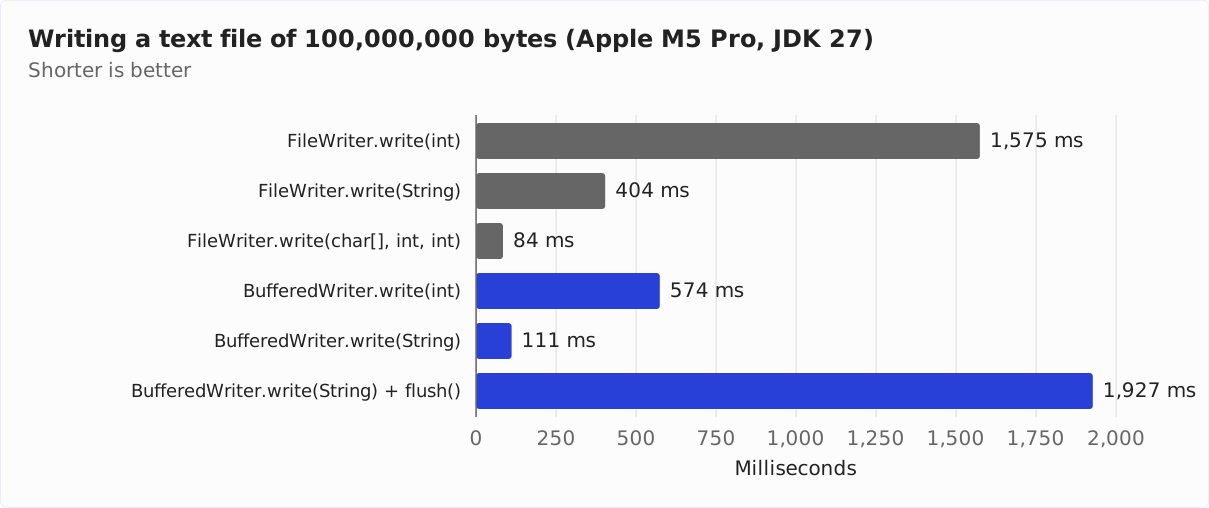
Character by character, FileWriter takes 1,575 ms, that is 15.9 ns per character. With a BufferedWriter in front of it, it is 574 ms, i.e., 5.8 ns per character; without BufferedWriter, FileWriter is thus 174% slower. The difference is the work per call that the section FileWriter, BufferedWriter, and PrintWriter describes: every write(int) on the FileWriter creates an array, enters a synchronized block, and encodes a single character. BufferedWriter, on the other hand, merely puts the character into its character buffer.
Line by line, FileWriter takes 404 ms, with a BufferedWriter in front of it 111 ms – without BufferedWriter, it is 264% slower. This is where the buffer of the StreamEncoder comes into play: no line is longer than 160 characters, so the buffer stays at 512 bytes, and FileWriter writes the file in blocks of 512 instead of 8,192 bytes. For the same lines, the article about PrintWriter counted what that means: 195,317 instead of 12,208 write accesses to the file. A counter-check there shows that these additional accesses account for almost the entire difference.
FileWriter alone is fastest when it gets large blocks: in blocks of 8,192 characters, it takes 84 ms; character by character, it takes 18.7 times as long. The very first call makes the buffer of the StreamEncoder grow to 8,192 bytes, and it stays that size. In addition, there is no second buffer through which the characters are copied. BufferedWriter with write(String) and newLine() is 32% slower at 111 ms.
With a flush() after every line, BufferedWriter takes 1,927 ms, 17 times as long as without. Every line thus becomes a separate write access to the file, 1,222,747 instead of 12,208 write accesses in total; each of the additional accesses costs 1.5 µs.
The conclusion: if you write character by character or line by line with a FileWriter, you should always wrap a BufferedWriter around it. If you write in large blocks, you do not need one. And you should call flush() only when someone reads the file at the same time.
Closing a FileWriter
Via its FileOutputStream, a FileWriter keeps a file open, and the buffer of its StreamEncoder holds the most recently encoded bytes. close() writes these bytes to the file and then closes the FileOutputStream – and with it the file. You must therefore always close the FileWriter, ideally with try-with-resources.
What happens if you do not close a FileWriter? Then whatever was still in the buffer is missing from the end of the file. A short file stays completely empty.
The following program shows this. It writes a line without closing the FileWriter and prints the size of the file after that and after a garbage collection:
Path log = Path.of("target/not-closed.log");
FileWriter writer = new FileWriter(log.toFile());
writer.write("2026-10-17 08:15:02 INFO  Server started on port 8080\n");
System.out.println("After write():              " + Files.size(log) + " bytes");

writer = null;
System.gc();
Thread.sleep(100);
System.out.println("After a garbage collection: " + Files.size(log) + " bytes");
After write(): 0 bytes
After a garbage collection: 0 bytesThe file stays empty. It does get closed as soon as the garbage collector has collected the FileOutputStream – the article about FileReader shows this in the section Closing a FileReader. But nobody writes the buffer of the StreamEncoder to the file in the process: the line’s 54 bytes are lost. The same applies when the program ends without closing the FileWriter.
After close(), the FileWriter can no longer be used. Every write access after closing throws an IOException:
FileWriter closed = new FileWriter("target/closed.log");
closed.close();
try {
  closed.write("too late");
} catch (IOException e) {
  System.out.println(e);
}
java.io.IOException: Stream closedIf you wrap a BufferedWriter around the FileWriter, it is enough to close the BufferedWriter. It writes its buffer into the FileWriter and closes the FileWriter as well.
Common Mistakes
The sections above show each of the following mistakes in detail:
- The
FileWriteris not closed: The last bytes remain in the buffer, and a short file stays empty. appendis missing: The constructor empties the file before the first character is written.- The code has to run on Java 17 or older and specifies no encoding: Then it writes the same characters as different bytes, depending on the operating system and locale.
write(int)gets a number or a code point:write(200)writes an “È”, and a rocket becomes a character from the Private Use Area.- A character that does not exist in the encoding is supposed to trigger an exception: Instead,
FileWriterwrites a question mark. - A truncated string ends with the first half of a surrogate pair: The file then contains a question mark.
- A binary file is written with a
FileWriter: Every byte with a value of 128 or more becomes two bytes. - Text is written character by character directly into the
FileWriter: With aBufferedWriterin front of it, it is 2.7 times as fast in the measurement. flush()after every line although nobody reads the file at the same time: Every line becomes a separate write access, and writing takes 17 times as long as withoutflush().- The directory of the file is missing: The constructor throws a
FileNotFoundExceptioninstead of creating the directory.
Summary
A FileWriter is an OutputStreamWriter around a FileOutputStream. The class consists of nothing but constructors. The OutputStreamWriter encodes the characters with the specified encoding – without one, with UTF-8 since Java 18 – into a byte buffer that starts at 512 bytes and grows to at most 8,192 bytes.
Without append = true, the constructor already empties the file. What you write is in the file only when the buffer is full, after flush(), or after close().
FileWriter replaces characters that do not exist in the encoding, and a single half of a surrogate pair, with a question mark, without any error message. The writer from Files.newBufferedWriter() and the Files.writeString() method, on the other hand, report them with an exception.
For a text file of 100,000,000 bytes, FileWriter takes 1,575 ms character by character and 84 ms in blocks of 8,192 characters. A BufferedWriter in front of it brings writing character by character down to 574 ms and writing line by line from 404 to 111 ms.
My recommendations:
- In new code, write text files with
Files.newBufferedWriter()orFiles.writeString()instead ofFileWriter. A character that does not exist in the encoding then shows up as an exception. You can also pass aFileobject toFiles.newBufferedWriter()withfile.toPath(). - Specify the encoding if your code also runs on Java 17 or older or if the file is not to be written in UTF-8.
- Set
appendtotrueif you want to append to a file. Withoutappend, the constructor already empties the file. - Never write character by character directly into the
FileWriter. Write in larger blocks or wrap aBufferedWriteraround it. - Write binary files with a
FileOutputStream, never with aFileWriter. - Close every
FileWriterwith try-with-resources.
How to write a string, a list of lines, or a byte array to a file in one step is shown in the article about writing files from the same series. How to write text line by line with println() and printf() is shown in the article about PrintWriter, and how to read the file back in, in the article about FileReader.
Did this article answer your questions? Then I’d be happy about a review on my ProvenExpert profile – it helps other developers find this content.