A FileReader reads text from a file. It opens the file, reads its bytes, and decodes them into characters using a character encoding – since Java 18, UTF-8 by default.
Since Java 25, it can read an entire file into a String with a single method call:
try (FileReader reader = new FileReader("files/server.log")) {
  String text = reader.readAllAsString();
  System.out.print(text);
}
2026-10-17 08:15:02 INFO Server started on port 8080
2026-10-17 08:15:07 INFO GET /java/java-bufferedreader/ 200
2026-10-17 08:15:09 WARN GET /java/bufferedreader/ 404
2026-10-17 08:15:11 INFO GET /java/java-streams/ 200
2026-10-17 08:15:12 ERROR Connection reset by peerFileReader has existed since Java 1.1. It rarely stands alone; usually, it is wrapped in a BufferedReader, which delivers its text line by line. FileReader itself has not a single method of its own: everything it can do, it inherits from InputStreamReader.
In this article, you will find out
- what is inside
FileReaderand how it relates toFileInputStreamandInputStreamReader, - how to create a
FileReaderand specify the character encoding, - how to read character by character, in blocks, and everything at once – and what
FileReadercannot do, - why it silently replaces invalid bytes and how to get an exception instead,
- how to read text from any
InputStreamwith anInputStreamReader, - when you need a
BufferedReaderand whenFileInputStreamis the right class, - how fast
FileReaderreads, - why you must always close a
FileReader.
The Examples in This Article
Most examples read the small log file files/server.log from the introduction, which the examples in the article about BufferedReader also read. It has five lines with a total of 276 characters, all from the ASCII character set.
You can find the complete code in the GitHub repository java-file-io, in the package eu.happycoders.filereader. Each section has its own class there with a main() method that produces the outputs shown. Start the classes in the root directory of the repository; files created by the examples end up in the target/ directory.
The examples use methods from Java 25 and therefore run only on Java 25 or later. If you work with an older version: for the newer methods, the text says since when they have existed – from transferTo() in Java 10 to readAllAsString() in Java 25.
What Is a FileReader?
FileReader is a subclass of InputStreamReader, which in turn is a subclass of Reader, the abstract base class of all classes that read characters.
The FileReader class consists of only five constructors. Each one opens the file with a FileInputStream and passes it to the constructor of the parent class InputStreamReader. Here, for example, is the constructor with file name and character encoding:
public FileReader(String fileName, Charset charset) throws IOException {
  super(new FileInputStream(fileName), charset);
}
So a new FileReader(fileName, charset) is the same as a new InputStreamReader(new FileInputStream(fileName), charset) – just shorter.
The following diagram shows how the classes for reading files are related. The solid lines stand for binary data, i.e., bytes, the dashed lines for text data, i.e., characters and strings:
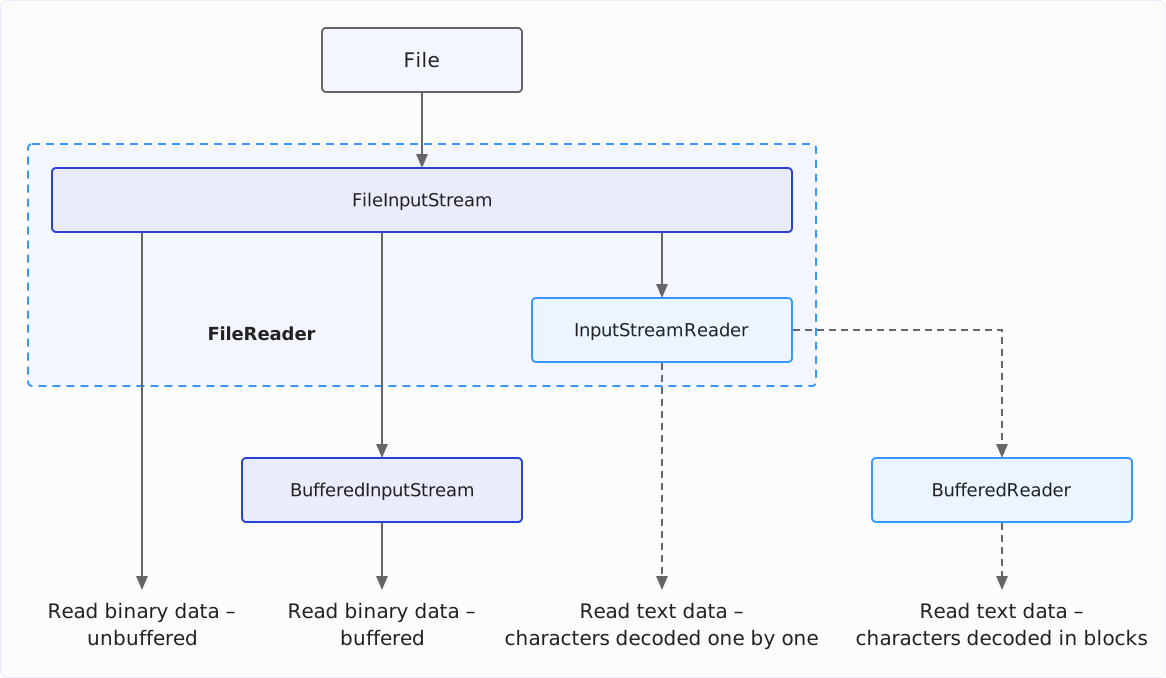
The FileInputStream supplies the bytes of the file. The InputStreamReader converts them into characters – this is called decoding. It does not do this itself, though, but leaves it to a StreamDecoder from the JDK-internal package sun.nio.cs, to which the InputStreamReader forwards every method call.
The StreamDecoder reads the bytes from the FileInputStream in blocks of 8,192 bytes and has a CharsetDecoder of the chosen character encoding turn them into characters. So FileReader accesses the file only every 8,192 bytes, even when you read it character by character.
Creating a FileReader
The five FileReader constructors differ in two respects: how you specify the file and whether you pass a character encoding.
| Constructor | Since | Character encoding |
|---|---|---|
FileReader(String fileName) | Java 1.1 | JVM default |
FileReader(File file) | Java 1.1 | JVM default |
FileReader(FileDescriptor fd) | Java 1.1 | JVM default |
FileReader(String fileName, Charset charset) | Java 11 | charset |
FileReader(File file, Charset charset) | Java 11 | charset |
File Name, File, and Path
You pass the file as a file name or as a File object. There is no constructor for a Path from the NIO.2 API; you convert a Path into a File object with toFile():
Path log = Path.of("files/server.log");
try (FileReader fromName = new FileReader("files/server.log");
    FileReader fromFile = new FileReader(new File("files/server.log"));
    FileReader fromPath = new FileReader(log.toFile())) {
  // all three read the same file
}
The third way, a FileDescriptor, refers to a file that is already open, e.g., via FileDescriptor.in to the standard input. You do not need it for reading files.
Specifying the Character Encoding
The constructors with a Charset parameter have existed since Java 11. Without this parameter, FileReader uses the default encoding of the JVM, Charset.defaultCharset().
Since Java 18, this default encoding is always UTF-8 (JEP 400). Up to and including Java 17, it depended on the operating system and the locale: on a German Windows, it was usually Windows-1252, on Linux and macOS usually UTF-8. The same code thus read the same file differently depending on the machine. The details are in the article about reading files, in the section What character encoding does Java use by default to read text files?
The method getEncoding() tells you which encoding a FileReader uses. The following example creates four FileReaders – one without an encoding and three with different ones – and prints getEncoding() for each, the last time for a closed FileReader:
try (FileReader reader = new FileReader("files/server.log")) {
  System.out.println("Without charset: " + reader.getEncoding());
}
try (FileReader reader = new FileReader("files/server.log", UTF_8)) {
  System.out.println("UTF_8:           " + reader.getEncoding());
}
try (FileReader reader = new FileReader("files/server.log", ISO_8859_1)) {
  System.out.println("ISO_8859_1:      " + reader.getEncoding());
}
try (FileReader reader =
    new FileReader("files/server.log", Charset.forName("windows-1252"))) {
  System.out.println("windows-1252:    " + reader.getEncoding());
}

FileReader closed = new FileReader("files/server.log");
closed.close();
System.out.println("After close():   " + closed.getEncoding());
Without charset: UTF8
UTF_8: UTF8
ISO_8859_1: ISO8859_1
windows-1252: Cp1252
After close(): nullNote the spelling: getEncoding() does not return the name under which you specified the encoding, but its so-called historical name, if the encoding has one – UTF8 instead of UTF-8, Cp1252 instead of windows-1252. Java defines these names for compatibility with the versions before the Charset class (Java 1.4). After close(), the method returns null.
I recommend specifying the encoding whenever your code must also run on Java 17 or earlier or the file is not in UTF-8. If it runs only on Java 18 or later and reads UTF-8 files, a UTF_8 in the constructor does not change the result.
When the File Cannot Be Opened
The constructor opens the file immediately. If it does not exist, is a directory, or the program is not allowed to read it, the constructor throws a FileNotFoundException:
for (String fileName : new String[] {"files/missing.log", "files"}) {
  try (FileReader reader = new FileReader(fileName, UTF_8)) {
    System.out.println(reader.read());
  } catch (IOException e) {
    System.out.println(e);
  }
}
java.io.FileNotFoundException: files/missing.log (No such file or directory)
java.io.FileNotFoundException: files (Is a directory)The reason in parentheses comes from the operating system; the output above is from macOS. For a file without read permission, it says Permission denied.
Incidentally, the two constructors with a Charset parameter declare IOException instead of FileNotFoundException, but throw the same FileNotFoundException in all three cases.
Reading with FileReader
All read methods of FileReader come from Reader and InputStreamReader. With them, you can read character by character, in blocks, or the entire rest of the file at once.
Reading Character by Character: read()
read() returns the next character as an int, and -1 at the end of the file. The return type is int instead of char so that -1 differs from every character. The usual loop assigns the result in the condition and checks it for -1.
The following program uses this loop to count the line breaks of the log file:
try (FileReader reader = new FileReader("files/server.log")) {
  int c;
  int count = 0;
  while ((c = reader.read()) != -1) {
    if (c == '\n') {
      count++;
    }
  }
  System.out.println(count + " lines");
}
5 linesHowever, a read() does not return a character in the Unicode sense, but a char, i.e., a UTF-16 code unit. Characters outside the so-called Basic Multilingual Plane, e.g., many emojis, occupy two of them, a so-called surrogate pair.
The following program shows this. It writes a coffee cup and a rocket to a file, reads them with read(), and prints the hexadecimal value and the Unicode name for each result:
Path coffee = Path.of("target/coffee.txt");
Files.writeString(coffee, "☕🚀");
try (FileReader reader = new FileReader(coffee.toFile())) {
  int c;
  while ((c = reader.read()) != -1) {
    System.out.println(Integer.toHexString(c) + " " + Character.getName(c));
  }
}
2615 HOT BEVERAGE
d83d HIGH SURROGATES D83D
de80 LOW SURROGATES DE80The coffee cup is in the Basic Multilingual Plane, which is why a single read() call returns it completely. read(), on the other hand, returns the rocket in two halves, spread over two calls. If you count, filter, or process characters individually with (char) c, you therefore have to put surrogate pairs back together yourself, e.g., with Character.toCodePoint().
Reading in Blocks: read(char[])
read(char[]) fills a char array and returns the number of characters read, and -1 at the end of the file. The loop in the following example reads the log file in blocks of 100 characters:
try (FileReader reader = new FileReader("files/server.log")) {
  char[] buffer = new char[100];
  int length;
  while ((length = reader.read(buffer)) != -1) {
    System.out.println("read " + length + " characters");
  }
}
read 100 characters
read 100 characters
read 76 charactersThe 276 characters of the file arrive in three blocks; the last one is only 76 characters long. After each call, only the first length characters of the array are valid. Behind them, there may still be what the previous call wrote into it.
The following program shows this. It appends the blocks to a StringBuilder twice: once only the first length characters, once the entire array. Then it prints the length of both results and the last line of the second one:
StringBuilder correct = new StringBuilder();
StringBuilder wholeArray = new StringBuilder();
try (FileReader reader = new FileReader("files/server.log")) {
  char[] buffer = new char[100];
  int length;
  while ((length = reader.read(buffer)) != -1) {
    correct.append(buffer, 0, length);
    wholeArray.append(buffer);
  }
}
System.out.println("correct:     " + correct.length() + " characters");
System.out.println("whole array: " + wholeArray.length() + " characters");
System.out.println(wholeArray.substring(wholeArray.lastIndexOf("\n") + 1));
correct: 276 characters
whole array: 300 characters
10-17 08:15:11 INFO GETThe entire array yields 300 instead of 276 characters. The 24 surplus characters in the last line come from the second block, which was still at these positions of the array.
There is also a variant read(char[], int, int), which fills the array from a given position up to a given length. read(char[]) calls it with position 0 and the length of the array.
FileReader does not split a surrogate pair across two blocks: if only one position is left in the array and a surrogate pair comes next, read(char[]) returns one character less, and the pair is at the beginning of the next block. However, this is how the JDK implements it, not something the documentation of Reader promises: a StringReader, e.g., does split the pair. And with an array of length 1, read(char[]), like read(), returns first one half and then the other.
Reading Everything at Once: readAllAsString() and readAllLines()
Since Java 25, every Reader has two methods that read the rest of the input at once: readAllAsString() returns it as a String, readAllLines() as a list of lines.
The following program first reads the log file with readAllLines(). Then it opens it a second time, skips the first 20 characters, i.e., date and time, with skip(), and reads the rest with readAllAsString():
try (FileReader reader = new FileReader("files/server.log")) {
  List<String> lines = reader.readAllLines();
  System.out.println(lines.size() + " lines, the last one: " + lines.getLast());
}

try (FileReader reader = new FileReader("files/server.log")) {
  reader.skip(20);
  String rest = reader.readAllAsString();
  System.out.println(rest.lines().findFirst().orElseThrow());
}
5 lines, the last one: 2026-10-17 08:15:12 ERROR Connection reset by peer
INFO Server started on port 8080Both methods read from the current position, not from the beginning of the file. readAllLines() recognizes the same line terminators as BufferedReader.readLine(): \n, \r\n, and \r.
For a file that you need as a whole, the Files class has long had two methods: Files.readString() since Java 11 and Files.readAllLines() since Java 7. They differ from FileReader in how they react to invalid bytes – the section Invalid Bytes: Replacement Characters or Exception shows this.
Transferring to a Writer: transferTo()
Since Java 10, you can use transferTo() to transfer all remaining characters of a Reader to a Writer. This way, you can, e.g., re-encode a file by initializing Reader and Writer with different encodings.
The following program writes “Grüße aus Köln” (“Greetings from Cologne”) to a file as ISO-8859-1, re-encodes it to UTF-8 with transferTo(), and prints both file sizes and the content of the new file:
Path latin1 = Path.of("target/greeting-latin1.txt");
Files.writeString(latin1, "Grüße aus Köln", ISO_8859_1);

Path utf8 = Path.of("target/greeting-utf8.txt");
long characters;
try (FileReader reader = new FileReader(latin1.toFile(), ISO_8859_1);
    FileWriter writer = new FileWriter(utf8.toFile(), UTF_8)) {
  characters = reader.transferTo(writer);
}

System.out.println(characters + " characters transferred");
System.out.println("ISO-8859-1: " + Files.size(latin1) + " bytes");
System.out.println("UTF-8:      " + Files.size(utf8) + " bytes");
System.out.println(Files.readString(utf8));
14 characters transferred
ISO-8859-1: 14 bytes
UTF-8: 17 bytes
Grüße aus KölnThe 14 characters occupy 14 bytes in ISO-8859-1 and 17 bytes in UTF-8: “ü”, “ß”, and “ö” need two bytes each in UTF-8 instead of one.
What FileReader Cannot Do: readLine(), mark(), and reset()
FileReader has no method that reads a single line. readLine() exists only in BufferedReader – the section FileReader and BufferedReader shows how to wrap it around a FileReader.
FileReader also does not support mark() and reset(), with which a Reader remembers a position and later jumps back to it. markSupported() returns false, and both methods throw an IOException:
try (FileReader reader = new FileReader("files/server.log")) {
  System.out.println("markSupported(): " + reader.markSupported());
  try {
    reader.mark(100);
  } catch (IOException e) {
    System.out.println(e);
  }
  try {
    reader.reset();
  } catch (IOException e) {
    System.out.println(e);
  }
}
markSupported(): false
java.io.IOException: mark() not supported
java.io.IOException: reset() not supportedBufferedReader, on the other hand, supports both methods, because it keeps the characters it has read in its buffer and can return to them.
Invalid Bytes: Replacement Characters or Exception
A FileReader does not report an error when a file is not in the expected encoding. It replaces every byte that does not yield a valid character in this encoding with the Unicode replacement character U+FFFD, which most fonts draw as a diamond with a question mark.
FileReader Replaces Invalid Bytes
The following program writes “Grüße aus Köln” to a file as ISO-8859-1 and reads it with a FileReader for UTF-8. In ISO-8859-1, each umlaut occupies a single byte between 128 and 255. In UTF-8, such a byte is never a character on its own, but at most part of a sequence of several bytes – on its own, it is invalid:
Path latin1 = Path.of("target/greeting-latin1.txt");
Files.writeString(latin1, "Grüße aus Köln", ISO_8859_1);

try (FileReader reader = new FileReader(latin1.toFile(), UTF_8)) {
  String text = reader.readAllAsString();
  System.out.println(text);
  System.out.println("Contains U+FFFD: " + (text.indexOf(0xFFFD) >= 0));
}
Gr��e aus K�ln
Contains U+FFFD: true“ü”, “ß”, and “ö” have become three replacement characters, and the program continues without an exception.
Where does this come from? The StreamDecoder creates the CharsetDecoder for an InputStreamReader – and thus for every FileReader – with the error action REPLACE:
cs.newDecoder()
    .onMalformedInput(CodingErrorAction.REPLACE)
    .onUnmappableCharacter(CodingErrorAction.REPLACE)
onMalformedInput() specifies what happens with an invalid byte sequence, onUnmappableCharacter() what happens with a character that does not exist in the target encoding. In both cases, REPLACE means: insert a replacement character and continue reading.
An Exception Instead of Replacement Characters
A CharsetDecoder that you create yourself with newDecoder(), on the other hand, has the error action REPORT. You can pass such a decoder to the InputStreamReader in the constructor. The InputStreamReader then reports an invalid byte with a MalformedInputException.
The following program reads the same ISO-8859-1 file with an InputStreamReader around a FileInputStream and a decoder with REPORT. The two on…() calls are not necessary, since REPORT is already the default; they are there to make visible what the decoder does:
CharsetDecoder decoder =
    UTF_8
        .newDecoder()
        .onMalformedInput(CodingErrorAction.REPORT)
        .onUnmappableCharacter(CodingErrorAction.REPORT);
try (InputStreamReader reader =
    new InputStreamReader(new FileInputStream(latin1.toFile()), decoder)) {
  System.out.println(reader.readAllAsString());
} catch (IOException e) {
  System.out.println(e);
}
java.nio.charset.MalformedInputException: Input length = 1MalformedInputException is a subclass of IOException. “Input length = 1” means: a single byte could not be decoded.
Incidentally, Files.newBufferedReader() works the same way. In the JDK, the method consists of three lines:
CharsetDecoder decoder = cs.newDecoder();
Reader reader = new InputStreamReader(newInputStream(path), decoder);
return new BufferedReader(reader);
Files.readString() and Files.readAllLines() also throw an exception for invalid bytes. So FileReader is the only one of these ways that silently keeps reading.
I recommend reading files with Files.newBufferedReader() or Files.readString(). A file in the wrong encoding is then noticed at the first invalid byte instead of being processed further with replacement characters. However, a file that contains even a single invalid byte cannot be read this way at all. If you have to process such files anyway, FileReader is the right choice – and check the text you read for U+FFFD.
The Byte Order Mark Stays
Some programs write the three bytes EF BB BF at the beginning of a UTF-8 file, the so-called byte order mark (BOM). It marks the file as UTF-8. FileReader does not remove it, but returns it as the first character, U+FEFF.
The following program writes a CSV file with a BOM and reads it with a FileReader. It prints the header line, its length, and its first character and compares it with "id;name". Then it removes the BOM and compares again:
Path withBom = Path.of("target/bom.csv");
byte[] bom = {(byte) 0xEF, (byte) 0xBB, (byte) 0xBF};
Files.write(withBom, bom);
Files.writeString(withBom, "id;name\n1;Grüße\n", UTF_8, APPEND);

try (FileReader reader = new FileReader(withBom.toFile(), UTF_8)) {
  String text = reader.readAllAsString();
  String header = text.lines().findFirst().orElseThrow();
  System.out.println("Header:            " + header);
  System.out.println("Length:            " + header.length());
  System.out.println(
      "First character:   U+" + Integer.toHexString(header.charAt(0)).toUpperCase());
  System.out.println("equals(\"id;name\"): " + header.equals("id;name"));

  if (!text.isEmpty() && text.charAt(0) == 0xFEFF) {
    text = text.substring(1);
  }
  String firstLine = text.lines().findFirst().orElseThrow();
  System.out.println("Without BOM:       " + firstLine.equals("id;name"));
}
Header: id;name
Length: 8
First character: U+FEFF
equals("id;name"): false
Without BOM: trueIn the output, the header line looks like id;name, but it is eight characters long, and the comparison fails. Only without the first character does it match.
This is not a peculiarity of FileReader: Files.newBufferedReader() and Files.readString() also return the BOM as the first character. If you read files that may have a BOM, you should therefore remove it yourself, as in the example above.
InputStreamReader: Text from Any InputStream
FileReader reads only files. If the text comes from another source – a resource on the classpath, a network socket, a compressed file – the respective API gives you an InputStream. An InputStreamReader converts it into characters.
InputStreamReader has four constructors:
| Constructor | Since | Character encoding |
|---|---|---|
InputStreamReader(InputStream in) | Java 1.1 | JVM default |
InputStreamReader(InputStream in, String charsetName) | Java 1.1 | Name of the encoding |
InputStreamReader(InputStream in, Charset cs) | Java 1.4 | cs |
InputStreamReader(InputStream in, CharsetDecoder dec) | Java 1.4 | Decoder with its own error handling |
The section An Exception Instead of Replacement Characters showed the constructor with CharsetDecoder. The following example uses the constructor with Charset to read a text file that is located on the classpath next to the class:
InputStream in = Ch4InputStreamReader.class.getResourceAsStream("greeting.txt");
try (InputStreamReader reader = new InputStreamReader(in, UTF_8)) {
  System.out.print(reader.readAllAsString());
}
Grüße aus dem ClasspathYou should always specify the encoding for the InputStreamReader. Which encoding the bytes have depends on their source – you cannot tell it from the bytes themselves.
It is best to pass it as a Charset object, e.g., a constant from StandardCharsets. The constructor with the name as a String checks the name only at runtime and throws the checked exception UnsupportedEncodingException for an unknown name:
try {
  new InputStreamReader(InputStream.nullInputStream(), "UTF-9");
} catch (UnsupportedEncodingException e) {
  System.out.println(e);
}
java.io.UnsupportedEncodingException: UTF-9For two common sources, the JDK already knows the right encoding:
- Output of a process: Since Java 17,
Process.inputReader()returns a ready-madeBufferedReaderfor the standard output of the process, with the encoding of the operating system from the system propertynative.encoding. - Console: For
System.in, you create anInputStreamReaderwith the encoding from the system propertystdin.encoding– the section BufferedReader Around System.in in the article aboutBufferedReadershows how.
FileReader and BufferedReader
Usually, FileReader does not stand alone, but is wrapped in a BufferedReader:
try (BufferedReader reader =
    new BufferedReader(new FileReader("files/server.log", UTF_8))) {
  String line;
  while ((line = reader.readLine()) != null) {
    System.out.println(line);
  }
}
2026-10-17 08:15:02 INFO Server started on port 8080
2026-10-17 08:15:07 INFO GET /java/java-bufferedreader/ 200
2026-10-17 08:15:09 WARN GET /java/bufferedreader/ 404
2026-10-17 08:15:11 INFO GET /java/java-streams/ 200
2026-10-17 08:15:12 ERROR Connection reset by peerWhy, if FileReader already reads the file in blocks of 8,192 bytes? BufferedReader brings two advantages:
readLine(): OnlyBufferedReadercan read line by line.- Fast
read(): Aread()onFileReaderdecodes at most twochars per call – enough for a surrogate pair – and enters asynchronizedblock in doing so.BufferedReader, in contrast, hasFileReaderdecode up to 8,192 characters at once and serves the followingread()calls from its own buffer.
If you read in blocks yourself with read(char[]), BufferedReader brings no advantage. If your array is at least as large as its buffer – 8,192 characters by default – it even passes the call directly to FileReader without copying the characters through its buffer.
The following table compares FileReader with BufferedReader around a FileReader and the two methods from the Files class. The two methods from Files expect a Path, the other two ways a file name or a File object:
| Since | readLine() | Invalid bytes | |
|---|---|---|---|
new FileReader(file) | Java 1.1 | ✗ | Replacement characters |
new BufferedReader(new FileReader(file)) | Java 1.1 | ✓ | Replacement characters |
Files.newBufferedReader(path) | Java 7 | ✓ | Exception |
Files.readString(path) | Java 11 | ✗ (returns everything at once) | Exception |
The article about BufferedReader shows how it buffers, which methods it has, and how fast they are.
FileReader vs. FileInputStream
A FileInputStream reads bytes, a FileReader reads characters. You need FileReader for text and FileInputStream for everything else – images, archives, class files, serialized objects.
If you read a binary file with a FileReader, it changes the data. The following program shows this: it writes all 256 possible byte values to a file and reads it once with a FileReader for UTF-8 and once with a FileInputStream:
byte[] allBytes = new byte[256];
for (int i = 0; i < allBytes.length; i++) {
  allBytes[i] = (byte) i;
}
Path binary = Path.of("target/all-bytes.bin");
Files.write(binary, allBytes);

try (FileReader reader = new FileReader(binary.toFile(), UTF_8)) {
  String text = reader.readAllAsString();
  long replaced = text.chars().filter(c -> c == 0xFFFD).count();
  System.out.println(text.length() + " characters, " + replaced + " of them U+FFFD");
  System.out.println("Back to bytes: " + text.getBytes(UTF_8).length + " bytes");
}

try (FileInputStream in = new FileInputStream(binary.toFile())) {
  byte[] bytes = in.readAllBytes();
  boolean identical = Arrays.equals(bytes, allBytes);
  System.out.println(bytes.length + " bytes, identical: " + identical);
}
256 characters, 128 of them U+FFFD
Back to bytes: 512 bytes
256 bytes, identical: trueThe bytes 0 to 127 are valid characters in UTF-8 and arrive unchanged. The bytes 128 to 255 are never a character on their own in UTF-8, but at most part of a sequence of several bytes. In the binary file, they stand alone, and FileReader replaces each of them with U+FFFD. Which byte was there can no longer be determined afterward. Converted back into bytes, each replacement character occupies three bytes, hence the 512 (= 128 + 384) bytes.
FileInputStream, in contrast, returns all 256 bytes unchanged.
The section Reading large binary files with FileInputStream in the article about reading files shows how to read large files with FileInputStream and BufferedInputStream.
How Fast Is FileReader?
For the article about BufferedReader, I measured with the Java Microbenchmark Harness (JMH), the microbenchmark tool of the OpenJDK project, how fast FileReader reads character by character and in blocks, and what a BufferedReader changes about that. Each method reads a text file of 100,000,000 bytes completely. The file is UTF-8 encoded and has 1,222,747 lines with 0 to 160 characters, 80 on average, and on average every hundredth character is an umlaut.
The following chart comes from that article and shows how long each method takes for the entire file, in milliseconds. Gray bars show InputStreamReader.read() and FileReader.read() without BufferedReader as well as Scanner.nextLine(), blue bars the methods of BufferedReader.
All BufferedReader methods run on a new BufferedReader(new FileReader(…)), except in the row “Files.newBufferedReader() + readLine()”:
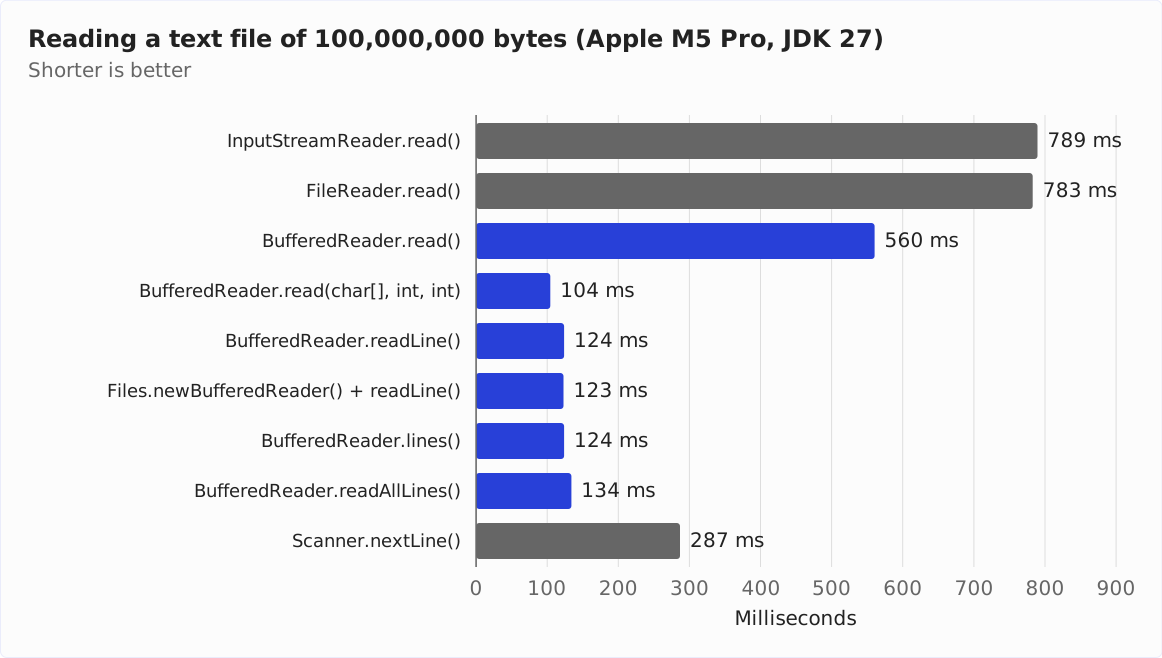
Character by character, FileReader.read() takes 783 ms. InputStreamReader.read() is on par with 789 ms – after all, FileReader is an InputStreamReader.
With a BufferedReader in between, read() takes 560 ms, so FileReader alone is 40% slower. The difference is the decoding of at most two characters per call, which the section FileReader and BufferedReader describes.
The bigger lever is the number of calls. Character by character, there are 99,024,162 read() calls, one per character of the file. The row “BufferedReader.read(char[], int, int)” reads the same characters with an array of 8,192 characters in 12,088 calls and needs 104 ms for this. Because the array is as large as the buffer of BufferedReader, the latter passes each call directly to FileReader. So the 104 ms are the time that FileReader needs in blocks, plus one method call of BufferedReader per block.
In blocks, FileReader is thus more than seven times as fast as character by character. Line by line with readLine(), BufferedReader takes 124 ms; in doing so, it searches for the end of the line and creates a String for each line.
It follows that you should never read character by character with FileReader, but in blocks, e.g., of 8,192 characters – or wrap a BufferedReader around it.
Closing a FileReader
Via its FileInputStream, a FileReader keeps a file open. close() closes the StreamDecoder, and the latter closes the FileInputStream – and with it the file. You should therefore always close the FileReader, preferably with try-with-resources.
After that, it can no longer be used. Every read access after closing throws an IOException:
FileReader closed = new FileReader("files/server.log");
closed.close();
try {
  closed.read();
} catch (IOException e) {
  System.out.println(e);
}
java.io.IOException: Stream closedWhat happens if you do not close a FileReader? Then the file stays open until the garbage collector collects the FileInputStream. Only then does the JVM close the file.
The following program shows this. It opens 100 FileReaders, reads one character from each, and closes none of them. It prints how many files the process has open at the start, after the loop, and after a garbage collection:
// works on Linux and macOS; Windows has no UnixOperatingSystemMXBean
UnixOperatingSystemMXBean os =
    (UnixOperatingSystemMXBean) ManagementFactory.getOperatingSystemMXBean();
System.out.println("Open files at the start:   " + os.getOpenFileDescriptorCount());
for (int i = 0; i < 100; i++) {
  FileReader reader = new FileReader("files/server.log");
  reader.read();
}
System.out.println("After 100 FileReaders:     " + os.getOpenFileDescriptorCount());
System.gc();
Thread.sleep(100);
System.out.println("After a garbage collection: " + os.getOpenFileDescriptorCount());
Open files at the start: 4
After 100 FileReaders: 104
After a garbage collection: 4After the loop, 100 more files are open, although the program can no longer reach any of the FileReaders. Only after System.gc() are they closed again. In a real program, the JVM decides when the garbage collector runs, not your code. Until then, the open files can reach the limit of the operating system, and every further attempt to open a file fails with a FileNotFoundException giving the reason Too many open files.
If you wrap a BufferedReader around the FileReader, it is enough to close the BufferedReader – it closes the FileReader as well.
Common Mistakes
The sections above show each of the following mistakes in detail:
- The code must run on Java 17 or earlier and specifies no encoding. Then it reads the same file differently depending on the operating system and locale.
- The result of
read()is treated as a character.read()returns an emoji in two halves of a surrogate pair. - After
read(char[]), the entire array is processed. Only the firstlengthcharacters are valid; behind them, there may be the rest of the previous block. - A wrong encoding is supposed to trigger an exception.
FileReaderreturns replacement characters instead. - The first line of a CSV file does not match the expected text. It starts with a byte order mark.
- A binary file is read with a
FileReader. Bytes with a value of 128 or higher that do not form a valid UTF-8 sequence are lost afterward. - The
FileReaderis not closed. The file stays open until the garbage collector runs.
Summary
A FileReader is an InputStreamReader around a FileInputStream. The class consists only of constructors. The InputStreamReader reads the file in blocks of 8,192 bytes and decodes it with the specified character encoding – if none is specified, with UTF-8 since Java 18.
read() returns a UTF-16 code unit, not a complete Unicode character; read(char[]) returns the number of characters read. Since Java 25, readAllAsString() reads the rest of the file at once, and since Java 10, transferTo() transfers it to a Writer. Only BufferedReader has readLine(), mark(), and reset().
FileReader replaces invalid bytes with U+FFFD, without an error message. The reader from Files.newBufferedReader() and the method Files.readString(), in contrast, report them with a MalformedInputException.
Character by character, FileReader needs 783 ms for a file of 100,000,000 bytes; in blocks of 8,192 characters, around 104 ms.
My recommendations:
- In new code, read text files with
Files.newBufferedReader()orFiles.readString()instead ofFileReader. A wrong encoding then shows up as an exception. - Use
FileReaderif you deliberately want to process invalid bytes further as U+FFFD, or if an API expects aFileobject or aReader. - Specify the encoding if your code also runs on Java 17 or earlier or the file is not UTF-8.
- Never read character by character directly from
FileReader. Read in blocks or wrap aBufferedReaderaround it. - Read binary files with a
FileInputStream, never with aFileReader. - Close every
FileReaderwith try-with-resources.
How to read files into a string, a list, or a byte array in one go is shown in the article about reading files from the same series. How to write text to a file is shown in the article about FileWriter, and how to write it line by line with println() and printf(), in the article about PrintWriter.
If this article has helped you, I would greatly appreciate a positive review on my ProvenExpert profile. Your feedback helps me improve my content and motivates me to write new informative articles.