
Modern processors don’t just perform one addition at a time, but four, eight, or even 64 – with a single instruction. The Java Vector API gives you access to these instructions from Java. It has been part of the JDK as the incubator module jdk.incubator.vector since Java 16; Java 27 contains its twelfth incubator round.
The Vector API has nothing to do with the class java.util.Vector, the synchronized list from Java 1.0.
In this article, you will learn:
- What SIMD is and what the Vector API makes of it
- What the JIT compiler vectorizes without the Vector API – and what it doesn’t
- How to add two arrays with the Vector API, with a tail loop or with a mask
- Which building blocks the API consists of: species, shapes, masks, operators, and shuffles
- How to compute, compare, reduce, filter, rearrange, and convert with vectors
- What a cosine similarity and a byte search look like with the Vector API
- Which machine code the C2 compiler generates from the Vector API
- When vectors end up as objects on the heap and when they don’t
- How much faster your loops get with the Vector API – and when they get slower
- Why the API has been incubating since Java 16 and what it has to do with Project Valhalla
- When the Vector API is worth it for you
You can find all example programs, the benchmarks, and the machine code in the GitHub repository java-vector-api. The outputs in this article come from Java 27 (build 27+35) on an Apple M5 Pro.
What Is the Vector API?
A regular arithmetic instruction processes a single value. Such values and instructions are called scalar. A vector instruction, on the other hand, processes several values at once: it adds, e.g., four pairs of floats where a scalar instruction adds only one pair. The principle is called SIMD (Single Instruction, Multiple Data).
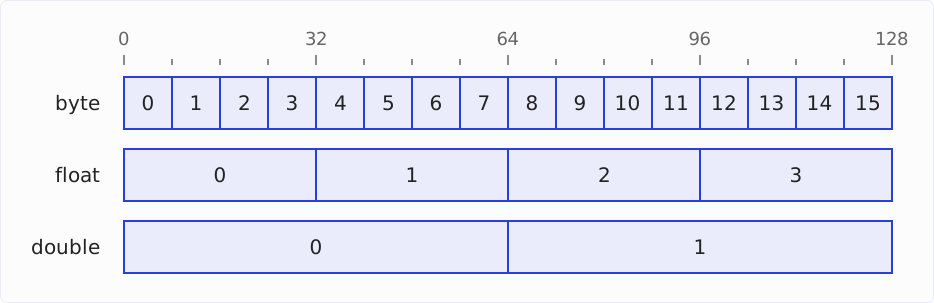
For this, the values sit side by side in a vector register of the CPU, which is 128, 256, or 512 bits wide, depending on the processor. Each slot in such a register is called a lane. How large a lane is and how many lanes a register has is not fixed: it depends on the data type of the values currently in it. A 128-bit register has, e.g., 16 lanes of 8 bits each for byte values, four lanes of 32 bits each for float values, or two lanes of 64 bits each for double values.
The diagram shows a 128-bit register in these three layouts; the scale at the top counts the bits:
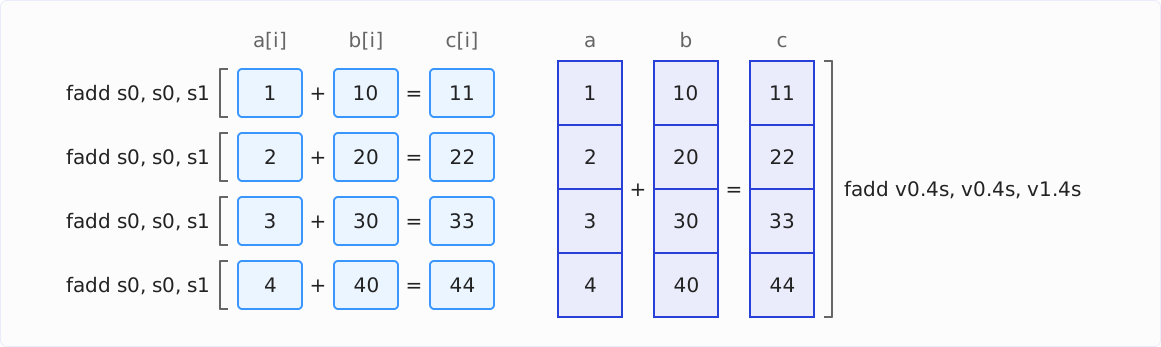
The following diagram shows four scalar additions with the ARM instruction fadd s0, s0, s1 on the left, and the same four additions as one vector instruction fadd v0.4s, v0.4s, v1.4s on the right. s0 and s1 are registers for one 32-bit floating-point value each, v0 and v1 are 128-bit vector registers, and the suffix .4s reads them as four lanes of 32 bits each. In both instructions, the destination comes first: fadd s0, s0, s1 adds s0 and s1 and writes the result to s0.
Both common CPU architectures have such instructions: x86 processors have the Streaming SIMD Extensions (SSE) and the Advanced Vector Extensions (AVX, AVX2, AVX-512), ARM processors have NEON and the Scalable Vector Extension (SVE).
Without the Vector API, only the JIT compiler uses these instructions: it translates a loop into vector instructions on its own, but only if the loop meets certain conditions – more on this in the section “What Does the JIT Compiler Vectorize on Its Own?”. The Vector API, defined by JDK Enhancement Proposal 338 and most recently JEP 537, lets you write such computations directly in Java. The JEP names these goals:
- Clear and concise API: A computation can be written so that it doesn’t depend on the vector size of the CPU – the same code runs with 128-bit as well as with 512-bit registers.
- Platform agnostic: The API is not tied to a CPU architecture. Where portability and optimization for a particular CPU conflict, portability wins.
- Reliable compilation on x64 and AArch64: The C2 compiler of the HotSpot JVM translates the vector operations into SSE and AVX instructions on x64, the 64-bit variant of x86, and into NEON and SVE instructions on AArch64, the 64-bit architecture of ARM.
- Graceful degradation: If the CPU doesn’t support an operation, the code still works, just more slowly.
- Alignment with Project Valhalla: The vector classes are to become value classes. More on this in the section “Why Is the Vector API Still Incubating?”.
Trying Out the Vector API
The Vector API is an incubator module: an API that is included in the JDK to gather feedback and that may still change until it is finalized. Once it is finalized, it gets a new package; you will then have to adjust at least your import statements (JEP 11).
An incubator module is not visible automatically. You have to add it with --add-modules jdk.incubator.vector when compiling and when running:
javac --add-modules jdk.incubator.vector AddArrays.java
java --add-modules jdk.incubator.vector AddArrays
With the source code launcher, it takes one step:
java --add-modules jdk.incubator.vector AddArrays.javaThe JVM acknowledges this with the following warning on every start:
WARNING: Using incubator modules: jdk.incubator.vectorWhat Does the JIT Compiler Vectorize on Its Own?
The C2 compiler of the HotSpot JVM translates simple loops into vector instructions even without the Vector API. In HotSpot, this auto-vectorization is called SuperWord, and it is enabled by default (VM option -XX:+UseSuperWord).
The following method (in the repository: jit/JitDemo.java) adds two int arrays element by element:
void addScalar(int[] a, int[] b, int[] c) {
  for (int i = 0; i < a.length; i++) {
    c[i] = a[i] + b[i];
  }
}
On the M5 Pro, C2 turns this into a loop of vector instructions. Here is an excerpt from the output of -XX:CompileCommand=print:
ldur  q16, [x12, #0xc]        ; load four ints
ldur  q17, [x13, #0xc]        ; load four ints from the other array
add   v16.4s, v16.4s, v17.4s  ; four additions with one instruction
add   x11, x4, x11
stur  q16, [x11, #0xc]        ; write four ints to c
q16 and q17 are 128-bit registers; v16.4s means: the same register, read as four 32-bit lanes. C2 has also unrolled the loop eightfold: this group of load, add, and store appears eight times in a row in the loop body, so one loop iteration adds 32 int values.
You can find out for yourself what auto-vectorization does for your code: run it once normally and once with -XX:-UseSuperWord and compare the run times. For the array addition, the result is in the section “Adding Two Arrays”.
A loop that exits early as soon as it has found something shows where auto-vectorization reaches its limit. The following method, also from jit/JitDemo.java, searches for the first occurrence of a byte:
int indexOfScalar(byte[] data, byte b) {
  for (int i = 0; i < data.length; i++) {
    if (data[i] == b) return i;
  }
  return -1;
}
In Java 27, C2 leaves this loop scalar. It is also unrolled eightfold, but each byte gets its own load instruction, its own comparison, and its own conditional branch:
ldrsb  w14, [x12, #0xc]  ; load byte 0
cmp    w14, w3           ; compare with b
b.eq   #0x1229d5dc0      ; found: leave the loop
ldrsb  w14, [x12, #0xd]  ; load byte 1
cmp    w14, w3
b.eq   #0x1229d5db0
...
The JEP describes the problem like this: which loops auto-vectorization recognizes is limited and depends on the shape of the code. Even a small change can cause a loop to no longer be vectorized. It gets especially hard with complex access patterns, rearrangements between lanes, masks, and branching control flow. That is why even in the JDK, methods like Arrays.hashCode() needed specially written vector support.
With the Vector API, on the other hand, you write the vectorization down yourself – and C2 translates it reliably. I’ll show what the byte search looks like with it and what C2 makes of it in the section “What the JIT Compiler Makes of the Vector API”.
First Steps: Adding Two Arrays
The first example, the program AddArrays (in the repository: firststeps/AddArrays.java), adds two float arrays with the Vector API. The arrays have ten elements each:
import jdk.incubator.vector.*;

static final VectorSpecies<Float> SPECIES = FloatVector.SPECIES_PREFERRED;

void main() {
  float[] a = {1, 2, 3, 4, 5, 6, 7, 8, 9, 10};
  float[] b = {10, 20, 30, 40, 50, 60, 70, 80, 90, 100};

  IO.println("Lanes:      " + SPECIES.length());
  IO.println("Loop bound: " + SPECIES.loopBound(a.length));

  float[] c = new float[a.length];
  addWithTailLoop(a, b, c);
  IO.println("Tail loop:  " + Arrays.toString(c));
}

void addWithTailLoop(float[] a, float[] b, float[] c) {
  int i = 0;
  int upperBound = SPECIES.loopBound(a.length);
  for (; i < upperBound; i += SPECIES.length()) {
    FloatVector va = FloatVector.fromArray(SPECIES, a, i);
    FloatVector vb = FloatVector.fromArray(SPECIES, b, i);
    FloatVector vc = va.add(vb);
    vc.intoArray(c, i);
  }
  for (; i < a.length; i++) {
    c[i] = a[i] + b[i];
  }
}
The method addWithTailLoop() works like this:
SPECIESdetermines which kind of vector we compute with:floatvalues in the vector size the CPU prefers. You’ll find out what exactly a species is in the section “The Building Blocks of the Vector API”.SPECIES.length()returns the number of lanes, i.e., how manyfloatvalues fit into one vector. The loop advancesiby this value in each iteration.SPECIES.loopBound(a.length)rounds the array length down to a multiple of the number of lanes. Up to this index, the vector loop processes the array in whole vectors; what lies beyond no longer fills a whole vector.FloatVector.fromArray()loads as many elements starting at indexiinto a vector as the species has lanes.va.add(vb)adds the two vectors lane by lane.vc.intoArray(c, i)writes the result back into the arrayc, starting at indexi.- Finally, the second, scalar loop processes the remainder that no longer fits into a whole vector.
On the M5 Pro, the program prints the following:
Lanes:      4
Loop bound: 8
Tail loop:  [11.0, 22.0, 33.0, 44.0, 55.0, 66.0, 77.0, 88.0, 99.0, 110.0]
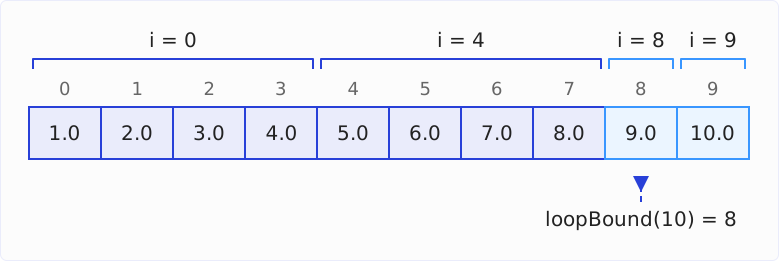
The preferred species has four lanes here. So the vector loop runs twice (for indexes 0 to 3 and 4 to 7) and adds eight elements, and the tail loop processes indexes 8 and 9. The diagram shows this split, with the elements of the tail loop in a lighter color:
With a Mask Instead of a Tail Loop
The tail loop can also be avoided: the last iteration then loads and stores only the lanes that are still inside the array. For this, there are masks – one boolean per lane that determines whether an operation processes this lane. The following method is also in firststeps/AddArrays.java:
static final VectorSpecies<Float> SPECIES = FloatVector.SPECIES_PREFERRED;

void addWithMask(float[] a, float[] b, float[] c) {
  for (int i = 0; i < a.length; i += SPECIES.length()) {
    VectorMask<Float> m = SPECIES.indexInRange(i, a.length);
    FloatVector va = FloatVector.fromArray(SPECIES, a, i, m);
    FloatVector vb = FloatVector.fromArray(SPECIES, b, i, m);
    FloatVector vc = va.add(vb);
    vc.intoArray(c, i, m);
  }
}
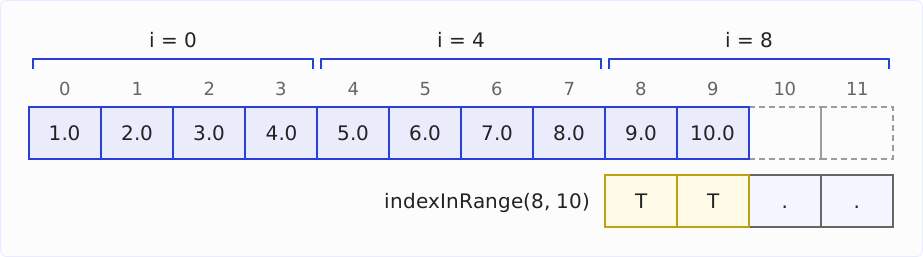
SPECIES.indexInRange(i, a.length) returns a mask that sets exactly the lanes whose index is less than a.length. In the first two iterations, all four lanes are set. In the third iteration, at i = 8, only the first two are, the lanes for indexes 8 and 9. The lanes for indexes 10 and 11 lie beyond the end of the array and are therefore unset. Thanks to the mask, fromArray() and intoArray() don’t access them there and don’t throw an IndexOutOfBoundsException.
The diagram shows the three vector iterations for the array with ten elements. The mask from indexInRange(8, 10) limits the last one to two lanes. T stands for a set lane (true), . for an unset one – this is also how toString() prints a mask:
In the program firststeps/AddArrays.java, main() also calls this method, with the same arrays a and b:
float[] d = new float[a.length];
addWithMask(a, b, d);
IO.println("Mask:       " + Arrays.toString(d));
The result is the same as with the tail loop:
Mask: [11.0, 22.0, 33.0, 44.0, 55.0, 66.0, 77.0, 88.0, 99.0, 110.0]The mask variant is shorter, but not always faster. The JEP recommends it in principle, but with a caveat: on CPUs without so-called predicate registers (registers that hold a mask directly), it is generally less efficient, and even on CPUs with predicate registers, masked operations can be slower than unmasked ones. AVX-512 and SVE have predicate registers; NEON and AVX2 don’t.
On the M5 Pro with NEON, the measurement shows this clearly, in two stages. If the array length is a multiple of the number of lanes, the mask is full in every iteration; the addition then takes 21 to 71 % longer than with the tail loop from 100 elements on. If a remainder is left, the last iteration needs a partial mask. Then every iteration allocates vector objects on the heap, not just the last one, and the addition takes many times as long – 48 times as long with 1,003 elements.
On the i7-12700H with AVX2, C2 doesn’t allocate any objects, but the mask costs there, too: with a full mask, adding 1,000 elements takes 30 % longer than with the tail loop; with an additional partial mask at the end, it takes almost three times as long with 1,003 elements.
Why Do We Have to Write the Loop Ourselves?
Whether with a tail loop or a mask – you have to write the loop over the array yourself. The Vector API has no method “add these two arrays.” I have found no explicit reason for this, neither in the JEPs nor on the developers’ mailing list. But the developers themselves see the hand-written loop as an open problem:
- The very first JEP, JEP 338, calls computing the loop bound a common source of errors and the tail loop duplicated code. For the loop bound, there has been
loopBound()ever since; the JEP defers the duplicated code to future work. - The current JEP 537 would recommend the mask variant for all platforms – only that it isn’t always optimal today. C2 could peel off the last iteration and remove the mask from the loop, but that remains an area for further investigation. You’ve just seen what this costs today: on the M5 Pro, adding 1,003 elements with a partial mask took 48 times as long as with the tail loop.
- A higher level of abstraction was the goal from the start. At a meeting of the JIT compiler team in January 2017, Vladimir Ivanov named code like
Vector<int,?>.map(arr, i -> i + 1)as the “Ultimate Goal”: a method that applies a lambda expression to an entire array. The slide lists three prerequisites for this: value types, generics with primitive types likeVector<int>, and lambda expressions that the JIT compiler can look into to translate their computation into vector instructions. In August 2018, he wrote on the panama-dev mailing list that such approaches “haven’t made their way into the Vector API yet” – “due to different reasons.”
Value types and generics with primitive types are now part of Project Valhalla, which the Vector API is waiting for anyway. Until then, it is the lower layer: it puts the vector instructions in your hands; the loop and the remainder are up to you for now.
Paul Sandoz, one of the authors of the Vector API, showed what a higher level of abstraction on top of it can look like in his talk “Java for AI” at JavaOne 2025: a matrix API that accepts element-wise operations as a lambda expression. The Vector API version behind it is currently written by hand, he said; in the future, Code Reflection could vectorize the lambda expression automatically.
The Building Blocks of the Vector API
Almost all types of the Vector API already appeared in the first example. Here is an overview.
Vector and the Element Types
A vector is an instance of the abstract class Vector<E>. The type parameter E is the wrapper type of the element type – e.g., Float for float values –, because generics in Java don’t (yet) work with primitive types.
For each of the six supported element types, there is an abstract subclass: ByteVector, ShortVector, IntVector, LongVector, FloatVector, and DoubleVector. They contain the methods whose signature names the primitive type – e.g., fromArray(VectorSpecies<Float>, float[], int) or reduceLanes(), which returns a float. There are no char or boolean vectors.
The concrete classes behind them – FloatVector128, IntVector256, and so on – are not public. You get instances exclusively through factory methods like fromArray(), zero(), or broadcast().
VectorShape and VectorSpecies
The shape of a vector is its size in bits. The enum VectorShape has five constants: S_64_BIT, S_128_BIT, S_256_BIT, S_512_BIT, and S_Max_BIT – the largest shape the CPU supports. S_Max_BIT is a constant of its own whose size the JVM only determines at startup: 128 bits on the M5 Pro, 256 bits on an x86 processor with AVX2. It doesn’t have to match one of the other four sizes: ARM CPUs with SVE can have vector registers of up to 2,048 bits, and the Vector API documentation even mentions 384 bits as a possible size.
Element type (int, long, float, etc.) and shape (size in bits) together make up the species (interface VectorSpecies<E>). The number of lanes follows from it: a 256-bit species for float, e.g., has eight lanes, a 128-bit species for byte has 16 lanes. Each vector class offers the species as constants, e.g., FloatVector.SPECIES_256 or IntVector.SPECIES_MAX.
SPECIES_PREFERRED is the species the JVM considers fastest on the current CPU. It lets you write code that uses the full register width on any CPU. The program PreferredSpecies (in the repository: species/PreferredSpecies.java) prints it for all six element types:
List<VectorSpecies<?>> species =
    List.of(
        ByteVector.SPECIES_PREFERRED,
        ShortVector.SPECIES_PREFERRED,
        IntVector.SPECIES_PREFERRED,
        LongVector.SPECIES_PREFERRED,
        FloatVector.SPECIES_PREFERRED,
        DoubleVector.SPECIES_PREFERRED);

for (VectorSpecies<?> s : species) {
  int bits = s.vectorBitSize();
  IO.println(s.elementType() + ": " + bits + " bits, " + s.length() + " lanes");
}
IO.println("Largest shape: " + VectorShape.S_Max_BIT.vectorBitSize() + " bits");
On the M5 Pro, every preferred species is 128 bits – the width of the NEON registers:
byte: 128 bits, 16 lanes
short: 128 bits, 8 lanes
int: 128 bits, 4 lanes
long: 128 bits, 2 lanes
float: 128 bits, 4 lanes
double: 128 bits, 2 lanes
Largest shape: 128 bits
On the Intel Core i7-12700H with AVX2, the same program returns 256-bit species:
byte: 256 bits, 32 lanes
short: 256 bits, 16 lanes
int: 256 bits, 8 lanes
long: 256 bits, 4 lanes
float: 256 bits, 8 lanes
double: 256 bits, 4 lanes
Largest shape: 256 bits
So there, the same Java code processes twice as many elements per instruction as on the M5 Pro. The section “Measurement” shows whether this also makes the i7 compute faster.
It’s best to store a species in a static final constant, as in all examples in this article. The Javadoc of VectorSpecies also allows local variables and parameters, but warns: in other fields or in arrays, a species can cost performance.
VectorMask
A mask (VectorMask<E>) contains one boolean per lane. You’ve already seen how indexInRange() creates a mask. More often, it results from a comparison (compare()), and many operations take a mask as an additional argument to process only certain lanes. Its toString() output writes T for a set lane and . for an unset one: Mask[TT..].
On CPUs with predicate registers, a mask goes directly into such a register. On the others, C2 emulates it in a regular vector register.
VectorOperators and lanewise()
For the most common operations, the vector classes have dedicated methods: add(), sub(), mul(), div(), min(), max(), neg(), abs(), and a few more. You call all other operations through the general method lanewise() – with a constant from the class VectorOperators as the first argument, e.g., v.lanewise(VectorOperators.SQRT). This keeps the number of methods manageable, even though VectorOperators defines a total of 69 operators and 40 conversions in Java 27.
Not every operator fits every element type. SQRT, FMA, and the trigonometric functions like SIN exist only for float and double; bit operators like AND, OR, and LSHL only for integral types. Because lanewise() accepts any operator, a mistake only shows up at run time: on an IntVector, lanewise(SQRT) throws this exception:
java.lang.UnsupportedOperationException: SQRT: inapplicable floating point operatorWith the dedicated methods, the compiler already notices: IntVector has no fma() method at all.
VectorShuffle
A shuffle (VectorShuffle<E>) is a list of lane indexes. It describes from which lane of the source vector each lane of the result takes its value. This lets you move values between lanes – shown in the section “Rearranging with rearrange() and selectFrom()”.
Operations that work lane by lane are called lane-wise in the API; operations across several lanes, like rearranging or summing up all lanes, are called cross-lane.
Operations by Example
The following examples use 128-bit species so that their output is the same on every CPU. In your own code, you should usually use SPECIES_PREFERRED.
Arithmetic
The first example (in the repository: operations/Arithmetic.java) shows the arithmetic operations on two vectors with four float values each:
import static jdk.incubator.vector.VectorOperators.*;

import jdk.incubator.vector.*;

static final VectorSpecies<Float> SPECIES = FloatVector.SPECIES_128;

void main() {
  FloatVector a = FloatVector.fromArray(SPECIES, new float[] {1, 4, 9, 16}, 0);
  FloatVector b = FloatVector.fromArray(SPECIES, new float[] {2, 3, -4, 5}, 0);

  IO.println("a + b         = " + a.add(b));
  IO.println("a * b         = " + a.mul(b));
  IO.println("a * 10        = " + a.mul(10));

  // Fused multiply-add: a * b + 100 in one step
  FloatVector hundred = FloatVector.broadcast(SPECIES, 100);
  IO.println("a * b + 100   = " + a.fma(b, hundred));

  // All other operators via lanewise()
  IO.println("sqrt(a)       = " + a.lanewise(SQRT));
  IO.println("abs(b)        = " + b.lanewise(ABS));
  IO.println("max(a, b)     = " + a.lanewise(MAX, b));
}
The output:
a + b         = [3.0, 7.0, 5.0, 21.0]
a * b         = [2.0, 12.0, -36.0, 80.0]
a * 10        = [10.0, 40.0, 90.0, 160.0]
a * b + 100   = [102.0, 112.0, 64.0, 180.0]
sqrt(a)       = [1.0, 2.0, 3.0, 4.0]
abs(b)        = [2.0, 3.0, 4.0, 5.0]
max(a, b)     = [2.0, 4.0, 9.0, 16.0]
Note:
a.mul(10)takes a scalar. The API distributes it to all lanes and multiplies each lane ofaby 10.FloatVector.broadcast(SPECIES, 100)does this distribution explicitly: it creates a vector in which every lane has the value 100, i.e.,[100.0, 100.0, 100.0, 100.0]. The example needs it becausefma()only exists with two vectors or with two scalars – for the vectorband the number 100, the 100 first has to become a vector.fma()stands for fused multiply-add: multiplication and addition in one instruction, with only one rounding at the end.abs()andmax()also exist as dedicated methods. The twolanewise()calls only show thatlanewise()works for every operator.
Comparing and blend(): Conditions Without Branches
An if statement decides for each value individually which branch runs. In a vector, the lanes would then have to go different ways, and a vector instruction can’t do that. That’s why the Vector API takes a different approach: it checks the condition for all lanes at once, records the result in a mask, and then selects the value for each lane based on the mask – the replacement value where the condition is true, otherwise the original value.
The following example (in the repository: operations/CompareAndBlend.java) replaces all negative values with 0 – in scalar code, this would be values[i] < 0 ? 0 : values[i]:
import static jdk.incubator.vector.VectorOperators.*;

import jdk.incubator.vector.*;

static final VectorSpecies<Float> SPECIES = FloatVector.SPECIES_128;

void main() {
  float[] values = {-1.5f, 2.0f, -0.5f, 3.0f, 4.0f, -2.0f, 0.0f, 1.0f};
  float[] result = new float[values.length];

  for (int i = 0; i < values.length; i += SPECIES.length()) {
    FloatVector v = FloatVector.fromArray(SPECIES, values, i);
    VectorMask<Float> negative = v.compare(LT, 0);
    FloatVector clamped = v.blend(0, negative);

    IO.println(v + " -> mask " + negative + " -> " + clamped);
    clamped.intoArray(result, i);
  }

  IO.println(Arrays.toString(result));
}
v.compare(LT, 0) checks for each lane whether its value is less than 0 – LT stands for “less than” – and returns a mask with T for each negative lane. The other comparisons are named accordingly: EQ (equal), NE (not equal), LE (less than or equal), GT (greater than), and GE (greater than or equal).
v.blend(0, negative) puts the value 0 into every lane whose mask bit is set and leaves the other lanes unchanged:
[-1.5, 2.0, -0.5, 3.0] -> mask Mask[T.T.] -> [0.0, 2.0, 0.0, 3.0]
[4.0, -2.0, 0.0, 1.0] -> mask Mask[.T..] -> [4.0, 0.0, 0.0, 1.0]
[0.0, 2.0, 0.0, 3.0, 4.0, 0.0, 0.0, 1.0]
The diagram shows the three stages for the first vector:
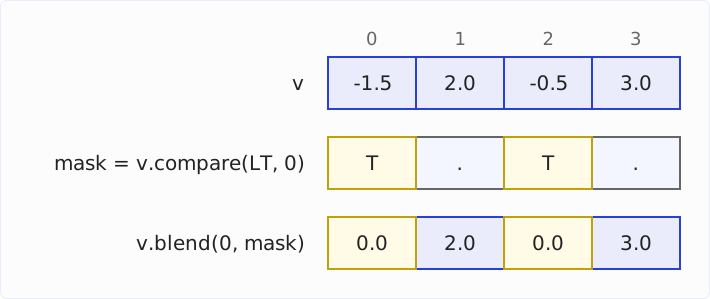
For exactly this case, there would also be v.max(0). But the pattern of compare() and blend() works for any condition and any replacement value.
Reductions
A reduction combines all lanes of a vector into a single value, e.g., the sum or the maximum. To do this, it has to combine values from different lanes. Such a cross-lane operation is more expensive than a lane-wise operation, in which each lane stays on its own.
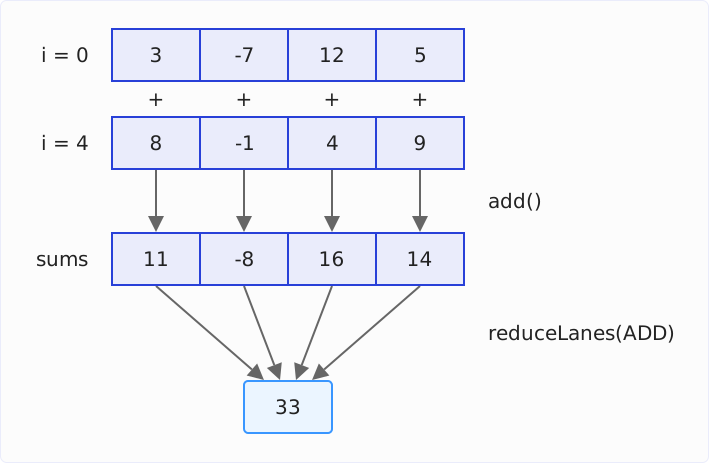
That’s why, for the sum of an array, you don’t reduce in every loop iteration. Instead, the loop adds each loaded vector lane by lane to a vector of sums. With four lanes, lane 0 thus collects elements 0, 4, 8, etc., lane 1 elements 1, 5, 9, etc. Only after the loop does a single reduction combine the four partial sums into one result.
The diagram shows the two stages for the first eight elements of the following program. The loop adds two vectors lane by lane to the vector of sums sums; afterward, reduceLanes(ADD) combines its four lanes into 33:
The following program (in the repository: operations/Reductions.java) computes the sum and the maximum of ten int values this way:
import static jdk.incubator.vector.VectorOperators.*;

import jdk.incubator.vector.*;

static final VectorSpecies<Integer> SPECIES = IntVector.SPECIES_128;

void main() {
  int[] values = {3, -7, 12, 5, 8, -1, 4, 9, 2, 6};

  // Accumulate lane by lane, reduce to a scalar only once at the end
  IntVector sums = IntVector.zero(SPECIES);
  IntVector maxima = IntVector.broadcast(SPECIES, Integer.MIN_VALUE);
  int i = 0;
  for (; i < SPECIES.loopBound(values.length); i += SPECIES.length()) {
    IntVector v = IntVector.fromArray(SPECIES, values, i);
    sums = sums.add(v);
    maxima = maxima.max(v);
  }
  IO.println("Lane sums:   " + sums);
  IO.println("Lane maxima: " + maxima);

  int sum = sums.reduceLanes(ADD);
  int max = maxima.reduceLanes(MAX);
  IO.println("Reduced:     sum " + sum + ", maximum " + max);

  for (; i < values.length; i++) {
    sum += values[i];
    max = Math.max(max, values[i]);
  }
  IO.println("With tail:   sum " + sum + ", maximum " + max);
}
After the loop, each lane holds the partial sum or the partial maximum of every fourth element. reduceLanes(ADD) and reduceLanes(MAX) combine the four lanes – the sum is the 33 from the diagram. The tail loop then processes elements 8 and 9, i.e., 2 and 6, and increases the sum to 41:
Lane sums:   [11, -8, 16, 14]
Lane maxima: [8, -1, 12, 9]
Reduced:     sum 33, maximum 12
With tail:   sum 41, maximum 12
A reduction also takes a mask and then combines only the lanes the mask sets. The following program (in the repository: operations/MaskedReduction.java) uses this to sum only the positive values of a vector:
import static jdk.incubator.vector.VectorOperators.*;

import jdk.incubator.vector.*;

static final VectorSpecies<Integer> SPECIES = IntVector.SPECIES_128;

void main() {
  IntVector v = IntVector.fromArray(SPECIES, new int[] {3, -7, 12, 5}, 0);

  // A reduction can also take a mask: sum of the positive values only
  VectorMask<Integer> positive = v.compare(GT, 0);
  IO.println("Vector:       " + v);
  IO.println("Mask:         " + positive);
  IO.println("Positive sum: " + v.reduceLanes(ADD, positive));
}
v.compare(GT, 0) sets the lanes with positive values, and reduceLanes(ADD, positive) adds only those. The lane with -7 is left out:
Vector:       [3, -7, 12, 5]
Mask:         Mask[T.TT]
Positive sum: 20
Filtering with compress() and expand()
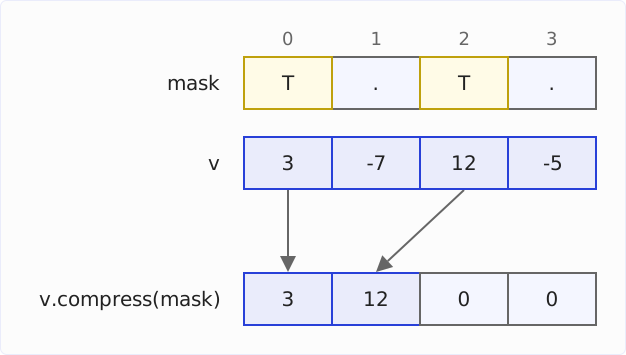
compress() moves the lanes whose mask bit is set to the beginning of the vector, without gaps, and fills the rest with 0. The following program (in the repository: operations/Compress.java) uses it to filter all positive values from an array:
import static jdk.incubator.vector.VectorOperators.*;

import jdk.incubator.vector.*;

static final VectorSpecies<Integer> SPECIES = IntVector.SPECIES_128;

void main() {
  int[] values = {3, -7, 12, -5, -8, 1, 4, 9, 2, -6, 0, 11};

  // Filter: copy all positive values, without gaps, into result
  int[] result = new int[values.length];
  int count = 0;
  for (int i = 0; i < values.length; i += SPECIES.length()) {
    IntVector v = IntVector.fromArray(SPECIES, values, i);
    VectorMask<Integer> positive = v.compare(GT, 0);
    IntVector packed = v.compress(positive);
    IO.println(v + " -> compress " + positive + " -> " + packed);

    // Writes all four lanes; the next round overwrites the zeros at the end
    packed.intoArray(result, count);
    count += positive.trueCount();
    IO.println("  result: " + Arrays.toString(result) + ", count: " + count);
    IO.println();
  }
  IO.println(Arrays.toString(Arrays.copyOf(result, count)));
}
intoArray() always writes all four lanes, including the zeros at the end. But the counter count only advances by the number of set mask bits (trueCount()), so the next round overwrites the zeros. The result lines of the output show this: after the first round, there are zeros at positions 2 and 3; in the second round, the program writes 1 and 4 there:
[3, -7, 12, -5] -> compress Mask[T.T.] -> [3, 12, 0, 0]
  result: [3, 12, 0, 0, 0, 0, 0, 0, 0, 0, 0, 0], count: 2

[-8, 1, 4, 9] -> compress Mask[.TTT] -> [1, 4, 9, 0]
  result: [3, 12, 1, 4, 9, 0, 0, 0, 0, 0, 0, 0], count: 5

[2, -6, 0, 11] -> compress Mask[T..T] -> [2, 11, 0, 0]
  result: [3, 12, 1, 4, 9, 2, 11, 0, 0, 0, 0, 0], count: 7

[3, 12, 1, 4, 9, 2, 11]
The diagram shows the first round, the mask at the top, below it the vector and the arrows to the result:
expand() is the inverse of compress(): it distributes the first lanes of a vector, in order, to the positions whose mask bit is set and fills the other lanes with 0. The following program (in the repository: operations/Expand.java) uses it to undo the compress() from the diagram:
import jdk.incubator.vector.*;

static final VectorSpecies<Integer> SPECIES = IntVector.SPECIES_128;

void main() {
  // expand() is the inverse of compress(): it distributes the first lanes
  // to the positions of the mask and fills the other lanes with 0
  IntVector packed = IntVector.fromArray(SPECIES, new int[] {3, 12, 0, 0}, 0);
  VectorMask<Integer> mask =
      VectorMask.fromArray(SPECIES, new boolean[] {true, false, true, false}, 0);
  IO.println(packed + " -> expand " + mask + " -> " + packed.expand(mask));
}
The output:
[3, 12, 0, 0] -> expand Mask[T.T.] -> [3, 0, 12, 0]The diagram shows how the first two lanes move to positions 0 and 2:
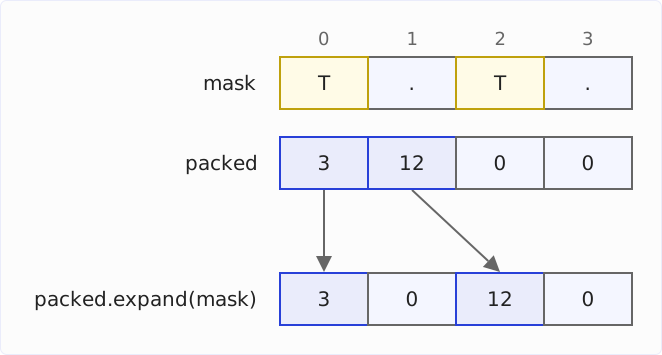
expand() restores the positions, but not the values: where compress() had discarded the -7 and the -5, there is now 0.
compress() and expand() have existed since Java 19 (JEP 426).
Rearranging with rearrange() and selectFrom()
rearrange() rearranges the lanes of a vector. Which lane goes where is determined by a shuffle – a list of lane indexes, see the section “VectorShuffle”: lane i of the result gets the value from the lane whose index is at position i of the shuffle.
The following program (in the repository: operations/Rearrange.java) uses rearrange() to reverse a vector and then to rotate it one lane to the left:
import jdk.incubator.vector.*;

static final VectorSpecies<Integer> SPECIES = IntVector.SPECIES_128;

void main() {
  IntVector v = IntVector.fromArray(SPECIES, new int[] {10, 20, 30, 40}, 0);

  // rearrange(): lane i of the result takes the lane named at position i
  VectorShuffle<Integer> reverse = VectorShuffle.fromValues(SPECIES, 3, 2, 1, 0);
  IO.println(v + " -> rearrange " + reverse + " -> " + v.rearrange(reverse));

  VectorShuffle<Integer> rotate = VectorShuffle.iota(SPECIES, 1, 1, true);
  IO.println(v + " -> rearrange " + rotate + " -> " + v.rearrange(rotate));
}
VectorShuffle.iota(SPECIES, 1, 1, true) creates the indexes 1, 2, 3, 4 – the last argument true makes them wrap around at the end, so 4 becomes 0:
[10, 20, 30, 40] -> rearrange Shuffle[3, 2, 1, 0] -> [40, 30, 20, 10]
[10, 20, 30, 40] -> rearrange Shuffle[1, 2, 3, 0] -> [20, 30, 40, 10]
selectFrom() swaps the roles: the vector you call the method on contains the indexes; the argument is the table to read from. This turns a vector into a lookup table. The following program (in the repository: operations/SelectFrom.java) uses it to convert 16 nibbles (values from 0 to 15) into hexadecimal digits in one step:
import jdk.incubator.vector.*;

static final VectorSpecies<Byte> SPECIES = ByteVector.SPECIES_128;

void main() {
  // selectFrom(): the vector holds the indexes, the argument is the table
  byte[] digits = "0123456789abcdef".getBytes(StandardCharsets.US_ASCII);
  ByteVector table = ByteVector.fromArray(SPECIES, digits, 0);
  byte[] nibbles = {12, 10, 15, 14, 11, 10, 11, 14, 0, 0, 0, 0, 0, 0, 0, 1};
  ByteVector indexes = ByteVector.fromArray(SPECIES, nibbles, 0);
  byte[] hex = new byte[16];
  indexes.selectFrom(table).intoArray(hex, 0);
  IO.println(new String(hex, StandardCharsets.US_ASCII));
}
Each of the 16 lanes of indexes has picked a character from table:
cafebabe00000001Since Java 24 (JEP 489), indexes in selectFrom() and rearrange() wrap around instead of throwing an exception – an index outside the lanes is reduced modulo the number of lanes, so with 16 lanes, 17 becomes lane 1. According to the JEP, the two operations have been considerably faster since then.
Since then, there has also been a variant of selectFrom() with two table vectors: indexes.selectFrom(v1, v2) reads from v1 and v2 as if from a table of twice the length. With 16 lanes, indexes 0 to 15 select from v1, indexes 16 to 31 from v2.
Converting Types and Sizes
When converting between element types, the size often changes: 16 byte values fill 128 bits, 16 int values need 512 bits. That’s why convertShape() returns the result in parts. If the size stays the same, as with int to float (both 32 bits), convert() is enough, which keeps the shape.
reinterpretShape(species, part), on the other hand, doesn’t convert any values, but reads the same bits as a vector of the given species – even with a different shape. If the target vector is smaller, part selects the slice; if it is larger, the bits end up in one part of it, and the rest becomes 0. For the common case that the shape stays the same, there are shorthands like reinterpretAsInts().
The following program (in the repository: operations/Conversions.java) shows all three: it converts a byte vector into four int vectors of 128 bits each, four int values into float values, and finally reads the byte vector as four int values:
import static jdk.incubator.vector.VectorOperators.*;

import jdk.incubator.vector.*;

static final VectorSpecies<Byte> BYTES = ByteVector.SPECIES_128;
static final VectorSpecies<Integer> INTS = IntVector.SPECIES_128;

void main() {
  byte[] data = new byte[16];
  for (int i = 0; i < data.length; i++) {
    data[i] = (byte) (i * 20); // byte is signed: from 140 on, values wrap
  }
  ByteVector bytes = ByteVector.fromArray(BYTES, data, 0);
  IO.println("Bytes: " + bytes);

  // 16 bytes become 16 ints = 512 bits: four 128-bit vectors,
  // one per part. convertShape() returns one part at a time.
  for (int part = 0; part < 4; part++) {
    Vector<Integer> ints = bytes.convertShape(B2I, INTS, part);
    IO.println("Part " + part + ": " + ints);
  }

  // Same lane count, same shape: int -> float, no part needed
  IntVector i = IntVector.fromArray(INTS, new int[] {1, 2, 3, 16_777_217}, 0);
  IO.println(i + " -> " + i.convert(I2F, 0));

  // Reinterpret: the same 128 bits, read as four ints
  IO.println("Reinterpreted: " + bytes.reinterpretAsInts());
}
The output:
Bytes: [0, 20, 40, 60, 80, 100, 120, -116, -96, -76, -56, -36, -16, 4, 24, 44]
Part 0: [0, 20, 40, 60]
Part 1: [80, 100, 120, -116]
Part 2: [-96, -76, -56, -36]
Part 3: [-16, 4, 24, 44]
[1, 2, 3, 16777217] -> [1.0, 2.0, 3.0, 1.6777216E7]
Reinterpreted: [1009259520, -1938267056, -590826336, 739771632]
Note:
bytes.convertShape(B2I, INTS, part)takes three arguments: the operator, the species of the result, and the number of the part. SoINTSdetermines the element type and size of the target vector – 128 bits here, and that’s why we need four such vectors for the 16 converted values.B2Iis the operator for convertingbytetoint. The sign is preserved: thebyte-116 becomes theint-116.- The conversion with
I2Ffollows the Java rules: 16,777,217 has no exact representation in afloatand is rounded to 16,777,216. - The values in the last line have only the bits in common with the bytes – every four bytes form one
int.
The JEP advises using operations that can change the shape sparingly, because they can cost portability and performance. Where there is a variant that keeps the shape, it is preferable: convert() instead of convertShape(), and the shorthands like reinterpretAsInts() instead of reinterpretShape(). According to the Javadoc, the shorthands read the same bits in the same shape – so they are not among the operations the JEP warns about.
Vectors from Off-Heap Memory: MemorySegment
Vectors can be loaded not only from arrays, but also from a MemorySegment of the Foreign Function & Memory API. The following example (in the repository: operations/MemorySegments.java) creates 1,000 long values outside the heap and sums them up:
import static jdk.incubator.vector.VectorOperators.*;

import java.lang.foreign.*;
import java.nio.ByteOrder;
import jdk.incubator.vector.*;

static final VectorSpecies<Long> SPECIES = LongVector.SPECIES_PREFERRED;

void main() {
  int count = 1_000;
  try (Arena arena = Arena.ofConfined()) {
    // Off-heap memory, aligned to the vector size
    long vectorBytes = SPECIES.vectorByteSize();
    MemorySegment segment = arena.allocate(count * (long) Long.BYTES, vectorBytes);
    for (int i = 0; i < count; i++) {
      segment.setAtIndex(ValueLayout.JAVA_LONG, i, i + 1L);
    }

    // The offset is in bytes, not in elements
    long bound = SPECIES.loopBound(count) * (long) Long.BYTES;
    ByteOrder order = ByteOrder.nativeOrder();
    LongVector sums = LongVector.zero(SPECIES);
    long offset = 0;
    for (; offset < bound; offset += vectorBytes) {
      LongVector v = LongVector.fromMemorySegment(SPECIES, segment, offset, order);
      sums = sums.add(v);
    }
    long sum = sums.reduceLanes(ADD);
    for (; offset < segment.byteSize(); offset += Long.BYTES) {
      sum += segment.get(ValueLayout.JAVA_LONG, offset);
    }
    IO.println("Sum of 1 to " + count + ": " + sum);
  }
}
Note:
SPECIES.vectorByteSize()returns the size of a vector in bytes – 16 on the M5 Pro, 32 on the i7. The second loop advances the offset by this value.Long.BYTESis the size of alongin bytes, i.e., 8.count * (long) Long.BYTESthus yields the size of the memory area in bytes, 8,000 here. The cast tolongmakes the multiplication compute inlongso that it doesn’t overflow theintrange for very large amounts.arena.allocate()takes the size in bytes as its first argument and the alignment as its second: the start address of the segment is a multiple ofvectorBytes. According to JEP 426, this alignment can speed up loading and storing on some architectures.fromMemorySegment()expects the offset in bytes, not as an index, and the byte order of the data.
The output:
Sum of 1 to 1000: 500500Since Java 19, the Vector API loads vectors from a MemorySegment; the earlier methods for byte[] and ByteBuffer were dropped in return, since a MemorySegment can be created from both.
Two Complete Examples
The examples so far show individual operations. The following two each solve a complete task – the way it occurs in a real application.
Cosine Similarity
The cosine similarity measures how similar the directions of two vectors are: 1 means the same direction, 0 means perpendicular. Search systems use it to compare embeddings – numeric vectors with hundreds or thousands of dimensions that describe the meaning of a text.
The formula needs three sums: the dot product of the two vectors and the sums of squares of each individual vector. The program examples/CosineSimilarity.java computes the cosine similarity twice: in scalar code and with the Vector API. The scalar version computes the three sums in one loop:
float cosineScalar(float[] a, float[] b) {
  float dot = 0;
  float normA = 0;
  float normB = 0;
  for (int i = 0; i < a.length; i++) {
    dot += a[i] * b[i];
    normA += a[i] * a[i];
    normB += b[i] * b[i];
  }
  return (float) (dot / (Math.sqrt(normA) * Math.sqrt(normB)));
}
The Vector API version collects the three sums in three vectors and reduces them after the loop:
static final VectorSpecies<Float> SPECIES = FloatVector.SPECIES_PREFERRED;

float cosineVector(float[] a, float[] b) {
  FloatVector dot = FloatVector.zero(SPECIES);
  FloatVector normA = FloatVector.zero(SPECIES);
  FloatVector normB = FloatVector.zero(SPECIES);
  int i = 0;
  for (; i < SPECIES.loopBound(a.length); i += SPECIES.length()) {
    FloatVector va = FloatVector.fromArray(SPECIES, a, i);
    FloatVector vb = FloatVector.fromArray(SPECIES, b, i);
    dot = va.fma(vb, dot); // dot += va * vb, lane by lane
    normA = va.fma(va, normA);
    normB = vb.fma(vb, normB);
  }
  float d = dot.reduceLanes(ADD);
  float na = normA.reduceLanes(ADD);
  float nb = normB.reduceLanes(ADD);
  for (; i < a.length; i++) {
    d += a[i] * b[i];
    na += a[i] * a[i];
    nb += b[i] * b[i];
  }
  return (float) (d / (Math.sqrt(na) * Math.sqrt(nb)));
}
va.fma(vb, dot) multiplies va by vb and adds dot – in one instruction per lane. The program CosineSimilarity from the example repository calls both methods with the same two vectors of 1,000 random numbers each:
Scalar: 0.9671541
Vector: 0.9671549
The two results differ from the seventh decimal place on. That is not a bug: the scalar loop adds the products strictly from front to back. The vector version adds them in four partial sums – one per lane – and combines them at the end. With floating-point numbers, the result depends on the order of the additions, and fma() additionally rounds only once instead of twice.
The Vector API explicitly does not guarantee that floating-point computations with vectors yield the same result as the scalar computation (JEP 537, “Non-Goals”). For a similarity search, the seventh decimal place doesn’t matter. If you need bit-for-bit reproducible results, you have to compute in the order of the scalar loop.
Counting and Finding Bytes
The second example (in the repository: examples/ByteSearch.java) works with text: it counts the line breaks in a byte array and searches for the first occurrence of a character. With byte values, a 128-bit vector processes 16 elements at once.
The method count() compares each vector with the byte it is looking for and counts the hits in the mask:
static final VectorSpecies<Byte> SPECIES = ByteVector.SPECIES_PREFERRED;

int count(byte[] data, byte b) {
  int count = 0;
  int i = 0;
  for (; i < SPECIES.loopBound(data.length); i += SPECIES.length()) {
    ByteVector v = ByteVector.fromArray(SPECIES, data, i);
    count += v.compare(EQ, b).trueCount();
  }
  for (; i < data.length; i++) {
    if (data[i] == b) count++;
  }
  return count;
}
The method indexOf() uses the same constant SPECIES and exits as soon as a vector contains a hit:
int indexOf(byte[] data, byte b) {
  int i = 0;
  for (; i < SPECIES.loopBound(data.length); i += SPECIES.length()) {
    ByteVector v = ByteVector.fromArray(SPECIES, data, i);
    VectorMask<Byte> found = v.compare(EQ, b);
    if (found.anyTrue()) {
      return i + found.firstTrue();
    }
  }
  for (; i < data.length; i++) {
    if (data[i] == b) return i;
  }
  return -1;
}
anyTrue() checks whether at least one mask bit is set; firstTrue() returns the lane of the first set bit. The program ByteSearch calls both methods on a three-line text and compares the result with String.indexOf():
Lines:          3
First 'J' at:   41
Expected:       41
First '#' at:   -1
Implemented in scalar code, this search is exactly the early-exit loop that C2 doesn’t vectorize on its own (see “What Does the JIT Compiler Vectorize on Its Own?”).
What the JIT Compiler Makes of the Vector API
The Vector API has two implementations:
- The first is pure Java code in the JDK class library: a vector is an object that holds its values in an array, and each operation is a loop over this array.
- The second implementation lives in the C2 compiler: it recognizes the methods of the API as intrinsics (methods for which the compiler generates its own machine code) and translates them into vector instructions of the CPU the application runs on. The vector objects on the heap disappear in the process; the values live only in vector registers – provided the vectors don’t leave the method (more on this in the section “When Vectors Do End Up on the Heap”).
These intrinsics only exist in C2 – supporting the client compiler C1 is explicitly not a goal (JEP 537, “Non-Goals”). They are enabled as soon as the JVM loads the module jdk.incubator.vector: it then sets the experimental VM option -XX:+EnableVectorSupport to true.
The program JitDemo from the example repository calls the two scalar methods from the section “What Does the JIT Compiler Vectorize on Its Own?” (addScalar() for the int addition and indexOfScalar() for the byte search) and their Vector API counterparts until C2 has compiled all four. The three int arrays and the byte array have 1,000 elements each. The byte searched for is in the last position, so the search runs through the entire array. The script print-assembly.sh then prints the machine code.
The Addition: No Difference
The Vector API version of the int addition used in JitDemo is structured like addWithTailLoop() from the first steps: a main loop adds the arrays vector by vector, and a scalar loop afterward adds the remaining elements that no longer fill a whole vector.
C2 generates the same code for the main loop as for the scalar loop. It has unrolled it eightfold: its body consists of eight identical groups of instructions, and each group adds one vector from a and one from b and writes the result to c. The following excerpt shows the first and the eighth group:
ldur   q16, [x16, #0xc]         ; load four ints from a
ldur   q17, [x17, #0xc]         ; load four ints from b
add    v16.4s, v16.4s, v17.4s   ; four additions with one instruction
add    x14, x4, x14
stur   q16, [x14, #0xc]         ; write four ints to c
...
ldur   q16, [x16, #0x7c]        ; eighth group: values 28-31
ldur   q17, [x17, #0x7c]
add    v16.4s, v16.4s, v17.4s
stur   q16, [x14, #0x7c]
add    w15, w15, #0x20          ; i += 32
cmp    w15, w13
b.lt   #0x1229dbb10
A group consists of three steps:
- Two
ldurinstructions each load fourintvalues fromaandbinto the 128-bit registersq16andq17. add v16.4s, v16.4s, v17.4sadds the four lanes with one instruction.sturwrites the four sums toc.
So one vector contains four int values. With its eight groups, one loop iteration processes eight vectors, i.e., 32 int values.
For a loop that C2 vectorizes anyway, the Vector API therefore brings nothing. You write more code for the same result – and in the measurement, the Vector API version is even slower.
The Byte Search: 64 Instead of Eight Bytes per Iteration
The byte search is a different story. The Vector API version indexOfVector() corresponds to the method indexOf() from the ByteSearch example. Its main loop looks like this (shortened by the second to fourth check):
add    x10, x2, w0, sxtw
ldur   q16, [x10, #0xc]               ; load bytes 0-15
ldur   q18, [x10, #0x3c]              ; load bytes 48-63
ldur   q19, [x10, #0x1c]              ; load bytes 16-31
ldur   q20, [x10, #0x2c]              ; load bytes 32-47
cmeq   v21.16b, v16.16b, v17.16b      ; compare 16 bytes with b
cmeq   v20.16b, v20.16b, v17.16b
cmeq   v19.16b, v19.16b, v17.16b
cmeq   v16.16b, v18.16b, v17.16b
addv   b18, v21.16b                   ; anyTrue(): sum up the lanes
umov   w8, v18.b[0]
cmp    w8, wzr
b.ne   #0x126a25940                   ; hit: leave the loop
...
add    w0, w0, #0x40                  ; i += 64
cmp    w0, w14
b.lt   #0x126a25760
C2 has unrolled the loop fourfold. v17 contains the byte searched for in all 16 lanes. cmeq compares 16 bytes with one instruction and sets every lane with a hit to 0xFF. For anyTrue(), addv adds up the 16 lanes into one byte, and a conditional branch checks whether it is non-zero.
The main loop of indexOfVector() consists of 28 instructions, just like the loop of indexOfScalar(), which C2 doesn’t vectorize but only unrolls eightfold (see “What Does the JIT Compiler Vectorize on Its Own?”). The scalar loop thus processes eight bytes, the vector loop 64 – eight times as many bytes per instruction. The section “Measurement” shows how much of this reaches the run time.
When Vectors Do End Up on the Heap
C2 can only optimize the vector objects away as long as they don’t leave the method – that is, as long as they are only local variables and their result is written back to an array. If you store a vector in a field or in an array of vectors, the JVM has to create it as a real object on the heap.
The program Allocations (in the repository: jit/Allocations.java) shows this. It uses ThreadMXBean.getCurrentThreadAllocatedBytes() to measure how many bytes are allocated on the heap per vector operation – once for a loop that writes the result back with intoArray(), and once for a loop that stores the result vectors in an array of type IntVector[]:
static final VectorSpecies<Integer> SPECIES = IntVector.SPECIES_128;

int[] a = new int[1_024];
int[] b = new int[1_024];
int[] c = new int[1_024];
IntVector[] kept = new IntVector[1_024 / 4];

void add() {
  for (int i = 0; i < a.length; i += SPECIES.length()) {
    IntVector va = IntVector.fromArray(SPECIES, a, i);
    IntVector vb = IntVector.fromArray(SPECIES, b, i);
    va.add(vb).intoArray(c, i);
  }
}

void addAndKeep() {
  for (int i = 0; i < a.length; i += SPECIES.length()) {
    IntVector va = IntVector.fromArray(SPECIES, a, i);
    IntVector vb = IntVector.fromArray(SPECIES, b, i);
    kept[i / 4] = va.add(vb);
  }
}
With C2, add() allocates nothing on the heap, addAndKeep() 48 bytes per vector:
add():        0 bytes per vector
addAndKeep(): 48 bytes per vector
The 48 bytes are an object of the class IntVector128 and an int array with the four values that it references.
This is why the Vector API is waiting for Project Valhalla: as value classes, vectors would no longer have identity. The JVM could then store their values directly in fields and arrays too, without an object of their own on the heap – and not only when C2 sees that a vector never leaves the method. The 48 bytes per vector in addAndKeep() could then disappear.
If you start the same program with -XX:TieredStopAtLevel=1, the JVM compiles only with C1. Then the Java implementation runs, and an object is allocated on the heap for every vector – for the two loaded vectors and the result vector, three times 48 bytes:
add():        144 bytes per vector
addAndKeep(): 144 bytes per vector
Measurement
The example repository contains three JMH benchmarks, each for arrays with 7, 16, 100, 1,000, and 100,000 elements:
AddBenchmarkadds twofloatarrays: scalar with auto-vectorization, scalar without auto-vectorization (-XX:-UseSuperWord), with the Vector API and a tail loop, and with the Vector API and a mask.IndexOfBenchmarksearches for a byte that is in the last position: scalar and with the Vector API.DotProductBenchmarkcomputes the dot product of twofloatarrays: scalar with one and with four sums, with the Vector API andfma()with one and with four vectors of sums.
I measured on two machines: a MacBook Pro with an Apple M5 Pro (ARM, NEON, 128-bit vector registers) and a Dell XPS 17 with an Intel Core i7-12700H (x86, AVX2, 256 bits). This processor doesn’t have AVX-512. So on the M5 Pro, a vector holds four float values, on the i7 eight.
That doesn’t make the i7 twice as fast. For the byte search in 1,000 elements, it needs 13.6 ns with the Vector API, the M5 Pro 12.7 ns; for the dot product with four vectors of sums, 38.8 against 42.0 ns. The two machines differ in more than the vector width, and the Dell also measures in a virtual machine. The following sections therefore compare the variants on the same machine, not the machines with each other.
The tables show the time per call in nanoseconds, for each benchmark first for the M5 Pro, then for the i7.
Adding Two Arrays
AddBenchmark adds two float arrays in four variants. The chart shows, for both machines, how long three of them take relative to the scalar loop with auto-vectorization – above 1, they are slower; below 1, faster.
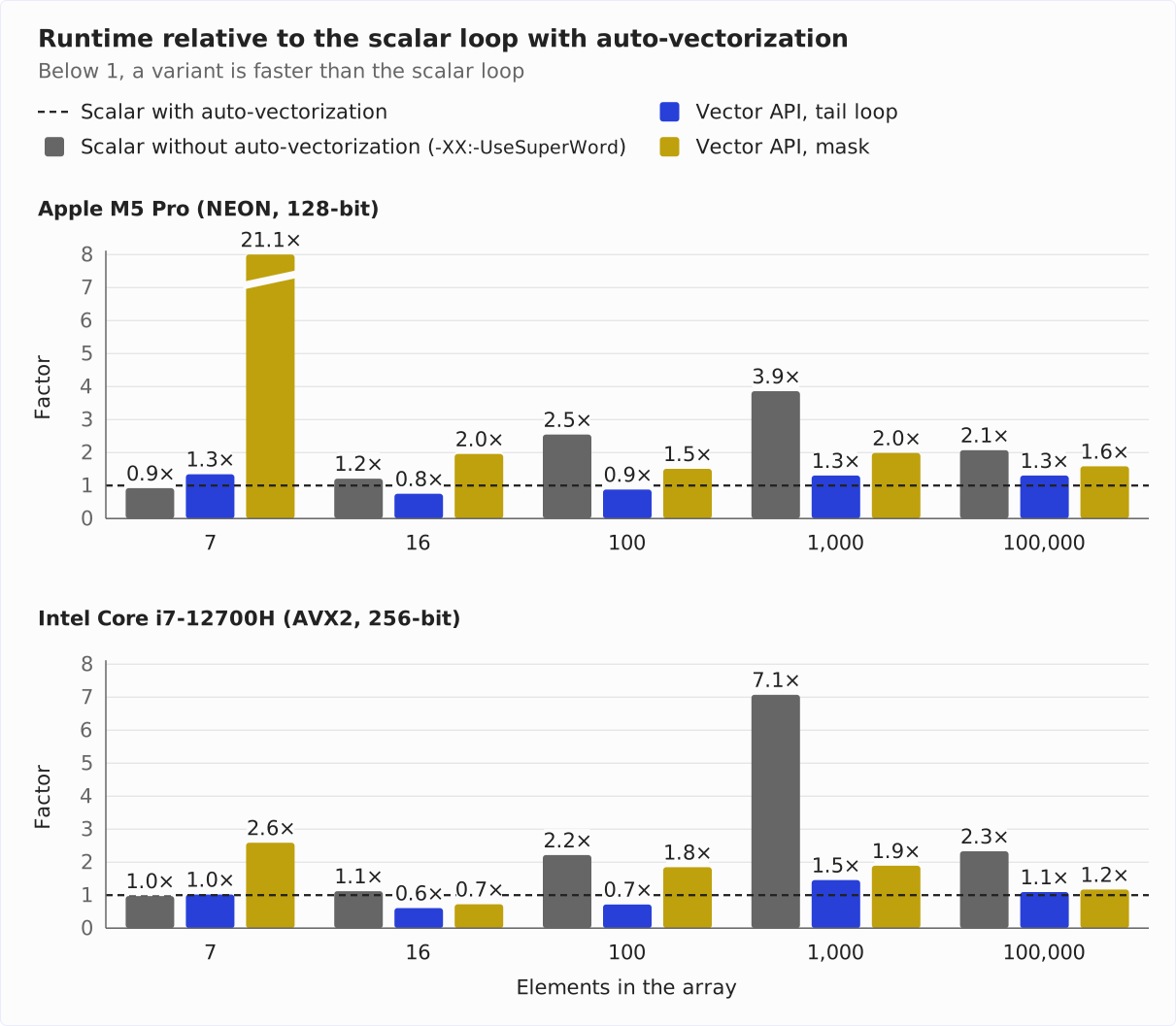
The two tables show the exact times in nanoseconds, first for the M5 Pro:
| Elements | Scalar with auto-vectorization | Scalar without auto-vectorization | Vector API, tail loop | Vector API, mask |
|---|---|---|---|---|
| 7 | 2.3 | 2.1 | 3.1 | 49.2 |
| 16 | 3.0 | 3.7 | 2.3 | 6.0 |
| 100 | 7.0 | 17.8 | 6.2 | 10.5 |
| 1,000 | 45.8 | 176.8 | 59.7 | 90.9 |
| 100,000 | 9,113 | 18,865 | 11,873 | 14,408 |
On the i7-12700H:
| Elements | Scalar with auto-vectorization | Scalar without auto-vectorization | Vector API, tail loop | Vector API, mask |
|---|---|---|---|---|
| 7 | 3.5 | 3.4 | 3.5 | 9.0 |
| 16 | 5.0 | 5.6 | 3.1 | 3.6 |
| 100 | 11.0 | 24.2 | 7.9 | 20.2 |
| 1,000 | 32.7 | 231.2 | 47.6 | 61.8 |
| 100,000 | 10,900 | 25,386 | 11,936 | 12,768 |
From 100 elements on, auto-vectorization makes a clear difference: without it, adding 100 elements takes 2.5 times as long on the M5 Pro and 2.2 times as long on the i7. With 1,000 elements, it is 3.9 and 7.1 times as long, respectively. With 100,000 elements, it is a little more than twice as long on both machines.
The Vector API adds nothing on top. Up to 100 elements, it is sometimes ahead of the scalar loop, sometimes behind it. With 1,000 elements, it even takes up to 30 % longer on the M5 Pro and 46 % longer on the i7 – even though C2 generates the same main loop for the Vector API as for auto-vectorization. On both machines, the difference comes from the alignment in memory – details in the info box.
Mask or Tail Loop?
On the M5 Pro, the mask variant takes longer than the tail loop variant at every size: 21 to 71 % longer with 100 to 100,000 elements, almost 16 times as long with 7 elements. With 16 elements, its results also vary – two of the three forks were at 3.1 ns, one at 11.6 ns.
16, 100, 1,000, and 100,000 are multiples of four, so the mask is full in every iteration there. Still, every iteration costs extra work: computing the mask, blending with it when loading, and checking before storing whether all lanes are set.
With 7 elements, the second iteration needs a partial mask for three lanes. C2 can’t translate it into vector instructions on the M5 Pro: for masked stores and for masked loads beyond the end of the array, C2 needs predicate instructions, and the compiler uses them on ARM only with SVE. Instead of the vector instructions, the Java implementation runs. The diagnostic log of C2 (-XX:+PrintIntrinsics) then reports:
** not supported: op=storeMasked vlen=4 etype=float mismatched_ms=0An additional measurement with 7 to 100,003 elements, where the last iteration needs a partial mask each time, shows how expensive this gets with different array sizes. It contains a third variant, vectorMaskedTail() from AddBenchmark.java: its main loop runs without a mask up to loopBound(), and only the elements beyond are processed by a single masked iteration instead of the tail loop:
if (i < a.length) {
  VectorMask<Float> m = SPECIES.indexInRange(i, a.length);
  FloatVector va = FloatVector.fromArray(SPECIES, a, i, m);
  FloatVector vb = FloatVector.fromArray(SPECIES, b, i, m);
  va.add(vb).intoArray(c, i, m);
}
The chart shows, for both machines, how long the two mask variants take relative to the tail loop:
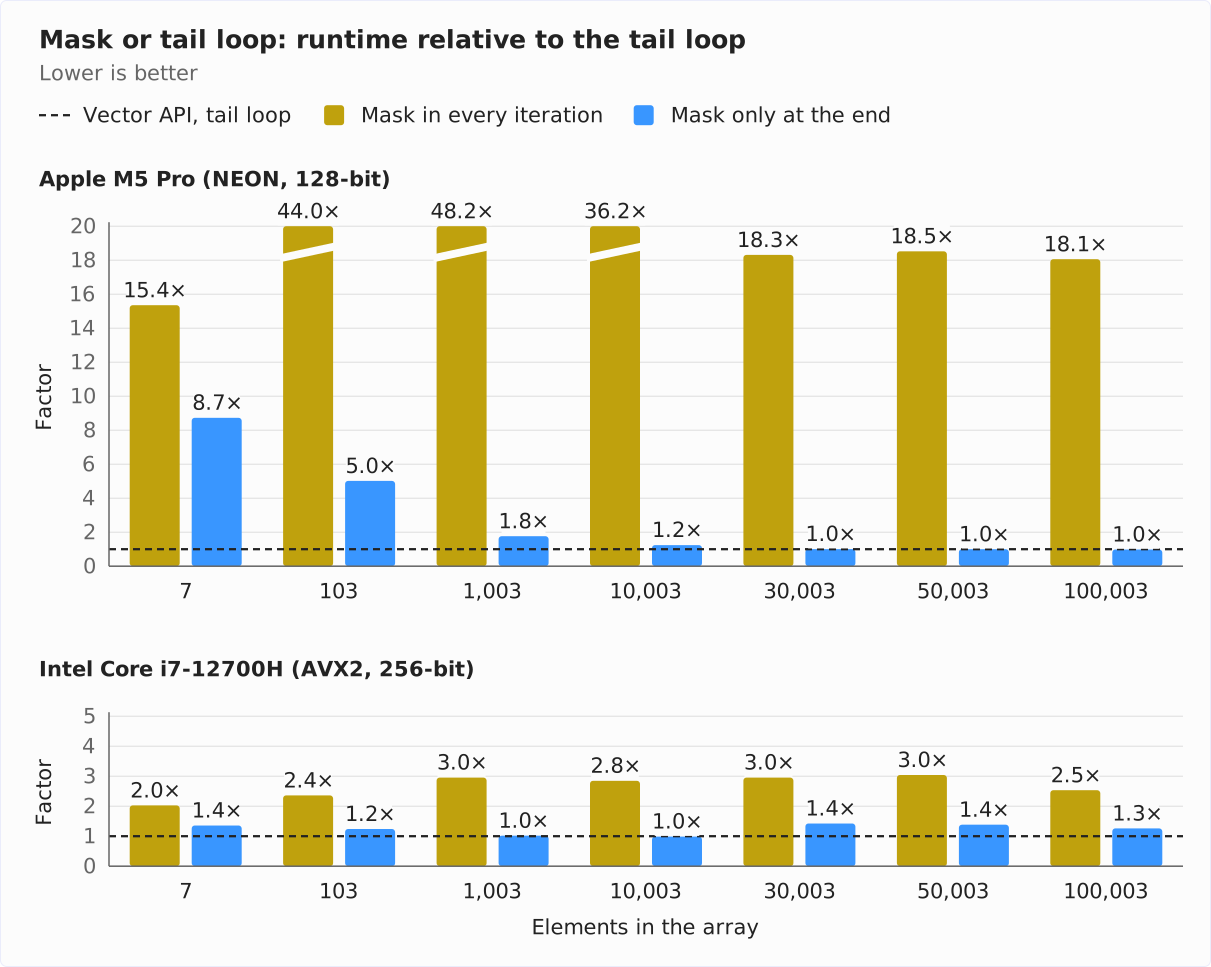
The two tables show the exact times in nanoseconds, first for the M5 Pro:
| Elements | Tail loop | Mask in every iteration | Mask only at the end |
|---|---|---|---|
| 7 | 3.0 | 46.1 | 26.2 |
| 103 | 6.7 | 296.0 | 33.8 |
| 1,003 | 55.2 | 2,659 | 97.3 |
| 10,003 | 560 | 20,304 | 695 |
| 30,003 | 3,271 | 59,894 | 3,294 |
| 50,003 | 5,402 | 100,076 | 5,388 |
| 100,003 | 10,955 | 197,839 | 10,791 |
With a mask in every iteration, adding 1,003 and 100,003 elements takes 48 and 18 times as long, respectively, and allocates 32,240 and 3,200,241 bytes on the heap per call – around 128 bytes per loop iteration. A recording with Java Flight Recorder shows where: in fromArray() and add(), i.e., for the loaded vectors and their sum – and that also in the iterations with a full mask.
With a mask only at the end, the damage stays limited to the one iteration with a partial mask: it allocates 176 bytes and costs 23 to 42 ns with up to 1,003 elements. From 30,003 elements on, this no longer matters; with only 7 elements, on the other hand, the addition takes almost nine times as long as with the tail loop.
This is the graceful degradation from the goals of the JEP: the code works, just more slowly. That’s why you use the tail loop on ARM CPUs without SVE.
Mask on the i7
On the i7-12700H, things look different:
| Elements | Tail loop | Mask in every iteration | Mask only at the end |
|---|---|---|---|
| 7 | 3.6 | 7.2 | 4.8 |
| 103 | 8.4 | 19.7 | 10.4 |
| 1,003 | 50.7 | 149.6 | 51.6 |
| 10,003 | 936 | 2,664 | 925 |
| 30,003 | 2,707 | 7,998 | 3,851 |
| 50,003 | 4,609 | 14,015 | 6,373 |
| 100,003 | 11,674 | 29,560 | 14,708 |
AVX2 doesn’t have predicate registers either, but there, C2 translates masked loads and stores into vector instructions (vmaskmovps). Nothing ends up on the heap. Still, the mask in every iteration is not cheap: the machine code shows that C2 then doesn’t unroll the loop and loads with a mask even when the mask is full. With a full mask, adding 1,000 elements takes 30 % longer than with the tail loop (table above in the section “Adding Two Arrays”); with an additional partial mask at the end, it takes almost three times as long with 1,003 elements.
The mask only at the end costs little up to 10,003 elements. From 30,003 elements on, however, it takes 26 to 42 % longer than the tail loop, even though its main loop is the same. Without a remainder, with 100,000 and 100,008 elements, both are equally fast. On the M5 Pro, this effect doesn’t occur. I have not found the cause.
My recommendation for both architectures: use the tail loop. The mask in every iteration costs on both machines, and the mask only at the end brings no measurable benefit anywhere.
Searching a Byte
IndexOfBenchmark searches a byte array for a byte that is in the last position. The chart shows, for both machines, how much faster the Vector API version is than the scalar loop: the factor is the run time of the scalar loop divided by that of the Vector API.
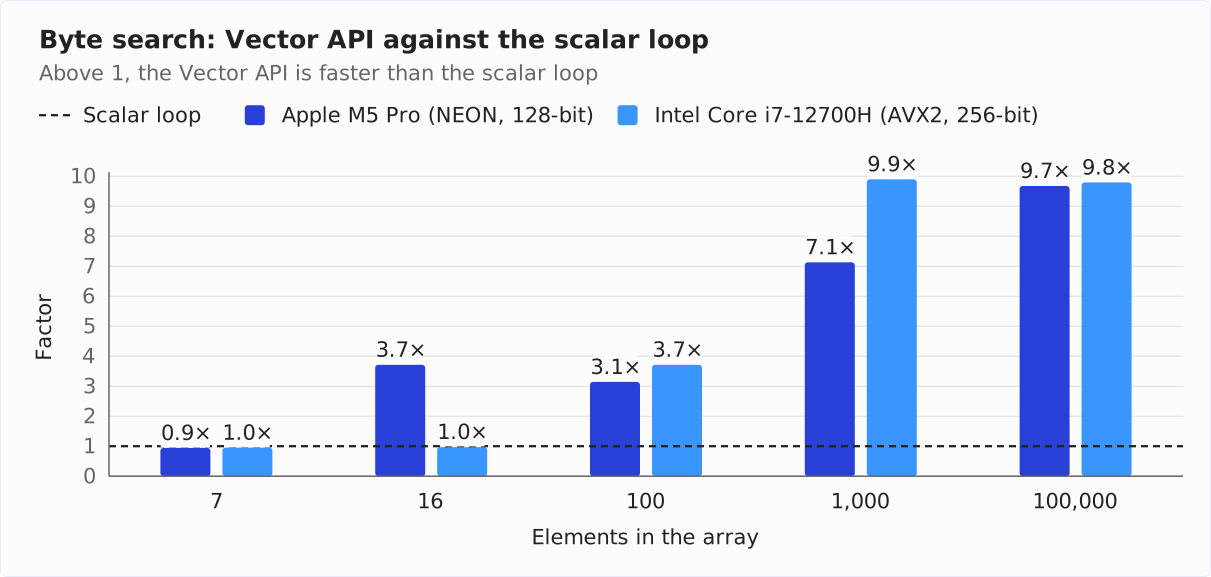
The two tables show the exact times in nanoseconds, first for the M5 Pro:
| Elements | Scalar | Vector API | Factor |
|---|---|---|---|
| 7 | 1.4 | 1.5 | 0.9 |
| 16 | 2.6 | 0.7 | 3.7 |
| 100 | 9.6 | 3.1 | 3.1 |
| 1,000 | 90.4 | 12.7 | 7.1 |
| 100,000 | 10,930 | 1,130 | 9.7 |
On the i7-12700H:
| Elements | Scalar | Vector API | Factor |
|---|---|---|---|
| 7 | 2.0 | 2.1 | 1.0 |
| 16 | 3.4 | 3.5 | 1.0 |
| 100 | 14.5 | 3.9 | 3.7 |
| 1,000 | 134.8 | 13.6 | 9.9 |
| 100,000 | 13,455 | 1,374 | 9.8 |
This is where the Vector API plays to its strengths: from 1,000 elements on, it is 7 to 10 times as fast as the scalar loop on the M5 Pro, and almost 10 times as fast on the i7. On the M5 Pro, this matches the machine code, which needs an eighth of the instructions per byte.
With small arrays, the vector loop doesn’t run at all: on the M5 Pro, a vector holds 16 bytes, so an array with 7 elements doesn’t fill a single one. The tail loop then processes all elements and does the same work as the scalar version. On the i7, a vector holds 32 bytes, so this also applies to 16 elements there.
Dot Product
C2 doesn’t vectorize the scalar loop for the dot product: the machine code contains only scalar fmul and fadd instructions. Mathematically, addition is associative, but not with floating-point numbers: because every intermediate result is rounded, a different order of the summands can yield a minimally different result. That’s why C2 must not reorder the summands. With the Vector API, you reorder them yourself and accept the deviation in the last digits.
Why a Single Sum Makes the CPU Wait
That C2 has to execute the additions in the order given in the Java code has a second consequence: each addition into sum has to wait for the result of the previous addition. That sounds obvious, but it costs time: a modern CPU can start several new additions in every clock cycle, but each one takes a few cycles until its result is available. That’s why independent additions can overlap. If each one depends on the result of the previous one, the next can only start when the previous one is finished – and the CPU spends most of its time waiting:
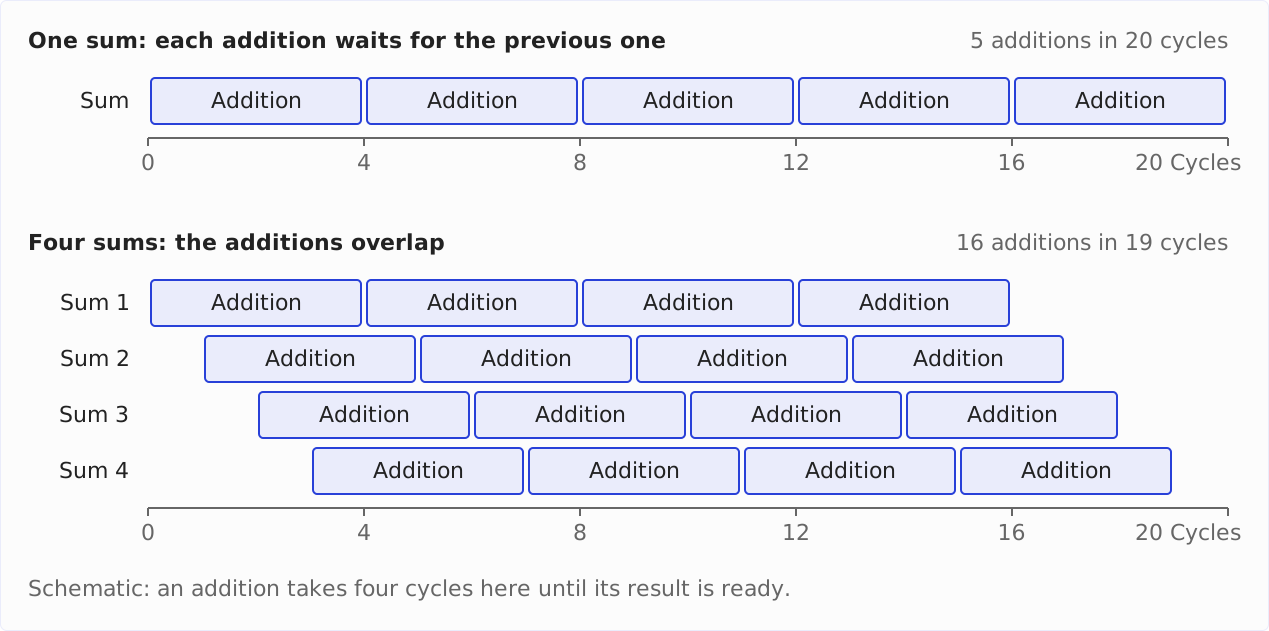
With a single sum, the benchmark therefore mainly measures how long an addition takes – and not how fast the CPU loads and multiplies elements. In the Vector API version vector(), each addition also waits for the previous one, only with vectors: each fma() adds into the same vector sums and needs the result of the previous fma() for this.
Two more variants break up this chain of dependent additions. The scalar one, scalarFourSums() (in the repository: DotProductBenchmark.java), distributes the elements in turn across four float sums:
for (; i < a.length - 3; i += 4) {
  sum0 += a[i] * b[i];
  sum1 += a[i + 1] * b[i + 1];
  sum2 += a[i + 2] * b[i + 2];
  sum3 += a[i + 3] * b[i + 3];
}
The four additions of one iteration don’t depend on each other, so the CPU can overlap them. After the loop, the method adds the four sums and processes the up to three remaining elements in scalar code. This also changes the order of the additions. C2 would even be allowed to vectorize it: each of the four sums could run in its own lane, with exactly the same additions in the same order. Still, it stays scalar in the machine code.
vectorFourAccumulators() does the same with the Vector API and distributes the work across four independent vectors of sums:
for (; i < upperBound; i += 4 * lanes) {
  sums0 = fma(i, sums0);
  sums1 = fma(i + lanes, sums1);
  sums2 = fma(i + 2 * lanes, sums2);
  sums3 = fma(i + 3 * lanes, sums3);
}
The helper method fma(i, sums) loads one vector each from a and b, starting at index i, and returns va.fma(vb, sums). After the loop, a second loop processes the remaining whole vectors; then the method adds the four vectors of sums and reduces the result with reduceLanes(ADD).
Results
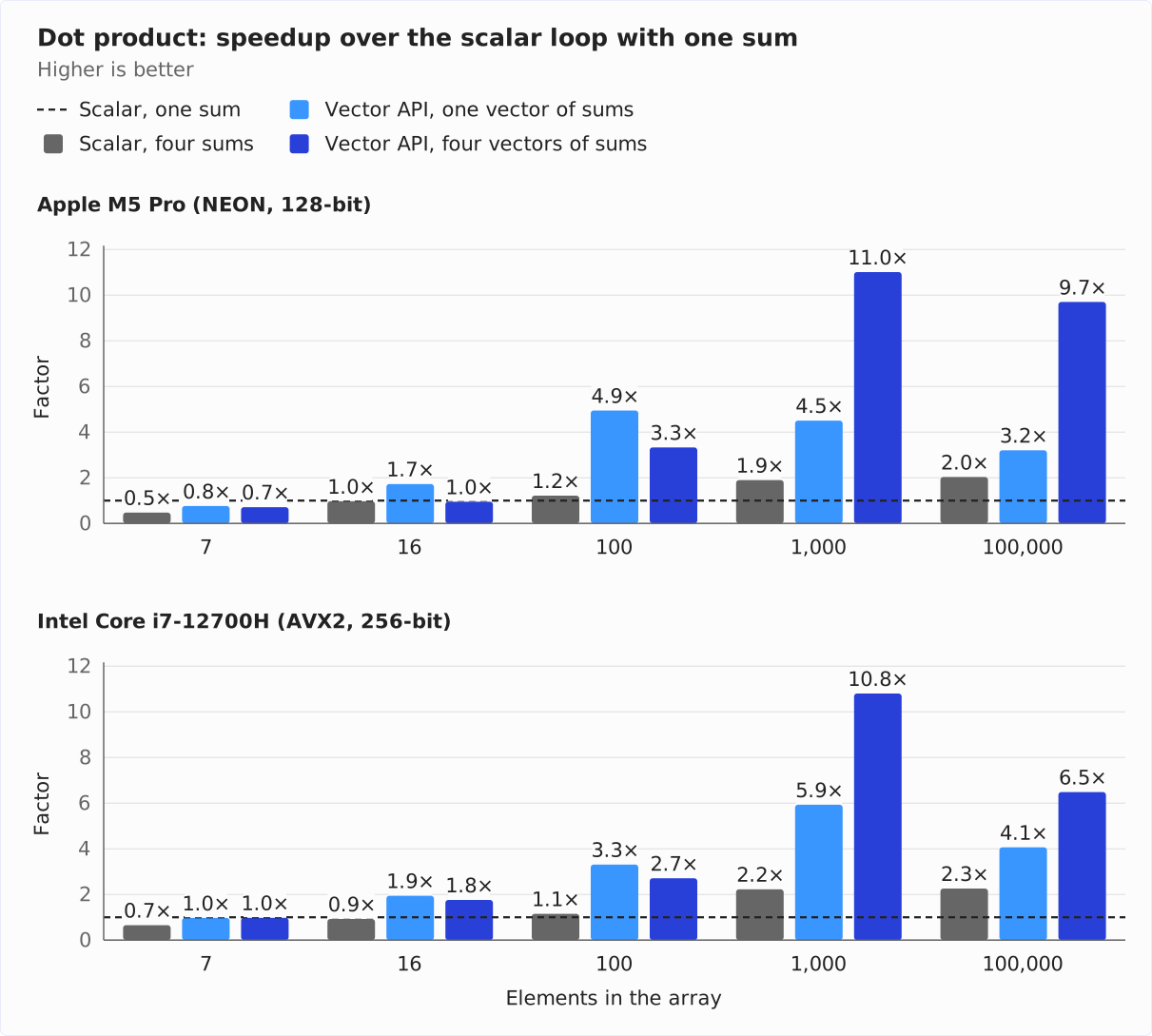
The chart shows, for both machines, how much faster the three other variants are than the scalar loop with one sum:
The two tables show the exact times in nanoseconds, first for the M5 Pro:
| Elements | Scalar, one sum | Scalar, four sums | Vector API, one vector of sums | Vector API, four vectors of sums |
|---|---|---|---|---|
| 7 | 1.9 | 4.0 | 2.5 | 2.7 |
| 16 | 3.3 | 3.4 | 1.9 | 3.5 |
| 100 | 22.8 | 18.7 | 4.6 | 6.8 |
| 1,000 | 462.5 | 244.1 | 102.6 | 42.0 |
| 100,000 | 54,332 | 26,708 | 16,962 | 5,601 |
On the i7-12700H:
| Elements | Scalar, one sum | Scalar, four sums | Vector API, one vector of sums | Vector API, four vectors of sums |
|---|---|---|---|---|
| 7 | 3.4 | 5.2 | 3.5 | 3.5 |
| 16 | 4.8 | 5.2 | 2.5 | 2.7 |
| 100 | 24.5 | 21.4 | 7.4 | 9.1 |
| 1,000 | 418.6 | 188.3 | 70.6 | 38.8 |
| 100,000 | 45,224 | 20,032 | 11,128 | 6,976 |
The chart shows three effects:
- Vector API with one vector of sums (light blue): from 100 elements on, it is 3.2 to 4.9 times as fast as the scalar loop with one sum on the M5 Pro, 3.3 to 5.9 times on the i7.
- Four sums instead of one help both techniques from 1,000 elements on: the scalar loop gets about twice as fast (gray, 1.9 to 2.3 times). The Vector API with four vectors of sums (dark blue) reaches 9.7 to 11.0 times on the M5 Pro and 6.5 to 10.8 times on the i7.
- With small arrays, four sums don’t pay off: with 7 elements, the scalar loop with four sums is only half as fast as with one on the M5 Pro (0.5), and with 16 elements, the Vector API with four vectors of sums is slower there than with one (1.0 against 1.7).
The fair comparison is between variants with the same number of sums, i.e., between the dark blue and the gray bar: from 1,000 elements on, the Vector API with four vectors of sums is 4.8 to 5.8 times as fast as the scalar loop with four sums on the M5 Pro, 2.9 to 4.9 times on the i7.
Pitfalls – Checklist
The following points decide whether your Vector API code will be fast:
- Species as
static final: In other fields or in arrays, a species can cost performance, according to the Javadoc ofVectorSpecies. - Don’t store vectors: A vector in a field, an array, or a collection becomes a heap object – 48 bytes for a 128-bit
IntVector. Keep vectors in local variables and write results back to arrays or memory segments. - C2 has to run: Without C2, the Java implementation runs. This affects the warmup phase, configurations with
-XX:TieredStopAtLevel=1, and JVMs without C2. - Reduce after the loop:
reduceLanes()belongs after the loop, not inside it – inside the loop, you accumulate lane by lane. - Masks with care: On ARM CPUs without SVE, e.g., the M5 Pro, C2 doesn’t translate a partial mask into vector instructions. Adding 1,003 elements took 48 times as long there with a mask as with the tail loop, and almost three times as long on the i7 with AVX2. Use the tail loop as long as you haven’t measured the mask on your target CPU.
- Several vectors of sums: If you add into a single vector in a loop, each operation waits for the previous one. With four vectors of sums, the dot product of 100,000 elements took only a third of the time on the M5 Pro. When comparing with a scalar loop, give it just as many sums – otherwise, you measure the waiting time, too.
- Comparing floating-point results: Vectorized sums deviate from the scalar sum in the last digits. Tests need a tolerance.
- Always measure: For loops that C2 vectorizes on its own, the Vector API generates the same machine code – and even took longer in the measurement, with 1,000 elements up to 30 % on the M5 Pro and 46 % on the i7. The gain only exists where auto-vectorization doesn’t kick in.
Why Is the Vector API Still Incubating?
The Vector API has been in the JDK since Java 16, with Java 27 in its twelfth incubator round. The following table shows all rounds with the most important changes their JEP names. Where it says “none,” the API stayed the same, and at most the implementation changed:
| Java | JEP | Most important changes |
|---|---|---|
| 16 | 338 | first version |
| 17 | 414 | operations for char[] (e.g., for UTF-8 decoding), unsigned comparisons, byte vectors from and to boolean[] |
| 18 | 417 | support for ARM SVE |
| 19 | 426 | loading and storing via MemorySegment, compress() and expand(), new bit operations |
| 20 | 438 | none |
| 21 | 448 | xor for masks |
| 22 | 460 | MemorySegments on arrays of any primitive type |
| 23 | 469 | none |
| 24 | 489 | selectFrom() with two tables, wrapping indexes, saturating arithmetic (overflow stays at the edge of the value range), class Float16 (see below) |
| 25 | 508 | VectorShuffle with MemorySegment |
| 26 | 529 | none |
| 27 | 537 | none |
The diagram shows the same rounds as a timeline. At the right end is Java 28 with JEP 401 – not a round of the Vector API, but the first preview of value objects, which it is waiting for:
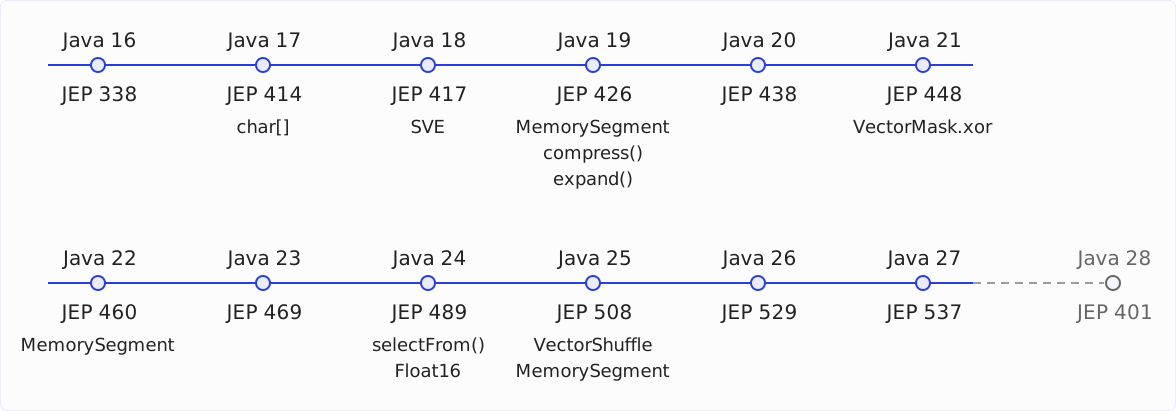
The reason for the long incubation is Project Valhalla. Since Java 20 (JEP 438), the JEP calls the alignment with Valhalla a critical part of finalizing the API, and since Java 23 (JEP 469), every JEP states the same plan: the Vector API stays in incubation until the necessary features of Project Valhalla are available as preview features. Then the API will be adapted to them and become a preview itself.
You’ve seen what Valhalla changes for the Vector API in the section “When Vectors Do End Up on the Heap”: today, Vector and its subclasses are value-based – classes whose identity you shouldn’t use, but which still have one. As value classes, they would no longer have one. In the long term, specialized generics are also to enable types like Vector<int>; according to the JEP, IntVector and the other type-specific subclasses might then become unnecessary.
The first Valhalla preview has been in the JDK since August 7, 2026: JEP 401: Value Objects (Preview) is integrated for Java 28. The article Project Valhalla: Value Objects in Java 28 shows what the value objects of this preview can do.
For the Vector API, there is no JEP for Java 28 yet (as of November 17, 2026). The feature freeze of Java 28 is on December 3, 2026.
Float16
Since Java 24, the module contains the class Float16 for 16-bit floating-point numbers according to IEEE 754 (binary16). Float16 is value-based, too, and is to become a value class as soon as Valhalla is available. Since Java 25, C2 vectorizes addition, subtraction, multiplication, division, square root, and fused multiply-add on Float16 values on x64 CPUs that support it (JEP 508).
Vectors of Float16 values don’t exist in Java 27 yet. Early-access build 23 of Java 28, however, already contains a public class Float16Vector. It entered the JDK source code on June 11, 2026, one week after the feature freeze of Java 27. There is no JEP describing it yet.
When Is the Vector API Worth It?
The Vector API is worth it when three things come together:
- The work happens in a loop over primitive arrays or memory segments – numbers, bytes, pixels, measurements.
- C2 doesn’t vectorize this loop on its own. This applies to loops with an early exit like the byte search, conditions that you can express with
compare()andblend(), rearrangements between lanes, and filters withcompress(). - You have measured that this loop accounts for a noticeable share of your application’s run time – and that the Vector API version is faster.
For everything else, the Vector API isn’t worth it: for a loop that C2 vectorizes anyway, it generates the same code. And for code that works with objects, collections, or strings, there are no vectors.
Before you use the API in production code, you should know the downside: it is currently still an incubator module. Every Java version can change it, the package will change at the latest when it is finalized, and every start needs --add-modules jdk.incubator.vector.
Two projects that use the API today show that it can still be worth it:
- Apache Lucene uses it to compute the dot product, cosine similarity, and squared distance between vectors (class
PanamaVectorUtilSupport). - Elasticsearch, which builds on Lucene, has enabled these SIMD implementations by default since version 8.9, so that its vector search computes the similarities faster (Elastic blog, June 2023). For many distance computations, however, Elasticsearch now uses its own C++ code, which it calls through the Foreign Function & Memory API: the Vector API “worked well for float32 dot products,” but “hand-tuned C++ intrinsics retain an edge” (Elastic blog, April 2026).
My recommendation: write the scalar loop first and measure it. If auto-vectorization doesn’t kick in and the loop is on the hot path, write a Vector API version next to it and measure again. Keep the scalar version as a fallback and for tests – that way, you can remove the Vector API at any time if the API changes.
Conclusion
The Vector API gives you direct access in Java to the SIMD instructions that otherwise only the JIT compiler uses. A loop over an array becomes a loop over vectors that process 128, 256, or 512 bits depending on the CPU; masks replace conditions, shuffles move values between lanes, and compress() filters without branching.
The machine code shows where this pays off and where it doesn’t: for adding two arrays, C2 generates the same loop with four int additions per instruction with and without the Vector API. For the byte search, which C2 leaves scalar, the Vector API version processes eight times as much data with the same number of instructions.
The measurements on the M5 Pro and the i7-12700H confirm this: from 1,000 elements on, the byte search is 7 to 10 times as fast as the scalar loop, and the dot product 2.9 to 5.9 times as fast as a scalar loop with the same number of sums. The addition, on the other hand, doesn’t get faster with the Vector API on either machine. With a mask, it even gets slower on both, on the M5 Pro by a multiple as soon as the last iteration needs a partial mask.
The API will only be final when Project Valhalla turns the vector classes into value classes. With Java 28, the first Valhalla preview enters the JDK. According to the JEP, the Vector API will then be adapted to value classes and become a preview itself – there is no JEP for this for Java 28 yet.
What should I cover next? The best way for me to find out is through your feedback: a review on my ProvenExpert profile shows me which topics matter to you – and motivates me to write more articles.