
Until now, if you wanted to read or write JSON in Java, you needed a library like Jackson or Gson. Java 28 brings a JSON parser into the JDK: the Simple JSON API, initially as the incubator module jdk.incubator.json.
The API is small. One interface for JSON values, six subtypes, one class for parsing and printing – that’s all. For individual values from a REST response, a configuration file, or a thread dump, that is enough, without a dependency and without configuration.
In this article, you will learn:
- What the Simple JSON API is and how you can try it out today
- How to parse JSON, navigate through the document, and convert values to Java types
- How to read values that are sometimes missing, sometimes
null, or have a different type depending on the version - How to read the error messages – including the path to the affected location
- How to generate and modify JSON
- How to analyze a JSON thread dump with the API
- What the API cannot do and when you are better off with Jackson or Gson
You can find all example programs in the GitHub repository java-json-api.
What Is the Simple JSON API?
The Simple JSON API is a JSON API in the JDK, defined by JDK Enhancement Proposal 540. It parses and generates JSON according to RFC 8259, the current JSON standard. JEP 540 replaces JEP 198, a first attempt at a JSON API from 2014.
The goal is to get simple tasks done with little code: read a few values from a document, generate a small document. Replacing the established libraries is explicitly not a goal. That is why everything Jackson and Gson can do beyond that is missing:
- Data binding: converting JSON directly into Java objects and back
- Streaming: reading a document piece by piece without holding all of it in memory
- Syntax extensions: comments, commas after the last element, single quotes
- Configuration: different parser settings
I’ll show what this looks like in code using a small document that runs through the whole article. It describes Java 28 with three of its JEPs and is in the repository as release.json:
{
  "version": 28,
  "ga": "2027-03-09",
  "lts": false,
  "jeps": [
    { "number": 401, "title": "Value Objects", "preview": true },
    { "number": 540, "title": "Simple JSON API", "incubator": true },
    { "number": 543, "title": "Structured Concurrency" }
  ],
  "successor": { "version": 29, "ga": null }
}
The document contains all six kinds of JSON values: numbers, strings, booleans, null, objects, and an array. And as of November 15, 2026, Java 29 doesn’t have a fixed GA date yet – hence the null.
The following program reads the file, extracts the version, the GA date, and the title of the first JEP, and prints them:
import jdk.incubator.json.*;

void main() throws IOException {
  JsonValue release = Json.parse(Files.readString(Path.of("release.json")));

  int version = release.get("version").asInt();
  String ga = release.get("ga").asString();
  String firstJep = release.get("jeps").get(0).get("title").asString();

  IO.println("Java " + version + " (GA " + ga + "), first JEP: " + firstJep);
}
Three steps, that’s all it takes: Json.parse() parses the text, get() navigates to the desired value, and asInt() or asString() converts it to a Java type. The program is a compact source file with an instance main method – Files, Path, and IO are available there without an import. The output:
WARNING: Using incubator modules: jdk.incubator.json
Java 28 (GA 2027-03-09), first JEP: Value Objects
The JVM prints the first line at every start as long as the API is an incubator module. I’ll leave it out of the other outputs in this article.
Trying Out the Simple JSON API
An incubator module contains an API that is not final yet. The JDK developers use it to collect feedback before they finalize the API – until then, it can still change.
Incubator modules are always named jdk.incubator.* and are included in the JDK, but not active by default. An incubator module differs from a preview feature in that it is a pure library: the language and the JVM remain unchanged, which is why you don’t need --enable-preview; instead, you add the module with --add-modules.
You need an early-access build of Java 28 from jdk.java.net/28. All outputs in this article come from build 28-ea+23.
With the source launcher, you start a program directly from the .java file:
java --add-modules jdk.incubator.json QuickStart.javaIf you compile with javac, you need the option when compiling and when starting:
javac --add-modules jdk.incubator.json QuickStart.java
java --add-modules jdk.incubator.json QuickStart
javac warns with warning: [incubating] using incubating module(s): jdk.incubator.json. Without the option, javac aborts with the error package jdk.incubator.json is not visible.
JShell is also suitable for trying things out:
$ jshell --add-modules jdk.incubator.json
jshell> import jdk.incubator.json.*
jshell> var release = Json.parse(Files.readString(Path.of("release.json")))
release ==> {"version":28,"ga":"2027-03-09","lts":false,"jeps ... :{"version":29,"ga":null}}
jshell> release.get("jeps").get(1).get("title").asString()
$3 ==> "Simple JSON API"
Parsing JSON with Json.parse()
The Json class has two methods for parsing: Json.parse(String) and Json.parse(char[]). parse() copies an array first, so later changes to it don’t affect the result.
The API doesn’t accept a Reader, an InputStream, or a Path as input. The API assumes that the document and the tree created from it fit into memory. You therefore read a file with Files.readString() first. If you use the JDK’s HttpClient, you get an HTTP response as a string with HttpResponse.BodyHandlers.ofString(); with other HTTP clients, you also read the body as a string first.
The parser is strict: it accepts only JSON according to RFC 8259 and rejects comments, commas after the last element, and duplicate names in an object. What the error messages look like when these rules are violated is shown in the section Reading Error Messages.
A Tree of JsonValue Objects
Json.parse() returns the root of a tree of JsonValue objects. JsonValue is a sealed interface with exactly six subtypes – one for each kind of JSON value: string, number, boolean, null, object, and array. The following diagram shows the six subtypes and, under each name, a value of this type from release.json; {…} and […] stand for an object and an array with any content:
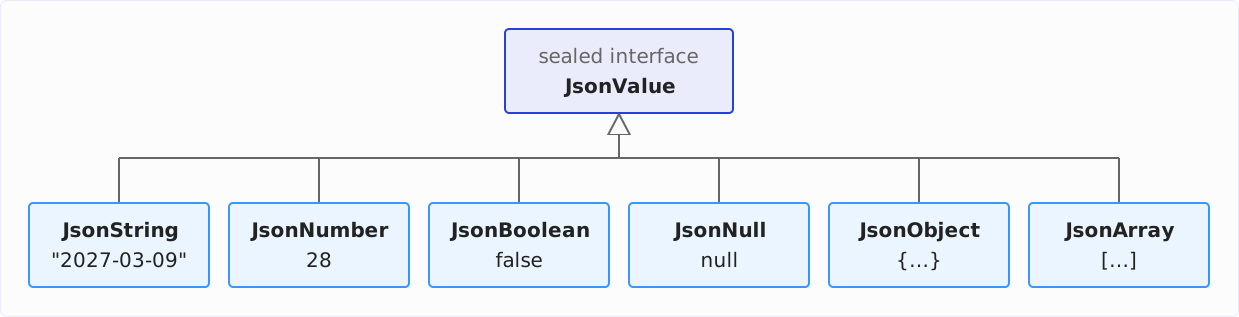
All JsonValue objects are immutable and thread-safe.
Because JsonValue is sealed, a switch with type patterns can cover all subtypes without a default branch.
The name-value pairs of an object, e.g., "version": 28, are called members in RFC 8259. The following program prints the type and a description of the value for each member of the root object:
import jdk.incubator.json.*;

void main() throws IOException {
  JsonValue release = Json.parse(Files.readString(Path.of("release.json")));

  for (var member : release.asMap().entrySet()) {
    IO.println(member.getKey() + ": " + describe(member.getValue()));
  }
}

String describe(JsonValue value) {
  return switch (value) {
    case JsonObject object -> "object with " + object.asMap().size() + " members";
    case JsonArray array -> "array with " + array.asList().size() + " elements";
    case JsonString string -> "string " + string.asString();
    case JsonNumber number -> "number " + number.asInt();
    case JsonBoolean bool -> "boolean " + bool.asBoolean();
    case JsonNull _ -> "null";
  };
}
JsonValue.asMap() returns the members of an object as a Map – more on that in the section Converting JSON Values to Java Values. The last case contains an unnamed pattern because a JsonNull has no value that the program would need. The output:
version: number 28
ga: string 2027-03-09
lts: boolean false
jeps: array with 3 elements
successor: object with 2 members
Note the order: a parsed JsonObject keeps the members in the order in which they appear in the document.
Navigating a JSON Document
The two navigation methods, JsonValue.get(String) (for objects) and JsonValue.get(int) (for arrays), are already declared in the JsonValue interface. So you don’t have to cast a value to JsonObject or JsonArray before accessing it, but can chain the calls directly:
JsonValue release = Json.parse(Files.readString(Path.of("release.json")));

IO.println(release.get("jeps").get(2).get("title").asString());
IO.println(release.get("successor").get("version").asInt());
The first line gets the array jeps from the root object, from it the third element, and from that the member title. The second line reads the version from the nested object successor. The output:
Structured Concurrency
29
The diagram shows the tree that Json.parse() builds from release.json, from the root on the left to the leaves on the right. Each box names the member with its value and below it the subtype; elements 0 and 1 of the array jeps are collapsed. Highlighted in blue is the path of the first line, release.get("jeps").get(2).get("title"):
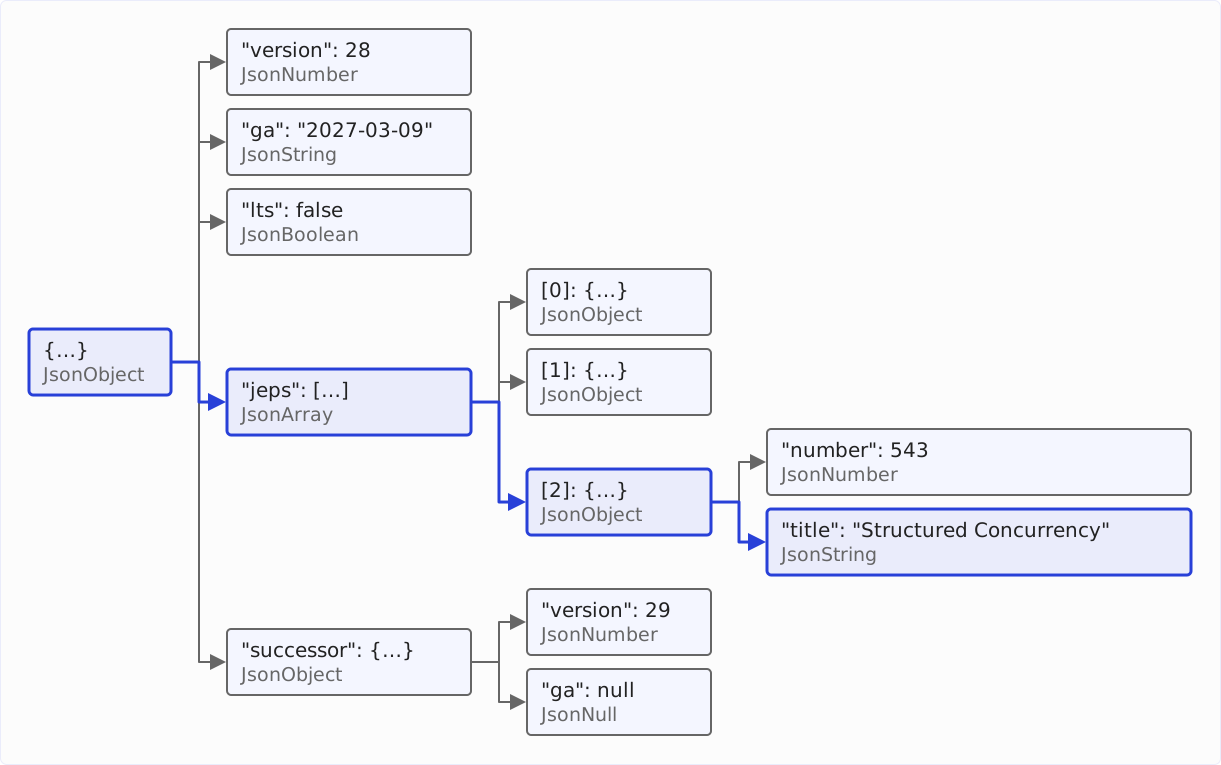
If a member is missing, an index is outside the array, or a value doesn’t have the expected type, get() throws a JsonValueException – e.g., for get(0) on the object successor, which is not an array. I’ll show how to deal with this in the section Missing Members, null, and Changing Types.
Iterating over Arrays and Objects
You can iterate over the elements of an array with asList() and over the members of an object with asMap(). The following listing prints all JEPs once with a loop and once as a list of their numbers, and then the members of successor:
JsonValue release = Json.parse(Files.readString(Path.of("release.json")));

for (JsonValue jep : release.get("jeps").asList()) {
  IO.println("JEP " + jep.get("number").asInt() + ": " + jep.get("title").asString());
}

List<Integer> numbers = release.get("jeps").asList().stream()
    .map(jep -> jep.get("number").asInt())
    .toList();
IO.println(numbers);

release.get("successor").asMap()
    .forEach((name, value) -> IO.println(name + " = " + value));
asList() returns an ordinary List<JsonValue>, on which you can also build streams. The output:
JEP 401: Value Objects
JEP 540: Simple JSON API
JEP 543: Structured Concurrency
[401, 540, 543]
version = 29
ga = null
In the last line, you can see how the toString() method prints a JsonNull: as null in JSON format.
Converting JSON Values to Java Values
The conversion methods as…(), which convert a JSON value into a Java value (e.g., a JSON number into an int), are declared in the JsonValue interface like the navigation methods. But each one works only for one subtype – for all others, it throws a JsonValueException. The table shows the seven methods:
| Method | Subtype | Java type |
|---|---|---|
asString() | JsonString | String |
asInt() | JsonNumber | int |
asLong() | JsonNumber | long |
asDouble() | JsonNumber | double |
asBoolean() | JsonBoolean | boolean |
asMap() | JsonObject | Map<String, JsonValue> |
asList() | JsonArray | List<JsonValue> |
There is no conversion method for JsonNull – that’s what tryValue() is for, which I’ll show in the section Missing Members, null, and Changing Types.
Each method reads only its own JSON type: you can read a JSON number as an int, long, or double, but not a JSON string as a number. So asInt() on a string like "28" doesn’t try to parse the string as a number but throws a JsonValueException. The same applies the other way around: asString() on the number 28 doesn’t return the text “28” but also throws a JsonValueException. If you need a number as text, call toString().
The Map from asMap() and the List from asList() are immutable.
There is a trap in the names asString() and toString(). The following program calls both on the GA date:
JsonValue release = Json.parse(Files.readString(Path.of("release.json")));
JsonValue ga = release.get("ga");

IO.println(ga.asString());
IO.println(ga.toString());
IO.println(ga);
The output:
2027-03-09
"2027-03-09"
"2027-03-09"
asString() returns the content of the string. toString(), on the other hand, returns the JSON text of the value, i.e., with quotation marks – and that is exactly what IO.println(ga) prints. If you insert a JsonString into a text without calling asString(), you get the quotation marks too.
The next program shows the other conversion methods. It reads lts as a boolean, the version as a long and as a double, and the object successor as a Map:
JsonValue release = Json.parse(Files.readString(Path.of("release.json")));

IO.println(release.get("lts").asBoolean());
IO.println(release.get("version").asLong());
IO.println(release.get("version").asDouble());

Map<String, JsonValue> successor = release.get("successor").asMap();
IO.println(successor.keySet());
The output:
false
28
28.0
[version, ga]
Converting Numbers
A JSON number can be arbitrarily large and arbitrarily precise; an int, a long, and a double cannot. The API solves this as follows:
asInt()andasLong()convert only numbers that can be represented exactly. A number with decimal places is allowed if it is an integer:123.0and234.56E2work,345.6doesn’t. A number outside the value range leads to an exception instead of an overflow.asDouble()rounds to the nearestdouble. A number outside the value range ofdoublealso leads to an exception.Double.parseDouble()would returnInfinityfor such a number instead, and-Infinityfor a negative one.
The following program tries this out on a few numbers. The helper method tryToConvert() prints the result of a conversion or – if it fails – the message of the JsonValueException:
void main() {
  IO.println(Json.parse("123.0").asInt());
  IO.println(Json.parse("234.56E2").asInt());
  tryToConvert(() -> Json.parse("345.6").asInt());
  tryToConvert(() -> Json.parse("2147483648").asInt());
  IO.println(Json.parse("2147483648").asLong());

  IO.println(Json.parse("3.141592653589793238462643383279").asDouble());
  tryToConvert(() -> Json.parse("1.8E309").asDouble());

  JsonValue price = Json.parse("19.990");
  IO.println(price);
  IO.println(new BigDecimal(price.toString()));
}

void tryToConvert(Supplier<Object> conversion) {
  try {
    IO.println(conversion.get());
  } catch (JsonValueException e) {
    IO.println(e.getMessage());
  }
}
By the way, Json.parse() accepts any JSON value as a document, not just objects and arrays – including a single number. The output:
123
23456
345.6 cannot be represented as an int. Path: "". Location: line 0, position 0.
2147483648 cannot be represented as an int. Path: "". Location: line 0, position 0.
2147483648
3.141592653589793
1.8E309 cannot be represented as a double. Path: "". Location: line 0, position 0.
19.990
19.990
2147483648 is one greater than Integer.MAX_VALUE and therefore doesn’t fit into an int, but it does fit into a long. asDouble() rounds pi with 30 decimal places to the nearest double, 3.141592653589793.
The last two lines show the lossless way: for a parsed number, toString() returns the text exactly as it was in the document – with the trailing zero. From it, you create a BigDecimal or a BigInteger. There is deliberately no asBigDecimal() method: JEP 540 keeps the number of conversion methods small because new BigDecimal(value.toString()) is almost as short.
Missing Members, null, and Changing Types
JSON documents have no schema, and a document changes over time. A member is missing in some objects, a value is sometimes a string and sometimes null, or a value changes its type with a new version of the format. With get() and the as…() methods, you get a JsonValueException in all three cases. The API has a solution for each of the three cases.
Optional Members: tryGet()
You read a member that may be missing with JsonValue.tryGet(String). The method returns an Optional that contains the value of the member as a JsonValue, or an empty Optional if the member doesn’t exist. In the example document, only JEP 401 has the member "preview": true. The following listing therefore appends “(Preview)” only there:
JsonValue release = Json.parse(Files.readString(Path.of("release.json")));

for (JsonValue jep : release.get("jeps").asList()) {
  boolean preview = jep.tryGet("preview").map(JsonValue::asBoolean).orElse(false);
  IO.println(jep.get("title").asString() + (preview ? " (Preview)" : ""));
}
The output:
Value Objects (Preview)
Simple JSON API
Structured Concurrency
tryGet() takes only a name as its parameter, not an index, because the method reads optional members of objects. If you call it on a value that is not an object, e.g., on the array jeps, it throws a JsonValueException just like get(String). So the Optional is empty only if the member is missing – not if the structure is wrong.
null Values: tryValue()
The GA date of Java 29 is null in the example document. For such values, there is JsonValue.tryValue(): the method returns an empty Optional if the JsonValue on which you call it is a JsonNull, and otherwise an Optional with exactly this JsonValue. The following listing prints the text “not set” instead of null:
JsonValue release = Json.parse(Files.readString(Path.of("release.json")));
JsonValue successor = release.get("successor");
String ga = successor.get("ga").tryValue().map(JsonValue::asString).orElse("not set");
IO.println("Java " + successor.get("version").asInt() + ", GA: " + ga);
The output:
Java 29, GA: not setOne difference between the two methods is easy to overlook: for a member whose value is null, tryGet() does not return an empty Optional, but one with a JsonNull in it. If you want an empty Optional both for a missing member and for a null value, chain both methods with flatMap():
JsonValue successor = release.get("successor");
IO.println(successor.tryGet("ga"));
IO.println(successor.tryGet("rampdown"));
IO.println(successor.tryGet("ga").flatMap(JsonValue::tryValue));
The object successor contains the member ga with the value null; there is no member rampdown. The output:
Optional[null]
Optional.empty
Optional.empty
The table summarizes which call returns what in which case. “Value” stands for the value of the member as a JsonValue:
| Call | Member present | Member null | Member missing |
|---|---|---|---|
get("ga") | value | JsonNull | exception |
tryGet("ga") | Optional with value | Optional with JsonNull | empty Optional |
get("ga").tryValue() | Optional with value | empty Optional | exception |
tryGet("ga").flatMap(JsonValue::tryValue) | Optional with value | empty Optional | empty Optional |
Changing Types: switch with Type Patterns
Sometimes what changes is not whether a value is there, but what type it has. An example from the JDK itself: in JSON thread dumps, the ID of a thread (tid) is a string up to Java 26 and a number since Java 27. A program that is supposed to read dumps of both versions distinguishes the cases with a switch:
long threadId(JsonValue thread) {
  return switch (thread.get("tid")) {
    case JsonNumber number -> number.asLong();
    case JsonString string -> Long.parseLong(string.asString());
    default -> throw new JsonValueException("Unexpected type for \"tid\"");
  };
}
Here, a default branch is necessary even though JsonValue is sealed, because the switch covers only two of the six subtypes. A switch can do without default only if it covers all six – as in the program in the section A Tree of JsonValue Objects. The constructor of JsonValueException is public, so your own code can also throw this exception. The complete program is in the repository as ChangingTypes.java. I’ll use the threadId() method further below in the practical example.
Reading Error Messages
The JSON API throws two exceptions, both unchecked: a JsonParseException if the text is not valid JSON, and a JsonValueException if you access a value that doesn’t exist or has a different type. Both messages contain a path and the location in the document.
Invalid JSON: JsonParseException
The following program parses four documents that violate RFC 8259: a comma after the last member, a duplicate name, single quotes, and a comment. The tryToParse() method prints the message and the location that the exception returns with getErrorLine() and getErrorPosition():
void main() {
  tryToParse("""
      { "version": 28, }""");
  tryToParse("""
      { "version": 28, "version": 29 }""");
  tryToParse("""
      { 'version': 28 }""");
  tryToParse("""
      {
        // Java 28
        "version": 28
      }""");
}

void tryToParse(String json) {
  try {
    Json.parse(json);
  } catch (JsonParseException e) {
    IO.println(e.getMessage());
    IO.println("  line " + e.getErrorLine() + ", position " + e.getErrorPosition());
  }
}
The output:
Expecting a JSON Object member name. Path: "{". Location: line 0, position 17.
  line 0, position 17
Duplicate member name: "version" was already parsed. Path: "{". Location: line 0, position 17.
  line 0, position 17
Expecting a JSON Object member name. Path: "{". Location: line 0, position 2.
  line 0, position 2
Expecting a JSON Object member name. Path: "{". Location: line 1, position 2.
  line 1, position 2
Line and position are counted from 0. So line 1, position 2 in the last example is the second line and the third character there – the first slash of the comment. In the first example, position 17 points to the curly brace at which the parser expected the next name.
Treating duplicate names as an error is a deliberate decision. RFC 8259 only says that the names in an object should be unique, and many libraries silently take the last value for duplicate names. JEP 540 justifies the strictness by saying that two systems with different libraries could otherwise read the same document differently – a source of hard-to-find bugs and of security vulnerabilities. The following info box shows how such a vulnerability arises.
For comments, JEP 540 recommends removing them before parsing. If, as in the example above, they are on lines of their own that start with //, a regular expression is enough:
String text = Files.readString(Path.of("config.json"));
JsonValue config = Json.parse(text.replaceAll("(?m)^\\s*//.*$", ""));
Wrong Access: JsonValueException
The following program accesses release.json incorrectly in five ways: a member that is missing, an index outside the array, the wrong type, get(String) on an array, and asString() on null. The helper method tryToRead() is built like tryToConvert() from the section Converting Numbers and prints the message of the exception:
JsonValue release = Json.parse(Files.readString(Path.of("release.json")));

tryToRead(() -> release.get("jeps").get(2).get("preview"));
tryToRead(() -> release.get("jeps").get(3));
tryToRead(() -> release.get("version").asString());
tryToRead(() -> release.get("jeps").get("title"));
tryToRead(() -> release.get("successor").get("ga").asString());
The output:
JsonObject member "preview" does not exist. Path: "{jeps[2". Location: line 7, position 4.
JsonArray index 3 out of bounds for length 3. Path: "{jeps". Location: line 4, position 10.
JsonNumber is not a JsonString. Path: "{version". Location: line 1, position 13.
JsonArray is not a JsonObject. Path: "{jeps". Location: line 4, position 10.
JsonNull is not a JsonString. Path: "{successor{ga". Location: line 9, position 38.
The path leads from the root to the value on which the failed call ran. The API writes it in a shorthand of its own:
{stands for an object, followed by the name of the member.[stands for an array, followed by the index.
The brackets are not closed. So {jeps[2 means: member jeps of the root object, in it the element with index 2 (i.e., the third element). The member preview is missing in this object. line 7, position 4 points to the opening brace of this object – the eighth line of release.json, the fifth character.
With chained calls, you can find out immediately which link of the chain failed, without taking the expression apart.
Generating JSON
To generate JSON, each subtype has a static factory method of():
JsonString.of(String)escapes quotation marks, backslashes, and control characters.JsonNumber.of()exists forint,long,double, andString. TheStringvariant converts text into a number – exactly what theas…()methods refuse to do for a JSON string. It checks the text against the JSON grammar, rejects inputs such as"028"or"abc"with anIllegalArgumentException, and otherwise keeps the text unchanged:"-0.5e3"does not become-500.0, and"1.8E309", outside thedoublerange, is allowed too. Thedoublevariant rejectsNaNandInfinitywith anIllegalArgumentExceptionbecause JSON doesn’t support them.JsonBoolean.of(boolean)JsonNull.of()JsonArray.of(List<? extends JsonValue>)JsonObject.of(Map<String, ? extends JsonValue>)
The last two expect JsonValue objects. So you have to wrap each value yourself – a 28 instead of JsonNumber.of(28) doesn’t compile.
JsonObject.of() keeps the order of the Map passed to it. However, the iteration order of Map.of() is not defined, as the following listing shows:
JsonObject release = JsonObject.of(Map.of(
    "version", JsonNumber.of(28),
    "ga", JsonString.of("2027-03-09")));
IO.println(release);
In six runs of the same program, version came first four times and ga twice:
{"version":28,"ga":"2027-03-09"}
{"ga":"2027-03-09","version":28}
If you need a fixed order, pass a LinkedHashMap.
The following program generates a JSON object with the Java version and the JEPs from a list of Jep records. It builds this object and the objects of the individual JEPs each from its own LinkedHashMap, so that the members are in a fixed order. The toJson() method converts a Jep record into a JsonObject:
record Jep(int number, String title) {}

void main() {
  List<Jep> jeps = List.of(
      new Jep(401, "Value Objects"),
      new Jep(540, "Simple JSON API"),
      new Jep(543, "Structured Concurrency"));

  var members = new LinkedHashMap<String, JsonValue>();
  members.put("version", JsonNumber.of(28));
  members.put("jeps", JsonArray.of(jeps.stream().map(this::toJson).toList()));
  JsonObject release = JsonObject.of(members);

  IO.println(release);
  IO.println(Json.toDisplayString(release, "  "));
}

JsonObject toJson(Jep jep) {
  var members = new LinkedHashMap<String, JsonValue>();
  members.put("number", JsonNumber.of(jep.number()));
  members.put("title", JsonString.of(jep.title()));
  return JsonObject.of(members);
}
The program prints the object twice. The first line comes from toString() – compact, without spaces and line breaks, suitable for storing and transmitting. The lines below it come from Json.toDisplayString() – indented and therefore easy to read; the second argument is the indentation per level. The output:
{"version":28,"jeps":[{"number":401,"title":"Value Objects"},{"number":540,"title":"Simple JSON API"},{"number":543,"title":"Structured Concurrency"}]}
{
  "version": 28,
  "jeps": [
    {
      "number": 401,
      "title": "Value Objects"
    },
    {
      "number": 540,
      "title": "Simple JSON API"
    },
    {
      "number": 543,
      "title": "Structured Concurrency"
    }
  ]
}
The indentation may consist only of spaces, tabs, and line breaks; otherwise, toDisplayString() throws an IllegalArgumentException. Json.parse() can read both outputs back in.
Modifying JSON Values
A JsonValue is immutable. If you want to change a value, you have to copy the members into a new Map, change them there, and build a new object from it. The following listing removes the JEPs from release.json and adds the feature freeze of Java 28:
JsonValue release = Json.parse(Files.readString(Path.of("release.json")));

var members = new LinkedHashMap<>(release.asMap());
members.remove("jeps");
members.put("featureFreeze", JsonString.of("2026-12-03"));
IO.println(JsonObject.of(members));
The output:
{"version":28,"ga":"2027-03-09","lts":false,"successor":{"version":29,"ga":null},"featureFreeze":"2026-12-03"}Comparing JSON Values
The following listing parses the same object twice and compares the two results, once with equals() and once via the Java value of the member version:
JsonValue a = Json.parse("{ \"version\": 28 }");
JsonValue b = Json.parse("{ \"version\": 28 }");
IO.println(a.equals(b));
IO.println(a.get("version").asInt() == b.get("version").asInt());
The output:
false
true
Two objects with the same content are not equal according to equals(). This is not a bug but intentional: according to its Javadoc, JsonValue defines neither identity nor value semantics. The implementation classes inherit equals() from Object and therefore compare references. Naoto Sato, the author of the implementation, gave the reason in the code review: the developers deliberately left equality undefined so that nobody accidentally relies on a particular behavior. If you want to compare two values, convert them to Java values and compare those.
A comparison via toString() works as long as it is enough for you that two documents match except for spaces and line breaks. Different notations of the same value are not considered equal, because a parsed value keeps its text: 1 and 1.0 result in different strings, as do "\u0041" and "A" or two objects with the same members in a different order.
Practical Example: Analyzing a Thread Dump
The JDK itself provides a JSON document that every Java developer has at hand right away: jcmd creates a thread dump with virtual threads in JSON format, too.
The command for this:
jcmd <pid> Thread.dump_to_file -format=json <file>For the example, I created thread dumps of the program Waiter from the repository for this article under Java 26, 27, and 28. Waiter holds a thread from a thread pool in wait() and lets a virtual thread and the main thread sleep. The beginning of the dump from Java 28:
{
  "threadDump": {
    "formatVersion": 2,
    "processId": 52046,
    "time": "2026-11-14T11:37:48.232193Z",
    "runtimeVersion": "28-ea+23-1886",
    "threadContainers": [
      {
        "container": "<root>",
        "parent": null,
        "owner": null,
        "threads": [
          {
            "tid": 3,
            "time": "2026-11-14T11:37:48.234120Z",
            "name": "main",
            "state": "TIMED_WAITING",
            "stack": [
              ...
The document has all three cases from the section Missing Members, null, and Changing Types: the member waitingOn appears only for threads that are waiting on an object, parent is null for the root container, and tid is a string up to Java 26.
The following program prints the name and parent container of each container with threads, below it each thread with ID, name, state, and, if applicable, the object it is waiting on. At the end, it counts the threads per state:
import jdk.incubator.json.*;

void main(String[] args) throws IOException {
  JsonValue dump = Json.parse(Files.readString(Path.of(args[0]))).get("threadDump");
  IO.println("Runtime " + dump.get("runtimeVersion").asString());

  Map<String, Integer> threadsPerState = new TreeMap<>();

  for (JsonValue container : dump.get("threadContainers").asList()) {
    List<JsonValue> threads = container.get("threads").asList();
    if (threads.isEmpty()) continue;

    String name = container.get("container").asString();
    String parent = container.get("parent").tryValue()
        .map(JsonValue::asString).orElse("none");
    IO.println(name + " (parent: " + parent + ")");

    for (JsonValue thread : threads) {
      String state = thread.get("state").asString();
      String waitingOn = thread.tryGet("waitingOn")
          .map(lock -> ", waiting on " + lock.asString()).orElse("");
      IO.println("  #" + threadId(thread) + " " + thread.get("name").asString()
          + ": " + state + waitingOn);
      threadsPerState.merge(state, 1, Integer::sum);
    }
  }

  IO.println(threadsPerState);
}

long threadId(JsonValue thread) {
  return switch (thread.get("tid")) {
    case JsonNumber number -> number.asLong();
    case JsonString string -> Long.parseLong(string.asString());
    default -> throw new JsonValueException("Unexpected type for \"tid\"");
  };
}
Here you see all three tools in action: tryValue() for the parent container, tryGet() for waitingOn, and the threadId() method with the switch from the section Changing Types. The output for the dump from Java 28:
Runtime 28-ea+23-1886
<root> (parent: none)
  #3 main: TIMED_WAITING
  #14 Reference Handler: RUNNABLE
  #15 Finalizer: WAITING, waiting on java.lang.Object@149b987a
  #16 Signal Dispatcher: RUNNABLE
  #31 Notification Thread: RUNNABLE
  #32 Common-Cleaner: TIMED_WAITING, waiting on java.lang.Object@16d3f6dc
  #40 VirtualThread-unblocker: RUNNABLE
  #44 Attach Listener: RUNNABLE
  #41 sleeper: TIMED_WAITING
java.util.concurrent.ThreadPoolExecutor@2805c96b (parent: <root>)
  #39 pool-1-thread-1: WAITING, waiting on java.lang.Object@57b5a6c9
ForkJoinPool-1/jdk.internal.vm.SharedThreadContainer@a997c51 (parent: <root>)
  #42 ForkJoinPool-1-worker-1: TIMED_WAITING
  #43 ForkJoinPool-1-delayScheduler: TIMED_WAITING
{RUNNABLE=5, TIMED_WAITING=5, WAITING=2}
Three of the threads belong to Waiter: main and the virtual thread sleeper, both in the state TIMED_WAITING, and pool-1-thread-1 in the container of its thread pool, waiting on the object on which it called wait(). The JVM started all other threads itself.
The same program also reads the dump from Java 26, in which tid is a string, without any change. The first lines of the output:
Runtime 26.0.1+8-34
<root> (parent: none)
  #3 main: TIMED_WAITING
  #16 Reference Handler: RUNNABLE
  #17 Finalizer: WAITING, waiting on java.lang.ref.ReferenceQueue$Lock@4442c626
By the way, besides tid, Java 27 changed two more parts of the format that the program doesn’t read: processId has been a number instead of a string since then, and the member formatVersion is new – it is still missing in the dump from Java 26. If your program reads these members, it has to handle both types of processId and a missing formatVersion.
Limitations of the Simple JSON API
What the API cannot do follows from its goal – simple tasks with little code:
- No data binding: You have to assemble records and classes from the values yourself and, in the other direction, wrap their data in
JsonValueobjects yourself. - No streaming: The whole document must be in memory as a
Stringorchar[], plus the tree thatJson.parse()builds from it. The API is not intended for a document of several gigabytes. - No syntax extensions: Comments, commas after the last element, and single quotes always lead to a
JsonParseException. This cannot be turned off. - No
equals(): Even for two JSON values with the same content,equals()returnsfalse. You therefore have to compare JSON values via their Java values.
Then there is the status: as an incubator module, the API needs --add-modules, the JVM prints a warning at every start, and the API can still change until the final version. According to JEP 540, during the incubation phase the JDK developers are collecting, among other things, use cases for generating and transforming JSON in order to evolve this part of the API.
Comparison with Jackson and Gson
How much code does the Simple JSON API save compared to the two most widespread libraries, Jackson and Gson? I solved the same task with all three: print all JEPs from release.json with number and title, and append “(Preview)” if "preview": true is set. I compared with Jackson 3.3.0 and Gson 2.15.0.
With the Simple JSON API:
String json = Files.readString(Path.of("release.json"));
JsonValue release = Json.parse(json);

for (JsonValue jep : release.get("jeps").asList()) {
  boolean preview = jep.tryGet("preview").map(JsonValue::asBoolean).orElse(false);
  IO.println(jep.get("number").asInt() + " " + jep.get("title").asString()
      + (preview ? " (Preview)" : ""));
}
With Jackson:
String json = Files.readString(Path.of("release.json"));
JsonNode release = new ObjectMapper().readTree(json);

for (JsonNode jep : release.get("jeps")) {
  boolean preview = jep.path("preview").asBoolean(false);
  IO.println(jep.get("number").asInt() + " " + jep.get("title").asString()
      + (preview ? " (Preview)" : ""));
}
With Gson:
String json = Files.readString(Path.of("release.json"));
JsonObject release = JsonParser.parseString(json).getAsJsonObject();

for (JsonElement element : release.getAsJsonArray("jeps")) {
  JsonObject jep = element.getAsJsonObject();
  boolean preview = jep.has("preview") && jep.get("preview").getAsBoolean();
  IO.println(jep.get("number").getAsInt() + " " + jep.get("title").getAsString()
      + (preview ? " (Preview)" : ""));
}
All three programs print the same:
401 Value Objects (Preview)
540 Simple JSON API
543 Structured Concurrency
The programs are almost the same length. Jackson reads the optional member with path(), which returns a placeholder node for a missing member, and asBoolean(false). Gson distinguishes between JsonElement and JsonObject, so you first have to convert each element with getAsJsonObject(). The Simple JSON API needs no cast and no placeholder, but an Optional.
One difference shows up not in the code but in the dependencies: Jackson brings three JARs with a total of 2.7 MB, Gson two JARs with 0.3 MB. The Simple JSON API costs no dependency.
Data Binding with Jackson and Gson
The following program shows, using Jackson, what Jackson and Gson can do and the Simple JSON API cannot. It converts release.json into nested records with a single call:
record Jep(int number, String title, boolean preview, boolean incubator) {}
record Successor(int version, String ga) {}
record Release(int version, String ga, boolean lts, List<Jep> jeps,
               Successor successor) {}

void main() throws IOException {
  Release release = new ObjectMapper()
      .readValue(Files.readString(Path.of("release.json")), Release.class);

  IO.println(release.version() + ", GA " + release.ga());
  release.jeps().forEach(IO::println);
  IO.println(release.successor());
}
The output:
28, GA 2027-03-09
Jep[number=401, title=Value Objects, preview=true, incubator=false]
Jep[number=540, title=Simple JSON API, preview=false, incubator=true]
Jep[number=543, title=Structured Concurrency, preview=false, incubator=false]
Successor[version=29, ga=null]
Jackson sets missing booleans to false and takes over null as null. With Gson, the call new Gson().fromJson(…) takes the place of new ObjectMapper().readValue(…); the output is the same. With the Simple JSON API, you would need one method per record that reads the values one by one to get the same result.
Differences in Detail
The three APIs differ significantly in how they handle documents that don’t match what is expected. The program EdgeCases in the repository reads the member version from six documents with asInt() or getAsInt():
{ "version": 28, "version": 29 }– a duplicate name- an object with the member
"version": 28, preceded by the comment line// Java 28 { "version": 345.6 }– a number with decimal places{ "version": "28" }– a number as a string{ "version": 2147483648 }– a number beyondInteger.MAX_VALUE{ }– an object without the member
The table shows the result or the name of the exception:
| Case | Simple JSON API | Jackson | Gson |
|---|---|---|---|
| duplicate name | JsonParseException | 29 | 29 |
| comment | JsonParseException | StreamReadException | 28 |
| decimal places | JsonValueException | 345 | 345 |
| number as string | JsonValueException | 28 | 28 |
int overflow | JsonValueException | JsonNodeException | −2147483648 |
| member missing | JsonValueException | NullPointerException | NullPointerException |
Jackson and Gson are partly lenient, partly imprecise, and partly just wrong. They are lenient when they silently take the last value for duplicate names and read a string as a number; Gson even accepts comments in JsonParser.parseString(). Both are imprecise with decimal places: they cut them off and turn 345.6 into the number 345. Gson’s result for the overflow is just wrong: 2147483648 becomes −2147483648. A missing member leads to null in both and thus to a NullPointerException on the next call.
The Simple JSON API throws an exception in all six cases, and its message names the path to the affected location. Jackson and Gson can be configured to be stricter – the Simple JSON API is strict out of the box.
Which One When?
I recommend the Simple JSON API for scripts, command-line tools, and programs that read a few values from a JSON document or generate a small document. There, you save the dependency, and the strict checking reports an unexpected document with an exception instead of with a wrong value.
You reach for Jackson or Gson when you need data binding or have to stream documents. Jackson is also the obvious choice if you are working in a framework that brings it along anyway – like Spring Boot.
For production code, you should wait until the API is final. Until then, every call in this article can still change.
Conclusion
- The Simple JSON API from JEP 540 is an incubator module in Java 28. You activate it with
--add-modules jdk.incubator.json. Json.parse()parses aStringor achar[]into a tree ofJsonValueobjects.JsonValueis a sealed interface with six subtypes that you can cover with aswitchwithoutdefault.get()navigates through objects and arrays without casts; theas…()methods convert values to Java types – only exactly and only if the subtype matches.asInt()on345.6throws an exception instead of returning 345.tryGet()returns an emptyOptionalif a member is missing,tryValue()if a value isnull; otherwise, theOptionalcontains theJsonValue. So for a member with the valuenull,tryGet()doesn’t return an emptyOptional, but one with aJsonNull. OnlytryGet(name).flatMap(JsonValue::tryValue)is empty in both cases.- Error messages name the path to the value and the location in the document, line and position counted from 0.
- You generate JSON with the
of()methods of the subtypes;toString()prints it compactly,Json.toDisplayString()indented. For a fixed order of the members, pass aLinkedHashMap. - Compared to Jackson and Gson, data binding, streaming, and any configuration are missing. In return, the API needs no dependency and rejects duplicate names and lossy conversions, which both libraries silently accept, as well as comments, which Gson accepts.
I recommend trying out the Simple JSON API now with the early-access build – e.g., on the next script for which you would otherwise have added Jackson. In project code, you should use it only once it is final.
Was this article helpful to you? Then I’d be happy if you took a moment to leave a review on my ProvenExpert profile.