
The JDK team has been working on Project Valhalla since 2014. With Java 28, its first part enters the JDK as a preview: value objects – objects without identity, defined solely by the values of their fields.
For your code, this means two things – for now only with preview features enabled. First, == compares two value objects by their fields: Integer 1996 is then always == Integer 1996. Second, the JVM may store value objects flat in memory instead of accessing a separate object through a pointer. One million LocalDates then take up 8 instead of 20 MB of heap.
This doesn’t come for free: a value object that the JVM cannot store flat often takes up more memory than an ordinary object and makes loops slower. You can see from the JVM when that happens – and I’ll show you how in this article.
In this article, you will learn:
- What Project Valhalla is and how you can try out value objects today
- Which 30 JDK classes become value classes and how to declare your own
- How
==andequals()differ for value objects - What no longer works without identity – from
synchronizedto serialization - Which rules apply to constructors and why
- How the JVM implements value objects: flattening, null markers, scalarization, the object header, and
== - How much memory and runtime value objects save – and when they cost more
- What you should check before converting your own classes
You can find all example programs in the GitHub repository project-valhalla.
What Is Project Valhalla?
Project Valhalla is an OpenJDK project that extends Java’s object model with value objects. The goal is to combine the abstraction of classes – names, methods, validation in the constructor – with the performance of primitive types such as int and long.
The JDK developers are not delivering Valhalla in one piece, but step by step across several Java versions. The project page currently lists five feature sets; the first one is value objects. This feature set consists of two JDK Enhancement Proposals (JEPs), both already integrated into Java 28:
- JEP 401: Value Objects (Preview) introduces value classes into the language and the JVM.
- JEP 539: Strict Field Initialization in the JVM (Preview) ensures that nobody can read a field of a value object before it has been assigned.
Java 28 is scheduled for release in March 2027. What comes after that is described in the section What Comes Next for Valhalla.
Trying Out Value Objects
Value objects are a preview feature and therefore disabled by default. You need an early-access build of Java 28 (jdk.java.net/28) and have to enable preview features when compiling and when running:
javac --release 28 --enable-preview Main.java
java --enable-preview Main
You can also run a program directly from source without compiling it first:
java --enable-preview Main.javaAnd you start JShell with jshell --enable-preview.
All outputs in this article come from the early-access build 28-ea+23. A lot can still change before the release – above all the memory layouts and the JVM’s diagnostic options that I use from the section How the JVM Implements Value Objects onwards.
Why Objects Without Identity?
Every Java object has an identity: two objects with the same field values are still two different objects. For objects, the == operator does not compare the content, but the identity.
The following program compares two Integer objects with the value 1996 and two LocalDate objects for March 9, 2027:
void main() {
  Integer i = 1996, j = 1996;
  IO.println("i == j: " + (i == j));

  LocalDate d1 = LocalDate.of(2027, 3, 9);
  LocalDate d2 = d1.plusYears(1).minusYears(1);
  IO.println("d1 == d2: " + (d1 == d2));
  IO.println("d1.equals(d2): " + d1.equals(d2));
}
Before Java 28, or in Java 28 without preview features enabled, the program prints the following:
i == j: false
d1 == d2: false
d1.equals(d2): true
The two Integer objects i and j are different objects, because Integer.valueOf() keeps only the values from -128 to 127 in a cache and otherwise returns a newly created Integer object. And d1.plusYears(1).minusYears(1) creates a new LocalDate, even though it represents the same date as d1. Only equals() says that both dates are equal.
You need identity for mutable objects. Two empty ArrayLists are equal, but if you add an element to one of them, the other one must stay empty. For immutable values such as a number or a date, on the other hand, there is no reason to distinguish two objects with the same content.
Identity also costs memory and time. The JVM has to create every object on the heap, with its own header, and accesses it through a pointer. A LocalDate, for example, consists of 6 bytes of data – an int for the year and one byte each for month and day. On the heap, however, it takes up 16 bytes, and the array pointing to it another 4 bytes per element.
The following diagram shows, on the left, an array with pointers to individual objects and, on the right, the same array with the data stored directly in its elements:
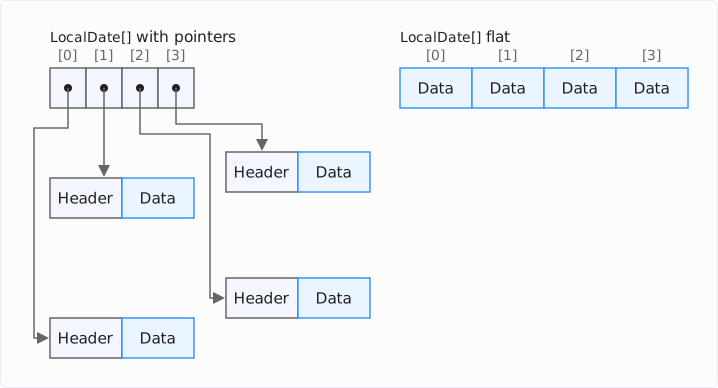
When a program iterates over the left array, the CPU has to follow the pointer for every element. If the objects are scattered in memory, it has to load a separate cache line from main memory for almost every element. In the right array, by contrast, the data lies one after another. Array and data together take up considerably less memory, and because the CPU reads the memory sequentially, it iterates over the array much faster than over the scattered objects.
Value objects clear the way for the right array: because they have no identity, the JVM may copy their data directly into the array elements.
Integer, LocalDate, and 28 More JDK Classes Become Value Classes
A value class is a class whose instances have no identity. These instances are called value objects. All other classes are now called identity classes, their instances identity objects.
With preview features enabled, 30 JDK classes are value classes:
| Package | Classes |
|---|---|
java.lang | Integer, Long, Float, Double, Byte, Short, Character, Boolean, Number, Record |
java.util | Optional, OptionalInt, OptionalLong, OptionalDouble |
java.time | LocalDate, LocalTime, LocalDateTime, ZonedDateTime, OffsetTime, OffsetDateTime, Duration, Instant, Period, Year, YearMonth, MonthDay |
java.time.chrono | MinguoDate, HijrahDate, JapaneseDate, ThaiBuddhistDate |
Number and Record are abstract value classes – I explain what that means in the section Inheritance: Abstract Value Classes.
If you run the program from the previous section on Java 28 with --enable-preview, it prints the following:
i == j: true
d1 == d2: true
d1.equals(d2): true
Now both == comparisons are true as well, without you changing a single line of code. However, you have to compile the program with preview features enabled and then also run it with them. If you compile without --enable-preview, the compiler uses the previous identity classes, and the code behaves as in Java 27.
The new method Objects.hasIdentity() checks whether an object has an identity:
void main() {
  IO.println("Integer:   " + Objects.hasIdentity(1996));
  IO.println("LocalDate: " + Objects.hasIdentity(LocalDate.of(2027, 3, 9)));
  IO.println("Optional:  " + Objects.hasIdentity(Optional.of("Duke")));
  IO.println("String:    " + Objects.hasIdentity("Duke"));
  IO.println("ArrayList: " + Objects.hasIdentity(new ArrayList<String>()));
}
With --enable-preview, the program prints:
Integer:   false
LocalDate: false
Optional:  false
String:    true
ArrayList: true
String is – as you can see from the example "Duke" – not a value class. According to JEP 401, the API and implementation of String depend on object identity. The new method Objects.requireIdentity() throws an IdentityException if an object has no identity.
Prepared Since Java 9
These 30 classes are not a random choice. The Javadoc has long called the concrete classes among them value-based and advises against relying on the identity of their instances. The constructors of the wrapper classes, such as new Integer(int), have been deprecated since Java 9. And since Java 16, the compiler warns you when you synchronize on an instance of a value-based class (JEP 390).
If you use the wrapper constructors anyway, you get a different result with Valhalla. The following program compares two Integer objects created by the constructor:
void main() {
  Integer a = new Integer(1996);
  Integer b = new Integer(1996);
  IO.println(a == b);
}
Without preview features, it prints false, with --enable-preview, however, true. According to the Javadoc, the constructor creates a “newly allocated Integer object” – that is, a new object that differs from all previous ones, even from Integer objects with the same value. A value class has no such object with its own identity: a new returns a value object, and comparing two value objects with the same field values via == yields true.
Declaring Your Own Value Classes
You declare your own value class with the new modifier value. It fits any class whose instances meet two conditions:
- Immutable: The value of an instance no longer changes after it has been created.
- Interchangeable: Two separately created instances with the same value do not need to be distinguishable.
Records meet both conditions out of the box and are therefore particularly well suited:
value record Point(int x, int y) {}A concrete value class is implicitly final, and all its fields are implicitly final as well. If a method tries to change a field, the compiler rejects it:
value class Counter {
  private int count;

  void increment() {
    count++;
  }
}
error: cannot assign a value to final variable countNot every immutable class fits as a record. The following class Money stores an amount of money internally as a number of cents in a single long, but offers euros and cents separately to the outside – the internal number of cents is not visible. A record would have to expose its fields as they are stored – a value class doesn’t.
The class Money is in a separate file Money.java:
value class Money {
  private long cents;

  Money(long euros, int cents) {
    this.cents = euros * 100 + cents;
  }

  long euros() { return cents / 100; }
  int cents() { return (int) (cents % 100); }

  @Override
  public String toString() {
    return "%d,%02d €".formatted(euros(), cents());
  }
}
The following program MoneyDemo.java creates two Money objects with the same amount, compares them with ==, and checks whether they have an identity:
void main() {
  Money a = new Money(12, 34);
  Money b = new Money(12, 34);
  IO.println(a + " == " + b + ": " + (a == b));
  IO.println(Objects.hasIdentity(a));
}
If both files are in the same directory, you start the program with java --enable-preview MoneyDemo.java – the source launcher finds Money.java by itself. The output:
12,34 € == 12,34 €: true
falseThe fields of a value class may point to identity objects. The following record Person stores a String – an identity object – and a LocalDate:
value record Person(String name, LocalDate birthday) {}Person still remains a value class: the field must be immutable, not the object it points to. What that means for the == comparison is shown in the next section.
== and equals() for Value Objects
For identity objects, == still checks whether two references point to the same object – that is, to the same memory address. For value objects, == checks whether the two objects are indistinguishable. They are if three conditions are met:
- Both are instances of the same value class.
- Their fields of primitive types have the same bit patterns.
- Their reference fields are indistinguishable – again checked with
==.
The third condition makes the comparison recursive. If a field points to a value object, its value decides. If a field points to an identity object, its identity decides – that is, the address in memory. The following program creates three Person objects – two with the string literal "Duke" and one with a string created via new String():
value record Person(String name, LocalDate birthday) {}

void main() {
  Person p1 = new Person("Duke", LocalDate.of(1995, 5, 23));
  Person p2 = new Person("Duke", LocalDate.of(1995, 5, 23));
  Person p3 = new Person(new String("Duke"), LocalDate.of(1995, 5, 23));
  IO.println("p1 == p2: " + (p1 == p2));
  IO.println("p1 == p3: " + (p1 == p3));
  IO.println("p1.equals(p3): " + p1.equals(p3));
}
The output:
p1 == p2: true
p1 == p3: false
p1.equals(p3): true
p1 == p2 is true because both string literals "Duke" point to the same String object in the string pool and the two LocalDate value objects are equal in value. p1 == p3 is false because new String() creates a new String object with its own identity. For equals(), all three are equal, because a record’s equals() compares the fields with equals().
The next two sections show two more cases in which == and equals() diverge. After that, we look at what a recursive comparison costs and at the methods a value class inherits from Object.
Custom equals() Method
If a value class has its own equals() method, two objects can be equal according to equals() even though their fields have different values – == then yields false. The following class Fraction stores a fraction unreduced, but considers 1/2 and 2/4 equal:
value class Fraction {
  private int numerator;
  private int denominator;

  Fraction(int numerator, int denominator) {
    this.numerator = numerator;
    this.denominator = denominator;
  }

  @Override
  public boolean equals(Object o) {
    return o instanceof Fraction f
        && (long) numerator * f.denominator == (long) f.numerator * denominator;
  }

  @Override
  public int hashCode() {
    return Double.hashCode((double) numerator / denominator);
  }
}
The program FractionDemo.java compares 1/2 and 2/4 in both ways:
void main() {
  Fraction half = new Fraction(1, 2);
  Fraction twoQuarters = new Fraction(2, 4);
  IO.println("half.equals(twoQuarters): " + half.equals(twoQuarters));
  IO.println("half == twoQuarters: " + (half == twoQuarters));
}
half.equals(twoQuarters): true
half == twoQuarters: false== compares the fields, i.e., 1 with 2 and 2 with 4. equals() compares the value that the fields represent.
NaN Values
For float and double, there are many different bit patterns that all mean “Not a Number” (NaN). The following program stores two of them in one Measurement record each:
value record Measurement(double value) {}

void main() {
  double nan1 = Double.longBitsToDouble(0x7ff8000000000000L);
  double nan2 = Double.longBitsToDouble(0x7ff8000000000001L);
  Measurement m1 = new Measurement(nan1);
  Measurement m2 = new Measurement(nan2);
  IO.println(m1 + " / " + m2);
  IO.println("m1.equals(m2): " + m1.equals(m2));
  IO.println("m1 == m2: " + (m1 == m2));
}
Measurement[value=NaN] / Measurement[value=NaN]
m1.equals(m2): true
m1 == m2: falseA record’s equals() treats all NaN values as equal. ==, on the other hand, compares the bit patterns, and they differ in the last bit.
Deeply Nested Objects
Because == compares reference fields recursively, a single comparison can take arbitrarily long. The following program builds two linked lists of 100,000 Node objects each and compares their heads:
value record Node(int value, Node next) {}

void main() {
  Node a = null;
  Node b = null;
  for (int i = 0; i < 100_000; i++) {
    a = new Node(i, a);
    b = new Node(i, b);
  }
  IO.println(a == b);
}
The comparison goes one level deeper for every element and ends in a StackOverflowError:
Exception in thread "main" java.lang.StackOverflowError
    at java.base/java.lang.runtime.ValueObjectMethods.isSubstitutable(...)
    at java.base/java.lang.runtime.ValueObjectMethods.isSubstitutable(...)
    ...
There can’t be an infinite loop, though: the constructor rules that I explain in the section Initializers and a Consequence for == prevent two value objects from pointing to each other.
Methods Inherited from Object
If a value class does not override equals(), hashCode(), and toString(), it inherits the methods from Object. For value objects, however, they work with the field values instead of the identity:
equals()compares with==.hashCode()computes a hash from the class and the field values.System.identityHashCode()returns the same value.toString()returns, as before, the class name and the hash, e.g.,Pixel@50287055.
The following class Pixel overrides none of the three methods:
value class Pixel {
  private int x;
  private int y;

  Pixel(int x, int y) {
    this.x = x;
    this.y = y;
  }
}
The program PixelDemo.java compares two equal Pixels and a different one and prints hash values and toString():
void main() {
  Pixel p1 = new Pixel(17, 3);
  Pixel p2 = new Pixel(17, 3);
  Pixel p3 = new Pixel(3, 17);
  IO.println("p1.equals(p2):        " + p1.equals(p2));
  IO.println("p1.equals(p3):        " + p1.equals(p3));
  IO.println("p1.hashCode():        " + p1.hashCode());
  IO.println("p2.hashCode():        " + p2.hashCode());
  IO.println("p3.hashCode():        " + p3.hashCode());
  IO.println("identityHashCode(p1): " + System.identityHashCode(p1));
  IO.println("p1.toString():        " + p1);
}
p1.equals(p2): true
p1.equals(p3): false
p1.hashCode(): 1344827477
p2.hashCode(): 1344827477
p3.hashCode(): 1344827057
identityHashCode(p1): 1344827477
p1.toString(): Pixel@50287055The JVM computes the hash in ValueObjectMethods.valueObjectHashCode(): it starts with the identity hash of the class and then mixes in the bits of each field, for reference fields their identity hash. Within one program run, indistinguishable value objects therefore always have the same hash. In another run, it can turn out differently, because the identity hash of the class can change.
None of this applies to value records. A record brings its own implementations of the three methods, as before:
equals()compares the components pairwise – references withObjects.equals(), primitive values with thecompare()method of their wrapper class.hashCode()combines the hashes of the components.toString()prints the name of the record and its components, e.g.,Point[x=1, y=2].
For comparing two values, equals() remains the right method. == only tells you whether two value objects are indistinguishable – not whether they represent the same value. How the JVM performs this comparison is shown in the section How the JVM Executes ==.
What No Longer Works Without Identity
Some operations need the identity of an object. On value objects, the compiler rejects them, or the JVM throws an exception at runtime.
One of them is synchronized. The following program tries to synchronize on a LocalDate:
void main() {
  LocalDate date = LocalDate.of(2027, 3, 9);
  synchronized (date) {
    IO.println("locked");
  }
}
The compiler rejects this:
error: unexpected type
  synchronized (date) {
  ^
  required: identity class
  found:    LocalDate
If the variable is of type Object, on the other hand, the compiler cannot know what it points to at runtime. The following program tries four operations that need an identity via an Object variable:
import java.lang.ref.WeakReference;

void main() {
  Object date = LocalDate.of(2027, 3, 9);

  try {
    synchronized (date) {
      IO.println("locked");
    }
  } catch (IdentityException e) {
    IO.println(e);
  }

  try {
    date.notify();
  } catch (IllegalMonitorStateException e) {
    IO.println(e);
  }

  try {
    new WeakReference<>(date);
  } catch (IdentityException e) {
    IO.println(e);
  }

  try {
    new WeakHashMap<Object, String>().put(date, "Release");
  } catch (IdentityException e) {
    IO.println(e);
  }
}
The output:
java.lang.IdentityException: Cannot synchronize on an instance of value class java.time.LocalDate
java.lang.IllegalMonitorStateException: current thread is not owner
java.lang.IdentityException: java.time.LocalDate is not an identity class
java.lang.IdentityException: java.time.LocalDate is not an identity class
wait() and notify() require the current thread to hold the lock on the object. Since that can never be the case for a value object, they always fail. A WeakReference and all other reference types from java.lang.ref depend on identity – and so does the WeakHashMap, which holds its keys in WeakReferences.
If the type is known, the compiler already warns about the reference types at compile time:
import java.lang.ref.WeakReference;

void main() {
  LocalDate date = LocalDate.of(2027, 3, 9);
  WeakReference<LocalDate> ref = new WeakReference<>(date);
  IO.println(ref.get());
}
warning: [identity] use of a value-based class with an operation that expects reliable identityThis warning appears even without --enable-preview, because it applies to all value-based classes.
Two more methods of Object change their behavior for value objects:
finalize(): According to JEP 401, the garbage collector never callsfinalize()for value objects, and the compiler warns if a value class overrides the method. In build 28-ea+23, it is even an error: “value classes cannot have finalize methods”.clone(): A cloned copy cannot be distinguished from the original, socopy == originalistrue. The usual expectationx.clone() != xno longer holds.
The following table summarizes whether the compiler rejects or warns about an operation when the variable’s type is a value class, and what happens at runtime:
| Operation | At compile time | At runtime |
|---|---|---|
synchronized | Error | IdentityException |
wait(), notify() | No message | IllegalMonitorStateException |
WeakReference, SoftReference, PhantomReference | Warning | IdentityException |
WeakHashMap.put() | Warning | IdentityException |
Overriding finalize() | Error | – (does not compile) |
clone() | No message | Copy is == original |
Inheritance: Abstract Value Classes
A concrete value class is implicitly final; no other class can extend it. If a value class should have subclasses, you declare it as an abstract value class. An abstract value class does not need an identity itself and leaves the choice to its subclasses: both value classes and identity classes may extend it.
An example from the JDK is Number. With preview features, Number is an abstract value class. Integer extends it as a value class, BigInteger as an identity class:
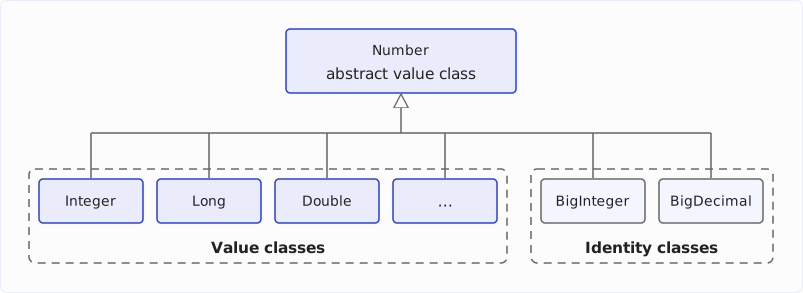
The following program assigns an Integer and then a BigInteger to a variable of type Number:
import java.math.BigInteger;

void main() {
  Number n = 1996;
  IO.println(n.getClass().getSimpleName() + ": " + Objects.hasIdentity(n));
  n = BigInteger.valueOf(1996);
  IO.println(n.getClass().getSimpleName() + ": " + Objects.hasIdentity(n));
}
Integer: false
BigInteger: trueA value class may only extend Object or an abstract value class. A concrete value class is out of the question as a superclass, because it is implicitly final. An identity class is ruled out because its code may depend on identity: it may have mutable fields and synchronized methods. In an abstract value class, the compiler rejects both – so the value modifier guarantees that the inherited code also works without identity.
If you try to let a value class extend an identity class anyway, the compiler reports an error:
import java.util.ArrayList;

value class Stack extends ArrayList<String> {}
error: The identity type ArrayList<String> cannot be a supertype of the value type StackObject is the exception: it is neither abstract nor a value class, and new Object() creates an identity object – yet all value classes extend it. This is possible because Object has neither fields nor synchronized methods. Its methods equals() and hashCode() work with the field values instead of the identity for value objects, as described in the section Methods Inherited from Object.
Abstract value classes can also be sealed. The following hierarchy allows exactly two subclasses of Shape:
sealed abstract value class Shape permits Circle, Square {
  abstract double area();
}
value class Circle extends Shape {
private double radius;
Circle(double radius) {
this.radius = radius;
}
@Override
double area() { return Math.PI * radius * radius; }
}value class Square extends Shape {
private double side;
Square(double side) {
this.side = side;
}
@Override
double area() { return side * side; }
}Value classes can also implement interfaces. A variable of type Comparable<?> can therefore point to value objects and to identity objects. There are no value interfaces: the compiler rejects a value interface. Any interface can be implemented by value classes as well as by identity classes.
Constructors: Fields First, Then super()
A value object must never become visible in a half-initialized state. Otherwise, a program could see the same object once with the default value of a field and once with its final value – and two states contradict the idea that a value object is determined only by its field values.
An object whose constructor is still running is called larval in the JEP: it already exists but isn’t finished yet. In an identity class, a constructor usually first calls the constructor of the superclass – if there is no super(…) in the code, the compiler inserts a super() at the beginning. Only then does it set its own fields. If the superclass constructor passes this on, the recipient sees an object whose fields partly still have their default values (null, 0, false).
Early and Late Construction
Since Java 25, there are flexible constructor bodies: code may stand before the super(…) call and set fields. This gives initialization two phases:
- Early construction: before
super(…). The constructor may set fields but must not usethis– that is, it must not call instance methods or passthison. - Late construction: after
super(…). Nowthisis available.
A constructor can therefore set its fields in two ways – after the super() call in the late construction phase or before it in the early construction phase:
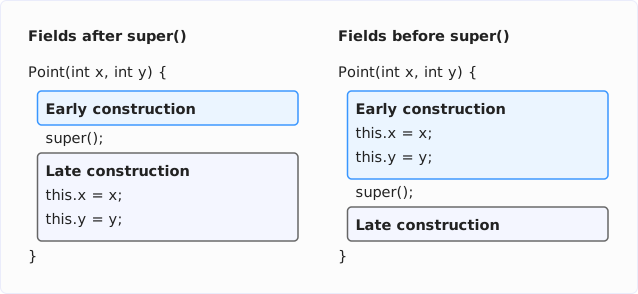
In an identity class, only the left variant was possible before flexible constructor bodies, i.e., up to Java 24 – the error-prone one, because the superclass can pass this on before the fields are set. Since Java 25, the right variant is possible as well. It cannot be enforced for identity classes: existing code that sets its fields after super() must continue to compile.
Value classes are new; there is no such existing code for them. That’s why only the right variant has been possible for them from the start. If there is no super() in the code, the compiler inserts it at the end of the constructor – the entire constructor then runs in the early construction phase.
Instance Methods in the Constructor
The following constructor tries to compute a field via an instance method:
import java.util.Locale;

value class UserName {
  private String name;
  private String normalized;

  UserName(String name) {
    this.name = name;
    this.normalized = normalize();
  }

  private String normalize() {
    return name.strip().toLowerCase(Locale.ROOT);
  }
}
In an identity class, this would not be a problem: there, the call to normalize() runs after the implicit super(), i.e., in the late construction phase. In the constructor of a value class, however, all code runs in the early construction phase, and as described above, calls to instance methods are not allowed there. The compiler therefore rejects the call:
error: reference to normalize() may only appear after an explicit constructor invocationThe solution: the method becomes static and receives the name as a parameter. If the constructor still needs this, it calls super() itself – after all fields have been set:
import java.util.Locale;

value class UserName {
  private String name;
  private String normalized;

  UserName(String name) {
    this.name = name;
    this.normalized = normalize(name);
    super();
    IO.println("Created: " + this);
  }

  private static String normalize(String name) {
    return name.strip().toLowerCase(Locale.ROOT);
  }

  @Override
  public String toString() {
    return name + " (" + normalized + ")";
  }
}
A new UserName("Duke") prints Created: Duke (duke).
So why don’t we solve the problem with the non-static normalize() method simply by putting super() at the beginning? The answer: after super(), the constructor could call normalize() – but it could no longer set any fields. The compiler then reports:
error: strict field name is not initialized before the supertype constructor has been calledThe reason is strict field initialization, which I explain in the section Strict Field Initialization in the JVM – JEP 539.
Initializers and a Consequence for ==
Two more rules concern initializations outside the constructor:
- A field to which you already assign a value in its declaration (e.g.,
private String currency = "EUR";) is set at the beginning of the constructor, i.e., in the early construction phase. The expression to the right of the equals sign may therefore neither call instance methods nor usethis. - An instance initializer block (
{ … }in the class body), on the other hand, only runs in the late construction phase. It may therefore call instance methods and usethis, but it may not set any fields of the value class.
The fact that the constructor of a value class first sets all fields and may only use this afterwards has an indirect consequence for the == comparison: a constructor cannot create another value object, pass this to it, and then assign it to one of its own fields. That’s because this is only available after super(), and by then the fields are already set. Two value objects can therefore never point to each other, and the recursive comparison from the section == and equals() always terminates.
Incompatible Change for All Records
With preview features enabled, the constructor rules from the previous sections apply to all records, including those without value. A canonical constructor – compact or written out – that uses this then no longer compiles. A written-out canonical constructor can only use this after an explicit super(), which may only come after all field assignments – and which a record constructor must not contain at all without --enable-preview. In a compact constructor, super() is not allowed even with preview features – there, this cannot be used at all.
The following record Node passes this to a validation method:
record Node(String label, List<Node> edges) {
  Node {
    requireNonNull(label, this);
    requireNonNull(edges, this);
  }

  static void requireNonNull(Object arg, Object owner) {
    if (arg == null) {
      throw new IllegalArgumentException("null argument for " + owner);
    }
  }
}

void main() {
  IO.println(new Node("A", List.of()));
}
Without preview features, the program prints Node[label=A, edges=[]]. With --enable-preview, the compiler reports two errors:
error: reference to this may only appear after an explicit constructor invocation
    requireNonNull(label, this);
                          ^
error: reference to this may only appear after an explicit constructor invocation
    requireNonNull(edges, this);
                          ^
According to the JEP, this is rare, and such an access is usually a bug anyway: if label were null in the example, the error message would call toString() on a record whose fields have not been set yet.
Strict Field Initialization in the JVM – JEP 539
The rules from the section Constructors: Fields First, Then super() – set fields before super(), use this only afterwards – are checked by the compiler. That’s not enough: bytecode can come from sources other than javac. That’s why JEP 539 introduces strictly initialized fields in the JVM. Such a field must be written before it can be read, and a final field must not be changed after it has been read for the first time. For instance fields, bytecode verification already checks this.
The compiler decides which fields are strictly initialized. With preview features enabled, javac marks the fields of all value classes and all records with the new flag ACC_STRICT_INIT. For the record Point from the section Declaring Your Own Value Classes, javap -v -p Point.class shows:
  private final int x;
    descriptor: I
    flags: (0x0812) ACC_PRIVATE, ACC_FINAL, ACC_STRICT_INIT
There is no new keyword for this. You can read more about JEP 539 in the article Java 28 Features.
Serialization and Deep Reflection
Strictly initialized fields (JEP 539) can only be set by a constructor. This affects two mechanisms that have so far filled objects while bypassing the constructor.
Serialization
When deserializing, serialization creates an object without calling the class’s constructor and writes the fields afterwards. For value records, deserialization still works, because Java has always deserialized records via the canonical constructor. For other value classes, it fails.
For the following example, the value record Point and the value class Money – this time with a single constructor parameter for the number of cents – implement the Serializable interface:
import java.io.Serializable;

value record Point(int x, int y) implements Serializable {}
import java.io.Serializable;
value class Money implements Serializable {
private long cents;
Money(long cents) {
this.cents = cents;
}
}The program SerializeValues.java writes one object each to a byte stream and reads it back:
import java.io.*;

void main() throws IOException, ClassNotFoundException {
  IO.println(roundTrip(new Point(17, 3)));
  try {
    roundTrip(new Money(1234));
  } catch (InvalidClassException e) {
    IO.println(e);
  }
}

Object roundTrip(Object o) throws IOException, ClassNotFoundException {
  var bytes = new ByteArrayOutputStream();
  try (var out = new ObjectOutputStream(bytes)) {
    out.writeObject(o);
  }
  try (var in = new ObjectInputStream(
      new ByteArrayInputStream(bytes.toByteArray()))) {
    return in.readObject();
  }
}
The Point comes back unchanged, the Money object doesn’t:
Point[x=17, y=3]
java.io.InvalidClassException: Money; cannot serialize due to final value class or strictly-initialized instance fields
With -Xlint:serial, the compiler warns you beforehand: “serializable value class does not declare, or inherits, a writeReplace method”. The solution is a stand-in object, a so-called serialization proxy: writeReplace() writes a record instead of the value object, and its readResolve() creates a new value object via the constructor when reading it back in:
import java.io.*;

value class Money implements Serializable {
  private long cents;

  Money(long cents) {
    this.cents = cents;
  }

  @Serial
  private Object writeReplace() {
    return new MoneyProxy(cents);
  }

  @Override
  public String toString() {
    return "%d,%02d €".formatted(cents / 100, cents % 100);
  }
}
import java.io.*;
record MoneyProxy(long cents) implements Serializable {
@Serial
private Object readResolve() {
return new Money(cents);
}
}The program SerializeMoney.java writes a Money object and reads it back:
import java.io.*;

void main() throws IOException, ClassNotFoundException {
  var bytes = new ByteArrayOutputStream();
  try (var out = new ObjectOutputStream(bytes)) {
    out.writeObject(new Money(1234));
  }
  try (var in = new ObjectInputStream(
      new ByteArrayInputStream(bytes.toByteArray()))) {
    Money money = (Money) in.readObject();
    IO.println(money + ", identity: " + Objects.hasIdentity(money));
  }
}
12,34 €, identity: falseDeep Reflection
Deep reflection – changing final fields via Field.setAccessible(true) and Field.set() – does not work at all for value objects. For the following example, two classes store a number of cents in a field cents: IdentityMoney as an ordinary class with a private final long cents, ValueMoney as a value class. The program ReflectValue.java tries to change the amount for both:
import java.lang.reflect.Field;

void main() throws ReflectiveOperationException {
  var identityMoney = new IdentityMoney(1234);
  Field field = IdentityMoney.class.getDeclaredField("cents");
  field.setAccessible(true);
  field.setLong(identityMoney, 9999);
  IO.println(identityMoney.cents());

  var valueMoney = new ValueMoney(1234);
  field = ValueMoney.class.getDeclaredField("cents");
  field.setAccessible(true);
  try {
    field.setLong(valueMoney, 9999);
  } catch (IllegalAccessException e) {
    IO.println(e);
  }
}
Started with --enable-final-field-mutation=ALL-UNNAMED, the program prints:
9999
java.lang.IllegalAccessException: Can not set final long field ValueMoney.cents to (long)9999
The final field of the identity class can be changed. Since Java 26, the JVM prints a warning (JEP 500) if you omit the option --enable-final-field-mutation=ALL-UNNAMED. The field of the value class, by contrast, remains unchanged even with --enable-final-field-mutation. Libraries that fill objects via deep reflection must create value objects via their constructors.
How the JVM Implements Value Objects
Because a program cannot distinguish two value objects with the same field values, the JVM may arrange them freely in memory. JEP 401 does not specify how it does this. What build 28-ea+23 does can be observed, however – and that yields rules for your own value classes.
Three Forms of a Value Object
The JVM knows three forms in which a value object can exist:
- On the heap (buffered): as an ordinary object with a header, pointed to by a pointer.
- Flat (flattened): The fields are stored directly in the field of another object or in an array element – without their own header, without a pointer.
- In registers (scalarized): The JIT compiler keeps the fields in parameters, return values, and local variables in individual CPU registers or on the stack.
The following diagram shows the same LocalDate in all three forms:
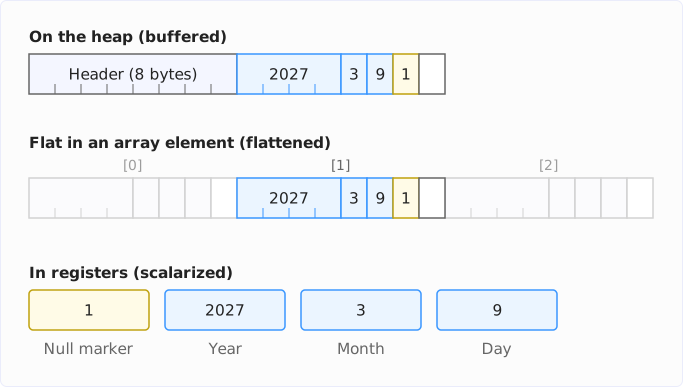
For Java code, it makes no difference which form a value object is in. The JVM converts between the forms whenever necessary.
Making Flattening Visible
Two diagnostic options show which fields and arrays the JVM lays out flat:
java --enable-preview -Xshare:off -XX:+UnlockDiagnosticVMOptions \
     -XX:+PrintFieldLayout -XX:+PrintFlatArrayLayout Main.java
-XX:+PrintFieldLayout prints the layout of its fields for every loaded class, -XX:+PrintFlatArrayLayout the layouts of the flat arrays. -Xshare:off is necessary so that the JDK classes appear as well. Otherwise, the JVM loads them ready-made from the CDS archive and doesn’t print their layout.
Diagnostic options are for looking, not for production. Their names and output can change with every build.
The Output for LocalDate
For LocalDate, the JVM prints the following (shortened to the instance fields and the layouts):
Layout of class java/time/LocalDate
Instance fields:
 @0 RESERVED 8/-
 @8 REGULAR 4/4 "year" I
 @12 REGULAR 1/1 "month" B
 @13 REGULAR 1/1 "day" B
 @14 NULL_MARKER 1/1
Instance size = 16 bytes
BUFFERED layout: 8/8
NULL_FREE_NON_ATOMIC_FLAT layout: -/-
NULL_FREE_ATOMIC_FLAT layout: 8/8
NULLABLE_ATOMIC_FLAT layout: 8/8
NULLABLE_NON_ATOMIC_FLAT layout: 7/4
Null marker offset = 14
The following table explains the lines about the object on the heap. Under Instance fields:, each line shows one field with offset (@), kind, size/alignment in bytes, name, and type:
| Line | Meaning |
|---|---|
@0 RESERVED 8/- | The object header, 8 bytes in size with compact object headers. It is not a field and therefore has no alignment. |
@8 REGULAR 4/4 "year" I | The field year at offset 8: 4 bytes in size, aligned to 4 bytes. I is the JVM’s type descriptor for int. |
@12 REGULAR 1/1 "month" B | The field month: 1 byte of type byte (B). |
@13 REGULAR 1/1 "day" B | The field day, also a byte. |
@14 NULL_MARKER 1/1 | One byte for the null marker, explained in the section Null Marker and the 8-Byte Limit. In the object on the heap, it has no meaning, because that object is never null. The JVM still reserves the space so that it can copy the bytes from offset 8 onwards in one piece into a flat field. |
Instance size = 16 bytes | The object on the heap takes up 16 bytes: 8 bytes of header, 6 bytes of fields, 1 byte of null marker, 1 byte of padding. The padding is created because the JVM rounds the size of every object up to a multiple of 8 bytes (-XX:ObjectAlignmentInBytes, default value 8). |
The Flat Layouts
Below the instance fields, the JVM lists the layouts it has computed for LocalDate. A layout defines how the bytes of a LocalDate are arranged and how much space they take up. BUFFERED is the layout of the data in the object on the heap. The other four are flat layouts for fields and array elements. Which of them the JVM uses depends on two questions: may the field contain null – then it needs a null marker? And does the JVM have to write the field atomically because it can change? The output gives size/alignment in bytes for each layout:
| Line | Meaning |
|---|---|
BUFFERED layout: 8/8 | The data of the object on the heap from offset 8: 8 bytes, aligned to 8 bytes. |
NULL_FREE_NON_ATOMIC_FLAT layout: -/- | Flat, without null marker, not atomic. This layout does not exist for LocalDate: the JVM must write a value class with more than one field atomically, unless the class carries the JDK-internal annotation @LooselyConsistentValue. Integer, on the other hand, has this layout (4/4): the CPU writes a single field atomically anyway. |
NULL_FREE_ATOMIC_FLAT layout: 8/8 | Flat, without null marker, atomic: 6 bytes of fields, rounded up to 8. Without a null marker, such a field cannot store null. In Java 28, only the JDK uses this layout internally; for your code, it will come in a future Java version with null-restricted types. You can try it out today via a JDK-internal API (see Measuring Null-Free Arrays Today). |
NULLABLE_ATOMIC_FLAT layout: 8/8 | Flat, with null marker, atomic: 7 bytes (6 bytes for the fields plus 1 byte for the null marker), rounded up to 8 and aligned to 8 bytes. The JVM uses this layout for ordinary fields and for arrays of type LocalDate. It fits into a single write access. |
NULLABLE_NON_ATOMIC_FLAT layout: 7/4 | Flat, with null marker, not atomic: 7 bytes without rounding up, aligned to 4 bytes like the int field. The JVM uses it only for final, strictly initialized fields, e.g., in value objects. Nobody writes these after the constructor, so atomicity is unnecessary there. |
Null marker offset = 14 | The null marker of the NULLABLE_… layouts is at offset 14, i.e., directly after day. |
Why must an atomic layout be aligned to its size? The JVM writes such a field with a single machine instruction. On Intel and ARM processors, this access is guaranteed to be atomic if its address is divisible by its size – for 8 bytes, that means by 8. An unaligned access, on the other hand, can extend across the boundary of two cache lines, and neither Intel nor ARM guarantees atomicity for that. Another thread could then read some of the bytes already new and the rest still old.
Flat Fields and Arrays
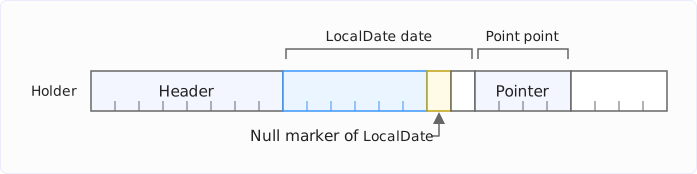
The JVM uses the NULLABLE_ATOMIC_FLAT layout in fields. The following class Holder has a field of type LocalDate and one of type Point – the value record Point(int x, int y) from the section Declaring Your Own Value Classes:
import java.time.LocalDate;

class Holder {
  LocalDate date;
  Point point;
}
Layout of class Holder
Instance fields:
@0 RESERVED 8/-
@8 FLAT 8/8 "date" Ljava/time/LocalDate; java/time/LocalDate NULLABLE_ATOMIC_FLAT
@16 REGULAR 4/4 "point" LPoint;
Instance size = 24 bytesThe field date is not a pointer but contains the 8 bytes of the LocalDate itself. The field point, on the other hand, is an ordinary pointer (REGULAR, 4 bytes) – the next section explains why.
The diagram shows the 24 bytes of a Holder object – the header, the flat LocalDate with its null marker and one unused byte, the pointer to the Point, and 4 bytes of padding:
The same applies to arrays as to fields. -XX:+PrintFlatArrayLayout reports for a LocalDate[]:
Flat Type Array: [Ljava.time.LocalDate;
 - element klass: 'java/time/LocalDate'
 - layout kind: NULLABLE_ATOMIC_FLAT
 - array properties: NULLABLE ATOMIC
 - element size 8 aligned layout size 8
Each element takes up 8 bytes – instead of 4 bytes for the pointer plus 16 bytes for the object.
Null Marker and the 8-Byte Limit
A variable of type LocalDate may be null. If it is a pointer, that’s easy: null is the pointer 0. A flat field, however, has no pointer. That’s why the JVM adds an extra byte to the fields, the null marker: 1 means the field contains an object, 0 means null.
The JVM looks for space for the null marker in a gap between the fields; if there is none, it appends it at the end. Then it rounds the size up to the next power of two.
Where the Null Marker Goes
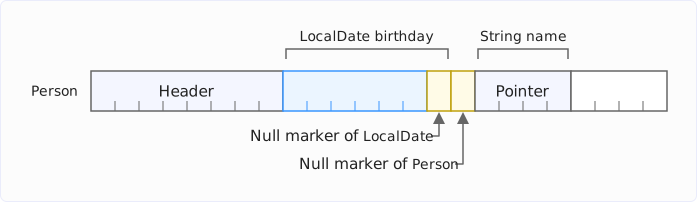
For LocalDate, the null marker is at the end, at offset 14. An example of a gap is the record Person(String name, LocalDate birthday) from the section == and equals() – here is its layout:
Layout of class Person
Instance fields:
 @0 RESERVED 8/-
 @8 FLAT 7/4 "birthday" Ljava/time/LocalDate; java/time/LocalDate NULLABLE_NON_ATOMIC_FLAT
 @15 NULL_MARKER 1/1
 @16 REGULAR 4/4 "name" Ljava/lang/String;
The flat birthday occupies the seven bytes from offset 8 to 14, including its own null marker. The pointer name must start at an address divisible by 4, i.e., at offset 16. The JVM puts the null marker of the Person itself into the gap at offset 15:
Why 8 Bytes Is the Limit
The JVM rounds the size including the null marker up to the next power of two – for LocalDate, from 7 to 8 bytes – because it must write a field that can change atomically: in a single write access. If a thread wrote a flat LocalDate in two steps, another thread could read the new year with the old month in between (tearing).
HotSpot writes a flat field in one piece only up to 8 bytes. That is the widest write access that Intel and ARM processors guarantee to execute atomically without additional features. Intel processors with AVX and ARM processors with the FEAT_LSE2 extension also write 16 bytes atomically, but HotSpot in Java 28 does not use this (yet). In addition, HotSpot writes a flat field only at addresses that are divisible by its size.
In a mutable field or an array, a value object including its null marker must therefore fit into 1, 2, 4, or 8 bytes; otherwise, the JVM does not store it flat there.
Which Classes Fit
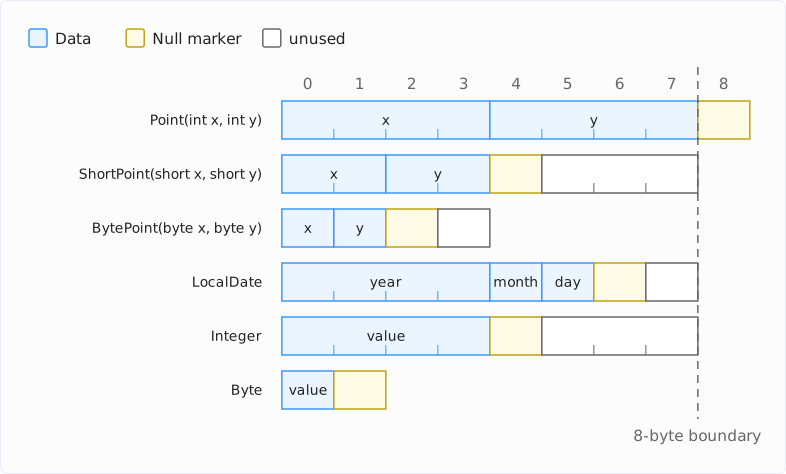
What the 8-byte limit means can be seen in three records with two fields and in three JDK classes. The table shows, for each class, the size of the fields, the size with null marker, and the space that a flat field or array element takes up – all in bytes:
| Class | Fields | With null marker | Flat | Unused |
|---|---|---|---|---|
Point(int x, int y) | 8 | 9 | – (pointer) | – |
ShortPoint(short x, short y) | 4 | 5 | 8 | 3 |
BytePoint(byte x, byte y) | 2 | 3 | 4 | 1 |
LocalDate | 6 | 7 | 8 | 1 |
Integer | 4 | 5 | 8 | 3 |
Byte | 1 | 2 | 2 | 0 |
Of all things, the most obvious point doesn’t fit: two ints already take up 8 bytes, with the null marker it’s 9. In a mutable field and in an array, the JVM therefore stores a Point(int x, int y) as a pointer to a heap object – that was the field point in Holder above.
A ShortPoint, on the other hand, fits, but costs 3 unused bytes: 4 bytes of data, 1 byte of null marker, rounded up to 8. The diagram shows the bytes of the classes from the table – data in blue, the null marker in yellow, and unused bytes in white. The dashed line marks the 8-byte limit:
Three observations from the output of -XX:+PrintFieldLayout:
- Field and array: The null marker is in the same place, regardless of whether the value object lies in a field or an array element. The JVM computes its position once per class.
- No merging: Several flat fields don’t share a null marker. Four
BytePointfields take up 4 × 4 bytes, and an additionalbytefield next to threeShortPointfields ends up behind them, not in one of their gaps. The reason is the atomic write access: the JVM reserves the full size of its layout for a flat field, unused bytes included, and always overwrites all of these bytes when writing – including anything that would be in a gap. LongandDouble: For these two classes, the JVM currently disables the layouts with null marker entirely. According to a comment in the source code, they caused a performance regression. Fields of the typesLongandDoubleare therefore always pointers.
What a Point(int x, int y) that is not stored flat costs in memory is shown in the section Measurement: more than an ordinary record.
Nested Value Objects: Flat Inside, a Pointer Outside
The 8-byte limit does not apply to the fields of a value class or a value record, and with preview features not to the fields of a record without value either. Both kinds of fields are final and strictly initialized: they never change after the constructor, so no other thread can see a half-written field. The JVM may use the NULLABLE_NON_ATOMIC_FLAT layout here, which may be larger than 8 bytes. A final field of an ordinary class, on the other hand, is not strictly initialized; the 8-byte limit still applies to it.
An example is LocalDateTime, which consists of a LocalDate and a LocalTime:
Layout of class java/time/LocalDateTime
Instance fields:
 @0 RESERVED 8/-
 @8 FLAT 8/4 "time" Ljava/time/LocalTime; java/time/LocalTime NULLABLE_NON_ATOMIC_FLAT
 @16 FLAT 7/4 "date" Ljava/time/LocalDate; java/time/LocalDate NULLABLE_NON_ATOMIC_FLAT
 @23 NULL_MARKER 1/1
Instance size = 24 bytes
First field offset = 8
BUFFERED layout: 16/4
NULL_FREE_NON_ATOMIC_FLAT layout: -/-
NULL_FREE_ATOMIC_FLAT layout: -/-
NULLABLE_ATOMIC_FLAT layout: -/-
NULLABLE_NON_ATOMIC_FLAT layout: 16/4
Both fields lie flat in the LocalDateTime, each with its own null marker: 8 bytes for the LocalTime, 7 for the LocalDate. Even without the null marker of the LocalDateTime itself, that’s 15 bytes, with it 16 – both too much for an atomic layout. That’s why NULL_FREE_ATOMIC_FLAT and NULLABLE_ATOMIC_FLAT show -/-.
In a mutable field, a LocalDateTime is therefore a pointer. It points to a LocalDateTime object on the heap in which LocalTime and LocalDate lie flat:
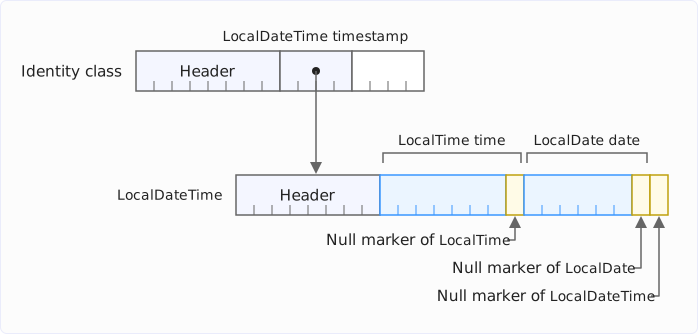
Without Valhalla, these would be three objects on the heap: the LocalDateTime plus one LocalTime and one LocalDate object each, which it points to with pointers. With Valhalla, it is one.
The following example shows the whole chain: a value record Event stores a timestamp, an identity class Button the last Event:
import java.time.LocalDateTime;

value record Event(LocalDateTime timestamp) {}
class Button {
Event lastEvent;
}The JVM prints for both classes (shortened):
Layout of class Event
Instance fields:
 @0 RESERVED 8/-
 @8 FLAT 16/4 "timestamp" Ljava/time/LocalDateTime; java/time/LocalDateTime NULLABLE_NON_ATOMIC_FLAT
 @24 NULL_MARKER 1/1
Instance size = 32 bytes
NULLABLE_ATOMIC_FLAT layout: -/-
NULLABLE_NON_ATOMIC_FLAT layout: 17/4

Layout of class Button
Instance fields:
 @0 RESERVED 8/-
 @8 REGULAR 4/4 "lastEvent" LEvent;
The LocalDateTime lies flat in the Event. The Event itself is 17 bytes in size with its null marker and has no atomic layout. The field lastEvent of Button therefore contains a pointer to an Event object on the heap – and in that object, all data lies flat:
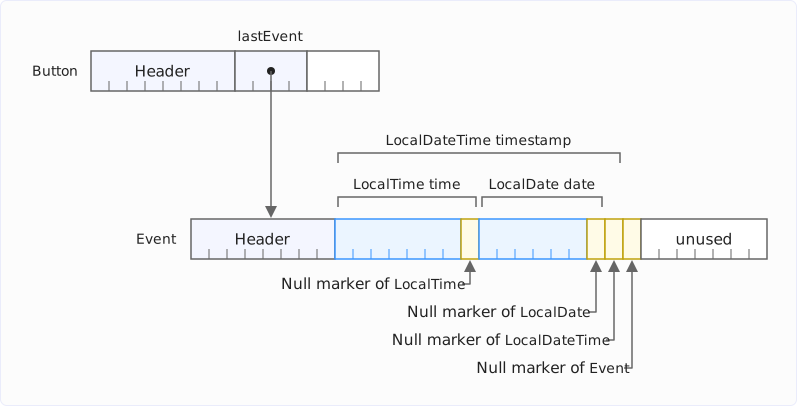
The Event object takes up 32 bytes: 8 bytes of header and 17 bytes of data including null markers add up to 25 bytes, and the JVM pads with 7 bytes to the next multiple of 8. For the LocalDateTime object above, by contrast, 8 bytes of header and 16 bytes of data added up to exactly 24 bytes; no padding was needed.
Without Valhalla, the Event would be added to the three objects from above; with Valhalla, it stays at one. Each level brings its own null marker: a value record Wrapper(Event event) would be 18 bytes in size.
Scalarization: Value Objects in Registers
Flattening applies to fields and arrays. For parameters, return values, and local variables, the JVM has a second technique: the JIT compiler breaks the value object down into its fields and passes them in individual registers. This is called scalarization.
The following program measures how many bytes ten million calls to a method allocate that moves a point and returns a new one – once with an ordinary record, once with a value record:
import java.lang.management.ManagementFactory;

record IdentityPoint(int x, int y) {}
value record ValuePoint(int x, int y) {}

static final int CALLS = 10_000_000;

void main() {
  var threads = (com.sun.management.ThreadMXBean)
      ManagementFactory.getThreadMXBean();
  for (int round = 1; round <= 5; round++) {
    long before = threads.getCurrentThreadAllocatedBytes();
    int sum = sumIdentityPoints();
    long identityBytes = threads.getCurrentThreadAllocatedBytes() - before;

    before = threads.getCurrentThreadAllocatedBytes();
    sum += sumValuePoints();
    long valueBytes = threads.getCurrentThreadAllocatedBytes() - before;

    IO.println("Round %d: identity %,d bytes, value %,d bytes (%d)"
        .formatted(round, identityBytes, valueBytes, sum));
  }
}

int sumIdentityPoints() {
  IdentityPoint p = new IdentityPoint(0, 0);
  for (int i = 0; i < CALLS; i++) {
    p = moveIdentity(p, i);
  }
  return p.x() + p.y();
}

IdentityPoint moveIdentity(IdentityPoint p, int i) {
  return new IdentityPoint(p.x() + (i & 1), p.y() + (i & 2));
}

int sumValuePoints() {
  ValuePoint p = new ValuePoint(0, 0);
  for (int i = 0; i < CALLS; i++) {
    p = moveValue(p, i);
  }
  return p.x() + p.y();
}

ValuePoint moveValue(ValuePoint p, int i) {
  return new ValuePoint(p.x() + (i & 1), p.y() + (i & 2));
}
To keep the JIT compiler from inlining the two move methods into the loops, I start the program with -XX:CompileCommand=dontinline,*::move*. This leaves a real method call that receives the point as a parameter and returns a new one:
Round 1: identity 160,000,144 bytes, value 6,052,432 bytes (30000000)
Round 2: identity 160,000,016 bytes, value 6,291,456 bytes (30000000)
Round 3: identity 160,000,016 bytes, value 0 bytes (30000000)
Round 4: identity 160,000,016 bytes, value 0 bytes (30000000)
Round 5: identity 160,000,016 bytes, value 0 bytes (30000000)
The ordinary record allocates 160 MB in every round – 16 bytes for each of the ten million points. The value record allocates nothing from the third round on. In the first two rounds, the code has not yet been fully compiled by the JIT compiler; the interpreter creates value objects as heap objects.
How much the interpreter allocates is shown by a run with -Xint, which switches off the JIT compiler entirely:
Round 1: identity 160,000,056 bytes, value 240,000,088 bytes (30000000)In the interpreter, every ValuePoint takes up 24 bytes – more than an IdentityPoint with 16 bytes. The reason is the null marker: 8 bytes of header, 8 bytes of data, and 1 byte of null marker add up to 17 bytes, rounded up to 24. On the heap, the null marker has no meaning – a heap object is never null – but the JVM reserves it so that it can copy the bytes in one piece into a flat field.
Two more diagnostic options show that the value record allocates nothing only thanks to passing the fields in registers. -XX:-ValueTypePassFieldsAsArgs and -XX:-ValueTypeReturnedAsFields switch off scalarization for parameters and for return values: the JIT compiler then passes the value object as a pointer to an object on the heap. The compiled code then allocates 240 MB in every round as well.
When the JVM Flattens a Value Object
Flattening and scalarization are optimizations. You cannot force them, but you can prevent them. Four conditions determine whether the JVM applies them:
- The type is concrete. The JVM lays out an
Integer[]flat, but not anObject[]with the sameIntegervalues – any object could end up in anObject[]later. The same applies to generic types: after type erasure, a field of typeTis a field of typeObject. - The size fits. In mutable fields and arrays, the value object including its null marker must fit into 8 bytes.
- The JVM knows the class early enough. When loading a class, it must know which field types are value classes. For this purpose,
javacwrites the new attributeLoadableDescriptorsinto the class file of every class that uses a value class as a field type or in a method signature. - The code is compiled (only for scalarization). In local variables, parameters, and return values, the interpreter keeps value objects as objects on the heap; only the JIT compiler breaks them down into registers. Fields and arrays, on the other hand, are already laid out flat by the interpreter, because their layout is fixed when the class is loaded.
An example of the first condition: a value record Box<T>(T value) has a field of type Object, and the layout shows a pointer there:
Layout of class Box
Instance fields:
 @0 RESERVED 8/-
 @8 REGULAR 4/4 "value" Ljava/lang/Object;
 @12 NULL_MARKER 1/1
The Box itself, on the other hand, can lie flat in another object: 4 bytes for the pointer and 1 byte of null marker fit into 8 bytes. The JVM shows a field Box<Integer> box in an ordinary class as FLAT 8/8. But then only the pointer lies flat, not the Integer it points to.
With the concrete type, things look different. In a value record IntegerBox(Integer value), the Integer lies flat in the field value, with its own null marker:
Layout of class IntegerBox
Instance fields:
 @0 RESERVED 8/-
 @8 FLAT 5/4 "value" Ljava/lang/Integer; java/lang/Integer NULLABLE_NON_ATOMIC_FLAT
 @13 NULL_MARKER 1/1
Instance size = 16 bytes
NULLABLE_ATOMIC_FLAT layout: 8/8
NULLABLE_NON_ATOMIC_FLAT layout: 6/4
With the null marker of the box, that’s 6 bytes, and the JVM also lays out a field IntegerBox integerBox as FLAT 8/8 – but this time with the int value itself instead of a pointer.
On the third condition: for the class Holder from the section Making Flattening Visible, javap -v shows two entries in the new attribute:
LoadableDescriptors:
  Ljava/time/LocalDate;
  LPoint;
When loading Holder, the JVM therefore loads LocalDate and Point in advance. This way, it knows their layout before it computes that of Holder and can store the LocalDate flat in Holder. It still stores the Point as a pointer – with its null marker, it doesn’t fit into 8 bytes.
If one of your own value classes is not listed there because the class file was compiled against an older version in which it was not yet a value class, the JVM doesn’t load it in advance. The field then only becomes flat if the class happens to be loaded already. The JVM, on the other hand, always knows the value classes of the JDK. If you turn one of your own classes into a value class, you should therefore also recompile the code that uses it.
The Header of Value Objects
A value object on the heap has a header like every other object. With compact object headers, which have been the default since Java 27, it is 8 bytes in size – as shown by the RESERVED 8/- at offset 0 in every layout output above.
Since Java 24, four bits in this header have been reserved for Project Valhalla – in the mark word for the classic headers, in the 64-bit header itself for compact object headers. With preview features enabled, the JVM in Java 28 uses three of them:
- Value type: The object is a value object.
- Flat array: The array stores its elements flat.
- Null-free array: The array contains no
null. Such arrays cannot be created in Java code yet, only via a JDK-internal API – their bit prepares the null-restricted types.
The fourth bit remains reserved. The diagram shows the object header with compact object headers:
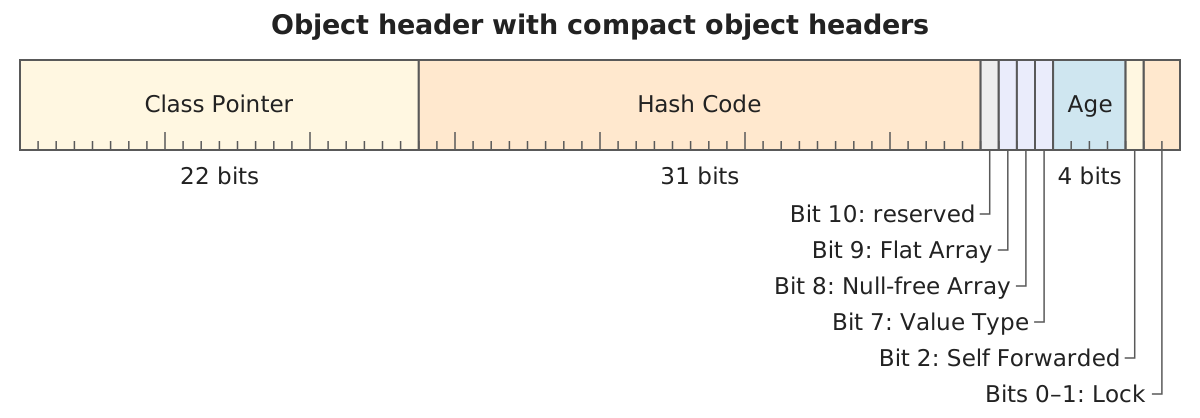
That the JVM actually sets these bits can be verified. The program MarkWord.java in the repository reads the first 8 bytes of some objects with sun.misc.Unsafe. The header of a ValuePoint differs from that of an IdentityPoint in bit 7, the value type bit. For a flat LocalDate[] and a flat Integer[], bit 9 is set, the flat array bit, but not for an Object[].
For value objects, the lock bits always show “unlocked”, because a value object cannot be locked. The JVM computes the hash from the class and the field values and may cache it in the header.
How the JVM Executes ==
For two identity objects, == compares two pointers. For two value objects, the JVM has to compare their fields – bit by bit, as described in the section == and equals().
For this purpose, it creates two lists when loading every value class and stores them in a hidden static field .acmp_maps of the class. -XX:+PrintFieldLayout prints them at the end of each layout. For Point(int x, int y):
Non-oop acmp map <offset,size>: <8,8>
oop acmp map:
The first list names the bytes that the JVM compares directly – here the 8 bytes from offset 8, i.e., x and y in one piece. The second list names the reference fields for which it continues comparing recursively. Point has none.
For Person(String name, LocalDate birthday), the two lists look like this:
Non-oop acmp map <offset,size>: <8,7>
oop acmp map: 16
The 7 bytes from offset 8 are the flat birthday including its null marker. At offset 16 is the pointer name – the JVM compares it with ==, and because String is an identity class, the recursion ends there.
JapaneseDate from java.time.chrono, also a value class with preview features, shows several entries in the first list:
Layout of class java/time/chrono/JapaneseDate
Instance fields:
 @0 RESERVED 8/-
 @8 FLAT 7/4 "isoDate" Ljava/time/LocalDate; java/time/LocalDate NULLABLE_NON_ATOMIC_FLAT
 @15 NULL_MARKER 1/1
 @16 REGULAR 4/4 "yearOfEra" I
 @20 REGULAR 4/4 "era" Ljava/time/chrono/JapaneseEra;
Non-oop acmp map <offset,size>: <8,7> <16,4>
oop acmp map: 20
The JVM compares the 7 bytes of the flat isoDate and the 4 bytes of yearOfEra, but not the byte in between: at offset 15 is the null marker of the JapaneseDate itself, and it has no meaning on the heap. The same applies to the Person above, whose <8,7> ends before the null marker at offset 15. The JVM compares the pointer era at offset 20 with ==, like name.
You can see the recursion in the stack trace of the example with the linked Node objects in the section == and equals(): the method ValueObjectMethods.isSubstitutable() calls itself for every level.
Measurement: Memory and Runtime
I measured how much memory and runtime value objects save – and when they cost more – with the early-access build of Java 28: first the memory footprint of an array with one million LocalDates, then the runtime of loops over large arrays.
Memory
The following program creates an array with one million different LocalDates. It then prints the lines of the class histogram that concern LocalDate – the same output as jcmd <pid> GC.class_histogram:
import java.lang.management.ManagementFactory;
import javax.management.ObjectName;

static final int COUNT = 1_000_000;

void main() throws Exception {
  LocalDate[] dates = new LocalDate[COUNT];
  LocalDate start = LocalDate.of(2000, 1, 1);
  for (int i = 0; i < COUNT; i++) {
    dates[i] = start.plusDays(i);
  }
  printHistogram();
  IO.println(dates[COUNT - 1]);
}

void printHistogram() throws Exception {
  var server = ManagementFactory.getPlatformMBeanServer();
  var command = new ObjectName("com.sun.management:type=DiagnosticCommand");
  String histogram = (String) server.invoke(command, "gcClassHistogram",
      new Object[] { null }, new String[] { String[].class.getName() });
  histogram.lines()
      .filter(line -> line.contains("num ") || line.contains("java.time.LocalDate ")
          || line.contains("[Ljava.time.LocalDate;"))
      .forEach(IO::println);
}
The last line prints the last date so that the array is still reachable when the histogram is created.
The output without preview features:
 num     #instances         #bytes  class name (module)
   1:       1000003       16000048  java.time.LocalDate (java.base@28-ea)
   2:             1        4000016  [Ljava.time.LocalDate; (java.base@28-ea)
With --enable-preview:
 num     #instances         #bytes  class name (module)
   1:             1        8000016  [Ljava.time.LocalDate; [flat, nullable, atomic] (java.base@28-ea)
 495:             4             64  java.time.LocalDate (java.base@28-ea)
Without Valhalla, the data takes up 20 MB: 16 MB for one million LocalDate objects of 16 bytes each and 4 MB for the array with the pointers. With Valhalla, it’s 8 MB, all in the flat array – 60% less.
A second program compares three arrays with one million points each: ValuePoint(int x, int y) and ShortPoint(short x, short y) as value records and IdentityPoint(int x, int y) as an ordinary record. The method printHistogram() filters as above, this time by the three class names:
static final int COUNT = 1_000_000;

void main() throws Exception {
  var valuePoints = new ValuePoint[COUNT];
  var shortPoints = new ShortPoint[COUNT];
  var identityPoints = new IdentityPoint[COUNT];
  for (int i = 0; i < COUNT; i++) {
    valuePoints[i] = new ValuePoint(i, -i);
    shortPoints[i] = new ShortPoint((short) i, (short) -i);
    identityPoints[i] = new IdentityPoint(i, -i);
  }
  printHistogram();
  IO.println(valuePoints.length + shortPoints.length + identityPoints.length);
}
The output (the missing line 4 concerns another class):
 num     #instances         #bytes  class name (module)
   1:       1000001       24000024  ValuePoint
   2:       1000000       16000000  IdentityPoint
   3:             1        8000016  [LShortPoint; [flat, nullable, atomic]
   5:             1        4000016  [LIdentityPoint;
   6:             1        4000016  [LValuePoint;
 933:             1             16  ShortPoint
The ShortPoints take up 8 MB in the flat array (the last line counts a single ShortPoint on the heap, outside the array). The IdentityPoints take up 20 MB: 16 MB of objects plus 4 MB of array.
And the ValuePoints even take up 28 MB: 24 MB of objects plus 4 MB of array – here, a value object that the JVM cannot store flat takes up 40% more memory than an ordinary object. The reason is once again the null marker: 8 bytes of header and 8 bytes of data fill 16 bytes exactly; the additional byte brings the heap object, with seven additional padding bytes, to 24 bytes, which is divisible by eight.
If an ordinary object, on the other hand, still has at least one byte of padding free, the null marker fits there, and both are the same size. A record of an int and a short, for example, takes up 16 bytes both as a value record and as an ordinary record.
Runtime
Less memory – apart from the exception described above – is one thing. Does the code also get faster? I measured that with JMH.
The Benchmark
The benchmark sums the elements of three arrays: an int[] for comparison, an Integer[], and a LocalDate[], for which it adds up the years.
The loop distributes the elements across four independent sums. This way, the benchmark primarily measures the access to the elements and not the additions – with only one sum, each addition would have to wait for the result of the previous one. For the Integer[], it looks like this:
@Benchmark
public long sumIntegersFourSums() {
  Integer[] a = integers;
  long s0 = 0, s1 = 0, s2 = 0, s3 = 0;
  for (int i = 0; i < a.length; i += 4) {
    s0 += a[i];
    s1 += a[i + 1];
    s2 += a[i + 2];
    s3 += a[i + 3];
  }
  return s0 + s1 + s2 + s3;
}
The methods for int[] and LocalDate[] are built the same way; the one for LocalDate[] adds a[i].getYear().
Without preview features, the Integer array and the LocalDate array contain pointers to one object per element on the heap. With --enable-preview, the values are stored directly in the array.
How expensive a pointer is depends on where the objects are. If a program creates many objects in a loop, they lie directly one after another on the heap, and the processor can load the following memory areas before the loop needs them – this is called prefetching. In an application that has been running for a while, objects created at different times tend to be scattered.
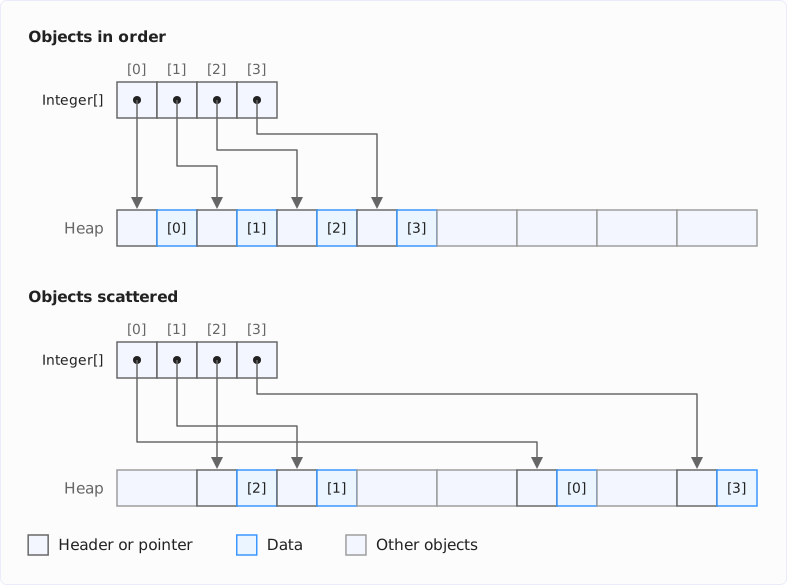
That’s why every benchmark runs once with the objects in the order in which they were created and once with a shuffled array – then every access jumps to a different place on the heap. To prevent a garbage collection from moving the objects during the measurement, the benchmarks get a heap that is large enough for the whole measurement.
The processor also keeps recently read data in its caches. On the M5 Pro on which I measured, each of the six fastest cores has an L1 data cache of 128 KB, and together they share an L2 cache of 16 MB. To show what happens when the data no longer fits into them, both variants run with one million, ten million, and one hundred million elements.
Scattered Objects
The diagram shows the runtimes with one hundred million elements, each without and with preview features. Shorter bars are better:
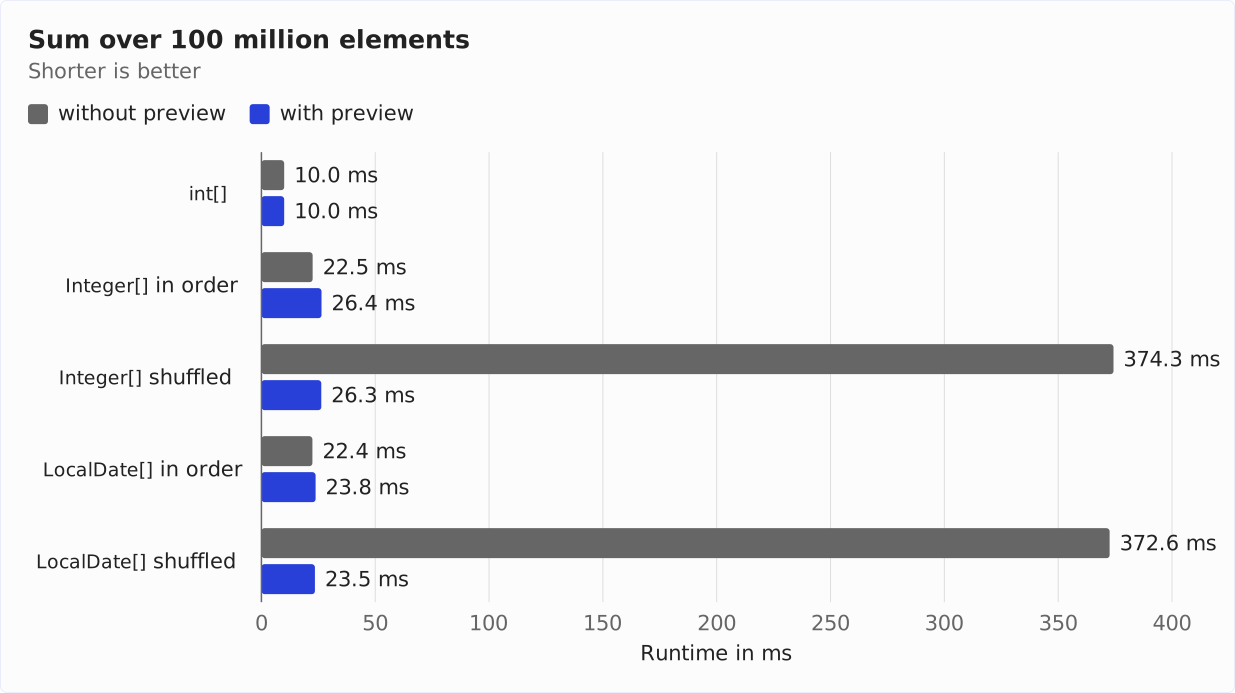
With preview features, it doesn’t matter in which order the objects were created: the flat array contains the values themselves, and the loop reads it in one go. Without preview features, everything depends on where the objects are. If they are scattered, the loop takes 14 to 16 times as long as over the flat array.
How much the scattered layout costs depends heavily on the size of the array. The diagram shows, for all three sizes, how much longer the loop over scattered objects takes without preview features than over the flat array:
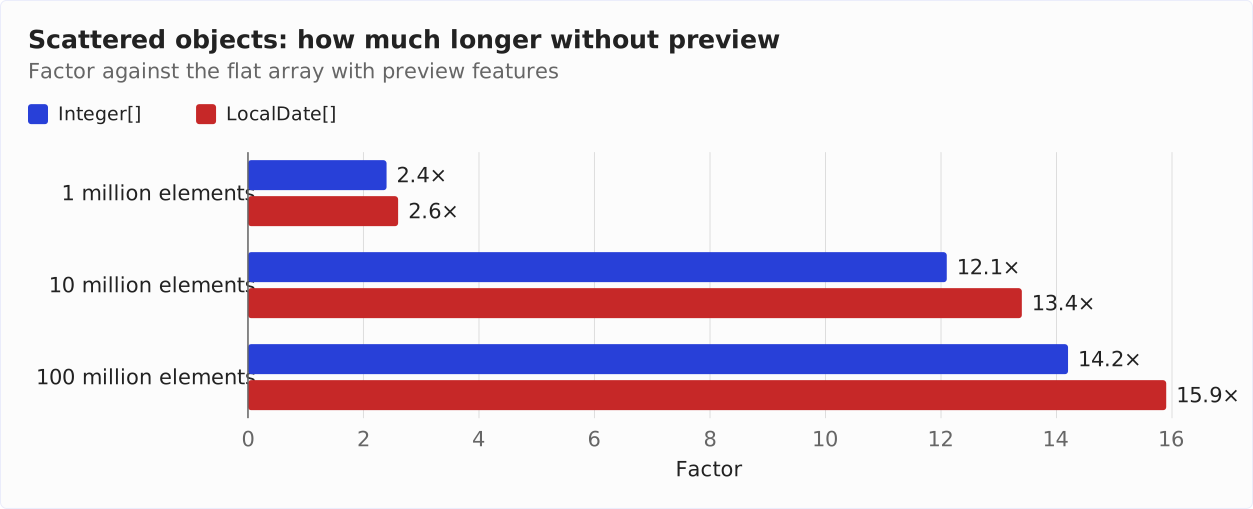
With one million elements, the data takes up 20 MB without preview features – 16 MB for the objects and 4 MB for the array with the pointers. A large part of it fits into the processor’s caches; the L2 cache alone holds 16 MB. Most jumps to a scattered location then hit the cache. With one hundred million elements, it’s 2 GB, and almost every object has to be loaded from main memory.
Objects in Order
If the objects lie one after another, the flat array is not faster than the array with pointers. The bars “in order” in the runtime diagram show this: the blue bar with preview features is slightly longer than the gray one without in each case – for LocalDate[], the loop takes 6% longer, for Integer[] even 17%.
This is due to the null marker. An Integer[] may contain null, and s0 += a[i] must then throw a NullPointerException. The compiled code therefore checks the null marker bit for every element, with additional instructions and a conditional jump per element. For a pointer, this check costs nothing: the JVM lets the processor intercept the access via a null pointer.
int[] remains the fastest: the loop takes less than half the time it takes over any other array. With one hundred million elements, the loop over it reads 400 MB – for the flat array, it’s 800 MB, for the array with pointers 2 GB.
Flat arrays make the runtime independent of where the objects lie. That pays off when the objects are scattered on the heap; if they lie one after another anyway, flat arrays gain nothing.
This changes as soon as the JVM can do without the null marker – see Measuring Null-Free Arrays Today.
Value Objects That Are Not Flattened
And what about the ValuePoint from the memory section, which the JVM cannot store flat? I compared it with IdentityPoint using the same benchmark setup, both with preview features. As a control, WideIdentityPoint(int x, int y, int z) is added, an ordinary record that, at 24 bytes, is just as large as a ValuePoint object. The runtimes for one hundred million points whose objects lie in order:
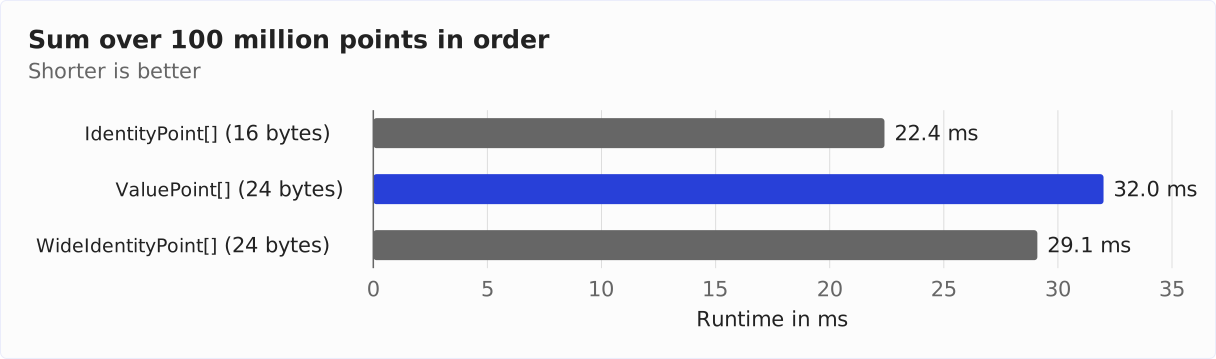
A value object that is not stored flat makes the loop slower than an ordinary record: with objects in order, it takes 43% longer. Over two-thirds of this is explained by the size – the equally large WideIdentityPoint is 30% slower than IdentityPoint. The rest is caused by the null checks: as with the flat Integer[], the compiled code explicitly checks for every ValuePoint whether it is null.
With scattered objects, all three are equally fast (372 to 376 ms), because almost every object comes from main memory anyway. It’s different with one million elements, which largely fit into the caches: there, the loop over the scattered ValuePoints takes almost 60% longer than over the IdentityPoints (964 instead of 608 µs).
So only what the JVM can store flat gets faster – and that is the same condition under which value objects save memory.
Migrating Your Own Classes – Checklist
As long as value objects are a preview feature, they don’t belong in production code. But you can already prepare your classes. A class is a good candidate if it represents immutable data and nobody needs to distinguish its instances. Abstract classes without state belong here as well: they shouldn’t force an identity on their subclasses.
Records meet the conditions out of the box, but still not every record should become a value record. A record without value remains an identity class, and that is still the right choice if code synchronizes on its instances or holds them in a WeakHashMap. Or if its components are too large for the JVM to store it flat: then a value record often takes up more memory than an ordinary one – whenever there is no padding byte free for the null marker – and loops over it become slower (see Measurement).
Before you add value to a class, you should check the following points:
- Public constructors: Does code rely on
newreturning a new, distinguishable object? With Valhalla,new Money(5) == new Money(5)istrue. That’s why the JDK deprecated the constructors of the wrapper classes years ago and recommends factory methods such asInteger.valueOf(). - Synchronization: If code synchronizes on instances of the class anywhere, it throws an
IdentityExceptionafter the conversion or no longer compiles. equals()andhashCode(): If the class doesn’t override them, both change their behavior. Override them before the conversion so that their result doesn’t depend on identity.- Weak references and caches: Libraries that hold objects in a
WeakHashMapor behind aWeakReferencefail with anIdentityException. One example is JOL (Java Object Layout) in version 0.17, which wraps every object it analyzes in aWeakReferenceand therefore cannot analyze value objects. - Serialization: A serializable value class that is not a record needs
writeReplace()andreadResolve(). - Deep reflection: Frameworks that set fields via reflection instead of calling the constructor fail on value objects.
- Constructors: If a constructor uses
thisbefore all fields are set, it no longer compiles and must be restructured – with preview features, this applies to all records as well. - Size: If the fields fit into 8 bytes together with a one-byte null marker, the JVM stores the objects flat in fields and arrays. If they are larger, they often take up more memory in mutable fields and arrays than before and make loops slower.
- Concrete types: Fields, arrays, and parameters of type
ObjectorTprevent flattening and scalarization. - Recompile: Classes that use value classes should be recompiled so that the value classes are listed in their
LoadableDescriptorsattribute.
Important for libraries: if a class is already final or abstract and all its fields are final – and this class is then converted to a value class – applications that use this class don’t need to be recompiled. They keep running, just without flattening, until they are recompiled (point 10). A concrete class without final, on the other hand, becomes implicitly final through value – subclasses derived from it then no longer load.
And one more warning: value objects don’t protect secret data. The result of == and System.identityHashCode() depends on the field values of a value object – anyone who applies both to other people’s objects can draw conclusions about their content.
What Comes Next for Valhalla
Value objects are the first of five feature sets listed on the project page. The table shows their status as of November 14, 2026:
| Feature set | JEP | Status |
|---|---|---|
| Value Objects | JEP 401, JEP 539 | integrated in Java 28 (preview) |
| Null-Restricted Storage | Draft 8316779 | Draft |
| Array Enhancements | – | no JEP |
| Unifying Primitives and Classes | JEP 402 | Draft |
| Parametric JVM | JEP 218 | Candidate, last updated in 2017 |
Null-Restricted Value Class Types
Next, the project page lists null-restricted storage, described in the draft Null-Restricted Value Class Types. These are supposed to let you declare a variable as Point!: it must then never be null. For such a variable, the JVM needs no null marker – and a Point(int x, int y) fits into 8 bytes. The JVM already computes these layouts today: NULL_FREE_ATOMIC_FLAT has 8 bytes for Point and 4 bytes instead of 8 for ShortPoint and Integer.
The ! is the current working syntax, but not yet fixed. A prototype that the Valhalla team presented in January 2026 now allows ! on any reference type, not just on value classes – explicitly as an intermediate state, not as the final version. A second draft, Null-Restricted and Nullable Types, additionally provides Foo? for types that deliberately allow null.
Measuring Null-Free Arrays Today
What null-free layouts bring can already be measured with Java 28. There is no syntax for Integer! yet, but the JVM can already create null-free arrays – via the JDK-internal class jdk.internal.value.ValueClass, which is only accessible with --add-exports java.base/jdk.internal.value=ALL-UNNAMED:
Integer[] integers = (Integer[]) ValueClass.newNullRestrictedAtomicArray(
    Integer.class, 100_000_000, 0);
The third argument, 0, is the value with which the JVM pre-fills all elements – a null-free array can’t start out with null, after all. I used this to extend the benchmark from the section Runtime (NullRestrictedArraySumBenchmark in the same repository). The diagram shows the values for one hundred million elements in order; without preview features, Point[] stands for the ordinary record IdentityPoint, with preview features for the ValuePoint:
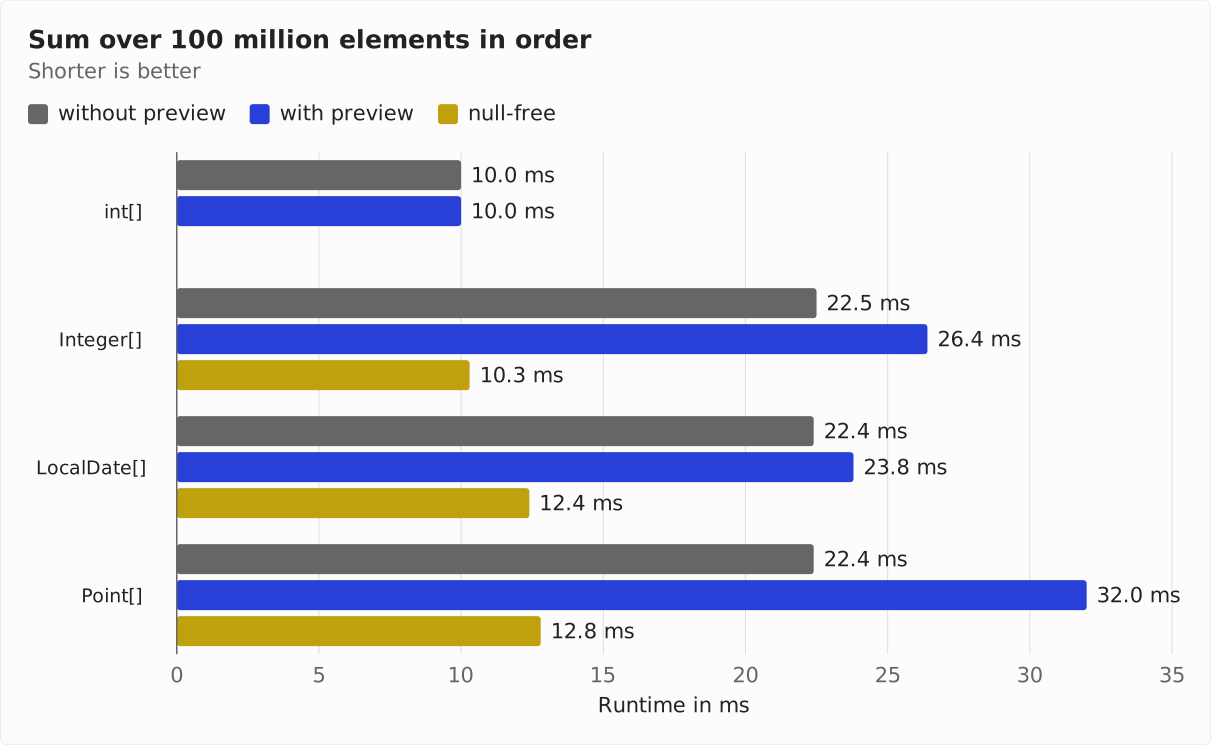
Without a null marker, the check for every element is gone, and the loops run almost twice to two and a half times as fast as over the nullable flat arrays. The null-free Integer[] takes up only 4 bytes per element and is as fast as int[]. And without a null marker, Point lies flat in the array with 8 bytes: the loop takes 12.8 instead of 32.0 ms – and is thus also faster than over the ordinary record with 22.4 ms.
Primitive Types and Generics
JEP 402 (Enhanced Primitive Boxing) is supposed to bring primitive types closer to reference types – e.g., by allowing List<int> instead of List<Integer>. At runtime, however, the values still lie in the list as Integer objects; the compiler boxes them when calling add() and get(), without Integer appearing in the code. And JEP 218 (Generics over Primitive Types) is supposed to specialize generic classes like List<T> for value classes, so that a T field can also lie flat.
Other Open Issues
The Vector API is also waiting for Valhalla. It has been an incubator feature since Java 16, in its twelfth round in Java 27. As of November 14, 2026, there was no JEP for Java 28 yet.
The atomicity problem from the section Null Marker and the 8-Byte Limit is still open (the JVM stores mutable fields and array elements flat only if it can write them in a single access – today, that means with at most 8 bytes). JEP 401 names two ways to larger flat fields: 16-byte atomic fields on hardware that supports them, or value classes that do without atomicity. The Valhalla team is betting on the second way, because value objects can exceed any limit for atomic accesses – that’s how Brian Goetz justifies it in his email “On atomicity and tearing”.
For doing without atomicity, the JDK already has the internal annotation jdk.internal.vm.annotation.LooselyConsistentValue, but no class in java.base carries it yet, and it has no counterpart at the language level.
Conclusion
- Value objects are objects without identity. With
--enable-preview, 30 JDK classes are value classes in Java 28, includingInteger,Optional, andLocalDate. You declare your own withvalue classorvalue record. ==compares value objects by their fields, recursively and bit by bit. For values,equals()remains the right comparison.- Without identity,
synchronized,wait()/notify(), weak references, and deep reflection no longer work. Serializable value classes that are not records needwriteReplace()andreadResolve(). - Constructors of value classes set all fields before calling
super(); the JVM enforces this with JEP 539. With preview features, this applies to all records – not just to value records. - The JVM stores value objects flat in mutable fields and arrays if they fit into 8 bytes together with a one-byte null marker, and keeps them in registers in compiled code. One million
LocalDates then take up 8 instead of 20 MB. - Flat arrays make loops faster when the objects are scattered on the heap: a loop over one hundred million
LocalDates created at scattered locations takes 23.5 instead of 373 ms with preview features. If the objects lie one after another anyway, the flat array is not faster. - If a value object together with its null marker doesn’t fit into 8 bytes, the JVM doesn’t store it flat. It then often takes up more memory than an ordinary object and makes loops slower: one million
Point(int x, int y)take up 28 instead of 20 MB, and the loop over them takes up to 59% longer.
I recommend that you try out value objects now with the early-access build and prepare your code with the checklist: equals() instead of ==, no synchronization on value-based classes, factory methods instead of public constructors. You should only convert once value objects are final – and then specifically the small classes that the JVM can store flat.
If you enjoyed this article, I’d appreciate a review on my ProvenExpert profile.