
For files, Java comes with two APIs: the package java.io from Java 1.0 and the package java.nio.file from Java 7. You can do most tasks with the newer API – with a single line from the class java.nio.file.Files.
The following program writes a string to a file and reads it back in:
Path file = Path.of("target/greeting.txt");
Files.writeString(file, "Grüße aus Java\n");
String text = Files.readString(file);
System.out.print(text);
Grüße aus JavaFiles.writeString() creates the file or overwrites it and writes the string into it, encoded as UTF-8. The text is German for “Greetings from Java”. Files.readString() reads the file back in. Both methods open and close the file themselves.
As soon as a file no longer fits into memory, or you want to process it line by line or write binary data, you need the classes Java uses to read and write data piece by piece: streams, readers, and writers.
This article is the map of the series on files in Java. It explains the concepts that all other parts presuppose and leads you, for each task, to the article that shows it in detail.
In this article, you will find out
- which call handles each of the most common file tasks,
- why Java has two file APIs and which one you should use for new code,
- how byte streams and character streams differ and why you nest streams inside each other,
- which class reads and writes text, bytes, primitive values, and objects,
- how to create, copy, move, and delete files and directories,
- when you need a
FileChannelinstead of a stream, - which exceptions occur when accessing files and how to close files reliably,
- which mistakes the articles of the series show and how to avoid them.
The Examples in This Article
You can find the complete code in the GitHub repository java-file-io, in the package eu.happycoders.overview. Each section with an example has its own class there with a main() method that produces the outputs shown.
The examples read the file files/server.log from the repository, a server log with five lines, and write to the directory target. The outputs come from macOS; messages from the operating system read differently on Windows.
The classes in the repository require Java 25 because they use the simplified main() method without String[] args. The listings in the article run on Java 11 and later – except for the console example with the class IO, which requires Java 25.
The Most Common Tasks at a Glance
The following table lists the call that handles each of the most common tasks. In it, path is a Path object that points to a file, dir is a Path object that points to a directory, target is a Path object that points to the target of a copy, and APPEND is the statically imported constant StandardOpenOption.APPEND. The link in the left column leads to the article that covers the task in detail:
| Task | Call |
|---|---|
| Read a text file into a string | Files.readString(path) |
| Read a text file into a list of lines | Files.readAllLines(path) |
| Process a text file line by line | Files.lines(path) |
| Read a binary file into a byte array | Files.readAllBytes(path) |
| Write a string to a file | Files.writeString(path, text) |
| Append text to a file | Files.writeString(path, text, APPEND) |
| Write a byte array to a file | Files.write(path, bytes) |
| Check whether a file exists | Files.exists(path) |
| Create a directory including its parent directories | Files.createDirectories(dir) |
| Copy a file | Files.copy(path, target) |
| Move or rename a file | Files.move(path, target) |
| Delete a file | Files.delete(path) |
| List a directory | Files.list(dir) |
| Get the working directory | Path.of("").toAbsolutePath() |
All calls except the last one are static methods of the class Files. The class Ch1Tasks in the repository executes them one after the other.
Files.lines() and Files.list() differ from the other methods: they return a stream that keeps the file or directory open until you close it. The section Reading Files shows what that looks like.
Two APIs: java.io and java.nio.file
The classes for files come from three stages of development, and all three are still part of the JDK today: java.io, NIO, and NIO.2. For paths and file operations, there are two APIs – File from java.io and Path with Files from NIO.2. At the end of this section, you will find out which one to use for new code.
What Was Added When
The following table shows which Java version brought which classes and methods for files. NIO stands for “New I/O”, NIO.2 for its second stage:
| Version | What was added |
|---|---|
| Java 1.0 | java.io with File, InputStream, OutputStream, FileInputStream, FileOutputStream, and RandomAccessFile |
| Java 1.1 | Reader and Writer for text, among them InputStreamReader, BufferedReader, BufferedWriter, and PrintWriter |
| Java 1.4 | NIO in the package java.nio: FileChannel and ByteBuffer |
| Java 7 | NIO.2 in the package java.nio.file: Path, Paths, and Files |
| Java 8 | Files.lines(), Files.list(), and Files.walk(), which return a stream, plus UncheckedIOException |
| Java 11 | Files.readString(), Files.writeString(), and Path.of() |
| Java 18 | UTF-8 as the default charset of all APIs to which you pass no charset (JEP 400) |
| Java 25 | the class java.lang.IO for input and output on the console |
The following diagram shows the three packages java.io, java.nio.file, and java.nio with their most important types and how they are connected. java.nio.file is in the middle because it connects the other two: a Path can be converted into a File and back, Files returns the streams and readers from java.io, and FileChannel.open() opens a channel to a Path. Outlined in dark blue is the API I recommend for new code, outlined in light blue are the classes that are still current, and outlined in gray is File, which has a successor in Path:
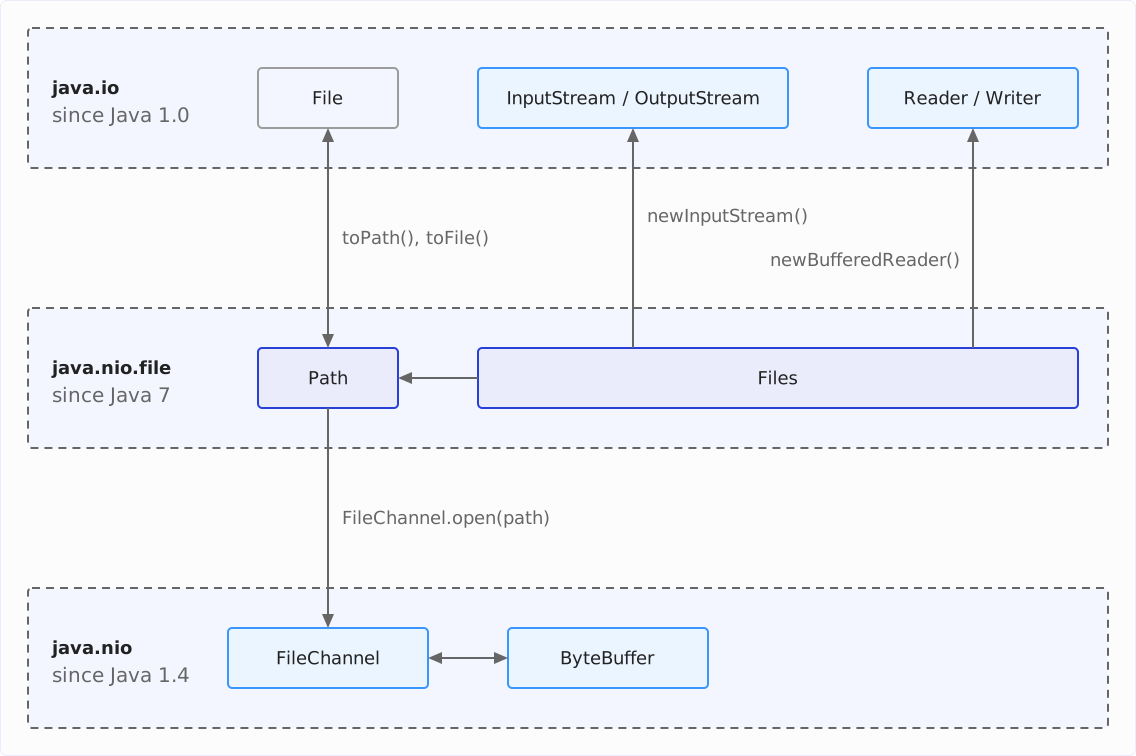
File and Path
Until Java 7, java.io.File was the only class that represented files and directories. Its name misleads beginners in particular, because it suggests that it represents only files.
NIO.2 splits this job: the interface java.nio.file.Path only describes the path, and the class Files performs all operations on it with its static methods – reading, writing, creating, copying, deleting.
The most important difference for your code lies in error handling. The following program tries to delete a file that does not exist and to list a directory that is actually a file – once with File, once with Files:
File file = new File("target/missing.txt");
boolean deleted = file.delete();
System.out.println("deleted = " + deleted);

Path path = Path.of("target/missing.txt");
try {
  Files.delete(path);
} catch (IOException e) {
  System.out.println(e);
}

File[] children = new File("files/server.log").listFiles();
System.out.println("children = " + children);

try (Stream<Path> entries = Files.list(Path.of("files/server.log"))) {
  System.out.println(entries.count());
} catch (IOException e) {
  System.out.println(e);
}
deleted = false
java.nio.file.NoSuchFileException: target/missing.txt
children = null
java.nio.file.NotDirectoryException: files/server.logFile.delete() reports the failure only with false, File.listFiles() only with null. You do not find out why it failed – and if you do not check the return value, you do not even notice that it failed. Files, on the other hand, throws an exception whose type names the reason: NoSuchFileException for the missing file, NotDirectoryException for the file that is not a directory.
In addition, Files can do what File cannot: create symbolic links (Files.createSymbolicLink()), read the owner and the POSIX permissions of a file (Files.getOwner() and Files.getPosixFilePermissions()), and move a file atomically (Files.move() with the option ATOMIC_MOVE). The method File.renameTo(), according to its Javadoc, may not be able to move a file between file systems, may not be atomic, and may fail if the target file already exists, depending on the operating system.
You switch between the two worlds with file.toPath() and path.toFile().
Which API Should You Use?
For new code, I recommend Path for paths and Files for all operations on files and directories. You create a File only with path.toFile() when an older API requires one.
However, almost every method of Files throws a checked IOException that you have to handle or pass on – even where File would simply have returned false.
This does not make the classes from java.io obsolete. NIO.2 also reads and writes via InputStream, Reader, and their relatives: Files.newInputStream() returns an InputStream, Files.newBufferedReader() a BufferedReader. Only File has a successor in Path.
The article on creating, copying, moving, and deleting files shows further differences between the two APIs.
The Stream Model: Bytes and Characters
In java.io, data flows as a so-called stream: a sequence of values that you read or write from front to back. Java distinguishes two kinds of streams, depending on what the values are – bytes or characters.
Byte Streams: InputStream and OutputStream
The abstract class InputStream reads bytes. Its method read() returns the next byte as an int between 0 and 255 – or -1 when the stream has ended. Its counterpart OutputStream writes bytes with write().
What the bytes mean does not matter to a byte stream. It transports an image just as well as a text file.
Character Streams: Reader and Writer
The abstract class Reader reads characters. Its method read() returns the next character as an int between 0 and 65,535 – or -1 at the end. Its counterpart Writer writes characters.
Between bytes and characters lies the character encoding (charset): it defines which bytes represent which character. In UTF-8, a “G” takes up one byte, a “ü” two.
The following program writes the German word “Grüße” (greetings) to a file and reads it twice: with a FileInputStream as bytes and with a FileReader as characters. Both print every value they read as a number:
Files.writeString(Path.of("target/greeting.txt"), "Grüße\n");

try (InputStream in = new FileInputStream("target/greeting.txt")) {
  int b;
  while ((b = in.read()) != -1) {
    System.out.print(b + " ");
  }
}
System.out.println();

try (Reader reader = new FileReader("target/greeting.txt", UTF_8)) {
  int c;
  while ((c = reader.read()) != -1) {
    System.out.print(c + " ");
  }
}
System.out.println();
71 114 195 188 195 159 101 10
71 114 252 223 101 10 The FileInputStream reads eight values, the FileReader six. “G” (71), “r” (114), “e” (101), and the line break (10) are the same in both lines. The “ü”, however, is stored in the file as the two bytes 195 and 188, and the FileReader decodes them into the character 252 – the Unicode value of “ü”. Likewise, 195 and 159 become the “ß” with the value 223.
If you read text with a different encoding than the one it was written with, you get wrong characters. That is why the example passes the charset UTF_8 explicitly. Without it, FileReader uses the default charset of the JVM, and that has been UTF-8 everywhere only since Java 18.
Nesting Streams
Many classes in java.io do not read from a file themselves but from another stream that you pass to their constructor. Each of these classes adds a capability:
InputStreamReaderdecodes the bytes of anInputStreaminto characters using a charset.BufferedReaderreads large blocks into a buffer and returns whole lines.DataInputStreamassembles bytes into primitive values such asintanddouble.ObjectInputStreamrestores objects that anObjectOutputStreamhas written.
On the writing side, the counterparts are called OutputStreamWriter, BufferedWriter, DataOutputStream, and ObjectOutputStream. In addition, there is PrintWriter, which formats text with println() and printf().
The following program nests three streams inside each other to read the file target/greeting.txt from the previous example line by line as text:
try (BufferedReader reader =
    new BufferedReader(
        new InputStreamReader(
            new FileInputStream("target/greeting.txt"), UTF_8))) {
  System.out.println(reader.readLine());
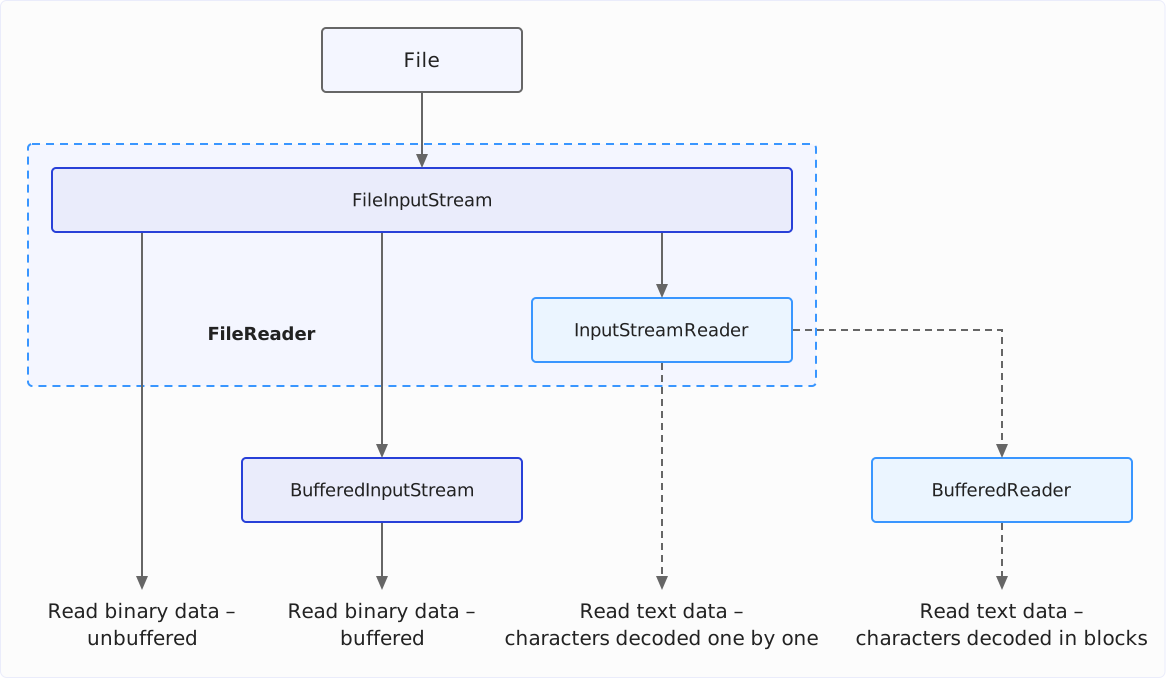
}GrüßeThe FileInputStream reads the bytes from the file, the InputStreamReader decodes them into characters, and the BufferedReader buffers the characters and returns the first line with readLine(). If you close the outer BufferedReader, it also closes the InputStreamReader and the FileInputStream.
The following diagram shows this chain together with the other ways to read a file: as binary data or as text, each unbuffered or buffered. Solid lines lead to binary data, dashed lines to text data. BufferedInputStream buffers the bytes without decoding them, and FileReader – in the dashed frame – combines FileInputStream and InputStreamReader in one class:
You rarely have to build this chain yourself. Files.newBufferedReader() creates it for you, with UTF-8 as the encoding if you do not specify one. Unlike the chain you build yourself, the BufferedReader created this way throws a MalformedInputException if the file contains bytes that do not match the encoding, instead of replacing them with “�”.
The Classes at a Glance
The following two tables arrange the classes of the byte and character streams by their role. Each class name leads to the article or section of the series that covers the class. The first table shows the byte streams:
| Role | Reading | Writing |
|---|---|---|
| Base class | InputStream | OutputStream |
| File | FileInputStream | FileOutputStream |
| Buffer | BufferedInputStream | BufferedOutputStream |
| Primitive values | DataInputStream | DataOutputStream |
| Objects | ObjectInputStream | ObjectOutputStream |
| Formatted text | ✗ | PrintStream |
PrintStream belongs to the byte streams even though it writes text: it encodes the text into bytes itself. System.out is also a PrintStream.
The second table shows the character streams:
| Role | Reading | Writing |
|---|---|---|
| Base class | Reader | Writer |
| File | FileReader | FileWriter |
| Buffer | BufferedReader | BufferedWriter |
| Bridge to the byte streams | InputStreamReader | OutputStreamWriter |
| Formatted text | ✗ | PrintWriter |
Reading Files
You can read a text file in three ways. Which one fits depends on how large the file is and how you process it:
- At once:
Files.readString()returns the content as aString,Files.readAllLines()as a list of lines. Both methods hold the entire file in memory. - Line by line as a stream:
Files.lines()reads the lines into memory only while the stream processes them. This way, you can also process files that are larger than your heap. - Line by line in a loop:
BufferedReader.readLine()returns the next line with each call. Here, too, the file enters memory piece by piece: theBufferedReaderreads it in blocks of 8,192 characters and holds only one block and the current line in memory. Choose this route if you prefer a loop to a stream or if the text does not come from a file but from anyReader– from the console or the network, for example.
The same distinction applies to binary files: Files.readAllBytes() reads the entire file into a byte array, Files.newInputStream() returns an InputStream from which you read it in blocks.
The following program uses Files.lines() to count the lines of the file files/server.log per log level. Because Files.lines() reads the lines piece by piece, this would work just as well with a file of many hundreds of gigabytes. The level starts at the 21st character of each line and is at most five characters long:
Path log = Path.of("files/server.log");
try (Stream<String> lines = Files.lines(log)) {
  Map<String, Long> levels = lines
      .map(line -> line.substring(20, 25).strip())
      .collect(groupingBy(level -> level, TreeMap::new, counting()));
  System.out.println(levels);
}
{ERROR=1, INFO=3, WARN=1}map() cuts the level out of each line, and the collector groupingBy() – statically imported from Collectors, like counting() – counts the lines per level in a sorted TreeMap.
The try-with-resources statement around the stream is essential. Files.lines() opens the file, and only close() closes it again. Without close(), the file would stay open; after many calls, the process runs out of file descriptors, and every further attempt to open a file fails with a FileSystemException (“Too many open files”).
The article How to Read a File in Java shows all ways with their encodings and a performance measurement. The articles on FileReader and BufferedReader cover these two classes in detail.
Writing Files
There are also three ways to write a file:
- At once:
Files.writeString()writes aString,Files.write()a list of lines or a byte array. - Line by line:
Files.newBufferedWriter()returns aBufferedWriterto which you write withwrite()andnewLine(). If you need formatted output withprintf(), you nest it in aPrintWriter. - Binary data in blocks:
Files.newOutputStream()returns anOutputStreamto which you write single bytes or whole byte arrays withwrite().
Without any further option, all these methods create the file if it does not exist yet and overwrite it if it does. With StandardOpenOption.APPEND, they append to an existing file.
The following program writes the line count per log level from the previous section to a file – the level left-aligned in a width of five characters, followed by the count:
Map<String, Long> levels =
    new TreeMap<>(Map.of("ERROR", 1L, "INFO", 3L, "WARN", 1L));

Path report = Path.of("target/report.txt");
try (PrintWriter writer = new PrintWriter(Files.newBufferedWriter(report))) {
  levels.forEach((level, count) -> writer.printf("%-5s %d%n", level, count));
}
System.out.print(Files.readString(report));
ERROR 1
INFO 3
WARN 1PrintWriter has no constructor that accepts a Path. That is why the example nests the BufferedWriter from Files.newBufferedWriter() in a PrintWriter.
PrintWriter does not throw an IOException. Only its method checkError() tells you whether a write operation failed.
The article Java Write to File shows all ways with a performance measurement. The articles on FileWriter and PrintWriter cover these two classes in detail.
Paths, Files, and Directories
A Path describes the way to a file or directory – absolute like /var/log/system.log or relative like files/server.log. Java resolves a relative path against the working directory of the process.
You build paths with Path.of() and resolve(), not by string concatenation. Both methods insert the separator of the operating system – / on Linux and macOS, \ on Windows. The article on file and directory names in Java shows how that works and how absolute, relative, and canonical paths differ.
The static methods of the class Files perform all operations on files and directories. The following table assigns them to the tasks; the link in the left column leads to the section that shows the methods:
| Task | Methods of Files |
|---|---|
| Check existence | exists(), notExists() |
| Create a file | createFile() |
| Create a directory | createDirectory(), createDirectories() |
| Create a temporary file | createTempFile(), createTempDirectory() |
| Copy | copy() |
| Move and rename | move() |
| Delete | delete(), deleteIfExists() |
| List a directory | list(), newDirectoryStream() |
| Search a directory tree | walk(), walkFileTree(), find() |
Files.delete() does not delete a directory that still contains entries; instead, it throws a DirectoryNotEmptyException. The article on creating, copying, moving, and deleting files shows how to delete or copy a directory together with its contents.
Binary and Structured Data
For data that is not text, java.io has two pairs of streams:
DataOutputStreamandDataInputStreamwrite and read primitive values and strings in a fixed binary format. You have to read in the same order in which you wrote – the file itself does not say which value is anintand which adouble. The article onDataOutputStreamandDataInputStreamshows what that looks like.ObjectOutputStreamandObjectInputStreamwrite and read whole objects including the objects they refer to. This serialization works for classes that implement the interfaceSerializable.
However, you should never read serialized data from a source you do not trust without a filter. The reason: the data determines which classes your application instantiates while reading. Any serializable class on the classpath can be one of them, and many of them execute code while being deserialized – code that attackers can exploit for their own purposes with crafted data. The article on serialization in Java shows how deserialization filters have limited this since Java 9.
Random Access, Channels, and Memory-Mapped Files
A stream reads and writes from front to back. If, on the other hand, you want to jump to a particular position in a file, you need one of the following two classes:
FileChannel(since Java 1.4) reads and writes at any position. It does not work with single bytes but with aByteBuffer. Withmap(), it maps a file into memory – a so-called memory-mapped file – and withlock(), it locks a file or a part of it against other processes.RandomAccessFile(since Java 1.0) jumps to a position withseek()and reads or writes bytes and primitive values there.
For new code, use FileChannel: you open it with FileChannel.open() directly from a Path, and only it can map and lock files. RandomAccessFile accepts only a file name as a String or a File. The class pays off where you read or write single primitive values at a few positions and the detour via a ByteBuffer is not worth the effort.
The article on FileChannel, memory-mapped I/O, and file locks shows how to read, write, map, and lock files with a FileChannel. The article on ByteBuffer explains how a ByteBuffer works with position, limit, flip(), and compact().
Closing Files and Handling IOException
Every file that your program opens occupies a file descriptor of the operating system until the program closes it again. The number of descriptors per process is limited.
Methods such as Files.readString() and Files.writeString() close the file themselves. If, however, a method returns an object that keeps a file or a directory open, you have to close this object yourself: every InputStream, OutputStream, Reader, and Writer as well as every stream from Files.lines(), Files.list(), and Files.walk(). The usual way is the try-with-resources statement (since Java 7) – it closes the resource even if an exception occurs.
Almost every operation on files can throw an IOException. The methods from Files throw subclasses whose names state the reason:
NoSuchFileExceptionif the file or a directory on the path does not exist,AccessDeniedExceptionif the permissions are not sufficient,FileAlreadyExistsExceptionif a file to be created already exists,NotDirectoryExceptionandDirectoryNotEmptyExceptionfor directories.
All these exceptions are subclasses of FileSystemException. Unlike the methods from Files, the streams, readers, and writers from java.io throw the same FileNotFoundException both for a missing file and for missing permissions; only its message states the reason.
The following program reads a file that does not exist, a directory instead of a file, and a file that is encoded in ISO-8859-1 instead of UTF-8:
try {
  Files.readString(Path.of("files/missing.log"));
} catch (IOException e) {
  System.out.println(e);
}

try {
  Files.readString(Path.of("files"));
} catch (IOException e) {
  System.out.println(e);
}

Path latin1 = Path.of("target/latin1.txt");
Files.writeString(latin1, "line 1\nGrüße\nline 3\n", ISO_8859_1);
try (Stream<String> lines = Files.lines(latin1)) {
  lines.forEach(System.out::println);
} catch (UncheckedIOException e) {
  System.out.println(e);
}
java.nio.file.NoSuchFileException: files/missing.log
java.io.IOException: Is a directory
java.io.UncheckedIOException: java.nio.charset.MalformedInputException: Input length = 1For the missing file, Files.readString() throws a NoSuchFileException. For the directory, there is no subclass of its own; here, the method throws a plain IOException with the message of the operating system.
The third error only occurs while the stream reads the lines – in forEach(). The methods of a stream do not declare any checked exceptions, so Files.lines() wraps the IOException in an UncheckedIOException. The trigger is the “ü”. ISO-8859-1 stores it as a single byte with the value 252. Without a charset, however, Files.lines() reads UTF-8, and in UTF-8, this byte is not a valid character.
Not Only Files: Console and Other Sources
The abstractions from java.io apply not only to files. System.in is an InputStream, System.out a PrintStream, and a Socket provides its data via getInputStream() and getOutputStream(). A ByteArrayInputStream reads from a byte array, a StringReader from a String.
If you write a method so that it accepts a Reader or InputStream instead of a Path, it works with all these sources. In a unit test, you can then pass it a StringReader, for example, instead of a file.
The class java.lang.IO, available since Java 25, is not to be confused with the package java.io. It prints to the console with println() and reads a line with readln(). Because it is in the package java.lang, you do not need an import.
The following program asks for a name and prints a greeting with this name:
void main() {
  String name = IO.readln("Name: ");
  IO.println("Hallo, " + name + "!");
}
Name: Sven
Hallo, Sven!With the simplified main() method from Java 25, this program needs no class declaration.
Common Mistakes
The following mistakes occur frequently when working with files. The link at the end of each item leads to the details:
- Putting paths together by string concatenation: A hard-coded
/or\fits only one operating system. UsePath.of()andresolve()instead – they insert the correct separator automatically (file and directory names in Java). - Leaving the character encoding to the default: Up to and including Java 17, the default charset depended on the operating system and the language settings; on Windows in the US and Western Europe, it was usually Windows-1252. Only since Java 18 has it been UTF-8 everywhere. If your code can run on an older version, always specify the charset explicitly (How to Read a File in Java).
- Not closing the stream from
Files.lines(),Files.list(), orFiles.walk(): Each of these streams keeps a file or a directory open, and withoutclose(), the process eventually runs out of file descriptors. So open the stream in a try-with-resources statement – it closes the stream automatically, even if an exception occurs (listing directory contents). - Not closing a writer: Whatever is still in its buffer then never reaches the file. Open the writer in a try-with-resources statement, too – when it is closed, it writes its buffer to the file (
FileWriter). - Reading a large file with
Files.readString()orFiles.readAllLines(): Both methods hold the entire file in the heap.Files.lines()or aBufferedReader, on the other hand, read it line by line (How to Read a File in Java). - Ignoring the return value of
File.delete()orFile.mkdir(): Both report a failure only withfalse. The newer methodsFiles.delete()andFiles.createDirectory(), on the other hand, throw an exception that states the reason (FileandPath). - Reading serialized data from untrusted sources without a filter: With crafted data, attackers can execute code on your server while it is being read. A deserialization filter defines which classes may be created (serialization in Java).
Summary
Java has two APIs for files: java.io from Java 1.0 and NIO.2 in the package java.nio.file from Java 7. For new code, I recommend Path for paths and the static methods of Files for all operations. Unlike java.io.File, they report errors with an exception whose type states the reason.
The streams from java.io are not obsolete, though – NIO.2 also reads and writes via them, for example with Files.newInputStream() or Files.newBufferedReader(). The stream model consists of three parts:
- Byte streams (
InputStreamandOutputStream) transport bytes without interpreting them. - Character streams (
ReaderandWriter) transport text. Between bytes and text lies the character encoding, and you should always specify it where your code can run on Java 17 or older. Only since Java 18 has it been UTF-8 by default. - Nested streams add capabilities to the inner stream: buffering, lines, primitive values, objects, formatted text.
You read and write small files with one line, for example with Files.readString() and Files.writeString(). You process large files line by line with Files.lines() or a BufferedReader and write them with a BufferedWriter or PrintWriter. You close every stream, reader, and writer with try-with-resources.
Where you continue reading depends on your task:
- Reading text and bytes: How to Read a File in Java,
FileReader, andBufferedReader - Writing text and bytes: Java Write to File,
FileWriter, andPrintWriter - Paths and directories: File and Directory Names in Java, working directory, creating, copying, moving, and deleting files, and listing directory contents
- Binary data and objects:
DataOutputStreamandDataInputStreamand serialization in Java - Random access: FileChannel, memory-mapped I/O, and file locks and
ByteBuffer
If this article has helped you, I would greatly appreciate a positive review on my ProvenExpert profile. Your feedback helps me improve my content and motivates me to write new informative articles.