
On September 14, 2021, the time had finally come: after the five “interim versions” Java 12 to 16, each of which was maintained for only half a year, Java 17 was published as the next Long-Term Support (LTS) release.
Oracle offers Premier Support for Java 17 until September 2026 and Extended Support until September 2029. The free updates of Oracle JDK 17 ended in October 2024; since then, they have been released under the paid OTN license. Free updates are still available from other distributions – Eclipse Temurin, for example, until at least October 2027.
In Java 17, 14 JDK Enhancement Proposals have been implemented. I have sorted the changes by relevance for daily programming work. The article starts with enhancements to the language and changes to the module system. Following are various enhancements to the JDK class library, performance improvements, new preview and incubator features, deprecations and deletions, and in the end, other changes that one comes into contact with relatively rarely in daily work.
Sealed Classes
The big innovation in Java 17 (besides long-term support) is sealed classes (and interfaces).
Due to the large scope of the topic, you’ll read what sealed classes are, how exactly they work, and why we need them in a separate article: Sealed Classes in Java
Strongly Encapsulate JDK Internals
In Java 9, the module system (Project Jigsaw) was introduced, especially to modularize code better and increase the Java platform’s security.
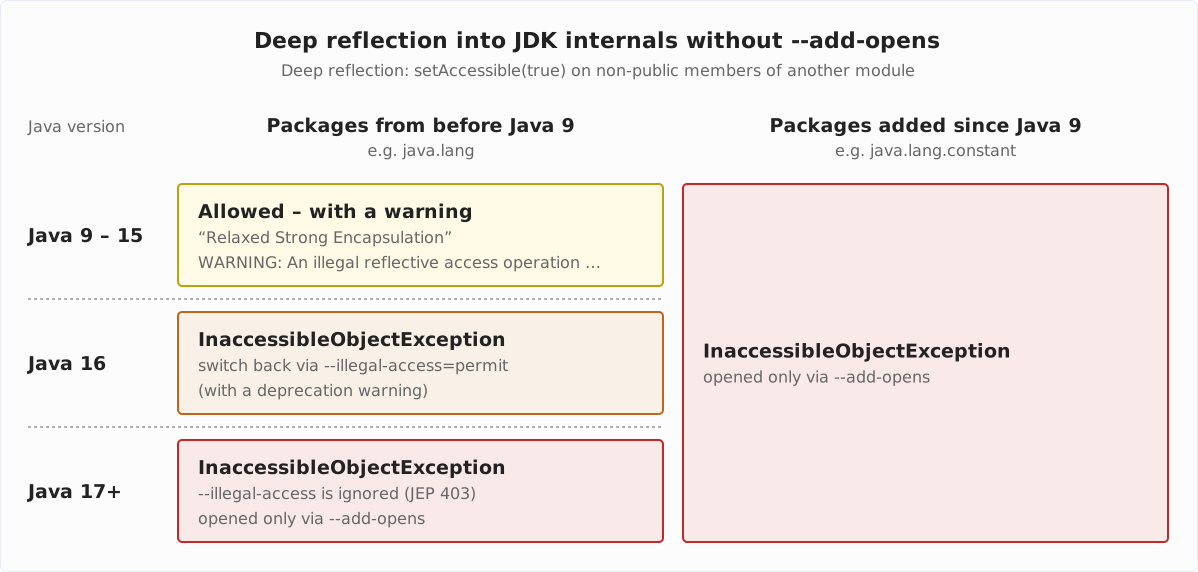
The following overview shows how deep-reflection access to JDK internals changed from Java 9 to Java 17; the three sections that follow walk through the stages in detail:
Before Java 16: Relaxed Strong Encapsulation
Until Java 16, this had little impact on existing code, as the JDK developers provided the so-called “Relaxed Strong Encapsulation” mode for a transition period.
This mode allowed access via deep reflection to non-public classes and methods of those JDK class library packages that existed before Java 9 without configuration changes.
The following example extracts the bytes of a String by reading its private value field:
public class EncapsulationTest {
  public static void main(String[] args) throws ReflectiveOperationException {
    byte[] value = getValue("Happy Coding!");
    System.out.println(Arrays.toString(value));
  }

  private static byte[] getValue(String string) throws ReflectiveOperationException {
    Field VALUE = String.class.getDeclaredField("value");
    VALUE.setAccessible(true);
    return (byte[]) VALUE.get(string);
  }
}
If we run this program with Java 9 to 15, we get the following output:
$ java EncapsulationTest.java
WARNING: An illegal reflective access operation has occurred
WARNING: Illegal reflective access by EncapsulationTest (file:/.../EncapsulationTest.java) to field java.lang.String.value
WARNING: Please consider reporting this to the maintainers of EncapsulationTest
WARNING: Use --illegal-access=warn to enable warnings of further illegal reflective access operations
WARNING: All illegal access operations will be denied in a future release
[72, 97, 112, 112, 121, 32, 67, 111, 100, 105, 110, 103, 33]
We see some warnings, but then we get the bytes we requested.
Deep reflection on new packages, however, was not allowed by default and had to be explicitly allowed via “--add-opens” on the command line since the introduction of the module system.
The following example attempts to instantiate the ConstantDescs class from the java.lang.constant package added in Java 12 (i.e., after the introduction of the module system) via its private constructor:
Constructor<ConstantDescs> constructor = ConstantDescs.class.getDeclaredConstructor();
constructor.setAccessible(true);
ConstantDescs constantDescs = constructor.newInstance();
The program terminates with the following error message:
$ java ConstantDescsTest.java
Exception in thread "main" java.lang.reflect.InaccessibleObjectException: Unable to make private java.lang.constant.ConstantDescs() accessible: module java.base does not "opens java.lang.constant" to unnamed module @6c3f5566
    at java.base/java.lang.reflect.AccessibleObject.checkCanSetAccessible(AccessibleObject.java:361)
    at java.base/java.lang.reflect.AccessibleObject.checkCanSetAccessible(AccessibleObject.java:301)
    at java.base/java.lang.reflect.Constructor.checkCanSetAccessible(Constructor.java:189)
    at java.base/java.lang.reflect.Constructor.setAccessible(Constructor.java:182)
        at ConstantDescsTest.main(ConstantDescsTest.java:7)
To make the program runnable, we need to open the new package for deep reflection via --add-opens:
$ java --add-opens java.base/java.lang.constant=ALL-UNNAMED ConstantDescsTest.javaThe code then runs through without errors or warnings.
Since Java 16: Strong Encapsulation by Default + Optional Relaxed Strong Encapsulation
In Java 16, the default mode was changed from “Relaxed Strong Encapsulation” to “Strong Encapsulation”. Since then, access to pre-Java 9 packages also had to be explicitly allowed.
If we run the first example on Java 16 without explicitly allowing access, we get the following error message:
$ java EncapsulationTest.java
Exception in thread "main" java.lang.reflect.InaccessibleObjectException: Unable to make field private final byte[] java.lang.String.value accessible: module java.base does not "opens java.lang" to unnamed module @62fdb4a6
    at java.base/java.lang.reflect.AccessibleObject.checkCanSetAccessible(AccessibleObject.java:357)
    at java.base/java.lang.reflect.AccessibleObject.checkCanSetAccessible(AccessibleObject.java:297)
    at java.base/java.lang.reflect.Field.checkCanSetAccessible(Field.java:177)
    at java.base/java.lang.reflect.Field.setAccessible(Field.java:171)
        at EncapsulationTest.getValue(EncapsulationTest.java:12)
        at EncapsulationTest.main(EncapsulationTest.java:6)
However, Java 16 still offered a workaround: Via VM option --illegal-access=permit, it was possible to switch back to “Relaxed Strong Encapsulation”:
$ java --illegal-access=permit EncapsulationTest.java
Java HotSpot(TM) 64-Bit Server VM warning: Option --illegal-access is deprecated and will be removed in a future release.
WARNING: An illegal reflective access operation has occurred
WARNING: Illegal reflective access by EncapsulationTest (file:/.../EncapsulationTest.java) to field java.lang.String.value
WARNING: Please consider reporting this to the maintainers of EncapsulationTest
WARNING: Use --illegal-access=warn to enable warnings of further illegal reflective access operations
WARNING: All illegal access operations will be denied in a future release
[72, 97, 112, 112, 121, 32, 67, 111, 100, 105, 110, 103, 33]
Since Java 17: Exclusively Strong Encapsulation
Per JDK Enhancement Proposal 403, this option is removed in Java 17. The --illegal-access VM option now leads to a warning, and access to String.value is no longer possible by default:
java --illegal-access=permit EncapsulationTest.java
OpenJDK 64-Bit Server VM warning: Ignoring option --illegal-access=permit; support was removed in 17.0
Exception in thread "main" java.lang.reflect.InaccessibleObjectException: Unable to make field private final byte[] java.lang.String.value accessible: module java.base does not "opens java.lang" to unnamed module @3e77a1ed
    at java.base/java.lang.reflect.AccessibleObject.checkCanSetAccessible(AccessibleObject.java:354)
    at java.base/java.lang.reflect.AccessibleObject.checkCanSetAccessible(AccessibleObject.java:297)
    at java.base/java.lang.reflect.Field.checkCanSetAccessible(Field.java:178)
    at java.base/java.lang.reflect.Field.setAccessible(Field.java:172)
        at EncapsulationTest.getValue(EncapsulationTest.java:12)
        at EncapsulationTest.main(EncapsulationTest.java:6)
If you want to use deep reflection from Java 17 onwards, you now have to explicitly allow it with --add-opens:
$ java --add-opens java.base/java.lang=ALL-UNNAMED EncapsulationTest.java
[72, 97, 112, 112, 121, 32, 67, 111, 100, 105, 110, 103, 33]
The program runs, and we no longer see any warnings – the long transition period since Java 9 is now complete.
Add java.time.InstantSource
The java.time.Clock class is handy for writing tests that check time-dependent functionality.
For example, when Clock is injected into the application classes via dependency injection, it can be mocked into tests, or a fixed time for test execution can be set using Clock.fixed().
Since Clock provides the getZone() method, you always have to think about which concrete time zone to instantiate a Clock object with.
To allow alternative, time zone-independent time sources, the interface java.time.InstantSource was extracted from Clock in Java 17. The new interface only provides the methods instant() and millis() for querying the time, where millis() is already implemented as a default method.
The Timer class in the following example uses InstantSource to determine the start and end times of a Runnable execution and uses those times to calculate the duration of execution:
public class Timer {
  private final InstantSource instantSource;

  public Timer(InstantSource instantSource) {
    this.instantSource = instantSource;
  }

  public Duration measure(Runnable runnable) {
    Instant start = instantSource.instant();
    runnable.run();
    Instant end = instantSource.instant();
    return Duration.between(start, end);
  }
}
In production, we instantiate Timer with InstantSource.system(), which returns the system time without a time zone (for tests, there is also InstantSource.fixed(Instant)):
Timer timer = new Timer(InstantSource.system());We can test the measure() method by mocking InstantSource, having its instant() method return two fixed values, and comparing the return value of measure() with the difference of these values:
@Test
void shouldReturnDurationBetweenStartAndEnd() {
  InstantSource instantSource = mock(InstantSource.class);
  when(instantSource.instant())
      .thenReturn(Instant.ofEpochMilli(1_640_033_566_000L))
      .thenReturn(Instant.ofEpochMilli(1_640_033_567_750L));

  Timer timer = new Timer(instantSource);
  Duration duration = timer.measure(() -> {});

  assertThat(duration, is(Duration.ofMillis(1_750)));
}
There is no JEP for this change; it is tracked in the bug tracker under JDK-8266846.
Hex Formatting and Parsing Utility
To print hexadecimal numbers, we could previously use the toHexString() method of the Integer, Long, Float, and Double classes – or String.format(). The following code shows a few examples:
System.out.println(Integer.toHexString(1_000));
System.out.println(Long.toHexString(100_000_000_000L));
System.out.println(Float.toHexString(3.14F));
System.out.println(Double.toHexString(3.14159265359));

System.out.println(
    "%x - %x - %a - %a".formatted(1_000, 100_000_000_000L, 3.14F, 3.14159265359));
The code produces the following output:
3e8
174876e800
0x1.91eb86p1
0x1.921fb54442eeap1
3e8 - 174876e800 - 0x1.91eb86p1 - 0x1.921fb54442eeap1
We could parse hexadecimal numbers with their respective counterparts:
Integer.parseInt("3e8", 16);
Long.parseLong("174876e800", 16);
Float.parseFloat("0x1.91eb86p1");
Double.parseDouble("0x1.921fb54442eeap1");
Java 17 provides the new class java.util.HexFormat to render and parse hexadecimal numbers using a unified API. HexFormat supports all primitive numbers (int, byte, char, long, short) and byte arrays – but no floating point numbers.
Here is an example of conversions to hexadecimal numbers:
HexFormat hexFormat = HexFormat.of();

System.out.println(hexFormat.toHexDigits('A'));
System.out.println(hexFormat.toHexDigits((byte) 10));
System.out.println(hexFormat.toHexDigits((short) 1_000));
System.out.println(hexFormat.toHexDigits(1_000_000));
System.out.println(hexFormat.toHexDigits(100_000_000_000L));
System.out.println(hexFormat.formatHex(new byte[] {1, 2, 3, 60, 126, -1}));
The output is:
0041
0a
03e8
000f4240
000000174876e800
0102033c7eff
It is noticeable that the output is always preceded by zeros.
We can adjust the output, for example, as follows:
HexFormat hexFormat = HexFormat.ofDelimiter(" ").withPrefix("0x").withUpperCase();ofDelimiter()sets a delimiter for formatting byte arrays.withPrefix()defines a prefix – but only for byte arrays!withUpperCase()switches the output to uppercase letters.
The output is now:
0041
0A
03E8
000F4240
000000174876E800
0x01 0x02 0x03 0x3C 0x7E 0xFF
The leading zeros cannot be removed.
We can parse integral numbers as follows:
int i = HexFormat.fromHexDigits("F4240");
long l = HexFormat.fromHexDigitsToLong("174876E800");
Corresponding methods for char, byte, and short do not exist.
Byte arrays can be parsed, for example, as follows:
HexFormat hexFormat = HexFormat.ofDelimiter(" ").withPrefix("0x").withUpperCase();
byte[] bytes = hexFormat.parseHex("0x01 0x02 0x03 0x3C 0x7E 0xFF");
There are other methods, e.g., to parse only a substring. You can find complete documentation in the HexFormat JavaDoc.
There is no JEP for this change; it is tracked in the bug tracker under JDK-8251989.
Context-Specific Deserialization Filters
Deserialization of objects poses a significant security risk. Malicious attackers can construct objects via the data stream to be deserialized, via which they can ultimately execute arbitrary code in arbitrary classes available on the classpath.
Java 9 introduced deserialization filters, i.e., the ability to specify which classes may (or may not) be deserialized.
Until now, there were two ways to define deserialization filters:
- Per
ObjectInputStream.setObjectInputFilter()for each deserialization separately. - System-wide via system property
jdk.serialFilteror security property of the same name in the fileconf/security/java.security.
These variants are not satisfactory for complex applications, especially those with third-party libraries that also contain deserialization code. For example, deserialization in third-party code cannot be configured via ObjectInputStream.setObjectInputFilter() (unless you change the third-party source code), but only globally.
JDK Enhancement Proposal 415 makes it possible to set deserialization filters context-specifically, e.g., for a specific thread or based on the call stack for a particular class, module, or third-party library.
The configuration of the filters is not easy and is beyond the scope of this article. You can find details in the JEP linked above.
JDK Flight Recorder Event for Deserialization
As of Java 17, it is also possible to monitor the deserialization of objects via JDK Flight Recorder (JFR).
Deserialization events are disabled by default and must be enabled using the jdk.Deserialization event identifier in the JFR configuration file (see the article linked below for an example).
If a deserialization filter is enabled, the JFR event indicates whether the deserialization was executed or rejected.
You can find more detailed information and an example in the article “Monitoring Deserialization to Improve Application Security”.
The Flight Recorder events for deserialization are not part of the above JEP; they are tracked in the bug tracker under JDK-8261160.
Enhanced Pseudo-Random Number Generators
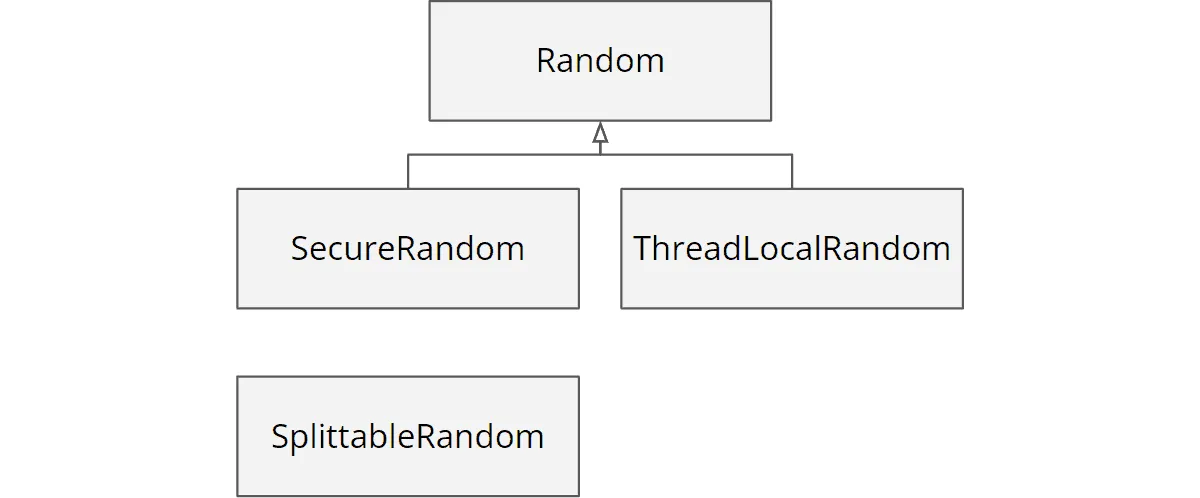
Until now, it was cumbersome to exchange the random number-generating classes Random and SplittableRandom in an application (or even to replace them by other algorithms) although they offer a mostly matching set of methods (e.g. nextInt(), nextDouble(), and stream-generating methods like ints() and longs()).
The class hierarchy used to look like this:
Through JDK Enhancement Proposal 356, Java 17 introduced a framework of interfaces inheriting from each other for the existing algorithms and new algorithms so that the concrete algorithms are easily interchangeable in the future:
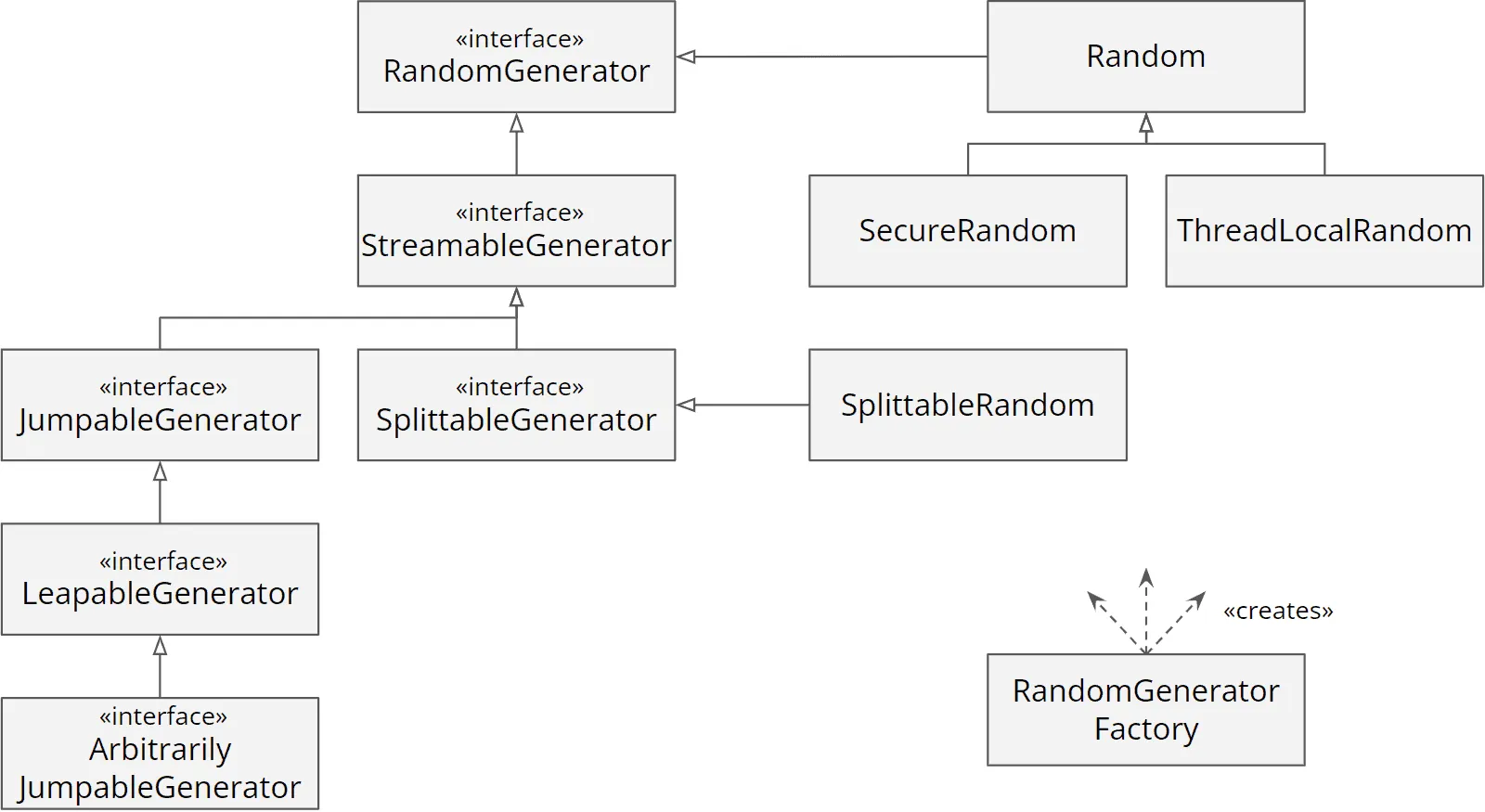
The methods common to all random number generators like nextInt() and nextDouble() are defined in RandomGenerator. So if you only need these methods, you should always use this interface in the future.
Besides RandomGenerator, the framework defines the interfaces StreamableGenerator (returns streams of generators via rngs()) and SplittableGenerator (can be split into independent generators via split() – previously, only SplittableRandom could do that) as well as three types for skipping random numbers:
JumpableGenerator: provides methods to skip a large number of random numbers (e.g., 264).LeapableGenerator: provides methods to skip a very large number of random numbers (e.g., 2128).ArbitrarilyJumpableGenerator: offers additional methods to skip an arbitrary number of random numbers.
In addition, duplicated code was eliminated from the existing classes, and code was extracted into non-public abstract classes (not visible in the class diagram) to make it reusable for future implementations of random number generators.
In the future, new random number generators can be added via the Service Provider Interface (SPI) and be instantiated via RandomGeneratorFactory.
Performance
Java 17 brings asynchronous logging, a long-overdue performance improvement to the Unified JVM logging system introduced in Java 9.
Unified Logging Supports Asynchronous Log Flushing
Asynchronous logging is a feature that all Java logging frameworks support. Log messages are first written to a queue by the application thread, and a separate I/O thread then forwards them to the configured output (console, file, or network).
This way, the application thread does not have to wait for the I/O subsystem to process the message.
As of Java 17, you can enable asynchronous logging for the JVM itself. This is done via the following VM option:
-Xlog:async
The logging queue is limited to a fixed size. If the application sends more log messages than the I/O thread can handle, the queue fills up. It then discards further messages; the JVM later reports how many in the log (“… messages dropped due to async logging”).
You can adjust the size of the queue via the following VM option:
-XX:AsyncLogBufferSize=<Bytes>
There is no JEP for this change; it is tracked in the bug tracker under JDK-8229517.
Preview and Incubator Features
Even though Java 17 is a Long-Term Support (LTS) release, it contains preview and incubator features, some of which only became production-ready years later (Pattern Matching for switch in Java 21, the Foreign Function & Memory API in Java 22) and some of which are still in the incubator stage today (the Vector API). So if you only use LTS releases, you had to wait at least until Java 21 to use these features.
Pattern Matching for switch (Preview)
Java 16 introduced “Pattern Matching for instanceof”, eliminating the need for explicit casts after instanceof checks. This allows for code such as the following:
if (obj instanceof String s) {
  if (s.length() > 5) {
    System.out.println(s.toUpperCase());
  } else {
    System.out.println(s.toLowerCase());
  }
} else if (obj instanceof Integer i) {
  System.out.println(i * i);
}
Through JDK Enhancement Proposal 406, checking whether an object is an instance of a particular class can also be written as a switch statement (or expression).
Pattern Matching for switch Statements
Here is the example from above rewritten into a switch statement:
switch (obj) {
  case String s -> {
    if (s.length() > 5) {
      System.out.println(s.toUpperCase());
    } else {
      System.out.println(s.toLowerCase());
    }
  }

  case Integer i -> System.out.println(i * i);

  default -> {}
}
It is noticeable that the default case must be specified – in this case with an empty code block, since an action is to be performed only for String and Integer.
The code becomes much more readable if we combine the case and if expressions by a logical “and” (this is called a “guarded pattern”):
switch (obj) {
  case String s && s.length() > 5 -> System.out.println(s.toUpperCase());
  case String s                   -> System.out.println(s.toLowerCase());

  case Integer i                  -> System.out.println(i * i);

  default -> {}
}
It is essential that a so-called “dominating pattern” must follow a “dominated pattern”. In the example, the shorter pattern from line 3 “String s” dominates the longer one from line 2.
If we were to swap these lines, it would look like this:
switch (obj) {
  case String s                   -> System.out.println(s.toLowerCase());
  case String s && s.length() > 5 -> System.out.println(s.toUpperCase());

  ...
}
In this case, the compiler would complain about line 3 with the following error message:
this case label is dominated by a preceding case label
The reason for this is that now every String – no matter what length – is matched by the pattern “String s” (line 2) and does not even get as far as the second case check (line 3).
Pattern Matching for switch Expressions
Pattern Matching can also be used for switch expressions (i.e., switch with a return value):
String output = switch (obj) {
  case String s && s.length() > 5 -> s.toUpperCase();
  case String s                   -> s.toLowerCase();

  case Integer i                  -> String.valueOf(i * i);

  default -> throw new IllegalStateException("Unexpected value: " + obj);
};
Here, the default case must return a value – or throw an exception as in the example. Otherwise, the return value of the switch expression could be undefined.
Exhaustiveness Analysis with Sealed Classes
By the way, when using Sealed Classes, the compiler can check whether a switch statement or expression is exhaustive. If this is the case, a default case is not needed.
This has another not immediately obvious advantage: If the sealed hierarchy is extended one day, the compiler will recognize the then incomplete switch statement or expression, and you will be forced to complete it. That will save you from unnoticed errors.
“Pattern Matching for switch” went through three more previews in Java 18, Java 19, and Java 20 and has been production-ready since Java 21.
Foreign Function & Memory API (Incubator)
Since Java 1.1, the Java Native Interface (JNI) offers the possibility to call native C code from Java. However, JNI is highly complex to implement and slow to execute.
To create a JNI replacement, Project Panama was launched. According to the JEP, the concrete goals are a) a pure-Java programming model that eliminates the implementation effort of JNI, and b) performance that is at least on par with JNI.
In the past three Java releases, two new APIs were introduced in the incubator stage:
- The Foreign Memory Access API (introduced in Java 14, refined in Java 15 and Java 16),
- The Foreign Linker API (introduced in Java 16).
JDK Enhancement Proposal 412 combined both APIs into the “Foreign Function & Memory API” in Java 17.
In Java 17, it is still in the incubator stage. It reached the preview stage in Java 19 and has been production-ready since Java 22. How to call native code and manage native memory with it is the subject of my article on the Foreign Function & Memory API.
Vector API (Second Incubator)
As described in the article about Java 16, the Vector API is not about the old java.util.Vector class, but about mapping mathematical vector computations to modern CPU architectures with single instruction multiple data (SIMD) support.
JDK Enhancement Proposal 414 improved performance and extended the API, e.g., with operations on char data such as copying between short vectors and char arrays, for example for UTF-8 decoding.
Since features in incubator status can still undergo significant changes, I will introduce the feature in detail when it reaches preview status – as of Java 27 (twelfth incubator), it has not.
Deprecations and Deletions
In Java 17, some outdated features have again been marked as “deprecated for removal” or removed completely.
Deprecate the Applet API for Removal
Java applets are no longer supported by any modern web browser and have already been marked as “deprecated” in Java 9.
JDK Enhancement Proposal 398 marks them as “deprecated for removal” in Java 17. In Java 26, the Applet API was completely removed via JEP 504.
Deprecate the Security Manager for Removal
The Security Manager has been part of the platform since Java 1.0 and was primarily intended to protect the computer and the user’s data from downloaded Java applets. These were started in a sandbox, in which the Security Manager denied access to resources like the file system or the network.
As described in the previous section, Java applets have been marked as “deprecated for removal”, so this aspect of the Security Manager will no longer be relevant.
Besides the browser sandbox, which generally denied access to resources, the Security Manager could also secure server applications via policy files. Examples are Elasticsearch and Tomcat.
However, there is no longer too much interest in this, as the configuration is complicated, and security can nowadays be better implemented via the Java module system or isolation through containerization.
In addition, the Security Manager represents a considerable maintenance effort. For all extensions to the Java class library, JDK developers must evaluate to what extent they must secure their changes via the Security Manager.
For these reasons, the Security Manager was classified as “deprecated for removal” via JDK Enhancement Proposal 411 in Java 17.
Since Java 24, the Security Manager can no longer be activated. It is not yet clear when the Security Manager will be completely removed.
Remove RMI Activation
Remote Method Invocation is a technology for invoking methods on “remote objects”, i.e., objects on another JVM.
RMI Activation allows objects that have been destroyed on the target JVM to be automatically re-instantiated as soon as they are accessed. This is intended to eliminate the need for error handling on the client-side.
However, RMI Activation is relatively complex and results in ongoing maintenance costs; it is also virtually unused, as analyses of open source projects and forums such as StackOverflow have shown.
For this reason, RMI Activation was marked as “deprecated” in Java 15 and wholly removed in Java 17 via JDK Enhancement Proposal 407.
Remove the Experimental AOT and JIT Compiler
In Java 9, Graal was added to the JDK as an experimental Ahead-of-Time (AOT) compiler. In Java 10, Graal was then made available as a Just-in-Time (JIT) compiler.
However, both features have been little used since then. As the maintenance overhead is significant, Graal was removed in the JDK 16 builds released by Oracle. Since no one complained about this, both AOT and JIT compilers were completely removed in Java 17 via JDK Enhancement Proposal 410.
The Java-Level JVM Compiler Interface (JVMCI) used to integrate Graal has not been removed, and Graal continues to be developed. To use Graal as an AOT or JIT compiler, you can download the GraalVM Java distribution.
Other Changes in Java 17
In this section, you’ll find minor changes to the Java class library that you won’t come into contact with on a daily basis. However, I recommend you skim them at least once to know where to look when you need a corresponding functionality.
New API for Accessing Large Icons
Here is a little Swing application that displays the file system icon of the C:\Windows directory on Windows:
FileSystemView fileSystemView = FileSystemView.getFileSystemView();
Icon icon = fileSystemView.getSystemIcon(new File("C:\\Windows"));

JFrame frame = new JFrame();
frame.setDefaultCloseOperation(JFrame.EXIT_ON_CLOSE);
frame.getContentPane().add(new JLabel(icon));
frame.pack();
frame.setVisible(true);
The icon has a size of 16 by 16 pixels, and there was no way to display a higher resolution icon until now.
In Java 17, the method getSystemIcon(File f, int width, int height) was added, allowing you to specify the size of the icon:
Icon icon = fileSystemView.getSystemIcon(new File("C:\\Windows"), 512, 512);There is no JEP for this change; it is tracked in the bug tracker under JDK-8182043.
Add support for UserDefinedFileAttributeView on macOS
The following code shows how extended attributes of a file can be written and read:
Path path = ...

UserDefinedFileAttributeView view =
    Files.getFileAttributeView(path, UserDefinedFileAttributeView.class);

// Write the extended attribute with name "foo" and value "bar"
view.write("foo", StandardCharsets.UTF_8.encode("bar"));

// Print a list of all extended attribute names
System.out.println("attribute names: " + view.list());

// Read the extended attribute "foo"
ByteBuffer byteBuffer = ByteBuffer.allocate(1024);
view.read("foo", byteBuffer);
byteBuffer.flip();
String value = StandardCharsets.UTF_8.decode(byteBuffer).toString();
System.out.println("value of 'foo': " + value);
This functionality has existed since Java 7 but was not supported for macOS until now. Since Java 17, the function is now also available for macOS.
There is no JEP for this change; it is tracked in the bug tracker under JDK-8030048.
System Property for Native Character Encoding Name
From Java 17 onwards, you can use the system property “native.encoding” to retrieve the operating system’s default character encoding:
System.out.println("native encoding: " + System.getProperty("native.encoding"));On Windows, this line will print Cp1252; on Linux and macOS, UTF-8.
If you call this code with Java 16 or earlier, it will print null.
Since Java 18, UTF-8 is the JVM’s default character encoding (file.encoding); native.encoding still reports the operating system’s encoding.
There is no JEP for this change; it is tracked in the bug tracker under JDK-8265989.
Restore Always-Strict Floating-Point Semantics
An almost unknown Java keyword is strictfp. It is used in class definitions to make floating-point operations within a class “strict”. This means that they lead to predictable results on all architectures.
Strict floating-point semantics was the default behavior before Java 1.2 (i.e., more than 20 years ago).
Starting with Java 1.2, “standard floating-point semantics” was used by default, leading to slightly different results depending on the processor architecture. On the other hand, it was more performant, especially on the x87 floating-point coprocessor, which was widespread at that time, since it had to perform additional operations for the strict semantics (for more details, see this Wikipedia article).
Those who wanted to continue strict calculation from Java 1.2 had to indicate this by the strictfp keyword in the class definition:
public strictfp class PredictiveCalculator {
  // ...
}
Modern hardware can perform strict floating-point semantics without performance degradation. So it was decided in JDK Enhancement Proposal 306 to make it the default semantics again, starting with Java 17.
The strictfp keyword is thus obsolete. The usage leads to a compiler warning:
$ javac PredictiveCalculator.java
PredictiveCalculator.java:3: warning: [strictfp] as of release 17,
all floating-point expressions are evaluated strictly and 'strictfp' is not required
New macOS Rendering Pipeline
In 2018, Apple marked the OpenGL library previously used by Java Swing for rendering on macOS as “deprecated” and introduced the Metal framework as its successor.
With JDK Enhancement Proposal 382, Java 17 gets an alternative rendering pipeline based on Metal, which is enabled via -Dsun.java2d.metal=true; OpenGL remains the default for now. Since Java 19, Metal is the default pipeline (JDK-8284378).
macOS/AArch64 Port
Apple has announced that it will switch Macs from x64 to AArch64 CPUs in the long term. Accordingly, a corresponding port is provided via JDK Enhancement Proposal 391.
The code extends the AArch64 ports for Linux and Windows published in Java 9 and Java 16 with macOS-specific adaptations.
New Page for “New API” and Improved “Deprecated” Page
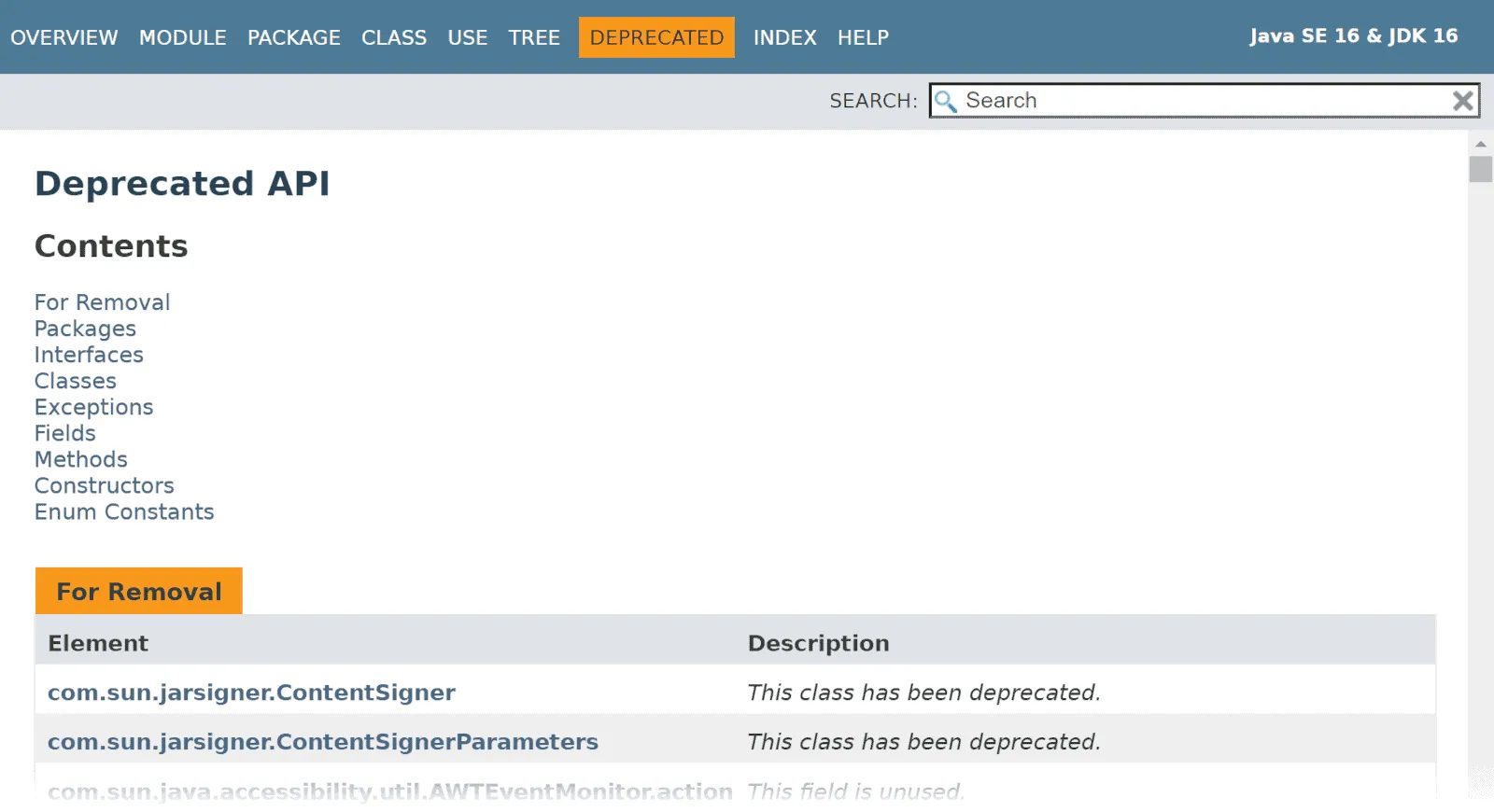
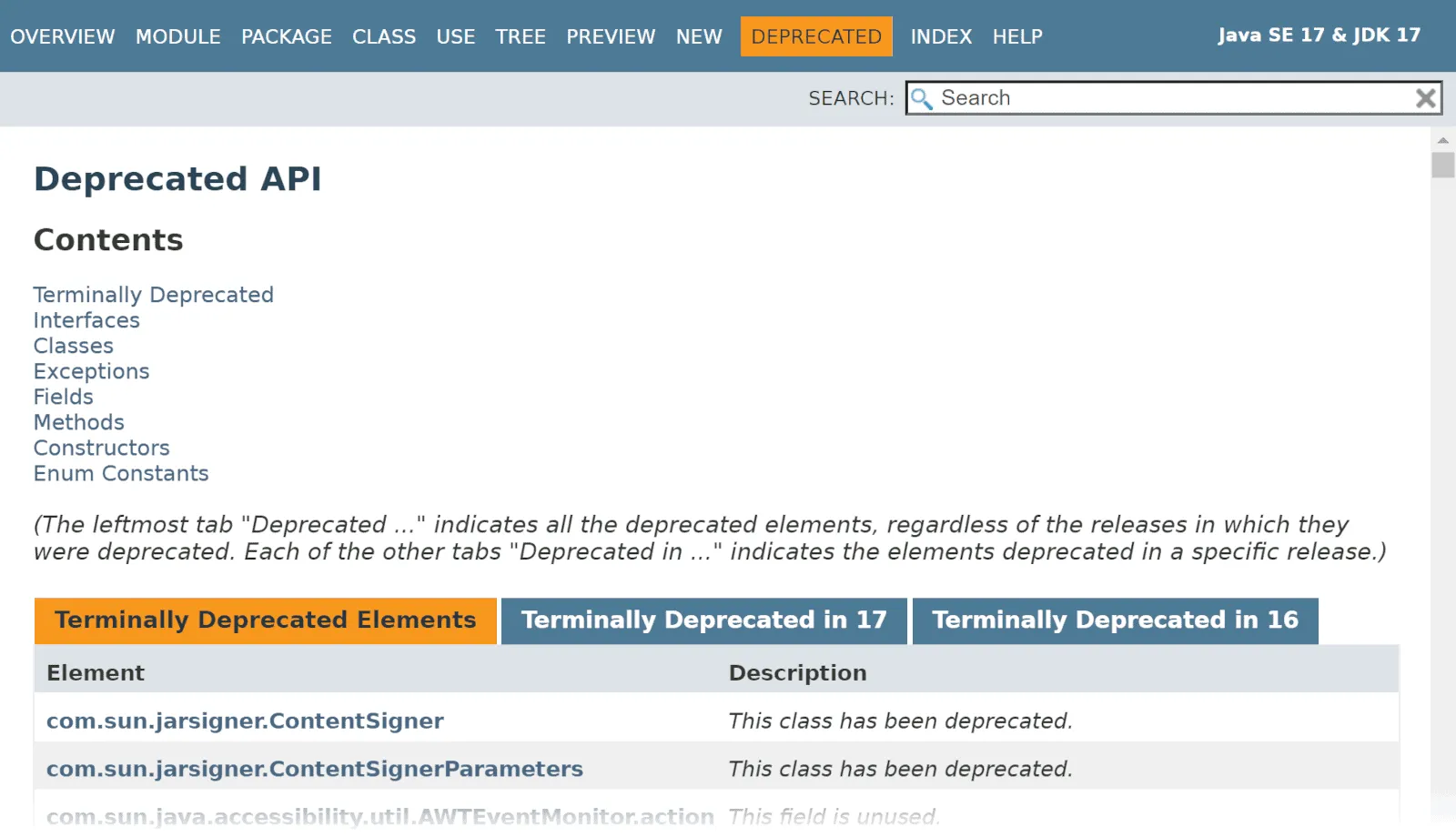
JavaDoc generated from Java 17 onwards has a “NEW” page, which shows all new features grouped by version. For this purpose, the @since tags of the modules, packages, classes, etc., are evaluated.
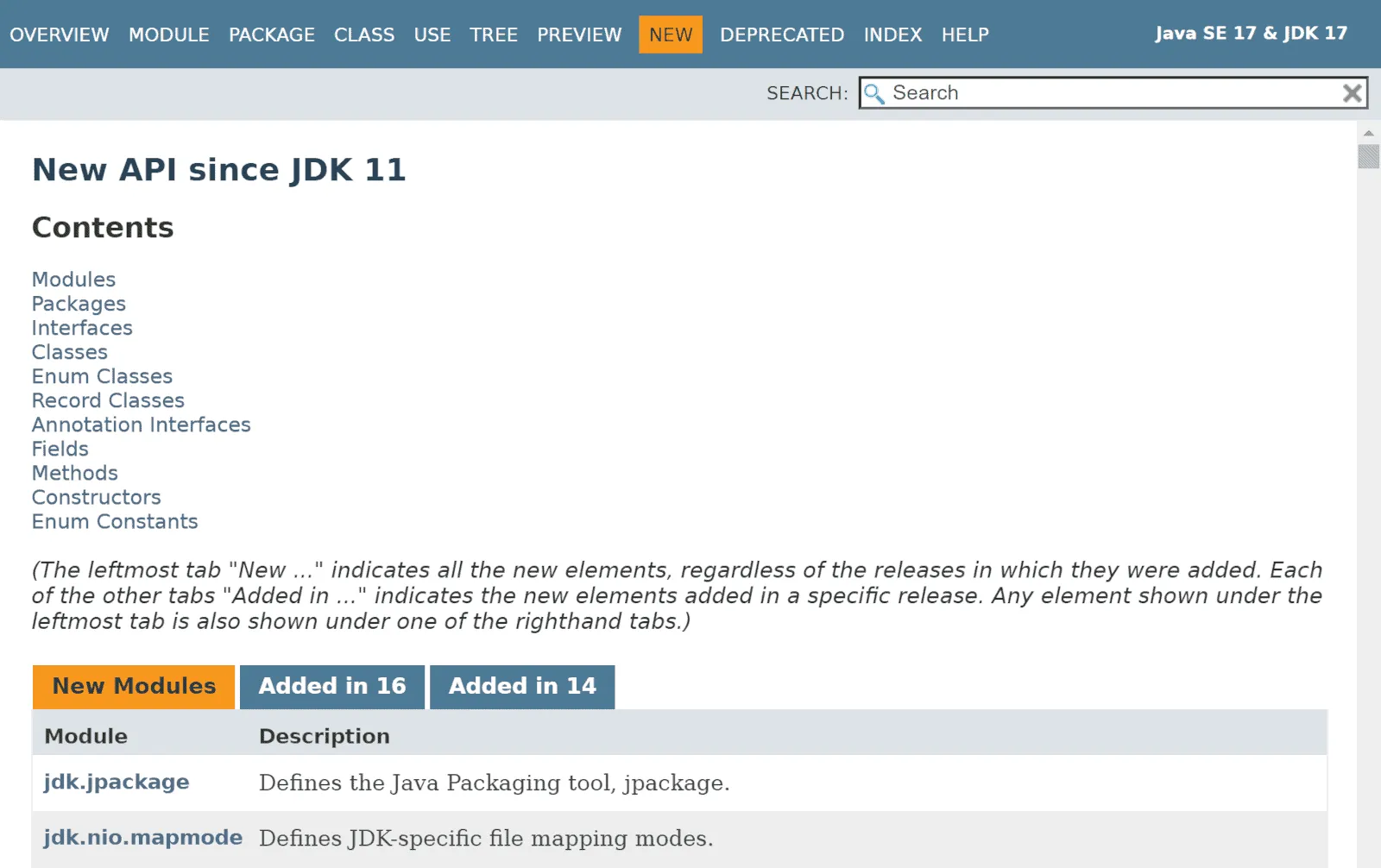
Also, the “DEPRECATED” page has been revised. Up to Java 16, we see an ungrouped list of all features marked as “deprecated”:
Starting with Java 17, we see deprecated features grouped by release:
There is no JEP for this change; it is tracked in the bug tracker under JDK-8263468.
Complete List of All Changes in Java 17
This article has presented all the changes defined in JDK Enhancement Proposals (JEPs) as well as numerous class library enhancements for which no JEPs exist. For more changes, especially related to security libraries, see the official Java 17 release notes.
Summary
Even though Java 17 is an LTS release, it is not much different from the previous ones. We again got a mixture of:
- new language features (Sealed Classes),
- API changes (
InstantSource,HexFormat, context-specific deserialization filters), - a performance improvement (asynchronous logging of the JVM),
- deprecations and deletions (Applet API, Security Manager, RMI Activation, AOT and JIT compiler),
- and new preview and incubator features (Pattern Matching for switch, Foreign Function & Memory API, Vector API).
In addition, the path taken in Java 9 with Project Jigsaw has been brought to an end by removing the transitionally provided “Relaxed Strong Encapsulation” mode and requiring access to private members of other modules (deep reflection) always to be explicitly enabled.
If you enjoyed this article, I’d appreciate a review on my ProvenExpert profile.
And if you want to stay up to date on new Java features, click here and sign up for the HappyCoders newsletter.