
An ArrayList is a list that stores its elements in an array. When the array is full, the list creates a larger one and copies the elements into the new array – so you don’t need to know the size in advance.
The following program creates an empty ArrayList, adds three names, and reads the second name, the number of elements, and the whole list:
List<String> names = new ArrayList<>();
names.add("Ada");
names.add("Grace");
names.add("Alan");

System.out.println(names.get(1));
System.out.println(names.size());
System.out.println(names);
Grace
3
[Ada, Grace, Alan]As with an array, the index starts at 0, so get(1) returns the second element.
In this article, you will learn:
- how an
ArrayListdiffers from an array, - how to create an
ArrayListand whyList.of()andArrays.asList()don’t give you one, - which methods you use to add, read, change, and remove elements,
- how to iterate over an
ArrayListand why aConcurrentModificationExceptioncan occur while you do, - how to convert an
ArrayListinto an array and back, - how the
ArrayListworks internally and how fast its operations are, - when you should use
LinkedList,Vector, orCopyOnWriteArrayListinstead.
The Examples in This Article
You can find the complete code in the GitHub repository java-collections-guide, in the package eu.happycoders.collections.arraylist. Each section has its own class there, with a main() method that produces the outputs shown.
Almost all examples work with the first names of computer science pioneers – Ada Lovelace, Grace Hopper, Alan Turing, Linus Torvalds, and a few more.
The classes in the repository require Java 25 because they use the simplified main() method without String[] args. The listings in the article run on Java 21 and later – they use getFirst(), addFirst(), and reversed(), which have only existed since Java 21.
What Is an ArrayList?
ArrayList is a class from the java.util package and implements the List interface. It has the following properties:
- It keeps the order in which you insert the elements.
- You access each element through an index, starting at 0.
- It may contain the same element several times, including
null. - It grows and shrinks with its elements.
- It is not thread-safe – if several threads write to it at the same time, you have to synchronize access yourself.
Before you can use it, you have to import it:
import java.util.ArrayList;
import java.util.List;
Since Java 25, you can import the whole java.base module instead with import module java.base;. In a compact source file – a source file without a class declaration – you don’t need an import at all, because it imports java.base automatically.
The following class diagram shows where ArrayList sits in the collections hierarchy. Outlined in blue are ArrayList and the interfaces it implements – since Java 21, List extends the SequencedCollection interface. Next to it, in gray for comparison, is LinkedList, which implements List as well:
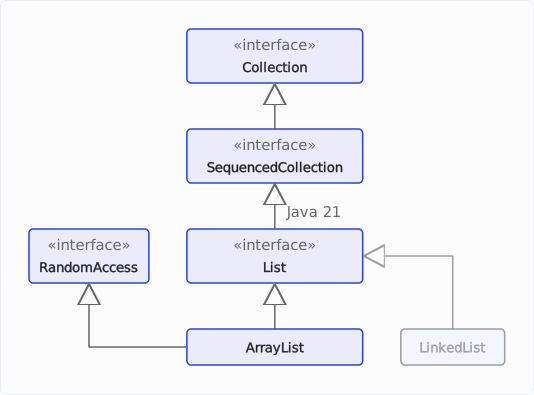
RandomAccess is a so-called marker interface without methods. Algorithms such as Collections.binarySearch() use instanceof RandomAccess to check whether access by index is fast and only then access the elements by index. LinkedList does not implement this interface.
Array vs. ArrayList
An array has a fixed length, which you specify when you create it. An ArrayList grows with every add() and shrinks with every remove().
The following listing creates an array for three names and an ArrayList that then takes four names without you having to specify a size first:
String[] array = new String[3];
array[0] = "Ada";
array[1] = "Grace";
array[2] = "Alan";
System.out.println(array.length + " " + Arrays.toString(array));

List<String> list = new ArrayList<>();
list.add("Ada");
list.add("Grace");
list.add("Alan");
list.add("Linus");
System.out.println(list.size() + " " + list);
3 [Ada, Grace, Alan]
4 [Ada, Grace, Alan, Linus]A fourth element would have no room in the array – array[3] = "Linus" would throw an ArrayIndexOutOfBoundsException.
The following table compares the two:
| Array | ArrayList | |
|---|---|---|
| Length | fixed | grows and shrinks |
| Element types | primitive types and objects | objects only |
| Number of elements | array.length | list.size() |
| Read an element | array[i] | list.get(i) |
| Write an element | array[i] = x | list.set(i, x) |
| Add an element | ✗ | list.add(x) |
| Remove an element | ✗ | list.remove(i) |
| Output as a string | Arrays.toString(array) | list.toString() |
An array is the better choice when the number of elements is fixed and you are dealing with primitive values. An int[] with one million numbers takes up 4 MB, an ArrayList<Integer> with the same numbers around 20 MB – the section Memory Usage of the ArrayList shows why.
How to create arrays and fill them with values is shown in the article How to Declare and Initialize Arrays in Java, how to determine their length in the article Java Array Length and Size.
List or ArrayList as the Variable Type?
The examples in this article declare their variables with the List interface and create the object with new ArrayList:
List<String> names = new ArrayList<>();This way, the code that uses names depends only on the methods of the interface. If you later want to use a different List implementation, you only need to change the one line with new.
You only need the type ArrayList for the variable if you call one of the three public methods the interface doesn’t have: ensureCapacity() and trimToSize() control the length of the internal array, clone() creates a copy.
Creating an ArrayList
You create an empty ArrayList with the no-argument constructor. You don’t need to repeat the element type on the right – the diamond operator <> takes it from the left side:
List<String> names = new ArrayList<>();Creating an ArrayList With Elements
You create an ArrayList that already contains elements by passing another collection to the constructor – most concisely, one created with List.of():
List<String> names = new ArrayList<>(List.of("Ada", "Grace", "Alan"));
names.add("Linus");
System.out.println(names);
[Ada, Grace, Alan, Linus]List.of() on its own does not return an ArrayList but an immutable list. And Arrays.asList() returns a fixed-size list backed by the array you pass in: set() works, add() and remove() don’t.
The following listing tries to add one element to each:
List<String> fixed = List.of("Ada", "Grace", "Alan");
try {
  fixed.add("Linus");
} catch (UnsupportedOperationException e) {
  System.out.println("List.of(): " + e);
}

List<String> backedByArray = Arrays.asList("Ada", "Grace", "Alan");
backedByArray.set(0, "Linus");
System.out.println("Arrays.asList() after set(): " + backedByArray);
try {
  backedByArray.add("Barbara");
} catch (UnsupportedOperationException e) {
  System.out.println("Arrays.asList(): " + e);
}
System.out.println(backedByArray.getClass().getName());
List.of(): java.lang.UnsupportedOperationException
Arrays.asList() after set(): [Linus, Grace, Alan]
Arrays.asList(): java.lang.UnsupportedOperationException
java.util.Arrays$ArrayListThe last line shows that Arrays.asList() returns an object of a nested class of Arrays with the same name, not the ArrayList from java.util. If you need a modifiable list, pass the result of List.of() or Arrays.asList() to new ArrayList<>(…).
Creating a Copy of Another Collection
The constructor with a collection parameter copies the elements into a new array. Changes to the copy therefore don’t affect the original:
List<String> names = new ArrayList<>(List.of("Ada", "Grace", "Alan", "Linus"));
List<String> copy = new ArrayList<>(names);
copy.removeFirst();
System.out.println(names);
System.out.println(copy);
[Ada, Grace, Alan, Linus]
[Grace, Alan, Linus]The copy is shallow, though: both lists refer to the same element objects. What that means is shown in the section Copying an ArrayList.
Creating an ArrayList With an Initial Capacity
If you know in advance how many elements the list will hold, you can pass the size of the internal array to the constructor:
List<String> names = new ArrayList<>(1_000);The list is still empty afterwards – size() returns 0. What the initial capacity buys you is explained in the section How the ArrayList Grows.
An ArrayList of Numbers
An ArrayList stores only objects. ArrayList<int> does not compile; instead, you use the wrapper class Integer as the element type. When you add an int, the compiler automatically converts it into an Integer object, and back again when you read it – this is called autoboxing and unboxing:
List<Integer> numbers = new ArrayList<>();
numbers.add(42);
numbers.add(7);
int sum = numbers.get(0) + numbers.get(1);
System.out.println(sum);49The same applies to long and double with Long and Double.
A List of Lists
There is no two-dimensional ArrayList, but there is an ArrayList whose elements are lists themselves. Unlike a 2D array, it doesn’t need to know the size of any row in advance.
The following program uses this to build the first five rows of Pascal’s triangle. Each row is one element longer than the previous one, and each inner element is the sum of the two elements above it:
List<List<Integer>> triangle = new ArrayList<>();
for (int n = 0; n < 5; n++) {
  List<Integer> row = new ArrayList<>();
  for (int k = 0; k <= n; k++) {
    if (k == 0 || k == n) {
      row.add(1);
    } else {
      List<Integer> previous = triangle.get(n - 1);
      row.add(previous.get(k - 1) + previous.get(k));
    }
  }
  triangle.add(row);
}
triangle.forEach(System.out::println);
[1]
[1, 1]
[1, 2, 1]
[1, 3, 3, 1]
[1, 4, 6, 4, 1]triangle.get(n - 1) returns the previous row as a List<Integer>, which you access with get() again.
The Methods of the ArrayList at a Glance
The following table shows the methods of the ArrayList, grouped like the sections that follow. The “Cost” column gives the time complexity, with n for the size of the list and m for the size of the collection passed in – where the values come from is explained in the section Time Complexity of the ArrayList. The “Since” column is empty for methods that already existed in Java 1.2, which introduced the ArrayList.
| Method | What it does | Cost | Since |
|---|---|---|---|
| Adding | |||
add(e) | appends an element | O(1) amortized | |
addLast(e) | appends an element | O(1) amortized | Java 21 |
add(i, e) | inserts an element at position i | O(n) | |
addFirst(e) | inserts an element at the beginning | O(n) | Java 21 |
addAll(c) | appends all elements of a collection | O(m) | |
addAll(i, c) | inserts all elements of a collection at position i | O(n + m) | |
| Reading | |||
get(i) | returns the element at position i | O(1) | |
getFirst(), getLast() | returns the first or last element | O(1) | Java 21 |
size(), isEmpty() | returns the number of elements or whether the list is empty | O(1) | |
contains(o) | checks whether the list contains an equal element | O(n) | |
indexOf(o), lastIndexOf(o) | returns the first or last position of an equal element | O(n) | |
| Changing | |||
set(i, e) | replaces the element at position i | O(1) | |
replaceAll(op) | replaces each element with the result of a function | O(n) | Java 8 |
sort(c) | sorts the list | O(n log n) | Java 8 |
| Removing | |||
remove(i) | removes the element at position i | O(n) | |
remove(o) | removes the first equal element | O(n) | |
removeFirst() | removes the first element | O(n) | Java 21 |
removeLast() | removes the last element | O(1) | Java 21 |
removeIf(p) | removes all elements that match a condition | O(n) | Java 8 |
removeAll(c), retainAll(c) | removes all elements contained in c, or keeps only those | O(n · m)* | |
clear() | removes all elements | O(n) | |
| Iterating | |||
iterator(), listIterator() | returns an iterator | O(1) | |
forEach(action) | performs an action for each element | O(n) | Java 8 |
reversed() | returns a view in reverse order | O(1) | Java 21 |
| Converting | |||
toArray(), toArray(a) | copies the elements into an array | O(n) | |
toArray(generator) | copies the elements into an array created by generator | O(n) | Java 11 |
subList(from, to) | returns a view of a range | O(1) | |
| Capacity | |||
ensureCapacity(k) | enlarges the internal array to at least k slots | O(n) | |
trimToSize() | shrinks the internal array to the size of the list | O(n) |
* removeAll() and retainAll() call contains() of the collection passed in for each element of the list. If that collection is a HashSet, each call costs only O(1), and the methods run in O(n).
Adding Elements
You add elements to an ArrayList with add() and addAll(), and since Java 21 also with addFirst() and addLast().
The following listing appends a name, inserts one at the second position, appends two more, inserts two at the third position, and finally puts one at the beginning:
List<String> names = new ArrayList<>(List.of("Ada", "Alan"));

names.add("Linus");
System.out.println(names);

names.add(1, "Grace");
System.out.println(names);

names.addAll(List.of("James", "Barbara"));
System.out.println(names);

names.addAll(2, List.of("Ken", "Dennis"));
System.out.println(names);

names.addFirst("Charles");
System.out.println(names);
[Ada, Alan, Linus]
[Ada, Grace, Alan, Linus]
[Ada, Grace, Alan, Linus, James, Barbara]
[Ada, Grace, Ken, Dennis, Alan, Linus, James, Barbara]
[Charles, Ada, Grace, Ken, Dennis, Alan, Linus, James, Barbara]add(e) and addLast(e) do the same: they append the element to the end. add() always returns true – the return value comes from the Collection interface, where a Set returns false to report that it already contained the element.
add(index, e), addAll(index, c), and addFirst(e), on the other hand, have to move all elements from the insertion position onward towards the back – by as many positions as new elements are added. With a long list, this takes time – how much is shown in the section Time Complexity of the ArrayList.
When you insert several elements, addAll(index, c) is therefore faster than a loop with add(index, e): it moves each element after the insertion position only once. The following diagram shows both ways for the addAll(2, …) from the listing above:
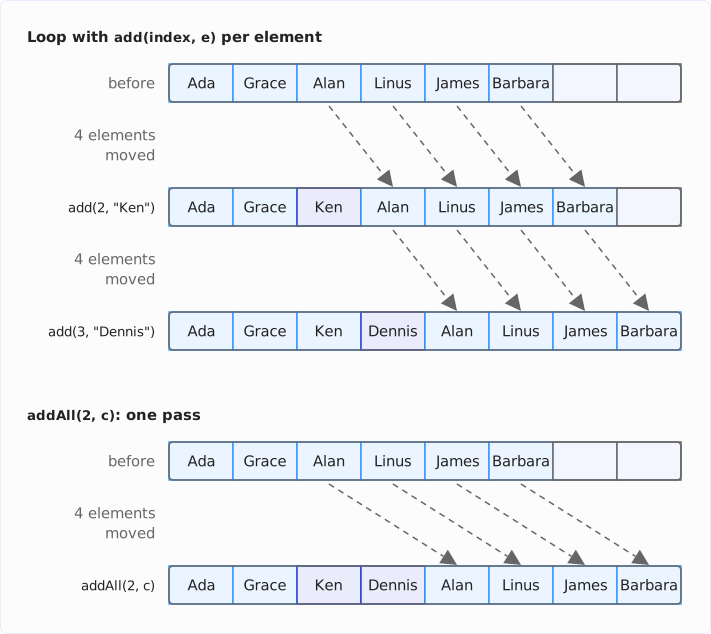
Any index from 0 up to and including size() is allowed as the position. add(names.size(), x) therefore appends to the end, and a larger index throws an IndexOutOfBoundsException:
List<String> names = new ArrayList<>(List.of("Ada", "Grace", "Alan"));
names.add(names.size(), "Linus");
System.out.println(names);
try {
  names.add(20, "Guido");
} catch (IndexOutOfBoundsException e) {
  System.out.println(e);
}
[Ada, Grace, Alan, Linus]
java.lang.IndexOutOfBoundsException: Index: 20, Size: 4Reading Elements
You read the element at a particular position with get(), and since Java 21 the first and the last one with getFirst() and getLast():
List<String> names = new ArrayList<>(List.of("Ada", "Grace", "Alan", "Grace"));

System.out.println(names.get(2));
System.out.println(names.getFirst() + " " + names.getLast());
System.out.println(names.size() + " " + names.isEmpty());
Alan
Ada Grace
4 falsesize() Instead of length
The number of elements is returned by size(). The ArrayList has neither a length field like an array nor a length() method like String. isEmpty() returns true if the list contains no elements.
Searching for Elements
You check whether the list contains an element with contains(). indexOf() returns the position of the first matching element, lastIndexOf() that of the last one; both return -1 if they don’t find one:
List<String> names = new ArrayList<>(List.of("Ada", "Grace", "Alan", "Grace"));
System.out.println(names.contains("Alan"));
System.out.println(names.indexOf("Grace") + " " + names.lastIndexOf("Grace"));
System.out.println(names.indexOf("Linus"));
true
1 3
-1All three methods compare with equals(), not with ==. For strings and wrapper classes such as Integer, this works without any effort on your part. For your own classes, you have to override equals() – otherwise contains() only finds the very same object, as the section Common Mistakes shows.
For this, the three methods go through the list element by element. With one million elements, that’s up to one million equals() calls. If you search often, a HashSet or a HashMap is the better data structure.
Invalid Index and Empty List
An index outside 0 to size() - 1 leads to an IndexOutOfBoundsException with get(). getFirst() and getLast(), on the other hand, throw a NoSuchElementException on an empty list:
List<String> names = new ArrayList<>(List.of("Ada", "Grace", "Alan", "Grace"));
try {
  names.get(4);
} catch (IndexOutOfBoundsException e) {
  System.out.println(e);
}

List<String> empty = new ArrayList<>();
try {
  empty.getFirst();
} catch (NoSuchElementException e) {
  System.out.println(e);
}
try {
  empty.get(0);
} catch (IndexOutOfBoundsException e) {
  System.out.println(e);
}
java.lang.IndexOutOfBoundsException: Index 4 out of bounds for length 4
java.util.NoSuchElementException
java.lang.IndexOutOfBoundsException: Index 0 out of bounds for length 0The “length” in the message is the size of the list, not the length of the internal array. By the way, when inserting with add(index, e), the message reads differently (“Index: 20, Size: 4”, see above), because add() checks the index with a method of the ArrayList itself and get() with Objects.checkIndex().
Changing Elements
You replace the element at a particular position with set(). The method returns the element that was there before. Since Java 8, you replace all elements at once with replaceAll(), which replaces each element with the result of a function:
List<String> names = new ArrayList<>(List.of("Ada", "Grace", "Alan"));

String replaced = names.set(1, "Linus");
System.out.println(replaced + " -> " + names);

names.replaceAll(String::toUpperCase);
System.out.println(names);
Grace -> [Ada, Linus, Alan]
[ADA, LINUS, ALAN]set() doesn’t change the size of the list and can therefore only write to positions that already hold an element – the section Common Mistakes shows this as well.
Removing Elements
You remove a single element with remove() – either by its position or by the element itself. remove(int) returns the removed element, remove(Object) returns true if it found and removed an equal element. Since Java 21, there are also removeFirst() and removeLast():
List<String> names =
    new ArrayList<>(List.of("Ada", "Grace", "Alan", "Linus", "James", "Barbara"));

String removed = names.remove(1);
System.out.println(removed + " -> " + names);

boolean found = names.remove("Linus");
System.out.println(found + " -> " + names);

names.removeFirst();
System.out.println(names);
Grace -> [Ada, Alan, Linus, James, Barbara]
true -> [Ada, Alan, James, Barbara]
[Alan, James, Barbara]remove(Object) removes only the first equal element. As with inserting, the ArrayList has to move all elements after it – here one position towards the front.
remove(int) or remove(Object)?
With a List<Integer>, it isn’t obvious which of the two methods a call hits. The following listing wants to remove the number 1 from the list [10, 20, 30, 1]:
List<Integer> numbers = new ArrayList<>(List.of(10, 20, 30, 1));
numbers.remove(1);
System.out.println(numbers);
numbers.remove(Integer.valueOf(1));
System.out.println(numbers);
[10, 30, 1]
[10, 30]The first call removes the 20. For the argument 1 of type int, the compiler picks the method remove(int) because it fits without autoboxing – and removes the element at position 1. Only remove(Integer.valueOf(1)) passes an object and hits remove(Object).
Removing Several Elements
Since Java 8, you can use removeIf() to remove all elements that match a condition. With removeAll(), you can remove all elements that are contained in another collection; with retainAll(), you keep all elements that are contained in another collection:
List<String> pioneers =
    new ArrayList<>(List.of("Ada", "Grace", "Alan", "Linus", "James", "Barbara"));
pioneers.removeIf(name -> name.startsWith("A"));
System.out.println(pioneers);
pioneers.removeAll(List.of("Grace", "James"));
System.out.println(pioneers);
pioneers.retainAll(List.of("Barbara", "Ken"));
System.out.println(pioneers);
[Grace, Linus, James, Barbara]
[Linus, Barbara]
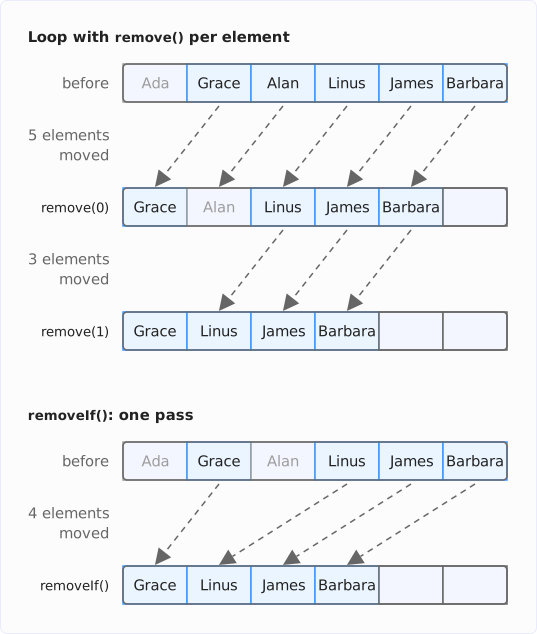
[Barbara]All three methods move each remaining element at most once. They are therefore faster than a loop that removes the elements one by one with remove() – there, the elements at the back move up again with every call. The following diagram shows both ways for the removeIf() from the listing above:
Removing a Range or All Elements
You remove a contiguous range by calling clear() on a view created with subList(). You remove all elements with clear() on the list itself:
List<Integer> digits = new ArrayList<>(List.of(0, 1, 2, 3, 4, 5, 6, 7, 8, 9));
digits.subList(2, 5).clear();
System.out.println(digits);
digits.clear();
System.out.println(digits + " " + digits.size());
[0, 1, 5, 6, 7, 8, 9]
[] 0subList(2, 5) covers the positions 2, 3, and 4 – the first index is included, the second isn’t. The section subList() Returns a View explains what a view is.
Iterating Over an ArrayList
There are five ways to iterate over an ArrayList. The following listing shows the first three – the for-each loop, the loop over the index, and the forEach() method:
List<String> names = new ArrayList<>(List.of("Ada", "Grace", "Alan"));

for (String name : names) {
  System.out.println(name);
}

for (int i = 0; i < names.size(); i++) {
  System.out.println(i + ": " + names.get(i));
}

names.forEach(System.out::println);
Ada
Grace
Alan
0: Ada
1: Grace
2: Alan
Ada
Grace
AlanI recommend the for-each loop. You only need the loop over the index if you want to know the position of the element.
The fourth way is the ListIterator. It lets you replace the current element while iterating and insert new elements after it. The following listing replaces “Grace” with “Grace Hopper” and inserts “Linus” after it:
List<String> names = new ArrayList<>(List.of("Ada", "Grace", "Alan"));
ListIterator<String> iterator = names.listIterator();
while (iterator.hasNext()) {
  String name = iterator.next();
  if (name.equals("Grace")) {
    iterator.set("Grace Hopper");
    iterator.add("Linus");
  }
}
System.out.println(names);
[Ada, Grace Hopper, Linus, Alan]The fifth way is a stream. It pays off when you want to filter, transform, or aggregate the elements. The following listing collects all names with at most four characters in a new list:
List<String> names = new ArrayList<>(List.of("Ada", "Grace", "Alan"));
List<String> shortNames = names.stream()
    .filter(name -> name.length() <= 4)
    .toList();
System.out.println(shortNames);
[Ada, Alan]Iterating Backwards
Since Java 21, you iterate over an ArrayList backwards with reversed(). The method returns a view in reverse order without copying the elements:
List<String> names = new ArrayList<>(List.of("Ada", "Grace", "Alan"));
for (String name : names.reversed()) {
  System.out.println(name);
}
Alan
Grace
AdaThe article Sequenced Collections covers reversed() and the other methods introduced in Java 21.
ConcurrentModificationException
If you remove an element with remove() in a for-each loop, the next iteration throws a ConcurrentModificationException. The following listing tries to remove all names that start with “A”:
List<String> names = new ArrayList<>(List.of("Ada", "Grace", "Alan", "Linus"));
try {
  for (String name : names) {
    if (name.startsWith("A")) {
      names.remove(name);
    }
  }
} catch (ConcurrentModificationException e) {
  System.out.println(e);
}
System.out.println(names);
java.util.ConcurrentModificationException
[Grace, Alan, Linus]“Ada” is removed, “Alan” is not – the loop aborts at the next element.
The reason: the for-each loop runs over an iterator. The ArrayList counts every change of its size in a field modCount, as well as every sort() and replaceAll() – but not a set(). When the iterator is created, it remembers this value, and with every next() it compares this value with the current value of modCount. If the values don’t match, it throws the ConcurrentModificationException. The documentation calls this mechanism fail-fast: the iterator aborts immediately instead of carrying on with an outdated state.
The following diagram shows the steps of the listing above:
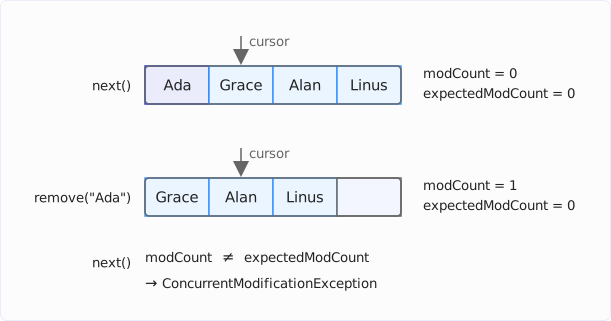
Nothing in this example is concurrent – a single thread modifies the list while iterating over it. The mechanism is meant for the concurrent case as well, though: if another thread modifies the list while a thread iterates over it, the iterator also aborts with a ConcurrentModificationException. This isn’t guaranteed, however – without synchronization, the iterator doesn’t always notice the change, because modCount is not volatile, so the iterating thread may not see the new value. The documentation therefore advises not to rely on the exception, but to use it only to detect bugs.
More dangerous is the case in which no exception is thrown. If you remove the second-to-last element, the loop ends without an error – and the last element is never visited:
List<String> names = new ArrayList<>(List.of("Ada", "Grace", "Alan", "Linus"));
for (String name : names) {
  System.out.println("Visiting " + name);
  if (name.equals("Alan")) {
    names.remove(name);
  }
}
System.out.println(names);
Visiting Ada
Visiting Grace
Visiting Alan
[Ada, Grace, Linus]This is due to hasNext(): the method only compares the position of the iterator with the size of the list and doesn’t check modCount. After the removal, the list is three elements long, and the iterator is positioned after the third element. hasNext() returns false, and the next() that would have noticed the change is never called.
There are three ways to remove elements correctly while iterating:
-
removeIf(): the shortest way when a condition decides which elements to remove:names.removeIf(name -> name.startsWith("A")); -
Iterator.remove(): removes the element last returned bynext()and adjusts the iterator’s rememberedmodCount:Iterator<String> iterator = names.iterator(); while (iterator.hasNext()) { if (iterator.next().startsWith("A")) { iterator.remove(); } } -
Loop over the index, from the back: removing an element only moves the elements after the current position – and the loop has already visited those:
for (int i = names.size() - 1; i >= 0; i--) {
  if (names.get(i).startsWith("A")) {
    names.remove(i);
  }
}
All three ways turn the list [Ada, Grace, Alan, Linus] into [Grace, Linus]. I recommend removeIf(): it’s the shortest, and it moves each remaining element only once, as described in the section Removing Several Elements.
Sorting and Searching an ArrayList
You sort an ArrayList with sort(). With null as the argument, the method sorts by the natural order of the elements; with a comparator, in any other order. The following listing sorts five names first alphabetically and then by their length:
List<String> names =
    new ArrayList<>(List.of("Grace", "Ada", "Linus", "Barbara", "Alan"));

names.sort(null);
System.out.println(names);

names.sort(Comparator.comparing(String::length)
    .thenComparing(Comparator.naturalOrder()));
System.out.println(names);
[Ada, Alan, Barbara, Grace, Linus]
[Ada, Alan, Grace, Linus, Barbara]How to sort in descending order, by several fields, and with accented characters is shown in the article How to Sort a List in Java.
In a sorted list, you find an element with Collections.binarySearch() in O(log n) – indexOf() would need O(n):
List<String> names =
    new ArrayList<>(List.of("Ada", "Alan", "Barbara", "Grace", "Linus"));
System.out.println(Collections.binarySearch(names, "Grace"));
System.out.println(Collections.binarySearch(names, "Ken"));
3
-5“Grace” is at position 3 in [Ada, Alan, Barbara, Grace, Linus]. For “Ken”, which is missing, the method returns -(insertion point + 1): “Ken” would belong at position 4, before “Linus”. How the search works is explained in the article on binary search.
Converting and Copying an ArrayList
Converting an ArrayList Into an Array
You convert an ArrayList into an array with toArray(). Without a parameter, the method returns an Object[], even for a List<String>. You get a String[] if you pass an empty array of the desired type or – since Java 11 – the constructor of such an array as a method reference:
List<String> names = new ArrayList<>(List.of("Ada", "Grace", "Alan"));
Object[] array1 = names.toArray();
String[] array2 = names.toArray(new String[0]);
String[] array3 = names.toArray(String[]::new);
System.out.println(array1.getClass().getSimpleName() + " " + Arrays.toString(array1));
System.out.println(array2.getClass().getSimpleName() + " " + Arrays.toString(array2));
System.out.println(array3.getClass().getSimpleName() + " " + Arrays.toString(array3));
Object[] [Ada, Grace, Alan]
String[] [Ada, Grace, Alan]
String[] [Ada, Grace, Alan]You can’t create an int[] with toArray() – for that, you need a stream that converts the Integer objects into int values with mapToInt():
List<Integer> numbers = new ArrayList<>(List.of(3, 1, 4, 1, 5));
int[] ints = numbers.stream()
    .mapToInt(Integer::intValue)
    .toArray();
System.out.println(Arrays.toString(ints));
[3, 1, 4, 1, 5]Converting an Array Into an ArrayList
You turn an array of objects into a list with Arrays.asList() and pass that list to the constructor of the ArrayList. With an int[], you first have to convert the int values in a stream into Integer objects with boxed() and turn the stream into a list with toList():
String[] languages = {"Java", "Kotlin", "Scala"};
List<String> languageList = new ArrayList<>(Arrays.asList(languages));
languageList.add("Groovy");
System.out.println(languageList);

int[] primes = {2, 3, 5, 7};
List<Integer> primeList = new ArrayList<>(Arrays.stream(primes)
    .boxed()
    .toList());
primeList.add(11);
System.out.println(primeList);
[Java, Kotlin, Scala, Groovy]
[2, 3, 5, 7, 11]Both lists accept new elements afterwards – unlike the lists that Arrays.asList() and Stream.toList() return themselves.
Copying an ArrayList
You create a copy with the constructor new ArrayList<>(original). Since Java 10, List.copyOf(original) returns an immutable copy. clone() also copies the list. However, you can only call the method through a variable of type ArrayList – List doesn’t have it. Through a List variable, the compiler doesn’t find the method at all:
List<String> names = new ArrayList<>(List.of("Ada", "Grace"));
List<String> copy = names.clone();
error: cannot find symbol
List<String> copy = names.clone();
^
symbol: method clone()In addition, clone() returns an Object, so you have to cast the result. Because the compiler can’t check the cast to ArrayList<String>, it warns about it – the annotation @SuppressWarnings("unchecked") suppresses the warning:
ArrayList<String> pioneers = new ArrayList<>(List.of("Ada", "Grace"));
@SuppressWarnings("unchecked")
ArrayList<String> pioneersCopy = (ArrayList<String>) pioneers.clone();
System.out.println(pioneersCopy);
[Ada, Grace]The constructor new ArrayList<>(original) is much simpler.
By the way, all three copies are shallow: they copy the references, not the objects behind them. The following listing extends a StringBuilder through the copy – and the original shows the change as well:
List<StringBuilder> original = new ArrayList<>(List.of(new StringBuilder("Ada")));
List<StringBuilder> copy = new ArrayList<>(original);
copy.getFirst().append(" Lovelace");
System.out.println("original: " + original);
System.out.println("copy:     " + copy);
original: [Ada Lovelace]
copy: [Ada Lovelace]The original list and the copy point to the same StringBuilder:
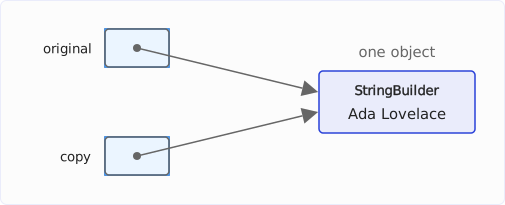
With immutable elements such as String or Integer, this doesn’t matter, because nobody can change them through the copy.
subList() Returns a View
subList(from, to) copies nothing but returns a view – a window onto a range of the original list. Whatever you change through the view changes the original list:
List<Integer> digits = new ArrayList<>(List.of(0, 1, 2, 3, 4, 5));
List<Integer> middle = digits.subList(2, 4);
middle.set(0, 20);
System.out.println(digits);
[0, 1, 20, 3, 4, 5]The view is just a window onto two positions of the original list: its index 0 is index 2 of digits.
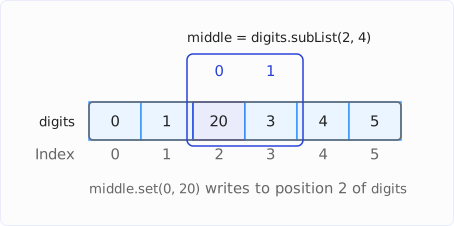
You can even change the size of the view, e.g., with add(), remove(), or clear(). These changes reach the original list as well, and the view stays valid. clear() on the view thus removes the whole range from the original list – the section Removing a Range or All Elements makes use of this too:
List<Integer> digits = new ArrayList<>(List.of(0, 1, 2, 3, 4, 5));
List<Integer> middle = digits.subList(2, 4);
middle.add(99);
System.out.println(digits + " " + middle);
middle.remove(0);
System.out.println(digits + " " + middle);
middle.clear();
System.out.println(digits + " " + middle);
[0, 1, 2, 3, 99, 4, 5] [2, 3, 99]
[0, 1, 3, 99, 4, 5] [3, 99]
[0, 1, 4, 5] []add(99) appends the 99 to the end of the view, so in digits it ends up after the 3, at position 4.
If, on the other hand, you change the size of the original list, the view becomes invalid:
List<Integer> digits = new ArrayList<>(List.of(0, 1, 2, 3, 4, 5));
List<Integer> middle = digits.subList(2, 4);
digits.add(6);
try {
  System.out.println(middle);
} catch (ConcurrentModificationException e) {
  System.out.println(e);
}java.util.ConcurrentModificationExceptionIf you need the range for longer and changes to it should not reach the original list, it’s best to copy it with new ArrayList<>(digits.subList(2, 4)).
How the ArrayList Works Internally
The ArrayList stores its elements in an array of type Object[] in the field elementData. A second field, size, counts how many of its slots are occupied.
The length of the array is called the capacity. It is always at least as large as size, usually larger. The following diagram shows an ArrayList with five elements in an array with ten slots. The numbers above the slots are the indexes; the brackets below mark size and the capacity:
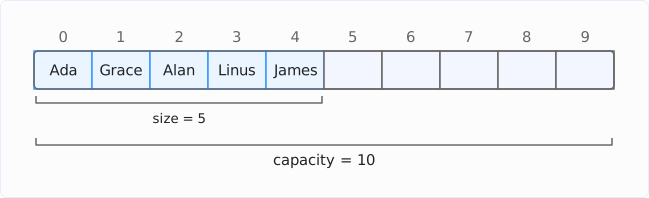
The empty slots are the reserve for the next calls to add().
Making the Capacity Visible
The ArrayList doesn’t reveal its capacity. The example repository therefore reads it via reflection from the private field elementData in the class Ch10Capacity. For this, you have to open the java.util package at startup with the VM option --add-opens java.base/java.util=ALL-UNNAMED – without the option, setAccessible(true) throws an InaccessibleObjectException.
The following listing adds 100 elements to an empty ArrayList and prints the capacity every time it changes:
ArrayList<Integer> list = new ArrayList<>();
System.out.println("size 0, capacity " + capacity(list));
int lastCapacity = capacity(list);
for (int i = 1; i <= 100; i++) {
  list.add(i);
  if (capacity(list) != lastCapacity) {
    lastCapacity = capacity(list);
    System.out.println("size " + list.size() + ", capacity " + lastCapacity);
  }
}
size 0, capacity 0
size 1, capacity 10
size 11, capacity 15
size 16, capacity 22
size 23, capacity 33
size 34, capacity 49
size 50, capacity 73
size 74, capacity 109The capacity() method is in the class Ch10Capacity and returns the length of elementData.
I explain the rule by which the capacity rises from 10 to 15, 22, 33, and so on in the section How the ArrayList Grows.
The Empty List and the First add()
The first line of the output in the previous section shows that a list created with new ArrayList<>() has a capacity of 0. So it doesn’t have an array with slots yet but refers to an empty array, the constant DEFAULTCAPACITY_EMPTY_ELEMENTDATA. Every list created with new ArrayList<>() refers to this one empty array. Only the first add() creates an array with ten slots – as many as the constant DEFAULT_CAPACITY specifies.
Many empty lists thus cost only their own objects, no array.
Inserting and Removing in the Middle
When you insert an element with add(index, e), the ArrayList uses System.arraycopy() to move all elements from index onward one slot towards the back and writes the new element into the gap. The following diagram shows add(2, "Ken") on the list [Ada, Grace, Alan, Linus, James] in an array with seven slots, before and after. The dashed arrows show which elements System.arraycopy() moves:
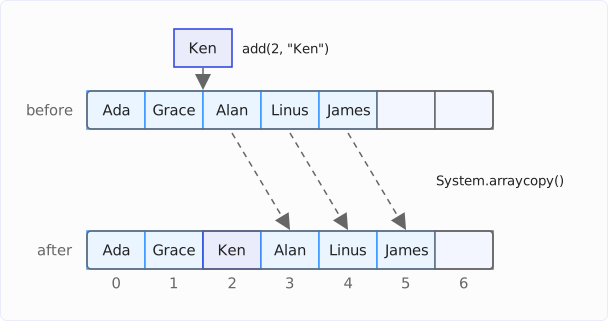
Conversely, remove(index) moves all elements after index one slot towards the front and sets the freed last slot to null. Otherwise, a copy of the reference to the last element would still be there. As long as the array holds this copy, the garbage collector can’t clean up the object – not even if it is later removed from the list and isn’t referenced anywhere else.
The further towards the front the position is, the more elements the ArrayList has to move. With add(0, e) and remove(0), it’s all of them. And the more elements it has to move, the longer inserting or removing takes – what this means in numbers is shown in the section Time Complexity of the ArrayList.
How the ArrayList Grows
When the array is full, the ArrayList creates an array half as large again on the next add() and copies the elements into the new array with Arrays.copyOf(). Ten slots become 15, 15 become 22 (15 plus 15 / 2 = 7, rounded down), 22 become 33.
The following diagram shows the step from 10 to 15 slots on the eleventh add(). As in the listing under Making the Capacity Visible, the list contains the numbers 1 to 10. The dashed arrows show where Arrays.copyOf() copies the elements and where the 11 from add(11) ends up:
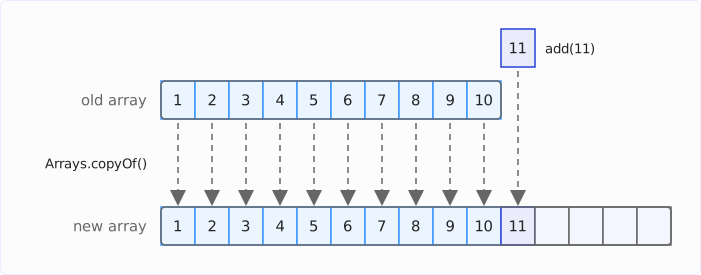
The old array is no longer referenced afterwards, and the garbage collector frees it.
In the JDK source code, the private method grow() calculates the new length with ArraysSupport.newLength(): the old length plus the larger of two increments – the preferred one, half the old length (oldCapacity >> 1), and the minimum required one. The minimum required one wins when addAll() adds more elements at once than the half provides: if you add 100 more elements to a full list with ten elements, the array grows directly to 110 slots.
Growing by half is an implementation detail. The documentation of the ArrayList only specifies that add() runs in amortized constant time. Amortized constant means: a single add() can be expensive because it copies the whole array. But because each copy increases the capacity by half, a copy of n elements is followed by at least n / 2 add() calls without a copy. Calculated over all calls, each add() therefore costs constant time, O(1).
By the way, a list created with new ArrayList<>(0) grows differently: it starts with the second empty array, EMPTY_ELEMENTDATA, and grows through 1, 2, 3, 4, 6, 9, and 13 slots – always by half, but by at least one slot.
The Array Does Not Shrink by Itself
When the internal array is full, the ArrayList automatically replaces it with a larger one – it never replaces it with a smaller one. So when you remove elements, the array keeps its length.
This can cost memory: if a list was once very large and you then removed most of its elements, it still occupies the large array – with lots of empty slots set to null. With an array of one million slots, that’s around 4 MB, even if only ten elements are left in it.
With trimToSize(), you shrink the array to the size of the list:
ArrayList<Integer> list = new ArrayList<>();
for (int i = 0; i < 11; i++) {
  list.add(i);
}
System.out.println("size " + list.size() + ", capacity " + capacity(list));
for (int i = 0; i < 8; i++) {
  list.removeLast();
}
System.out.println("size " + list.size() + ", capacity " + capacity(list));
list.trimToSize();
System.out.println("size " + list.size() + ", capacity " + capacity(list));
size 11, capacity 15
size 3, capacity 15
size 3, capacity 3With ensureCapacity(), you enlarge the array in advance:
ArrayList<Integer> list = new ArrayList<>(List.of(0, 1, 2));
System.out.println("size " + list.size() + ", capacity " + capacity(list));
list.ensureCapacity(1_000);
System.out.println("size " + list.size() + ", capacity " + capacity(list));
size 3, capacity 3
size 3, capacity 1000Both methods exist only in the ArrayList class, not in the List interface.
If you know the number of elements in advance, it’s best to pass it to the constructor right away, e.g., new ArrayList<>(1_000). Then the ArrayList creates a single array. With the default capacity, it creates 13 arrays while filling up to the 1,000th element and copies the elements twelve times – the last array has 1,234 slots.
Memory Usage of the ArrayList
The internal array of an ArrayList contains only references. The elements themselves are separate objects on the heap. With an ArrayList<Integer>, each element therefore costs memory twice: 4 bytes for the reference in the array and 16 bytes for the Integer object. An int[] stores the same number in 4 bytes:
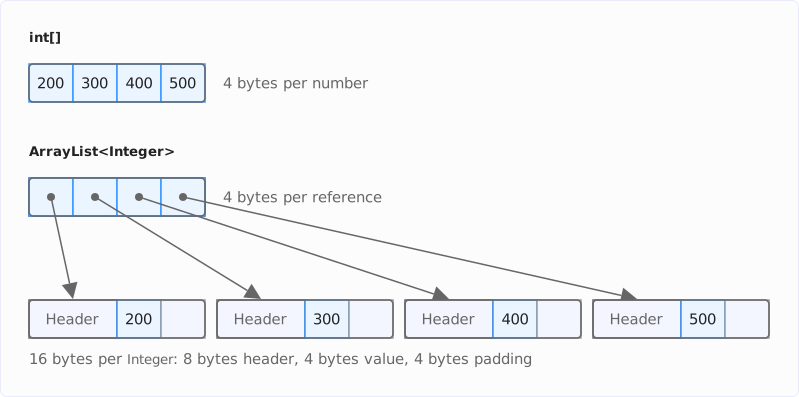
For one million numbers, that’s around 20 MB versus 4 MB. The numbers from -128 to 127 are an exception: for them, autoboxing returns Integer objects from a cache that all lists share.
With Project Valhalla, Integer becomes a value class. What this means for Integer arrays and why an ArrayList does not benefit from it at first is explained in the section When the JVM Flattens a Value Object of the Valhalla article.
Time Complexity of the ArrayList
The following table shows the time complexity of the most important operations of an ArrayList with n elements. The reasons are given in the sections How the ArrayList Works Internally and How the ArrayList Grows:
| Operation | Time complexity | Reason |
|---|---|---|
get(i), set(i, e) | O(1) | one access to the internal array |
size(), isEmpty() | O(1) | reads the field size |
add(e) at the end | O(1) amortized | usually just one write, rarely also a copy of the whole array |
add(i, e),remove(i) in the middle | O(n) | moves the elements after index i |
add(0, e),remove(0) at the beginning | O(n) | moves all elements |
remove(size() - 1) at the end | O(1) | moves nothing |
contains(o), indexOf(o) | O(n) | compares element by element with equals() |
When moving elements, the ArrayList doesn’t touch them one by one: System.arraycopy() copies the references as one contiguous block of memory.
What O(1) and O(n) mean is explained in the article on Big O notation.
ArrayList vs. LinkedList, Vector, and CopyOnWriteArrayList
ArrayList vs. LinkedList
A LinkedList stores each element in a node of its own, which points to its predecessor and its successor. The insertion itself costs it only O(1): if it is already at the right position, e.g., with a ListIterator, it just links the new node in between two others. The ArrayList needs O(n) for this because it moves all elements after it.
To get to that position, however, the LinkedList has to follow the references from node to node, starting at one end – which itself costs O(n). On top of that comes a separate node object per element, and the nodes are usually not next to each other in memory – so the CPU cache doesn’t load any neighbors along with a node. How arrays and linked lists differ in memory and locality is shown in the article Array vs. Linked List.
I recommend the ArrayList as the default for lists. If you need a queue or a stack that inserts and removes at both ends in O(1), use an ArrayDeque.
Vector
Vector is the predecessor of the ArrayList from Java 1.0. The class also works with an array, but doubles it when growing, and all its methods are synchronized. The Javadoc of the class recommends the ArrayList if you don’t need a thread-safe list. If you need a thread-safe list, use one of the two ways from the next section.
Thread-Safe Lists
An ArrayList is not thread-safe. If several threads modify it at the same time, elements can get lost, or exceptions are thrown. For lists that several threads share, there are two ways:
Collections.synchronizedList(new ArrayList<>()): wraps the list and synchronizes every method call. If you iterate over the list, you also have to put the loop into asynchronizedblock on the list yourself.CopyOnWriteArrayList: copies the whole array on every change. An iterator works on the state the array had when the iterator was created and never throws aConcurrentModificationException. This pays off for lists that are rarely changed and often read – such as a list of event listeners.
Common Mistakes
The following mistakes are shown in detail in the sections above or in the listing that follows:
remove(1)on aList<Integer>: removes the element at position 1, not the number 1. You remove the number withremove(Integer.valueOf(1)).remove()in a for-each loop: throws aConcurrentModificationExceptionor silently skips the last element. UseremoveIf()instead.add()on a list fromList.of()orArrays.asList(): throws anUnsupportedOperationException. Copy it into a newArrayListfirst.set()on a list with an initial capacity: the capacity is not the size –new ArrayList<>(10)is empty, andset(0, …)throws anIndexOutOfBoundsException. Fill the list withadd().- Comparing
Integerelements with==: compares references, not values. For -128 to 127, the result is only correct because autoboxing takes these numbers from a cache – from 128 on, it isn’t. Compare withequals(). contains()with your own classes withoutequals(): finds only the same object, not an equal one. Overrideequals()andhashCode()or use a record, which brings both along.add(0, …)in a loop over many elements: moves the whole list with every call. Append withadd()and reverse the list at the end withCollections.reverse()– or use anArrayDeque.
The following listing shows the mistakes with the capacity, with ==, and with contains(). It uses two types with the same fields – a class without equals() and a record:
class Point {
  final int x;
  final int y;

  Point(int x, int y) {
    this.x = x;
    this.y = y;
  }
}

record PointRecord(int x, int y) {}
This is how the three mistakes play out:
List<String> names = new ArrayList<>(10);
try {
  names.set(0, "Ada");
} catch (IndexOutOfBoundsException e) {
  System.out.println(e);
}

List<Integer> small = new ArrayList<>(List.of(127, 127));
List<Integer> large = new ArrayList<>(List.of(128, 128));
System.out.println(small.get(0) == small.get(1));
System.out.println(large.get(0) == large.get(1));
System.out.println(large.get(0).equals(large.get(1)));

List<Point> points = new ArrayList<>(List.of(new Point(1, 2)));
System.out.println(points.contains(new Point(1, 2)));
List<PointRecord> records = new ArrayList<>(List.of(new PointRecord(1, 2)));
System.out.println(records.contains(new PointRecord(1, 2)));
java.lang.IndexOutOfBoundsException: Index 0 out of bounds for length 0
true
false
true
false
trueSummary
An ArrayList stores its elements in an array and reads and writes them by index in O(1). When the array is full, it is replaced by one that is half as large again. This way, adding elements at the end takes amortized O(1). Inserting and removing at the beginning or in the middle, on the other hand, costs O(n), because the elements after the position have to be moved.
A list created with new ArrayList<>() creates its array only on the first add(), with ten slots. The array doesn’t shrink by itself; trimToSize() shrinks it.
List.of() and Arrays.asList() don’t return an ArrayList. You only get a modifiable list by passing the result of List.of() or Arrays.asList() to new ArrayList<>(…).
An ArrayList<Integer> needs 20 bytes per element – five times as much as an int[], because each number is a separate Integer object referenced from the array.
My recommendations:
- Use the
ArrayListas the default for lists and declare the variable with theListinterface. - If you know the number of elements, pass it to the constructor as the initial capacity.
- If you want to remove elements based on a condition, use
removeIf()– neverremove()in a for-each loop. - Compare elements with
equals(), never with==, and implementequals()andhashCode()in your own element classes – better still: use a record. - Use an
ArrayDequefor queues and stacks, and an array for large amounts of primitive numbers.
The article How to Sort a List in Java shows how to sort a list, the article Sequenced Collections how to access the first and last element and iterate backwards, and the article Java LinkedList what a LinkedList does differently from the ArrayList.
Did you take something away from this article? With a review on my ProvenExpert profile, you help other developers assess whether these articles are worth reading – and you help me understand which content is most useful to you.