
A HashMap stores pairs of keys and values. It finds the value for a key without searching through the entries: from the key, it calculates where in its internal table the entry is located.
The following program creates an empty HashMap, stores how often three words occur, and reads one value, the number of entries, and the whole map:
Map<String, Integer> counts = new HashMap<>();
counts.put("to", 2);
counts.put("be", 2);
counts.put("or", 1);

System.out.println(counts.get("be"));
System.out.println(counts.size());
System.out.println(counts);
2
3
{be=2, or=1, to=2}The map doesn’t print its entries in the order in which you inserted them. Why that is and how to get a fixed order is explained in the section Order and Sorting.
In this article, you will learn:
- how to create a
HashMapand whyMap.of()doesn’t give you one, - which methods you use to add, read, change, and remove entries,
- how to count and group with
merge()andcomputeIfAbsent(), - how to iterate over a
HashMapand why aConcurrentModificationExceptioncan occur while you do, - what a key needs:
equals()andhashCode(), - how the
HashMapworks internally – with hashing, buckets, growth, and trees, - when you should use
HashSet,Hashtable,LinkedHashMap,TreeMap, orConcurrentHashMap.
The Examples in This Article
You can find the complete code in the GitHub repository java-collections-guide, in the package eu.happycoders.collections.hashmap. Each section has its own class there, with a main() method that produces the outputs shown.
Most of the examples count words from the most famous line in Hamlet: “to be or not to be that is the question”. So the keys are strings, and the values are numbers.
The classes in the repository require Java 25 because they use the simplified main() method without String[] args. The listings in the article run on Java 21 and later – the most recent feature they use is Thread.ofPlatform() in the section on thread safety.
What Is a HashMap?
HashMap is a class from the java.util package and implements the Map interface. It has the following properties:
- Each key occurs at most once. If you store a value under a key that already exists, it replaces the old value.
- The entries have no defined order.
- A key may be
null, and values may benull. get()andput()take constant time on average, regardless of the size of the map.HashMapis not thread-safe – if several threads access it at the same time and at least one of them writes, you have to synchronize access yourself.
Before you can use it, you have to import it:
import java.util.HashMap;
import java.util.Map;
Since Java 25, you can import the whole java.base module instead with import module java.base;. In a compact source file, you don’t need an import at all, because it imports java.base automatically.
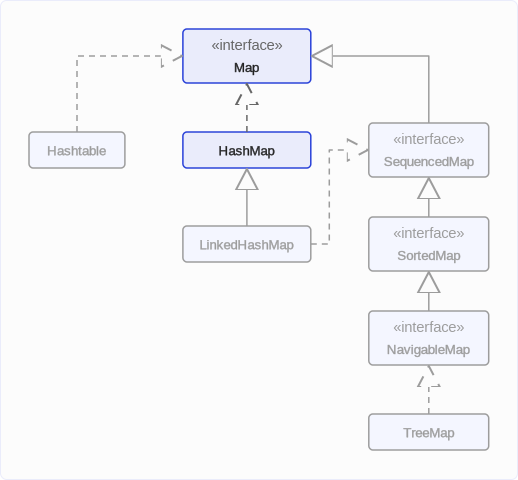
The following class diagram shows where HashMap sits in the hierarchy of maps. Outlined in blue are HashMap and the Map interface, which it implements. Next to them, in gray, are LinkedHashMap, TreeMap, and Hashtable, with which this article later compares the HashMap:
Map or HashMap as the Variable Type?
The examples in this article declare their variables with the Map interface and create the object with new HashMap:
Map<String, Integer> counts = new HashMap<>();That way, the code that uses counts depends only on the methods of the interface. If you want to switch to a LinkedHashMap or a TreeMap later, you only change the line with new. All methods shown in this article also exist in the Map interface – except for clone() and the static method HashMap.newHashMap().
Creating a HashMap
You create an empty HashMap with the parameterless constructor. You don’t have to repeat the types of key and value on the right – the diamond operator <> takes them from the left-hand side:
Map<String, Integer> counts = new HashMap<>();Creating a HashMap With Entries
You create a HashMap that already contains entries by passing another map to the constructor – the shortest way is a map created with Map.of():
Map<String, Integer> counts = new HashMap<>(Map.of("to", 2, "not", 1, "that", 1));
counts.put("the", 1);
System.out.println(counts);
{the=1, that=1, not=1, to=2}Map.of() alone does not return a HashMap but an unmodifiable map. It throws an UnsupportedOperationException on every attempt to modify it, a NullPointerException for a null key or value, and an IllegalArgumentException for a duplicate key:
Map<String, Integer> fixed = Map.of("to", 2, "not", 1, "that", 1);
try {
  fixed.put("the", 1);
} catch (UnsupportedOperationException e) {
  System.out.println("put(): " + e);
}
try {
  Map.of("to", 2, "not", null);
} catch (NullPointerException e) {
  System.out.println("null value: " + e);
}
try {
  Map.of("to", 2, "to", 1);
} catch (IllegalArgumentException e) {
  System.out.println("duplicate key: " + e);
}
put(): java.lang.UnsupportedOperationException
null value: java.lang.NullPointerException
duplicate key: java.lang.IllegalArgumentException: duplicate key: toMap.of() takes at most ten pairs. For more than ten entries, there is Map.ofEntries(), to which you pass the pairs with Map.entry():
Map<String, Integer> counts = new HashMap<>(Map.ofEntries(
    Map.entry("to", 2),
    Map.entry("not", 1),
    Map.entry("that", 1),
    Map.entry("the", 1)));
Creating a Copy of Another Map
The constructor with a map parameter copies the entries into a new table. Changes to the copy therefore don’t affect the original:
Map<String, Integer> original = new HashMap<>(Map.of("to", 2, "not", 1, "that", 1));
Map<String, Integer> copy = new HashMap<>(original);
copy.remove("not");
System.out.println(original);
System.out.println(copy);
{that=1, not=1, to=2}
{that=1, to=2}As with the ArrayList, the copy is shallow: it has entries of its own, but they refer to the same key and value objects as the entries of the original. So if you remove a pair from the copy or replace a value there with another one, the original remains unchanged. If, on the other hand, you modify a value object itself – for example, by adding an element to a list stored as a value – you see the change in both maps.
Creating a HashMap for a Known Number of Entries
If you know in advance how many entries the map will hold, you can, since Java 19, create it with HashMap.newHashMap():
Map<String, Integer> counts = HashMap.newHashMap(1_000);The map is empty afterward, but on the first insertion, it creates an internal table that is large enough for 1,000 entries without growing. Without this number – that is, with new HashMap<>() – the table is initially large enough for only twelve entries. On the 13th entry, the map creates a table twice as large and redistributes all entries across it. This is repeated each time the table becomes too small again – seven times in total up to the 1,000th entry. How this works is shown in the section How the HashMap Grows.
Why new HashMap<>(1_000) is not the same as HashMap.newHashMap(1_000) is explained in the section Reserving Space.
A HashMap With Numbers
A HashMap stores only objects, no primitive data types. HashMap<String, int> does not compile; you have to use the wrapper class Integer instead. When you insert an int, the compiler automatically converts it into an Integer object, and back again when you read it – this is called autoboxing and unboxing:
Map<String, Integer> numbers = new HashMap<>(Map.of("to", 2, "not", 1));
int sum = numbers.get("to") + numbers.get("not");
System.out.println(sum);3If the key is missing from the map, get() returns null, and unboxing throws a NullPointerException – the section Common Mistakes shows this.
The Methods of the HashMap at a Glance
The following table shows the methods of the HashMap, grouped like the sections that follow. The “Cost” column gives the average time complexity, with n for the number of entries and m for the size of the map passed in – where the values come from and what happens in the worst case is explained in the section Time Complexity of the HashMap. The “Since” column is empty for methods that already existed in Java 1.2, the version that introduced the HashMap.
| Method | What it does | Cost | Since |
|---|---|---|---|
| Adding and changing | |||
put(k, v) | stores v under k, returns the old value | O(1) | |
putIfAbsent(k, v) | stores v only if k is missing | O(1) | Java 8 |
putAll(map) | copies all entries of another map | O(m) | |
replace(k, v) | replaces the value only if k is present | O(1) | Java 8 |
replaceAll(f) | replaces each value with the result of the function f | O(n) | Java 8 |
| Reading | |||
get(k) | returns the value for k or null | O(1) | |
getOrDefault(k, d) | returns the value for k or d | O(1) | Java 8 |
containsKey(k) | checks whether the key exists | O(1) | |
containsValue(v) | checks whether the value exists | O(n) | |
size(), isEmpty() | returns the number of entries or whether the map is empty | O(1) | |
| Removing | |||
remove(k) | removes the entry for k, returns the old value | O(1) | |
remove(k, v) | removes the entry only if k maps to v | O(1) | Java 8 |
clear() | removes all entries | O(capacity) | |
| Counting and collecting | |||
merge(k, v, f) | stores v or combines it with the old value using the function f | O(1) | Java 8 |
computeIfAbsent(k, f) | computes and stores a value if k is missing | O(1) | Java 8 |
computeIfPresent(k, f) | computes a new value if k is present | O(1) | Java 8 |
compute(k, f) | computes a new value from the old one or null | O(1) | Java 8 |
| Iterating | |||
entrySet(), keySet(), values() | returns the entries, keys, or values as a view | O(1) | |
forEach(action) | performs an action for each entry | O(n) | Java 8 |
| Creating | |||
HashMap.newHashMap(n) | creates an empty map with space for n entries | O(1) | Java 19 |
clone() | creates a shallow copy | O(n) |
The methods from Java 8 are default methods of the Map interface, which the HashMap overrides with its own implementations.
Adding and Changing Entries
You store an entry with put(). If the key already exists, put() replaces the value and returns the old one; otherwise, it returns null. putIfAbsent() writes only if the key is missing, and putAll() copies all entries of another map:
Map<String, Integer> counts = new HashMap<>();
System.out.println(counts.put("to", 1));
System.out.println(counts.put("to", 2));
System.out.println(counts);

System.out.println(counts.putIfAbsent("to", 5));
System.out.println(counts.putIfAbsent("be", 2));
System.out.println(counts);

counts.putAll(Map.of("or", 1, "not", 1));
System.out.println(counts);
null
1
{to=2}
2
null
{be=2, to=2}
{not=1, be=2, or=1, to=2}putIfAbsent() returns the existing value if it writes nothing, and null if it creates an entry. In the example, putIfAbsent("to", 5) doesn’t change the map, because “to” already exists, and returns its value 2. putIfAbsent("be", 2), on the other hand, creates a new entry and returns null.
One exception: if the value null is stored under the key, putIfAbsent() overwrites it – to putIfAbsent(), an entry with null counts as missing.
replace() is the counterpart to putIfAbsent(): it changes a value only if the key already exists and doesn’t create a new entry. The method returns the previous value, or null if the key is missing:
System.out.println(counts.replace("or", 3));
System.out.println(counts.replace("that", 1));
System.out.println(counts);
1
null
{not=1, be=2, or=3, to=2}For “or”, replace() replaces the value 1 with 3 and returns the old value 1. “that” is missing from the map, so replace() changes nothing and returns null.
If the map contains null values, the return value null is ambiguous: unlike for putIfAbsent(), an entry with null counts as present for replace(). The method overwrites it and returns null as well.
Reading Values
You read the value for a key with get(). If the key is missing, the method returns null. You check whether a key exists in the map with containsKey():
Map<String, Integer> counts = new HashMap<>(Map.of("to", 2, "be", 2));
counts.put("not", null);

System.out.println(counts.get("be"));
System.out.println(counts.get("that"));
System.out.println(counts.get("not"));
System.out.println(counts.containsKey("that") + " " + counts.containsKey("not"));
2
null
null
false trueSo the null returned by get() has two meanings: there is no entry, or there is an entry with the value null. You can only tell them apart with containsKey(). I recommend not storing any null values at all – then null always means “no entry”.
getOrDefault()
getOrDefault() returns a default value instead of null if the key is missing:
Map<String, Integer> counts = new HashMap<>(Map.of("to", 2, "be", 2));
counts.put("not", null);

System.out.println(counts.getOrDefault("that", 0));
System.out.println(counts.getOrDefault("not", 0));
0
nullThe second line shows: for a key with the value null, getOrDefault() returns null, not the default value. Here, too, it helps not to store any null values.
containsKey(), containsValue(), size(), and isEmpty()
containsKey() checks whether a key occurs in the map, containsValue() whether a value does. size() returns the number of entries, and isEmpty() returns true if the map has no entries:
Map<String, Integer> counts = new HashMap<>(Map.of("to", 2, "be", 2, "not", 1));

System.out.println(counts.containsKey("be"));
System.out.println(counts.containsValue(2));
System.out.println(counts.size() + " " + counts.isEmpty());
true
true
3 falsecontainsKey() finds a key as fast as get(). containsValue(), on the other hand, has to go through all entries, because the HashMap organizes its entries only by key, not by value. If you often search for values, you need a second map with the roles of key and value swapped.
Removing Entries
You remove an entry with remove(). remove(key) returns the removed value, or null if the key did not exist. remove(key, value) removes the entry only if the key maps to exactly this value, and returns true if it removed the entry:
Map<String, Integer> counts =
    new HashMap<>(Map.of("to", 2, "not", 1, "that", 1, "the", 1, "question", 1));

System.out.println(counts.remove("that"));
System.out.println(counts.remove("that"));
System.out.println(counts.remove("to", 1));
System.out.println(counts.remove("to", 2));
System.out.println(counts);
1
null
false
true
{the=1, not=1, question=1}You remove the key null like any other, with remove(null). With null as a value, however, the return value of remove(key) is ambiguous: null means either that the key did not exist or that the removed entry had the value null. remove(key, null), by contrast, is unambiguous: it returns true only if it removed an entry with the value null:
counts = new HashMap<>(Map.of("to", 2));
counts.put("be", null);
counts.put("not", null);
counts.put(null, 1);

System.out.println(counts.remove(null));
System.out.println(counts.remove("be"));
System.out.println(counts.remove("that"));
System.out.println(counts.remove("not", null));
System.out.println(counts.remove("that", null));
System.out.println(counts);
1
null
null
true
false
{to=2}remove("be") removed the entry, remove("that") did nothing – both return null.
This is another reason why I recommend using null neither as a key nor as a value. Then the return value null always means that the key did not exist.
Removing Several Entries
The HashMap itself has no removeIf() method. But you can call it on one of the three views returned by keySet(), values(), and entrySet(). Whatever you remove from a view, you also remove from the map. The following example first removes all entries whose key is longer than three characters, and then all entries whose value is 1:
counts = new HashMap<>(Map.of("to", 2, "not", 1, "that", 1, "the", 1, "question", 1));
counts.keySet().removeIf(word -> word.length() > 3);
System.out.println(counts);
counts.values().removeIf(count -> count == 1);
System.out.println(counts);
{the=1, not=1, to=2}
{to=2}If you need key and value for the condition, you call removeIf() on the entrySet(). The following example removes all entries whose key is at most three characters long and whose value is 1:
counts = new HashMap<>(Map.of("to", 2, "not", 1, "that", 1, "the", 1, "question", 1));
counts.entrySet()
    .removeIf(entry -> entry.getKey().length() <= 3 && entry.getValue() == 1);
System.out.println(counts);
{that=1, to=2, question=1}“to” stays in the map because its value is 2; “that” and “question” stay because they are longer than three characters.
You remove all entries with clear():
counts.clear();
System.out.println(counts + " " + counts.size());
{} 0Counting and Collecting: merge(), compute(), computeIfAbsent()
One of the most common tasks for a HashMap is counting. The following listing counts the words of the Hamlet line in three ways – first with containsKey() and put(), then with getOrDefault(), then with merge():
String[] words = "to be or not to be that is the question".split(" ");

Map<String, Integer> counts = new HashMap<>();
for (String word : words) {
  if (counts.containsKey(word)) {
    counts.put(word, counts.get(word) + 1);
  } else {
    counts.put(word, 1);
  }
}
System.out.println(counts);

counts = new HashMap<>();
for (String word : words) {
  counts.put(word, counts.getOrDefault(word, 0) + 1);
}
System.out.println(counts);

counts = new HashMap<>();
for (String word : words) {
  counts.merge(word, 1, Integer::sum);
}
System.out.println(counts);
{the=1, that=1, not=1, be=2, or=1, question=1, is=1, to=2}
{the=1, that=1, not=1, be=2, or=1, question=1, is=1, to=2}
{the=1, that=1, not=1, or=1, be=2, question=1, is=1, to=2}The three ways produce the same result but differ in cost, because every method call on the map searches its table for the key anew:
containsKey()andput(): If a word is already in the map, it takes three lookups for this word – withcontainsKey(),get(), andput(). For a new word, it takes two lookups:containsKey()andput().getOrDefault()andput(): Here, it takes two lookups for each word.merge(): Here, it takes only one lookup per word, because the method reads and writes in a single step.
merge(word, 1, Integer::sum) means: if word is missing, store 1. If word already exists, store the sum of the old value and 1. I recommend merge() – it is the shortest and searches for each key only once.
In the third line of the output, “or” and “be” are swapped. This is not a bug but is due to how merge() inserts a new key into the table – the section Collisions explains it. It is one more reason never to rely on the order of a HashMap.
computeIfAbsent(): A Map of Lists
computeIfAbsent() returns the value for a key. If the key is missing, the method computes the value with the function passed in, stores it in the map, and returns it.
This is useful when each key is to collect several values. The value is then a list, and the function creates an empty list. The following listing collects the words of the line by their first letter:
Map<Character, List<String>> byFirstLetter = new HashMap<>();
for (String word : words) {
  byFirstLetter.computeIfAbsent(word.charAt(0), letter -> new ArrayList<>())
      .add(word);
}
System.out.println(byFirstLetter);
{q=[question], b=[be, be], t=[to, to, that, the], i=[is], n=[not], o=[or]}The function letter -> new ArrayList<>() runs only for a letter that is not yet in the map. For all further words with the same letter, computeIfAbsent() returns the existing list, and add() appends the word.
compute() and computeIfPresent()
compute() computes the new value from the key and the old value. The old value is null if the key is missing – so the compute function must be able to handle null. computeIfPresent() calls the compute function only for existing keys. If the key is missing, the method changes nothing and returns null.
For both methods: if the compute function returns null, they remove the entry:
Map<String, Integer> counts = new HashMap<>(Map.of("to", 2, "not", 1, "that", 1));
counts.compute("to", (word, count) -> count == null ? 1 : count + 1);
counts.compute("the", (word, count) -> count == null ? 1 : count + 1);
counts.computeIfPresent("not", (word, count) -> count > 1 ? count - 1 : null);
System.out.println(counts);
{the=1, that=1, to=3}“to” goes up from 2 to 3, “the” is added with 1, and “not” disappears because the compute function returns null for the count 1.
The two compute() calls in this example only count up. As shown above, merge() does that in less code: counts.merge("to", 1, Integer::sum).
If the words are in a stream, you can also count and group with the collectors groupingBy() and toMap(), without having to create a map yourself.
Iterating Over a HashMap
A HashMap provides its contents through three views: keySet() with the keys, values() with the values, and entrySet() with the entries, i.e., the key-value pairs. You can iterate over each of these views with a for-each loop. In addition, there is the method forEach(), which you call directly on the map:
Map<String, Integer> counts = new HashMap<>(Map.of("to", 2, "not", 1, "that", 1));

for (String word : counts.keySet()) {
  System.out.print(word + " ");
}
System.out.println();

int total = 0;
for (int count : counts.values()) {
  total += count;
}
System.out.println(total);

for (Map.Entry<String, Integer> entry : counts.entrySet()) {
  System.out.println(entry.getKey() + " = " + entry.getValue());
}

counts.forEach((word, count) -> System.out.println(word + ": " + count));
that not to
4
that = 1
not = 1
to = 2
that: 1
not: 1
to: 2If you need key and value, it is best to iterate over entrySet() instead of over keySet() with one get() per key – that would look up every key a second time. You could also abbreviate the long type Map.Entry<String, Integer> with var entry.
If you want to filter or transform, you can convert entrySet() into a stream. The following listing collects all words that occur more than once:
List<String> frequent = counts.entrySet().stream()
    .filter(entry -> entry.getValue() > 1)
    .map(Map.Entry::getKey)
    .toList();
System.out.println(frequent);[to]The three views, keySet(), values(), and entrySet(), are not copies. If you remove something from a view, it also disappears from the map:
counts.keySet().remove("that");
System.out.println(counts);
{not=1, to=2}Modifying the Map While Iterating
If you remove an entry from the map with remove() in a for-each loop over one of the three views – keySet(), values(), or entrySet() – the next iteration throws a ConcurrentModificationException. The following listing tries to remove all words with the count 1:
Map<String, Integer> counts =
    new HashMap<>(Map.of("to", 2, "not", 1, "that", 1, "the", 1));
try {
  for (String word : counts.keySet()) {
    if (counts.get(word) == 1) {
      counts.remove(word);
    }
  }
} catch (ConcurrentModificationException e) {
  System.out.println(e);
}
System.out.println(counts);
java.util.ConcurrentModificationException
{that=1, not=1, to=2}“the” is removed, “that” and “not” are not – after the first word has been removed, the loop aborts at the next entry. The mechanism is the same as with the ArrayList: the map counts every structural change in a field modCount, and with every next(), the iterator compares this value with the one it remembered when it was created. The section ConcurrentModificationException in the ArrayList article explains this in detail.
There are two ways to remove entries correctly while iterating over a map (both listings again remove the words whose count is 1):
-
removeIf()on a view: the shortest way:counts.values().removeIf(count -> count == 1); -
Iterator.remove(): removes the entry last returned bynext()and adjusts the iterator’s rememberedmodCount:Iterator<Integer> iterator = counts.values().iterator(); while (iterator.hasNext()) { if (iterator.next() == 1) { iterator.remove(); } }
Both ways result in {to=2}.
You may change values while iterating, though: setValue() on an entry doesn’t change the structure of the map and doesn’t increase modCount. To change all values at once, there is replaceAll(). The following listing first multiplies each value by 10 using setValue() and then divides all values by 10 again at once with replaceAll():
Map<String, Integer> counts =
    new HashMap<>(Map.of("to", 2, "not", 1, "that", 1, "the", 1));
for (Map.Entry<String, Integer> entry : counts.entrySet()) {
  entry.setValue(entry.getValue() * 10);
}
System.out.println(counts);
counts.replaceAll((word, count) -> count / 10);
System.out.println(counts);
{the=10, that=10, not=10, to=20}
{the=1, that=1, not=1, to=2}Order and Sorting
A HashMap prints its entries in the order of its internal table, not in the order in which you inserted them. And this order can change when new entries are added. The following listing first counts the words of the first Hamlet line in a HashMap and prints it, and then also counts the words of the second line in the same HashMap and prints it again:
Map<String, Integer> counts = new HashMap<>();
for (String word : "to be or not to be that is the question".split(" ")) {
  counts.merge(word, 1, Integer::sum);
}
System.out.println(counts);
for (String word : "whether 'tis nobler in the mind to suffer".split(" ")) {
  counts.merge(word, 1, Integer::sum);
}
System.out.println(counts);
{the=1, that=1, not=1, or=1, be=2, question=1, is=1, to=2}
{mind=1, or=1, be=2, 'tis=1, question=1, in=1, nobler=1, is=1, the=2, that=1, suffer=1, not=1, whether=1, to=3}In the first output, “the” comes first; in the second, it is in ninth place, after “is”. The reason: on the 13th word, the table grew from 16 to 32 buckets, and “the”, “that”, and “not” moved to the back half.
The size of the table is not the only thing that determines the order. The order also depends on the hash codes of the keys and on the order of insertion. With string keys, it is reproducible, because the hash code of a string depends only on its characters. But it is not documented, and it can change with any Java version.
How the entries are distributed across the buckets when the table grows is shown in the section How the HashMap Grows.
If you need an order, you use a different Map implementation:
- Insertion order: A
LinkedHashMapkeeps the order in which you inserted the keys. - Sorted by key: A
TreeMapsorts its keys – by their natural order or by a comparator passed to the constructor.
The following listing counts the words of the first Hamlet line in a LinkedHashMap and then copies the entries into a TreeMap:
Map<String, Integer> linked = new LinkedHashMap<>();
for (String word : "to be or not to be that is the question".split(" ")) {
  linked.merge(word, 1, Integer::sum);
}
System.out.println(linked);

Map<String, Integer> sorted = new TreeMap<>(linked);
System.out.println(sorted);
{to=2, be=2, or=1, not=1, that=1, is=1, the=1, question=1}
{be=2, is=1, not=1, or=1, question=1, that=1, the=1, to=2}There is no map that sorts by the value of an entry. For that, you have to sort the entries in a stream and then collect them in a LinkedHashMap, which keeps the sorted order. The following listing starts with the HashMap counts from the beginning of this section, which contains the words of both Hamlet lines. It sorts the words by their count in descending order (comparingByValue().reversed()) and, if the count is the same, alphabetically (thenComparing(comparingByKey())):
Map<String, Integer> byCount = counts.entrySet().stream()
    .sorted(Map.Entry.<String, Integer>comparingByValue()
        .reversed()
        .thenComparing(Map.Entry.comparingByKey()))
    .collect(Collectors.toMap(
        Map.Entry::getKey,
        Map.Entry::getValue,
        (first, second) -> first,
        LinkedHashMap::new));
System.out.println(byCount);
{to=3, be=2, the=2, 'tis=1, in=1, is=1, mind=1, nobler=1, not=1, or=1, question=1, suffer=1, that=1, whether=1}'tis comes before the other words with the count 1, because the apostrophe comes before the letters in the character set.
More about toMap() with LinkedHashMap::new is in the section Order and Map Type of the article on toMap(), more about comparators in the article How to Sort a List in Java. How to access the first and last entry of a LinkedHashMap or TreeMap is shown in the article Sequenced Collections.
What a Key Needs: equals() and hashCode()
The HashMap uses hashCode() to determine which bucket a key belongs to, and equals() to determine whether two keys are equal. For this to work, the two methods have to match: equal objects must return the same hash code. Conversely, unequal objects may return the same hash code as well – that is a collision, which the map can handle.
String, the wrapper classes such as Integer, and enums fulfill this contract. A class of your own inherits equals() and hashCode() from Object – and there, an object is equal only to itself. The following listing uses as keys, first, a class without the two methods and, second, a record with the same fields:
class Point {
  final int x;
  final int y;

  Point(int x, int y) {
    this.x = x;
    this.y = y;
  }
}

record PointRecord(int x, int y) {}
This is how both behave as keys:
Map<Point, String> labels = new HashMap<>();
labels.put(new Point(1, 2), "start");
System.out.println(labels.get(new Point(1, 2)));

Map<PointRecord, String> recordLabels = new HashMap<>();
recordLabels.put(new PointRecord(1, 2), "start");
System.out.println(recordLabels.get(new PointRecord(1, 2)));
null
startget() with a new, equal Point finds nothing, because to the map, it is a different key. The record comes with equals() and hashCode() methods that include all fields, which makes two PointRecords with the same coordinates the same key.
If you override only equals() in a class and not hashCode(), get() usually finds nothing either: the two equal objects have different hash codes, and the map usually searches in the wrong bucket. Even if both hash codes happen to lead to the same bucket, it doesn’t find the entry, because within the bucket, it first compares the hash codes and then the keys with equals(). Only if both objects happen to have the same hash code does get() find the entry.
Modifying a Key After put()
A key that is modified after insertion and thus gets a new hash code also causes problems. The map has placed the entry in the bucket of the old hash code and doesn’t find it under the new one – not even if the new hash code happens to lead to the same bucket, because the old hash code is stored with the entry. The following listing uses an ArrayList as a key and appends an element after put():
List<String> phrase = new ArrayList<>(List.of("to", "be"));
Map<List<String>, Integer> phrases = new HashMap<>();
phrases.put(phrase, 1);
phrase.add("or");

System.out.println(phrases.get(phrase));
System.out.println(phrases.get(List.of("to", "be")));
System.out.println(phrases.containsKey(phrase));
System.out.println(phrases + " " + phrases.size());
null
null
false
{[to, be, or]=1} 1The entry is there – the output of the map shows it – but get() finds it neither with the modified key nor with a key that equals the old one:
- The modified key has a new hash code, and
get()therefore searches in the wrong bucket. - The old list
[to, be]does lead to the right bucket, but within the bucket, the search usesequals(), and[to, be]is no longer equal to the stored key – which is now[to, be, or].
What Makes a Good Key
Good keys are immutable: String, Integer and the other wrapper classes, enums, and records whose components are themselves immutable.
In addition, hashCode() should distribute the keys across the buckets as evenly as possible. return 42; is a correct hashCode(), because equal objects have the same hash code – but all entries are then in the same bucket, and get() and put() get slower with each entry. You only have to take care of the distribution if you write hashCode() yourself. In that case, it is best to include all fields that equals() compares, for example, with Objects.hash(x, y).
How the map deals with many entries in one bucket is shown in the section Buckets as Trees.
How the HashMap Works Internally
The following sections describe the HashMap from the JDK source code of Java 27. Most of it is not specified and can change in a future Java version. The class documentation specifies the following about the internal structure:
- The map consists of buckets, initially 16 by default, with a load factor of 0.75.
- When the number of entries exceeds the product of load factor and capacity, the map grows to approximately twice the number of buckets.
get()andput()take constant time if the hash codes distribute the keys well across the buckets.- Iterating over the map takes longer the more buckets and entries it has.
How the map calculates the bucket index, how it stores the entries of a bucket, and when it turns them into a tree is not specified there.
The Table and Its Buckets
The HashMap stores its entries in an array in the field table. Each slot of this array is called a bucket. An entry is an object of the inner class Node with four fields: the hash of the key, the key, the value, and a reference next to the next node in the same bucket.
The following diagram shows the table for the counted words of the first Hamlet line. Seven buckets are occupied, nine are empty, and bucket 3 contains two entries, linked via next:
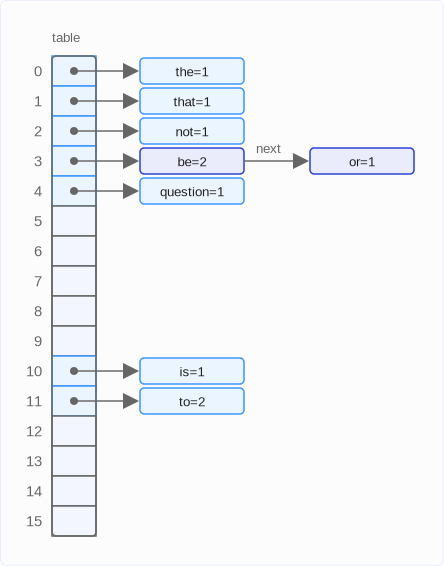
Why two entries can be in the same bucket is explained in the next two sections, From the Key to the Bucket and Collisions.
The map creates the table only on the first put(), with 16 buckets – so an empty HashMap costs no more than its own object. The occupancy in the diagram comes from a program that reads the table via reflection, just as the ArrayList article makes the capacity visible. It is in the class Ch13Internals and needs the VM option --add-opens java.base/java.util=ALL-UNNAMED.
From the Key to the Bucket
The map calculates in three steps which bucket an entry goes into:
- It calls
hashCode()on the key. - It combines the upper 16 bits of the result with the lower ones via XOR:
hash = h ^ (h >>> 16). - It takes as many low bits of this hash as the table length dictates:
index = (n - 1) & hash. With 16 buckets, that is the lower four bits.
The following diagram shows the three steps for the key “question”:
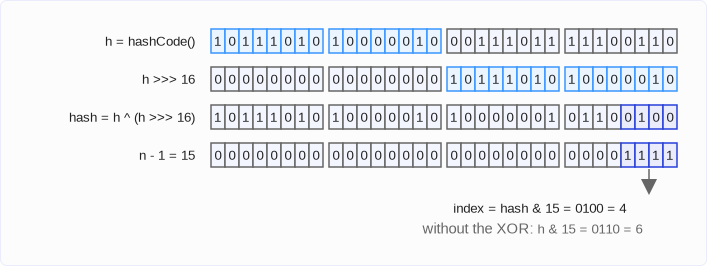
The third step explains why the table length is always a power of two: only then does n - 1 consist entirely of ones in its low bits – for 16, that is 1111 – and the bitwise AND gives the same result as the remainder of the division hash % n, only faster. And the index is never negative, not even for negative hash codes.
The second step is necessary because the third uses only the low bits. Without it, keys whose hash codes differ only in the upper bits all end up in the same bucket of a small table. The XOR lets the upper 16 bits contribute to the index. For “question”, it changes the index from 6 to 4.
The key null has no hash code. For it, the map sets the hash to 0, so it always ends up in bucket 0.
Collisions
If two keys have the same bucket index, that is a collision. With 16 buckets, this happens quickly: “be” and “or” have different hash codes (0xC43 and 0xDE3) but the same lower four bits – both end up in bucket 3.
The entries of a bucket form a linked list. get("or") finds the entry like this:
- It calculates the bucket index 3 and reads the first node of the bucket, “be”.
- It compares the stored hash of “be” with the hash of “or”. They differ, so it follows
nextto the next node. - At the node “or”, the hash matches. Only now does the method call
equals()– and finds the entry.
Comparing the hash before calling equals() saves time: two numbers are compared faster than two strings, and if the hashes differ, the keys cannot be equal.
put() goes through the list in the same way. If it finds the key, it replaces the value; otherwise, it appends a new node at the end. merge(), compute(), and computeIfAbsent(), on the other hand, put a new node at the front of the bucket. That is why, in the section Counting and Collecting, “or” came before “be” after counting with merge().
As long as the lists stay short, get() and put() stay fast. The map ensures this by growing.
How the HashMap Grows
Two values determine when the map grows: the current capacity, i.e., the number of buckets, and the load factor, 0.75 by default. The product of capacity and load factor is the threshold: with 16 buckets, that is 12 entries. When the number of entries in the map exceeds the threshold, the map doubles the table – on the 13th entry, from 16 to 32 buckets.
The following listing inserts 100 entries and prints the length of the table each time it changes. The method tableLength() from the class Ch13Internals reads this length from the map via reflection:
HashMap<Integer, Integer> map = new HashMap<>();
System.out.println("size 0, table " + tableLength(map));
int lastLength = tableLength(map);
for (int i = 1; i <= 100; i++) {
  map.put(i, i);
  if (tableLength(map) != lastLength) {
    lastLength = tableLength(map);
    System.out.println("size " + map.size() + ", table " + lastLength);
  }
}
size 0, table 0
size 1, table 16
size 13, table 32
size 25, table 64
size 49, table 128
size 97, table 256On each doubling, the map creates a new table and redistributes the entries. It does not recalculate any hash – each hash is stored in its node. And it doesn’t even have to recalculate the index: with 32 buckets, one more bit goes into the bucket index than with 16 buckets, namely the fifth bit from the right. If this bit of the hash is 0, the entry stays at its bucket index; if it is 1, it moves to the right by the old capacity, from bucket index i to i + 16.
The following diagram shows this for bucket 1 of the table from the section Order and Sorting. On the 13th word, “mind”, it contains “that” and “mind”:
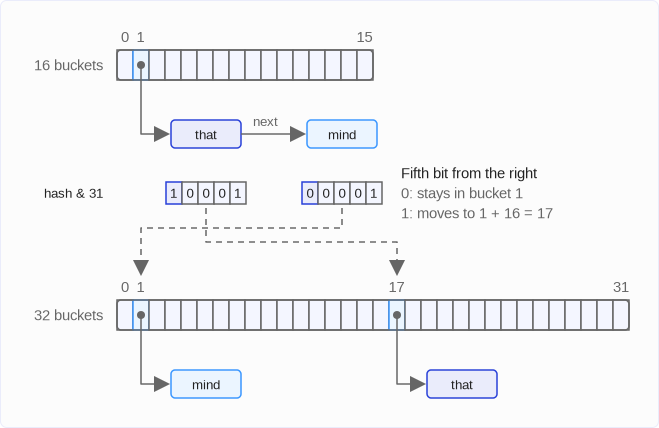
The diagram shows, from top to bottom:
- The table with 16 buckets: “that” and “mind” are in bucket 1 and are linked via
next. - The lower five bits of both hashes: The four bits on the right are the same,
0001, hence the shared bucket 1. The fifth bit from the right differs: for “that”, it is 1; for “mind”, 0. - The table with 32 buckets: “mind” stays in bucket 1, “that” moves to bucket 1 + 16 = 17.
This also explains why, in the section Order and Sorting, the order of the printed words changed after the words of the second Hamlet line had been added: “the”, “that”, and “not” have the fifth bit from the right set and moved to buckets 16 to 18, behind “is” in bucket 10.
The table grows automatically, but it never shrinks – neither on remove() nor on clear(). After map.clear(), the map from the listing above still has 256 buckets. This is rarely a problem, but it can slow down iterating over an almost empty map, because the iterator goes through all buckets. The only way to make the table smaller is to create a new map.
Reserving Space
The constructor new HashMap<>(100) does not create a map for 100 entries. Its argument is the capacity, i.e., the number of buckets – rounded up to the next power of two, 128. With the load factor 0.75, 96 entries fit, and the 97th doubles the table.
HashMap.newHashMap(100), on the other hand, starts from the number of entries: 100 / 0.75 = 133.3, which, rounded up to the next power of two, gives 256 buckets. The program Ch13Internals fills both maps with 100 entries:
new HashMap<>(100): size 0, table 0
new HashMap<>(100): size 1, table 128
new HashMap<>(100): size 97, table 256
HashMap.newHashMap(100): size 0, table 0
HashMap.newHashMap(100): size 1, table 256
Even with an initial capacity, the map creates its table only on the first put(). The map created with new HashMap<>(100) grows once and redistributes all 97 entries in the process, whereas the map created with newHashMap(100) doesn’t have to grow.
HashMap.newHashMap() has only existed since Java 19 – before that, you had to do the math yourself and write new HashMap<>(134).
Buckets as Trees: Treeification
If many keys have the same bucket index, the list gets long, and get() has to search it node by node. This happens, for example, with a hashCode() method that returns the same value for many different objects.
Since Java 8 (JEP 180), the HashMap therefore converts a bucket with more than eight nodes into a red-black tree. The constant for this is called TREEIFY_THRESHOLD and has the value 8.
The following diagram shows the same bucket with nine keys as a list and as a tree. get() finds the key 7 after seven steps in the list and after four in the tree:
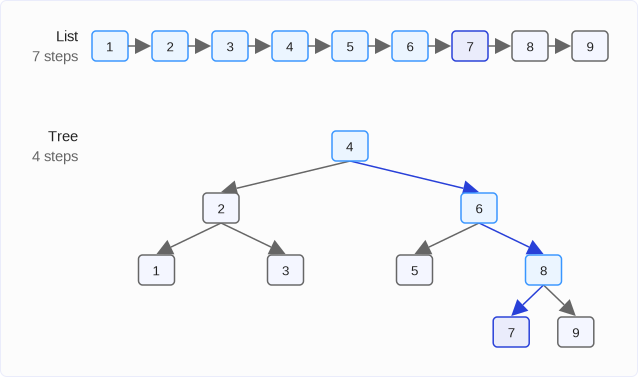
This works only if the keys can be compared – more on that in the section What the Tree Sorts By.
If the table has fewer than 64 buckets (MIN_TREEIFY_CAPACITY), no tree is created; instead, the map doubles the table – a longer table often distributes the keys well enough.
The program Ch13Internals shows this with keys whose hashCode() always returns 42:
size 1, table 16, java.util.HashMap$Node
…
size 8, table 16, java.util.HashMap$Node
size 9, table 32, java.util.HashMap$Node
size 10, table 64, java.util.HashMap$Node
size 11, table 64, java.util.HashMap$TreeNode
The 9th and 10th entries double the table; only the 11th turns the bucket into a tree of TreeNode objects.
The tree becomes a list again in two cases: when a doubling of the table splits it into parts of six or fewer nodes (UNTREEIFY_THRESHOLD), and when entries are removed from the map and the tree has become too small. For removal, the map doesn’t count the nodes but checks the shape of the tree: if the root lacks a child or the left child lacks a left child, the tree becomes a list.
With well-distributed hash codes, a tree practically never occurs. A comment in the source code gives the probability of a bucket with eight nodes as 0.00000006 – less than once in ten million buckets.
What the Tree Sorts By
A red-black tree needs an order. The HashMap sorts the nodes of a tree first by hash. If the hash is the same, it compares the keys with compareTo(), provided that their class implements Comparable with itself. Otherwise, it orders the keys by class name and then by System.identityHashCode().
The order by class name and identity hash code only determines where in the tree a node ends up. get() cannot use it for searching, because the identity hash code belongs to the object, not to its content: if you create a new key new PointRecord(1, 2) for get(), it is equal to the key in the map according to equals(), but it almost always has a different identity hash code. In the worst case, get() therefore has to search every node.
I measured with JMH how big the difference is in practice: get() for a randomly chosen existing key, once with keys that each have a hash code of their own and twice with keys that all have the same hash code – with and without Comparable:
| Entries | own hash codes | same hash code,Comparable | same hash code, not Comparable |
|---|---|---|---|
| 10 | 3.3 ns | 13.6 ns | 13.6 ns |
| 100 | 3.3 ns | 33.3 ns | 65.4 ns |
| 1,000 | 3.3 ns | 45.9 ns | 634.7 ns |
| 10,000 | 4.3 ns | 76.4 ns | 8,582.0 ns |
With ten entries, the bucket is still a list, and Comparable makes no difference. From 100 entries on, it is a tree. With Comparable keys, the time grows with the depth of the tree, i.e., logarithmically. Without Comparable, it grows with the number of entries – with 10,000 entries, get() takes 112 times as long as with Comparable keys. Without Comparable, searching for a key that doesn’t exist takes twice as long again, because get() has to search the whole tree instead of half of it on average.
One small thing comes on top for Comparable keys: if get() has to compare keys with the same hash in the tree, it first checks with instanceof whether the key it is looking for is Comparable at all. If it isn’t, the check ends there. If it is, the map additionally checks via reflection whether its class implements Comparable with itself. This leaves 32 bytes of garbage per call, as JMH’s profiler -prof gc shows (two arrays of 16 bytes each, because the reflection methods getGenericInterfaces() and getActualTypeArguments() each return a copy of their internal array). For String keys, the map skips the reflection check.
What this means for you: write a good hashCode() method, so that collisions are rare. And if a key class has a natural order, implement Comparable – then the map stays fast even with many collisions.
Memory Usage of the HashMap
Each entry of a HashMap costs one Node object and one slot in the table, not counting key and value:
Node: 24 bytes with compact object headers, which have been the default since Java 27, 32 bytes without.- Table: 4 bytes per bucket. Because the map doubles the table at a fill level of 75%, it has between 1.33 and 2.67 buckets per entry, i.e., 5.3 to 10.7 bytes per entry.
With one million entries, the table has 2,097,152 buckets, and one entry costs 32.4 bytes – 24 for the Node and 8.4 for its share of the table.
A TreeNode (used when a bucket holds a tree instead of a list) takes up 56 bytes, with and without compact object headers – more than twice as much as a Node with compact object headers. With well-distributed hash codes, this doesn’t matter, because there are hardly any trees.
Time Complexity of the HashMap
The following table shows the time complexity of the most important operations of a HashMap with n entries. The average case applies to well-distributed hash codes, the worst case to keys that all have the same hash code:
| Operation | Average | Worst case,Comparable | Worst case, not Comparable |
|---|---|---|---|
get(), containsKey() | O(1) | O(log n) | O(n) |
put(), remove() | O(1) | O(log n) | O(n) |
containsValue() | O(n) | O(n) | O(n) |
| Iteration | O(n + capacity) | O(n + capacity) | O(n + capacity) |
put() is amortized O(1): a single put() can double the table and redistribute all entries. But because the table doubles, it is followed by so many put() calls without doubling that each call takes constant time on average.
Iteration goes through all buckets, including the empty ones, and visits each entry in them – hence n + capacity. For a map that was once large and whose table has not shrunk, it therefore costs more than the number of entries suggests.
What O(1), O(log n), and O(n) mean is explained in the article on big O notation.
HashMap vs. HashSet, Hashtable, LinkedHashMap, TreeMap, and ConcurrentHashMap
The following table compares the HashMap with the other maps of the JDK that you can use for similar tasks:
HashMap | LinkedHashMap | TreeMap | Hashtable | ConcurrentHashMap | |
|---|---|---|---|---|---|
| Order | none | insertion order | sorted | none | none |
null as a key | yes | yes | no* | no | no |
null as a value | yes | yes | yes | no | no |
| thread-safe | no | no | no | yes | yes |
get() | O(1) | O(1) | O(log n) | O(1) | O(1) |
| since | Java 1.2 | Java 1.4 | Java 1.2 | Java 1.0 | Java 5 |
* A TreeMap with natural order throws a NullPointerException for the key null; with a comparator that can order null, it accepts it.
HashMap vs. HashSet
A HashSet stores single elements instead of pairs – each at most once. Internally, it is a HashMap whose keys are the elements. As the value, it stores the same object for every element, the constant PRESENT. This is what add() looks like in the source code of HashSet:
public boolean add(E e) {
  return map.put(e, PRESENT) == null;
}
So everything this article says about hashing, buckets, growth, and trees also applies to the HashSet. If you need a value for each element, use the HashMap; otherwise, use the HashSet.
HashMap vs. Hashtable
Hashtable is the predecessor of the HashMap, from Java 1.0. All its methods are synchronized, and it allows neither keys nor values that are null. Its Javadoc recommends the HashMap if you don’t need a thread-safe map, and the ConcurrentHashMap as a thread-safe map. So there is no reason to use Hashtable anymore. The same goes for its abstract superclass Dictionary, which the Javadoc calls obsolete.
HashMap vs. LinkedHashMap
A LinkedHashMap is a HashMap whose entries additionally form a doubly linked list – each entry has the references before and after. When you iterate over a LinkedHashMap, you traverse this list and get the entries in the order in which you inserted the keys. Lookup works as in the HashMap; the two additional references cost memory. Use the LinkedHashMap if you need the insertion order.
HashMap vs. TreeMap
A TreeMap stores its entries in a single red-black tree, sorted by key. get() and put() therefore cost O(log n) instead of O(1). In exchange, it returns the keys in sorted order and provides methods such as higherKey() for the next higher key and subMap() for all entries whose keys are within a certain range. Use the TreeMap if you need sorted keys, otherwise the HashMap.
Thread Safety: ConcurrentHashMap
A HashMap is not thread-safe. In the following program, two threads each write 100,000 different keys into the same map – 200,000 in total:
Map<Integer, Integer> map = new HashMap<>();
Thread first = Thread.ofPlatform().start(() -> putRange(map, 0));
Thread second = Thread.ofPlatform().start(() -> putRange(map, 100_000));
first.join();
second.join();
putRange() calls put(i, i) for 100,000 consecutive numbers – the first thread inserts the numbers 0 to 99,999, the second the numbers 100,000 to 199,999. In five runs, only between 113,603 and 178,543 of the 200,000 keys were found in the map afterward, and size() returned values between 109,163 and 156,468. The entries are lost when both threads write to the same bucket at the same time or when one thread doubles the table while the other thread is still writing to the old table.
size() differs from the number of keys found because the map counts the entries with ++size. This is not thread-safe either: if both threads read the same value, one increment is lost. A lost entry, on the other hand, is counted nonetheless. size() can therefore be smaller or larger than that number.
There was no exception in the five runs. In further runs, however, put() also threw a ClassCastException, or a thread got stuck in an endless loop.
With a ConcurrentHashMap, the same program finds all 200,000 keys in every run, and size() returns 200,000 as well. When writing, the ConcurrentHashMap locks only the bucket concerned, so several threads can write to different buckets at the same time. It even fills an empty bucket without a lock, using an atomic compare-and-set operation: if two threads try to fill the same empty bucket, only one succeeds. The other tries again, finds the bucket occupied, and appends its entry using a lock. Reading needs no lock at all. Like the Hashtable, it doesn’t allow null.
Collections.synchronizedMap(new HashMap<>()) makes a HashMap thread-safe as well, by synchronizing every method call. Each access then locks the whole map, and when iterating, you additionally have to synchronize on the map yourself. I recommend the ConcurrentHashMap.
HashMap vs. ConcurrentHashMap: Performance in a Single Thread
If only one thread uses the map, you pay for thread safety without needing it. I measured with JMH how much that costs – all accesses come from a single thread. The times are per call; for insertion, they include the growth of the table:
| Access | Entries | HashMap | ConcurrentHashMap |
|---|---|---|---|
reading only: get() | 100 | 1.5 ns | 1.9 ns |
| 10,000 | 2.7 ns | 3.3 ns | |
| 1,000,000 | 19.5 ns | 33.0 ns | |
writing only: put(),existing keys | 100 | 1.8 ns | 5.7 ns |
| 10,000 | 3.1 ns | 7.3 ns | |
| 1,000,000 | 35.4 ns | 60.7 ns | |
writing only: put(),new keys | 100 | 4.7 ns | 21.0 ns |
| 10,000 | 5.6 ns | 17.4 ns | |
| 1,000,000 | 28.7 ns | 60.5 ns | |
mixed: nine times get(),once put() | 100 | 1.8 ns | 2.4 ns |
| 10,000 | 3.1 ns | 3.7 ns | |
| 1,000,000 | 22.4 ns | 35.5 ns |
For reading and for mixed access, the ConcurrentHashMap takes 1.2 to 1.7 times as long, for overwriting existing values 1.7 to 3.1 times, and for inserting new keys 2.1 to 4.5 times. So use the ConcurrentHashMap if several threads access the map, and otherwise the HashMap.
Common Mistakes
The sections above have shown most of the following mistakes in detail; a listing for the first one follows after the list:
int count = map.get(key)for a missing key:get()returnsnull, and unboxing throws aNullPointerException. UsegetOrDefault(key, 0)or count withmerge().- A key class without
equals()andhashCode():get()finds only the same object, not an equal one. Use a record or implement both methods. - Modifying a key after
put(): The entry can no longer be found afterward. Use immutable keys. - Relying on the order: It can change with every new entry. Use a
LinkedHashMapor aTreeMap. remove()in a for-each loop: throws aConcurrentModificationException. Remove withremoveIf()on a view.new HashMap<>(n)for n entries: The argument is the capacity, not the number of entries – the map often grows before the n-th entry. UseHashMap.newHashMap(n).containsKey()followed byget()orput(): looks up the key two or three times.getOrDefault(),merge(), andcomputeIfAbsent()do it in one step.put()on a map fromMap.of(): throws anUnsupportedOperationException. Copy the map into a newHashMapfirst.- Using a
HashMapin several threads: The map loses entries, usually without an exception. Use aConcurrentHashMap.
The following listing shows the first mistake:
Map<String, Integer> counts = new HashMap<>(Map.of("to", 2, "not", 1));
try {
  int count = counts.get("that");
} catch (NullPointerException e) {
  System.out.println(e.getMessage());
}
Cannot invoke "java.lang.Integer.intValue()" because the return value of "java.util.Map.get(Object)" is nullThe message names the cause: the return value of get() was null, and unboxing called intValue() on it.
Summary
A HashMap stores pairs of keys and values in a table. From the hash code of the key, it calculates the bucket in which the entry is located, and thus finds it in O(1) on average. It links several keys in the same bucket into a list, and with more than eight entries in the bucket into a red-black tree.
The table starts with 16 buckets on the first put() and doubles as soon as it is more than 75% full. This can change the order of the entries – the HashMap has no fixed order. The table doesn’t shrink by itself.
A key must implement equals() and hashCode() in a matching way and must not change after insertion. One entry in the map costs around 32 bytes, not counting key and value.
My recommendations:
- Declare the variable with the
Mapinterface. - Use immutable keys:
String, wrapper classes, enums, or records. - Count with
merge(), collect withcomputeIfAbsent(). - If you know the number of entries in advance, create the map with
HashMap.newHashMap(n). - When iterating, remove with
removeIf()on a view. - If you need an order, use a
LinkedHashMaporTreeMap; with several threads, aConcurrentHashMap.
How to collect the results of a stream in a map is shown in the articles on groupingBy() and toMap(). What the ArrayList does differently from the HashMap internally is shown in the article Java ArrayList.
Was this article helpful to you? Then I’d be happy if you took a moment to leave a review on my ProvenExpert profile.