In Java, a String is a sequence of characters – a word, a sentence, the content of a file. You create one with text in double quotes and concatenate strings with +.
The following program builds a greeting from two strings and prints it, along with its length and the same greeting in uppercase:
String greeting = "Hello";
String name = "Ada";
String message = greeting + ", " + name + "!";

System.out.println(message);
System.out.println(message.length());
System.out.println(message.toUpperCase());
Hello, Ada!
11
HELLO, ADA!By the way, toUpperCase() does not change message but returns a new string. The section Strings Are Immutable explains why.
In this article, you will learn:
- what a string is and how to create one,
- why strings are immutable and what that means for your code,
- which methods you use to search, split, change, compare, concatenate, format, and convert strings,
- why you have to compare strings with
equals()and not with==, - how a string is structured internally, what the String pool is, and when
intern()pays off, - which mistakes with strings are the most common.
The Examples in This Article
You can find the complete code in the GitHub repository java-string, in the package eu.happycoders.string.basics.en. Each section has its own class there with a main() method that produces the outputs shown. The benchmarks and memory measurements from the section on the internals are in the package eu.happycoders.string.benchmark.
The classes in the repository require Java 25 because they use the simplified main() method without String[] args. The listings in the article run on Java 21 and later – one example uses splitWithDelimiters(), which only exists since Java 21. The only exception is equalsFoldCase() in the section on comparing: this method only exists since Java 26, so its example is not in the repository.
What Is a String?
A string is a sequence of characters. In Java, it is an object of the class java.lang.String and not a primitive type like int or char.
Nevertheless, you use it almost like a primitive type:
- You don’t need to import
String, because all classes from the packagejava.langare imported automatically. - You don’t need
new; you simply write the text in double quotes – a so-called string literal. - You can concatenate strings with
+. No other class supports that.
A single character, on the other hand, is of the primitive type char and is written in single quotes: 'a' is a char, "a" is a String with one character.
You should keep three cases apart:
nullmeans: the variable does not refer to any string at all. Every method call on it throws aNullPointerException.""is the empty string: a string object with zero characters." "is a blank string: a string that consists only of whitespace.
The methods isEmpty() and isBlank(), which tell the last two cases apart, are shown in the section Length and Individual Characters.
Creating Strings
You already know the usual way from the first example – the string literal:
String literal = "Java";You can also create a string with new String("Java"). However, this creates an additional object that you don’t need – the section on the String pool explains why.
To create a string from individual characters or from bytes, use the constructors that take a char[] or a byte[]. For bytes, you should always specify the charset (character set) they are encoded in:
char[] chars = {'J', 'a', 'v', 'a'};
String fromChars = new String(chars);

byte[] bytes = {74, 97, 118, 97};
String fromBytes = new String(bytes, StandardCharsets.UTF_8);

System.out.println(fromChars + " " + fromBytes);
Java JavaEscape Sequences
Some characters cannot be written directly into a string literal: the quotation mark, because it would end the string, or the line break. For these, there are escape sequences – a backslash followed by a character. The following table shows the most common ones:
| Escape sequence | Meaning |
|---|---|
\" | quotation mark |
\\ | backslash |
\n | line break (line feed) |
\t | tab |
\uXXXX | Unicode character with the hexadecimal code XXXX |
The following listing uses all five:
System.out.println("She said: \"Hello\"");
System.out.println("C:\\Users\\ada");
System.out.println("Name:\tAda\nName:\tGrace");
System.out.println("Coffee: \u2615");
She said: "Hello"
C:\Users\ada
Name: Ada
Name: Grace
Coffee: ☕Multiline Strings
For text spanning several lines – JSON, SQL, HTML – there have been text blocks since Java 15. A text block begins and ends with three quotation marks, and you don’t have to escape line breaks and quotation marks in it with \n or \":
String json = """
    {
      "name": "Ada"
    }
    """;
System.out.print(json);
{
"name": "Ada"
}The compiler removes the indentation common to all lines. How it determines that indentation and which escape sequences text blocks add is explained in the article on text blocks.
Strings Are Immutable
A string object cannot be changed after it has been created – strings are immutable. All methods that seem to change a string actually return a new string.
The following listing calls toUpperCase() twice – once without and once with assigning the result:
String name = "ada";
name.toUpperCase();
System.out.println(name);

name = name.toUpperCase();
System.out.println(name);
ada
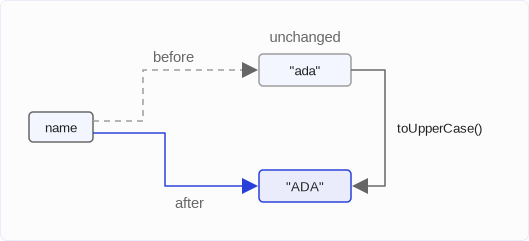
ADAThe first call creates the string "ADA" but does not assign it to any variable; name still points to "ada". Only the assignment in the second call makes name point to the new string.
The following diagram shows the assignment name = name.toUpperCase(): before, name points to the object "ada" (dashed); after, it points to the new object "ADA". toUpperCase() created "ADA" from "ada" without changing "ada":
Once no variable references the String object "ada" anymore, the garbage collector removes it.
The class String is designed this way for several reasons:
- Sharing: Because a string cannot change, any number of variables may share the same object. The String pool is based on this.
- Thread safety: Several threads can read the same string without you having to synchronize.
- Keys in a
HashMap: A string that is a key in a map cannot change its hash code – the map always finds it again. - Cached hash code: Because the content is fixed, a string calculates its hash code only once and remembers it.
Immutable here means: the public methods of the class offer no way to change a string. With so-called deep reflection, you can still overwrite the content of a string – with consequences for every place in the program that uses the same literal. How that works and why you shouldn’t do it is shown in the article Deep Reflection: How to Hack Integer and String.
The Methods of the String Class at a Glance
The following table lists the most important methods of the class String, grouped by the sections in which I explain them. The “Since” column names the Java version in which a method was added – it remains empty for the methods that have existed since Java 1.0.
| Method | What it does | Since |
|---|---|---|
| Length and characters | ||
length() | number of char values | |
isEmpty() | checks whether the length is 0 | Java 6 |
isBlank() | checks whether the string contains only whitespace | Java 11 |
charAt(int) | char at a position | |
toCharArray() | all characters as char[] | |
chars(), codePoints() | characters or code points as IntStream | Java 8 |
codePointCount(int, int) | number of Unicode characters | Java 5 |
| Searching | ||
contains(CharSequence) | checks whether a substring occurs | Java 5 |
indexOf(), lastIndexOf() | position of the first or last occurrence | |
startsWith(String), endsWith(String) | checks the beginning or end | |
matches(String) | checks against a regular expression | Java 1.4 |
| Extracting and splitting | ||
substring() | substring | |
trim() | removes control characters and spaces at both ends | |
strip(), stripLeading(), stripTrailing() | removes whitespace according to Unicode | Java 11 |
split(String) | splits at a regular expression | Java 1.4 |
splitWithDelimiters(String, int) | splits and keeps the delimiters | Java 21 |
lines() | lines as Stream<String> | Java 11 |
| Changing | ||
replace(char, char) | replaces a character | |
replace(CharSequence, CharSequence) | replaces a substring | Java 5 |
replaceAll(String, String), replaceFirst(String, String) | replaces matches of a regular expression | Java 1.4 |
toUpperCase(), toLowerCase() | uppercase or lowercase letters | |
repeat(int) | repeats the string | Java 11 |
stripIndent() | removes the common indentation | Java 15 |
indent(int) | indents or outdents each line | Java 12 |
translateEscapes() | translates escape sequences in the text | Java 15 |
| Comparing | ||
equals(Object) | compares the content | |
equalsIgnoreCase(String) | compares ignoring case | |
equalsFoldCase(String) | compares using Unicode case folding | Java 26 |
compareTo(String) | compares lexicographically | |
compareToIgnoreCase(String) | lexicographically, ignoring case | Java 1.2 |
| Concatenating | ||
concat(String) | appends a string | |
String.join() | joins several strings with a delimiter | Java 8 |
| Formatting | ||
String.format() | inserts values into a template | Java 5 |
formatted(Object...) | like format(), as an instance method | Java 15 |
| Converting | ||
String.valueOf() | converts a value into a string | |
getBytes(Charset) | encodes the string as byte[] | Java 6 |
transform(Function) | applies a function to the string | Java 12 |
| Internals | ||
intern() | returns the instance from the String pool | |
hashCode() | hash code of the content |
Length and Individual Characters
The method String.length() returns the length of a string. Note the parentheses: for a string, the length is a method; for an array, it is the field length; and for a list, it is the method size().
You read individual characters with charAt(). The index starts at 0, so the last character is at position length() - 1:
String word = "Java";
System.out.println(word.length());
System.out.println(word.charAt(0) + " " + word.charAt(3));
4
J aAn index outside this range leads to a StringIndexOutOfBoundsException.
isEmpty() checks whether a string has length 0. The method isBlank(), available since Java 11, checks whether it consists only of whitespace – an empty string also counts as blank:
System.out.println("".isEmpty() + " " + "".isBlank());
System.out.println("   ".isEmpty() + " " + "   ".isBlank());
true true
false trueIf a variable can also be null, you should check that first; otherwise, the call throws a NullPointerException: text == null || text.isBlank().
Iterating Over the Characters of a String
You iterate over the characters of a string either with a counting loop and charAt() or with a for-each loop over toCharArray(). toCharArray() copies all characters into a new array:
String word = "Java";

for (int i = 0; i < word.length(); i++) {
  System.out.print("[" + word.charAt(i) + "]");
}
System.out.println();

for (char c : word.toCharArray()) {
  System.out.print("[" + c + "]");
}
System.out.println();
[J][a][v][a]
[J][a][v][a]For reading only, the counting loop is enough; it does not create a copy. You need toCharArray() if you want to change or sort the characters – the section Converting Strings shows an example.
Since Java 8, the method chars() also returns the characters as an IntStream. The following listing uses it to count how often the a occurs in "Java":
String word = "Java";
long count = word.chars().filter(c -> c == 'a').count();
System.out.println(count);2The Trap: length() Does Not Count Characters
length() returns the number of char values, not the number of characters you see. As long as a text contains only characters from the so-called Basic Multilingual Plane – the first 65,536 Unicode characters with all common scripts – that is the same thing.
Emojis and some rare characters, however, lie outside this range – a char, with its 16 bits, is not enough for them. Java therefore stores each of these characters as two char values, a so-called surrogate pair.
The following listing counts the characters of a string with an emoji, once with length(), once with codePointCount(), and once with codePoints():
String text = "Hi 👋";
System.out.println(text.length());
System.out.println(text.codePointCount(0, text.length()));
System.out.println(text.codePoints().count());
5
4
4length() counts five char values – the H, the i, the space, and two char values for the emoji. A code point is the number of a character in Unicode; codePointCount() and codePoints() count each character once, so four.
Searching in a String
You check whether a string contains another with String.contains(). indexOf() returns the position of a substring – or -1 if it does not occur. indexOf() also exists with a second parameter from which the search starts. lastIndexOf() searches from the end; startsWith() and endsWith() check the beginning and end:
String sentence = "A String is a sequence of characters";

System.out.println(sentence.contains("sequence"));
System.out.println(sentence.indexOf("a"));
System.out.println(sentence.indexOf("a", 13));
System.out.println(sentence.lastIndexOf("e"));
System.out.println(sentence.indexOf("Java"));
System.out.println(sentence.startsWith("A") + " " + sentence.endsWith("characters"));
true
12
28
33
-1
true trueNote the second line: indexOf("a") finds the lowercase “a” at position 12, not the “A” at the beginning. All of these methods are case-sensitive. The third line starts the search after that “a” and finds the next one in “characters”.
There is no separate contains() variant for a case-insensitive search. The usual way is to convert both sides to lowercase first:
String sentence = "A String is a sequence of characters";
System.out.println(sentence.contains("string"));
System.out.println(sentence.toLowerCase(Locale.ROOT).contains("string"));
false
trueThe section Replacing and Changing Case explains why Locale.ROOT is there.
matches() checks with a regular expression whether an entire string matches a pattern. \\d+ stands for “one or more digits” – the double backslash is necessary because \ is itself an escape character in the string literal:
System.out.println("12345".matches("\\d+"));
System.out.println("123a5".matches("\\d+"));true
falseRegular expressions will be covered in a separate article.
Extracting and Splitting
String.substring() returns part of a string. With one argument, the substring extends from the given position to the end; with two arguments, up to just before the second position:
String name = "Ada Lovelace";
System.out.println(name.substring(4));
System.out.println(name.substring(0, 3));Lovelace
AdaHow to create substrings of a specific length or from the end and what substring() does internally is shown in the article on the substring() method.
strip() or trim()?
Both methods remove whitespace at the beginning and end of a string. But they mean different things by it:
trim()removes all characters with a code up to and includingU+0020, i.e., the space and the ASCII control characters such as tab and line break.strip()has existed since Java 11. The method removes all characters thatCharacter.isWhitespace()classifies as whitespace – including Unicode spaces such as the em spaceU+2003.
The following listing surrounds the name “Ada” with two em spaces and prints the length before and after trim() and strip():
String padded = "\u2003Ada\u2003";
System.out.println(padded.length());
System.out.println(padded.trim().length());
System.out.println(padded.strip().length());5
5
3trim() leaves both em spaces in place; strip() removes them. I recommend strip() because text from web forms and documents can contain such spaces. stripLeading() and stripTrailing() remove whitespace only at the beginning or only at the end.
split(): Splitting Strings
String.split() splits a string at a delimiter and returns the parts as an array. A line in CSV format, i.e., with commas as delimiters, shows two things that surprise many people:
String csv = "Ada,Grace,,Alan,,";
System.out.println(Arrays.toString(csv.split(",")));
System.out.println(Arrays.toString(csv.split(",", -1)));
System.out.println(Arrays.toString(csv.split(",", 2)));[Ada, Grace, , Alan]
[Ada, Grace, , Alan, , ]
[Ada, Grace,,Alan,,]In the first line, the two empty strings at the end are missing, because split() removes empty parts at the end of the result. The empty part in the middle, however, remains. The second parameter, limit, controls this:
- With a negative
limit,split()keeps all empty parts. - With a positive
limit,split()returns at most that many parts. The last one contains the rest of the string, including all further delimiters.
The second surprise: the argument of split() is not a simple delimiter but a regular expression. In it, . (“any character”) and | (“or”) have a special meaning:
System.out.println(Arrays.toString("1.2.3".split(".")));
System.out.println(Arrays.toString("1.2.3".split("\\.")));
System.out.println(Arrays.toString("a|b".split("|")));[]
[1, 2, 3]
[a, |, b]split(".") splits at every character. Only empty strings remain, and split() removes them because they are all at the end – the array is empty. split("|") splits at an empty character sequence – there is nothing to the left and right of the “or” – and thus between all characters.
For a character with a special meaning to stand for itself, you have to escape it. Besides . and |, this applies to *, +, ?, and $, for example. In the regular expression, you put a backslash in front of the character. Because the backslash itself must be escaped in the string literal, you write two – as in the second line of the listing: split("\\.") splits at the dot.
Alternatively, you can leave the escaping to Pattern.quote(): the method turns any string into a regular expression that matches exactly this string – no matter which and how many special characters it contains. So split(Pattern.quote("|")) splits at the pipe character.
The delimiters themselves don’t end up in the result of split(). If you need them, the method splitWithDelimiters() has been available since Java 21. It returns the delimiters as separate elements between the parts:
System.out.println(Arrays.toString("1+2-3".splitWithDelimiters("[+-]", 0)));[1, +, 2, -, 3]The best way to split a text with several lines is lines(). The method recognizes \n, \r, and \r\n as line endings and returns the lines as a stream:
System.out.println("one\ntwo\r\nthree".lines().toList());[one, two, three]Replacing and Changing Case
String has four methods for replacing characters and substrings. Two of them expect a regular expression:
replace(char, char)andreplace(CharSequence, CharSequence)replace every occurrence of a character or substring.replaceAll(String, String)replaces every match of a regular expression.replaceFirst(String, String)replaces only the first match of a regular expression.
The following listing first uses replace(char, char) to replace the dots in “1.2.3” with underscores. Then it removes the dots once with replace() and twice with replaceAll(). Finally, it replaces sequences of digits with a #:
System.out.println("1.2.3".replace('.', '_'));
System.out.println("1.2.3".replace(".", ""));
System.out.println("1.2.3".replaceAll(".", ""));
System.out.println("1.2.3".replaceAll("\\.", ""));
System.out.println("a1b22c333".replaceAll("\\d+", "#"));
System.out.println("a1b22c333".replaceFirst("\\d+", "#"));1_2_3
123
123
a#b#c#
a#b22c333The third output line is empty: the dot in replaceAll(".", "") stands for any character, so replaceAll() removes all of them. If you don’t need a regular expression, use replace(). Next to replaceAll(), its name sounds like “only the first occurrence” – but replace() also replaces all occurrences.
You remove a character or a character sequence by replacing it with the empty string – "Hello".replace("l", "") returns "Heo".
Uppercase, Lowercase, and the Turkish I
toUpperCase() and toLowerCase() convert a string to uppercase or lowercase. Without an argument, they use the default locale of the JVM, which depends on the language setting of the operating system. The following listing shows two peculiarities:
System.out.println("Straße".toUpperCase(Locale.ROOT));
Locale turkish = Locale.forLanguageTag("tr");
System.out.println("title".toUpperCase(turkish));
System.out.println("TITLE".toLowerCase(turkish));
System.out.println("title".toUpperCase(Locale.ROOT));STRASSE
TİTLE
tıtle
TITLEThe first line shows: toUpperCase() turns the German ß into “SS” – the string gets longer. The two middle lines show the so-called Turkish I: Turkish has an i with a dot and an i without a dot, each as an uppercase and a lowercase letter. That is why i becomes İ and I becomes ı.
Suppose your program compares an input regardless of case: input.toUpperCase().equals("TITLE"). On a computer with Turkish language settings, the input “title” then becomes “TİTLE”, and the comparison fails. For everything that is not text for humans – commands, keys, file extensions, protocol names – you should therefore always pass Locale.ROOT.
Repeating and Reversing
Since Java 11, there has been the method repeat(), which repeats a string any number of times. String, however, has no method for reversing – for that, you need a StringBuilder:
System.out.println("-".repeat(10));
System.out.println(new StringBuilder("Hello").reverse().toString());----------
olleHIndentation and Escape Sequences
For multiline strings, such as text from a file, there are methods that edit the indentation. stripIndent() removes the indentation common to all lines and the whitespace at the end of each line – just as the compiler does for a text block. indent(n) indents each line by n spaces; with a negative n, it removes that many whitespace characters at the beginning of each line, as far as there are any:
String sql = " SELECT name\n FROM users";
System.out.println(sql);
System.out.println(sql.stripIndent());
System.out.print(sql.stripIndent().indent(2)); SELECT name
FROM users
SELECT name
FROM users
SELECT name
FROM usersindent() also terminates the last line with a line break – that is why the listing prints the result with print() instead of println().
translateEscapes() translates escape sequences that appear as text in the string into the characters they stand for:
String raw = "Name:\\tAda\\nName:\\tGrace";
System.out.println(raw);
System.out.println(raw.translateEscapes());Name:\tAda\nName:\tGrace
Name: Ada
Name: GraceHowever, the method does not handle Unicode escapes. If a string contains the character sequence \u2615 as text at runtime – for example, because it comes from a file – translateEscapes() throws an IllegalArgumentException. The reason: the compiler translates Unicode escapes in the source code as it reads it, before it even recognizes string literals. They are therefore not among the escape sequences of a string literal, and translateEscapes() translates only those.
Comparing Strings
You compare two strings with String.equals(), not with ==. The operator == checks whether two variables point to the same object – equals() checks whether two strings contain the same characters.
In the following listing, the program assembles the string “Java” from two parts at runtime and compares it with the literal "Java":
String language = "Java";
String prefix = "Ja";
String built = prefix + "va";
System.out.println(language == built);
System.out.println(language.equals(built));
System.out.println(language.equalsIgnoreCase("JAVA"));false
true
truelanguage and built contain the same characters but are two different objects. Why == nevertheless returns true for two equal literals is shown in the section on the String pool. equalsIgnoreCase() compares regardless of case.
Since Java 26, there is also equalsFoldCase(). The method compares according to the case folding of the Unicode standard, which also takes into account characters that turn into several characters when the case changes:
String a = "Fuß";
String b = "FUSS";
System.out.println(a.equalsIgnoreCase(b));
System.out.println(a.equalsFoldCase(b));false
trueequalsIgnoreCase() compares character by character and finds no counterpart for “ß”; equalsFoldCase() treats “ß” as equal to “ss”.
Calling equals() on a null reference throws a NullPointerException. If the variable can be null, either put the literal first or use Objects.equals():
String input = null;
System.out.println("Java".equals(input));
System.out.println(Objects.equals(input, "Java"));false
falsecompareTo() compares two strings lexicographically and returns a negative number, 0, or a positive number – depending on whether the first string is sorted before, at the same position as, or after the second. How compareTo() arrives at its result is explained in the section How to Compare Two Strings in Java? in the article on Comparator and Comparable. Why uppercase letters end up before lowercase letters and how to sort accented characters correctly is shown in the section Sorting Strings in the article on sorting lists.
Since Java 7, you can also branch over a string with switch. switch compares with equals(), not with ==:
String command = "stop";
switch (command) {
case "start" -> System.out.println("Starting ...");
case "stop" -> System.out.println("Stopping ...");
default -> System.out.println("Unknown: " + command);
}Stopping ...The arrow syntax -> has existed since Java 14; with a colon and break, the same works from Java 7 onward.
Concatenating Strings
You already saw the operator + in the first example. If one of the two operands is a string, Java converts the other into a string and appends the two. += appends to an existing variable:
String first = "Ada";
String last = "Lovelace";
int count = 3;
System.out.println(first + " " + last);
System.out.println("Count: " + count);
String text = "Ada";
text += " Lovelace";
System.out.println(text);Ada Lovelace
Count: 3
Ada LovelaceWith numbers, the order matters, because + is evaluated from left to right:
System.out.println(1 + 2 + "3");
System.out.println("1" + 2 + 3);33
123In the first line, Java first calculates 1 + 2 = 3 and then appends "3". In the second line, the left operand is already a string, so each number is appended.
concat() also appends a string but accepts only strings. You can join several strings with a delimiter between them using String.join() – from individual arguments or from a collection, in the following example from a list. A stream collects its elements into a string with Collectors.joining(), optionally with a prefix and suffix:
System.out.println(String.join(", ", "Ada", "Grace", "Alan"));
List<String> names = List.of("Ada", "Grace", "Alan");
System.out.println(String.join(", ", names));
System.out.println(names.stream().collect(Collectors.joining(", ", "[", "]")));Ada, Grace, Alan
Ada, Grace, Alan
[Ada, Grace, Alan]Concatenating in a Loop: StringBuilder
Because strings are immutable, every += creates a new string and copies all previous characters of both strings into the new string. In a loop with many iterations, this adds up. That is what the StringBuilder is for: it collects its characters in a growing array and creates a string only at the end:
StringBuilder sb = new StringBuilder();
for (int i = 1; i <= 5; i++) {
sb.append(i).append(' ');
}
System.out.println(sb.toString().strip());1 2 3 4 5Outside of loops, you can use + without hesitation. The compiler joins a concatenation of string literals directly into a single string. Since Java 9, it translates every other concatenation within a single expression into an invokedynamic call that copies the characters of all strings involved into the resulting string only once. What this looks like in the bytecode is shown in the section Under the hood: what "" + i becomes in the article on converting int to String.
Formatting Strings
With String.format(), you insert values into a template with placeholders. The placeholders are called format specifiers and begin with %. Since Java 15, you can do the same with the instance method formatted() directly on the template string:
String name = "Grace";
int points = 42;
System.out.println(String.format("%s has %d points.", name, points));
System.out.println("%s has %d points.".formatted(name, points));Grace has 42 points.
Grace has 42 points.The following table shows the format specifiers you need most often:
| Format specifier | Meaning | Example | Result |
|---|---|---|---|
%s | string (or toString() of an object) | "%s", "Ada" | Ada |
%d | integer | "%d", 42 | 42 |
%.2f | decimal number with two decimal places | "%.2f", Math.PI | 3.14 |
%5d | minimum width, right-aligned | "%5d", 7 | 7 |
%-6s | minimum width, left-aligned | "%-6s", "Ada" | Ada |
%,d | integer with thousands separator | "%,d", 1234567 | 1,234,567 |
%n | line break of the operating system | "%n" |
%.2f and %,d format according to the language setting: on an English system, a dot separates the decimal places and a comma the thousands; on a German system, a comma separates the decimal places and a dot the thousands. If you need a fixed format, pass the Locale as the first argument:
System.out.println(String.format(Locale.GERMANY, "%.2f", Math.PI));
System.out.println(String.format(Locale.US, "%.2f", Math.PI));3,14
3.14With minimum widths, you align columns – here a name left-aligned in six characters, a number right-aligned in five characters, and a second number with thousands separators in ten characters:
String row = "%-6s|%5d|%,10d%n";
System.out.print(String.format(Locale.US, row, "Ada", 7, 1234567));
System.out.print(String.format(Locale.US, row, "Grace", 42, 89));Ada | 7| 1,234,567
Grace | 42| 89Java does not have string interpolation like "Hello $name" in Kotlin. The string templates from Java 21 and 22 were supposed to bring it but were withdrawn again in Java 23.
Converting Strings
To convert a string into an int, use Integer.parseInt(). For the opposite direction – from number to string – use String.valueOf(), which exists for all primitive types and for Object:
int number = Integer.parseInt("42");
String text = String.valueOf(number);
System.out.println(number + 1);
System.out.println(text + 1);43
421For other number types, there are the corresponding methods Long.parseLong(), Double.parseDouble(), etc. The pitfalls of parseInt() are described in the article How to Convert String to Int in Java.
Besides String.valueOf(), Integer.toString(), String.format("%d", …), and the concatenation "" + number also convert a number into a string. Which of these four ways is the fastest is measured in the article How to Convert int to String in Java.
A char becomes a string with String.valueOf('x'). From String to char[], you convert with toCharArray(); from char[] to String, with the constructor new String(char[]). Because the array is a copy in both cases, you can change it without either of the two strings changing:
String java = "Java";
char[] chars = java.toCharArray();
chars[0] = 'L';
System.out.println(java);
String lava = new String(chars);
chars[0] = 'J';
System.out.println(lava);Java
LavaWith getBytes(), you convert a string into a byte array – for example, to write it to a file or send it over the network. As with the constructor new String(byte[], Charset) for the opposite direction, you should specify the charset. In UTF-8, the German “ü” and “ß” take up two bytes each, so the five characters of “Grüße” (German for “greetings”) become seven bytes:
byte[] utf8 = "Grüße".getBytes(StandardCharsets.UTF_8);
System.out.println(utf8.length);
System.out.println(new String(utf8, StandardCharsets.UTF_8));7
GrüßeWithout a charset, getBytes() uses the JVM’s default – since Java 18, that is UTF-8; before, it depended on the operating system. What this change means for existing code is shown in the section UTF-8 by Default in the article on Java 18.
With split(), a string with delimiters becomes an array (covered in detail in the section split(): Splitting Strings), and then with Arrays.asList(), a list. String.join() takes you back (covered in detail in the section Concatenating Strings):
String[] parts = "Ada,Grace,Alan".split(",");
List<String> list = Arrays.asList(parts);
System.out.println(list);
System.out.println(String.join(";", list));[Ada, Grace, Alan]
Ada;Grace;AlanWith transform(), you apply any function to a string and get its result back. This keeps a chain of calls readable from left to right, even if a constructor or a static method comes at the end:
BigDecimal price = " 19.99 ".strip().transform(BigDecimal::new);
System.out.println(price.multiply(BigDecimal.TWO));39.98Without transform(), the last step would come first: new BigDecimal(" 19.99 ".strip()). When else the method pays off is shown in the article on Java 12.
How a String Is Structured Internally
Up to this point, you have used strings. From here on, it’s about how the class String is built.
String is final, so you cannot create a subclass of String. Among other interfaces, the class implements Comparable<String> (hence compareTo()) and CharSequence, the interface that StringBuilder also implements. Its data is stored in four fields (JDK source code as of November 2026):
private final byte[] value;
private final byte coder;
private int hash;
private boolean hashIsZero;value contains the characters; coder says how they are encoded. hash and hashIsZero store the hash code once it has been calculated.
Compact Strings: One or Two Bytes per Character
Up to Java 8, a string stored its characters in a char[], i.e., with two bytes per character. Since Java 9, it stores them in a byte[], in one of two encodings that is fixed when the string is created – the feature is called Compact Strings:
- Latin-1: If all characters fit into one byte – i.e., all characters up to
U+00FF, which include the German umlauts and ß – the string stores one byte per character.coderis then 0. - UTF-16: If the string contains even a single character beyond
U+00FF, it stores all characters with two bytes.coderis then 1.
The following diagram shows two strings with three characters each, in each case the String object with its four fields and, below it, the byte array that value points to. On the left is “Hey” in Latin-1 with one byte per character; on the right, “H€y” in UTF-16 with two bytes per character – the ticks in the cells separate the two bytes of a character:
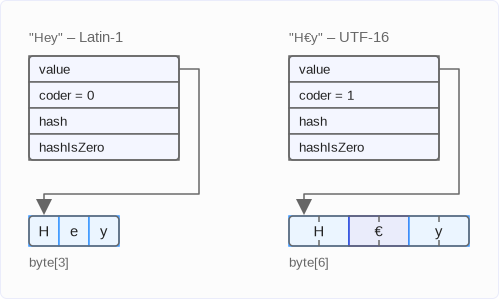
A single euro sign thus doubles the space for the characters of the entire string. How strings were structured in older Java versions – with char[], with the fields offset and count, and with the experiment “Compressed Strings” in Java 6u21 – is shown in the section Deep Reflection with Strings in Older Java Versions in the article on deep reflection.
How much memory does a string cost? The String object itself occupies 24 bytes, regardless of how the characters are encoded. Then there is the byte array: 12 bytes for the object header including the length, then the characters, rounded up to a multiple of 8 at the end. For a string with 20 characters, this results in:
- in Latin-1: 12 + 20 = 32 bytes for the array, together with the object 56 bytes,
- in UTF-16: 12 + 40 = 52, rounded up to 56 bytes for the array, together 80 bytes.
These figures apply to Java 27, in which Compact Object Headers are enabled by default. If you explicitly disable them with -XX:-UseCompactObjectHeaders, the header of the array grows to 16 bytes, and the Latin-1 string occupies 64 instead of 56 bytes.
substring() Copies
substring() copies the characters of the substring into a new byte array. Up to and including Java 7 Update 5, the substring shared the char[] with the original instead. That saved the memory for a second array and the time for copying. The downside: as long as the substring was alive, the garbage collector could not free the array of the original, even if nothing else used it anymore. A substring with ten characters could thus keep an array with 10,000 characters in memory. The details are in the section How Does substring() Work in Java? of the article on substring().
The Hash Code Is Calculated Once
String.hashCode() calculates the hash code of a string from all its characters using the formula s[0]·31n−1 + s[1]·31n−2 + … + s[n−1]. For a long string, that is a lot of arithmetic. That is why the string stores the result in the field hash and does not recalculate it on the next call.
A special case is the hash code 0: it is also the initial value of the field hash and cannot be distinguished from it. For strings whose hash code actually is 0 – such as the empty string – since Java 13, the string records this in the field hashIsZero.
For strings as keys in a HashMap, this means: a string key calculates its hash code only on the first call of hashCode(). Because the string is immutable, the stored value remains valid.
Equal strings always have the same hash code; the reverse is not true – "Aa" and "BB" both have the hash code 2112:
System.out.println("Aa".hashCode() + " " + "BB".hashCode());2112 2112What the HashMap does with such collisions is shown in the article on the HashMap.
The String Pool
Two equal string literals in the code result in the same object at runtime. The JVM places every literal in the so-called String pool the first time it is used and returns the same instance every time it is used again. This is possible because strings are immutable.
The following listing compares the literal "Java" with five other strings that all contain “Java”, using ==:
String a = "Java";
String b = "Java";
String c = new String("Java");
String d = "Ja" + "va";
String prefix = "Ja";
String e = prefix + "va";
System.out.println(a == b);
System.out.println(a == c);
System.out.println(a == d);
System.out.println(a == e);
final String constantPrefix = "Ja";
System.out.println(a == constantPrefix + "va");true
false
true
false
trueThe five lines in order:
aandbare the same literal, thus the same object from the pool.new String("Java")always creates a new object. It does share the byte array with the literal – the constructor takes overvalueandcoderof the string passed in – but it is a secondStringobject. That is why you should never usenew String(…)with a string as its argument – you get a second object but no benefit."Ja" + "va"consists only of constants. The compiler joins the expression into"Java"at compile time, and at runtime there is only the one literal.prefix + "va"contains a variable and is only assembled at runtime – the result is a new object.- If the variable is
finaland initialized with a constant, on the other hand, the compiler joins this expression at compile time as well.
The following diagram shows the situation after the first three lines of the listing: the variables a and b point to the same object in the pool, c to its own object outside the pool. Both objects use the same byte array. I explain the dashed arrow c.intern() in the next section:
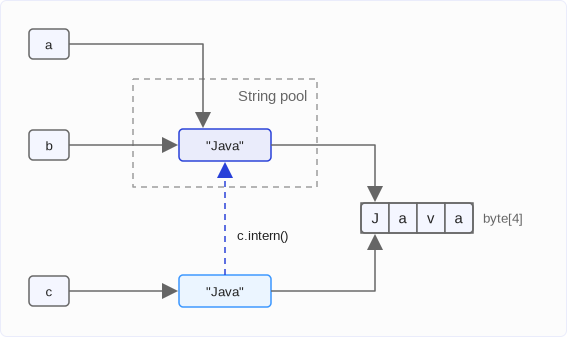
Since Java 7, the strings of the pool are stored in the regular heap and no longer in the Permanent Generation, a separate, size-limited memory area of the JVM of the time. HotSpot manages the pool via a hash table, the String Table. It starts with 65,536 buckets and grows as soon as there are more than two strings per bucket on average.
That == returns true for equal string literals is therefore a side effect of the pool – the fourth output line of the listing shows that you cannot rely on it.
String.intern()
The method String.intern() returns the instance from the pool that has the same content as the string on which you call it. If there is none yet, intern() puts the string into the pool and returns it. With the variables a, c, and e from the listing in the section The String Pool:
System.out.println(a == c.intern());
System.out.println(a == e.intern());
true
trueWhat is this good for? If a program creates many equal strings at runtime – for example, the country codes from a large CSV file – each of them occupies its own memory. If you store the result of intern() instead of each string, only one object remains of equal strings – for example, a single "DE" for all lines with the country code for Germany.
How much this saves is shown by a measurement with one million strings that have 1,000 different values with 20 characters each:
| Memory | |
|---|---|
| no measure | 56.0 MB |
| with String Deduplication | 24.0 MB |
with intern() | 0.06 MB |
The section String Deduplication or intern()? explains the variant with String Deduplication.
The price of intern() is time: every call searches the String Table. In the same series of measurements, an intern() call for an already interned string took 50 ns when there were 1,000 strings in the pool, 87 ns with 100,000, and 245 ns with one million strings. Custom deduplication with a ConcurrentHashMap and putIfAbsent() takes 24, 24, and 80 ns for the same work – so it is two to three and a half times as fast.
The String Table holds its entries only weakly referenced. An interned string to which your program no longer has a reference can therefore be removed by the garbage collector.
Can you then compare strings with ==? Only if all strings you compare have gone through intern() – if one place in the code forgets the call, == returns false. The gain is small: equals() took 1.4 ns for two equal strings with 20 characters, == 0.3 ns. For this saving of just over 1 ns, intern() only pays off if you compare each string very often: even with 1,000 strings in the pool, an intern() call costs about 50 ns – more than 30 times as long as a call to equals().
I therefore recommend: always compare strings with equals(). If you keep a great many equal strings in memory, deduplicate them with your own ConcurrentHashMap instead of with intern() – it was two to three and a half times as fast in the measurement. Unlike the String Table, however, the map holds on to its strings until you remove them yourself.
String Deduplication or intern()?
String Deduplication is a feature of the garbage collector: it looks for strings with the same content and lets them share a byte array. The measurement in the section String.intern() shows the difference from intern() – of one million strings with 1,000 different values, one million String objects remain with deduplication (24.0 MB), but only 1,000 with intern() (0.06 MB).
The following table compares both approaches:
| String Deduplication | intern() | |
|---|---|---|
| Who decides | the garbage collector | your code |
| What is shared | the byte array | the whole String object |
a == b for equal content | false | true |
| How to enable | -XX:+UseStringDeduplication | call intern() |
| Cost | work for the GC | one lookup per call |
String Deduplication is disabled by default. Since Java 18, ZGC, the Serial GC, and the Parallel GC support it in addition to G1 – in the measurement, all four reached the same 24.0 MB. When deduplication pays off is explained in the section ZGC / SerialGC / ParallelGC Support String Deduplication in the article on Java 18.
You need deduplication if you cannot change the code or don’t know where the duplicate strings are created. intern() or your own map save more but need the call in the right place.
Common Mistakes
The following list summarizes the mistakes that came up in this article, each with its solution:
==instead ofequals():==compares references, not contents. Compare strings withequals().- Result not assigned:
s.toUpperCase()without assignment changes nothing, because strings are immutable. Writes = s.toUpperCase(). +=in a loop: Each iteration copies the entire previous string. Use aStringBuilder.split("."): The argument is a regular expression; the dot stands for any character. Writesplit("\\.").replaceAll()with literal text:replaceAll()also expects a regular expression. For literal replacement, usereplace()– it also replaces all occurrences.toUpperCase()withoutLocale: On a Turkish system,ibecomesİ. PassLocale.ROOTif the text is not meant for humans.length()on text with emojis:length()countscharvalues; an emoji counts twice. If you need the number of characters, usecodePointCount().s.equals("…")onnull: Ifsisnull, aNullPointerExceptionis thrown. Write"…".equals(s)orObjects.equals(s, "…").
Summary
A String is an immutable sequence of characters. Every method that seems to change it returns a new string – you have to assign the result.
The class has methods for searching (contains(), indexOf()), splitting (substring(), split(), strip()), changing (replace(), toUpperCase()), comparing (equals(), compareTo()), concatenating (+, String.join()), formatting (String.format(), formatted()), and converting (String.valueOf(), getBytes()). split(), replaceAll(), and matches() expect regular expressions; replace() does not.
Internally, since Java 9, a string stores its characters in a byte array – with one byte per character as long as all characters fit into Latin-1, otherwise with two. A string with 20 characters thus occupies 56 bytes in Java 27, with a single euro sign 80 bytes. Equal literals share one object from the String pool; intern() also puts strings created at runtime there. With one million strings made of only 1,000 different values, the strings thus occupy 0.06 instead of 56 MB, but every intern() call costs 50 to 245 ns.
My recommendations:
- Compare strings with
equals(), never with==– not even afterintern(). - Concatenate with a
StringBuilderin loops and with+outside of loops. - Use
strip()instead oftrim()– andreplace()instead ofreplaceAll()as long as you don’t need a regular expression. - Pass a
LocaletotoUpperCase(),toLowerCase(), andString.format()if the result should not depend on the language setting. - If you keep a great many equal strings in memory, enable String Deduplication first. If that is not enough, deduplicate with your own
ConcurrentHashMap– it is faster thanintern().
How substring() works internally is shown in the article on the substring() method. Multiline strings are explained in the article on text blocks; converting between numbers and strings in the articles How to Convert int to String in Java and How to Convert String to Int in Java.
If you enjoyed this article, I’d appreciate a review on my ProvenExpert profile.